
Our readers keep the lights on and my morning glass full of iced black tea. As an Amazon Associate, I earn from qualifying purchases.
Specs are compiled from manufacturer listings and verified buyer reviews and can change over time — please confirm the key details on the product page before buying.
You walk into the conference room, plug in a single USB cable, and suddenly every seat is visible and every whisper is audible. That is the promise of a truly all-in-one video conferencing system. The hard part is picking which one actually delivers that experience in your specific room, with your specific laptop, without a stack of adapters and a six-page IT manual.
I’m Min — the founder and writer behind Gadgets Feed. This guide is built by comparing the manufacturers’ published specifications and the patterns across verified customer reviews, so you get each pick’s real strengths and trade-offs instead of marketing spin.
Whether you are equipping a huddle room or a large boardroom, this breakdown of the best all-in-one video conferencing equipment will point you to the model that fits your space, your platform, and your budget without the guesswork.
Our Picks at a Glance


How To Choose The Best All-In-One Video Conferencing Equipment
Every all-in-one video bar packs a camera, microphones, and speakers into a single box. But your choice depends on three things: how big your room is, how many people sit around the table, and which video-calling apps your company actually uses. The specs that matter most are the camera resolution, the field of view, the microphone pickup range, and whether the device supports the AI tracking features you need.
Room Size and Camera Coverage
The field of view (measured in degrees) determines how many people fit in the frame. A 120° wide-angle lens covers a typical small-to-medium conference table, while a 360° camera lets everyone around a circular or square table be seen without anyone squeezed off the edge. Pair this with the camera resolution: 1080p is fine for laptop screens, but a 4K sensor keeps faces sharp when you zoom in or display on a large TV.
Microphone Pickup and Audio Quality
Microphone arrays vary widely — some units have four mics, others have eight. The pickup range tells you the maximum distance a person can sit from the device and still be heard clearly. Look for beamforming microphones that focus on the active speaker and noise-canceling tech that filters out HVAC hum, typing, and side chatter. The speaker wattage (often 5W in mid-range units) determines how loud and clear the far-end audio plays in the room.
Platform Compatibility and AI Features
Most devices are plug-and-play with USB, but certification for Microsoft Teams, Zoom Rooms, or Google Meet ensures the camera, mute controls, and speaker tracking work without extra software. AI features like auto-framing (keeping the whole group centered) and speaker-tracking (zooming in on whoever is talking) turn a static webcam into a smart meeting assistant. Devices without these features require manual pan/tilt/zoom, which distracts from the conversation.
Quick Comparison
| Model | Best For | Camera Resolution | Field of View | Mic Pickup Range | Amazon |
|---|---|---|---|---|---|
| Meeting Owl 3★ Best Overall | Proven 360° for medium rooms | 1080p HD | 360° | 18 ft (5.5m) | Amazon |
| Meeting Owl 4+Also Great | Large rooms needing 4K 360° | 4K (3840p) | 360° | 18 ft (5.5m) | Amazon |
| Meeting Owl 3 Premium PackExtended Set | Extended cable & warranty | 1080p HD | 360° | 18 ft (5.5m) | Amazon |
| KanDao Meeting Pro | Standalone 360° with local recording | 1080p | 360° | 18 ft | Amazon |
| COOLPO Camera 360 | Budget 360° with speaker tracking | 4K (3840p) | 360° | 15 ft | Amazon |
| Logitech MeetUp | Small huddle rooms & BYOD | 4K UHD | 120° | 4m (13 ft) | Amazon |
| Yealink UVC34 | Teams-certified 4K with electric lens cover | 4K (8MP) | 120° | 8-mic array | Amazon |
| WYRESTORM 4K | Mid-range with AI presenter tracking | 4K UHD | 120° | 4-mic array | Amazon |
| Pyle 4K USB | Budget all-in-one with desk tripod | 4K | 120° | 8m (26 ft) | Amazon |
In‑Depth Reviews
1. Owl Labs Meeting Owl 3 – 360° 1080p HD Conference Room Camera
Our pick — over 4★ from 650+ verified ratings; the strongest balance of quality and price.
The workhorse 360° all-in-one that has proven its durability in real conference rooms for years.
The Meeting Owl 3 has earned its reputation. It captures 360° video in 1080p HD and 360° audio up to 18 ft (5.5m) using the award-winning Owl Intelligence System. The camera and microphones work together to automatically focus on whoever is speaking, showing remote participants a panoramic view of the room. Owners mention accurate voice tracking, a clear panoramic view, and audio that stays clean up to 17 ft. One owner even mentioned the unit survived nine drops and still worked fine, which speaks to its build quality. It is certified for Microsoft Teams and compatible with Zoom, Google Meet, Cisco Webex, and others.
The plug-and-play USB setup gets you from unboxing to your first meeting in about six minutes. IT admins can manage multiple units through The Nest management tool for bulk registration and setting defaults. You can also pair two Meeting Owls or add an Expansion Mic to cover larger spaces. However, some reviewers noted that the 1080p video looked “terrible on large TVs” and a few wanted 4K at the price point. This unit is a proven performer — just know the resolution limit if you intend to display on a 65-inch screen.
what separates it
- Proven durability — buyers confirm it survives drops and continues working
- smooth 360° tracking with clear voice pickup up to 18 ft
- IT management via The Nest for fleet deployment
The resolution limit
- 1080p max resolution — not sharp enough for large TV displays
- No 4K sensor, so digital zoom makes details fuzzy quickly
Reach for this if: You want the most battle-tested 360° all-in-one that reliably tracks speakers and survives daily abuse in a medium-sized meeting room.
skip it if: Your primary display is a large TV where 1080p video looks soft — the Meeting Owl 4+ (4K) is a better match.
2. Meeting Owl 4+ 360-Degree, 4K Smart Video Conference Camera, Microphone, and Speaker
The 4K upgrade to the Owl series that finally makes every face sharp on a big screen.
The Meeting Owl 4+ captures 360° video in 4K and 360° audio up to 18 ft (5.5m) away, automatically focusing on whoever is speaking. Unlike the 1080p Meeting Owl 3, the 4K sensor keeps faces crisp when you zoom in or display on a large TV — a common complaint buyers had with the previous generation. It works with apps like Zoom and Google Meet, with a dedicated enterprise WiFi connection and the option for Power over Ethernet via an adapter. The Owl Intelligence System uses visual and audio cues to track the active speaker, so remote participants always see who is talking.
Buyers report that setup takes about six minutes from unboxing to the first meeting, and the device is universally compatible with platforms like Microsoft Teams, Cisco Webex, and GoToMeeting. One reviewer noted the camera lag slightly when switching speakers, but most found the experience reliable enough to recommend for rectangular rooms with up to 12 seats. The built-in Kensington lock and enterprise WiFi make it ready for permanent installation in a boardroom.
Standout spec: 4K 360° video in an all-in-one bar — the only Owl model that pairs full-room coverage with sharp zoomed-in detail.
One caveat: The microphone array can struggle with backlit participants (people facing a window), and the speaker-tracking lag on fast conversation may require a brief adjustment period for your team.
Best fit for: Teams that already trust the Owl ecosystem but need 4K resolution for a large TV display, and IT admins who want enterprise features like a Kensington lock and PoE support.
Look elsewhere if: Your room is small and you rarely zoom — the 1080p Meeting Owl 3 gives you the same 360° coverage for less.
3. Meeting Owl 3 Premium Pack: 360-Degree, 1080p HD Smart Video Conference Camera
The same proven 1080p Owl with a longer cable and extended protection for permanent installs.
The Meeting Owl 3 Premium Pack bundles the standard Meeting Owl 3 with a 16 ft (5m) USB-C to USB-C extension cable, a dedicated stand, and Owl Care — an extended device protection policy. The core hardware is identical to the standard Meeting Owl 3: 360° 1080p HD video, 360° audio pickup up to 18 ft (5.5m), auto speaker-tracking, and the Owl Intelligence System. This pack is built for teams that want to mount the camera on a credenza or wall mount without worrying about a short cable reaching the laptop.
Customers note that the picture, sound, and mic quality are all solid and that the auto-focus and framing work well. One buyer mentioned that the video can appear grainy and the audio choppy in certain setups, but most found it a “solid value” compared to other options. The Premium Pack is universally compatible with platforms like Microsoft Teams, Zoom, Google Meet, and Cisco Webex. The big draw is the added cable length and warranty, making it ideal for mounting on a wall or placing further from the connected computer.
Why this pack exists: The included 16 ft USB-C cable and Owl Care extended protection remove the two biggest pain points of a fixed installation — short cable and no warranty.
Who it is for: Teams that plan to wall-mount or credenza-mount the Owl 3 in a permanent conference room and want confidence with added support.
Grab this if: You already decided on the Meeting Owl 3 but need a longer cable to reach your desk or TV mount without an add-on purchase.
Look elsewhere if: A short cable is fine for your tabletop setup — the standard Meeting Owl 3 gives you the same hardware for less.
4. KanDao Meeting Pro 360-degree Video Conference Camera

A 360° all-in-one that works completely on its own — no laptop required for simple calls.
The KanDao Meeting Pro uses dual 195° wide-angle lenses to stitch together a complete 360° view. It features an 8-mic array and a 5W high-fidelity speaker with an 18 ft audio pickup range. The AI face and voice tracking automatically highlights the active speaker. What makes this unit different is its built-in Android OS: it can operate as a standalone device without a computer, supporting local recording to an SD card for meeting review. It offers five smart modes (Discussion, Global, Presentation, Patrol, and Custom) and is lightweight at just 0.8 kg (1.76 lbs).
Buyers praise the 360° view and the AI autofocus. One owner reported the image and audio quality are outstanding, though the device is not Google Play Protect certified, which blocks access to the Play Store and some integrated apps. It works as a USB webcam or standalone with HDMI output. The SD card slot lets you record meetings locally for later review. This is a strong option for teams that want 360° coverage without being tethered to a laptop or that need meeting recording.
Why it stands out
- Standalone Android OS — works as a USB webcam or completely independent device
- Local recording to SD card for meeting review and data security
- Lightweight 0.8 kg design with 5 smart meeting modes
The certification catch
- Not Google Play Protect certified — limits native app access on the standalone Android mode
- 1080p max resolution — not ideal for large TV displays
Reach for this if: You want a portable 360° all-in-one that can record meetings to an SD card and run without a computer.
pass on it if: You need native Google Meet or Teams app support directly on the device — the lack of Play certification creates a hurdle.
5. COOLPO Camera 360, 4K Smart Video Conference Room Camera

4K 360° video with speaker tracking at a price that undercuts the big names by hundreds.
The COOLPO AI Huddle Pana delivers a 360° view in 4K resolution with no stitching needed — the single camera captures the full room. It uses 8 high-quality microphones with a 15 ft voice pickup range and AI-driven speaker tracking that automatically focuses on the active speaker. The Intelligent Zoom feature adjusts the frame and focus based on who is highlighted. All data processing happens locally on the device using edge computing, so your video data never leaves the hardware. It works with Zoom, Google Meet, Microsoft Teams, and other platforms via a simple USB plug-and-play connection.
Reviewers point out that the device is great for hybrid meetings, with one owner saying a community manager brings it to meetings, plugs in power and USB, and it just works — even after four years of being thrown onto a car seat without a case. Some users note a slight delay (a second or two) when the camera switches focus between speakers. The build quality gets positive marks, though the camera can create visual oddities around a rectangular table due to the single fisheye lens. This is a compelling mid-range 360° option that brings 4K resolution to a price point that typically tops out at 1080p.
Standout value: 4K 360° video at a price well below the premium Owl systems — the camera tracks speakers and processes data locally for privacy.
One honest trade-off: The single fisheye lens creates distortion around rectangular tables, and the speaker-tracking switch can take a beat to lock on.
Best fit for: Budget-conscious teams that insist on 4K 360° coverage and value local edge computing for privacy over camera finesse.
Not the one for: Spaces with a long rectangular table where fisheye distortion makes far-end participants look unusually large or small.
6. Logitech MeetUp Video Conferencing System

The classic small-room all-in-one that balances wide-angle coverage with premium build quality.
The Logitech MeetUp is designed specifically for huddle and small rooms. It packs an Ultra HD 4K sensor, a wide 120° field of view, and 5x HD digital zoom. The beamforming microphone array captures voices up to 4m away (extendable to 5m with the optional Expansion Mic). The motorized pan and tilt expands the field of view up to 170°, letting you pan to a whiteboard or other areas of interest without moving the camera. It connects via USB for BYOD (bring-your-own-device) scenarios and can be managed through Logitech Sync for remote monitoring and updates.
Buyers consistently praise the ease of setup — one reviewer called it “basically plug and play” with clear video and loud enough sound for a 5-7 person room. Another noted the camera tracking is “OK” and that the 4K sensor keeps digital zoom impressively lossless. The remote control lets you adjust zoom and focus on the fly. However, one reviewer criticized the extreme wide-angle lens, which makes zooming in heavily pixelated because it relies entirely on digital zoom. The MeetUp does not come with an expansion microphone (sold separately), so large rooms will need the add-on.
Why it works
- Motorized pan/tilt for up to 170° coverage — manually direct the camera at a whiteboard
- 4K sensor keeps digital zoom usable for most huddle room scenarios
- Works with Logitech RoomMate and Tap for Teams/Zoom Rooms
Where it falters
- Digital zoom only — heavy zoom-in becomes pixelated
- Optional Expansion Mic needed for rooms larger than 4m from the camera
Reach for this if: You need a reliable, well-supported all-in-one for a small huddle room (5-6 people) and value motorized pan/tilt over 360° tracking.
it’s not for you if: You want a 360° view or need to cover more than ~6 people — the Meeting Owl 3 or 4+ handles larger groups naturally.
7. Yealink UVC34 4K Conference Room Camera System

A Microsoft Teams-certified bar that combines 4K video with an electric privacy lens cover.
The Yealink UVC34 integrates a 4K AI-powered camera (8MP, 1/2.8-inch CMOS), a built-in 8-microphone array, and a 5W high-fidelity speaker into a single device. It delivers a 120° super-wide-angle view with 5x digital zoom. The AI auto-framing automatically keeps participants centered, and the camera brightness tune even in dim or backlit environments. The electric lens cover automatically opens when a video conference starts and closes when it ends, ensuring privacy when not in use. It is certified for Microsoft Teams and compatible with Zoom Rooms, Google Meet, Cisco Webex, and other platforms.
The UVC34 is controlled via the included remote or the Yealink USB Control Software for remote device management, configuration, and firmware upgrades. It features Yealink Noise Proof Technology, dereverberation, and full-duplex audio for clear communication. The 8MP effective still resolution puts it between the Meeting Owl 3 (16MP) and the Meeting Owl 4+ (4K). Unlike the 360° Owl devices, the UVC34 covers a 120° field — better for rooms with a traditional rectangular table setup.
Standout privacy feature: The electric lens cover automatically blocks the camera when not in use — no manual cap to lose or forget.
Room shape matters: The 120° lens suits rectangular conference tables perfectly but will miss participants seated at the edges of a round table or far to the sides.
Reach for this if: Your company is deep in the Microsoft Teams ecosystem and you need a certified device with automatic privacy protection.
look elsewhere if: Your meeting table is round or square and you want everyone visible at once — a 360° camera like the Meeting Owl 4+ covers the full circle.
8. WYRESTORM 4K Conference Room Camera System with AI Auto Framing
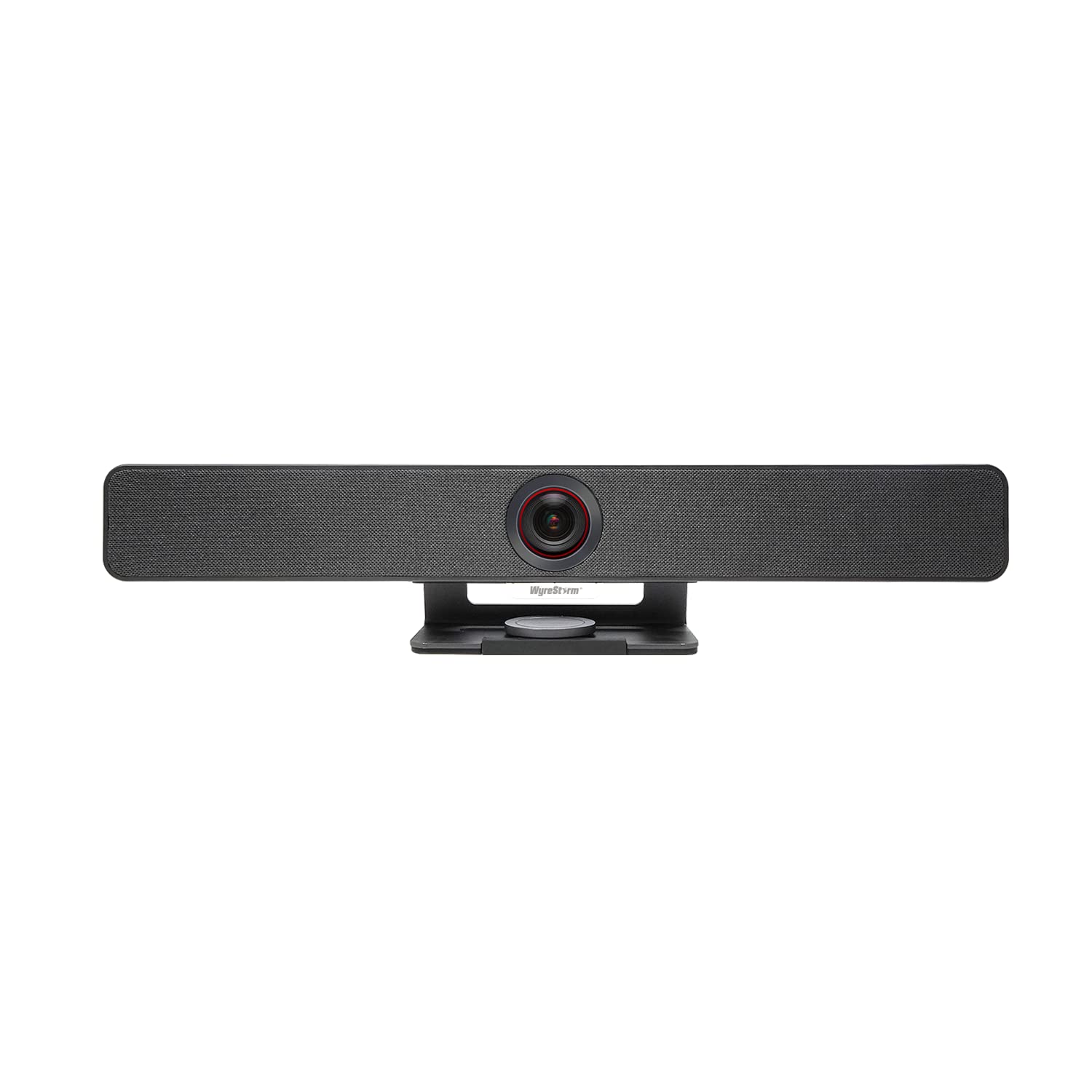
A larger-room all-in-one that brings AI presenter tracking and 8x zoom to the mid-range tier.
The WYRESTORM 4K system is built for medium-to-large conference rooms. It offers AI auto-framing that detects participants and adjusts the frame in real time, plus presenter and speaker tracking that follows the active person during presentations. The 120° wide-angle lens and 8x digital zoom give you more reach than the 5x zoom on the Pyle system. It features a 4-mic array with noise reduction and built-in dual speakers. A magnetic privacy cover slides over the lens when the camera is not in use. It works plug-and-play with Microsoft Teams, Zoom, Google Meet, and other platforms.
The all-in-one design combines camera, microphones, and speakers to reduce cable clutter on the conference table. The magnetic lens cap is a physical privacy solution you can manually attach, unlike the Yealink’s electric cover. The 8x digital zoom lets you get closer to a whiteboard or speaker than most competitors in this price tier. It comes with a wall-mountable bracket for permanent installation.
What stands out
- 8x digital zoom — more reach than the 5x on the Pyle or Yealink UVC34
- Magnetic privacy cover included — simple physical protection when not in use
- AI presenter tracking for dynamic presentations and training sessions
What to know
- 4-mic array (fewer mics than the 8-mic Kaylee Meeting Pro or Yealink UVC34)
- Digital zoom only — heavy zoom can degrade image quality
Reach for this if: You need a 120° camera with strong digital zoom (8x) for mid-sized rooms and want AI presenter tracking without jumping to a premium price bracket.
steer clear if: Your room is large enough that a 4-mic array might miss voices at the far end — consider the 8-mic Yealink UVC34 or a 360° device.
9. Pyle 4K USB Video Conference Room Camera System

An affordable 4K all-in-one that includes a remote control and desk tripod for flexible placement.
The Pyle 4K USB system delivers 4K resolution with a 120° field of view, 5x digital zoom, AI auto-framing, and echo cancellation. The MEMS microphone array offers an 8m (26 ft) voice pickup range with noise cancellation to filter out background distractions. The all-in-one unit includes a desk tripod for monitor placement, wall-mount components, and a remote control for adjusting settings without touching the computer. It works with Zoom, Microsoft Teams, Skype, and other platforms via plug-and-play USB.
Shoppers say that the camera is easy to set up and works well for group meetings. One customer observed they bought it for a conference room where they needed a wide-angle camera to capture everyone and found the 12MP resolution provided excellent detail even at full 5x zoom. Another reviewer noted the device runs Android, which allows native app installation if you can manage the setup. Some reviews mention mixed experiences with image quality, including graininess and noise in the video stream. The included desk tripod and peeping cover add versatility for different room configurations.
Value highlights
- Includes remote control, desk tripod, wall-mount bracket, and peeping cover
- 8m (26 ft) voice pickup range — longer than the Logitech MeetUp’s 4m range
- Runs Android for potential standalone operation
Quality check
- Mixed buyer reports on image quality — some note graininess and noise
- 5x digital zoom is less powerful than the WYRESTORM’s 8x zoom
Best fit for: Budget-first buyers who need 4K resolution and a long 8m microphone pickup range in a flexible kit with mounting options.
Not the one for: Teams that need flawless video quality on a large display or heavy digital zoom — consider the WYRESTORM or Yealink if sharpness is critical.
Understanding the Specs
Field of View (FoV)
This is the angle the camera sees. A 120° field of view covers a standard rectangular conference table well, showing everyone from the left edge to the right edge. A 360° camera captures the entire room in a circle — ideal for round tables or when people sit all around the device. If your room is long and narrow, 120° is fine. If people sit on all sides, go 360°.
Microphone Array and Pickup Range
The number of microphones (4, 8, or more) and their pickup range (measured in feet or meters) determine how far a person can sit from the device and still be heard clearly. Beamforming microphones focus on the active speaker while canceling out background noise. A longer pickup range (like 18 ft on the Meeting Owl or 8m on the Pyle) lets people sit farther away without sounding distant.
Digital Zoom vs. Optical Zoom
All the devices in this category use digital zoom, which crops into the sensor and enlarges the image. This means heavy zoom reduces sharpness. A higher-resolution sensor (4K vs 1080p) gives you more room to zoom before the picture degrades. Optical zoom, which uses moving lenses, is rare in all-in-one conferencing bars. If your room requires frequent zooming, prioritize a 4K sensor or a unit with 8x digital zoom like the WYRESTORM.
AI Auto-Framing and Speaker Tracking
Auto-framing keeps the entire group centered in the frame by adjusting the zoom and pan automatically. Speaker tracking zooms in on whoever is talking, switching between participants as the conversation moves. These features turn a static camera into a dynamic meeting assistant. The trade-off is lag: some units take a second or two to switch focus, which can feel choppy in fast-moving discussions. For most meetings, the convenience outweighs the slight delay.
FAQ
Do all-in-one video conferencing systems work with any laptop?
Can I use a 360° camera with a rectangular conference table?
What is the difference between 1080p and 4K in a conference camera?
How many microphones do I need for a small conference room?
Does AI speaker tracking work with all video platforms?
Can I mount an all-in-one conference camera to a wall or TV?
What does “certified for Microsoft Teams” mean exactly?
How long does it take to set up an all-in-one video conferencing system?
Will a conference camera work with Zoom on my personal laptop?
Final Thoughts: The Verdict
Across the board, the best all-in-one video conferencing equipment winner is the Meeting Owl 4+ because it combines 4K 360° video with proven Owl Intelligence tracking and an 18 ft audio pickup range — the complete package for medium to large rooms. If you want 360° coverage on a tighter budget, the COOLPO Camera 360 delivers 4K resolution and speaker tracking at a mid-range price. And for small huddle rooms that prioritize flexibility, the Logitech MeetUp offers motorized pan/tilt and strong platform support in a compact, reliable form factor.
How We Picked
We do not accept paid placement. Every pick is matched to a real buyer and a real use-case; we do not hands-on test units.
Sources & Methodology
Specifications: manufacturer listings and product documentation. Review insights: verified customer reviews, as of July 2026. Pricing: not shown on this page (it changes often); check the current price via the retailer link.
As an Amazon Associate, Gadgets Feed earns from qualifying purchases. This does not affect which products we feature.