
The search for a genuinely white computer case often ends in compromise — a black interior, dark-tinted glass, or a shade that reads more “off-white.” An all-white chassis should deliver on its promise of a uniform, bright aesthetic from every angle, while still offering the thermal performance and build quality serious PC builders demand. The best options in this space manage both without asking for a visual sacrifice.
I’m Min — the co-founder and writer behind Gadgets Feed. I’ve spent countless hours studying the thermal layouts, cable management channels, and GPU clearance specs across dozens of white mid-tower cases to identify which models actually deliver on the all-white promise without cutting corners on cooling.
Whether you are building a clean workstation or a showcase gaming rig, this guide breaks down the top contenders for your next build. Finding the right best all white computer case means balancing aesthetics with real-world airflow data and interior space.
How To Choose The Best All White Computer Case
An all-white case is a deliberate aesthetic choice that carries real implications for build compatibility, thermal performance, and long-term visual appeal. Not every white case hides a white interior, and not every white chassis provides adequate airflow for high-TDP components. Understanding what separates a true all-white enclosure from a painted-over standard design is the first step to a satisfying purchase.
Interior and Component Uniformity
The most common disappointment among builders is opening a white case to find a black PSU shroud, black fan frames, or a dark motherboard tray. True all-white cases extend the finish to every internal surface, fan hub, and cable grommet. Check product images for interior coloring — if the spec sheet doesn’t explicitly mention an all-white interior, assume the PSU shroud and rear chamber remain black.
Airflow and Fan Configuration
White surfaces reflect light and heat differently than black. Cases with restrictive front panels will trap heat more quickly in an all-white build because the internal cavity acts as a brighter, more reflective chamber. Prioritize cases with high-perforation front meshes, multiple fan mounting points on the side or bottom for direct GPU cooling, and at least three pre-installed fans. Reverse-blade side fans are a strong indicator of a case designed with thermal balance in mind.
GPU and Radiator Clearance
Modern GPUs measure well beyond 300mm, and many flagship cards approach 360mm. An all-white case must support these lengths without obstructing front-mounted radiators. Measure your GPU’s exact length and cross-reference it against the case’s maximum GPU clearance with a top-mounted radiator installed — many cases lose 20–30mm of GPU space when a 360mm AIO occupies the front position. The same logic applies to radiator thickness; a 45mm-plus radiator with push-pull fans can interfere with tall VRM heatsinks on ATX boards.
Quick Comparison
On smaller screens, swipe sideways to see the full table.
| Model | Category | Best For | Key Spec | Amazon |
|---|---|---|---|---|
| Antec Flux Pro White | Full Tower | Premium Full-Tower Builds | 420mm radiator support, 6 fans included | Amazon |
| NZXT H9 Flow (2025) | Dual Chamber | Showcase & Water Cooling | 3x 140mm + 1x 120mm fans, 420mm rad top | Amazon |
| Corsair 4000D RS Frame | Mid Tower | Modular Customization | InfiniRail fan mounting, 3x RS fans | Amazon |
| Montech Sky Two | Mid Tower | Value ARGB Builds | 4x PWM ARGB fans, 400mm GPU clearance | Amazon |
| NZXT H7 Flow RGB | Mid Tower | Direct GPU Cooling | 3x bottom fan support, 420mm front rad | Amazon |
| MUSETEX Y6 | Mid Tower | Maximum Pre-Installed Fans | 6 PWM ARGB fans, 270° glass panel | Amazon |
| Montech XR-W | Mid Tower | Entry-Level White Builds | 3x ARGB fans, wood grain I/O | Amazon |
In‑Depth Reviews
1. Antec Flux Pro White

The Flux Pro White is a full-tower E-ATX case that spares no expense in build quality or thermal engineering. Its front panel combines high-perforation steel with a birch wood accent strip, giving the all-white exterior a textured, furniture-grade aesthetic rarely seen in PC cases. Six pre-installed PWM fans — three 140mm Tranquil units at the front, two P12R reverse-blade fans on the PSU shroud, and one rear 140mm exhaust — deliver substantial airflow out of the box, with a built-in fan hub simplifying cable routing.
The standout feature is the iShift PSU 90-degree mount, which orients the power supply vertically behind the motherboard tray. This frees up the traditional PSU chamber to house the two reverse-blade fans that blow directly onto the GPU, a design choice that lowered load temperatures significantly in real reviews. The Flux Pro also supports simultaneous 420mm top and 360mm front radiators, making it a strong candidate for custom water loops. The CPU/GPU temperature display on the front I/O is a practical bonus for monitoring without software.
At 29 pounds, this is not a case you move often, but the thick steel panels, peg-and-lock side panel system, and untinted tempered glass justify the weight. The interior is fully white — every bracket, shroud, and fan frame matches the exterior. Cable management channels are extra-wide, and the removable cooling brackets make radiator installation much less frustrating than traditional fixed mounts.
Why it’s great
- Six high-quality PWM fans with hub included
- iShift PSU mount improves GPU cooling directly
- 420mm + 360mm dual radiator support
- Built-in temperature display is genuinely useful
Good to know
- Heavy at 29 pounds
- Front panel I/O cables are slightly short for large cases
- Premium price point reflects full-tower size
2. NZXT H9 Flow (2025)
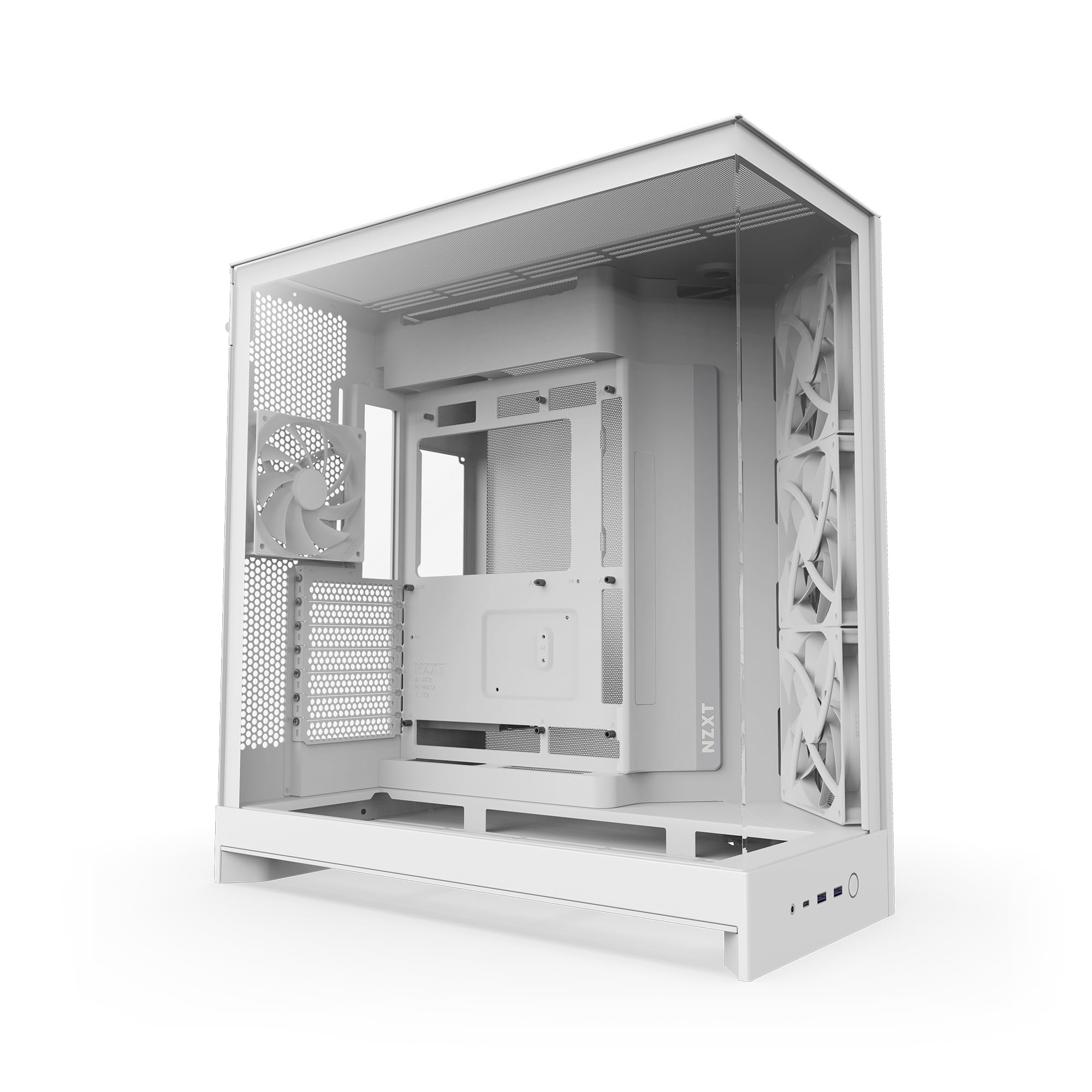
The H9 Flow is a dual-chamber mid-tower that prioritizes panoramic visibility without sacrificing airflow. Its wraparound tempered glass panels give an unobstructed view of the entire build, while the perforated steel front-right panel feeds cool air directly to the GPU and CPU areas. The 2025 revision includes three F140Q 140mm fans in the front-right and one F120Q 120mm fan at the rear, providing solid out-of-the-box cooling for mid-range to high-end components.
The dual-chamber layout separates the PSU, drives, and cable clutter into a rear compartment, leaving the main chamber exceptionally clean. This design is particularly beneficial for water cooling loops — reviews confirm it can fit two 260mm reservoirs alongside a 360mm radiator with room for a second 420mm radiator on the top. The case supports up to nine 140mm fans total, with bottom fan mounts that can target the GPU directly. It is also back-connect motherboard compatible, supporting ASUS BTF and MSI Project Zero boards for a cable-free front face.
The all-white execution here is thorough: the interior, fan frames, PSU shroud, and even the cable grommets are white. Build quality feels dense and premium, with extra-wide cable channels and built-in Velcro straps. The only recurring criticism is the bottom-mounted front panel connectors — power and reset buttons sit low enough that users with the case on the floor may need an extension cable or a ruler to press them comfortably.
Why it’s great
- Seamless panoramic glass for full component display
- Dual-chamber design hides cables completely
- Supports up to 420mm top radiator
- Back-connect motherboard compatible
Good to know
- Bottom I/O panel can be awkward to reach
- No GPU support bracket included
- Included fans are 3-pin DC, not PWM
3. Corsair 4000D RS Frame

The 4000D RS Frame introduces Corsair’s FRAME modular system, which allows users to swap out the motherboard tray, front I/O panel, and other core components as needs evolve. This is a mid-tower with an unusually long upgrade path — the case can grow with you rather than being replaced entirely. The all-white variant features a clean matte finish on both steel and tempered glass panels, with a 3D Y-pattern airflow front panel that provides a low-restriction intake path without looking like a typical mesh cutout.
The InfiniRail fan mounting system is the headline feature here. Instead of fixed screw holes, steel rails allow sliding fans to any position along the front and roof, accommodating fan sizes from 120mm to 200mm in the front and up to 140mm in the roof. This eliminates alignment headaches and ensures the fans sit exactly where they are most effective for your specific component layout. Three Corsair RS PWM fans are included, supporting daisy-chainable 4-pin connections and Zero RPM mode for silent operation at low load.
The side panel near the motherboard tray serves a dual purpose: it can act as a cable cover for a clean look, or it can be removed to mount additional fans for increased cooling. The case supports up to two 360mm radiators simultaneously and comes reverse-connector motherboard compatible. Build quality is sturdy, with magnetic dust filters on all major intake points. The only caveat is that the glass side panel requires careful alignment during reinstallation — the lack of a hinge or guide can increase the risk of drops.
Why it’s great
- FRAME modular system allows future tray/I/O upgrades
- InfiniRail fan mounting for perfect fan alignment
- Dual-purpose side panel — cable cover or extra fan mount
- Supports up to 200mm front fans
Good to know
- Glass side panel removal/reinstall is finicky
- Front USB-C cable may arrive pinched in some units
- PSU area is tight with HDD cage installed
4. Montech Sky Two

The Sky Two balances a premium dual tempered glass aesthetic with a mid-range price point. Its integrated front and side glass panels create a continuous viewing window into the main chamber, while a fine mesh strip on the front edge and PSU shroud allows adequate airflow. The case includes four pre-installed AX120 and RX120 PWM ARGB fans — two reverse-blade side intake fans, one rear exhaust, and one PSU shroud fan that directs air upward toward the GPU.
Clearance is generous for a case in this tier: GPUs up to 400mm, CPU coolers up to 168mm, and PSUs up to 210mm. This means the Sky Two can accommodate flagship GPUs like the RTX 4090 without forcing a front radiator relocation. The cable management system is straightforward but effective — a dedicated cable channel with three Velcro strips keeps the main chamber tidy. The LED button on the front I/O cycles through 21 lighting effects without requiring motherboard software.
The white finish extends to all visible surfaces, including the fan frames, PSU shroud, and interior walls. Build quality is solid for the price, with a sturdy steel frame and tempered glass panels that feel denser than expected. Some users note that the rear fan placement can be tight when installing a 240mm AIO, requiring minor modification. Overall, the Sky One delivers high visual impact and strong cooling at a price that undercuts most competitors with similar features.
Why it’s great
- Integrated front/side glass for clean panoramic view
- 400mm GPU clearance fits flagship cards
- 4 pre-installed ARGB PWM fans with controller
- 21 lighting effects with hardware button control
Good to know
- Rear fan may obstruct 240mm AIO mounting
- Glass panels can be fingerprint magnets
- Cable management depth is average
5. NZXT H7 Flow RGB

The H7 Flow RGB is a mid-tower engineered specifically for high-airflow builds. Its full mesh front panel maximizes intake, and the case includes three front-mounted 120mm RGB fans with a single-frame design that reduces cable clutter. The standout feature is the support for three bottom-mounted 120mm fans that blow directly onto the GPU — a configuration rarely seen in mid-tower cases. This bottom intake path can lower GPU temperatures by 5–8°C in GPU-intensive workloads, as confirmed by multiple user builds with RTX 40-series and 50-series cards.
Radiator support is generous: the front can accommodate up to a 420mm radiator, and the top supports a 360mm radiator. This makes the H7 Flow RGB viable for high-end custom loops or large AIO coolers. The cable management system uses wide channels with built-in hooks and included straps, making even full ATX builds look organized. The all-white exterior extends to the fan frames, mesh, and interior — the only black components are the I/O cable wires, which are easily hidden behind the motherboard tray.
The slim 18.43-inch depth keeps the footprint manageable for desk placement. Build quality is typical NZXT — precise panel gaps, sturdy aluminum accents, and a clean unibody aesthetic. The included RGB fan bar is a single unit that syncs with motherboard software. The only limitation is the lack of a rear exhaust fan on the RGB version; you will want to add one for optimal positive pressure. The H7 Flow RGB is an excellent choice for builders prioritizing GPU thermals above all else.
Why it’s great
- Supports 3 bottom fans for direct GPU cooling
- 420mm front radiator clearance
- Full mesh panel maximizes airflow
- Compact mid-tower footprint saves desk space
Good to know
- No rear exhaust fan included
- Bottom fan installation may conflict with thick radiators
- Single-frame RGB bar limits individual fan control
6. MUSETEX Y6

The Y6 from MUSETEX delivers an aggressive six-fan configuration in a package that undercuts competitors with similar fan counts. Two reverse-blade fans are pre-installed on the side panel for intake, three top fans handle exhaust, and a rear fan completes the flow path — all 120mm PWM ARGB units. The 270-degree full-view tempered glass panel wraps around the front and side, providing one of the widest viewing angles in its price bracket. The white finish covers the steel body, glass frame, and fan blades, ensuring a cohesive look.
Internal clearance is competitive: GPUs up to 400mm, CPU coolers up to 176mm, and top-mounted 360mm radiator support. The front I/O includes a USB 3.2 Type-C port, two USB 3.0 ports, and HD audio jacks. Build reviewers note that the Y6 is best suited for Micro-ATX boards if you want optimal cable routing, as full-size ATX boards can crowd the side cable channels. The rear chamber is spacious enough for excess cable bulk, but bottom cable cutouts are absent, requiring careful planning before motherboard installation.
The pre-installed fans use ribbon-style two-pin connectors, so individual fan color control is not possible without aftermarket controllers — the fans operate as a single lighting zone. However, they respond to motherboard ARGB sync for unified lighting effects. The magnetic dust filters on the top and bottom are a practical touch for reducing maintenance frequency. For builders who want maximum fan count out of the box and a wide display window, the Y6 offers exceptional per-dollar value.
Why it’s great
- 6 pre-installed PWM ARGB fans with reverse-blade side fans
- 270° tempered glass for showcase builds
- Type-C front I/O included
- Generous GPU and cooler clearance
Good to know
- ATX motherboard cable routing is tight
- Fans are single-zone lighting only
- Best suited for Micro-ATX boards
7. Montech XR-W

The Montech XR-W delivers an impressive feature set at an entry-level price point that belies its build quality. The case includes three pre-installed ARGB fans — two reverse-blade 120mm units on the side for clean intake and one standard 120mm rear exhaust — all spinning up to 1500 RPM. The inclusion of a wood-grain design I/O interface is a distinctive touch that adds warmth to the all-white aesthetic without looking out of place. The dual tempered glass side and front panels provide a clear view of the entire internal layout.
Despite its compact dimensions (17.1 x 8.98 x 17.7 inches), the XR-W fits ATX, Micro-ATX, and Mini-ITX motherboards, supports GPUs up to 400mm, and accommodates a 360mm radiator at the top. Builders have reported fitting high-end RTX 40-series cards and 360mm AIO coolers without clearance issues. The cable management is surprisingly refined for this tier, with a unified front panel connector that speeds up motherboard hookup and a dedicated channel with included zip ties. Dust filters cover the top, bottom, and side panels, a feature typically reserved for more expensive enclosures.
Customer reviews consistently praise the spacious interior and ease of assembly, with several noting this was their fastest build yet. The only recurring downside is that the glass panels arrive with light scratches or smudges from packaging, and they are fingerprint magnets during handling. The all-white paint covers every visible surface, including the fan hubs. For budget-conscious builders who refuse to compromise on GPU and radiator compatibility, the XR-W is the strongest entry-level option in the all-white category.
Why it’s great
- 3 pre-installed ARGB fans with reverse-blade design
- Fits 360mm radiator and high-end GPUs
- Dust filters on every intake panel
- Unified front connector simplifies wiring
Good to know
- Glass panels are fingerprint magnets
- May arrive with minor scratches on glass
- Side panel fitment can be slightly tight
FAQ
Do all white computer cases have white interiors?
Does a white case affect component temperatures?
What is the advantage of reverse-blade fans in a white case?
Can I fit a 360mm AIO cooler in any mid-tower white case?
How important is a Type-C front I/O port on a white case?
Final Thoughts: The Verdict
For most users, the best all white computer case winner is the Antec Flux Pro White because it delivers uncompromising build quality, six pre-installed PWM fans, and unique iShift PSU mounting that directly cools the GPU without compromising interior space. If you want panoramic dual-chamber visibility with water cooling support, grab the NZXT H9 Flow (2025). And for a budget-friendly all-white build that still fits 360mm radiators and high-end GPUs, nothing beats the Montech XR-W.