
Our readers keep the lights on and my morning glass full of iced black tea. As an Amazon Associate, I earn from qualifying purchases.
Specs are compiled from manufacturer listings and verified buyer reviews and can change over time — please confirm the key details on the product page before buying.
The right keyboard can turn a painful hour of typing into a full day of comfortable work, especially when wrist pain, limited finger mobility, or vision loss makes standard keys a barrier. This guide covers five alternatives—from split ergonomic designs to Braille input for smartphones—so you can match a device to your specific physical needs.
I’m Min — the founder and writer behind Gadgets Feed. This guide is built by comparing the manufacturers’ published specifications and the patterns across verified customer reviews, so you get each pick’s real strengths and trade-offs instead of marketing spin.
Find the best alternative keyboards for disabilities here, ranked by real owner experiences and ergonomic design, not just price.
Our Picks at a Glance

How To Choose The Best Alternative Keyboards For Disabilities
Choosing an accessible keyboard starts with identifying your specific physical barrier. Wrist and forearm strain calls for a split or tented design, while low hand strength or tremor points to light-touch keys, and vision impairment points to large-print, backlit, or even Braille-based input.
Match the Layout to the Limitation
A split keyboard angles the two key halves outward, which keeps your wrists straighter than a flat board. A contoured model adds sunken key wells so your fingers rest naturally instead of hovering. If you cannot reach a full row of keys comfortably, a compact device with fewer, larger buttons may be the smarter fit — like an 8-key Braille pad compared to a 104-key board.
Quick Comparison
| Model | Best For | Design | Keys | Connection | Amazon |
|---|---|---|---|---|---|
| Microsoft Ergonomic 4000★ Best Overall | Wrist pain relief on a budget | Split, cushioned rest | 104 | Wired | Amazon |
| Macally Ergonomic SplitMac-Friendly Pick | Mac users needing backlighting | Split, padded support | 100 | Bluetooth | Amazon |
| Hable One Braille | Vision-impaired smartphone users | Compact, 8 tactile | 8 | Bluetooth | Amazon |
| KINESIS Advantage360 | Power users wanting full programmability | Contoured, tenting | 108 | Bluetooth | Amazon |
| Microsoft Desktop 7000 | Keyboard plus mouse bundles | Natural arc, mouse | — | Radio Frequency | Amazon |
In‑Depth Reviews
1. Microsoft Wired Natural Ergonomic Keyboard 4000
Our pick — over 4★ from 6,000+ verified ratings; the strongest balance of quality and price.
The reliable split-board that cuts wrist strain without a steep learning curve or a premium price tag.
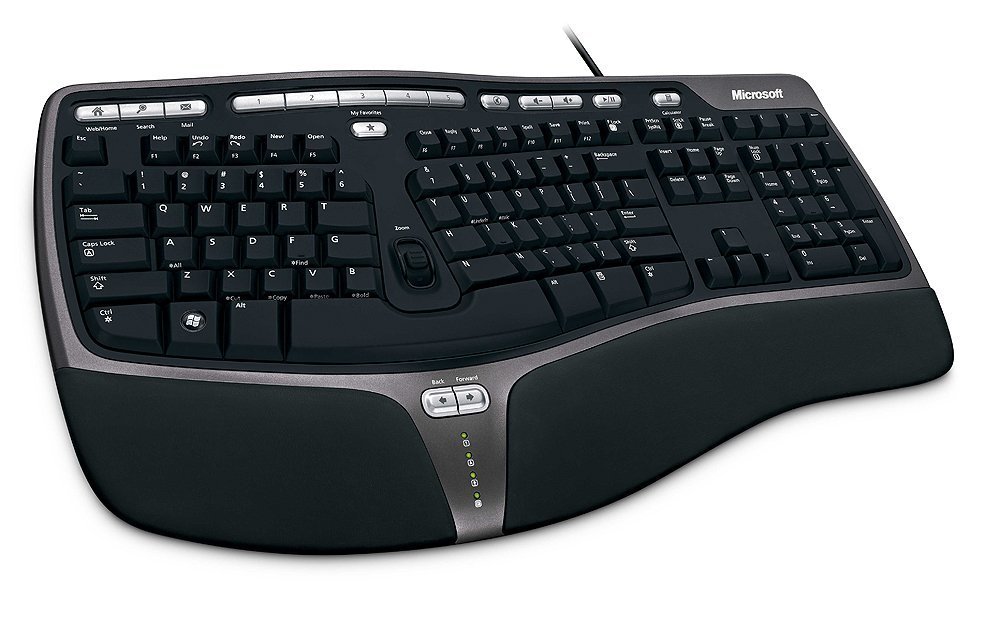
Its split ergonomic design angles your hands, wrists, and forearms into a natural handshake position, reducing strain. The cushioned palm rest supports a neutral wrist position, and a palm lift adds a relaxed angle that has helped many owners type for hours without the pain they felt on a laptop.
This wired 104-key board plugs into any Windows PC and works immediately. Owners praise its build quality and ergonomics, though the letter labels can wear off over time—a minor issue for touch typists. Some also report a stiff spacebar or that a key can stop responding, so reliability is not universal, but the durability is strong enough that many buy a second one after years of use — as one owner put it, “5 years use, still works.”
Compared to the larger 108-key KINESIS below, this Microsoft is far less adjustable, but it is also dramatically simpler and has a much broader base of satisfied owners. The lower price means no tenting adjustment or backlight, only a fixed, comfortable split angle.
Why It Wins People Over
- Split design plus cushioned rest eases wrist and forearm strain for most users
- Silent, matte keys with an oversized spacebar in many units
- Proven durability — several buyers report 4-5 years of daily use
Where It Shows Its Age
- Key labels can wear off within months
- No wireless option and no adjustable tenting
- A few units arrive with a noisy or stiff spacebar
Reach for this if: you have wrist or carpal tunnel pain and want a proven, affordable wired fix.
Look elsewhere if: you need backlighting, wireless freedom, or fully adjustable key wells.
2. Macally Bluetooth Ergonomic Split Keyboard
A backlit split keyboard built for Mac users who type in dim rooms and switch between Apple devices.
This is the best choice for Apple households. It uses a familiar 100-key MacOS layout with 13 shortcuts, and it can pair and switch between 3 Apple Bluetooth devices — think MacBook, iPad, and iPhone — with a single connection. The backlit keys have 3 brightness settings (Off, Low, Mid, High), so you can see the letters in any lighting, which matters if your vision makes low-contrast keys hard to read.
It also adds 4 adjustable kickstands for different typing angles, plus padded wrist support in a split design meant to ease wrist pain and be friendly to arthritic hands. The 2000 mAh built-in battery recharges over USB-C, and owners consistently call it comfortable with a great key feel — some report a full year of 10-hour daily use with only minor key wear. The catch is reliability: a notable share of owners mention the board dying after about 1.5 years, with one saying it “won’t stay powered on even plugged in.” The recurring gripe is that lifespan and Bluetooth connectivity are not guaranteed, so treat this as a comfort upgrade rather than a buy-it-for-life device.
Unlike the wired Microsoft above, this one trades certain durability for wireless convenience, backlighting, and a layout tuned for macOS instead of Windows. If you live in the Apple ecosystem, those features are worth the difference.
What Wins People Over: the light-touch, comfortable keys and the clean integration with Mac products.
The Honest Caveat: reliability is the mixed bag here — some units work for years, others stop connecting or powering on after a year or so.
Best for: Mac users who want backlit, split ergonomics and the ability to hop between Apple devices.
Think twice if: you need guaranteed long-term durability — the failure reports suggest a shorter lifespan than the wired alternative.
3. Hable One Portable Braille Keyboard
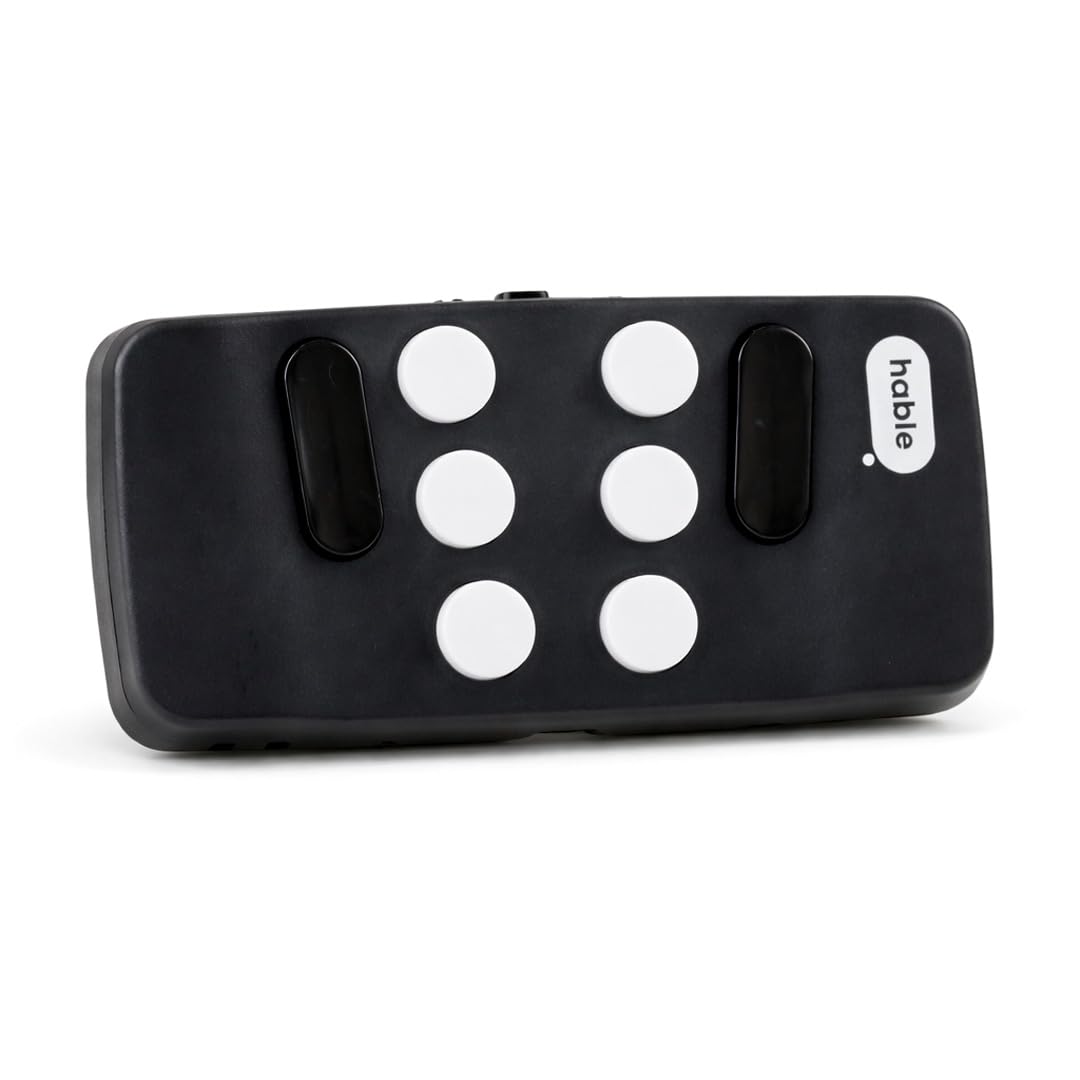
A pocket-sized Braille pad that turns any iPhone or Android into a fully navigable, private typing device.
This is a completely different approach: instead of a full keyboard, you get a compact device with 8 tactile buttons that you hold in your hand, letting you type and navigate your phone’s screen reader while the phone stays in your pocket or bag. It connects via Bluetooth to iPhone, Android, and tablets, and works with your phone’s built-in screen reader plus voice commands like Siri or Dictation.
The physical size tells the story — at just 1.81″L x 0.31″W x 3.93″H, while the Microsoft above measures 19.8″L x 10.3″W x 3.26″H, and it has 8 buttons versus 104. That tiny form makes it genuinely portable and private, since no one can read your screen while you type. One parent bought it for a son who was born blind, and the son uses it every day and highly recommends it — that kind of daily reliance shows in the 4.8-star rating, though the review base is small. Owners note it has a rechargeable battery lasting over a month on a single charge and that it is less error-prone than dictation, though fast typing can trigger accidental sends.
A key point for beginners: no prior Braille knowledge is needed to start, and the company offers free onboarding calls and tutorials. That said, most users do have some Braille familiarity, since the 8-button layout mirrors Braille input rather than a QWERTY arrangement.
The Thing Everyone Raves About: the natural, fast Braille typing that makes a phone fully usable without touching the screen.
How It Differs: this is the only pick here built for vision-impaired users, not for wrist or hand pain — so it belongs in a different category entirely.
Reach for this if: you are blind or visually impaired and want private, portable Braille input for your smartphone.
Not the right fit if: your challenge is wrist or finger pain on a standard keyboard.
4. KINESIS Advantage360 Professional

A fully adjustable, contoured workhorse for power users who need every key exactly where they want it.
This is the most adjustable keyboard on this list, and it shows. The patented contoured shape has split key wells with a concave design, thumb keys, and an orthogonal layout, plus integrated tenting with 3 adjustable heights so you can tilt each half to suit your body. The split halves can separate up to 10″ with the included cable, which is a huge range compared to the fixed Microsoft board.
Under the keys are Kailh Box Pink Silent switches — quiet, with a low activation force and a linear feel rated for 50M presses. That light touch is a real benefit for anyone with limited hand strength, and the 108 keys include thumb clusters that reduce pinky reach. It connects over Bluetooth to Windows 7-11, macOS, Linux, and Chrome, and power users can re-configure the base layout using GitHub or a web-based GUI — a level of programmability none of the others offer. Customers note excellent build quality and often say wrist pain disappeared within two weeks, though the ergonomics and Bluetooth do get mixed feedback: some find the reach to upper pinky keys hard, and some Windows users report random disconnects that a USB cable fixes.
The honest trade-off is the learning curve and the price. Expect 1-2 weeks to adapt to the contoured wells, and note the premium palm pads are sold separately. If you type for a living and want to eliminate hand strain, this is the serious tool — but it beats the Macally on adjustability and programmability while demanding far more from your budget.
Built For Deep Customization
- 3 tenting heights and up to 10″ split separation
- Light-touch linear switches rated for 50M presses
- Fully programmable via GitHub or web GUI
Before You Commit
- 1-2 week adaptation period to the contoured wells
- Bluetooth can drop randomly on Windows; cable fixes it
- Premium palm pads sold separately
Choose this if: you are a heavy daily typist or coder who wants complete control over layout and tenting.
skip it if: you want a simple plug-and-play board — the learning curve and price are too steep for occasional use.
5. Microsoft Natural Ergonomic Desktop 7000 for Business

A wireless keyboard-and-mouse duo designed around a natural handshake posture for your whole setup.
This is the only pick that bundles a keyboard with a matching ergonomic mouse, which matters if wrist strain comes from both typing and pointing. The keyboard uses a Natural Arc that curves the key layout to match fingers of different lengths, and a palm rest with a removable palm lift provides reverse tilt to reduce wrist extension. The mouse has a baseball-like shape that keeps your wrist in a neutral, relaxed position, plus a thumb scoop that guides your hand into an ergonomically correct resting spot.
It connects over Radio Frequency rather than Bluetooth, which avoids pairing hassles but means you need the included receiver. Owners who like it say the key layout is improved, the function buttons are well placed, and the mouse reduces wrist strain — one called it the only keyboard they will use. But the feedback is sharply mixed: some report keys sticking and causing repeated characters, a missing caps lock indicator, and non-functional extra buttons like zoom and favorites.
The bundled mouse also drew specific criticism, with one owner noting it has an extremely slow response time and seems to go into sleep mode immediately when it stops moving. Between the keyboard reliability complaints and the mouse lag, this is the hardest pick to recommend — it is best for someone who specifically wants the complete wireless keyboard-and-mouse package and can test it in their own environment.
The Appeal: a full ergonomic setup that addresses both typing and mouse grip in one purchase.
The Honest Read: reliability reports are genuinely split, and the wireless range and mouse response both drew complaints — proceed with clear expectations.
Consider this if: you want one box that covers keyboard and mouse ergonomics together.
Look elsewhere if: you need dependable key registration — the sticking-key reports make the wired Microsoft 4000 above a safer bet.
Understanding the Specs
Split vs. Contoured Layout
A split keyboard angles the two halves outward so your wrists stay straighter, which is the core relief for carpal tunnel and forearm strain. A contoured design goes further with sunken key wells and thumb keys, letting your fingers rest in a natural curl — but it demands a longer adaptation period. The key questions are how straight your wrists need to be and how much relearning you can tolerate.
Key Switch Feel
Mechanical switches vary in activation force, which is how much pressure a key needs to register. A low activation force means a light touch is enough, which helps people with limited hand strength or arthritis, while stiffer keys can cause fatigue over a long day. Quiet switches matter in shared spaces, and durability ratings like 50M presses tell you how many keystrokes the switch is engineered to survive.
FAQ
Will a split keyboard help with carpal tunnel pain?
Does the Hable One work with both iPhone and Android?
Do I need to know Braille to use the Hable One?
How long does the KINESIS Advantage360 take to get used to?
Is a wired or wireless keyboard better for accessibility?
What does “tenting” mean on an ergonomic keyboard?
Are backlit keys better for low vision users?
Can I use the KINESIS with a Windows PC and a Mac?
Final Thoughts: The Verdict
If you want one dependable pick, the alternative keyboards for disabilities winner is the Microsoft Natural Ergonomic 4000 because it delivers proven wrist-strain relief at the most accessible price, backed by thousands of owners. If you are deep in the Apple ecosystem and want backlighting, the Macally split keyboard is the comfortable wireless match. For vision-impaired users, the Hable One is a truly different, pocket-sized Braille solution — and if you want maximum adjustability and programmability, the KINESIS Advantage360 earns its premium price.
How We Picked
We do not accept paid placement. Every pick is matched to a real buyer and a real use-case; we do not hands-on test units.
Sources & Methodology
Specifications: manufacturer listings and product documentation. Review insights: verified customer reviews. Pricing: not shown on this page (it changes often); check the current price via the retailer link.
As an Amazon Associate, Gadgets Feed earns from qualifying purchases. This does not affect which products we feature.