
Our readers keep the lights on and my morning glass full of iced black tea. As an Amazon Associate, I earn from qualifying purchases.
Specs are compiled from manufacturer listings and verified buyer reviews and can change over time — please confirm the key details on the product page before buying.
You want a keyboard that feels solid and doesn’t flex like cheap plastic. An aluminum case gives you that weight, stops the board from sliding around, and changes both the sound and feel of every keystroke. The hard part is finding a metal build that actually delivers on typing quality without hidden downsides like clunky software or a stiff construction. This guide breaks down seven aluminum keyboard case picks, from ready-to-type wireless boards to barebones kits for DIY builders, so you can choose the right one for your desk setup and budget.
I’m Min — the founder and writer behind Gadgets Feed. This guide is built by comparing the manufacturers’ published specifications and the patterns across verified customer reviews, so you get each pick’s real strengths and trade-offs instead of marketing spin.
You will get a clear breakdown of what each aluminum keyboard offers, how they compare on specs like connectivity and weight, and honest feedback from real buyers who have tested them for gaming and daily typing.
Our Picks at a Glance

How To Choose The Best Aluminum Keyboard Case
An aluminum case is a big step up from plastic, but not all metal builds are the same. Here are the key things to check before you buy.
Full Keyboard vs Barebones Kit
A full keyboard comes with switches and keycaps installed — you open the box and start typing. A barebones kit gives you the case, PCB, and plate, but you add your own switches and keycaps. If you enjoy tinkering and want to choose every part, go barebones. If you just want a great typing experience without the extra work, pick a full build.
Connectivity and Battery Life
If you want to use the keyboard wirelessly, check for Bluetooth or 2.4GHz support and look at the battery capacity in mAh (milliamp-hours — a measure of how much energy the battery holds). A larger number, like 6000mAh or 8000mAh, means longer time between charges. For competitive gaming, a wired USB-C connection with a high polling rate (the speed the keyboard reports keystrokes to your PC, measured in Hz; 1000Hz is standard for responsive gaming) is usually better because it has no lag.
Switch Compatibility and Mount Type
Most aluminum cases use a hot-swappable PCB, meaning you can change switches without soldering. Look for one that supports 3-pin and 5-pin switches (the two common types of mechanical switch feet) so you have the widest choice. The mount type matters too: a gasket mount suspends the plate between soft pads, creating a bouncier, softer typing feel, while a tray mount is more rigid.
Quick Comparison
| Model | Best For | Connectivity | Weight | Layout | Amazon |
|---|---|---|---|---|---|
| YUNZII AL80★ Best Overall | Wireless + RGB + LCD | BT / 2.4G / USB-C | 1.4 kg (3.1 lbs) | 75% (80 keys) | Amazon |
| Womier ERA75Best Value | VIA support + huge battery | BT / 2.4G / USB-C | — | 75% (—) | Amazon |
| MK INKY75 | Sound-dampened creamy typing | BT / 2.4G / USB-C | 3.2 lbs (1.45 kg) | 75% (87 keys) | Amazon |
| CORBOBO LEOBOG Hi75C | DIY barebones build | USB-C | — | 75% (—) | Amazon |
| ARBITER Polar 65 | Competitive gaming (Rapid Trigger) | USB-C | — | 65% (—) | Amazon |
| IQUNIX EV63 | High-end HE gaming | USB-C | 2.7 lbs (1.22 kg) | 60% (64 keys) | Amazon |
| NPKC GH60 Case | Budget 60% replacement case | — (case only) | 0.24 kg (0.53 lbs) | 60% (61 keys) | Amazon |
In-Depth Reviews
1. YUNZII AL80 Wireless Mechanical Keyboard
Our pick — over 4.5★ from 400+ verified ratings; the strongest balance of quality and price.
A wireless aluminum workhorse with a built-in LCD screen and huge battery that lasts through long sessions.
You get three ways to connect — Bluetooth, 2.4GHz wireless, and USB-C — so you can switch between your PC, tablet, or phone without unplugging anything. The 6000mAh battery (a measure of how much energy it stores) means you can go days or weeks between charges even with the RGB lighting on. The anodized aluminum frame feels dense and sturdy, and buyers report it as a “heavy aluminum case, attractive simple design” that feels premium on the desk.
The 75% layout packs 80 keys, including a metal knob for volume control, and the customizable LCD screen can show a GIF, the time, or your battery level. It supports VIA and QMK (open-source firmware that lets you remap every key and create macros — essentially shortcuts for complex commands). One trade-off: some owners mention the stock Cocoa Cream V2 switches are loud, so you might want to swap them for quieter ones, which is easy thanks to the hot-swappable PCB (a board that lets you change switches without soldering).
Unlike the NPKC GH60 case, which is a bare replacement shell, the YUNZII AL80 is a complete keyboard ready to type on from the start. Compared to the Womier ERA75, the AL80 offers a larger battery and an LCD screen, though the ERA75 has an 8000mAh battery if raw capacity is your priority.
Standout features
- Customizable LCD screen for GIFs, time, battery status
- Tri-mode connectivity (BT, 2.4G, USB-C) with 1000Hz polling rate
- 6000mAh battery for extended wireless use
- QMK/VIA support for full key remapping and macros
Trade-offs to know
- Stock switches (Cocoa Cream V2) can be loud for some
- LCD screen software has poorly translated menus
- Knob lacks knurling, making it feel smooth to grip
Best for: Anyone who wants a complete wireless aluminum keyboard with a unique LCD screen, long battery life, and the flexibility to customize every key.
The catch: If you prefer a quieter typing sound from the start, plan to swap the switches — the board is hot-swappable, so it is an easy fix.
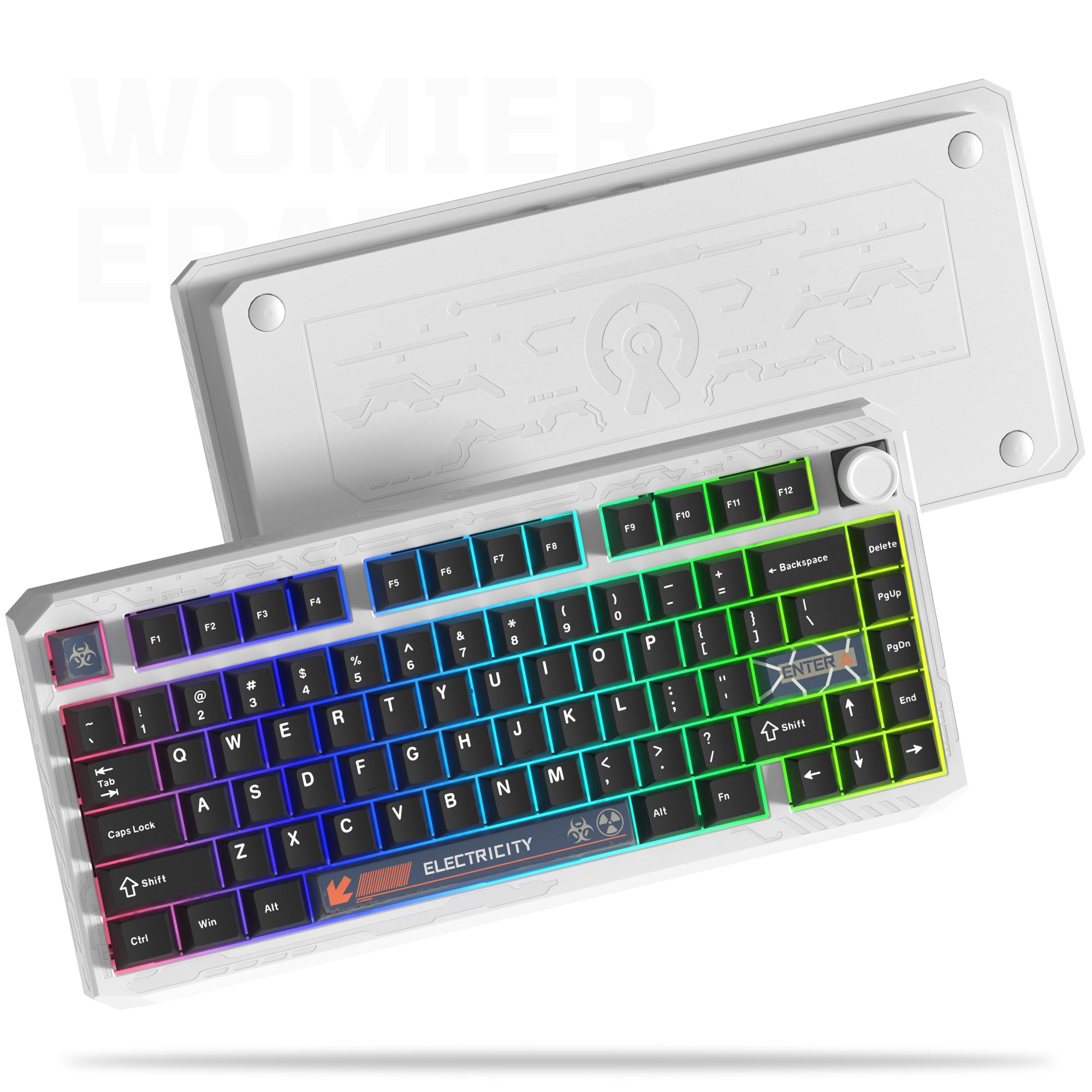
2. Womier ERA75 75% Wireless Mechanical Keyboard
An 8000mAh battery and full VIA customization in a powder-coated aluminum frame that feels rock solid.
The ERA75 stands out because of its massive 8000mAh battery — the largest in this list — so you can leave the RGB on for hours without hunting for the charging cable. The aluminum case has a silky powder-coated finish and bold diamond-cut edges that catch the light. It connects via Bluetooth, 2.4GHz wireless, or USB-C, and customers note the “sturdy CNC aluminum build” feels “slightly heavy” in a reassuring way.
VIA support (a browser-based tool for remapping keys, creating macros, and adjusting lighting) works right from the start without installing software — just open the web configurator and customize. The hot-swappable PCB accepts both 3-pin and 5-pin switches, and the included POM linear switches (plastic-on-plastic switches known for smooth, low-friction keystrokes) give a creamy feel. One reviewer noted the ERA75 “beats Keychron Q1 at half price,” making it a strong value play. Some users mention the gasket mount can come loose during shipping, but the magnetic case design makes disassembly and adjustment easy.
Compared to the YUNZII AL80, the ERA75 has a larger battery and simpler VIA integration but lacks the LCD screen. It is also heavier than the NPKC GH60 case by a significant margin, though that heft contributes to its stable desk presence.
Why it stands out
- 8000mAh battery — longest wireless run time in this list
- VIA web-based customization, no software install needed
- Hot-swappable PCB compatible with 3 and 5-pin switches
- Magnetic case design for easy opening and modding
Things to check
- Some units arrived with a loose gasket mount
- No physical toggle switch for connection mode
- Stock keycaps have low contrast, may want to replace
Reach for this if: You want huge battery capacity, easy VIA customization, and a wireless aluminum board that punches above its price tier.
Look elsewhere if: You want a built-in knob — the ERA75 has a hot-swap knob position but it is optional and not pre-installed.
3. MK INKY75 CNC Aluminum Mechanical Keyboard
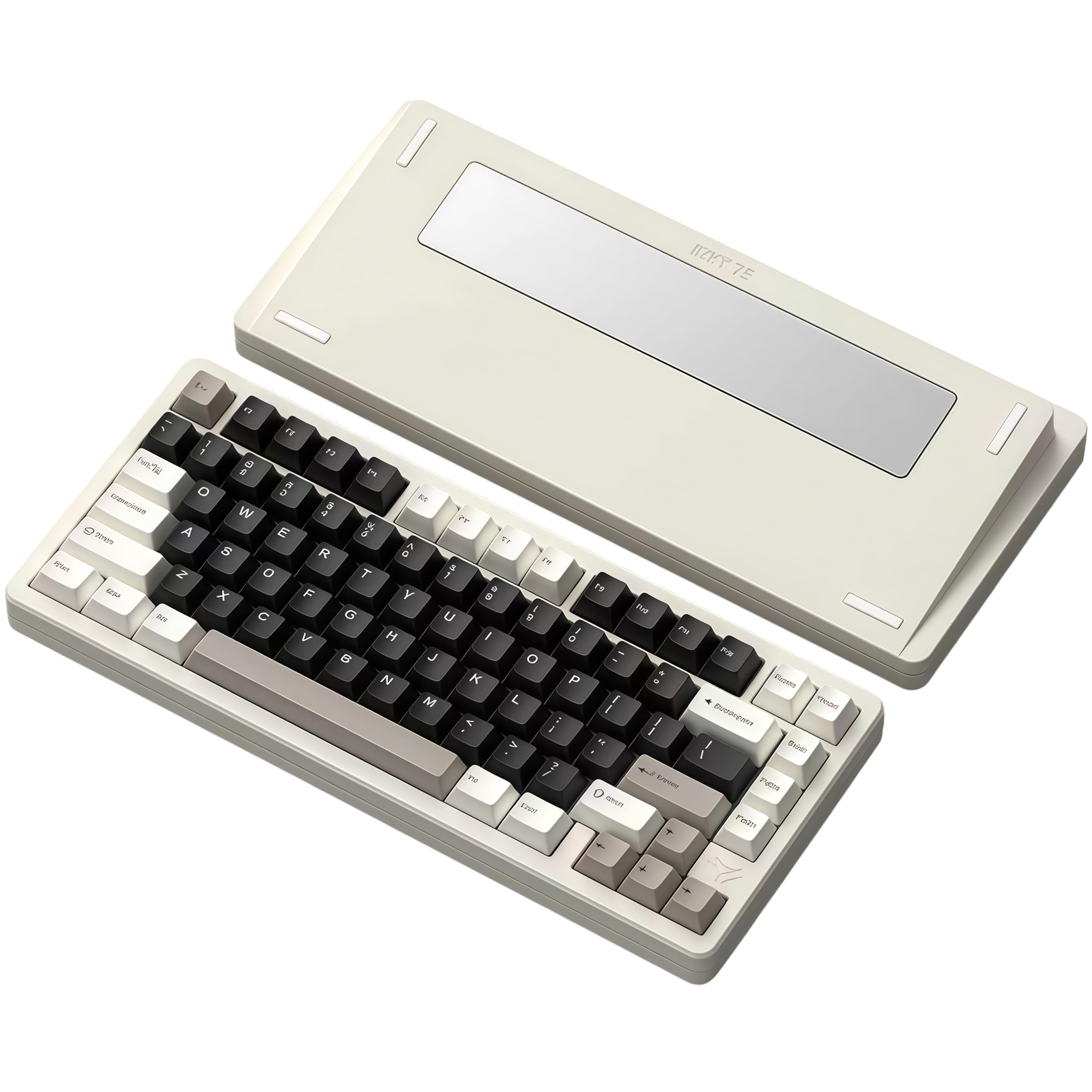
A creamy-sounding aluminum board with five layers of sound dampening for a smooth, ASMR-like typing experience.
The Inky75 is built for sound quality. Inside the full aluminum chassis, there are five layers of acoustic padding: PORON plate foam, IXPE switch pad, PET acoustic film, EPDM case foam, and PET insulation film. These layers soak up echo and hollowness, producing a creamy, light pop with each keystroke. Buyers describe it as “creamy, light poppy sound — the definition of ASMR” and note the 3.2-pound weight gives it a planted, immovable feel on the desk.
It comes pre-installed with factory-lubed Matcha Buttermilk linear switches, developed with HMX, and OEM-profile PBT keycaps (PBT is a tough plastic that resists the shiny wear ABS caps get over time). Connectivity is tri-mode — Bluetooth, 2.4GHz, and USB-C — with a 4000mAh battery that lasts about a week with backlight off. It also supports VIA for key remapping, though some buyers find the Elec Fox software janky. One quirk: the power switch sits under the Caps Lock key, so you have to remove the keycap to turn it on or off.
Unlike the ARBITER Polar 65, which focuses on gaming speed with Hall Effect switches, the Inky75 prioritizes typing sound and feel. It is heavier than the NPKC GH60 case (3.2 lbs vs 0.24 kg), but that weight contributes to its acoustic performance.
Acoustic highlight
- Five-layer sound dampening for creamy, non-hollow sound
- Full aluminum chassis with glitter finish for durability
- VIA-compatible for full key remapping and macros
- PBT keycaps resist shine and wear over time
Minor frustrations
- Power switch hidden under Caps Lock keycap
- Keycap puller can also pull out the switch stem
- Third-party software from Elec Fox is less polished
Perfect for: Typing enthusiasts and streamers who want a satisfying, creamy sound in a premium aluminum frame without building from scratch.
One downside: The hidden power switch makes wireless use less convenient than a dedicated toggle, especially if you switch between wired and wireless often.
4. CORBOBO LEOBOG Hi75C Upgraded Wired Mechanical Keyboard Kit
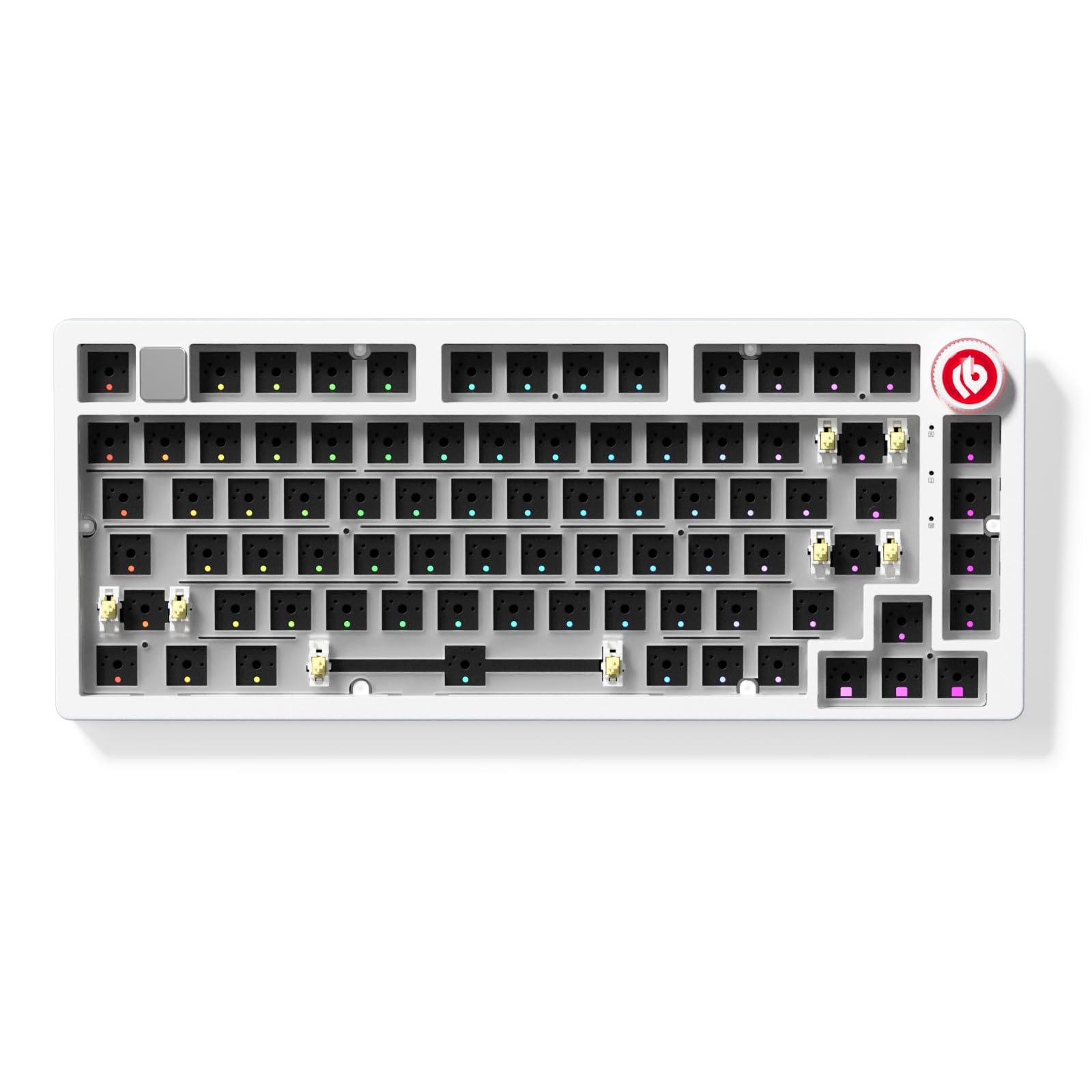
A wired aluminum barebones kit that gives builders full control over switches and keycaps for a custom sound profile.
The Hi75C is for people who enjoy building their own keyboard. It comes as a kit — the CNC-machined aluminum case, the hot-swappable PCB, the gasket mount plate, and a retractable coiled USB-C cable — but you supply the switches and keycaps. The design is an evolution of the popular Hi75, with a refined PCB and tune gasket mount that delivers a soft, bouncy typing feel. Reviewers point out “the aluminum alloy case feels incredibly solid and premium — this isn’t a flimsy plastic shell.”
The wired connection means zero latency and no battery to worry about — it is always ready. RGB backlighting with 17 preset effects and 10 music-responsive modes gives you plenty of visual flair. The volume knob and mute button are integrated into the frame for instant audio control. Shoppers say that the stabilizers (the mechanisms under longer keys like the spacebar) are the weakest part of the build, but they are easy to relube or replace. Compared to the ARBITER Polar 65, which is a complete gaming keyboard, the Hi75C is a blank canvas for tinkerers.
The dimensions are 14″L x 7″W x 2.7″H, making it noticeably larger than the NPKC GH60 case at 11.81″L x 4.33″W x 0.79″H — a 19% difference in length.
Strengths
- Solid CNC aluminum alloy frame with gasket mount for soft feel
- Hot-swappable PCB for 3 or 5-pin switches
- Retractable coiled USB-C cable included
- RGB with 17 effects and 10 music-responsive modes
Weaknesses
- Stabilizers need tuning for best performance
- Ribbon cable connecting PCB is delicate
- Wired only — no wireless option
Best for: Keyboard modders who want a high-quality aluminum base to build their dream layout with their own switches and caps.
The catch: The PCB uses a thin ribbon cable that can break during disassembly, so be careful if you plan to mod heavily.
5. ARBITER Polar 65 CNC Magnetic Gaming Keyboard

A compact 65% aluminum board with Hall Effect switches and Rapid Trigger for ultra-fast competitive gaming.
If you play FPS games like Valorant or CS2, the Polar 65 is built for you. It uses Fuji Hall Effect switches (magnetic switches that detect keystrokes without physical metal contacts, making them more durable and faster) with 20 adjustable sensitivity levels from 0.1mm to 3.8mm. Rapid Trigger registers a key press the instant you move it even a fraction of a millimeter — no need to bottom out — and does it with less than 1ms latency. One buyer mentioned it “improved Osu performance via adjustable actuation at 0.3mm” and called it “a fantastic performance keyboard.”
The CNC aluminum frame is paired with a polycarbonate top section for a mix of stability and weight savings. Dual silicone dampening keeps typing quiet with a deep sound, and the screw-in stabilizer on the spacebar minimizes rattle. It connects via USB-C, so it is wired-only — the trade-off for zero wireless lag. Buyers describe it as “smooth, responsive, quiet” and note the dual-shot PBT keycaps (a two-layer molding process that makes the lettering permanent) have a unique grippy texture. The main downside: some users wish it had a wireless option.
Compared to the IQUNIX EV63, which also uses Hall Effect switches, the Polar 65 is more affordable and offers 20 sensitivity levels versus the EV63’s M.A.T. 2.0 algorithm for auto-calibration.
Why gamers love it
- Hall Effect switches with 20 adjustable actuation points (0.1mm to 3.8mm)
- Rapid Trigger with under 1ms latency for instant inputs
- CNC aluminum and polycarbonate hybrid frame
- Dual-shot PBT keycaps with a grippy, matte finish
Trade-offs
- Wired-only connectivity — no Bluetooth or 2.4GHz
- Not ideal for typing enthusiasts who prefer a mechanical switch feel
Reach for this if: You play competitive games and want the fastest possible input with adjustable actuation in a compact, sturdy aluminum build.
Look elsewhere if: You need wireless freedom or you prefer a traditional mechanical typing feel over magnetic switches.
6. IQUNIX EV63 Hall Effect Magnetic Gaming Keyboard
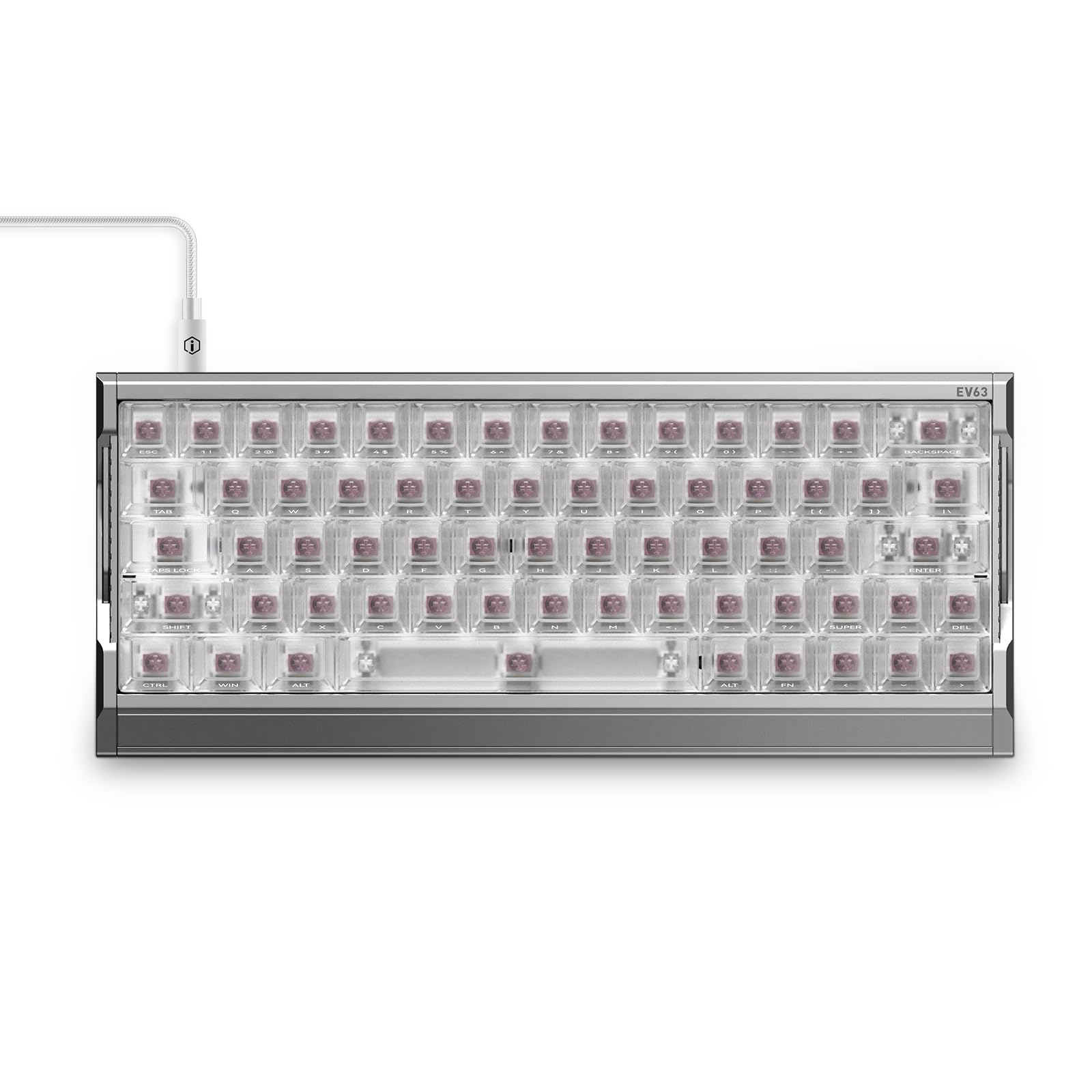
An aircraft-grade aluminum unibody with Hall Effect switches and a pro-tuned algorithm for tournament-level precision.
The EV63 is a 60% keyboard with a precision-milled unibody frame made from aircraft-grade aluminum — a material choice that gives it a “built like a tank” feel at 2.7 pounds. It uses Magnetic X Pro switches with third-generation Hall Effect sensors that boost flux variation by 50% compared to standard switches, meaning more consistent and accurate keystroke detection. The M.A.T. 2.0 algorithm auto-calibrates to your typing style without manual tweaking, and the 400% wider usable voltage range eliminates missed or accidental key presses. Buyers call it “endgame keeb” and say “IQUNIX has the best quality HE keyboards right now.”
It supports pro-level competitive functions like SOCD (Simultaneous Opposing Cardinal Directions — a technique where pressing two opposite keys at once gives you an instant directional input advantage in games), Rapid Trigger, DKS (Dynamic Keystroke), and RS (Rapid Sequence). The web-based software is easy to use — one owner reported they “updated the keyboard and set up Rapid Trigger within 60 seconds.” The 64-key layout is compact, and the translucent dual-shot PBT keycaps let the bright RGB shine through while staying non-slippery. The main trade-off: at its price tier, it is an investment, and it is wired-only (USB-C).
Compared to the ARBITER Polar 65, the EV63 offers a higher-end unibody build and auto-calibration, while the Polar 65 gives you more manual sensitivity levels at a lower cost. Both are excellent for competitive gaming, but the EV63 feels more refined from the start.
Premium features
- Aircraft-grade aluminum unibody frame for rock-solid stability
- Magnetic X Pro switches with 3rd-gen Hall Effect sensors
- M.A.T. 2.0 auto-calibration for consistent accuracy
- Pro functions: SOCD, Rapid Trigger, DKS, RS
- Web-based software, easy and fast to configure
Considerations
- Wired USB-C only — no wireless option
- Premium price reflects the build and sensor tech
- 60% layout means no function row or arrow keys
Best for: Competitive gamers who want a top-tier Hall Effect keyboard with auto-calibrating sensors and a premium unibody aluminum frame that will last for years.
The catch: If you prefer a wireless setup or need more than 64 keys, this compact layout may feel too limiting for productivity work.
7. NPKC GH60 Anodizing Aluminum CNC Case for 60% Keyboards

A lightweight, affordable replacement aluminum case for 60% PCBs that gives your build a metal upgrade on a budget.
If you already have a 60% mechanical keyboard and just want to swap the plastic case for a metal one, the NPKC GH60 case is the most budget-friendly entry point. It is a CNC-anodized aluminum shell with aluminum feet, weighing just 0.24 kilograms — that is about 5.8 times lighter than the YUNZII AL80. It is compatible with GH60, DZ60, YD60, XD60, and Poker 1 and 3 PCBs (Poker 2 does not fit). Buyers report it is a “sturdy case for Anne Pro 2; fits only 2 screws but works well.” Others mentioned it works for SK64 and Wooting 60HE with a snug fit.
The case has a 0% typing angle from the start, but the included feet let you raise it to a taller angle if you prefer. Some users note the USB-C slot has extra space around it, and there is no bottom switch hole plug for wired-only keyboards. At this price, you are getting a basic, functional aluminum shell with no extra features like RGB, gasket mount, or a PCB included. It is a straightforward drop-in replacement if your existing PCB matches the compatible list.
Compared to the CORBOBO LEOBOG Hi75C, which is a full barebones kit, the NPKC GH60 is just the case — you need your own plate, PCB, switches, and keycaps. It is also significantly smaller at 11.81″L x 4.33″W x 0.79″H versus the Hi75C’s 14″L x 7″W x 2.7″H.
What you get
- CNC anodized aluminum case and feet at an entry-level price
- Compatible with many 60% PCBs (GH60, DZ60, YD60, etc.)
- Ultra-light at 0.24 kg for easy transport
- Includes riser feet for adjustable typing angle
Limitations
- Case only — no PCB, switches, keycaps included
- Some PCBs (Poker 2, GK61, GK64) require modifications to fit
- USB-C slot has extra space; no plug for bottom switch hole
Reach for this if: You already have a compatible 60% PCB and just want an inexpensive aluminum case to replace a plastic one.
Look elsewhere if: You need a complete keyboard or want features like gasket mount, RGB, or wireless — this is purely a shell.
Understanding the Specs
Hall Effect vs Mechanical Switches
A mechanical switch uses a metal leaf spring to make contact when you press a key. A Hall Effect switch uses magnets and sensors instead — no physical contact means less wear over time, faster response, and adjustable actuation points (how far you have to press to register a keystroke). If you play competitive games, Hall Effect switches with Rapid Trigger let you reset and re-press a key faster than a traditional switch allows. For typing, many people prefer the feel and sound of mechanical switches.
VIA and QMK Customization
VIA is a web-based application that lets you remap any key, create macros (a sequence of commands triggered by a single keypress), and adjust lighting without installing software. QMK is the open-source firmware that runs on the keyboard’s chip — it gives you deeper control over layers, tap-dance functions, and custom behaviors. A keyboard that supports both gives you the flexibility of VIA for quick changes and QMK for advanced programming. Not all “VIA-compatible” keyboards support full QMK, so check the product details if you plan to dive deep.
FAQ
Will an aluminum case make my keyboard sound different?
Can I use any 60% PCB with the NPKC GH60 case?
What is a gasket mount and why does it matter?
Can I use an aluminum keyboard case wirelessly?
What is the difference between a barebones kit and a full keyboard?
What does “hot-swappable” mean?
Is a heavier aluminum keyboard always better?
What is Rapid Trigger on a Hall Effect keyboard?
Can I replace the keycaps on these aluminum keyboards?
Which aluminum keyboard case is best for a first-time builder?
Final Thoughts: The Verdict
For most people, the best aluminum keyboard case is the YUNZII AL80 because it combines a full wireless build, a customizable LCD screen, a 6000mAh battery, and VIA support all in a dense aluminum frame. If you prioritize sound and creamy typing feel, grab the MK INKY75 with its five-layer dampening. And for competitive gaming with the fastest possible input, the ARBITER Polar 65 delivers Hall Effect Rapid Trigger in a compact aluminum chassis.
How We Picked
We do not accept paid placement. Every pick is matched to a real buyer and a real use-case; we do not hands-on test units.
Sources & Methodology
Specifications: manufacturer listings and product documentation. Review insights: verified customer reviews, as of July 2026. Pricing: not shown on this page (it changes often); check the current price via the retailer link.
As an Amazon Associate, Gadgets Feed earns from qualifying purchases. This does not affect which products we feature.