
The shift from plastic to aluminum in mechanical keyboards isn’t just a trend—it’s the single most defining upgrade in build quality you can make. A machined aluminum frame transforms the typing experience from hollow and wobbly into a dense, resonant, and rock-solid foundation that delivers superior acoustics and a premium feel every time you press a key.
I’m Rikta — the co-founder and writer behind Gadgets Feed. I’ve spent countless hours analyzing the structural engineering, gasket configurations, and mounting systems that separate a true aluminum chassis from a cheap metal wrap, ensuring the recommendations here reflect genuine material and acoustics research. (And Homer 🐱 approved each board by sitting regally on its case before the first keystroke.)
This guide evaluates nine standout models across wireless connectivity, battery endurance, hot-swappable PCBs, and acoustic dampening layers. After thorough comparison, the best aluminum mechanical keyboard for your specific needs depends on whether you prioritize a massive battery, a rapid-trigger magnetic switch, tool-free modding, or the purest thocky sound signature on the market.
How To Choose The Best Aluminum Mechanical Keyboard
An aluminum keyboard isn’t just about durability—it fundamentally changes the sound, weight, and feel of every keystroke. Here are the critical specs that differentiate a great aluminum board from a mediocre one.
Chassis Construction and Material Grade
A full CNC-machined aluminum case is heavier and more acoustically inert than a thin metal top plate over a plastic base. Look for 6063 aluminum alloy with an anodized finish, which resists scratching and gives the board its characteristic dense heft. The weight, typically between 1.4 kg and 2.4 kg, prevents the keyboard from sliding during intense typing or gaming sessions.
Mounting System and Acoustic Dampening
Gasket mount designs suspend the plate between layers of silicone or PORON foam, isolating each keystroke vibration to deliver a softer bottom-out and a creamy or thocky sound. Multi-layer dampening (IXPE, EPDM, PET film) directly controls the resonance of the aluminum cavity. Boards without these layers often produce a hollow ping, whereas well-dampened examples offer a satisfying, focused thud.
Wireless Connectivity and Battery Capacity
Tri-mode connectivity (2.4GHz, Bluetooth 5.x, and USB-C) provides flexibility for both low-latency gaming and multi-device office use. Battery capacities range from 4,000 mAh to 8,000 mAh in the mid-range, while premium models can push beyond that. A higher mAh rating directly correlates to longer runtime between charges, especially crucial when using the brighter RGB backlighting that aluminum boards often feature.
Quick Comparison
On smaller screens, swipe sideways to see the full table.
| Model | Category | Best For | Key Spec | Amazon |
|---|---|---|---|---|
| YUNZII AL80 | 75% Custom | LCD enthusiasts & wireless users | 6000mAh battery + LCD screen | Amazon |
| EPOMAKER Galaxy100 | 1800 Compact | Numpad users & spreadsheet work | 8000mAh battery | Amazon |
| MK INKY75 | 75% Glitter | Sound purity & budget value | 5-layer acoustic dampening | Amazon |
| Chilkey ND75 | 75% Modular | Tool-free modding & beginners | 3 mounting systems + LCD | Amazon |
| Womier RD75 Pro | 75% Quick Release | Ultra-low latency & long battery | 8000mAh + 4ms 2.4GHz latency | Amazon |
| Keychron K2 HE | 75% Magnetic | Rapid Trigger & competitive gaming | Hall Effect magnetic switches | Amazon |
| Wobkey Crush 80 | TKL High-End | Tool-free case & premium acoustics | 7500mAh Pro battery | Amazon |
| GravaStar Mercury K1 Pro | 75% Skeletal | Unique aesthetics & dual RGB | 8000mAh battery | Amazon |
| ASUS ROG Azoth Extreme | 75% Flagship | Ultimate build & 8KHz polling | Carbon-fiber plate + OLED touch | Amazon |
In‑Depth Reviews
1. YUNZII AL80 Wireless Mechanical Keyboard

The YUNZII AL80 delivers a heavy, full-CNC aluminum anodized case that feels remarkably premium for its price tier. Its 6000mAh battery easily outlasts many competitors in the same bracket, offering tri-mode connectivity (Bluetooth 5.0, 2.4GHz, and USB-C) with a 1000Hz polling rate that keeps latency in check for both gaming and office work. The 75% layout saves desk space while retaining the F-row and a metal knob, making it a versatile daily driver.
What truly sets the AL80 apart is its customizable LCD screen, which can display GIFs, battery status, and connection mode. The gasket-mounted structure, paired with pre-lubed Cocoa Cream V2 linear switches, produces a creamy, thocky sound signature that many reviewers found satisfying straight out of the box. The south-facing RGB adds a vibrant underglow, though the stock keycaps aren’t shine-through, so legends are less visible in low light.
While the Cocoa Cream V2 switches have a high-pitched ring that some users swapped out for quieter alternatives, the full QMK/VIA support and hot-swappable PCB mean you aren’t locked into the stock feel. The software for the OLED screen could be more polished, but the board’s core typing experience and battery life round it into an outstanding all-around package.
Why it’s great
- Heavy anodized aluminum case with elegant aesthetics.
- 6000mAh battery offers exceptional wireless endurance.
- Full QMK/VIA support for deep key remapping.
Good to know
- Stock Cocoa Cream V2 switches can be loud with a high-pitched ring.
- LCD screen software is poorly translated and limits customization.
- Keycaps lack shine-through for low-light visibility.
2. EPOMAKER Galaxy100 QMK/VIA Wireless Keyboard

The EPOMAKER Galaxy100 packs a full numpad into an 1800 compact layout without sacrificing the desk space of a full-size board. Its aluminum alloy shell is weighty at roughly 1.4 kg, providing a stable typing platform, and the gasket-mounted structure with five soft cushioning layers delivers a creamy, thocky sound that reviewers consistently praised as “super satisfying.” The 8000mAh battery is among the largest in this roundup, supporting extended wireless sessions via Bluetooth or 2.4GHz.
QMK/VIA support is a star feature here, allowing you to remap every key—including the metal volume knob—and create complex macros. The pre-lubed Marble White linear switches produce a gentle, mellow sound that works for both quiet office environments and gaming. The south-facing RGB is bright from the typist’s angle, and the doubleshot PBT keycaps resist shine over long-term use.
The only consistent complaints involve a delayed wake-up when powering on wirelessly and the lack of a built-in dongle storage slot. Some users also noted that the included keycaps are not shine-through, so legends fade in the dark. Despite these small quirks, the Galaxy100’s combination of a numpad, massive battery, and creamy acoustics makes it a top pick for number crunchers and productivity power users.
Why it’s great
- 1800 layout with numpad saves desk space while retaining data entry keys.
- 8000mAh battery provides marathon wireless battery life.
- QMK/VIA offers unlimited key remapping and macro creation.
Good to know
- Wireless wake-up can be delayed when powering on.
- No integrated dongle storage inside the case.
- Stock keycaps are non-shine-through, limiting low-light visibility.
3. MK INKY75 CNC Aluminum Mechanical Keyboard
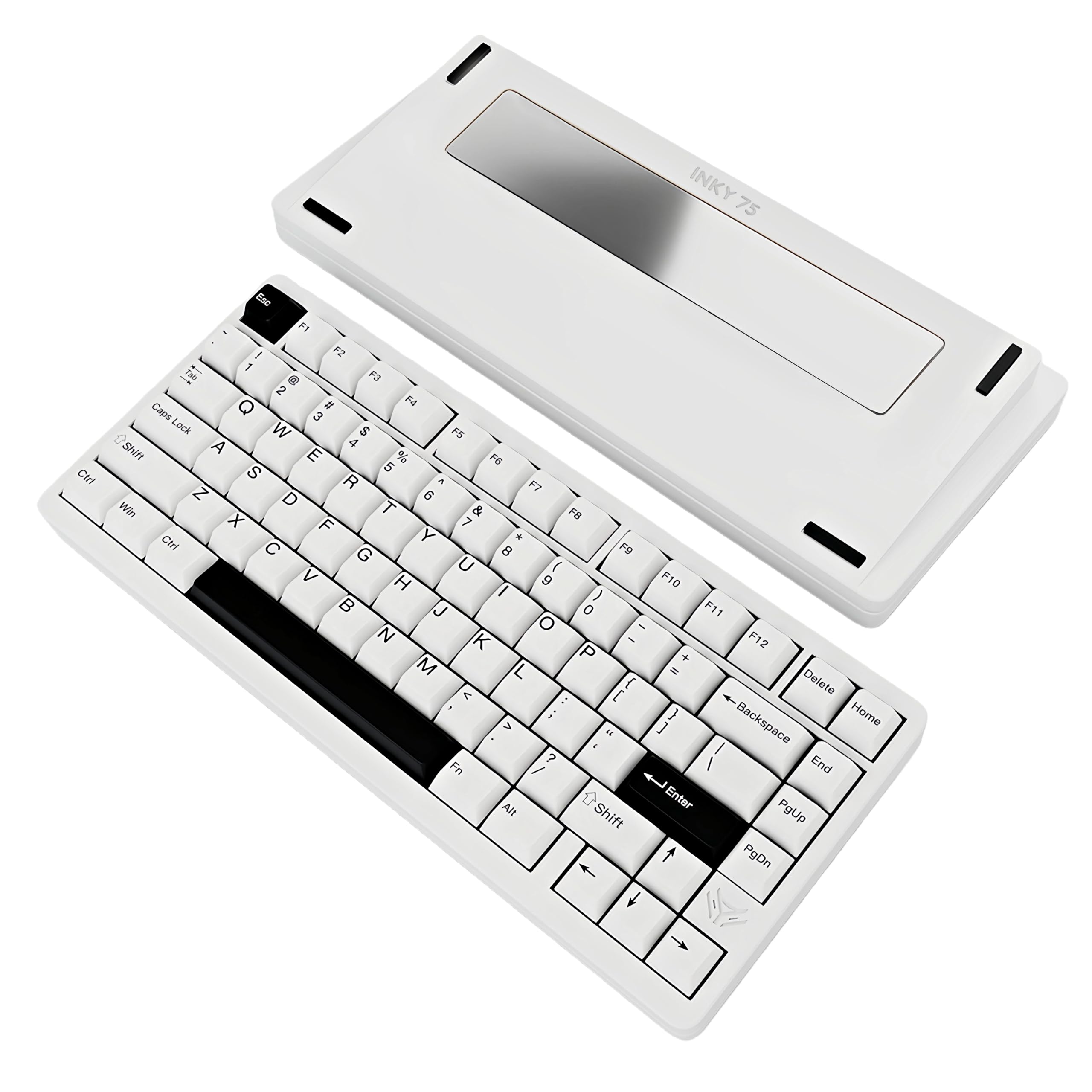
The INKY75 punches well above its price point with a full CNC aluminum chassis that features a distinctive glitter finish—adding a subtle sparkle without being gaudy. Its acoustic design is the highlight: five layers of dampening (PORON plate foam, IXPE pad, PET film, EPDM case foam, PET insulation) eliminate hollowness, resulting in a smooth, creamy sound that reviewers described as “ASMR-like.” The HMX Matcha Buttermilk linear switches are factory-lubed and deliver a buttery smooth typing experience.
VIA compatibility gives you full control over key mapping and RGB lighting via a web-based driver, though some users reported that the Elec Fox software feels janky and requires switching to a custom VIA JSON. The 4000mAh battery offers about a week of wireless use with backlighting off, which is adequate but not class-leading. The tri-mode connectivity (Bluetooth 5.0, 2.4GHz, USB-C) covers the essentials.
The biggest drawback is the power switch location—it sits under the Caps Lock key, which is awkward to access. Additionally, removing keycaps can sometimes pull the switch out of the hot-swap socket, so a switch puller is essential. But for the acoustic performance and aluminum build at this budget level, the INKY75 is a fantastic entry point to the premium typing experience.
Why it’s great
- Five-layer acoustic dampening delivers an outstanding creamy sound profile.
- VIA web driver support enables full key remapping and macro setup.
- CNC aluminum with glitter finish looks unique and premium.
Good to know
- Power switch is inconveniently located under the Caps Lock key.
- Keycap removal can accidentally unseat the switch from the socket.
- OEM software is janky and may require a custom VIA file.
4. Chilkey ND75 Aluminum Keyboard
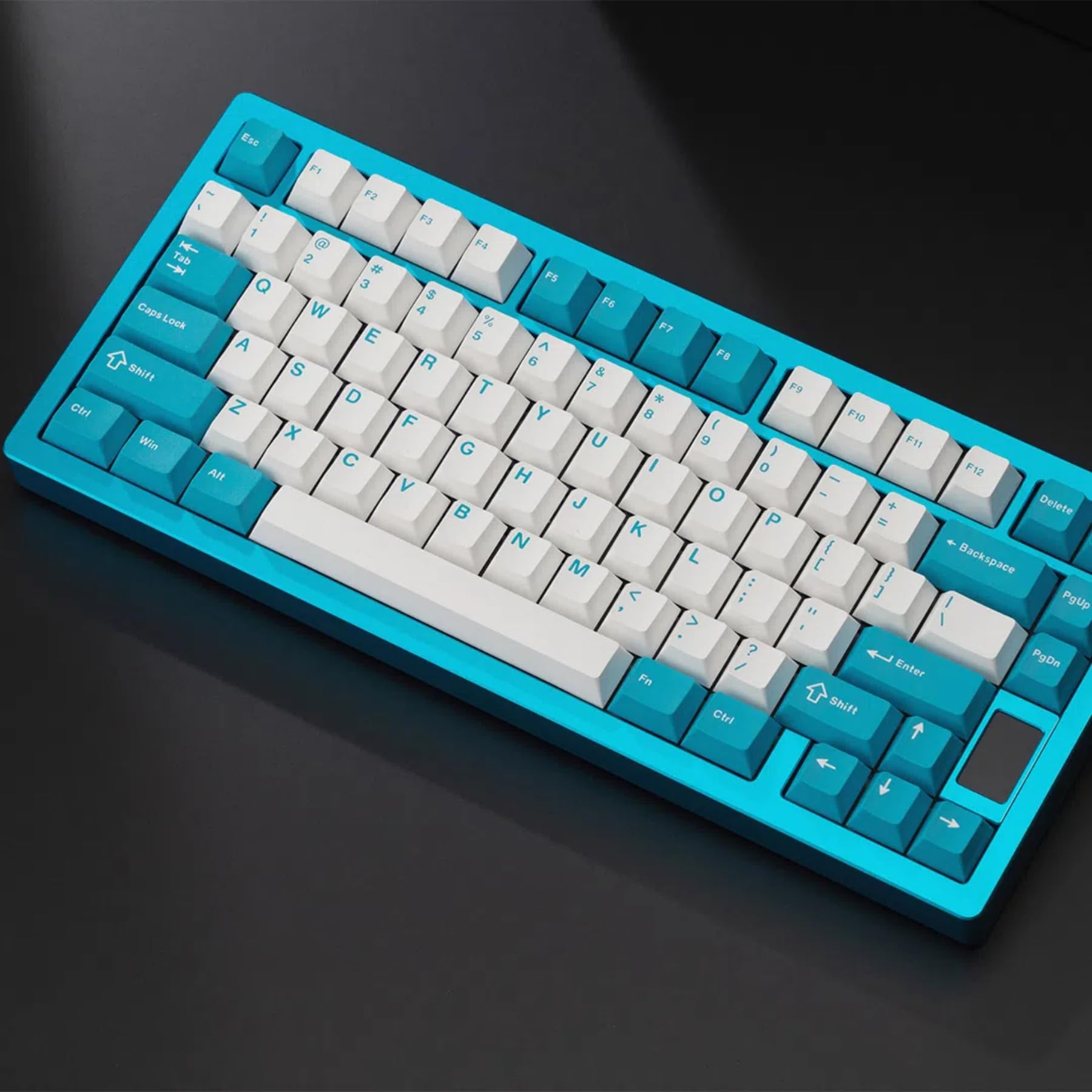
The ND75 is designed for enthusiasts who love to tinker. Its screwless quick assembly uses a ball-catch system and a magnetic PCB connector, letting you disassemble and rebuild the entire board in seconds without tools. You get three mounting systems in one package—Split O-Ring, Silica Gel Particle, and Top Mount—each altering the typing feel and sound, making this an ideal learning platform for beginners or a playground for experienced modders.
The CNC full aluminum case features an artistic gradient pattern on the counterweighted backplate, giving it a visual flair that stands out from simpler slab designs. Four layers of sound insulation (PORON, IXPE, PET, and PORON PCB foam) produce a Hi-Fi auditory experience with a satisfying “THWACK.” The per-key RGB offers 19 preset lighting effects, and the PBT keycaps in a Cherry profile provide ergonomic sculpting for fatigue-free typing.
User feedback highlights two recurring pain points: the battery drains quickly, with some reporting a 5% drop every 5 minutes in wireless mode, and the official software is difficult to find and buggy. The screen setup is also more complex than competing units. If you prioritize wireless endurance, the ND75’s battery performance may be a dealbreaker, but for wired use or short wireless sessions where modding flexibility is king, it remains a compelling choice.
Why it’s great
- Tool-free ball-catch disassembly makes modding exceptionally fast and easy.
- Three different mounting systems let you customize typing feel on the fly.
- High-quality aluminum case with artistic gradient backplate.
Good to know
- Battery life is poor, draining rapidly in wireless mode.
- Official drivers are hard to find and the web app is buggy.
- Screen setup requires complex steps and a hard-to-find software file.
5. Womier RD75 Pro Wireless Gaming Keyboard

The Womier RD75 Pro targets competitive gamers with its ultra-low latency figures: 3ms wired, 4ms over 2.4GHz, and 8ms via Bluetooth. The ball-catch quick-release mechanism and magnetic daughterboard make disassembly effortless, while the 8000mAh battery delivers up to 900 hours of use—effectively months of daily typing without charging. The pre-lubed POM linear switches feel smooth, and the gasket mount provides a soft, pleasant bottom-out.
Full QMK/VIA support lets you remap every key and customize the 40+ RGB lighting effects via an intuitive online configurator. A hidden dongle storage slot under a magnetic badge on the back keeps the 2.4GHz receiver secure without spoiling the sleek aesthetic. The aluminum case is solid and hefty, with a velvety anodization on the blue variant that reviewers found superior to spray-coated finishes.
There’s no toggle switch for connection type, so you must cycle through modes via the function key, which some found less convenient than a dedicated switch. The stock sound is described as clacky rather than thocky, so achieving a deeper thock may require switch and foam swaps. Despite these trade-offs, the RD75 Pro’s combination of near-instant wireless response and immense battery capacity makes it a serious contender for latency-sensitive gamers.
Why it’s great
- Ultra-low 4ms 2.4GHz wireless latency ideal for competitive gaming.
- 8000mAh battery provides up to 900 hours of battery life between charges.
- Tool-free ball-catch case with hidden dongle storage slot.
Good to know
- Stock sound is clacky rather than deep thocky.
- No physical toggle switch for connection mode selection.
- VIA requires downloading a custom .json file for full functionality.
6. Keychron K2 HE Rapid Trigger Keyboard

The Keychron K2 HE is a paradigm shift with its Gateron Double-Rail magnetic switches that use Hall Effect sensors instead of traditional mechanical contacts. This allows fully adjustable actuation from 0.2mm to 3.8mm in 0.1mm increments, plus a Rapid Trigger mode that instantly resets keystrokes based on real-time travel—eliminating dead zones for counter-strafing in FPS games. The 75% aluminum and rosewood frame gives it a premium, warm aesthetic that feels solid.
Tri-mode connectivity includes Bluetooth 5.2 and 2.4GHz wireless with a 1000Hz polling rate, and the web-based Launcher software lets you customize actuation points, key mapping, and macros from any browser without bloatware. The 4000mAh battery lasts roughly 40-50 hours with RGB on, but the magnetic switch technology means zero debounce delay and a crisp, linear feel that many reviewers called the smoothest they’d ever used.
The PBT keycaps are not shine-through, making legends hard to see in low light. The ABS plastic bottom case and aluminum+wood top frame mean it’s not a full aluminum enclosure, though the weight (965g) and wood side panels provide a unique hybrid feel. If you want bleeding-edge magnetic switch innovation with adjustable actuation and Rapid Trigger, the K2 HE is the keyboard to beat.
Why it’s great
- Hall Effect magnetic switches with 0.1mm adjustable actuation precision.
- Rapid Trigger mode eliminates dead zones for competitive gaming.
- Web-based Launcher customization without bloatware.
Good to know
- Non-shine-through PBT keycaps reduce legend visibility in low light.
- Not a full metal enclosure; features an ABS plastic bottom.
- Magnetic switches are not compatible with standard MX-switch keycaps.
7. KEEBMONKEY WOBKEY Crush 80 Reboot
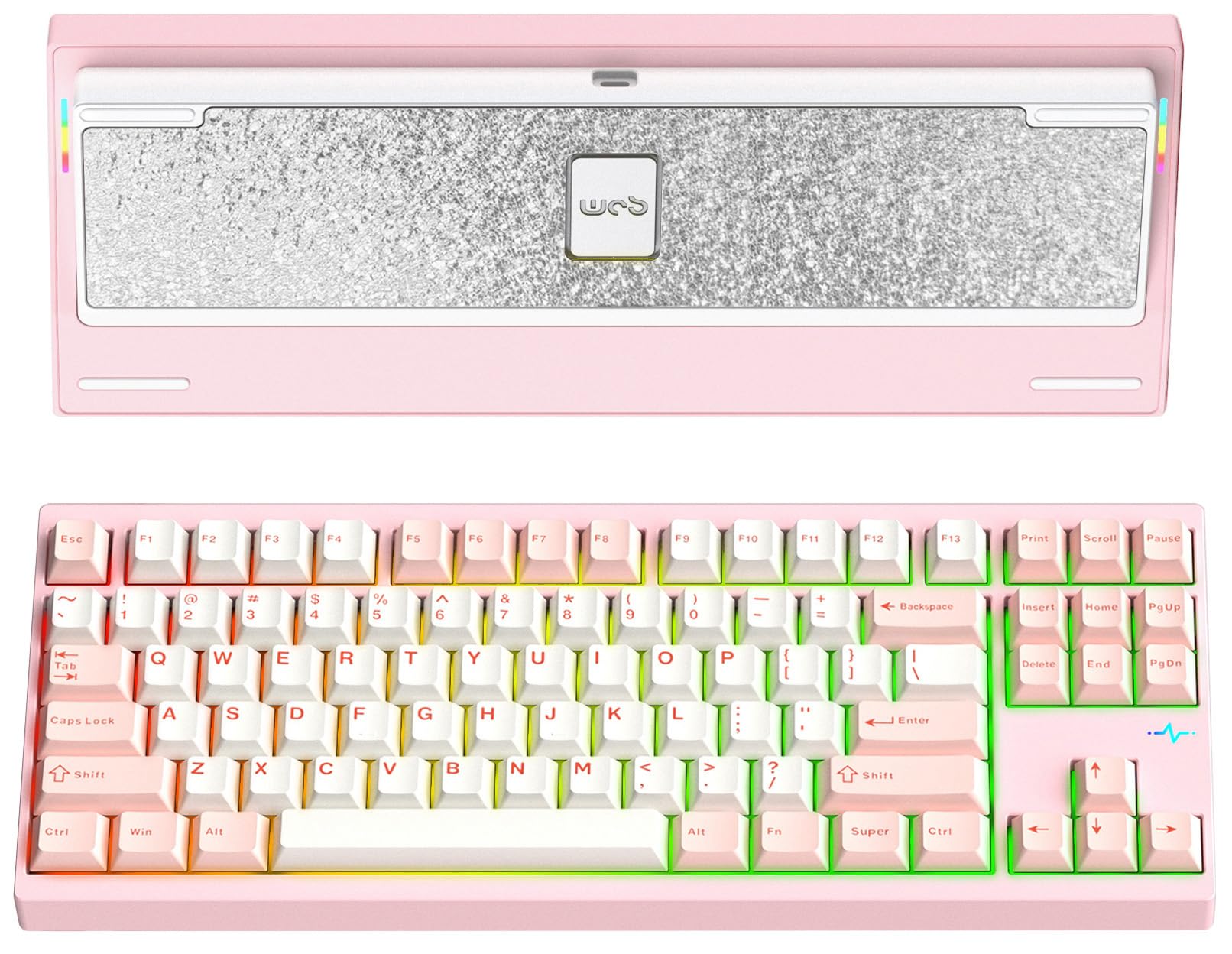
The Wobkey Crush 80 is a TKL powerhouse built from CNC 6063 aluminum, weighing in at a substantial 2.4 kg. Its magnetic ball-catch quick-release system lets you open the case in five seconds without tools, exposing a hot-swappable PCB and POGO pin connectors. The stock Kailh Cocoa switches deliver a marbly, creamy sound that reviewers consistently rated among the best in class, and the 7500mAh Pro battery ensures months of use even with RGB enabled.
The 88-key compact layout saves desk space while retaining a full function row and arrow cluster. South-facing A-RGB lighting provides vibrant per-key illumination, and a side RGB “heartbeat” light adds ambient flair. The gasketed case with force break mod eliminates hollow ping, resulting in a deep, non-hollow sound that rivals far more expensive customs. An extra plate, foam, and travel case are included, adding significant value.
Some users reported that the F13 key misaligns the function row for touch typists accustomed to standard spacing. The stock switches, while excellent, are lightweight linear, so typists preferring tactile feedback will want to swap them out via the hot-swap PCB. Despite these minor ergonomic quirks, the Crush 80 offers a premium, heavy-duty typing experience that many consider an “end game” TKL board.
Why it’s great
- CNC 6063 aluminum case provides exceptional rigidity and a premium feel.
- 5-second magnetic quick-release case for effortless modding.
- 7500mAh battery delivers extended wireless endurance.
Good to know
- F13 key position may misalign the function row for touch typists.
- Stock linear switches may be too light for users who prefer tactile feedback.
- Heavy weight (2.4 kg) makes it less portable.
8. GravaStar Mercury K1 Pro Wireless

The GravaStar Mercury K1 Pro is a visual showpiece, with a skeletal aluminum alloy frame and Phoenix-inspired pudding PBT keycaps that let dual RGB lighting (key backlight + base ambient glow) shine through spectacularly. The gasket-mounted FR4 plate and five layers of sound-dampening foam produce an extremely thocky and clacky sound that reviewers called “ridiculously satisfying.” The custom Kailh Speedy Mint linear switches feature a 45gf actuation force and a smooth POK stem for a refined typing feel.
Tri-mode connectivity (Bluetooth, 2.4GHz, USB-C) pairs with an enormous 8000mAh battery, supporting marathon sessions without recharging. The programmable control knob on the top-right corner provides quick volume and lighting adjustments, and the software offers separate controls for base and key lighting—an unusual degree of customization. The 79-key compact 75% layout saves desk space while retaining the F-row and navigation cluster.
The biggest trade-off is the lack of dedicated QMK/VIA support, meaning macros and key remapping rely on GravaStar’s first-party software, which lacks the depth of the open-source alternatives. The side-shine pudding keycaps, while stunning, make some legends harder to read in direct lighting. If pure customization depth matters most, you may prefer a QMK/VIA board, but for design-forward builders prioritizing aesthetics and sound, the K1 Pro is unrivaled.
Why it’s great
- Unique skeletal aluminum design with dual-zone RGB lighting systems.
- Very thocky and clacky sound profile with five dampening layers.
- 8000mAh battery provides exceptional wireless battery life.
Good to know
- No QMK/VIA support; uses proprietary software for remapping.
- Pudding keycaps can make some legends harder to read in certain lighting.
- Skeletal frame collects dust and debris between open sections.
9. ASUS ROG Azoth Extreme Wireless

The ASUS ROG Azoth Extreme sits at the pinnacle of this list, built from a solid aluminum-alloy chassis milled through a 12-step CNC process and reinforced with a genuine carbon-fiber positioning plate. This hybrid construction produces crisp yet controlled keystrokes, while dual PORON foams and a silicone pad absorb every vibration for a refined, high-fidelity sound profile. The pre-lubed ROG NX Snow linear switches are exceptionally smooth out of the box, delivering a deep, satisfying thock.
The 1.47-inch OLED touchscreen and multi-function knob let you monitor battery life, adjust volume, toggle lighting modes, and even display custom animations without touching software. With the ROG Polling Rate Booster, you can achieve an 8K Hz polling rate in both wired and wireless modes—the absolute fastest responsiveness available on a consumer keyboard. Speed Tap Mode enables instant directional changes in FPS titles, giving competitive gamers a subtle but real edge.
The included silicone wrist rest with an aluminum base is comfortable and premium, though it is not magnetic. The Armoury Crate software remains the weak link—some users found it slow and bloatware-like, and firmware updates have occasionally bricked units. Battery life with the OLED and RGB enabled is much shorter than the advertised 1600 hours with everything off. If your budget allows for the ultimate in build quality and feature density, the Azoth Extreme is the undisputed flagship, but many will find better value in the standard Azoth or other mid-range options.
Why it’s great
- Solid aluminum + carbon-fiber construction delivers unmatched build quality.
- 8K Hz polling rate in wired and wireless modes sets the latency benchmark.
- OLED touchscreen and multi-function knob provide intuitive real-time control.
Good to know
- Armoury Crate software can be slow, buggy, and occasionally brick units.
- Battery life degrades significantly with OLED and RGB enabled.
- Very expensive, with diminishing returns over the standard Azoth.
FAQ
Is a full aluminum case worth the extra weight over a plastic keyboard?
What is the difference between gasket mount and top mount in an aluminum keyboard?
Can I use any standard MX switches in a hot-swappable aluminum keyboard?
Final Thoughts: The Verdict
For most users, the best aluminum mechanical keyboard winner is the YUNZII AL80 because it combines a high-quality anodized aluminum chassis, a practical LCD screen, generous 6000mAh battery, and full QMK/VIA support at a mid-range price that represents outstanding value. If you need a full numpad and the battery endurance to never worry about charging, grab the EPOMAKER Galaxy100. And for the absolute pinnacle of build quality and gaming responsiveness, nothing beats the ASUS ROG Azoth Extreme with its carbon-fiber plate and 8KHz polling rate.