
When you’re building a compact AMD Ryzen machine that punches above its weight class, the motherboard choice makes or breaks your entire build. The mATX form factor offers the sweet spot of expansion potential without the cavernous footprint of a full ATX tower, but finding the right AM4 board that balances power delivery, connectivity, and value requires navigating a sea of chipset tiers and VRM capabilities.
I’m Min — the co-founder and writer behind Gadgets Feed. I’ve spent countless hours cross-referencing datasheets, analyzing VRM phase counts, and poring over user-verified memory overclocking reports to separate the genuine performers from the spec-sheet mirages in this AM4 mATX landscape.
This guide delivers a curated, no-nonsense ranking of thebest am4 matx motherboardoptions for 2025, covering B450 through B550 chipsets so you can match the right board to your Ryzen processor and budget.
How To Choose The Best AM4 mATX Motherboard
The AM4 mATX motherboard market is split into two main chipset eras: B450 (PCIe 3.0) and B550 (PCIe 4.0). Your choice dictates what CPUs you can run out of the box and how much bandwidth your GPU and storage drives get. Beyond the chipset, VRM quality and memory support are the real differentiators.
VRM Phase Count and Power Delivery
A board’s VRM (Voltage Regulator Module) converts power from your PSU into stable, clean voltage for the CPU. More phases — and higher-quality components like DrMOS — mean cooler operation and more headroom for overclocking Ryzen 5000-series chips. Boards with 6+ real phases (like the ASUS TUF B550M-PLUS) handle a 5900X comfortably, while 4-phase designs (like the MSI B450M PRO-VDH Max) are best paired with 65W TDP chips. Look for VRM heatsinks; bare MOSFETs throttle quickly under sustained load.
PCIe Gen and M.2 Slot Configuration
B550 brings PCIe 4.0 to both the primary GPU slot and at least one M.2 NVMe slot, doubling bandwidth versus PCIe 3.0. This matters if you plan to run a high-end GPU (like an RTX 4080) or a Gen4 SSD that pushes 7,000 MB/s sequential reads. B450 boards are limited to PCIe 3.0, which is still fine for mid-range GPUs and SATA SSDs, but you sacrifice future storage speed. Also check how many M.2 slots you get — two is standard on B550, while B450 usually offers one.
Memory Overclocking Support and Capacity Ceiling
Ryzen’s Infinity Fabric scales with RAM speed, so a board’s official memory support list matters. B550 boards typically support DDR4-4400+ (OC), while B450 boards cap out around 3466-3866 MHz. Look for rated speeds at least 3600 MHz, which is the sweet spot for Ryzen 5000 series. Also check the maximum capacity — 128 GB across four DIMM slots is common among premium boards, while some budget boards only officially support 64 GB.
Quick Comparison
On smaller screens, swipe sideways to see the full table.
| Model | Category | Best For | Key Spec | Amazon |
|---|---|---|---|---|
| ASUS TUF Gaming B550M-PLUS | B550 Premium | High-end gaming and OC | 8+2 DrMOS VRM, 2.5 Gb LAN | Amazon |
| GIGABYTE B550M AORUS Elite AX | B550 Premium | Wi-Fi 6E and multi-M.2 builds | Wi-Fi 6E, 5+3 VRM, dual PCIe 4.0 M.2 | Amazon |
| ASRock B550M PRO SE | B550 Mid | Compact Ryzen 7 builds | HDMI 2.1, DP 1.4, 4+ DIMM 128GB | Amazon |
| ASUS Prime B550M-A WiFi II | B550 Value | Reliable Ryzen 5 builds | WiFi 6, ECC memory, HDMI 2.1 | Amazon |
| MSI B550M PRO-VDH WiFi | B550 Value | Entry-level Ryzen 5000 gaming | Flash BIOS button, dual M.2 | Amazon |
| MSI ProSeries B450M PRO-VDH Max | B450 Value | Ultra-budget Ryzen builds | PCIe 3.0, 1 M.2, D-Sub/DVI/HDMI | Amazon |
In‑Depth Reviews
1. ASUS TUF Gaming B550M-PLUS
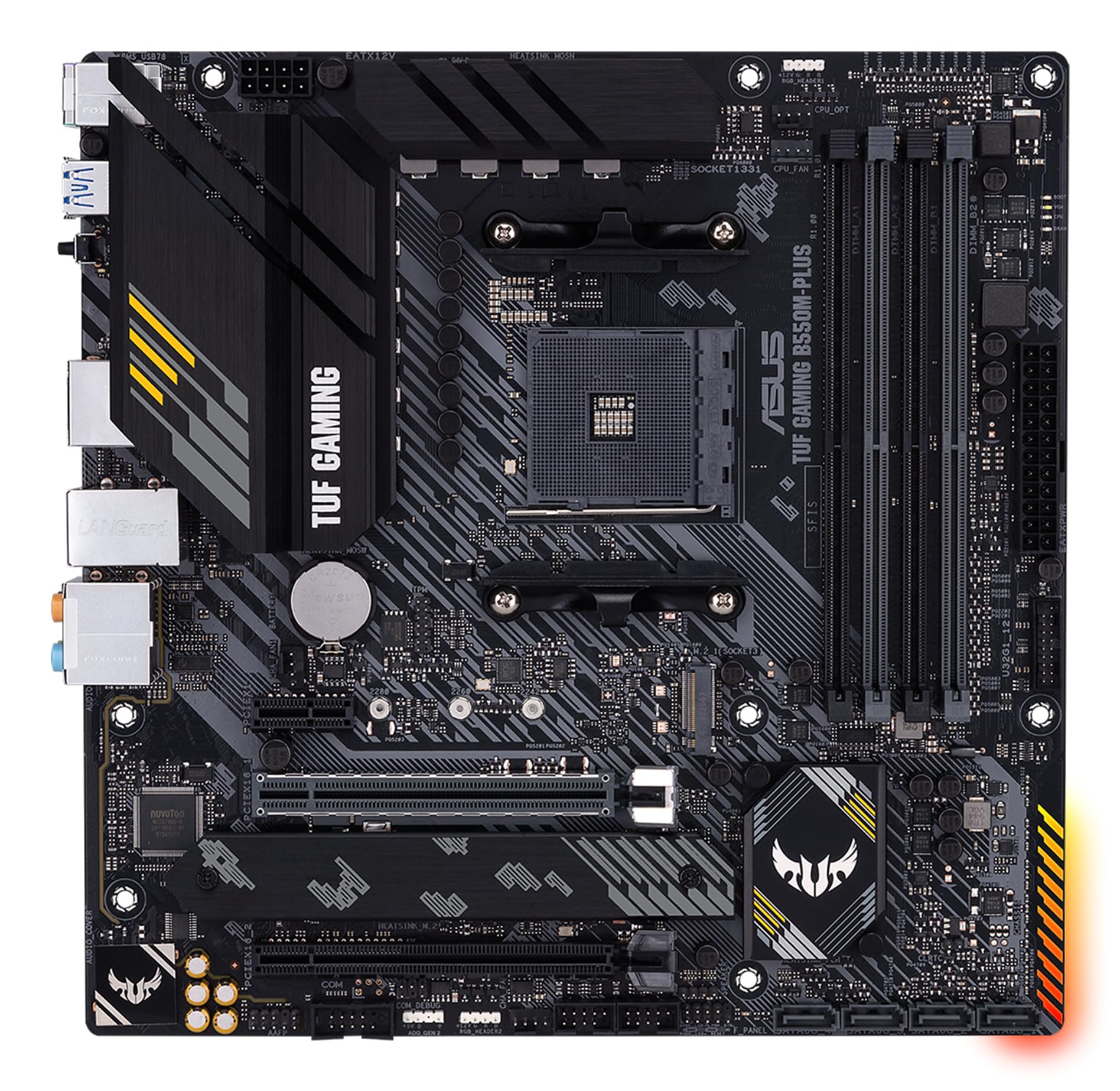
This board is the gold standard for AM4 mATX builds that demand rock-solid stability under heavy CPU loads. The 8+2 DrMOS power stage design is overkill for a Ryzen 5 5600X, but it gives a Ryzen 9 5900X the clean, cool power it needs without VRM thermal throttling even during prolonged rendering sessions. The military-grade TUF components and ProCool power connector add real durability that justifies the premium over budget B550 options.
Connectivity is well thought out for a micro-ATX layout. You get a 2.5 Gb Ethernet port — not Wi-Fi, which some users prefer to avoid — a USB 3.2 Gen 2 Type-C rear port, and dual M.2 slots with one Gen4 and one Gen3. The second M.2 slot sits under a heatsink, and the SATA ports are placed at the bottom edge so a long GPU doesn’t block them. The Realtek S1200A codec delivers clean 108 dB SNR audio that’s miles ahead of typical budget codecs.
One subtle but important win: the BIOS flashback feature lets you update the BIOS without a CPU installed, which matters if you’re pairing this board with a Ryzen 5000 CPU out of the box. The only real hiccup reported is the plastic USB 3.0 connector casing being a bit fragile on the motherboard header, so handle that front-panel cable with care. If you want a board that won’t hold back a high-end Ryzen build and will last through years of daily use, this is the one.
Why it’s great
- 8+2 DrMOS VRM handles 5900X/5950X without issue
- 2.5 Gb Ethernet and USB-C rear port
- BIOS flashback for CPU-less updates
Good to know
- No integrated Wi-Fi module
- Only 2 chassis fan headers (use splitters)
- USB 3.0 front panel header connector is delicate
2. GIGABYTE B550M AORUS Elite AX

If wireless connectivity is your priority, this board delivers with Wi-Fi 6E and Bluetooth 5.3 out of the box — no dongles or PCIe adapters needed. The 5+3 power phase VRM (digital, with premium chokes and capacitors) is enough to run a Ryzen 7 5800X3D without breaking a sweat, especially with the enlarged MOSFET heatsink keeping temperatures in check. The integrated I/O shield also makes installation noticeably cleaner.
Storage options are generous for mATX: two PCIe 4.0 M.2 slots (one of which is Gen4 x4, the other Gen3 x4) plus four SATA ports. The board supports DDR4 up to 4733 MHz (OC), which gives plenty of headroom for Ryzen’s Infinity Fabric tuning. The Q-Flash Plus button is a genuine time-saver — you can flash the BIOS without a CPU, RAM, or GPU installed, which is a lifesaver if your Ryzen 5000 CPU needs a newer BIOS revision.
One notable omission is the lack of a front-panel USB-C header. If your case has a Type-C port on the front, you’ll need a PCIe card to enable it. A few users also report the front panel IO labeling is faint, so double-check the manual during first connect. And the board ships with a reasonably up-to-date BIOS, but if you’re using a 5800X3D, a quick Q-Flash update is recommended for best stability. This is the board for Wi-Fi-first builders who want dual M.2 slots and a clean out-of-box experience.
Why it’s great
- Integrated Wi-Fi 6E and Bluetooth 5.3
- Q-Flash Plus BIOS button (no CPU needed)
- Two PCIe 4.0 M.2 slots with heatsinks
Good to know
- No front-panel USB-C header
- Front panel IO labeling can be hard to read
- Some 5800X3D systems may need immediate BIOS update
3. ASRock B550M PRO SE

This board cuts the fat to deliver B550 essentials at a mid-range price. It packs four DIMM slots supporting up to 128 GB of DDR4, an HDMI 2.1 port that handles 4K at 60Hz, and a DisplayPort 1.4 output — making it a great choice for a Ryzen 5 or Ryzen 7 APU build or a compact system that doesn’t need a discrete GPU yet. The B550 chipset provides PCIe 4.0 for your GPU and storage, keeping the door open for future upgrades.
What you give up is integrated Wi-Fi and Bluetooth — this board is strictly wired networking. That’s not a problem for desk-bound builds with Ethernet, but if you need wireless, budget for a USB or PCIe adapter. The 4+2 VRM phase design is modest; it runs a Ryzen 5 5600X or 5700X comfortably, but I wouldn’t push a 5950X on this board. The compact 9.61 x 9.61 inch footprint fits even tighter mATX cases like the O11 Dynamic Mini.
The user-reported build quality is decent — the board posts without a BIOS update for most Ryzen 5000 CPUs, which is refreshing. However, there have been some reports of boards arriving dead on arrival, so buying with a return-friendly seller is wise. For a clean, no-frills B550 board that does the basics well and leaves room in your budget for a better CPU or GPU, the PRO SE is a solid value play.
Why it’s great
- 128 GB DDR4 support across 4 DIMM slots
- HDMI 2.1 and DP 1.4 for APU builds
- Compact mATX size fits small cases
Good to know
- No integrated Wi-Fi or Bluetooth
- Basic 4+2 VRM; skip for 12-core CPUs
- Mixed reliability reports — check return policy
4. ASUS Prime B550M-A WiFi II

ASUS’s Prime line has always been about no-nonsense reliability, and the B550M-A WiFi II delivers exactly that. It’s built around a 5+3 phase VRM with solid heatsinks, enough to run a Ryzen 7 5700X without thermal issues. The standout feature is ECC memory support — rare in this price tier — making it an interesting choice for a budget home server or workstation that needs error-correcting RAM.
Connectivity is well-rounded for an entry-level price: integrated Wi-Fi 6 (802.11ax), a single 1 Gb LAN port, HDMI 2.1 (4K at 60Hz), and D-Sub and DVI outputs for legacy monitors. You get two M.2 slots — one PCIe 4.0 x4 and one PCIe 3.0 x4 — plus four SATA ports. The 128 GB memory capacity ceiling is generous for the price, and ASUS’s OptiMem layout helps achieve high DDR4 speeds more consistently.
The main catch is the port selection: there’s no USB-C on the rear I/O or a front-panel USB-C header, and the single USB 3.0 bus means the front-panel Type-A ports share bandwidth. A few users also note that the graphics card can physically block the second PCIe slot, so plan your GPU length accordingly. If you want a cheap, stable B550 board with Wi-Fi and ECC support, this is the one to grab.
Why it’s great
- ECC memory support for budget workstation builds
- Integrated Wi-Fi 6 saves on adapter cost
- HDMI 2.1 with 4K60 output
Good to know
- No USB-C rear or front-panel header
- Single USB 3.0 bus limits front-panel speed
- Large GPU may block second PCIe slot
5. MSI B550M PRO-VDH WiFi
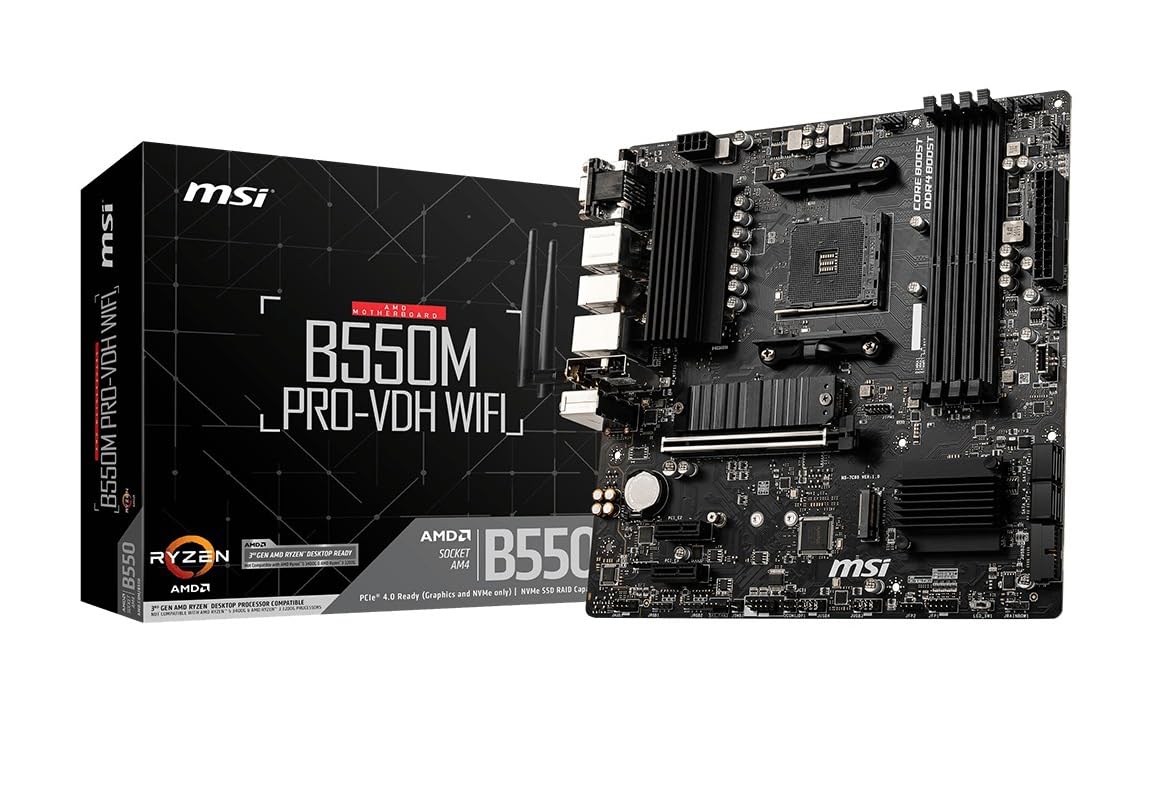
MSI’s entry-level B550 board packs surprising value for the price. It includes integrated Wi-Fi and Bluetooth, a Flash BIOS button that lets you update the firmware without a CPU installed, and two M.2 slots — one Gen4 and one Gen3. The Core Boost VRM with digital power regulation is a 6-phase design that runs a Ryzen 5 5600X or 5700X with stable voltages, and the 7W/mK thermal pad on the MOSFET heatsink keeps temperatures in check during gaming sessions.
Memory support is rated up to 4400 MHz (OC), which aligns well with the Ryzen 5000 sweet spot of 3600-3800 MHz. The rear I/O includes a USB 3.2 Gen 2 Type-C port, HDMI, DisplayPort, and D-Sub — good flexibility for both modern and legacy monitors. The board also features AUDIO BOOST with a Realtek ALC892/897 codec, which delivers clean enough sound for most gaming headsets without needing a separate DAC.
One consistent user note is that the board may require a BIOS flash for Ryzen 5000 series CPUs, especially the 5600X and above. The Flash BIOS button makes this a 5-minute process with a USB stick, but it’s an extra step. Some users also found that the on-board Wi-Fi driver isn’t recognized by Windows out of the box, so have a wired connection or pre-downloaded driver handy. For a budget B550 that doesn’t skimp on M.2 slots or wireless connectivity, this is the play.
Why it’s great
- Flash BIOS button for CPU-less updates
- Integrated Wi-Fi and Bluetooth
- Dual M.2 slots (1x Gen4, 1x Gen3)
Good to know
- May need BIOS flash for Ryzen 5000 out of box
- Wi-Fi driver requires manual install
- Entry-level audio codec; not for audiophile builds
6. MSI ProSeries B450M PRO-VDH Max

This is the board you reach for when your budget is tight but you still need something that works reliably out of the box. The B450 chipset limits you to PCIe 3.0, but for a Ryzen 5 3600, 5600 (non-X), or 3400G APU build, it’s more than sufficient. The 4+2 phase VRM with Core Boost is basic but competent for 65W and 95W TDP CPUs, and the EZ Debug LEDs are a godsend for troubleshooting during first post.
You get four DIMM slots supporting up to 128 GB of DDR4 at 3466+ MHz OC, though real-world stability tends to cap around 3200 MHz. The board includes a single Turbo M.2 slot running PCIe Gen3 x4 — enough for a fast NVMe drive, but only one. The rear I/O has HDMI, DVI, D-Sub, plus USB 3.2 Gen1 ports, which covers basic peripherals and dual monitors for office or light gaming setups.
The critical catch is that this board runs the older B450 chipset, so PCIe 4.0 is off the table for both GPU and storage. That means a future GPU upgrade to an RTX 4060 or RX 7600 will still work, but you’ll lose some performance on the PCIe 4.0 x8 lanes some mid-range cards use. MSI deployed this board in over 100 workstations with zero hardware failures, which speaks to its reliability. If you need the absolute cheapest path to a stable AM4 build, this is it.
Why it’s great
- Proven reliability — used in 100+ workstations
- EZ Debug LEDs for easy troubleshooting
- 4 DIMM slots, supports 128 GB DDR4
Good to know
- PCIe 3.0 only; no Gen4 support
- Single M.2 slot limits storage expansion
- BIOS may need update for Ryzen 4th/5th gen
FAQ
Can I use a Ryzen 5000 CPU on a B450 board without a BIOS update?
Is PCIe 4.0 worth it on an mATX B550 board?
How do I know if my mATX motherboard will fit in my case?
Final Thoughts: The Verdict
For most users, the best am4 matx motherboard winner is the ASUS TUF Gaming B550M-PLUS because its 8+2 DrMOS VRM and 2.5 Gb Ethernet deliver high-end stability and connectivity without going overboard. If you want integrated Wi-Fi and dual PCIe 4.0 M.2 slots, grab the GIGABYTE B550M AORUS Elite AX. And for the cheapest reliable entry point into AM4, nothing beats the MSI ProSeries B450M PRO-VDH Max for budget builds.