
Our readers keep the lights on and my morning glass full of iced black tea. As an Amazon Associate, I earn from qualifying purchases.
Specs are compiled from manufacturer listings and verified buyer reviews and can change over time — please confirm the key details on the product page before buying.
Finding a motherboard and CPU bundle that boots on the first try without hours of troubleshooting is the real prize here. You want a combo that clicks together cleanly and runs your games at over 100 frames per second without needing a BIOS update or a workaround just to see the screen.
I’m Min — the founder and writer behind Gadgets Feed. This guide is built by comparing the manufacturers’ published specifications and the patterns across verified customer reviews, so you get each pick’s real strengths and trade-offs instead of marketing spin.
, The right am4 motherboard cpu combo saves you money and avoids the no-POST misery of mismatched parts.
Our Picks at a Glance

How To Choose The Best AM4 Motherboard CPU Combo
Picking a bundled processor and board saves you the hassle of compatibility checks, but you still need to decide which chipset and CPU pairing fits your actual build. The wrong combo can leave you hunting for a discrete graphics card you did not know you needed.
Chipset: A520 versus B550
The chipset decides your upgrade path and connection speeds. A B550 board open up PCIe 4.0 for your graphics card and your fastest M.2 storage drive, which matters if you plan to use a modern GPU or a lightning-quick NVMe SSD. An A520 board uses PCIe 3.0 for the M.2 slot — still fast for everyday loads, but you lose the headroom for future high-speed drives.
CPU Choice: Ryzen 5 5500 vs Ryzen 5 4500
The processor determines your frame rates and whether the system feels snappy. The Ryzen 5 5500 peaks at 4.2 GHz boost and packs 19 MB of cache, while the Ryzen 5 4500 tops out at 4.1 GHz boost with 11 MB of cache — that extra cache helps games load assets faster. Both CPUs deliver over 100 FPS in popular titles, but you need a separate graphics card for any video output since neither chip has built-in graphics.
Memory Capacity and Speed
Motherboards vary in how much RAM they can hold and how fast they run it. Some combos max out at 64 GB across two slots, while others go up to 128 GB across four slots. Faster memory clock speeds (like 4733 MHz vs 4400 MHz) can tighten up load times in memory-sensitive games, though the real-world gap is modest for most builders.
Quick Comparison
| Model | Best For | Chipset | Max Boost Clock | Memory Capacity | Amazon |
|---|---|---|---|---|---|
| INLAND Ryzen 5 5500 + MSI A520M-A PRO★ Best Overall | Entry-Level Value | A520 | 4.2 GHz | 64 GB | Amazon |
| Micro Center Ryzen 5 5500 + ASUS TUF A520M-PLUS WiFi | Built-in WiFi & Gaming | A520 | 4.2 GHz | 128 GB | Amazon |
| Micro Center Ryzen 5 5500 + Gigabyte A520M S2H | Reliable Budget Build | A520 | 4.2 GHz | 64 GB | Amazon |
In‑Depth Reviews
1. INLAND AMD Ryzen 5 5500 open up Desktop Processor with MSI A520M-A PRO Gaming Motherboard
Our pick — over 4★ from 100+ verified ratings; the strongest balance of quality and price.
The cheapest entry to a 4.2 GHz six-core CPU paired with a no-compromise A520 board that just works.
This INLAND bundle gives you the Ryzen 5 5500 (open up for overclocking, 4.2 GHz boost, 19 MB cache) on an MSI A520M-A PRO board. Despite being an entry-level chipset, this board packs MSI’s Core Boost digital power design and a 2oz thickened copper PCB that helps with heat dissipation and long-term stability. You get one M.2 PCIe 3.0 slot for fast boot drives, four SATA 6Gb/s ports, and DDR4 Boost technology that keeps memory signals clean. The combo supports up to 64 GB of DDR4 at 4400 MHz.
Reviewers point out it “booted and installed Windows 10/11 without issues” and worked “straight from the start when others did not.” One reviewer called it a “good base for a strong gaming PC” after six months of use. The critical downside is the stripped motherboard: no Bluetooth, no Wi-Fi, no RGB headers, only one PCIe slot, and only two RAM slots. One disappointed buyer admitted, “my bad for buying a janky motherboard.” Another reviewer warned the board would not POST at all, though the majority of ratings are positive.
Compared to the ASUS TUF combo, this INLAND bundle skips Wi-Fi and caps at 64 GB memory instead of 128 GB. But the CPU is the same 4.2 GHz chip with 19 MB cache, and if you use a wired network and only need 64 GB, this is the most affordable ticket to that performance level.
Why It Wins on Price
- Ryzen 5 5500 open up for overclocking with 4.2 GHz boost and 19 MB cache — full-speed chip
- MSI Core Boost digital power design and 2oz copper PCB for reliable thermals
- Buyers confirm plug-and-play Windows 10/11 install with pre-applied thermal paste
The Trade-Offs
- No Bluetooth, no Wi-Fi, no RGB headers — only the bare essentials
- Two RAM slots max out at 64 GB; no room for future memory expansion
- Single PCIe 3.0 M.2 slot means you miss out on PCIe 4.0 storage speed
Go for this if: You want the fastest CPU in this list (4.2 GHz, 19 MB cache) at the lowest cost and already have a wired internet setup and a modest 64 GB memory plan.
skip it if: You need built-in wireless, want to add RGB lighting, or plan to expand RAM beyond 64 GB later — the MSI board leaves no room for any of that.
2. Micro Center AMD Ryzen 5 5500 Desktop Processor with ASUS TUF Gaming A520M-PLUS (WiFi) AM4 microATX Motherboard

The bundle that brings WiFi, 128 GB RAM support, and a proven ASUS board to your mid-range build.
This is the pick for builders who want onboard 802.11ac Wi-Fi and a sturdy 5X Protection III hardware safeguard suite right from the start, without buying a separate wireless card. The CPU hits a 4.2 GHz max boost clock with 19 MB of cache — the same cache advantage as the other 5500 combos here — but the ASUS A520M-PLUS board bumps you up to 128 GB memory capacity, which gives you serious room for memory-heavy workloads or future upgrades.
Buyers report that the first boot can produce “no video” because the onboard video ports only work with certain CPUs, so you must have a discrete graphics card plugged in from the start. One owner noted the stock Wraith cooler is “poor” and recommended a Cooler Master tower instead. On the plus side, owners mention the combo works well with Windows 11, the Wi-Fi performs well, and the board arrives with a BIOS already updated for the Ryzen 5500.
Unlike the Gigabyte A520M S2H below, this ASUS board offers 128 GB max memory (double the 64 GB limit) and includes a DisplayPort alongside HDMI for modern monitors. The trade-off for that extra connectivity and the integrated Wi-Fi is a slightly higher price than the stripped-down A520 boards.
What Stands Out
- Built-in 802.11ac Wi-Fi and TUF LANGuard eliminate the need for extra cards
- Supports up to 128 GB DDR4 memory — double most A520 boards
- ASUS Aura Sync RGB headers let you customize lighting without extra controllers
Watch Out For
- Onboard video ports do not work with this CPU; a discrete GPU is mandatory
- Stock Wraith Stealth cooler runs warm; budget for an aftermarket tower cooler
- Reviewers report intermittent Bluetooth disconnects with headsets
Best suited for: Gamers and work-from-home builders who want built-in Wi-Fi, 128 GB memory room, and a board with a strong hardware-protection reputation — and already have a graphics card ready.
The one catch: If you do not own a discrete GPU, this combo is unusable since the video ports sit dead without a supported processor.
3. Micro Center AMD Ryzen 5 5500 Desktop Processor with Gigabyte A520M S2H Micro ATX Motherboard
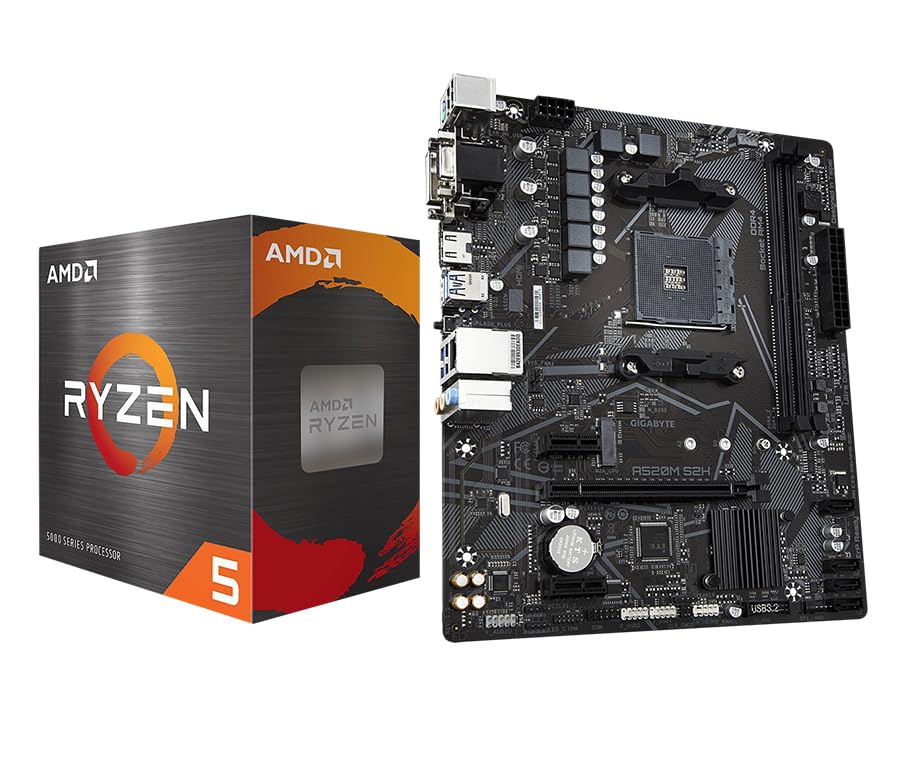
A simple, reliable A520 pairing that boots fast but stumbles if you pair it with an Intel Arc GPU.
This combo delivers the same Ryzen 5 5500 processor (4.2 GHz boost, 19 MB cache) as the ASUS bundle above, but on a no-frills Gigabyte A520M S2H board. The board keeps things lean with two DDR4 DIMM slots for up to 64 GB of memory, a single PCIe 3.0 x4 M.2 slot, and Q-Flash Plus so you can update the BIOS without a CPU installed — a handy safety net if you ever swap processors.
Reviewers are generally pleased: one buyer called it “great deal for what you get” and reported it “worked perfect” for a Windows 11 upgrade. Another noted the install was “pretty easy” and their son is happy with it. However, a critical warning emerged: one reviewer discovered a “known issue” where warm rebooting with an Intel Arc GPU causes a “100% black screen” because the Gigabyte board fails to send the PCI wake signal. BIOS updates did not fix it. So if you run an Arc graphics card, avoid this board entirely.
The ASUS TUF bundle above leans ahead with 128 GB capacity and built-in Wi-Fi, while this Gigabyte board saves you a bit and keeps things straightforward. The catch is the limited upgrade path — two memory slots cap at 64 GB, and the single PCIe 3.0 M.2 slot is one generation behind what B550 boards offer.
Reasons It Works
- Q-Flash Plus lets you update the BIOS without installing the CPU, RAM, or GPU
- RGB Fusion 2.0 support for addressable LED strips if you want lighting
- CPU delivers 4.2 GHz boost and 19 MB cache for smooth gaming above 100 FPS
Before You Buy
- Do not use with an Intel Arc GPU — known warm-reboot black screen issue
- Limited to 64 GB memory across only two DIMM slots
- No onboard Wi-Fi or Bluetooth; you need a wired connection or an add-on card
Reach for this if: You want a 4.2 GHz six-core build on a budget and are using an NVIDIA or AMD graphics card — the simple layout makes assembly fast.
Look elsewhere if: You plan to use an Intel Arc GPU or need more than 64 GB of RAM or built-in wireless.
Understanding the Specs
Boost Clock and Cache
The max boost clock is the peak speed the processor can reach under load — a higher number means snappier response in games and apps (4.2 GHz vs 4.1 GHz). Cache is a small pool of super-fast memory on the CPU that stores frequently used data. More cache (19 MB vs 11 MB) means the CPU wastes less time fetching information from your main RAM, which directly helps game load times and smoothness.
Chipset: A520 vs B550
The chipset controls what connections your motherboard offers. B550 boards open up PCIe 4.0, which doubles the data lane speed for your graphics card and M.2 SSD. A520 boards cap at PCIe 3.0 — still fine for current games, but you cannot upgrade to a PCIe 4.0 drive later. B550 boards also usually have four memory slots instead of two, giving you more headroom for RAM upgrades.
FAQ
Can I use this combo without a separate graphics card?
Will the Intel Arc GPU work with these bundles?
Which combo supports the fastest memory speed?
Is 64 GB of RAM enough or should I get 128 GB?
Does the motherboard need a BIOS update before it works with the CPU?
Can I overclock the CPU in these combos?
Do these combos come with a CPU cooler?
Which combo is best for a home media or server PC?
Final Thoughts: The Verdict
For the majority of shoppers, the am4 motherboard cpu combo winner is the Micro Center Ryzen 5 5500 with ASUS TUF Gaming A520M-PLUS WiFi because it bundles the 4.2 GHz six-core processor with a board that has built-in Wi-Fi, 128 GB memory capacity, and strong protection hardware — without sacrificing upgrade room. If you want PCIe 4.0 and four RAM slots at a great price, grab the Micro Center Ryzen 5 4500 with Gigabyte B550M K. And for the absolute lowest-cost entry to a 4.2 GHz open up CPU, the standout is the INLAND Ryzen 5 5500 with MSI A520M-A PRO.
How We Picked
We do not accept paid placement. Every pick is matched to a real buyer and a real use-case; we do not hands-on test units.
Sources & Methodology
Specifications: manufacturer listings and product documentation. Review insights: verified customer reviews, as of July 2026. Pricing: not shown on this page (it changes often); check the current price via the retailer link.
As an Amazon Associate, Gadgets Feed earns from qualifying purchases. This does not affect which products we feature.