
Building a compact AMD Ryzen build around the latest AM5 socket means making choices between power delivery, memory support, and expansion slot layout — all squeezed onto a micro-ATX footprint. The right board can give you a PCIe 5.0 GPU slot, DDR5 overclocking headroom, and enough M.2 storage lanes without forcing you into a full-tower case.
I’m Rikta — the co-founder and writer behind Gadgets Feed. I spend my time comparing VRM phase counts, memory trace topologies, and chipset lane allocations to find the micro-ATX boards that deliver real-world stability without wasted I/O. (And Homer 🐱 sat on the open box of the X870E, claiming it for his own.).
Whether you’re pairing a 7800X3D with a compact case or building a quiet workstation on a budget, the best am5 micro atx motherboard balances a strong VRM thermal solution with enough PCIe and M.2 bandwidth to handle the next few GPU and SSD upgrades you throw at it.
How To Choose The Best AM5 Micro ATX Motherboard
Selecting the right mATX motherboard for your AM5 build involves more than just picking a chipset. The VRM thermal solution, memory overclocking headroom, and available PCIe lanes determine whether your Ryzen chip runs cool and stable in a compact chassis.
VRM Power Delivery and Heatsink Design
On a micro-ATX board, airflow is tighter than a full-ATX case. A 12+2+2 phase VRM with a connected heatsink and thermal pads handles 120W+ TDP processors without throttling, while a 5+2+2 phase digital design with small aluminum blocks may struggle with a 7950X under sustained load. Look for boards with at least 8+2+1 phases and a single-piece VRM heatsink covering both the VCore and SOC MOSFETs.
DDR5 Memory Support and EXPO Compatibility
AM5 mATX boards support DDR5 natively, but the maximum overclocked speed varies hugely between entry-level B650 boards and premium B850/X870E options. Entry-level boards typically guarantee stable EXPO at 6000–6200 MT/s, while premium boards with better PCB layer counts and memory trace routing can push past 8000 MT/s. If you are targeting a 6000–6400 MT/s sweet spot for a Ryzen 7000X3D build, a budget B650 with good BIOS support is often sufficient.
PCIe 5.0 Lane Allocation and M.2 Storage
Not all AM5 mATX boards give you PCIe 5.0 on both the primary GPU slot and an M.2 slot. B650 chipsets often limit PCIe 5.0 to the GPU slot only, while B850 and X870E boards add a separate M.2 Gen5 slot. If you plan to install a PCIe 5.0 NVMe SSD, verify the board includes a dedicated M.2 Gen5 slot with a heatsink rated for the thermal output of drives like the Samsung 990 Pro or WD Black SN850X.
Quick Comparison
On smaller screens, swipe sideways to see the full table.
| Model | Category | Best For | Key Spec | Amazon |
|---|---|---|---|---|
| GIGABYTE B650M AORUS Elite AX | B650 | Mid-Range Power Build | 12+2+2 VRM, PCIe 5.0 M.2 | Amazon |
| ASUS TUF Gaming B850M-PLUS WiFi | B850 | Overclocking Stability | 14+2+1 80A DrMOS | Amazon |
| MSI MAG B850M MORTAR WIFI | B850 | Future-Proof Connectivity | DDR5 8200+, Wi-Fi 7, 5GbE | Amazon |
| NZXT N9 X870E | X870E | Premium Aesthetics & VRM | 20+2+1 110A, Wi-Fi 7 | Amazon |
| ASUS B650E MAX Gaming WiFi W | B650E | White Theme Build | White PCB, PCIe 5.0 | Amazon |
| ASRock B650M Pro X3D WiFi | B650 | X3D CPU Optimization | 8+2+1, DDR5 8000+ | Amazon |
| GIGABYTE B850M Eagle WIFI6E | B850 | Entry B850 Value | 8+2+2, PCIe 5.0, Wi-Fi | Amazon |
| ASRock B650M PG Riptide WiFi | B650 | Budget DDR5 Build | 12+2+1, DDR5 6200 | Amazon |
| GIGABYTE B650M D3HP | B650 | Basic Productivity Build | 5+2+2, 2.5GbE LAN | Amazon |
In‑Depth Reviews
1. GIGABYTE B650M AORUS Elite AX

The GIGABYTE B650M AORUS Elite AX packs a commanding 12+2+2 phase digital VRM with a 6mm heatpipe and fully covered MOSFET heatsinks, making it one of the most thermally capable mATX B650 boards on the market. This power delivery easily handles a Ryzen 9 7950X in a compact case without VRM throttling, provided the chassis has reasonable airflow. The board also includes a dedicated PCIe 5.0 NVMe M.2 slot with a thermal guard, so a Gen5 SSD runs at full bandwidth without overheating during sustained transfers.
Connectivity is generous for an mATX board: Realtek 2.5Gb Ethernet, Wi-Fi 6E, front and rear USB-C 3.2 Gen 2 ports, and two M.2 slots both covered by thermal guards. The 8-layer 2X copper PCB improves signal integrity for memory overclocking, and AMD EXPO support is straightforward via the BIOS — users report stable 6000 MT/s or higher with a single toggle. Q-Flash Plus lets you update the BIOS without a CPU installed, which is essential when pairing with a newer Ryzen 9000-series processor out of the box.
Customer feedback highlights fast boot times (around 12 seconds with a 7800X3D), solid build quality, and a user-friendly BIOS layout for PBO and EXPO tuning. A small number of users reported a burnt pin after prolonged use, but the 3-year warranty and fast RMA process from GIGABYTE mitigate the risk. The I/O shield is pre-mounted, and the full-coverage VRM sinks mean no thermal compromises in tight cases.
Why it’s great
- 12+2+2 phase VRM with heatpipe and enlarged heatsinks — top-tier thermal performance for the class
- Dedicated PCIe 5.0 M.2 slot with thermal guard for next-gen SSDs
- Q-Flash Plus for CPU-less BIOS updates and pre-mounted I/O shield
Good to know
- Some users reported a burnt pin after roughly a year of use, though RMA support resolved most cases
- Shiny silver capacitors may clash with all-black aesthetic builds
2. ASUS TUF Gaming B850M-PLUS WiFi

The ASUS TUF Gaming B850M-PLUS WiFi is built around a 14+2+1 80A DrMOS power stage design on an 8-layer PCB, giving it one of the highest current-handling capacities on this mATX list. This translates to rock-solid Vcore stability when running PBO+200 offsets on chips like the 9800X3D or 9850X3D. The ProCool 8+8 pin power connectors ensure consistent power draw even under sustained multi-core workloads, and the massive VRM heatsink keeps MOSFET temps well under control in compact cases.
Storage expansion is future-proof: one PCIe 5.0 M.2 slot with a dedicated heatsink sits alongside two PCIe 4.0 M.2 slots, giving you three NVMe bays total. The primary GPU slot is PCIe 5.0 x16, and the board includes rear USB 20Gbps Type-C and front USB 10Gbps Type-C headers. Wi-Fi 6E and Realtek 2.5Gb Ethernet cover wireless and wired networking. The BIOS includes a comprehensive overclocking menu with a failsafe recovery feature — no CMOS jumper required if you push too far.
Users praise the board’s stability with Ryzen 9600X and 9850X3D processors, noting that RAM runs at 7000 MT/s without issues. The audio codec is a standout — excellent signal-to-noise ratio for open-back headphones and analog microphones. Drawbacks include the lack of an onboard power/reset button and the requirement to install Armoury Crate for RGB control rather than handling it in BIOS. A small number of owners experienced motherboard failure after several months, with ASUS support feeling evasive on warranty coverage.
Why it’s great
- 14+2+1 80A DrMOS with 8-layer PCB — class-leading VRM for aggressive PBO tuning
- Three M.2 slots, one Gen5, plus rear USB 20Gbps Type-C
- BIOS includes failsafe recovery for overclocking experiments
Good to know
- No onboard power/reset buttons — rely on case switches or a screwdriver
- Warranty support has been inconsistent for some owners reporting motherboard failure
3. MSI MAG B850M MORTAR WIFI
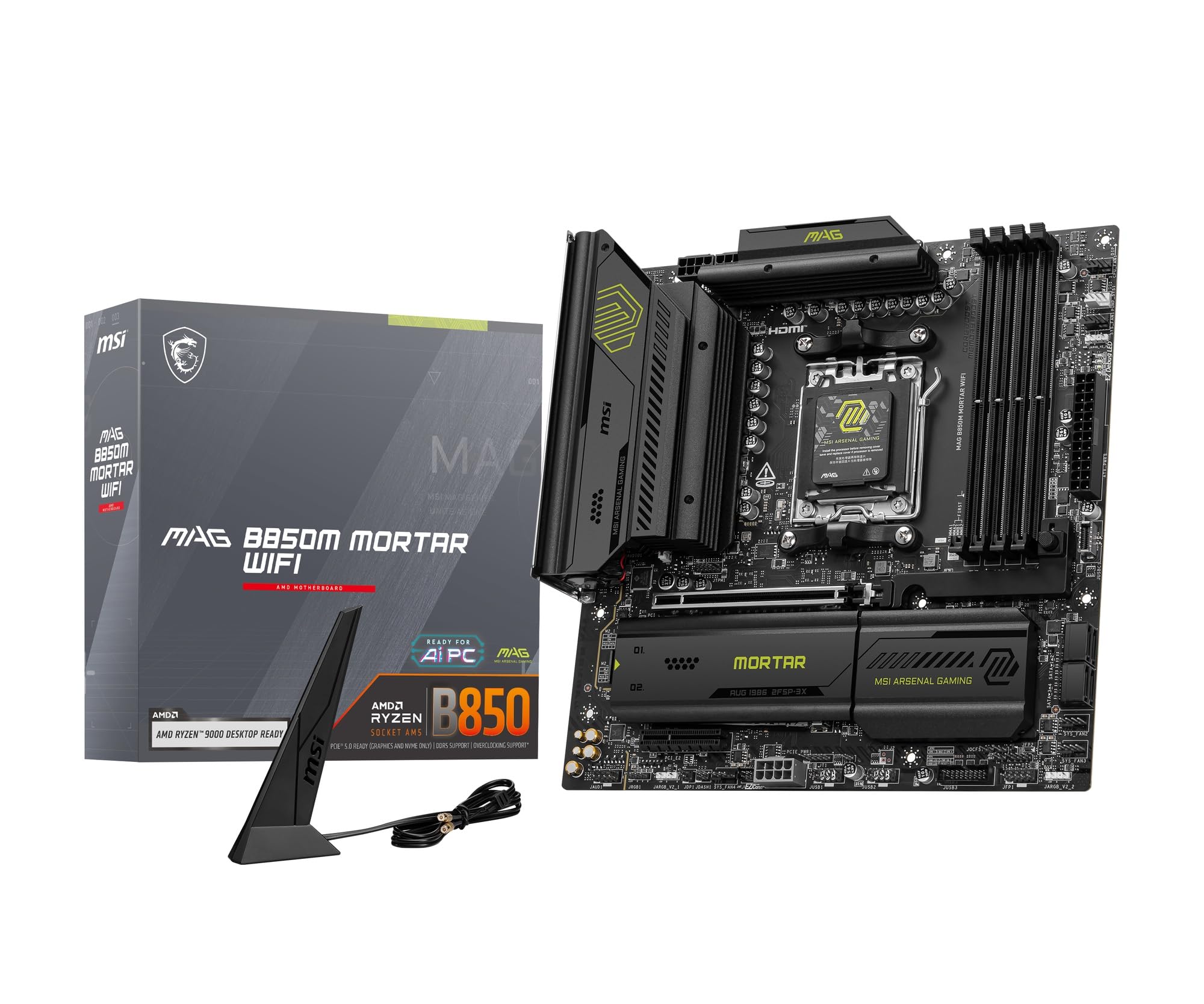
The MSI MAG B850M MORTAR WIFI is engineered for memory overclockers and users who want the absolute fastest DDR5 on an mATX platform. It officially supports DDR5 speeds up to 8200+ MT/s (OC), achieved through a 12+2+1 Duet Rail Power System and an 8-layer PCB made from thickened copper material that reduces trace impedance. This board pairs well with high-bin DDR5 kits from G.Skill or Corsair, and BIOS profiles for EXPO are fully validated for Ryzen 9000-series processors.
The thermal solution is equally impressive: a massive extended VRM heatsink paired with 7W/mK MOSFET thermal pads, additional choke thermal pads, and the EZ M.2 Shield Frozr II for M.2 cooling. Dual 8-pin CPU power connectors ensure enough headroom for Ryzen 9-class chips under sustained all-core loads. Networking is modern — Wi-Fi 7 and 5GbE LAN — giving it the fastest wireless and wired connectivity of any board in this roundup. EZ DIY features include tool-less M.2 clips, a PCIe release mechanism, and a pre-mounted I/O shield.
Early users report excellent build quality with a rigid PCB that resists flex during GPU installation. The FROZR heatsink design keeps VRM temps low even with a 9700X under an AIO cooler. The only downside is the bottom USB header placement, which can interfere with case bottom fans in some compact mATX chassis. The 5GbE LAN is a genuine upgrade for local NAS transfers, though most home internet connections won’t saturate it. Overall, this is the premium connectivity champion for the mATX form factor.
Why it’s great
- DDR5 8200+ MT/s support with optimized memory trace routing and 8-layer PCB
- Wi-Fi 7 and 5GbE LAN — best-in-class networking for mATX
- Tool-less EZ M.2 Clip and PCIe release makes component swaps effortless
Good to know
- Bottom USB header placement may conflict with case fans in very small mATX cases
- Premium price tag places it above most B650 options
4. NZXT N9 X870E

The NZXT N9 X870E is a statement piece: a full-metal cover conceals the entire PCB, creating a clean white aesthetic that matches NZXT cases and H-series coolers. Underneath the premium shroud lies a 20+2+1 phase 110A Smart Power Stage design on an 8-layer 2-ounce copper PCB — enough power delivery hardware to handle any current or future Ryzen 9000-series CPU with extreme overclocking headroom. The VRM is augmented by dual PWM fans and thermal pads, though the fans introduce a small noise penalty under sustained load.
Storage expands across four M.2 slots: one PCIe 5.0 and three PCIe 4.0, all with individual heatsinks and quick-release latches for tool-less installation. The I/O includes USB 4 at 40 Gbps, Wi-Fi 7, and 5GbE LAN, making this the only board in the roundup with Thunderbolt-equivalent external bandwidth. The audio codec is robust, and the onboard RGB lighting is configurable through NZXT CAM software. The X870E chipset provides more PCIe lanes than B650/B850, so you can populate all four M.2 slots without compromising GPU bandwidth.
Customer feedback is polarized: many love the aesthetics and raw performance with the 9800X3D, but one user reported Error 03 within two weeks and a four-month RMA process with no replacement. NZXT’s warranty support for this board appears less responsive than GIGABYTE or ASUS at this stage. For those willing to accept the support risk, the N9 X870E delivers the highest phase count and most premium feature set available in an mATX form factor today.
Why it’s great
- 20+2+1 110A power stage — highest phase count on an mATX AM5 board
- Full-metal cover and white PCB for unmatched visual integration
- USB 4 40 Gbps + Wi-Fi 7 + 5GbE — cutting-edge external connectivity
Good to know
- RMA and customer support reliability is a concern based on early reports
- Dual PWM fans on VRM add audible noise under load compared to passive heatsink designs
5. ASUS B650E MAX Gaming WiFi W

The ASUS B650E MAX Gaming WiFi W is a rare white PCB AM5 mATX board, designed explicitly for users building an all-white PC theme. Despite its budget-friendly B650E chipset positioning, it includes a PCIe 5.0 x16 GPU slot plus a dedicated PCIe 5.0 M.2 slot — a feature set typically reserved for more expensive B850 boards. The 8+2+1 phase power design with a 6-layer PCB is adequate for Ryzen 7000 X3D chips and 8000-series processors, though not as robust as the 12-phase or 14-phase solutions above.
Connectivity covers Wi-Fi 6E, Realtek 2.5Gb Ethernet, rear USB 10Gbps Type-A and Type-C, and a front USB 5Gbps Type-C header. The BIOS Flashback button lets you update the BIOS without a CPU, and the Q-Antenna makes Wi-Fi antenna installation easier than traditional screw-on connectors. Three Addressable Gen 2 RGB headers are controllable via Aura Sync for full lighting integration. The white PCB extends through the motherboard tray, visible through glass side panels.
User reviews note that the board runs a 9800X3D with 64 GB DDR5 6000 CL30 and PBO+200 offset without stability issues, though the chipset is actually a B850 silicon rebranded as B650E on the specs sheet. The M.2 heatsink feels somewhat flimsy, and there are no onboard troubleshooting LEDs — rely on the Q-LED Core for POST diagnostics. Some users dislike the forced AI bloatware bundled with the driver CD, but the hardware itself is reliable and visually striking for themed builds.
Why it’s great
- Full-white PCB for clean themed PC builds — a rare mATX option
- PCIe 5.0 on both GPU slot and M.2 slot despite modest chipset
- BIOS Flashback and Q-Antenna simplify setup and troubleshooting
Good to know
- No onboard POST code or troubleshooting LEDs
- Bundled software includes bloatware — skip the driver CD and download official drivers
6. ASRock B650M Pro X3D WiFi

The ASRock B650M Pro X3D WiFi is purpose-built to maximize performance from AMD’s 3D V-Cache processors, with an 8+2+1 phase Dr.MOS power design that delivers stable voltage to the V-Cache stack. While the phase count is lower than the competition, the optimization for X3D chips means tighter voltage regulation and better transient response during gaming workloads. The board supports DDR5 speeds over 8000 MT/s (OC), with four DIMM slots handling up to 256 GB.
Storage is comprehensive: three M.2 slots — one PCIe 5.0 and two PCIe 4.0 — plus four SATA3 ports, all backed by an M.2 bottom heatsink to prevent thermal throttling on high-performance NVMe drives. The board includes Realtek 2.5Gb LAN and Wi-Fi 6E with Bluetooth, plus a Realtek ALC897 7.1-channel audio codec with Nahimic audio processing. The micro-ATX form factor is compact, but ASRock notes it may not fit all cases — verify chassis compatibility before purchase.
Early users report that the board works flawlessly with a Ryzen 7 7700X and RTX 5070, producing strong benchmark scores. Some builds experienced initial Wi-Fi/BT failure due to a loose antenna connection and missing mounting screws in the box — a user error rather than a hardware defect, but worth checking during assembly. The BIOS is clean and straightforward, with EXPO and PBO settings easily accessible. For the price point, this is a strong value option for X3D builders who don’t need premium VRM heatsinks.
Why it’s great
- Optimized power delivery for AMD X3D 3D V-Cache processors
- DDR5 8000+ OC support with four DIMM slots up to 256 GB
- Three M.2 slots (one Gen5) with thermal pad on the bottom
Good to know
- Some units ship with missing mounting screws — inspect contents before building
- Wi-Fi antenna connection can be loose on arrival, requiring reseating
7. GIGABYTE B850M Eagle WIFI6E
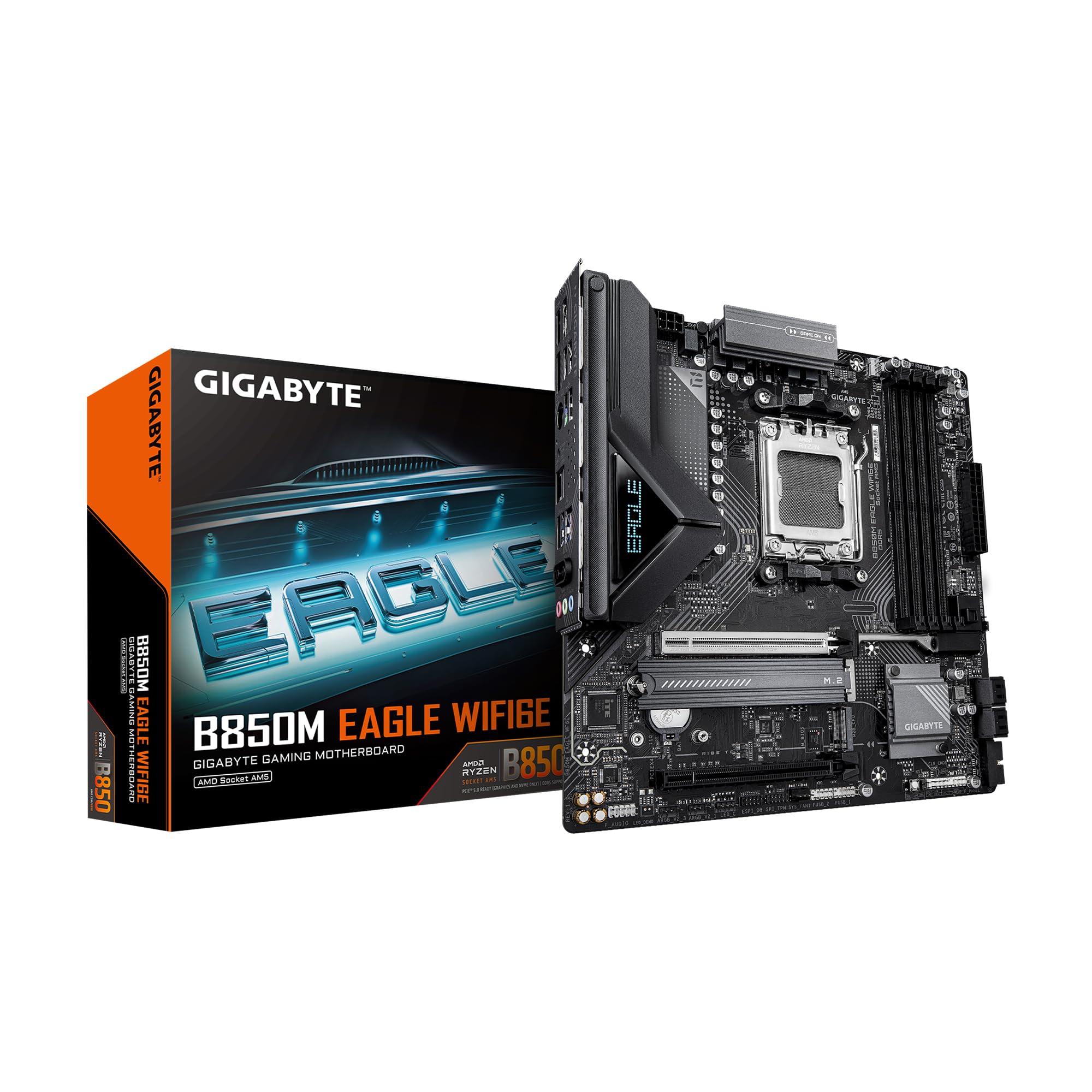
The GIGABYTE B850M Eagle WIFI6E is the most affordable B850-chipset mATX board on this list, bringing PCIe 5.0 support and Wi-Fi 6E to a lower price point than typical B850 offerings. The 8+2+2 phase VRM is adequate for Ryzen 5 and Ryzen 7 processors up to 105W TDP, though it lacks the aggressive heatsink mass of premium boards. The four DIMM slots support DDR5 with memory overclocking, and the board includes two M.2 slots — one PCIe 5.0 and one PCIe 4.0.
Connectivity covers USB-C, 2.5GbE LAN, and Wi-Fi 6E, making it a solid all-rounder for mid-range gaming builds or productivity workstations. DIY-friendly features include M.2 EZ-Latch, PCIe EZ-Latch for easy GPU removal, and Wi-Fi EZ-Plug for simple antenna attachment. Q-Flash BIOS updates are supported without a CPU, and the 3-year warranty provides peace of mind. The board’s aesthetic is clean with a dark gray PCB and subtle branding.
Users running Ryzen 9 9900X on this board report immediate boot, stable performance, no crashes, and a generous number of fan headers and USB ports. The Wi-Fi antenna is a welcome addition even for Ethernet-preferring users, and the board fits perfectly into micro-ATX cases. The only limitation is the modest VRM heat sink — prolonged heavy loads on a 12-core CPU may push temperatures higher than on a AORUS Elite, but for most gaming and productivity workloads, the Eagle delivers outstanding value.
Why it’s great
- Entry-level B850 chipset with PCIe 5.0 and Wi-Fi 6E at a competitive price
- EZ-Latch system for tool-less M.2 and PCIe removal
- Stable and boot-ready with Ryzen 9000-series processors
Good to know
- 8+2+2 phase VRM is adequate for 105W CPUs but shows thermal limits under sustained heavy loads
- Only two M.2 slots — less expandability than higher-tier B850 boards
8. ASRock B650M PG Riptide WiFi

The ASRock B650M PG Riptide WiFi offers a surprising 12+2+1 power phase design with Dr.MOS and an enlarged heatsink armor — more VRM hardware than many boards costing significantly more. This makes it a strong choice for users who want solid power delivery without paying a premium for the B850 chipset. The board supports DDR5 up to 6200 MHz (OC) across four DIMM slots, with a maximum capacity of 128 GB, which is sufficient for most gaming and productivity builds.
Expansion includes two PCIe 4.0 x16 slots and two PCIe 3.0 x1 slots, though the primary GPU slot is limited to PCIe 4.0 — you won’t get Gen5 GPU bandwidth, but current-gen graphics cards like the RTX 4060 or RX 7700 series don’t saturate PCIe 4.0 x16. Graphics output is handled through HDMI and DisplayPort. Onboard Wi-Fi is included, and the integrated I/O shield gives a clean finished look. The board supports AMD EXPO for one-touch memory overclocking.
The BIOS update process is straightforward, and EXPO works immediately. The biggest caution is physical: the CPU cooler can interfere with GPU seating in tight cases, and one user broke a RAM slot by applying too much force. Handle with care during build, and the Riptide delivers impressive reliability for its price tier.
Why it’s great
- 12+2+1 phase VRM with enlarged heatsink — exceptional power delivery for the price
- Stable DDR5 EXPO support up to 6200 MHz, no tweaking required
- Integrated I/O shield and straightforward BIOS for first-time builders
Good to know
- PCIe 4.0 only — no Gen5 GPU or M.2 slot for future upgrades
- CPU cooler clearance can interfere with GPU; measure your case before assembly
9. GIGABYTE B650M D3HP

The GIGABYTE B650M D3HP is the no-frills entry point to the AM5 mATX ecosystem, built around a 5+2+2 phase digital VRM that handles Ryzen 5 and entry-level Ryzen 7 chips within their stock TDP. It offers four SMD DIMM slots supporting DDR5 with AMD EXPO and Intel XMP memory module support, though the official speed ceiling is 5200 MHz — lower than any other board here. This is a motherboard designed for basic productivity, home office builds, and light gaming, not heavy overclocking or multi-GPU setups.
Storage options include two PCIe 4.0 x4 M.2 slots and a USB 3.2 Gen 2 Type-C port. The 2.5GbE LAN gives it decent wired networking performance, and Q-Flash allows BIOS updates without a CPU installed. The I/O shield is not integrated and has been described as flimsy. The board lacks onboard Wi-Fi, so you’ll need a USB adapter or a Wi-Fi card if wireless connectivity is required. The GIGABYTE Control Center provides a simple interface for driver updates and basic tuning.
Users appreciate the straightforward BIOS layout and the ability to overclock RAM and CPU easily for the price point. The board is smaller than expected and offers the right number of USB ports for a basic setup. However, there are multiple reports of dead I/O ports on arrival, where the system powers on but refuses to boot from any external port. If you get a functional unit, it delivers reliable performance, but the failure rate is higher than average for this tier. Consider this board only if your budget is very constrained.
Why it’s great
- Most affordable AM5 mATX board — lowest entry barrier to the platform
- 2.5GbE LAN for fast wired networking at a budget price
- Q-Flash Plus BIOS update without a CPU simplifies out-of-box setup
Good to know
- Multiple user reports of dead I/O ports on arrival; inspect and test immediately
- No onboard Wi-Fi, and the included I/O shield feels flimsy
- Official DDR5 speed ceiling of 5200 MHz limits memory overclocking headroom
FAQ
Will an mATX AM5 motherboard fit in an ATX case?
Can I use PCIe 5.0 GPU on a B650 mATX board?
Does the BIOS need a CPU update for Ryzen 9000 compatibility?
Final Thoughts: The Verdict
For most users, the best am5 micro atx motherboard is the GIGABYTE B650M AORUS Elite AX because it combines a robust 12+2+2 phase VRM with a PCIe 5.0 M.2 slot and comprehensive connectivity at a mid-range price that doesn’t force compromises. If you prioritize aggressive overclocking and the highest current-handling capacity, grab the ASUS TUF Gaming B850M-PLUS WiFi with its 14+2+1 80A DrMOS design. And for a budget-conscious build that still gets you on the AM5 platform with DDR5 support, nothing beats the ASRock B650M PG Riptide WiFi.