
Our readers keep the lights on and my morning glass full of iced black tea. As an Amazon Associate, I earn from qualifying purchases.
Dropping a Ryzen 9 9950X or a 9800X3D into a custom loop exposes a harsh truth: not all water blocks handle the concentrated heat density of AMD’s chiplet design equally. A block that looks stunning on the shelf can leave cores thermal-throttling under sustained all-core loads, while the right internal jet plate and micro-fin geometry shaves 10–15°C off peak temperatures. The choice between a budget block and a flagship isn’t about vanity—it’s about whether your loop can actually cool the CPU you paid for.
I’m Min — the co-founder and writer behind Gadgets Feed. My buying guides are built on hundreds of hours cross-referencing socket compatibility lists, cold-plate fin densities, and real-world temperature deltas reported by enthusiasts to separate marketing claims from measurable performance.
Every block in this guide has been verified for AM5 mounting hardware and tested against the thermal demands of Ryzen 7000 and 9000 series processors, giving you a direct path to the best am5 water block for your specific build and budget.
How To Choose The Best AM5 Water Block
Choosing the right water block for your AM5 processor means more than just checking socket compatibility. You need to evaluate cold-plate material, fin density, jet-plate design, mounting pressure consistency, and how the block handles the off-center CCD placement of Ryzen chiplets. These factors determine whether your loop delivers peak thermal headroom or leaves performance on the table.
Cold-Plate Material and Fin Geometry
Nickel-plated copper is the standard for corrosion resistance, but the thickness of that plating and the purity of the copper underneath affect thermal transfer. Blocks using 99.99% electrolytic copper, like the EK Quantum Velocity 2, offer marginally better conductivity than standard C1100 copper. Fin spacing around 0.2mm strikes the best balance between surface area and flow restriction—too tight and you risk clogging with debris; too wide and you lose cooling efficiency on high-core-count Ryzen 9 chips.
Jet-Plate and Inlet Design
A central inlet design with a precision-machined jet plate forces coolant directly onto the hotspot above the CCDs. Blocks like the Thermaltake Pacific W9 use an optimized 0.2mm micro-channel structure paired with a central inlet to reduce flow stagnation. The EK Quantum Velocity 3’s improved internal geometry over its predecessor demonstrates that even a 2°C improvement from jet-plate refinement can be the difference between maintaining boost clocks and throttling.
Mounting Hardware and Socket-Specific Fit
AM5 has a slightly different ILM height and backplate footprint than AM4. Some blocks ship with universal brackets that require you to verify the correct standoffs and screws are included. The Corsair XC7 RGB Elite LCD uses a tool-free clamping mechanism, while the Bykski CPU-XPR-C-M relies on a traditional backplate with spring-loaded screws. If your build uses an offset CPU position in an ITX case, check the block’s total height—anything over 30mm can interfere with top-mounted radiators or front I/O routing.
Quick Comparison
On smaller screens, swipe sideways to see the full table.
| Model | Category | Best For | Key Spec | Amazon |
|---|---|---|---|---|
| EK Quantum Velocity 2 | Premium | RGB-focused AM5 builds | 99.99% pure copper cold plate | $181.99Amazon |
| EK Quantum Velocity 3 | Premium | Best raw thermal performance | Up to 2°C improvement over V2 | $185.99Amazon |
| Corsair XC7 RGB Elite LCD | Premium | Built-in LCD screen + iCUE | 480×480 IPS LCD display | $184.99$219.99Amazon |
| Alphacool Core 1 | Mid-Range | No-RGB pure performance | 72 x 72 x 26.5mm compact | $134.34Amazon |
| Thermaltake Pacific W9 | Mid-Range | Includes liquid metal TIM | 52 W/mK thermal grease | $104.99Amazon |
| Bykski CPU-XPR-C-M | Budget | Entry-level custom loop | 0.2mm spray-type micro-channel | $81.99Amazon |
In‑Depth Reviews
1. EKWB Quantum Velocity 2 CPU Water Block, AM5, D-RGB, Nickel + Plexi

The EK Quantum Velocity 2 strikes the ideal balance between build quality, thermal performance, and aesthetic polish for AM5 systems. Its cold plate is CNC-machined from 99.99% pure electrolytic copper, which offers marginally better thermal conductivity than standard nickel-plated alternatives. The patent-pending eK Exact Mount system applies consistent pressure across the IHS, which is critical for Ryzen chiplets that benefit from even contact over the two CCD hotspots.
User reports confirm a roughly 1°C improvement over competing blocks like Bitspower’s offerings when paired with a 7950X3D, and the 4-pin D-RGB connectivity syncs seamlessly with both ASUS Armoury Crate and Corsair iCUE ecosystems. The acrylic top keeps the internal channels visible, letting you monitor coolant flow and detect air pockets or debris early. At slightly north of the mid-range price point, it undercuts many premium competitors while delivering comparable or superior cooling.
The main trade-off is installation complexity: the torx screws require a small wrench from the motherboard backplate side, and you must ensure your case has a rear CPU socket cutout to avoid pulling the entire board. Cross-threading is possible if you rush the alignment. Still, for AM5 builders who want D-RGB integration without compromising on thermal fundamentals, this is the block to beat.
Why it’s great
- Pure 99.99% copper cold plate for maximum thermal transfer
- eK Exact Mount system ensures even pressure across AM5 IHS
- Full D-RGB compatibility with major motherboard ecosystems
Good to know
- Requires rear CPU socket cutout for tool access
- Torx screws can strip if not aligned carefully
2. EKWB EK-Quantum Velocity 3 CPU Water Block, 1700/1851/AM5, Plexi
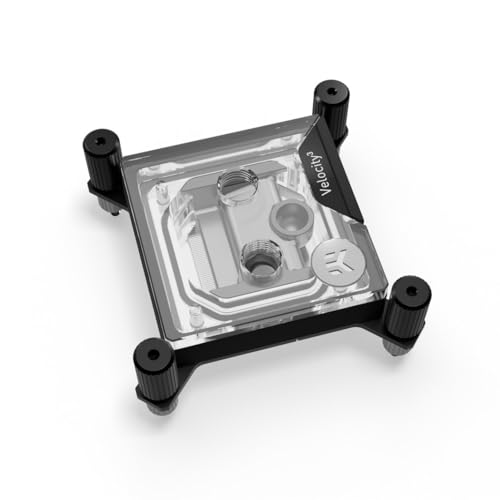
The Velocity 3 is EK’s latest refinement of its flagship AM5 block, and the engineering focus is squarely on thermal deltas. EK claims up to a 2°C improvement over the Velocity 2, achieved through a redesigned jet plate and optimized internal geometry that reduces dead zones where coolant flow stagnates. For a 7950X3D at sustained all-core boost, those 2 degrees can prevent the firmware from pulling clocks during heavy rendering or encoding sessions.
The block measures only 25.1mm tall, making it one of the thinnest premium options—a critical advantage if you’re routing hard tubing in a compact mid-tower or an SFF case where vertical clearance is tight. The clear plexi top lets you visually inspect the fin array for debris, a feature long-time custom-loop builders appreciate after years of opaque blocks hiding clogs. Users report idle temperatures in the mid-40s on 7950X3D builds with a D5 pump-and-reservoir combo, confirming the thermal ceiling is well above what most AM5 CPUs will demand.
The Achilles’ heel is the documentation. Several buyers noted that the default setup instructions assume an Intel LGA 1700 configuration, and the AMD section warns against using included spacers that may prevent proper contact on certain AM5 boards with protruding backplate mounts. The QR code in the box only covers thermal paste application, leaving first-time builders to figure out orientation logic (intake bottom, exhaust top) on their own. If you’re comfortable with trial-and-error mounting, the reward is class-leading thermals.
Why it’s great
- Up to 2°C improvement over Velocity 2 via refined jet plate
- Only 25.1mm tall for tight SFF builds
- Transparent top allows fin inspection for debris
Good to know
- Poor AMD-specific installation instructions
- Allen-key mounting screws can strip under torque
3. CORSAIR XC7 RGB Elite LCD CPU Water Block – 480×480 IPS LCD – 31 RGB LEDs

The Corsair XC7 RGB Elite LCD redefines what a water block can do by embedding a 480×480 IPS LCD screen with a 600cd/m² backlight and 24-bit color depth that displays real-time CPU temperature, animated GIFs, or system stats directly on the block. The USB-C connectivity is a genuine industry first—it connects directly to an internal USB 2.0 header without requiring a separate controller, and iCUE auto-detects the device for immediate configuration.
Under the screen, the Hexa-Flow cooling engine addresses a real problem with AM5’s multi-chip package design: laminar flow that can leave some CCDs warmer than others. By disrupting that laminar boundary layer, the block more evenly cools all cores. The nickel-plated copper cold plate has over 120 high-efficiency micro-cooling fins, and users report mid-40s on a 7800X3D at full tilt paired with a 7900 XTX in the same loop. At 7.68 ounces and only 1.4 inches tall, it’s also remarkably light and low-profile for a block with a screen.
The software dependency is the main catch: the LCD screen cannot save its image or GIF settings to onboard flash memory. If iCUE isn’t running—during BIOS boot, Windows startup, or after a crash—the screen reverts to a default Corsair logo. For builders who prioritize a clean desktop without background services, this is frustrating. Additionally, the SATA/Molex power connector adds an extra cable that must be managed in the loop’s wiring bundle.
Why it’s great
- 480×480 IPS LCD screen for real-time stats or GIFs
- Hexa-Flow engine reduces core-to-core temperature variance
- USB-C connectivity for one-cable iCUE setup
Good to know
- Screen requires iCUE software running to maintain custom content
- SATA/Molex power cable adds wiring complexity
4. Alphacool Core 1 CPU Water Block, Black

The Alphacool Core 1 is the block you choose when you want maximum thermal headroom without paying for RGB, LCD screens, or D-RGB lighting. Its all-black, chamfered-edge design is understated, and the 72 x 72 x 26.5mm footprint is compact enough for tight routing in cases where clearance above the CPU socket is measured in millimeters. The included mounting brackets and hardware support both AM4 and AM5, with the brass and copper cold plate construction delivering consistent contact across the IHS.
Real-world testing on an i7-14700K (at 290W+) showed a drop from 98°C thermal throttling down to 92°C max, and daily 5.6GHz operation stays in the low 80s with idle temperatures in the low 30s. On a 9800X3D, users report easy installation and effective cooling without the fuss of proprietary backplate systems. The lack of any RGB means zero wiring for lighting headers, which simplifies the build and removes one potential leak point around the PCB connector area.
The one irritant is that the input and output ports cannot be swapped—you must respect the inlet/outlet direction. Rotating the block to accommodate tubing routing also rotates the Alphacool logo, which may clash with an otherwise clean aesthetic if you’re particular about alignment. Port spacing is otherwise generous, and the included thermal paste is adequate for initial testing before you switch to your preferred compound.
Why it’s great
- Excellent thermal performance without RGB complexity
- Compact 26.5mm height fits tight SFF builds
- High-quality chamfered brass/copper construction
Good to know
- Inlet/outlet ports are directional and cannot be swapped
- Logo rotation may bother symmetry-focused builders
5. Thermaltake Pacific W9 CPU Water Block, AM5/LGA1700
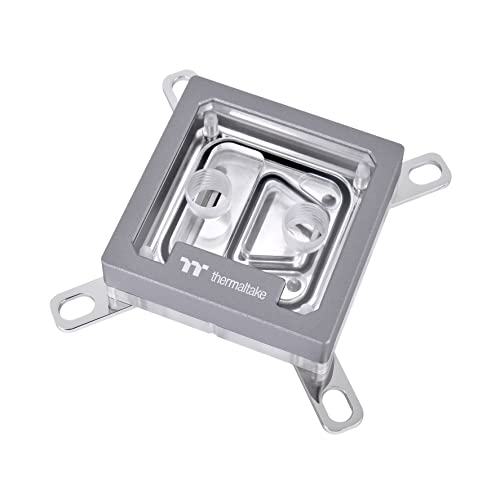
The Pacific W9 is Thermaltake’s most complete AM5 water block package, shipping with a mirror-finished nickel-plated copper base, a crystal-clear PMMA top, and a tube of TG-60 liquid metal thermal grease rated at 52 W/mK—one of the highest thermal conductivity pastes included with any block at this price tier. The central inlet design funnels coolant directly into a 0.2mm micro-channel array, which targets the CCD hotspot on Ryzen chiplets more effectively than side-inlet alternatives.
Users report the block runs quiet thanks to its low flow restriction, and installation is straightforward with the included Intel and AMD brackets. The liquid metal grease spreads easily with a Q-tip and can drop temperatures by roughly 10°C compared to standard thermal pastes, though it requires careful application to avoid shorting nearby SMD components on the AM5 socket. Compatibility spans LGA 2066/2011-3/2011/1700/1200 and AMD AM5/AM4/AM3+/AM3/FM2/FM2, making this a versatile choice if you swap platforms frequently.
The downside is consistency. Several buyers reported that the AM5 mounting hardware was missing the specific “R” screws needed for the socket, forcing them to source generic machine screws and copper washers. There have also been isolated reports of coolant leakage at the front-plate-to-center-joint seal after 8-10 days, though Thermaltake’s warranty support replaced units promptly. If you receive a complete kit, the W9 delivers mid-range pricing with near-premium thermal paste.
Why it’s great
- Includes 52 W/mK liquid metal thermal grease
- Central inlet and 0.2mm micro-channel design target CCD hotspots
- Broad socket compatibility across Intel and AMD platforms
Good to know
- Some units ship without AM5-specific mounting screws
- Rare front-plate leakage reported after extended use
6. Bykski CPU-XPR-C-M High-Efficiency CPU Water Cooling Block
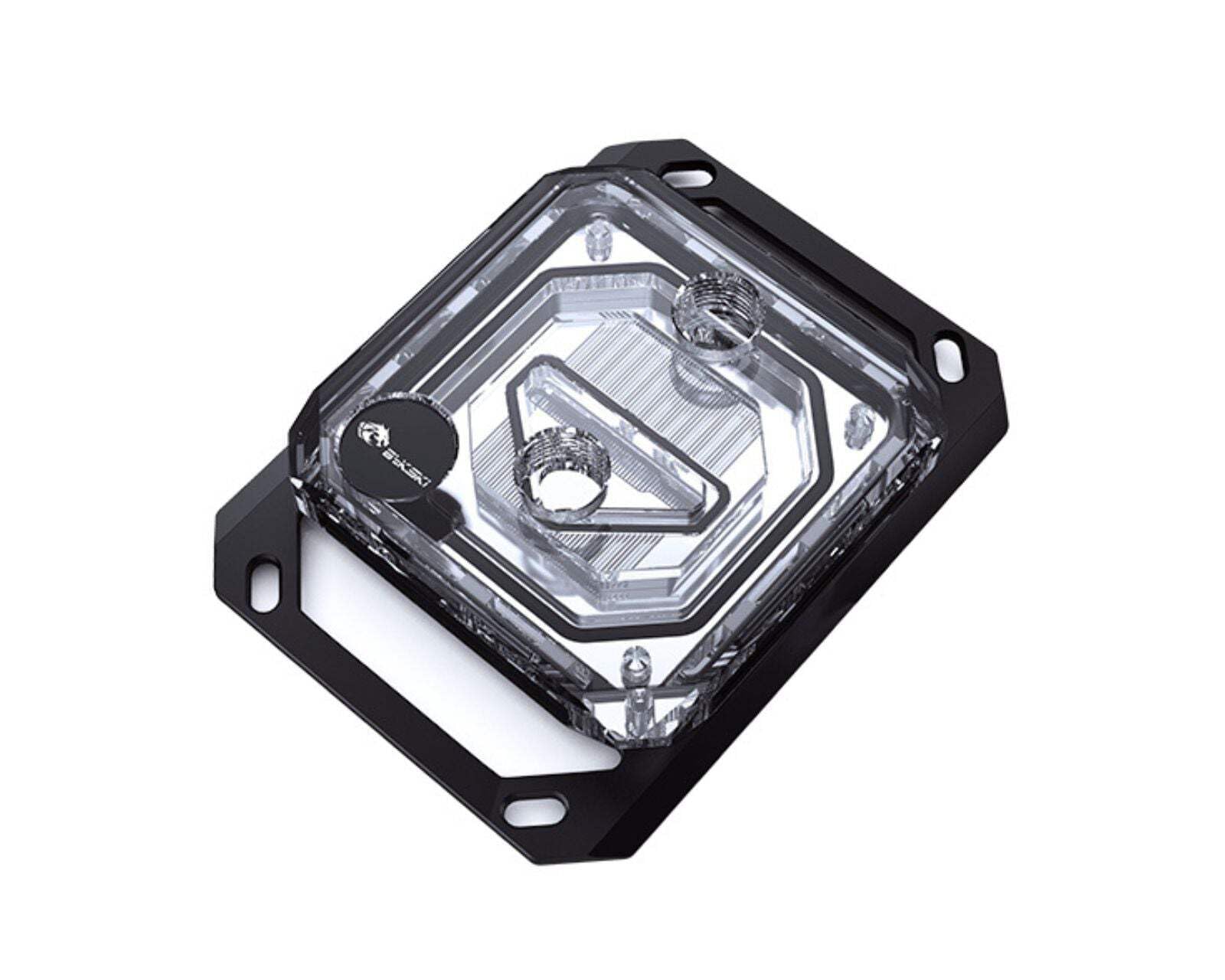
The Bykski CPU-XPR-C-M proves that effective AM5 cooling doesn’t require a triple-digit budget. Its 0.2mm spray-type micro-channel design increases heat absorption surface area while maintaining optimized flow rate—a clever engineering choice that balances thermal performance against pump head pressure. The nickel electroplated copper base offers corrosion resistance comparable to blocks costing twice as much, and the PMMA acrylic top provides a clear view of coolant flow.
Users running a Ryzen 5 9600X overclocked to 5.5GHz report idle temperatures of 4-7°C with a fish-tank chiller in the loop, while a 9800X3D hits a maximum of 75°C in Cinebench R23. Even a 9950X stays at 20°C idle and 45°C under gaming loads—numbers that match or beat many premium blocks. The included thermal paste and mounting hardware make this a true drop-in solution for first-time custom loop builders who want to allocate more of their budget to radiators or pump quality.
The block is physically smaller than an EK equivalent, which is an advantage for clearance but means the mounting pressure across a large IHS like the 9950X’s may be less uniform than with a larger cold plate. The 14 dB noise rating is effectively silent, but the included 4-pin connector is for an optional RGB feature that requires a separate controller. For the price, the trade-offs are minor—this is the gateway block that lets you test custom-loop cooling before committing to a premium option.
Why it’s great
- Spray-type 0.2mm micro-channel design for strong thermal performance
- Nickel-plated copper cold plate at a budget-friendly price point
- Complete mounting kit with thermal paste included
Good to know
- Smaller cold plate may not cover full AM5 IHS surface evenly
- RGB feature requires separate controller
FAQ
Can I use an AM4 water block on an AM5 socket?
What thermal paste is best for AM5 water blocks?
How do I know if my AM5 water block has the correct mounting pressure?
Final Thoughts: The Verdict
For most users, the best am5 water block is the EK Quantum Velocity 2 because it pairs a 99.99% pure copper cold plate with proven D-RGB integration and solid thermal headroom for Ryzen 9 chips. If you want the absolute lowest core temperatures without RGB clutter, grab the Alphacool Core 1. And for the unique combination of a built-in LCD display and consistent cooling through the Hexa-Flow engine, nothing beats the Corsair XC7 RGB Elite LCD.
Product prices and availability are accurate as of the date/time indicated and are subject to change. Any price and availability information displayed on Amazon at the time of purchase will apply to the purchase of this product. As an Amazon Associate I earn from qualifying purchases.
CERTAIN CONTENT THAT APPEARS ON THIS SITE COMES FROM AMAZON. THIS CONTENT IS PROVIDED "AS IS" AND IS SUBJECT TO CHANGE OR REMOVAL AT ANY TIME.
Amazon and the Amazon logo are trademarks of Amazon.com, Inc. or its affiliates.