
Our readers keep the lights on and my morning glass full of iced black tea. As an Amazon Associate, I earn from qualifying purchases.
Specs are compiled from manufacturer listings and verified buyer reviews and can change over time — please confirm the key details on the product page before buying.
Finding a wireless mouse that feels natural in either hand is tougher than it sounds — most mice are sculpted for right-handed grips, leaving lefties stuck with mirrored layouts or awkward reach. The best ambidextrous wireless mouse solves this by pairing a symmetrical shape with side buttons you can swap or reprogram, so your thumb lands exactly where it should, no matter which hand you use.
I’m Min — the founder and writer behind Gadgets Feed. This guide is built by comparing the manufacturers’ published specifications and the patterns across verified customer reviews, so you get each pick’s real strengths and trade-offs instead of marketing spin.
After comparing DPI ranges, battery life, weight, and connectivity across six models, these picks cut through the noise to help you find the right ambidextrous wireless mouse for your actual desk setup and daily workflow.
Quick Picks
- Logitech G903 Lightspeed — Best Overall
- Razer Viper V3 Pro SE — Competition Ready
- Corsair M75 Wireless RGB — Button Swapper
- Lenovo Legion M600 RGB — Featherlight Champ
- Azio IZO Wireless Optical Mouse — Desk Statement
- HP 400 Quiet Wireless Mouse — Budget Champion
How To Choose The Best Ambidextrous Wireless Mouse
Many buyers assume that any symmetrical mouse works equally well for both hands. The catch is that most “ambidextrous” mice still place side buttons on the left edge only, which means nothing changes for left-handed users. Here is what actually matters when narrowing down the options.
Swappable or Duplicate Side Buttons
A true ambidextrous mouse either includes side buttons on both sides or lets you physically move a set of buttons from one edge to the other. Without this feature, you are buying a right-handed mouse with a symmetrical shell — your left thumb still has nothing to press.
DPI and Sensor Performance
DPI (dots per inch) controls how fast the cursor moves relative to your hand motion. For everyday office work, 1600 to 2400 DPI is plenty. Competitive gamers often want 16,000 DPI or higher for faster flicks, but anything above 26,000 DPI is mostly bragging rights — your monitor’s resolution cannot even use that speed at normal sensitivity settings.
Battery Life and Charging Convenience
Wireless mice fall into two camps: models that run on a single AA or AAA battery for many months, and rechargeable models that last anywhere from 6 to 200 hours per charge. The trade-off is simple — long battery life on disposables versus the convenience of USB-C charging. If you hate scrambling for batteries during a workday, look for a rechargeable model with at least 100 hours of rated battery life.
Quick Comparison
| Model | Best For | DPI Range | Battery Life | Weight | Amazon |
|---|---|---|---|---|---|
| Logitech G903 Lightspeed | Pro-grade esports + long sessions | 100 – 25,600 DPI | 140 hours (with RGB) | 107g + 10g optional | $98.77$139.99Amazon |
| Razer Viper V3 Pro SE | Ultra-light competitive gaming | up to 35,000 DPI | 95 hours | 54g | $79.99$99.99Amazon |
| Corsair M75 Wireless | FPS players wanting swappable buttons | up to 26,000 DPI | 105 hours | 89g | from $49.31Amazon |
| Lenovo Legion M600 | Gamers who want feather-light build | up to 16,000 DPI | 200 hours | 69g | $48.00$50.49Amazon |
| Azio IZO | Stylish office work on a budget | 1000 / 1600 / 2400 DPI | 6 hours | — | $49.99Amazon |
| HP 400 Quiet | Quiet daily driver with long battery | up to 6000 DPI | 24 months | — | $31.99Amazon |
In‑Depth Reviews
1. Logitech G903 Lightspeed

The gold standard for lefties who refuse to compromise on sensor accuracy or customization.
If you use both hands throughout the day or are left-handed and tired of mice that treat you like an afterthought, the Logitech G903 Lightspeed is built for you — it has a fully ambidextrous design with up to 11 configurable buttons, and the side buttons are magnetic so you can move them from the left edge to the right edge depending on your grip. The HERO 25K sensor delivers 1:1 tracking with a sensitivity range from 100 to 25,600 DPI, meaning the cursor follows your hand exactly without any smoothing or acceleration getting in the way.
One reviewer with large hands called it the best ambidextrous mouse for lefties and praised the free-spinning scroll wheel that lets you toggle between notched and frictionless scrolling. Battery life reaches 140 hours with the LIGHTSYNC RGB lighting running, and if you go without lighting it stretches to 180 hours. The G903 also works with the POWERPLAY wireless charging mat (sold separately), so you can keep it topped off without plugging in a cable.
The trade-off is weight — at 107g before you add the optional 10g weight, it is noticeably heavier than many modern gaming mice, and there is no Bluetooth connectivity, only a USB RF dongle. Buyers also note that the included micro-USB charging port is dated compared to the USB-C found on newer models.
Sensor supremacy: The HERO 25K sensor is more responsive than the standard optical sensors found in many mid-range mice, so you get consistent tracking even on glossy desks or mouse pads with varying textures.
Reach for this if: you want a premium, feature-packed mouse that works equally well for right and left hands, with enough programmable buttons to handle both work macros and in-game commands.
Look elsewhere if: you prefer a lightweight mouse under 80g, or you rely on Bluetooth rather than a dedicated USB receiver.
2. Razer Viper V3 Pro SE
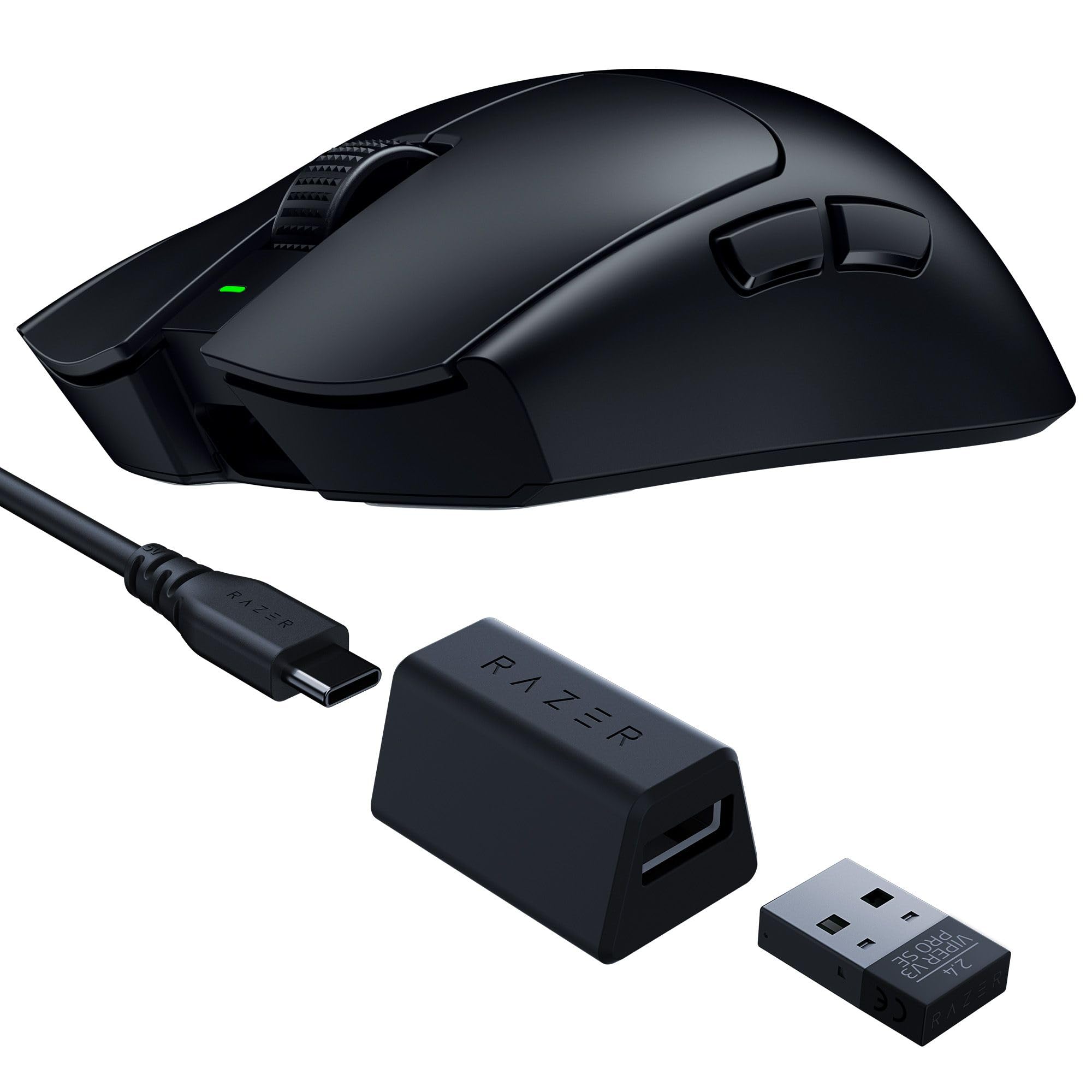
A sub-55g symmetrical mouse that makes fast flicks feel easy, designed alongside esports pros.
At just 54g, the Razer Viper V3 Pro SE is the lightest mouse on this list by a large margin — it is 35g lighter than the Corsair M75 and more than half the weight of the Logitech G903 at 107g. The FOCUS PRO 35K OPTICAL SENSOR GEN-2 can track up to 35,000 DPI in 1-DPI steps, so competitive players can dial in their sensitivity with extreme precision, even on glass surfaces. It uses Razer’s HyperSpeed wireless with a 1000 Hz polling rate dongle that stays stable in crowded tournament environments.
Buyers report excellent battery life, with some saying it lasts multiple days of heavy gaming without needing a charge, and the rated 95 hours backs that up. The Gen-3 optical switches are rated for 90 million clicks and actuate at 0.2 ms with no debounce delay, meaning your clicks register instantly without any double-clicking issues. The smooth-touch finish on the shell gives a grippy feel without catching on your skin during long sessions.
The main compromise is the lack of a bundled 8K polling dongle — the included dongle polls at 1000 Hz, and upgrading to 8K requires a separate purchase. Some users with large hands have also noted that the symmetrical shape feels slightly small for palm grips, though it works well for claw and fingertip styles.
Speed advantage: The Viper V3 Pro SE is 35g lighter than the Corsair M75, which translates to noticeably faster flicks and less fatigue during long gaming sessions.
Choose this for: competitive gaming where every gram matters and you want a sensor that tracks on any surface, including glass.
skip it if: you need a mouse with Bluetooth or rely on programmable buttons for productivity work — the Viper focuses on gaming essentials over office features.
3. Corsair M75 Wireless RGB

An 89g FPS-focused mouse that lets you physically move side buttons from one side to the other.
The Corsair M75 Wireless solves the biggest ambidextrous problem with a simple mechanical trick: the side buttons snap into either the left or right edge using magnets, so left-handed users can move them over instead of just reassigning functions in software. It weighs 89g, which is light enough for fast FPS play — one reviewer noted it felt “very light and smooth” — and the CORSAIR MARKSMAN optical sensor reaches 26,000 DPI with 650 IPS tracking and 50G acceleration, so quick sweeps and recenters stay accurate.
Battery life is rated at 105 hours, and buyers confirm it lasts about a week of daily use with no noticeable lag. The CORSAIR QUICKSTRIKE buttons use optical switches rated for 100 million clicks, which eliminate debounce delay entirely — your shot registers exactly when you press, not a millisecond later. One left-handed reviewer specifically praised the comfort and battery life, calling it a great mouse for lefties.
The side buttons themselves feel slightly clunky and jiggly according to multiple reviews, and the DPI button is located on the underside of the mouse, making it impossible to switch sensitivity mid-game. The iCUE software is functional but not the most intuitive, and the RGB lighting is the main praise for an otherwise average build feel.
True Ambidextrous Hardware
- Magnetic swappable side buttons stay secure during use
- 105-hour battery life keeps you gaming for over a week per charge
- Optical switches rated for 100 million clicks
Ergonomics Catch
- Side buttons jiggle slightly, which some buyers found distracting
- DPI button on the underside prevents on-the-fly sensitivity switching
- Plastic build feels cheaper than the price suggests
Best for: left-handed FPS players who want physical side buttons on the right edge without needing to buy a specialty left-handed mouse.
pass on it if: you need a mouse with a premium metal or rubberized feel — the all-plastic enclosure may disappoint.
4. Lenovo Legion M600 RGB

A 69g wireless mouse that lasts 200 hours per charge — the best battery-life-to-weight ratio on this list.
The Lenovo Legion M600 weighs under 69g, making it 20g lighter than the Corsair M75 and 38g lighter than the Logitech G903, yet it packs a 200-hour battery life that outlasts every other rechargeable model here. A 2.5-hour full charge gets you back to 200 hours, and a rapid 5-minute charge delivers 10 hours of use on the go (with the lights off). The 16,000 DPI optical sensor works with a 1000 Hz polling rate, and the Omron microswitches are rated for 50 million clicks.
Owners mention that the M600 feels “very reliable” and “on par with other gaming mice,” with one reviewer mentioning the excellent price-to-performance ratio. The 9 programmable buttons include dedicated stealth mode and lighting toggle buttons, so you can switch between RGB-on gaming and RGB-off office mode without opening software. The 100% PTFE mouse feet (a type of smooth plastic pad on the bottom) let the mouse glide across cloth and hard pads with minimal friction.
The lightweight plastic construction does feel less premium than the Logitech G903 or the Razer Viper, and some buyers mentioned the need to adjust to the ultra-lightweight feel. The symmetrical shape is comfortable for small to medium hands, but larger hands may find it cramped, and the software is basic compared to the iCUE or G Hub ecosystems.
Battery endurance: At 200 hours, the M600 lasts nearly double the 105 hours of the Corsair M75 and over triple the 95 hours of the Razer Viper, making it the clear choice for long workdays and weekend gaming.
Pick this if: you want a lightweight mouse under 70g that you only need to charge once every few weeks, even with frequent use.
Consider other options if: you need premium build quality or a thicker, more substantial feel — the plastic shell feels cost-effective, not luxurious.
5. Azio IZO Wireless Optical Mouse

A retro-styled wireless mouse that adds personality to your desk without sacrificing true ambidextrous usability.
The Azio IZO stands out visually with its blue iris matte finish and gold accents, but its ambidextrous credentials are genuine — the symmetrical shell has no thumb grooves, so it fits either hand equally well. It uses a PixArt PAW3212 optical sensor with three DPI presets (1000, 1600, and 2400) that you switch by pressing a button on the bottom. Connectivity options include Bluetooth 3.0, Bluetooth 5.0, and a 2.4G RF-USB dongle, and the internal 1000 mAh battery recharges via USB-C.
One reviewer called it “absolutely adorable” and said it matched their Azio keyboard perfectly, while another mentioned it feels comfortable even in large hands and connects quickly after waking from sleep. The non-touchy surface prevents accidental clicks when you rest your fingers on the buttons, and customers note that the auto-off feature helps preserve battery life — though one noted that the rated 6-hour battery life only lasts about a week with daily use.
The biggest catch is the short 6-hour battery life on a full charge, which is far behind the competition — the Lenovo Legion M600 offers 200 hours, so you will be charging the IZO frequently. The 3-button layout (left, right, and scroll wheel click) is also minimal compared to the 9 or 11 buttons on gaming mice, so power users may feel limited.
Style and Simplicity
- Unique blue and gold aesthetic stands out from a sea of black mice
- Bluetooth 5.0 + 2.4G RF gives you flexible connectivity options
- USB-C charging is modern and convenient
Limited Runtime
- Only 6 hours of battery life per charge — the shortest on this list
- Only 3 buttons, which limits productivity and gaming customization
- Some users experienced freezing issues after several months of use
Great for: users who want a stylish desk accessory that works ambidextrously and don’t mind plugging it in every few days.
Look elsewhere if: you need longer battery life or extra buttons for gaming — the IZO is best suited for light office work.
6. HP 400 Quiet Wireless Mouse
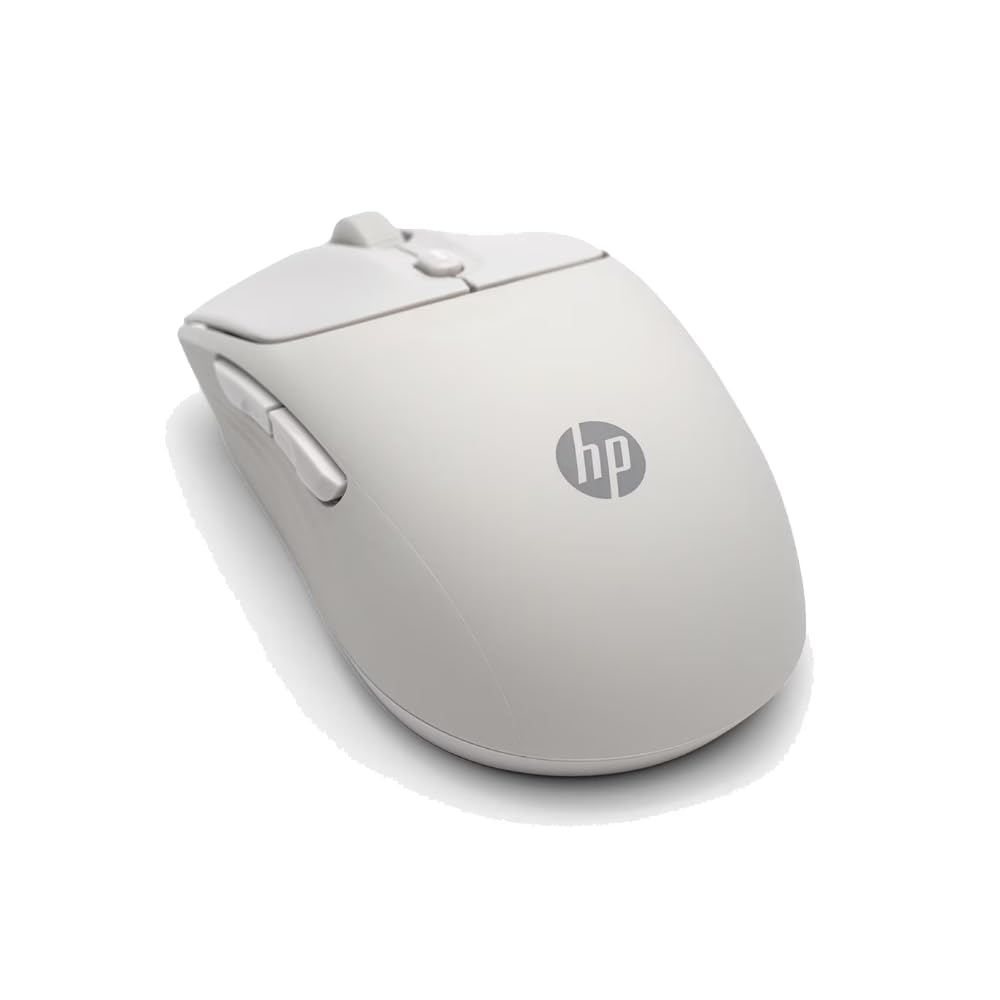
A quiet, eco-friendly mouse that runs for two years on a single AA battery — no charging cables needed.
The HP 400 Quiet Wireless Mouse eliminates the charging headache entirely: it runs on one AA battery for a rated 24 months, so you can toss it in a bag and forget about cable management. The symmetrical silicone rubber shell is soft and easy to sanitize, and reviewers point out it feels “perfectly” comfortable for their hand size with a smooth scroll wheel and quiet clicks. Connectivity works via Bluetooth or a 2.4GHz dongle, and the adjustable DPI goes up to 6000, which covers everything from precise spreadsheet work to general browsing.
Reviewers consistently mention the soft, comfortable feel and the quick Bluetooth connection — one buyer called it “a great alternative mouse to the much more expensive Logitech Anywhere 3S” and praised the premium feel for the price. The HP 400 is made with at least 40% post-consumer recycled materials and comes in FSC-certified packaging, so it is among the most environmentally conscious options on this list. The Microsoft Wheel setting lets you access shortcuts with one click of the center button, adding a small productivity boost for Windows users.
At 6000 DPI, it has a 20,000 DPI gap compared to the 26,000 DPI Corsair M75, so competitive gamers will want more sensor headroom. The 5-button layout lacks the swappable side buttons that make true ambidextrous use comfortable for left-handed users — both side buttons sit on the left edge, leaving lefties with the same button imbalance found in right-handed mice.
Set-and-forget battery: The 24-month battery life means you never need to remember to charge — unlike the Azio IZO’s 6-hour battery, the HP 400 runs for almost two years without a second thought.
Choose this for: a low-maintenance office mouse that works for both hands in a quiet environment and won’t need a battery swap for years.
it’s not for you if: you are left-handed and need side buttons on the right edge — the HP 400 keeps its side buttons on the left side only.
Understanding the Specs
DPI — Sensitivity and Speed
DPI (dots per inch) measures how many pixels the cursor moves for every inch you move the mouse. A higher DPI means the cursor zips across the screen with smaller hand movements — useful for gaming or 4K monitors. Lower DPI gives you fine control for design work. The Corsair M75 reaches 26,000 DPI, while the HP 400 caps at 6000 DPI. For most people, 1600 to 2400 DPI is comfortable. Competitive players might use 800 to 1600 for precision aiming and only crank it up for fast 180-degree turns.
Battery Life — Rechargeable vs Disposable
Battery life is the spec that separates office mice from gaming mice most clearly. The HP 400 uses a single AA battery and lasts 24 months — you low-maintenance. Rechargeable gaming mice like the Lenovo Legion M600 offer 200 hours per charge but need to be plugged in every few weeks. The Azio IZO only gets 6 hours, which means charging every day or two. If you hate hunting for batteries, go rechargeable. If you hate plugging in cables, go with a long-life AA model.
FAQ
What makes a mouse truly ambidextrous versus just symmetrical?
Can I use an ambidextrous mouse if I am right-handed?
How important is the DPI sensor for everyday use?
Will a heavy mouse cause wrist strain during long use?
What is the difference between Bluetooth and 2.4GHz wireless?
Can I left-click with the right button if I switch hands?
How long do rechargeable mice last before the battery degrades?
Are ambidextrous mice good for palm grip?
What is the quietest mouse on this list?
Which mouse lasts the longest on a single charge or battery?
Final Thoughts: The Verdict
If you want one dependable pick, the best ambidextrous wireless mouse winner is the Logitech G903 Lightspeed because it combines a proven HERO 25K sensor, swappable side buttons, and 140-hour battery life into a package that genuinely works for both hands. If you want an ultra-light mouse for competitive gaming, grab the Razer Viper V3 Pro SE. And for a quiet, maintenance-free office mouse that lasts two years on one battery, the standout is the HP 400 Quiet.
How We Picked
We do not accept paid placement. Every pick is matched to a real buyer and a real use-case; we do not hands-on test units.
Sources & Methodology
Specifications: manufacturer listings and product documentation. Review insights: verified customer reviews, as of July 2026. Pricing: not shown on this page (it changes often); check the current price via the retailer link.
As an Amazon Associate, Gadgets Feed earns from qualifying purchases. This does not affect which products we feature.
Related Guides
Product prices and availability are accurate as of the date/time indicated and are subject to change. Any price and availability information displayed on Amazon at the time of purchase will apply to the purchase of this product. As an Amazon Associate I earn from qualifying purchases.
CERTAIN CONTENT THAT APPEARS ON THIS SITE COMES FROM AMAZON. THIS CONTENT IS PROVIDED "AS IS" AND IS SUBJECT TO CHANGE OR REMOVAL AT ANY TIME.
Amazon and the Amazon logo are trademarks of Amazon.com, Inc. or its affiliates.