
The right hardware transforms a keyboard-and-mouse chore into an authentic over-the-road experience where every button press and wheel rotation connects you directly to the dash of your digital rig. This guide cuts through the noise to find the gear that actually makes you feel like you are behind the wheel of a Class 8 truck.
I’m Min — the co-founder and writer behind Gadgets Feed. I have spent hundreds of hours analyzing the technical specifications, build quality, and compatibility matrices of sim trucking peripherals to separate real immersion from plastic gimmicks.
After rigorous comparison of nine products spanning button boxes, steering wheels, pedals, and conversion kits, this is the definitive guide to the best american truck simulator accessories for building a rig that actually feels like a truck cab.
How To Choose The Best American Truck Simulator Accessories
American Truck Simulator presents a unique set of demands compared to circuit racing sims. You need large wheel rotation (900 degrees or more), realistic heavy-vehicle braking force, and a control interface that matches a truck cab rather than a Formula One cockpit. These four criteria will immediately narrow your options to the gear that actually enhances your ATS experience.
Wheel Diameter and Rotation Angle
A standard 11-inch racing wheel feels tiny when you are trying to keep a long hood Peterbilt between the lines. Look for a wheel at least 400mm (about 15.7 inches) in diameter for the most realistic truck feel. The rotation angle must reach 900 degrees or higher — anything less than 900 degrees will make navigating tight docks and sweeping highway curves feel twitchy and unnatural.
Load Cell Brake Pedals vs. Standard Potentiometers
Trucks require sustained, modulated braking force to bring 80,000 pounds to a stop. A load cell brake pedal measures the force you apply rather than the distance the pedal travels, delivering far more consistent and realistic braking for heavy hauling. Standard potentiometer pedals measure travel distance and tend to feel vague when you need to feather the brakes for a smooth stop at a weigh station.
Dedicated Button Boxes vs. Keyboard Mapping
Managing engine brakes, trailer brakes, differential locks, wipers, lights, and beacon controls on a keyboard destroys immersion. A dedicated button box with tactile switches and labeled keys allows you to operate these functions by touch alone. Look for units with at least 15 programmable buttons and, ideally, a keyed ignition switch and real toggle switches for trailer air brakes.
Build Quality and Mounting Options
Sim trucking gear endures long sessions and repeated use. Assess the mounting system early — some premium wheels and pedals require sturdy cockpits or reinforced desk clamps. Bolt patterns, VESA compatibility, and clamp depth ratings are critical specs that determine whether your accessory stays planted or shifts mid-haul.
Quick Comparison
On smaller screens, swipe sideways to see the full table.
| Model | Category | Best For | Key Spec | Amazon |
|---|---|---|---|---|
| MOZA TSW Truck Wheel 400mm | Steering Wheel | Truck-specific realism | 400mm diameter, microfiber leather | Amazon |
| SIM-PANEL HT/HTE Button Box | Button Box | True cab immersion | 19 stainless steel buttons, keyed ignition | Amazon |
| Logitech G RS Pedals | Pedal Set | Load cell braking on a budget | 75 kg load cell brake, Hall effect sensors | Amazon |
| THRUSTMASTER SimTask Steering Kit | Wheel Mod Kit | Converting racing wheel to truck feel | Adjustable clamp, spinner knob | Amazon |
| Simjack UT Sim Racing Pedals | Pedal Set | High-force precision braking | 200 kg load cell, CNC stainless steel | Amazon |
| PXN V99 Racing Wheel | Full Wheel Bundle | Entry-level full setup | 3.2Nm force feedback, 270/900 degree | Amazon |
| PXN CB1 Button Box | Button Box | Budget multi-function control | 30 programmable buttons, RGB lighting | Amazon |
| Corsair Fanatec CSL GT3 Wheel | Steering Wheel | Premium build with versatile inputs | 300mm GT3 rim, magnetic shifters, OLED | Amazon |
| MOZA R3 Bundle | Full Wheel Bundle | Entry-level direct drive for Xbox/PC | 3.9Nm DD base, 22 buttons, Hall pedals | Amazon |
In‑Depth Reviews
1. MOZA TSW Truck Wheel 400mm
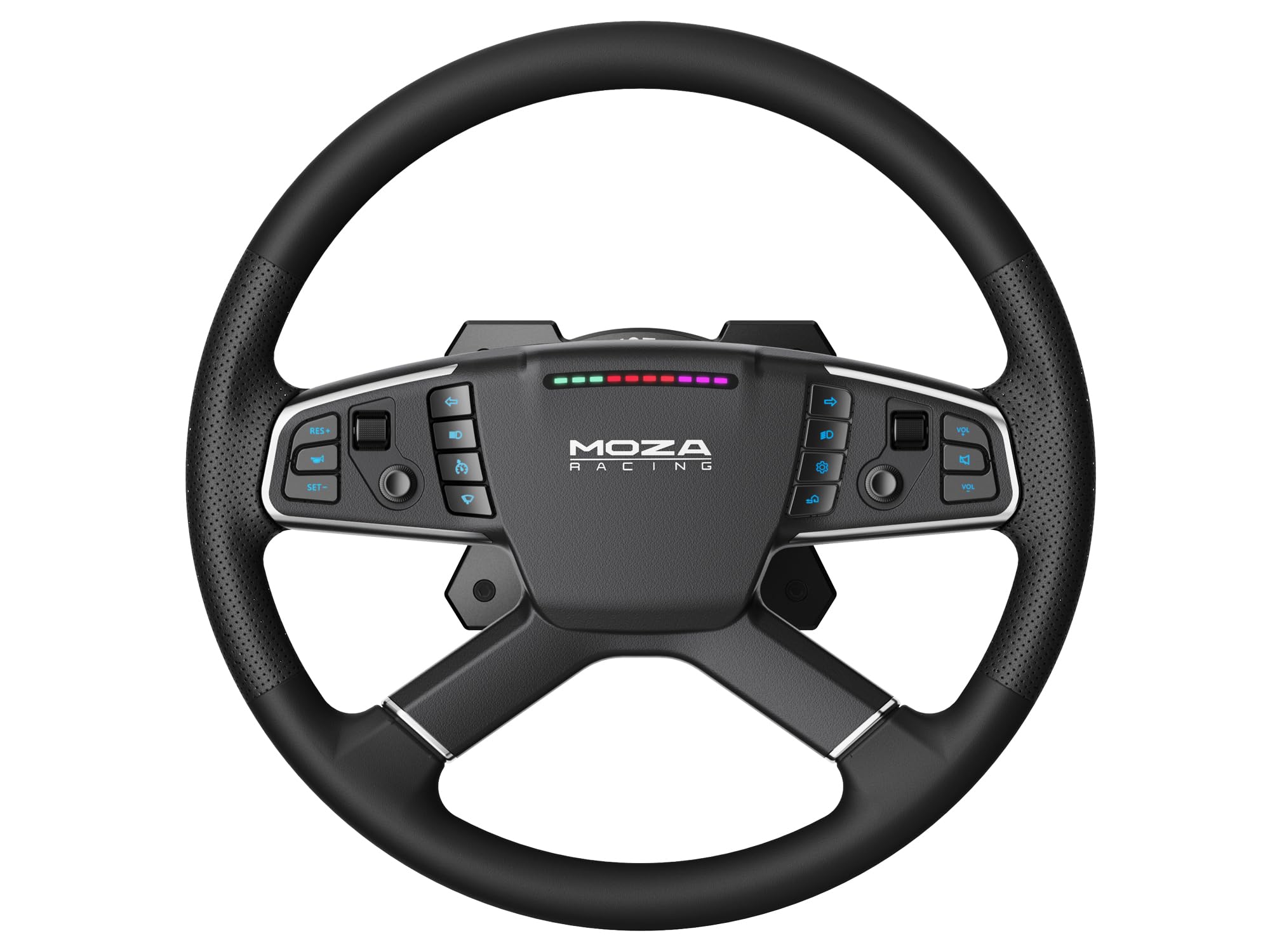
The MOZA TSW Truck Wheel arrives at a critical 400mm diameter — substantially larger than standard racing wheels and the only dedicated truck wheel in this roundup that matches the scale of a real semi steering wheel. The aerospace-grade aluminum alloy frame provides a rigid foundation for the microfiber leather wrapping with hand stitching, and the integration with the MOZA ecosystem ensures zero latency through its wireless and conductive slip ring connection.
What sets this wheel apart for ATS players is the RGB backlit buttons that you can customize to flash with turn signals in-game. The large diameter naturally limits the rotation speed you can apply, which is exactly what you want for realistic steering ratio feel. Paired with a Moza R12 or R5 base, this wheel delivers the inertia and heft that makes highway cruising feel authentic rather than arcade-like.
Mounting is straightforward on any Moza-compatible base via the quick-release system, though the premium price reflects that this is a rim-only purchase — you will need a separate base and pedals. The weighty construction and premium materials eliminate the “toy” feel that some budget options carry, and the software-based customization of button lighting adds a layer of personalization that truckers specifically appreciate for long night hauls.
Why it’s great
- True 400mm truck wheel diameter for the most realistic steering feel
- Customizable RGB buttons can sync with in-game turn signals
- Wireless connectivity eliminates tangled cables while maintaining responsive inputs
Good to know
- Requires a separate Moza wheel base — not a standalone product
- Some users report the leather feels slightly less premium than expected at this price point
2. SIM-PANEL HT/HTE Button Box

The SIM-PANEL HT/HTE is the only button box in this selection that includes a true-to-life ignition key and dedicated truck and trailer brake controls. The 19 stainless steel pushbuttons and rotary switches replicate the physical feedback of an actual Class 8 dashboard, with each press delivering crisp tactile confirmation that a keyboard keystroke simply cannot match. The integrated desk clamps and 75mm VESA compatibility mean you can mount this panel directly to a monitor arm or the side of your sim rig.
What separates this from cheaper button boxes is the fully customizable backlighting for each individual label, adjustable on the fly without requiring software changes. For ATS players, this means you can assign colors by function — blue for lights, red for brakes, green for engine controls — and adjust brightness based on whether you are day-driving or running a night delivery route. The plug-and-play USB connectivity works with both American Truck Simulator and Euro Truck Simulator 2 out of the box, though in-game keybinding setup will take some initial configuration.
The build quality is noticeably denser than the PXN CB1, with stainless steel components that feel built for years of use rather than months. The mounting clamps could be more refined — some users have improvised with washers and felt pads for a tighter fit on non-standard surfaces — but once secured, the panel stays planted even during aggressive shifter interactions. The stainless steel labels are legible and backlit effectively, addressing a common complaint about button boxes where text becomes unreadable in dim sim rooms.
Why it’s great
- Real ignition key and trailer brake valves provide genuine truck cab immersion
- Individual label backlighting is customizable on the fly for any control scheme
- Stainless steel construction feels premium and durable over long sessions
Good to know
- Mounting clamps could be more robust for thicker surfaces
- Initial keybinding setup in ATS can take time due to limited instructions
3. Logitech G RS Pedals
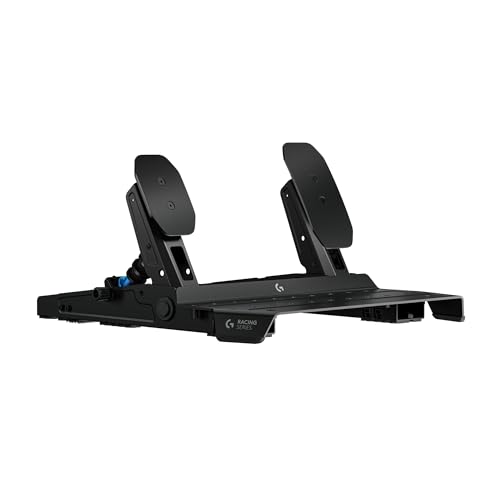
The Logitech G RS Pedals bring a 75 kg load cell brake to the market at a price point that undercuts most dedicated load cell solutions while maintaining the brand’s reputation for durable build quality. The Hall Effect accelerator and clutch sensors deliver contactless, wear-free throttle modulation that feels linear and predictable — critical for matching engine RPM during gear changes in heavy trucks. The steel frame with extendable wall brace and carpet grippers ensures the pedal set does not slide across the floor under heavy braking.
For ATS players transitioning from entry-level potentiometer pedals, the load cell brake transforms how you approach stops. Instead of guessing throttle position based on pedal travel, you modulate pressure — the same muscle memory you use for real vehicle braking. The adjustable pedal positions on the frame allow you to space the pedals to match your natural resting foot position, which is a significant ergonomic upgrade for long-haul delivery sessions that can run hours.
The build quality is exemplary for the price point, with a steel frame that feels substantial at nearly 11 pounds. Logitech G-Hub software had some early-reported issues with loading and hanging, but a late 2025 update resolved the majority of those problems. The RS Pedals connect directly to Logitech Pro and RS50 wheel bases via USB, or can be used with other brand wheels through the Racing Adapter sold separately, making them one of the most versatile pedal options for mixed-brand sim rigs.
Why it’s great
- Affordable load cell brake delivers realistic force-based braking for heavy trucks
- Hall Effect sensors provide precise, contactless throttle control with no wear
- Steel frame with wall brace and rubber feet prevents any pedal movement during use
Good to know
- G-Hub software required for configuration has had stability issues in the past
- Clutch pedal module sold separately if you need a three-pedal setup
4. Thrustmaster SimTask Steering Kit

The Thrustmaster SimTask Steering Kit addresses a specific pain point for truck sim players who already own Thrustmaster wheels — the difficulty of steering a virtual truck with a small-radius racing wheel mounted at a circuit-racing angle. This conversion kit includes an adjustable clamp that repositions your Thrustmaster T128, T248, or T818 base into a flat-mounted orientation, transforming the steering angle from Formula-style to the horizontal layout you would find in a Freightliner cab.
The rotary spinner knob is the key addition here, enabling one-handed steering while your other hand operates a mouse, button box, or gear shifter. For ATS players running dedicated trailer control panels or managing CB radio add-ons, the spinner knob eliminates the need to constantly grab and release the wheel. The three-axis position adjustment allows tool-free height and angle changes, so you can dial in the exact driving posture that matches your real-world truck reference points.
Compatibility is limited to Thrustmaster wheels with a compatible servo base, and the kit’s desk clamp accommodates surfaces between 15mm and 50mm thick. Some users have found the installation instructions confusing, and removing the wheel after mounting can be tricky due to cable routing. However, for the sub- price, this kit extends the life of an existing Thrustmaster ecosystem and provides a more truck-appropriate driving position without investing in an entirely new wheel base.
Why it’s great
- Converts racing wheel geometry to flat truck-style positioning with tool-free adjustment
- Spinner knob enables realistic one-handed steering for simultaneous control input
- Three-axis adjustment lets you fine-tune the perfect driving posture for long sessions
Good to know
- Only compatible with select Thrustmaster wheel bases, not universal
- Desk clamp thickness range may not suit thicker or non-standard desktop surfaces
5. Simjack UT Sim Racing Pedals
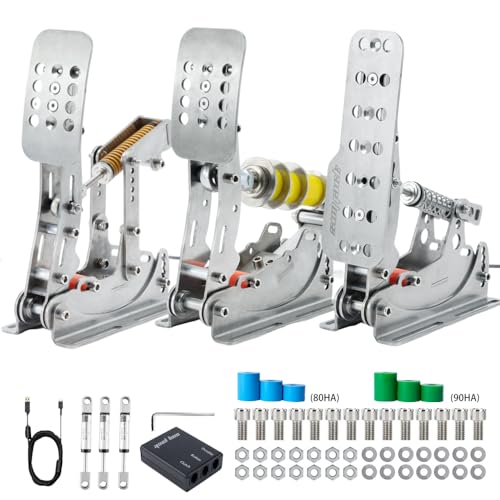
The Simjack UT pedals push braking force into territory usually reserved for pedals costing twice as much, with a 200 kg load cell brake that provides extraordinary resolution in force modulation. The CNC precision laser-cut stainless steel construction — 3mm thick with the brake load-bearing section thickened to 6mm — offers a rigidity that eliminates any chassis flex during heavy braking. The built-in 32-bit dual-core processor with 16-bit independent ADC chip delivers three-channel simultaneous data sampling for the throttle, brake, and clutch with no perceptible latency.
For American Truck Simulator, the high-force brake translates into fine-grained control over trailer braking. The imported rubber dampeners come in 60, 80, and 90 Shore hardness options, allowing you to tune the brake pedal feel to match your preference between a softer progressive travel or a stiffer racing-style resistance. The Simjack Control software enables you to set linear output curves, dead zones, and braking curves that can be saved as profiles and applied across any simulator, meaning you can maintain consistent braking feel between ATS and ETS2 without reconfiguration.
The pedal set connects via USB directly to PC with no driver installation required, and the Simjack Control software provides configurable output curves, dead zones, and brake curves that can be saved as profiles. Some users have noted that the brake pedal sits very tall, requiring approximately a 1-inch heel rest for comfortable braking, and the included brake elastomers are quite stiff from the factory — many owners swap to aftermarket springs from Etsy for easier trail braking. The gas pedal’s damper is reported to be largely non-functional, but the load cell quality more than compensates for these minor ergonomic quibbles at this price point.
Why it’s great
- 200 kg load cell provides high-resolution braking force modulation for precise trailer control
- CNC stainless steel construction with thickened brake section offers zero-flex rigidity
- Configurable software profiles maintain consistent feel across ATS and other sims
Good to know
- Brake pedal height can be uncomfortable without a heel rest or pedal plate adjustment
- Factory brake elastomers are very stiff — many users replace them for a softer feel
6. Corsair Fanatec CSL GT3 Wheel
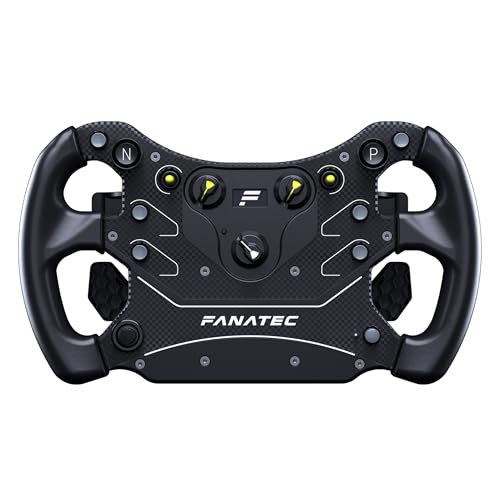
The Corsair Fanatec CSL Steering Wheel GT3 is a 300mm GT3-style rim built with overmolded rubber grips at 50 Shore A hardness for comfort and durability. While 300mm is smaller than the ideal truck wheel diameter, this rim packs an extraordinary number of inputs into a compact space: nine push buttons, two Multi-Position Switches with encoders, two 2-way toggle switches, a 7-way FunkySwitch, custom magnetic rocker shifters, and dual analog paddles that support clutch bite-point, handbrake, and brake/throttle axis modes.
For ATS players who run Fanatec bases, this wheel offers a level of button density that effectively serves as a wheel-integrated control panel. The dual analog paddles can be configured for engine brake modulation and trailer brake control, keeping critical functions within thumb reach without requiring a separate button box. The magnetic shifters provide crisp, audible engagement that makes gear changes feel connected, and the OLED display on the wheel hub can show telemetry data like speed, gear, and engine temperature.
The QR2 Lite wheel-side is preinstalled, making this compatible with any Fanatec Direct Drive base, and it unlocks Xbox compatibility through licensed bases. The overmolded rubber grips offer excellent durability for extended sessions, and the wheel feels solid with zero flex under strong force feedback. The 300mm diameter is more suited to GT racing than trucking, but the comprehensive input array and Fanatec ecosystem integration make it a compelling option for players who split time between ATS and circuit racing sims on a single wheel base.
Why it’s great
- Extensive button and switch layout enables wheel-integrated control of engine brake and trailer functions
- Magnetic shifters and analog paddles offer tactile, precise gear and clutch control
- OLED display provides in-wheel telemetry for speed, gear, and engine data
Good to know
- 300mm diameter is smaller than ideal for pure truck simulation use
- Requires a Fanatec base — not a standalone wheel
7. MOZA R3 Bundle

The MOZA R3 Bundle provides a complete entry point into direct drive sim racing with Xbox and PC compatibility, including an R3 direct drive base delivering 3.9Nm of torque, an ES steering wheel with 22 customizable buttons, SR-P Lite pedals with Hall effect sensors, and a desk clamp. The 3.9Nm force feedback is modest compared to higher-end direct drive bases, but the torque ripple is ultra-low, meaning the force delivery feels smooth and detailed rather than grainy — essential for feeling the subtle road texture changes that differentiate asphalt from gravel roads in ATS.
The 11-inch round ES wheel is better suited to trucking than many smaller GT-style wheels, and the 22 buttons provide ample room for mapping ATS-specific functions directly onto the wheel. The quick-release system allows you to swap rims later if you upgrade to the MOZA TSW Truck Wheel or a larger diameter rim. The SR-P Lite pedals use high-precision Hall sensors for throttle and brake input, which is a significant step up from basic potentiometer pedals found in entry-level bundles, though the brake pedal lacks a load cell and will feel soft compared to dedicated pedal sets.
The MOZA Pit House software gives you granular control over force feedback curves, steering sensitivity, and button mapping, and the mobile app provides cloud-based access to configurations. The brake pedal is the weak point of this bundle — many users recommend a brake mod or upgrading to MOZA’s load cell pedal kit. The desk clamp is 5mm CNC machined steel and works well with standard desks, and the base does get warm after extended sessions but remains functional. For the price, this is the most affordable path to direct drive for ATS on Xbox or PC.
Why it’s great
- Entry-level direct drive with smooth force feedback that reveals subtle road texture in ATS
- 22-button wheel allows extensive function mapping without a separate button box
- Xbox and PC compatibility with an easy-to-use software ecosystem
Good to know
- Brake pedal lacks load cell technology and feels soft for heavy truck simulation
- Wheel diameter at 11 inches is smaller than ideal for realistic truck steering feel
8. PXN V99 Racing Wheel

The PXN V99 delivers a complete racing package — wheel, pedals, and shifter — at a price that undercuts most competitors by a significant margin. The dual-motor force feedback system produces 3.2Nm of torque, and the wheel supports switching between 270-degree rotation for circuit racing and 900-degree rotation for truck simulation. This flexibility is critical for ATS buyers who also play track-based games and want one setup that covers both without compromise.
The 11.8-inch detachable wheel is wrapped in TPR rubber with an anti-sweat texture, and the 4-paddle layout includes upper shifters for gear changes and lower analog paddles that can function as progressive clutches or customizable inputs for engine brake and trailer brake control. The Hall-effect three-pedal system provides precise, linear throttle and brake response, though the pedals do tend to slide on hard floors without a dedicated rig or mounting solution. The 6+1 gear shifter offers strong mechanical feedback for gear changes but has been reported to feel toy-like in construction relative to the rest of the setup.
Multi-platform compatibility with PC, Xbox One, Xbox Series X|S, and PS4 makes the V99 versatile, though PS5 compatibility is limited to games that support PS4 peripherals. The shifter has known compatibility issues with iRacing and can be inaccurate with gear detection — the 6-speed layout uses a 7-slot gate that can confuse some sim titles. The force feedback can trigger a gear lash feel under heavy torque, and some units have reported overheating and shutdown during extended sessions. For the price, the V99 is a functional entry point, but the build quality inconsistencies make it a stepping stone rather than a long-term solution.
Why it’s great
- Complete bundle includes wheel, Hall-effect pedals, and 6+1 shifter at a competitive price
- Adjustable rotation between 270 and 900 degrees suits both circuit and truck sims
- Multi-platform support covers PC, Xbox One, Series S/X, and PS4 out of the box
Good to know
- Shifter build quality feels low-tier and has incompatibility issues with some racing sims
- Force feedback can cause unit to overheat and shut down during extended sessions
- Pedals lack anti-slip mounting and slide on hard floors without a rig
9. PXN CB1 Button Box
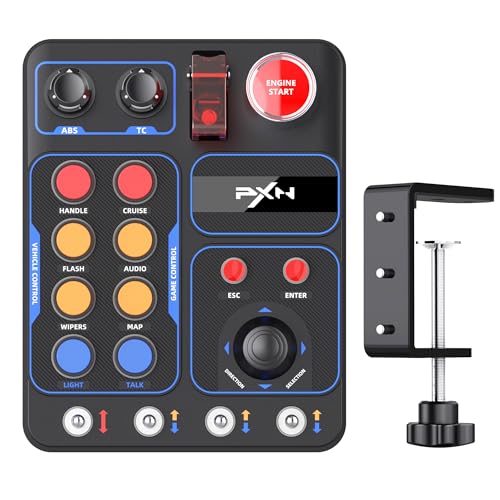
The PXN CB1 is the most affordable dedicated button box in this lineup, packing 30 programmable buttons into a compact ABS resin chassis with adjustable RGB lighting. For ATS players who are tired of hunting for keyboard keys to activate engine brakes, beacon lights, or differential locks, the CB1 provides a dedicated surface that lives on your desk or mounts to a monitor via its included VESA-compatible bracket. The simple installation design accommodates surfaces up to 7cm thick, and the setup process with Simhub or Control Mapper is straightforward for configuring each button to send specific keyboard or joystick inputs.
The rotary dial switch functions as an engine start/stop control with metal contact points that provide tactile confirmation, and the RGB lighting knob lets you cycle through seven preset effects or connect to the racing base software for custom color palettes and brightness adjustment. The 30 buttons are laid out in a grid that maps naturally to truck functions — you can assign the left column to lights and wipers, the center column to engine and retarder controls, and the right column to trailer functions and parking brake activation.
The buttons themselves have been described as feeling “low-quality” by some users, with a mushy actuation that lacks the satisfying click of mechanical switches found in higher-end button boxes. There is no included sticker sheet for labeling the buttons — the static printed descriptions may not match your specific button assignments. The LED illumination on the button names is absent, making the labels difficult to read in dark sim rooms. However, for the price, the CB1 offers an immediate quality-of-life improvement over keyboard-based trucking, and the 30-button count provides enough inputs for nearly every ATS function without requiring multiple layers.
Why it’s great
- 30 programmable buttons provide enough inputs for nearly all ATS truck functions
- VESA-compatible mounting bracket allows flexible placement on desk or monitor arm
- Adjustable RGB lighting adds cab-like atmosphere for night driving sessions
Good to know
- Button feel is mushy without the tactile click of higher-end mechanical switch boxes
- No labeling stickers included — you must memorize or create your own button layout
- Button names lack backlighting, making them hard to read in low-light conditions
FAQ
Do I need a 900-degree wheel for American Truck Simulator to feel realistic?
Can I use a racing wheel setup for ATS without a button box?
Will the MOZA TSW Truck Wheel work with a non-MOZA wheel base?
Why is a load cell brake better than a standard pedal for truck simulation?
Final Thoughts: The Verdict
For most users, the best american truck simulator accessories winner is the MOZA TSW Truck Wheel 400mm because its dedicated truck wheel diameter and Moza ecosystem integration provide the most authentic steering feel available. If you want a complete cab control experience, grab the SIM-PANEL HT/HTE Button Box for its realistic ignition key and trailer brake controls. And for an affordable load cell braking upgrade, nothing beats the Logitech G RS Pedals.