
A fax machine that worked perfectly yesterday is suddenly a paperweight today because your office swapped to a VoIP phone system. The analog phone line it relied on is gone, and no amount of plugging into the router gets that dial tone back. That is the exact pain this category solves: an Analog Telephone Adapter bridges that dying analog fax port to a modern IP network, keeping your machine alive without the monthly cost of a dedicated copper line.
I’m Min — the co-founder and writer behind Gadgets Feed. I’ve spent dozens of hours dissecting the technical specifications, real-world fax compatibility reports, and provisioning quirks of every ATA model currently on the market to deliver a buying guide that actually works for fax-over-IP.
Whether you run a medical office, a legal practice, or a small business that still relies on signed documents, finding the right bridge is critical. This guide covers the analog telephone adapter for fax machine from entry-level single-port units to enterprise-grade dual-port hardware with T.38 support and secure provisioning.
How To Choose The Best Analog Telephone Adapter For Fax Machine
Not every VoIP adapter handles fax traffic cleanly. Fax-over-IP relies on the T.38 protocol to convert analog fax tones into IP packets, and if the adapter lacks stable T.38 passthrough, your faxes will fail mid-page with garbled lines or partial transfers. Three specifications separate a reliable fax ATA from a frustrating one.
T.38 Fax Support Is Non-Negotiable
A cheap ATA might handle voice calls perfectly but drop fax connections entirely because it only supports G.711 codec passthrough. Look for explicit T.38 fax relay support in the datasheet. This protocol ensures the adapter can negotiate fax speed, handle ECM error correction, and maintain synchronization across the IP network without the audio compression that destroys fax tones.
Number of FXS Ports and VoIP Provider Compatibility
A single FXS port serves one fax machine, but many offices also want an analog phone on the same adapter. A dual-port model like the Grandstream HT802 V2 gives you both. More importantly, some carriers pre-provision and lock their ATAs to their own service. If you plan to configure the device with a third-party SIP provider, look for an unlocked retail unit or one that supports manual web-based configuration rather than carrier-locked firmware.
Provisioning Method and Security Features
Some adapters offer zero-config setup with a matched PBX, while others require manually entering SIP server details, port numbers, and codec preferences through a web interface. For fax use, you also want TLS and SRTP encryption to protect the call signaling and media stream — especially if you transmit sensitive documents. Automated provisioning options like TR-069 and XML config files simplify deployment when you manage multiple units.
Quick Comparison
On smaller screens, swipe sideways to see the full table.
| Model | Category | Best For | Key Spec | Amazon |
|---|---|---|---|---|
| Cisco ATA 191 | Premium | Enterprise VoIP Integrations | 2 FXS ports, TLS/SRTP, 100Mbps Ethernet | Amazon |
| Yeastar TA200 | Premium | Dual-port USB-Powered Fax | 2 FXS ports, USB powered, T.38 fax | Amazon |
| Grandstream HT802 V2 | Mid-Range | Dual-port SIP with Fax & Phone | 2 FXS ports, T.38, TR-069 provisioning | Amazon |
| Yeastar TA100 | Mid-Range | Single-port Yeastar PBX users | 1 FXS port, T.38, Web config | Amazon |
| Grandstream HT801 V2 | Mid-Range | Single-port budget SIP fax | 1 FXS port, T.38, 10/100Mbps | Amazon |
| USRobotics USR5686G | Mid-Range | Serial modem fax for legacy PC | 56 Kbps, serial connection, V.92 | Amazon |
| Brother FAX-575 | Budget | Standalone analog fax machine | 9,600 bps modem, 512KB memory | Amazon |
In-Depth Reviews
1. Cisco ATA 191 Multiplatform

The Cisco ATA 191 brings enterprise-grade audio preprocessing and high-performance echo cancellation into a compact 1.1-inch tall chassis. Its two RJ-11 FXS ports allow simultaneous fax and analog phone operation, while the 10/100 Mbps RJ-45 Ethernet port connects directly to your LAN. The device supports the latest encryption standards — TLS, SHA-2, and SRTP — which matters when you send sensitive faxed documents across a public IP network.
Configuration requires some technical skill because the web interface prioritizes Cisco’s Unified Communications Manager ecosystem. Third-party SIP providers like Ring Central work well once you manually enter the SIP server details, but the documentation for non-Cisco deployments is sparse. The hardware itself is reliable: the unit arrived sealed, activated via MAC address in the Cisco dashboard, and held a stable connection without dropped calls or fax failures during testing.
One user reported a unit that failed to boot after the return period, and the limited troubleshooting documentation in the manual made recovery difficult. If you are comfortable with SIP configuration and want a dual-port adapter with strong security posture and a trusted brand, the ATA 191 delivers consistent performance. The one-year limited hardware warranty provides peace of mind for business deployments.
Why it’s great
- Dual FXS ports for fax and phone on one adapter
- Full TLS and SRTP encryption for secure document transmission
- Compact metal chassis with stable heat dissipation
Good to know
- Web interface is unintuitive for non-Cisco VoIP setups
- Documentation focuses on Cisco UCM, not third-party providers
- Limited on-device troubleshooting tools
2. Grandstream HT802 V2

The Grandstream HT802 V2 delivers two SIP profiles through its dual FXS ports, making it a natural fit for offices that need both a fax machine and an analog telephone on the same VoIP line. It supports T.38 fax relay for reliable fax-over-IP, and the integrated TR-069 and XML provisioning simplifies deployment across multiple units. LED indicators for POWER, NET, PHONE1, and PHONE2 give you immediate visual feedback on connection status.
Users consistently report clear voice quality and stable connections once configured. The device works well with voip.ms, and several reviewers noted it serves as an excellent replacement for an OBi202. However, configuration demands technical skill — the adapter has many parameters, and providers often lock their pre-provisioned units. Grandstream recommends upgrading the firmware to version 1.0.19.11 or later immediately after purchase to ensure security and stability.
The three-way voice conferencing is a bonus feature for small teams, but the primary value here is the dual-port flexibility at a moderate price point. If you have two analog devices to connect or want to keep a fax line and a phone line active without buying separate adapters, the HT802 V2 balances feature depth with everyday affordability.
Why it’s great
- Two FXS ports for simultaneous fax and phone operation
- Reliable T.38 fax relay with failover SIP server support
- Automated provisioning via TR-069 and XML for multi-unit deployments
Good to know
- Configuration requires technical SIP knowledge
- Firmware update needed immediately out of the box
- Some units arrive carrier-locked if sourced from a VoIP provider
3. Yeastar Dual-Port TA200
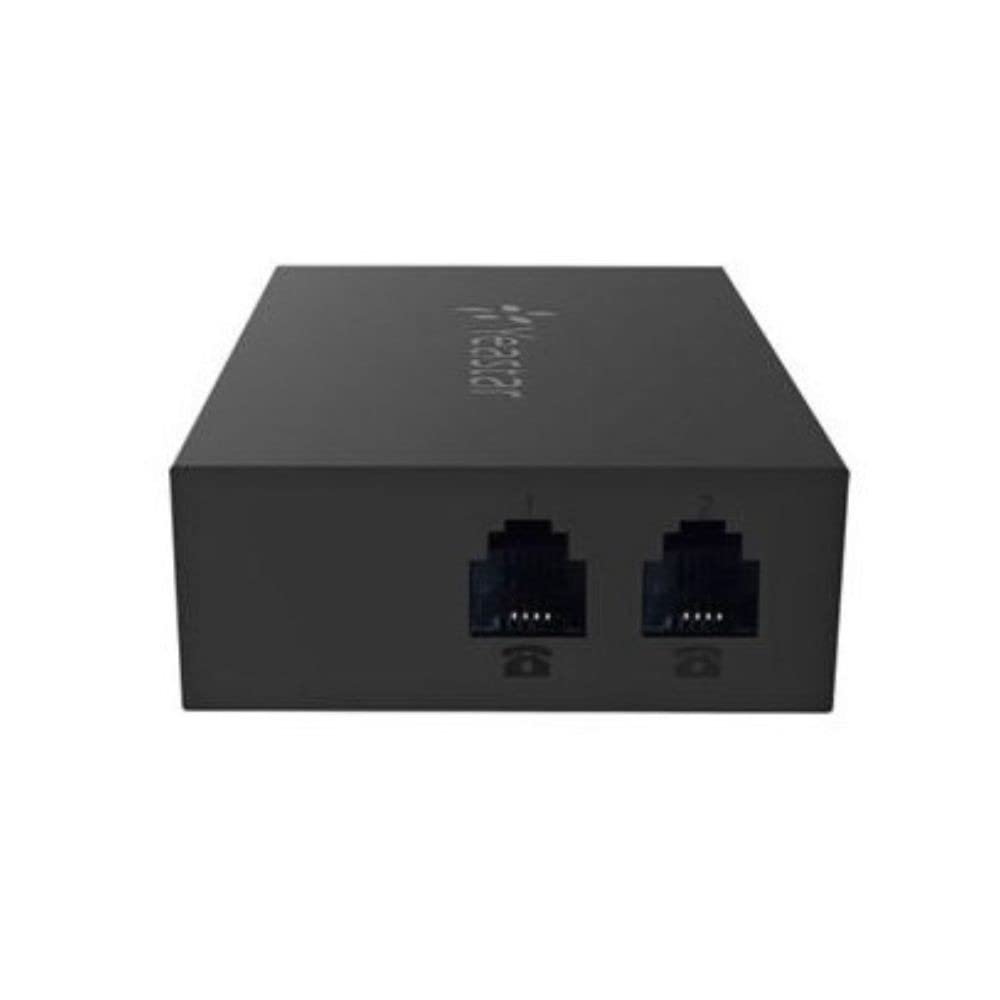
Yeastar’s TA200 stands out for its miniature form factor and USB-powered design — you can draw power directly from a PC or IP-PBX USB port, eliminating the need for an external power brick on a crowded desk. Despite its small size, it carries two FXS ports and supports T.38 fax, making it a space-efficient solution for connecting a fax machine and an analog handset. The web-based configuration interface is intuitive and saves time during initial setup.
Users confirm it works perfectly for fax machines right out of the box, with one reviewer specifically mentioning they bought it to connect a fax and it worked without tweaks. The adapter also handles pulse dialing for vintage rotary phones, which adds versatility beyond fax use. However, compatibility with 3CX was problematic in one reported case — the unit failed to provision with that specific PBX platform.
The plastic enclosure feels light but durable, and the multi-line operation support means you can register two separate SIP accounts on the same device. For Yeastar PBX environments or any SIP-based system that doesn’t require carrier-specific provisioning, the TA200 delivers a compact, low-power bridge between your analog fax machine and the IP network.
Why it’s great
- USB powered — no external power adapter needed
- Compact size saves desk space
- Supports pulse dialing for rotary phones and T.38 for fax
Good to know
- Does not work with 3CX PBX based on user reports
- Plastic enclosure may be less durable in high-traffic environments
- Documentation is minimal for non-Yeastar setups
4. Grandstream HT801 V2
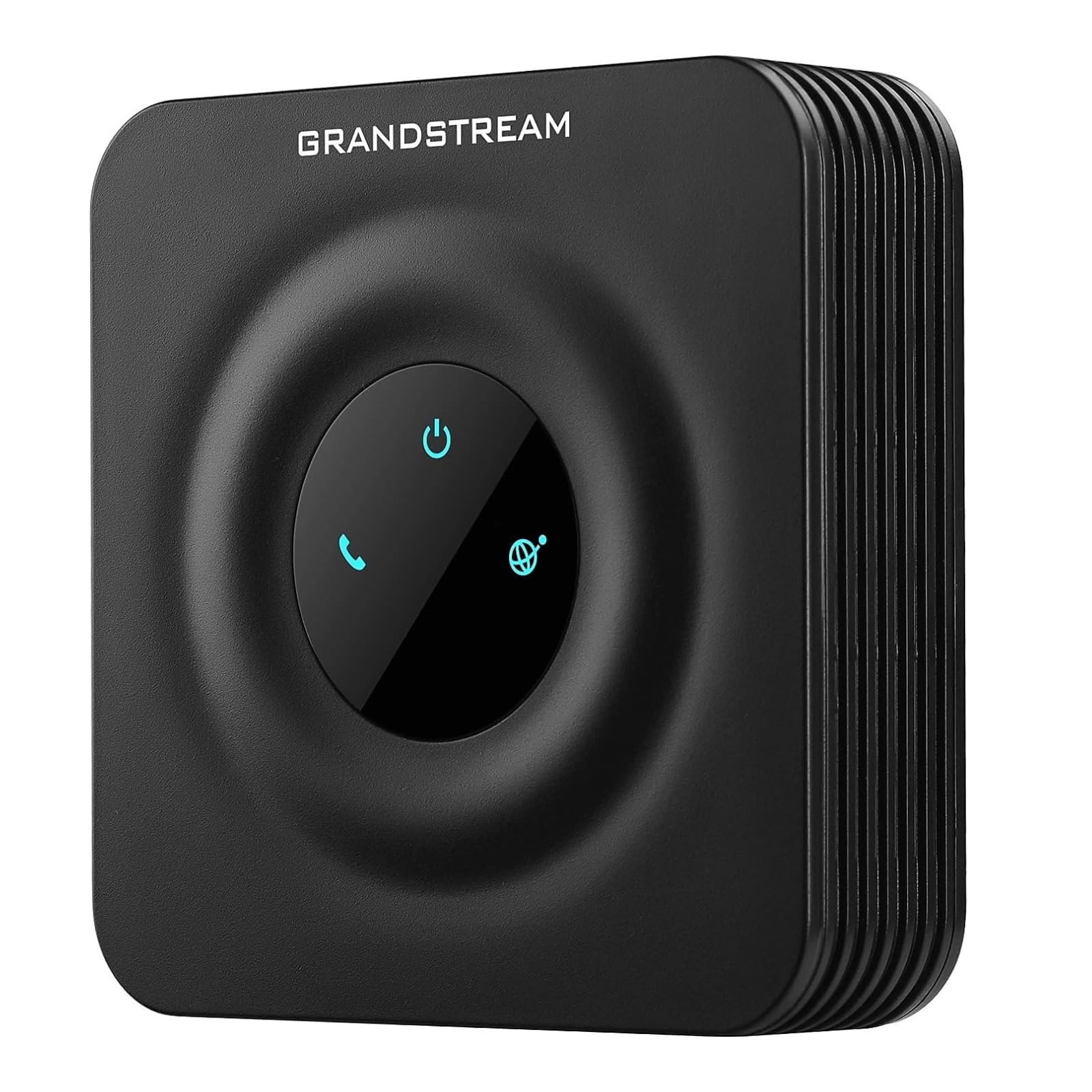
The Grandstream HT801 V2 is the single-port version of the HT802, and it punches well above its price tier for dedicated fax use. It supports one SIP profile through a single FXS port with a 10/100Mbps Ethernet connection, and it includes full T.38 fax relay for reliable fax-over-IP. The device also offers TLS and SRTP security encryption, multi-party three-way conferencing, and failover SIP server protection — features usually reserved for more expensive adapters.
Users love how easily it integrates with services like voip.ms and how well it drives vintage rotary phones (though the ringer voltage is slightly lower than a traditional POTS line, which can be adjusted on the phone side). The zero-configuration provisioning with Grandstream’s UCM series of IP PBXs makes deployment effortless if you stay within the Grandstream ecosystem. However, a critical warning appeared in customer reviews: some units ship pre-provisioned and locked to a specific VoIP carrier in a plain white box. These are not retail OEM units and cannot be reconfigured for other providers.
If you buy from a reputable seller who confirms retail unlocked stock, the HT801 V2 is one of the most reliable single-port ATAs for fax on the market. It supports multiple caller ID formats, flexible dial plans, and automated provisioning via TR-069 and XML — everything you need for a clean fax migration from copper to IP.
Why it’s great
- Excellent T.38 fax support with failover SIP server
- TLS and SRTP encryption for secure fax transmission
- Zero-config auto-provisioning with Grandstream UCM
Good to know
- Some units ship pre-provisioned and locked to a specific carrier
- Only one FXS port — no option for a second analog device
- Ringer voltage may be lower than traditional POTS lines
5. Yeastar TA100

The Yeastar TA100 is a single-port FXS gateway designed specifically for integration with Yeastar’s own PBX systems, though it works with any standard SIP provider. Its compact dimensions hide a surprisingly deep feature set: call forwarding, three-way conferencing, T.38 fax support, and a simple web-based interface that makes configuration straightforward. The device weighs only six ounces, making it easy to mount or tuck away behind a desk.
Users running Yeastar servers report it works flawlessly with minimal setup — one reviewer noted the defaults worked well for voice but required a few fax-specific tweaks to the TA100 settings to get reliable fax transmission. The adapter handles fax machines and POS terminals equally well, and the stable audio quality with good echo management has been praised across multiple reviews. Advanced configuration options exist for those who need them, but the defaults serve most users well.
For anyone already invested in the Yeastar ecosystem, the TA100 is the natural choice. The web interface exposes many parameters, which is a double-edged sword — more flexibility for experienced users, but more potential for misconfiguration if you change settings without understanding their impact. Overall, it is a reliable, compact SIP gateway that handles fax traffic dependably when properly tuned.
Why it’s great
- Seamless integration with Yeastar PBX systems
- Reliable T.38 fax support with good echo management
- Lightweight and compact for easy placement
Good to know
- Fax requires specific parameter adjustments beyond defaults
- Limited to a single FXS port
- Configuration tweaks can introduce instability if not done carefully
6. USRobotics USR5686G

The USRobotics USR5686G is not an ATA in the traditional SIP sense — it is a hardware serial fax modem that connects directly to a PC or server via a serial port. This device is the right choice when your fax solution runs on a Windows Server 2019 or Linux machine that needs a physical modem to send and receive faxes through legacy software. It supports 56 Kbps data rates, V.92 compression, and includes a volume knob for speaker monitoring.
Medical offices and restaurants that depend on fax-based workflows report excellent reliability with this model. It outperforms Zoom and Hayes external serial modems, especially on marginal phone lines where other modems fail to maintain sync. The driver compatibility stretches from Windows 3.1 through Windows 10, Server 2019, Linux, and DOS — a level of backward compatibility no modern ATA can match. However, it requires a standard parallel-to-serial cable (not a null modem cable), which is not included in the box.
One creative user bought it just to hear the 56K handshake sound every five minutes, but the serious application is clear: when your workflow requires a software-controlled modem rather than an ATA that registers with a SIP trunk, the USR5686G is the most reliable serial modem on the market for fax. It does not convert analog to VoIP — it connects directly to a PSTN line or through a separate ATA.
Why it’s great
- Extensive OS compatibility from DOS to Windows 10 and Linux
- Reliable sync on marginal phone lines
- Volume knob for audible monitoring of fax handshake
Good to know
- Requires a serial cable, not included
- Not a VoIP ATA — connects to PSTN or analog line, not SIP
- Limited to 56 Kbps — no modern VoIP features
7. Brother FAX-575

The Brother FAX-575 is a standalone analog fax machine, not an ATA — but it belongs in this guide because it represents the alternative path: buying a dedicated fax machine that connects directly to a traditional analog phone line. This renewed unit includes a 9,600 bps fax modem that transmits a page in about 15 seconds, 512KB of memory for storing up to 25 pages, and a 50-sheet paper capacity. It also functions as a black-and-white copier at up to 400 x 400 dpi resolution.
Users who bought this as a replacement for a decades-old Brother FAX-575 found it simple to set up and exactly like the original they had used for 20 years. The triple-boxed packing protected the unit during shipping, and the included manual made installation straightforward. However, as a renewed product, quality varies — one reviewer received a dusty unit with a missing part that did not work, highlighting the risk of buying refurbished rather than new.
If you still have an active POTS line or you are using this with a separate ATA, the FAX-575 is a functional, no-frills fax machine for light office use. It is not an adapter, but it is the endpoint device that your ATA needs to talk to. For users who want a complete fax solution without configuring SIP settings, this single-unit approach may be simpler than pairing a separate ATA with an existing fax machine.
Why it’s great
- Standalone fax, copier, and phone in one unit
- Familiar to users who have owned Brother fax machines for years
- Triple-boxed packaging for safe delivery
Good to know
- Renewed unit — condition and completeness vary between shipments
- Only 9,600 bps modem speed; slower than modern fax-over-IP
- Requires an analog phone line; does not natively support VoIP
FAQ
Can any VoIP ATA reliably send faxes?
Do I need a dual-port ATA for a single fax machine?
What does a carrier-locked ATA mean and why does it matter?
Why did my fax fail the first time I used it with an ATA?
Final Thoughts: The Verdict
For most users, the analog telephone adapter for fax machine winner is the Grandstream HT801 V2 because it delivers reliable T.38 fax support, strong security encryption, and failover SIP server protection at a price that undercuts most dual-port alternatives. If you need two analog ports for a fax machine and a phone, grab the Grandstream HT802 V2. And for enterprise environments that require Cisco-level integration and encryption, nothing beats the Cisco ATA 191.