
Our readers keep the lights on and my morning glass full of iced black tea. As an Amazon Associate, I earn from qualifying purchases.
Specs are compiled from manufacturer listings and verified buyer reviews and can change over time — please confirm the key details on the product page before buying.
To pick the right Android Bluetooth keypad, first decide how you work. If you punch numbers all day, a standalone ten-key with scissor switches (keys that use a stable, quiet mechanism) speeds up spreadsheet entry. If you type long documents on the go, a folding full-size board keeps your hands comfortable and your posture better.
I’m Min — the founder and writer behind Gadgets Feed. This guide is built by comparing the manufacturers’ published specifications and the patterns across verified customer reviews, so you get each pick’s real strengths and trade-offs instead of marketing spin.
For accountants, data-entry pros, or students juggling spreadsheets, this roundup of android bluetooth keypad options zeroes in on what matters daily: key count, tilt angle, battery life, and connectivity stability. You will see exactly how each model handles those four things, so you can match one to your routine.
Our Picks at a Glance

How To Choose The Best Android Bluetooth Keypad
The right choice starts with how you actually work. A standalone numeric keypad solves the “my laptop has no ten-key” problem, while a folding full-size keyboard replaces your typing setup entirely. Both need rock-solid Bluetooth, but they serve very different daily routines.
Key Count and Layout
A 22-key pad covers the basics — digits, NumLock, Tab, and Delete — and keeps your desk minimal. A 34-key layout adds Page Up, Page Down, Insert, and calculator shortcuts, which shaves time off heavy spreadsheet work. If you also type prose, a full 99-key folding board with a number pad gives you the complete desktop experience on the move.
Battery and Charging
Rechargeable keypads with a 100mAh to 110mAh battery typically run for weeks on a single charge, so you rarely think about power at all. Some pads run on a single AAA battery instead — convenient, but you’ll want a spare on hand. Look for auto-sleep modes that wake on any keypress, since that’s what stretches a charge to 60 days or more.
Connectivity and Compatibility
Most modern pads use Bluetooth 5.0, which pairs quickly and holds a stable connection up to about 33 feet. If you switch between a laptop, a tablet, and a phone during the day, multi-device pairing saves constant re-pairing. Before you buy, confirm the pad explicitly states Android support alongside Windows and iOS.
Quick Comparison
| Model | Best For | Key Count | Tilt Angle | Battery Type | Amazon |
|---|---|---|---|---|---|
| TECKNET Foldable Bluetooth Keyboard★ Best Overall | Travel + full-size typing | 99 keys | — | Rechargeable (USB-C) | Amazon |
| JOYEKY Wireless Number PadBest Value | Budget-friendly data entry | 34 keys | 7.5° | 110mAh rechargeable | Amazon |
| SANWA Bluetooth Numeric KeypadErgonomic Pick | Classic ergonomic numpad | 22 keys | 15° | 100mAh rechargeable | Amazon |
| Rytaki Pro Bluetooth Number Pad | Ultra-portable basic pad | 22 keys | 15° | 1x AAA (not included) | Amazon |
| HoRiMe 2-in-1 Number Pad | Numpad + calculator combos | 34 keys | 15° | Rechargeable | Amazon |
| Kisnt FD17 Mechanical Numpad | Mechanical feel + hot-swap | 17 keys | — | 1x AAA (not included) | Amazon |
| JPHTEK Wireless Numeric Keyboard | Tri-mode connectivity | 21 keys | — | USB-C wired or wireless | Amazon |
| iClever Bluetooth Number Pad | Premium aluminum build | 34 keys | — | USB-C rechargeable | Amazon |
| Samsers Full-Size Foldable Keyboard | Full keyboard + numpad travel | 99 keys | — | Rechargeable (90 hrs) | Amazon |
In-Depth Reviews
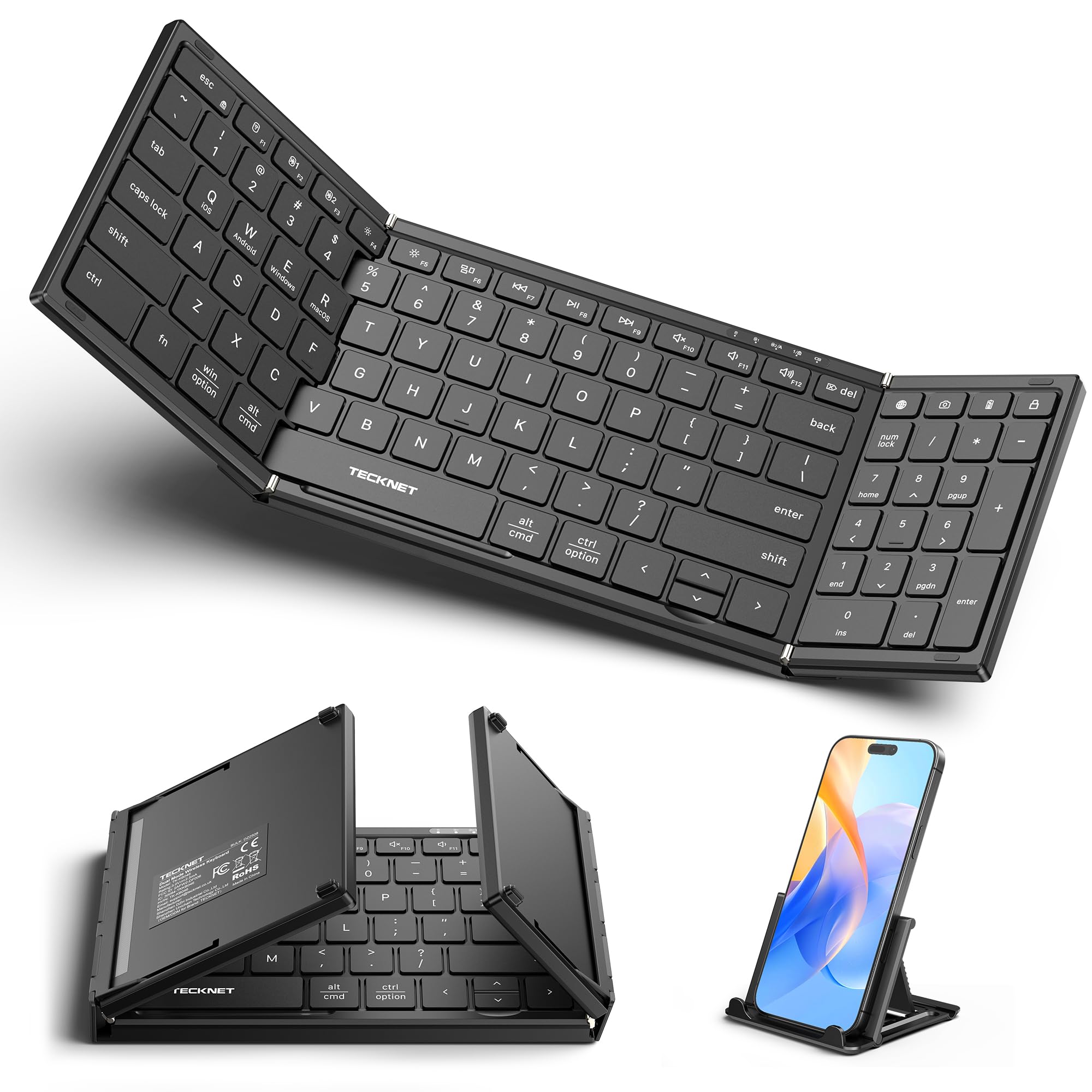
1. TECKNET Wireless Foldable Bluetooth Keyboard
Our pick — over 4★ from 750+ verified ratings; the strongest balance of quality and price.
The full-size board that folds into a bag and pairs with three devices at once.
The defining feature here is the complete 99-key layout with a numeric keypad — a full desktop experience that folds down to just 7.26 inches long and 0.9 inches tall. That makes it the rare keyboard that gives you a ten-key pad for spreadsheets and a comfortable QWERTY row for long documents, all in one travel-friendly unit.
You get three simultaneous connections — laptop, tablet, phone — using dual Bluetooth 6.0 chips plus a 2.4G USB receiver, and you switch between Windows, Mac, iOS, and Android instantly. The rechargeable battery relies on an auto-sleep function that stretches standby to 275 days, so a short work trip rarely demands a charger. The aluminum alloy hinge is rated for over 100,000 folds, and the included device stand props your phone or tablet at a comfortable viewing angle.
The ultra-quiet scissor-switch keys cut typing noise by 90%, making them ideal for libraries or open offices. Buyers love the quality and compact size, but they report the rubber feet don’t grip well — one says, “Smaller than other competitors, but my only gripe that it doesn’t grip very well and slides around when in use…the rubber feet barely prevent the keyboard from moving.” On a smooth desk, add your own grip pads underneath to keep it steady.
What owners love
- Full 99-key layout with a real numeric pad in a foldable frame
- Three-device switching between laptop, tablet, and phone
- Quiet scissor keys plus a 275-day standby battery
What to watch
- Rubber feet let it slide on smooth surfaces — grip is the main gripe
- Folding design means a slight learning curve on key spacing
Reach for this if: you want one keyboard that covers both typing and number entry while traveling.
Think twice if: your desk is polished glass or wood — the slide factor may annoy you.
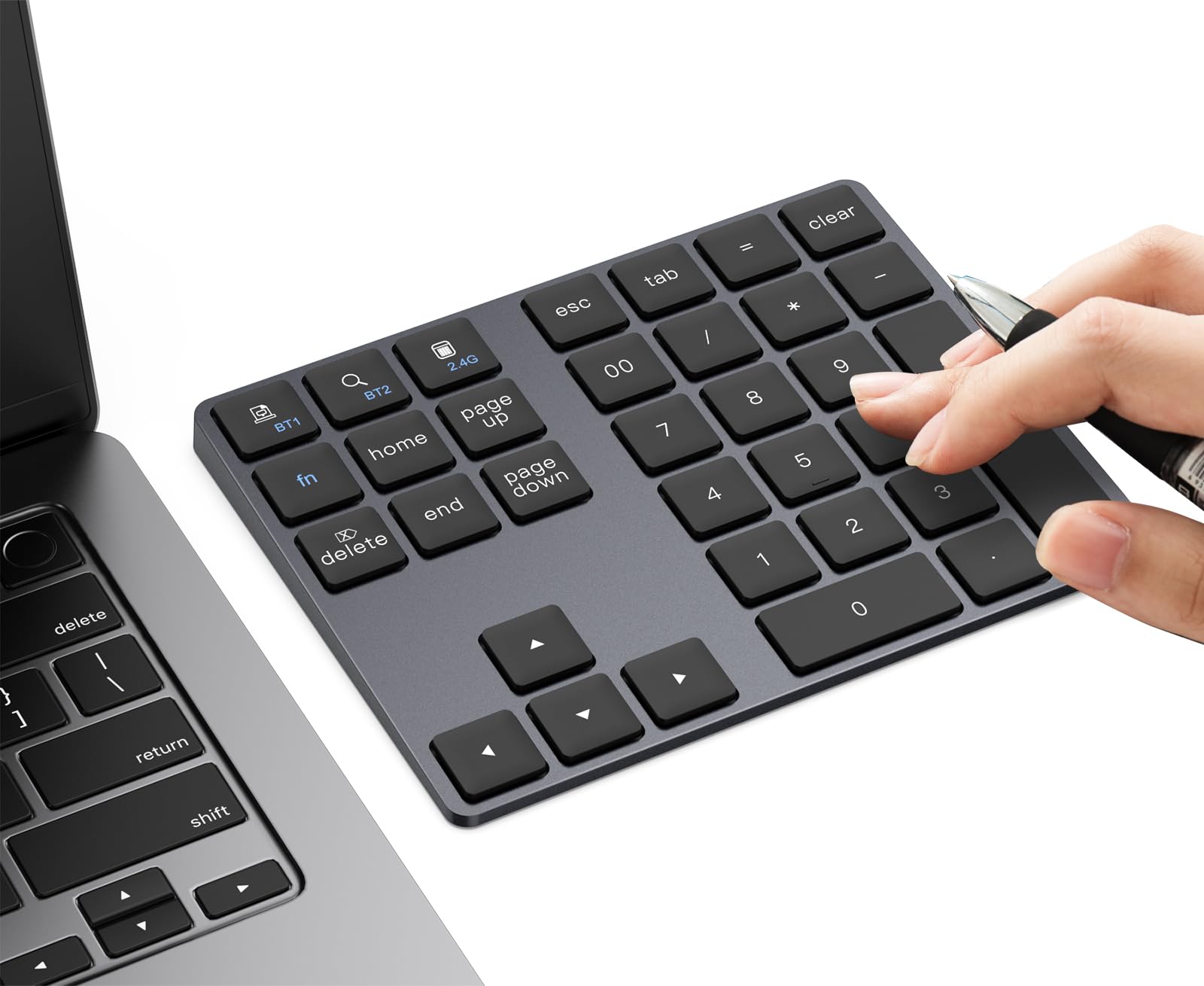
2. JOYEKY Wireless Number Pad Bluetooth Numeric Keypad
A 34-key pad that solves the missing ten-key problem for a bargain price.
The standout spec is the 110mAh rechargeable battery — the highest capacity in the standalone pad group — which fully charges in 2 hours and delivers up to 60 days of use. Buyers report “Super easy to connect and haven’t had to recharge in several months,” which tells you the power management is genuinely efficient for everyday spreadsheet work.
The 34 keys include practical shortcuts like calculator, Page Up, Page Down, and End, so you’re not just punching digits. The 7.5° tilted angle is gentler than the 15° on some rivals — a flatter, more neutral position that some prefer. The quiet scissor-switch keys keep the noise down, and the ultra-thin body slips into a backpack or even a large pocket.
Bluetooth 5.0 pairs fast and stays stable, and the pad works across Windows, macOS, iOS, Android, and Chrome OS. The catch is honesty about the numeric layout: the keys are the classic ten-key arrangement, so if you’re used to a full keyboard’s number row, there’s a brief adaption period. For data entry and Excel work, though, it punches well above its price tier.
Data-entry star: The 110mAh battery plus 60-day runtime makes this the set-and-forget budget pick, and the nav keys next to the numbers speed up data abstraction work.
Who it fits: students, accountants, or anyone who lives in spreadsheets and wants a cheap, reliable number pad.
Note the trade-off: The flatter 7.5° tilt may not suit you if you prefer a more aggressive angle for wrist support.
3. SANWA Bluetooth Numeric Keypad
The lightest ergonomic pad here, with a steep 15° angle for wrist relief.
The defining spec is the 15° ergonomic tilted slope — exactly double the 7.5° on the JOYEKY above — which rolls your wrist into a more natural position during long data-entry sessions. At just 3.52 ounces, it’s the featherweight of the group, and the four non-slip pads on the back keep it planted while you hammer numbers.
The 22 full-sized keys cover the essentials: digits, NumLock, Tab, Home, Esc, plus/minus, divide, equals, page navigation, Delete, Enter, and a calculator shortcut. That’s a focused layout with just 22 keys versus the 34 on the JOYEKY — a real trade-off if you need Page Up and Page Down. The scissor-switch keys deliver a PC-like feel with a tactile rebound, and the built-in 100mAh battery runs up to 55 constant hours per charge.
The wireless range reaches up to 32.8 feet, and pairing takes a simple 3-second button hold. The thing that wins people over is reliability — buyers describe it as dependable and praise the round key design. The honest caveat is connectivity: some owners mention issues pairing with certain Dell PCs, so if you’re on a finicky Windows box, check compatibility first. For MacBook and Android tablet users, it’s consistently praised.
Why it stands out
- Steep 15° ergonomic angle reduces wrist strain
- Only 3.52 ounces — throw it in any bag
- Up to 55 hours constant use per charge
Fit notes
- 22 keys means no Page Up/Down shortcuts
- Some Dell PC owners hit pairing issues
Grab it if: wrist comfort is your priority and you want a featherweight pad for travel.
Look elsewhere if: you need nav keys beyond the basics or you run a Dell PC that’s picky about pairing.
4. Rytaki Pro Bluetooth Number Pad
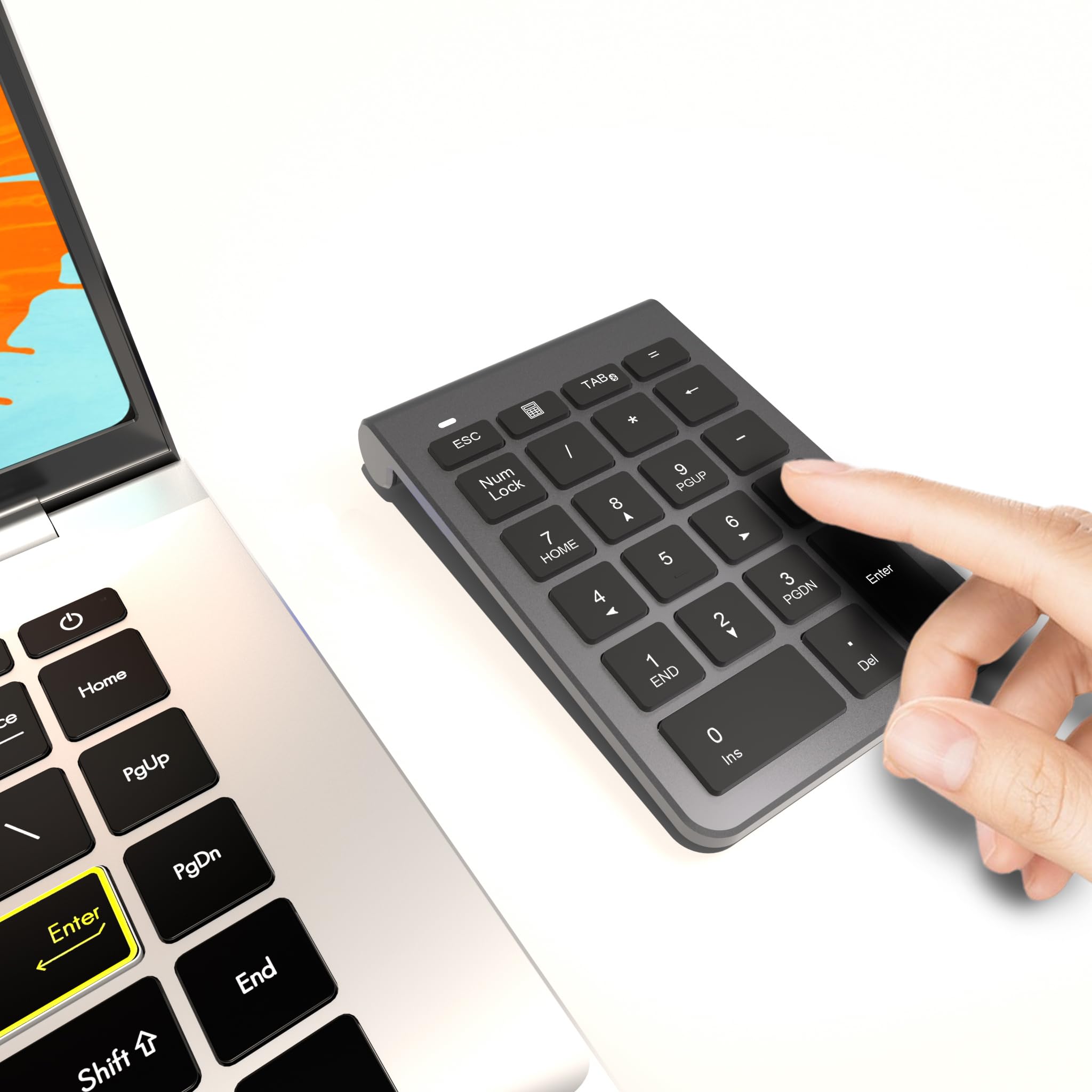
A featherweight 30-gram pad with a 33-foot range and AAA simplicity.
The headline number is the weight — just 30 grams makes this the lightest keypad in the entire lineup, barely noticeable inside a laptop bag. It trades that portability for a AAA battery (not included) rather than a rechargeable cell, which means you’ll swap a battery every so often instead of hunting for a USB-C cable.
The 22 keys include essential shortcuts like NumLock, ESC, Delete, and a calculator opener. Bluetooth 5.0 gives you a stable connection up to 33 feet, and the 15° tilt angle lines up perfectly with the SANWA above for wrist-friendly typing. The scissor-switch keys run quiet, and the durable ABS casing plus anti-slip base keep it stable during intense number-crunching.
Compatibility is genuinely broad — Windows, macOS, iOS, Android, and even specific Amazon Fire tablet models. The review pattern is positive: buyers praise the quick pairing and the backspace and tab keys that save time on spreadsheets. A few note a slight input lag and the lack of up/down arrow keys, plus a back-arrow placement that can get confused with the negative sign. For a compact setup that needs a basic ten-key, this is a solid, light choice.
Light-and-simple: You pay for the featherweight design with AAA battery swaps and a lean 22-key layout, but the 33-foot range and no-driver pairing make it genuinely easy.
Reach for this if: weight matters most and you want a no-fuss pad that works with nearly every device you own.
skip it if: you hate buying AAA batteries or you need arrow keys for navigation.
5. HoRiMe 2-in-1 Number Pad
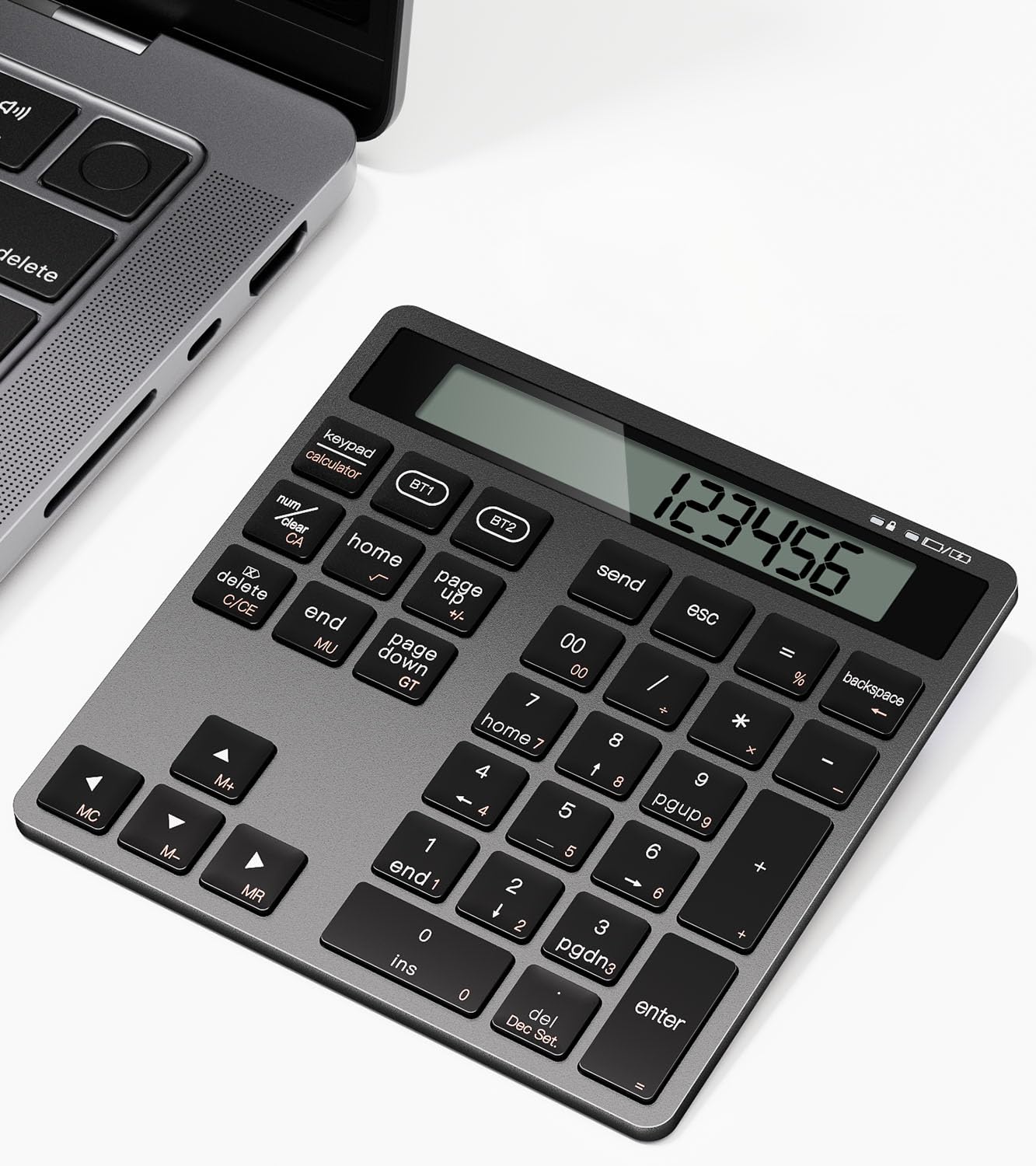
A 34-key numpad that doubles as a standalone calculator with a display.
The trick that makes this pad unique is the built-in display — it works as a full numeric keypad AND a standalone calculator, so you can crunch numbers without looking at your screen. The 34-key layout includes NumLock, ESC, Delete, page navigation, and a calculator shortcut, with dual Bluetooth letting you pair two devices and switch with a tap.
The 15° ergonomic tilt plus quiet scissor-switch keys keep long sessions comfortable, and buyers often note it “looks similar to Apple’s keyboard” in appearance. The sturdy ABS construction and anti-slip base handle fast typing without shifting. Battery life gets mixed feedback — one heavy user reports roughly two weeks with 50-70 hours of weekly use and the pad never switched off, so light users will stretch it much further.
Compatibility spans Windows, macOS, Android, iOS, and Chrome OS, though some shortcut keys may be limited on macOS. The quality and functionality are the most-praised aspects by a wide margin, with value for money also drawing strong mentions. The dual-device switching is the real differentiator — a quick tap moves you between laptop and phone without re-pairing.
The bonus features
- Standalone calculator display — no screen needed
- Dual Bluetooth to switch between two devices instantly
- 34 keys with full page navigation shortcuts
The honest limits
- Battery drains faster under heavy use
- Some macOS shortcut keys won’t work
Choose this if: you want a numpad that also works as a calculator and switches between two devices.
Consider the cost: the display and dual Bluetooth eat battery faster than simpler pads.
6. Kisnt FD17 Wireless Mechanical Numpad
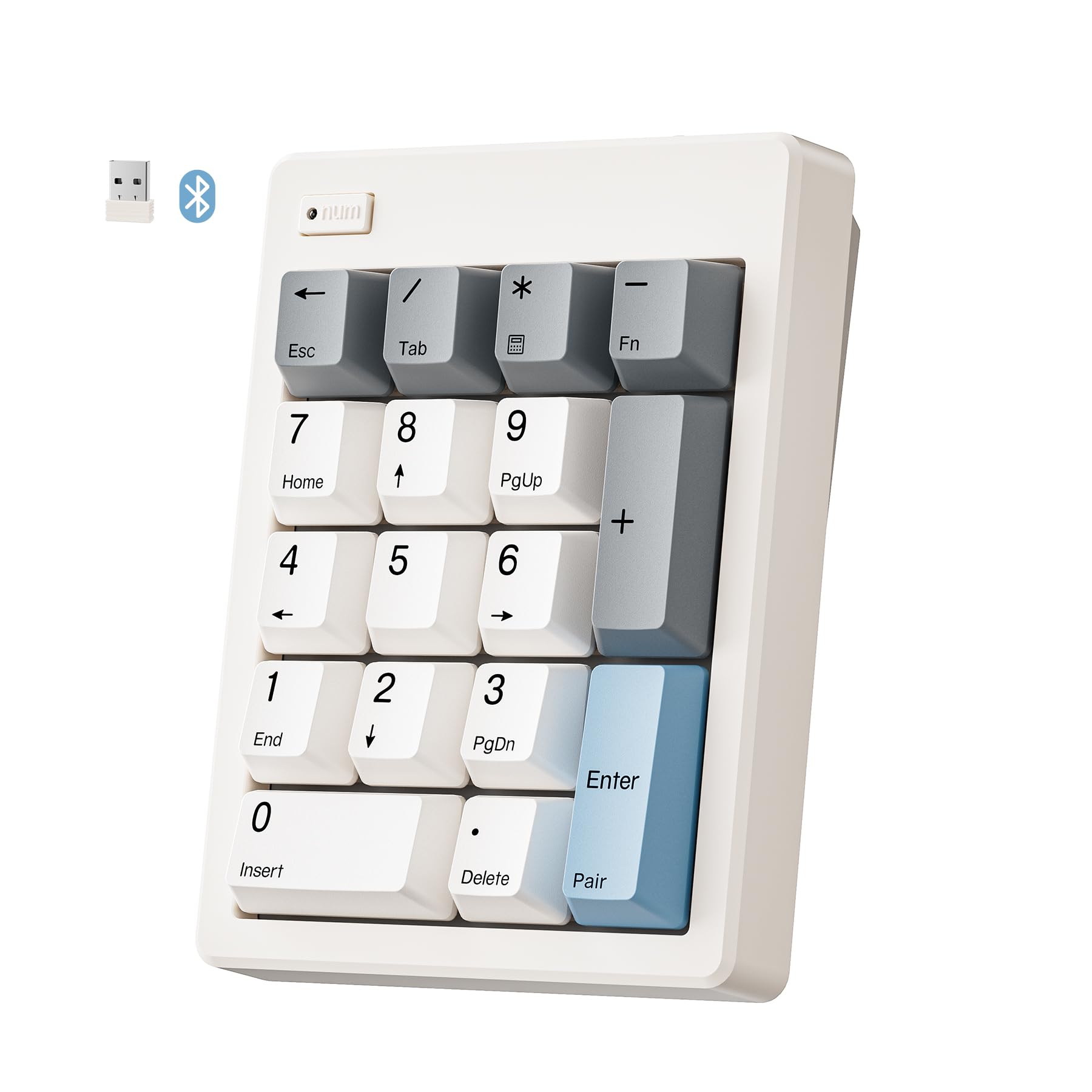
A mechanical numpad with pre-lubed linear switches and hot-swap customization.
This one is for the mechanical keyboard crowd. The FD17 runs on pre-lubed Bsun linear switches with 45-50gf actuation, giving you a consistent, smooth keystroke without tactile bumps. The gasket-mounted design plus five layers of sound-dampening foam produces what owners describe as a “creamy” typing sound — quiet enough for an office but with that satisfying mechanical character.
You get dual-mode connection via Bluetooth 5.0 and 2.4G wireless, so you can switch between a laptop, MacBook, tablet, or smartphone. The 17 keys are the most compact in the lineup but include an independent Backspace plus shortcuts for ESC, Tab, and Calculator. The hot-swap socket accepts 3/5-pin switches, so you can drop in tactile or clicky switches to match your main keyboard without any soldering.
Know the limits before you buy. The pad has no backlight and cannot be programmed, so you cannot remap keys or type in the dark. On Mac OS, the 10-key is limited: the Num Lock key acts as Clear, and Home, End, Page Up, Page Down, Insert, Delete, and arrow keys do not work. Chrome OS is not supported at all. On Android and Windows, though, buyers praise the build quality and key feel, and battery life holds at 75% after two weeks on a single AAA battery.
What makes it special
- Hot-swappable switches to match your typing style
- Creamy mechanical sound via multi-layer dampening
- Dual Bluetooth + 2.4G connectivity modes
Know before you buy
- No backlight, no remapping, no Chrome OS support
- Limited Mac OS keys — no navigation or arrow keys
Pick this if: you’re a mechanical enthusiast who wants a customizable numpad beside a TKL keyboard.
Move on if: you need navigation keys or full Mac OS functionality — this is strictly for the numbers.
7. JPHTEK Wireless Numeric Keyboard
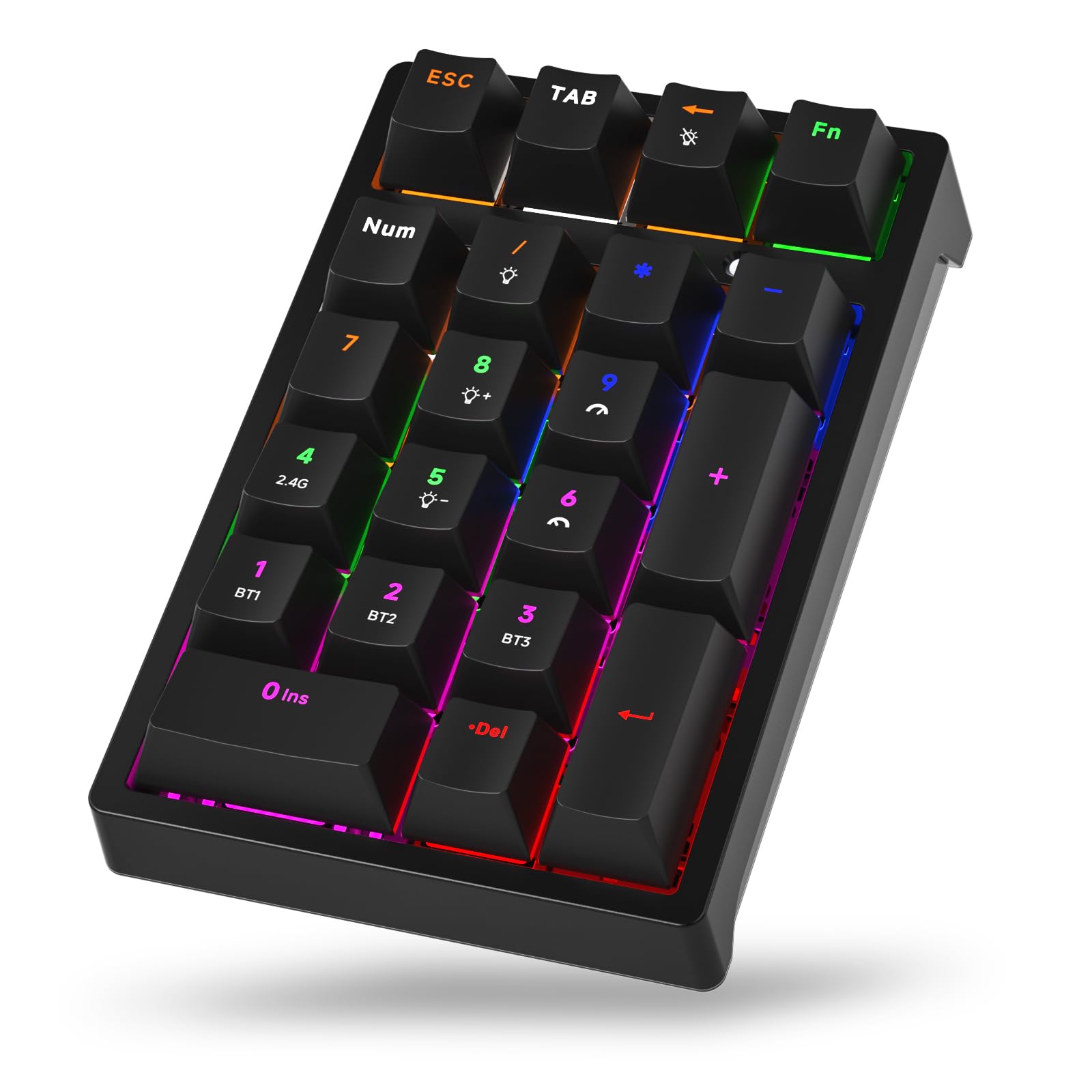
A 21-key tri-mode pad with 50-million-keystroke durability and PBT keycaps.
The most flexible connectivity of any pad here: a 3-mode system supporting 2.4GHz wireless, Bluetooth 5.0, and USB-C wired. You can connect up to 3 Bluetooth devices, 1 wireless 2.4GHz device, and 1 wired device simultaneously, switching between them with FN+1/2/3/4. That makes it a bridge device for complex multi-computer setups.
The 21 keys use double-shot injection-molded PBT keycaps rated for 50 million keystrokes, backed by a multi-layer silencing structure with sandwich foam and an IXPE switch pad. The stepped keycap and spring-type ergonomic design aim to reduce finger and wrist fatigue. Compatibility spans Windows 2000 through 10, Android, Linux, and Mac systems.
Buyers highlight the function as the strongest point — “Gets frequent use and works well” sums up the consensus. The lighting and color options get mixed reviews, with some finding the RGB undersaturated and the per-key fixed colors inflexible. The keys are clicky and loud, which is great for a home office but disruptive in a shared workspace. The cable is non-removable and the pad isn’t rechargeable, so wired mode is your charging answer.
Connectivity king: No other pad here matches its 3-mode flexibility, but the loud clicky keys and fixed RGB colors mean it’s best for a private desk, not a cubicle.
Get this if: you juggle multiple computers and want wired, 2.4G, and Bluetooth all in one pad.
Sit this out if: you need quiet keys or want full RGB customization — this pad is clicky and fixed-color.
8. iClever Bluetooth Number Pad
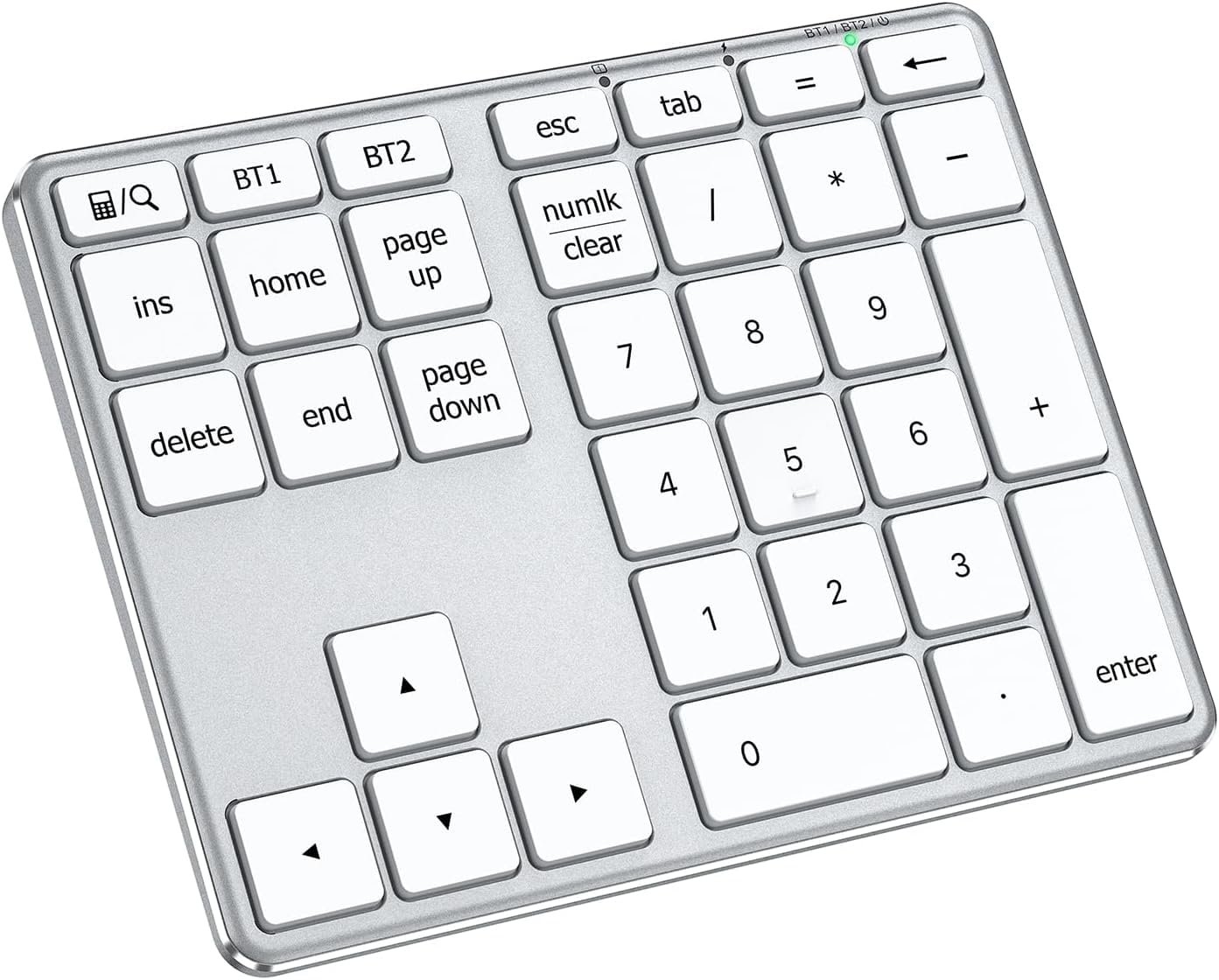
A stainless-steel-based numpad with 34 keys and a 100-hour battery.
This is the premium-feeling pick, built with a stainless steel base, ABS top cover, and smooth scissor switches rated for over 5 million keystrokes. The 34 keys include calculator, PgUp, PgDn, and Insert shortcuts, tailored for accountants and students who need speed. Its 7.65-ounce weight gives it a solid, substantial feel on the desk.
The rechargeable battery is the standout spec: up to 100 hours of use from a quick 1-hour USB-C charge. That’s the best runtime-to-charge ratio in the lineup. Dual-device connection lets you pair two devices and switch easily, with compatibility across Windows, Mac, iOS, Android, and Chrome OS.
Buyers consistently praise the functionality and connectivity, calling it a “remote work gamechanger” for its space-saving efficiency and reliable connection. The one honest concern is fast typing: a few customers note that rapid entry can drop or double digits — ‘123’ becoming ’13’ or ‘1223’ — though slow and normal typing works flawlessly. If you’re a ten-key speed demon doing heavy numeric work, that’s a real consideration; for everyday spreadsheet entry, it’s excellent.
The premium edge
- 100-hour battery from a 1-hour USB-C charge
- Stainless steel base + ABS top for durability
- 34 keys with full nav and calculator shortcuts
The catch
- Fast typists report occasional dropped or doubled digits
- Bluetooth-only — no wired mode on the USB-C port
Choose this if: you want a premium metal build with the best battery-to-charge ratio in the group.
Reconsider if: you type at extreme speed — the rare dropped digit may frustrate you during heavy data entry.
9. Samsers Full-Size Foldable Bluetooth Keyboard

A full-size 99-key folding board with a 90-hour battery and a real numpad.
This is the premium full-size answer to the TECKNET above, giving you a true desktop feel that folds. Its defining spec is the 99-key layout with a standard numeric keypad, unfolding to 13.5 x 4.5 inches with 0.63-inch standard keys that match your finger size and typing habits. The smooth metal hinge and quiet scissor-switch keys, plus non-slip PU leather (a durable synthetic material) on the bottom, make it feel like a proper desktop keyboard that happens to fold.
Three Bluetooth 5.1 chips (the wireless standard for stable, low-power connections) let you connect three devices at once — iPad, phone, and laptop — and switch between them without delay. The built-in rechargeable battery lasts up to 90 hours of use or 120 days of standby after a 2-3 hour charge, and owners confirm it: one reports “have had this for over two years and still love it.” At only 9.3 ounces, it folds magnetically into a palm-sized package, with a phone stand and velvet storage bag included.
On Android and Windows, the full-size numpad, delete, backspace, and Esc keys make it a genuine full-typing replacement. The honest caution involves Apple devices: some nav keys like Home, End, PgUp, and PgDn don’t work on macOS, and the FN lock can reset after a few minutes. On Android, though, reviewers point out the 15-second pairing and excellent responsiveness on phones and tablets.
The travel solution
- Full-size 99-key layout with a dedicated numpad
- 90-hour battery and 120-day standby
- Three-device Bluetooth 5.1 switching
Limitations to know
- No Home/End/PgUp/PgDn keys on Apple devices
- FN lock can reset after a few minutes of use
Buy this if: you want a true full-size keyboard with a numpad that folds into a bag for trips.
Pass if: you’re entirely on Mac — the missing nav keys will frustrate you.
Understanding the Specs
Key Count and Layout
The number of keys ranges from 17 on a stripped-down mechanical pad to 99 on a full-size folding board. A 22-key pad covers the ten-key essentials and is priced for simple data entry. A 34-key layout adds Page Up, Page Down, Insert, and Delete, which seriously speeds up spreadsheet navigation. Full 99-key boards include the entire QWERTY row and a number pad, so they replace your laptop keyboard entirely.
Tilt Angle and Ergonomics
The tilt angle is the angle between the flat keys and the desk surface. A 7.5° angle is flatter and more neutral; a 15° angle rolls your wrist into a more relaxed position and reduces strain during hour-long sessions. If you type constantly, the steeper angle tends to feel better; the flatter angle suits people who prefer a laptop-like profile.
FAQ
Will an Android Bluetooth keypad work with my phone or tablet?
How long does a Bluetooth number pad battery actually last?
Is a 22-key pad enough, or do I need 34 keys?
What does the tilt angle do, and why does it matter?
Can I connect a keypad to multiple devices at once?
Do I need a 2.4G receiver or is Bluetooth enough?
Are these keypads quiet enough for a shared office?
Will these work with a Windows laptop or only Android?
Which pads are rechargeable versus battery-powered?
Final Thoughts: The Verdict
For most buyers, the android bluetooth keypad winner is the TECKNET Foldable Bluetooth Keyboard because it wraps a complete 99-key desktop layout with a numeric pad, three-device switching, and a 275-day standby battery into a 7.26-inch foldable frame. If you want a dedicated numpad with the best battery-to-charge ratio, grab the iClever Bluetooth Number Pad. And for budget-conscious spreadsheet work, the JOYEKY Wireless Number Pad delivers a 34-key layout and 60-day battery at a price that’s hard to argue with.
How We Picked
We do not accept paid placement. Every pick is matched to a real buyer and a real use-case; we do not hands-on test units.
Sources & Methodology
Specifications: manufacturer listings and product documentation. Review insights: verified customer reviews, as of August 2026. Pricing: not shown on this page (it changes often); check the current price via the retailer link.
As an Amazon Associate, Gadgets Feed earns from qualifying purchases. This does not affect which products we feature.