
A digital canvas that actually feels like paper and responds to the lightest feather of a stylus is the single most important tool for any artist leaving the sketchbook behind. Most Android tablets treat drawing as an afterthought, layering a generic stylus onto a media-consumption device, which delivers a frustrating gap between intent and execution on screen.
I’m Min — the co-founder and writer behind Gadgets Feed. I’ve spent months dissecting the technical specifications of the drawing tablet market, analyzing pressure curves, refresh rates, screen lamination techniques, and processor performance to separate the real creative tools from the pretenders.
This guide distills thousands of pages of research down to the handful of devices that share one thing in common: they were engineered from the ground up for drawing. Whether you’re sketching on the couch or rendering in a studio, these picks represent the current state of the android drawing tablet.
How To Choose The Best Android Drawing Tablet
The market splits into two distinct camps: standalone tablets with a built-in Android operating system that let you draw anywhere, and pen displays that require a connection to a separate computer. Your choice depends entirely on whether you need total mobility or absolute screen real estate and color fidelity in a fixed studio setup.
Screen Technology and Surface Feel
Full lamination eliminates the air gap between the glass and the LCD panel, reducing parallax — the visual offset between where your pen touches the glass and where the ink appears on screen. An anti-glare etched glass surface, sometimes called AG glass, diffuses reflections and adds a subtle paper-like texture that prevents the stylus from sliding on bare glossy glass. These two features separate a drawing-first device from a general-purpose tablet.
Pressure Sensitivity and Stylus Performance
Pressure sensitivity is measured in levels, but the initial activation force — the minimum pressure required to register a mark — matters more than the top-level number. A stylus with 16384 levels and a 2-gram IAF will register the faintest ghost of a pencil stroke, while a 4096-level pen with a high IAF feels mushy at the low end. Battery-free EMR styluses are preferred because they never need charging and maintain consistent performance over years of use.
Quick Comparison
On smaller screens, swipe sideways to see the full table.
| Model | Category | Best For | Key Spec | Amazon |
|---|---|---|---|---|
| Wacom MovinkPad Pro 14 | Premium Standalone | Professional all-in-one mobility | 14″ OLED 3K / Snapdragon 8s Gen 3 | Amazon |
| XPPen Artist Pro 19 Gen2 | Premium Tethered | Ultra-fidelity studio work | 18.4″ 4K UHD / 16384 pressure | Amazon |
| Samsung Galaxy Tab S10 FE | Premium Standalone | Versatile Android workhorse | Exynos 1580 / 90 Hz refresh | Amazon |
| XPPen Magic Drawing Pad | Mid-Range Standalone | 16K pressure on the go | 12.2″ 2160×1440 / 16384 levels | Amazon |
| Wacom MovinkPad 11 | Mid-Range Standalone | Battery-free Wacom pen performance | 11.45″ / 8192 pressure levels | Amazon |
| TCL NXTPAPER 14 | Mid-Range Standalone | Eye-friendly large canvas | 14.3″ 2.4K / 10000 mAh battery | Amazon |
| Xiaomi Pad 7 | Mid-Range Standalone | High-refresh display at a budget | 11.2″ 3.2K / 144 Hz refresh | Amazon |
| HUION Kamvas Slate 11 | Budget Standalone | Entry-level standalone Android art | 10.95″ FHD+ / 90 Hz refresh | Amazon |
| HUION Kamvas 13 (Gen 3) | Budget Tethered | Affordable screen with 16384 pressure | 13.3″ 99% sRGB / 16384 levels | Amazon |
In‑Depth Reviews
1. Wacom MovinkPad Pro 14

The Wacom MovinkPad Pro 14 is the closest thing to a dedicated pro-level creative studio that runs on Android. Its 14-inch OLED panel delivers 3K resolution with 100% DCI-P3 coverage, producing true blacks and vivid color that make every brushstroke pop. The Snapdragon 8s Gen 3 processor paired with 12GB of RAM ensures zero lag even when working on massive multi-layer Clip Studio Paint files, and the battery-free Pro Pen 3 offers 8192 pressure levels with replacement nibs stored in the pen barrel.
The Premium Textured etched glass provides an anti-glare, anti-fingerprint surface that mimics the tooth of quality drawing paper. With Android 15 out of the box, access to Google Play’s full creative suite, and the ability to switch into a tethered pen display mode for Windows and Mac, this tablet eliminates the compromise between mobility and screen fidelity. The included microSD expansion slot means you can store years of projects without cloud dependency.
While the lack of an audio jack and a slightly finicky touchscreen are minor frustrations, the core drawing experience — low parallax, consistent pressure curve, and zero stylus charging — is unmatched in the Android space. This is the machine for the artist who needs a professional-grade canvas that fits in a bag.
Why it’s great
- Stunning 14-inch OLED with wide color gamut and true blacks
- Snapdragon 8s Gen 3 handles heavy layer counts without stutter
- Battery-free EMR stylus with excellent 8192 pressure response
Good to know
- No 3.5mm audio jack
- Requires a third-party case for full protection
- Premium price point reflects the professional build
2. XPPen Artist Pro 19 Gen2

The XPPen Artist Pro 19 Gen2 is a tethered pen display that redefines what color-accurate studio work looks like on Android. Its 18.4-inch 4K UHD screen with Calman verification and a Delta E of under 1.5 means what you see is exactly what prints. The 99.8% sRGB, 96% Adobe RGB, and 98% Display P3 coverage make it suitable for everything from web design to cinema color grading.
The dual stylus system — an X3 Pro Roller Stylus with a scroll wheel and an X3 Pro Slim Stylus with removable buttons — offers 16384 pressure levels and a 2-gram initial activation force. The AG etched glass is TÜV SÜD certified for low blue light, and the included ACK05 wireless shortcut keyboard adds a physical dial and ten customizable keys that streamline your workflow. The full-laminated display eliminates parallax completely, making the ink appear right under the nib.
This is not a portable device; it requires a computer and a power adapter. But for the artist who spends eight-hour sessions at a desk, the massive 4K canvas, dual pens with 23 extra nibs, and industry-leading color accuracy justify the investment. The wing-shaped stand and VESA mount compatibility add flexibility for complex desk setups.
Why it’s great
- Calman-verified 4K UHD panel with exceptional color accuracy
- Two high-performance styluses included with 16384 pressure levels
- Wireless shortcut remote with a physical dial for workflow efficiency
Good to know
- Heavy and not portable — a dedicated studio piece
- Not a standalone tablet; requires a computer connection
- No touchscreen functionality
3. Samsung Galaxy Tab S10 FE

The Samsung Galaxy Tab S10 FE is the safest mainstream choice for artists who also need a general-purpose Android tablet. The Exynos 1580 processor and 90 Hz refresh rate deliver smooth scrolling and responsive stylus input, while the included S Pen provides a battery-free EMR experience with handwriting assist and math solver features that extend beyond drawing into note-taking and study.
The 20-hour battery life from an 8000 mAh cell ensures you can draw through a full workday and then some. The IP68 water and dust resistance is rare in the drawing tablet category, giving you peace of mind if you sketch near a pool or outdoors. The 16:10 aspect ratio screen is bright and sharp, though it lacks the full lamination and etched glass of dedicated art tablets — you will notice more parallax and glare in bright environments.
The S Pen is comfortable and responsive, but its 4096 pressure levels feel less nuanced compared to the 8192 or 16384 offerings from Wacom and XPPen. For the artist who wants a do-everything tablet that handles Netflix, emails, and drawing equally well, the S10 FE offers the best ecosystem and long-term software support.
Why it’s great
- Excellent battery life with 20 hours of mixed use
- IP68 water and dust resistance for outdoor use
- Versatile S Pen with handwriting assist and math solver
Good to know
- Only 4096 pressure levels — less expressive than dedicated art tablets
- Glossy screen with visible parallax and reflections
- Non-removable battery limits long-term lifespan
4. XPPen Magic Drawing Pad

The XPPen Magic Drawing Pad is a standalone Android 14 tablet built from the ground up for artists, and it shows in every spec sheet detail. The 12.2-inch screen with 2160×1440 resolution and a 3:2 aspect ratio mirrors the proportions of a physical sketchbook. The AG-etched glass delivers a paper-like feel with minimal glare, while full lamination keeps parallax nearly nonexistent.
The X3 Pro Slim stylus offers an industry-first 16384 pressure levels, which translates to 100% more sensitivity than the 8192 standard. This means ultra-fine brush tapering and pressure gradients that react to the weight of a single finger resting on the pen. The 8000 mAh battery provides up to 13 hours of continuous drawing, and the 8GB of RAM plus 256GB of expandable storage handles Clip Studio Paint and ibisPaint X without swapping apps.
Tilt support is impressive at 60 degrees, but some users disable it to avoid unintended brush rotation in apps that don’t handle tilt gracefully. The included protective case with a stylus holder is a welcome addition, and the TÜV Rheinland eye comfort certification makes long sessions less fatiguing. The rear and front cameras are mediocre, but this is a drawing tool, not a photography one.
Why it’s great
- 16384 pressure sensitivity with ultra-low 2g IAF
- Full-laminated AG-etched glass with excellent paper feel
- Expandable storage up to 1TB via microSD
Good to know
- Android version locked at 14 with no OS upgrade path
- Camera quality is below smartphone standards
- Included keyboard case has a mediocre trackpad
5. Wacom MovinkPad 11

The Wacom MovinkPad 11 proves that a smaller footprint doesn’t mean compromising on pen quality. Weighing just 1.3 pounds, this 11.45-inch Android 14 tablet is designed to slip into a bag alongside a sketchbook. The battery-free slim Pro Pen 3 delivers 8192 pressure levels with three customizable buttons, and replacement nibs store conveniently in the back of the pen barrel.
The matte etched glass surface provides a subtle paper texture that reduces glare and fingerprints, making it comfortable to draw under harsh lighting. The Quick Draw feature — tap and hold the pen on the lock screen to instantly launch Wacom Canvas — mimics the immediacy of opening a physical notebook. With 8GB of RAM and 128GB of storage, it handles professional software like Clip Studio Paint without freezing, even on large canvases.
Battery life is strong, but charging is slow compared to modern smartphones. The processor, while adequate for drawing and sketch work, shows strain when applying heavy effects like liquefy or when running complex filters. It also lacks a 3.5mm audio jack and does not include a protective case. For the artist who values portability and a legendary Wacom pen feel above raw processing power, this is the ideal travel companion.
Why it’s great
- Ultra-portable at 1.3 pounds with excellent build quality
- Battery-free Wacom Pro Pen 3 with 8192 pressure levels
- Quick Draw feature for instant sketching from lock screen
Good to know
- Processor lags on intensive effects and filters
- Slow charging speed
- No case or audio jack included
6. TCL NXTPAPER 14
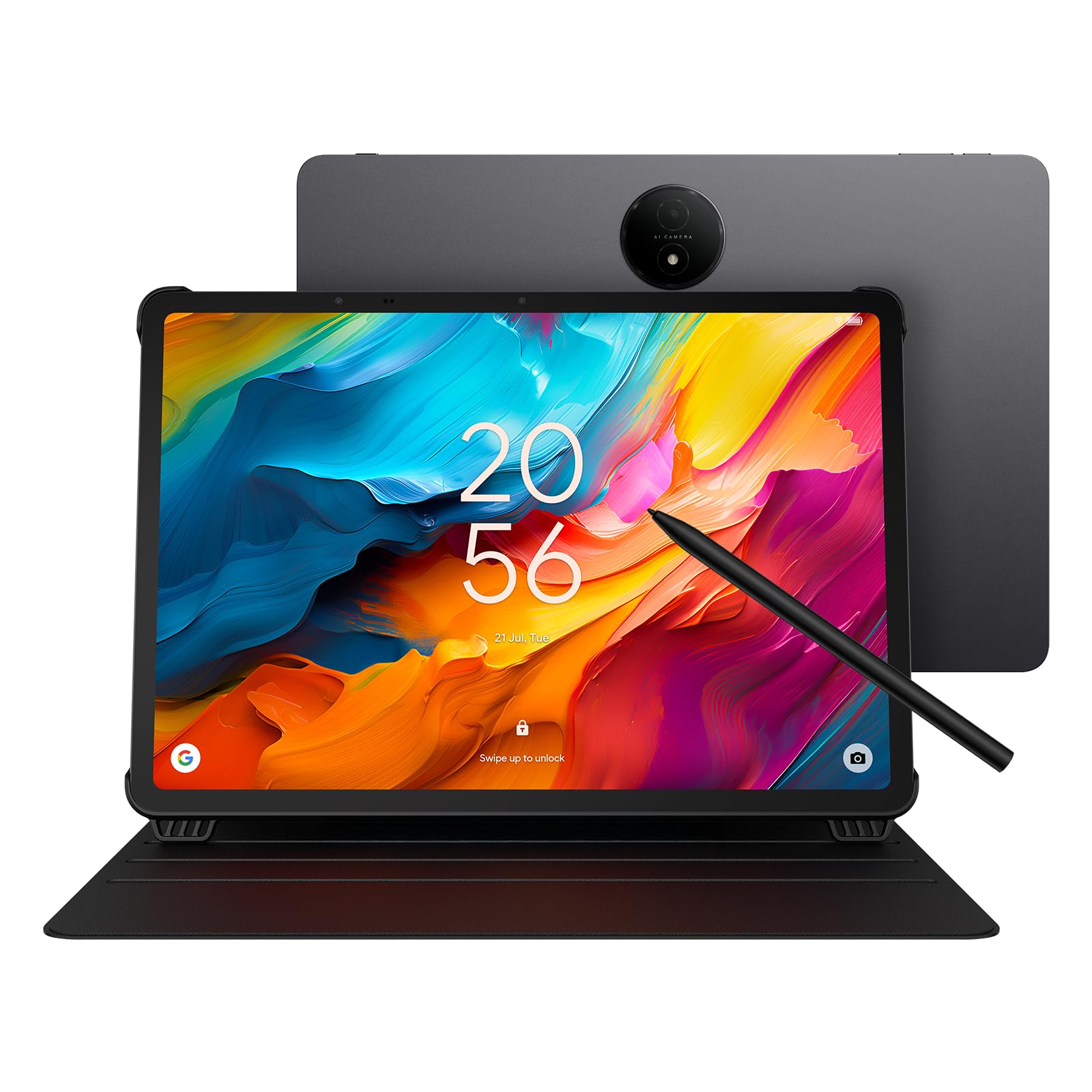
The TCL NXTPAPER 14 takes a unique approach to the drawing tablet category by prioritizing eye comfort alongside creative output. Its 14.3-inch 2.4K display uses NXTPAPER 3.0 technology to filter blue light and reduce glare without the yellow tint common on anti-blue-light filters. The three display modes — Standard, Color Paper, and Ink Paper — let you switch between crisp everyday use, comic-friendly saturation, and a monochrome reader-like experience for note-taking.
The included T-Pen stylus offers 4096 pressure levels, which is adequate for sketching and note-taking but lacks the expressiveness of higher-end pens. The 10,000 mAh battery delivers around 10 hours of real-world use, and the 33W fast charging replenishes the massive cell in under three hours. The quad stereo speakers with Smart PA produce room-filling sound, making this a capable media device when you’re not drawing.
The MediaTek Helio G99 processor handles multitasking and basic drawing apps smoothly, but it will choke on heavy layer counts in Clip Studio Paint. The dual front cameras (13MP + 5MP) are useful for video calls and reference capture. The lack of microSD support and the 60 Hz refresh rate are limiting factors for serious digital artists, but for students, musicians, and hobbyists who want a paper-like drawing experience without eye strain, the NXTPAPER 14 is a compelling choice.
Why it’s great
- Exceptional 14.3-inch eye-care display with multi-mode switching
- Massive 10000 mAh battery with fast and reverse charging
- Includes a flip case and stylus in the box
Good to know
- 60 Hz refresh rate feels dated compared to competitors
- MediaTek Helio G99 lags on intensive art apps
- No microSD expansion slot
7. Xiaomi Pad 7

The Xiaomi Pad 7 delivers a display that rivals tablets costing significantly more. Its 11.2-inch 3.2K screen with a 144 Hz refresh rate and 345 PPI pixel density produces incredibly smooth scrolling and crisp text. The Snapdragon 7+ Gen 3 processor, built on a 4nm process, provides flagship-level performance that handles demanding drawing apps and multitasking without breaking a sweat.
The 8850 mAh battery supports 45W turbo charging, though the charger must be purchased separately. With Wi-Fi 6E and Bluetooth 5.4, connectivity is future-proof, and the four-speaker system with Dolby Vision support makes this a capable entertainment device. The 3:2 aspect ratio is perfect for drawing, offering more vertical space than the typical 16:10 screen.
However, the Xiaomi Pad 7 ships without a stylus included, and finding a high-quality third-party pen with good palm rejection and low latency requires research. Running Android globally means some apps may not be optimized for the 3:2 screen. The lack of a 3.5mm headphone jack and the WiFi-only configuration (no cellular, no SD slot) also limit its versatility. It’s a phenomenal general-purpose tablet with a stunning screen, but as a dedicated drawing tablet, you must budget for a quality stylus separately.
Why it’s great
- Stunning 3.2K display with a buttery-smooth 144 Hz refresh rate
- Snapdragon 7+ Gen 3 offers excellent performance
- 3:2 aspect ratio ideal for drawing and productivity
Good to know
- No stylus included — must be purchased separately
- No SD card slot and no cellular connectivity
- Charger not included in the box
8. HUION Kamvas Slate 11

The HUION Kamvas Slate 11 is the most affordable standalone Android drawing tablet in this lineup, and it delivers a surprisingly complete package for the price. The 10.95-inch FHD+ screen with a 90 Hz refresh rate and 99% sRGB coverage provides a sharp, fluid canvas that outperforms budget tablets from generic brands. The 8000 mAh battery ensures all-day use without hunting for an outlet.
The H-Pencil offers 4096 pressure levels with 60-degree tilt recognition, and the full-laminated anti-glare screen reduces parallax to a minimum. It runs Android 14 out of the box and comes pre-installed with Clip Studio Paint, ibisPaint X (with three months of free membership), and other creative apps. The 8-core CPU, 8GB of RAM, and 128GB of storage (expandable via microSD to 1TB) provide enough headroom for moderate layer counts and file sizes.
The build quality is acceptable but not premium — the aluminum back feels good, but the included leather case is basic. Some early units shipped with touch screen and pen calibration issues, though Huion’s customer service has been responsive with replacements. The Kamvas Slate 11 is best viewed as an entry point into standalone Android drawing, offering a genuine all-in-one experience at a price that undercuts everything else on this list.
Why it’s great
- Most affordable standalone Android drawing tablet with a quality screen
- Full-laminated anti-glare display with 90 Hz refresh rate
- Pre-installed with Clip Studio Paint and ibisPaint X
Good to know
- Build quality and included case feel budget-oriented
- Pen performance can become choppy with palm rejection enabled
- Some quality control variability reported by users
9. HUION Kamvas 13 (Gen 3)

The HUION Kamvas 13 (Gen 3) is a tethered pen display that brings professional-grade pressure sensitivity to a budget-friendly price point. The 13.3-inch fully laminated screen with Canvas Glass 2.0 reduces glare and provides an anti-sparkle surface that feels closer to paper than any other tablet in its price range. The 99% sRGB coverage and factory calibration report with an average Delta E of under 1.5 ensure color-accurate output.
The PenTech 4.0 stylus delivers a staggering 16384 pressure levels with a 2-gram IAF, making it one of the most responsive pens on the market regardless of price. The dual dial controls and five programmable shortcut keys streamline the creative workflow, and the included ST300 adjustable stand allows for comfortable drawing at various angles. Single USB-C cable support (with a separate full-featured USB-C cable) reduces desk clutter compared to the older 3-in-1 cable.
The Kamvas 13 Gen 3 is not a standalone device; it requires a computer or an Android device with USB 3.1 Gen 1 and DP 1.2 support. The 200-nit brightness is adequate for indoor use but struggles in brightly lit rooms. It also tends to run warm near the port side after extended sessions. For the budget-conscious digital artist who wants the highest pressure sensitivity available and doesn’t need portability, this tethered display offers incredible value per dollar.
Why it’s great
- Industry-leading 16384 pressure sensitivity with ultra-low 2g IAF
- Factory-calibrated 99% sRGB color gamut with Delta E < 1.5
- Redesigned anti-sparkle Canvas Glass 2.0 with reduced parallax
Good to know
- Not a standalone device — requires a computer or compatible Android device
- Screen brightness limited to 200 nits
- Runs warm near the port side during extended use
FAQ
What does full lamination do for a drawing tablet?
How many pressure levels do I really need for drawing?
Can I use an Android drawing tablet without a computer?
Final Thoughts: The Verdict
For most users, the android drawing tablet winner is the Wacom MovinkPad Pro 14 because it combines a stunning OLED display, flagship processor, and the best battery-free stylus on the market into a portable all-in-one package. If you want the absolute highest pressure sensitivity and a paper-like studio canvas, grab the XPPen Magic Drawing Pad. And for a budget-friendly entry point into the category, nothing beats the HUION Kamvas Slate 11.