
Our readers keep the lights on and my morning glass full of iced black tea. As an Amazon Associate, I earn from qualifying purchases.
Specs are compiled from manufacturer listings and verified buyer reviews and can change over time — please confirm the key details on the product page before buying.
Typing a Wi-Fi password with a TV remote is a slow, frustrating ritual. A wireless keyboard with a touchpad lets you type passwords and navigate menus from the couch without a laptop. This guide compares nine wireless keyboards that all work with Android TV boxes and smart TVs, focusing on battery life, connection type, and whether the built-in touchpad actually feels usable.
I’m Min — the founder and writer behind Gadgets Feed. This guide is built by comparing the manufacturers’ published specifications and the patterns across verified customer reviews, so you get each pick’s real strengths and trade-offs instead of marketing spin.
You are looking for a device to control your streaming box, and the android keyboard for tv category has options from pocket-sized remotes to full-size lap boards, and this guide breaks down which style fits your setup.
Our Picks at a Glance


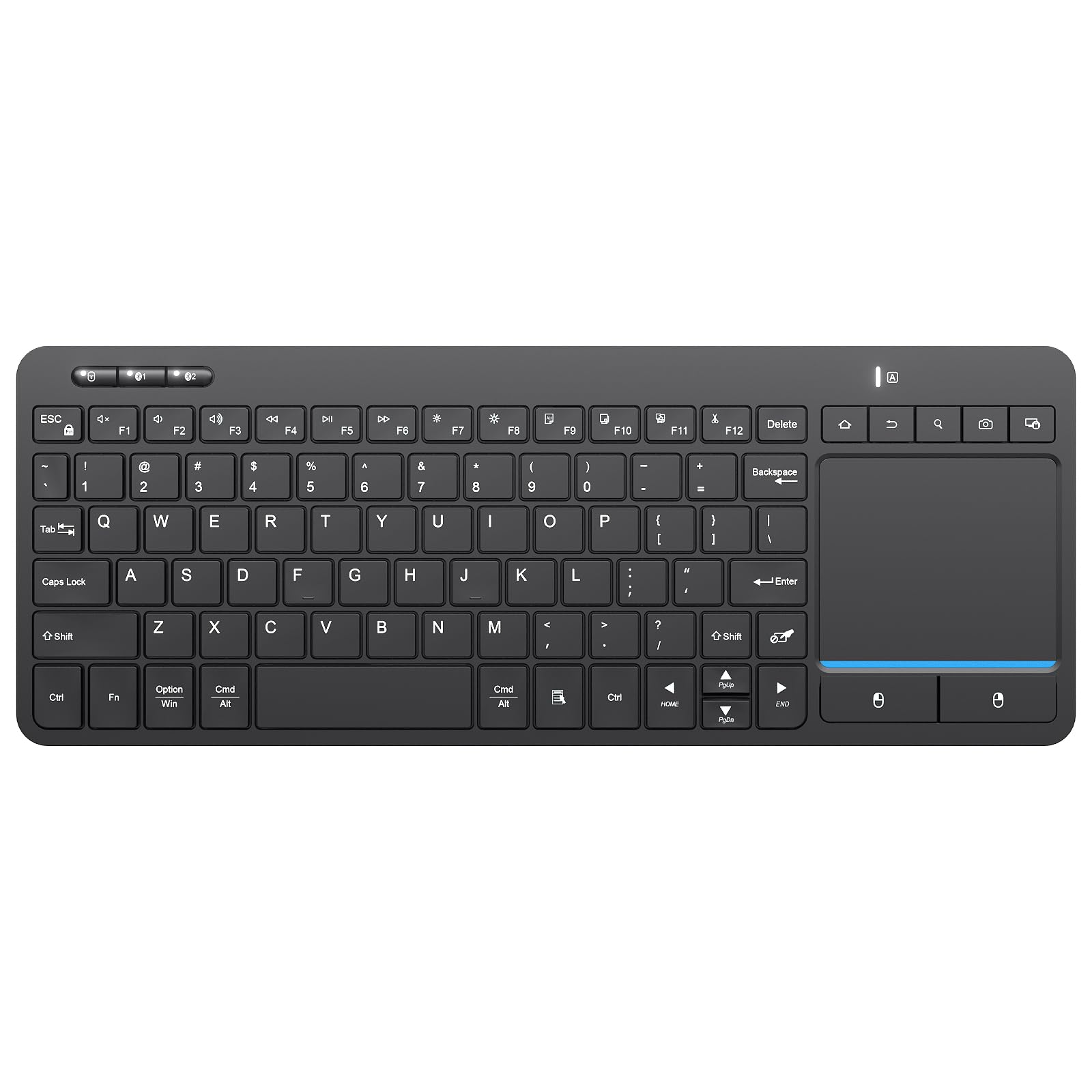
How To Choose The Best Android Keyboard For TV
Consider whether you mostly type long queries or just scroll menus. Are you typing long search queries and passwords, or do you mostly need to scroll menus and press play? That choice determines if a full-size keyboard or a compact air-mouse remote suits you.
Connection Type: 2.4GHz vs Bluetooth
A 2.4GHz connection uses a small USB dongle you plug into your TV box. It usually wakes instantly and feels more responsive, but it occupies a USB port. Bluetooth frees that port and works with devices that hide their USB ports, but some keyboards take a few seconds to wake from sleep. Many premium models now support both, giving you flexibility.
Navigation: Touchpad vs Air Mouse
A touchpad works like a laptop, letting you glide a finger to move the cursor. An air mouse uses a gyroscope (a sensor that detects motion) so you move the whole remote in the air to point the cursor, much like a Wii remote. Air mice are great for browsing but can feel twitchy if the sensitivity is not adjustable.
Extra Features Worth Paying For
Backlit keys are essential for dark-room viewing. IR learning keys can replace your TV’s own remote for power and volume. Battery type matters too: some use AA batteries that last up to 18 months, while others are rechargeable and need charging every few weeks. Always verify features against the product’s official specs.
Quick Comparison
| Model | Best For | Connection | Navigation | Power Source | Amazon |
|---|---|---|---|---|---|
| Logitech K400 Plus★ Best Overall | Full-size lap typing | 2.4GHz RF | Large Touchpad | 2 AA Batteries | Amazon |
| Arteck Universal BacklitBest Value | Multi-device tablet use | Bluetooth | None (Keys only) | Rechargeable | Amazon |
| Bnnwa Multi-DeviceMost Versatile | 3-device switching | BT + 2.4GHz | Multi-touch Trackpad | 2 AAA Batteries | Amazon |
| Rii K06 | Pocket-sized remote | BT + 2.4GHz | Small Touchpad | Rechargeable | Amazon |
| Rii 2.4G/BT Aluminum | Laptop-style feel | BT 5.1 + 2.4GHz | Touchpad | Rechargeable | Amazon |
| BuzzTV ARQ-100 | BuzzTV box owners | 2.4GHz RF | Air Mouse | Alkaline | Amazon |
| Dupad G60S Pro | Sofa PC control | BT 5.0 + 2.4GHz | Air Mouse + Touchpad | Rechargeable | Amazon |
| Dupad MX3 Pro Voice | Voice input & IR | 2.4GHz RF | 6-Axis Air Mouse | 2 AAA Batteries | Amazon |
| Samsers Foldable | Travel & portability | Bluetooth 5.1 | Multi-touch Trackpad | Rechargeable 500mAh | Amazon |
In‑Depth Reviews
1. Logitech K400 Plus Wireless Touch TV Keyboard
Our pick — over 4★ from 40,000+ verified ratings; the strongest balance of quality and price.
A full-size lap board that turns your TV box into a lean-back PC experience.
For ten-finger typing instead of thumb-pecking, this is the top pick. It pairs an 84-key layout with a built-in touchpad that owners say is 2.5x larger than typical media keyboards, giving you a laptop-like feel without a mouse. The wireless range stretches up to 33 ft, so you can keep it on your lap or coffee table and it stays responsive across the room.
Power is a genuine highlight: two AA batteries deliver up to 18 months of use, and an on/off button stretches that even further. The receiver plugs straight into a USB port on your Android TV box and works instantly. Buyers report it is compatible with Samsung smart TVs, Linux systems, and Macs, and the dedicated volume and mute keys make it a favorite for media apps like Emby and VLC.
Build quality is what wins people over. The keys are comfortable and tactile, and a spill-resistant design means a stray drink drop is not a disaster. The main trade-offs are a lack of backlighting for dark rooms and the fact it is receiver-only, so there is no Bluetooth for devices without a USB port. If you type a lot of searches and passwords from the couch, the comfort is worth the larger footprint.
Why it wins
- Large, comfortable keys for full touch typing
- 18-month battery life on two AA batteries
- 33 ft wireless range with a reliable USB receiver
Know the limits
- No backlight — hard to see keys in a dark room
- Receiver-only, so no Bluetooth for port-free devices
Reach for this if: you want a comfortable full-size keyboard for heavy typing and media control from the sofa.
Think twice if: you need backlit keys or a gadget that slips into a pocket.
2. Arteck Universal Backlit Wireless Bluetooth Keyboard
An ultra-thin Bluetooth slab that goves you laptop feel for half the weight.
This one is for the multi-device owner who wants one keyboard for the TV box, tablet, and phone. It connects via Bluetooth to all four major systems — Android, iOS, Windows, and Mac OS — and pairs in under three minutes per the product description. The 6-month battery life (based on two hours of use a day with the backlight off) means you rarely think about charging.
Seven backlight colors with two brightness levels make it a rare pick that looks good in a dark media room. At 0.37 lb and just 0.24 inches thin, it disappears into a backpack or messenger bag, which is why owners praise its size and portability. The keys are standard-sized, so touch-typing stays accurate, and it works while charging via USB cable.
The catch is that there is no built-in touchpad, so you will need a separate mouse or remote for cursor control. A few owners note a slight wake lag of about 10 seconds after sleep, and the backlight turns off after 10-15 seconds of inactivity to save power. This is a typing tool, not a complete TV navigation solution.
Smart pick for: a budget-friendly Bluetooth keyboard that splits time between a TV box, iPad, and laptop.
Not for: couch warriors who want cursor control built into the same device.
3. Bnnwa Multi-Device Wireless Bluetooth Keyboard with Touchpad
One keyboard, three devices, and a smooth switching key that keeps your work flowing.
If your setup mixes a TV box, a laptop, and a phone, this keyboard shines. It offers three connection modes — one USB dongle plus two Bluetooth — and lets you jump between them with a single key press, so you can type a search on your TV and immediately answer a message on your phone without re-pairing. The 33 ft operating range covers any living room comfortably.
The multi-touch trackpad supports zooming, scrolling, and pointing gestures, and owners mention it feels responsive for light to medium use. Quality is a common point of praise for the price, and the compact layout saves space on a coffee table while keeping useful direction buttons. The ABS plastic build is wear-resistant, so the key legends should not rub off quickly.
Two AAA batteries last 2-3 weeks if you remember to switch the keyboard off; the sleep mode still drains slowly, which is the recurring gripe. The touchpad is “mediocre” for some and the keys are smaller than average, which may cramp long typing sessions. It is a solid all-rounder for the price, not a marathon-typing tool.
Standout strengths
- Switch between 3 devices instantly with one key
- Multi-touch trackpad with zoom and scroll gestures
- Wear-resistant ABS build for daily use
Watch outs
- Battery drains in sleep mode if not powered off
- Keys smaller than standard, tight spacing
Grab it if: device-hopping is your daily routine and you want one input for everything.
skip it if: you need a full-size keyboard for hours of continuous typing.
4. Rii K06 Backlit 2.4G/BT Mini Keyboard

A thumb-sized controller that puts a QWERTY keyboard, touchpad, and TV remote in one hand.
For the person who wants to ditch the original remote entirely, this mini keyboard is a complete replacement. It has 10 IR learning keys, so you can program it to control your TV’s power and volume, then use the 2.4G or Bluetooth connection for your Android TV box, Fire Stick, or PC. Customers note it works with newer Samsung QLED TVs and Android phones cast to the big screen.
The backlit keys are bright enough for dark rooms, and the built-in touchpad includes mouse left and right buttons for easy copy and paste. A USB-C charging port tops up the built-in lithium battery, and owners say the charge lasts impressively — one notes charging only once in six months. The auto-sleep and wake function preserves that battery when you set it down.
Size is the honest trade-off. At 5.9 x 2.3 inches, it is pocket-sized and great for thumb-typing passwords, but the non-staggered keys and small spacebar slow down serious typing. The trackpad is also small and a bit touchy. This is a navigation and quick-input tool, not a full typing deck.
Perfect for: replacing multiple remotes with one pocketable device for TV, PC, and streaming sticks.
Reconsider if: you plan to type long emails or documents from the couch.
5. Rii 2.4G Wireless / Bluetooth Aluminum Alloy Keyboard

An aluminum lap board with laptop-style keys that feels far pricier than it is.
This keyboard earns its premium reputation through feel. Buyers consistently compare its tactile, laptop-like keys favorably against the Logitech K400, calling them more responsive and comfortable for extended use. The aluminum alloy and ABS construction makes it sturdy and rigid, with a 1.6cm angle bar that improves typing ergonomics on a flat surface.
It supports both Bluetooth 5.1 and 2.4GHz RF, so you can connect to a TV box, PC, or tablet with one keyboard. The easy-switch keys let you pair up to 2 devices and toggle between them instantly. It is rechargeable via USB-C, and the built-in battery handles light daily use without constant charging. The touchpad has separate physical click buttons, which owners prefer over a single rocker bar.
The main complaint is the lack of a backlight and an Fn lock, despite some listings implying otherwise. The trackpad defaults to a fast sensitivity that needs OS-level tuning, and the 2.4G receiver slot is a bit loose. It is a great daily driver for sofa PC control, but reliability over the long term is still unproven according to some.
What impresses
- Superior key feel with scissor switches
- Dual Bluetooth 5.1 and 2.4GHz connectivity
- Rigid aluminum build for lap use
What to expect
- No backlight for dark viewing
- Trackpad needs sensitivity adjustment from the start
Best for: anyone who values typing comfort and sturdy build over extra features like backlighting.
Look elsewhere if: you watch in a pitch-dark room and need illuminated keys.
6. BuzzTV ARQ-100 Wireless Air Mouse Keyboard Remote

A purpose-built air mouse for BuzzTV boxes that turns pointing into a natural wrist motion.
If you own a BuzzTV Android device, this remote is designed specifically for it. The built-in air mouse lets you move the cursor by pointing the remote across the room, a major upgrade over tapping arrow keys, according to owners who have used the stock remote. The forward-facing controls sit comfortably in your hand, with the air mouse button positioned right of the info key for easy access.
Flip it over and you get a full QWERTY keyboard on the reverse side, which reviewers point out is “perfect for typing in your search and logins.” The 2.4GHz wireless connection keeps things stable and responsive, and the remote weighs just 0.15 kg, so it feels light during long viewing or gaming sessions. It also handles basic volume and app navigation from a single device.
The limitation is scope: it is built for BuzzTV boxes, not general Android TV boxes, and it supports only one device at a time. Reliability gets mixed feedback, with some units acting up after a week of use. If you are all-in on the BuzzTV ecosystem, this is the natural companion.
Ideal for: BuzzTV owners who want the convenience of an air mouse and QWERTY in one hand.
Not ideal for: general-purpose Android TV boxes or multi-device households.
7. Dupad G60S Pro Bluetooth Voice Remote with Keyboard

A gyroscope-powered air mouse and backlit keyboard combo built for the sofa PC crowd.
This remote packs a 6-axis gyroscope (a motion sensor that tracks tilt and speed) so you can point it in the air to control the cursor, plus a multi-touch touchpad with gesture support for scroll and zoom. It works with Nvidia Shield, projectors, Android TV boxes, and PC, making it a strong fit for home theater PC setups. Owners praise the gyro mouse for sofa control and the IR power-on feature.
Dual-mode connectivity gives you both 2.4G and Bluetooth 5.0, and the LED backlit keys make dark-room use comfortable. The voice button works with Google Assistant for searches, though it only functions in apps with built-in voice input. USB-C charging keeps the internal lithium battery topped up, and light users report about two months between charges.
The honest catch is the button mapping. Some units arrive with the back and next buttons acting as volume controls, and the Home button may send a Back command instead, which breaks double-press recent-app switching. Quality is mixed — some call it high quality, others say it feels cheap. It is feature-rich but demands a tolerance for firmware quirks.
Packed with
- 6-axis gyroscope for precise air mouse control
- Backlit keys with multi-touch touchpad
- Voice search via Google Assistant
Be aware
- Button mapping may require remapping software
- Quality control is inconsistent across units
Choose this if: you want a gyro air mouse, backlight, and voice search in one remote for a PC-based TV setup.
Pass if: you expect flawless button behavior straight from the start.
8. Dupad MX3 Pro Voice Mini Keyboard

A budget air mouse with a clever 38-key layout that types every character.
This is the entry-level air mouse that still manages to feel complete. The 38-key layout uses an Alt key to switch between letters and punctuation, so it enters all characters despite the small footprint. It runs on a 6-axis gyration system — made of a 3-gyro and 3-G sensor — that controls the mouse accurately for motion-sensing games and general navigation.
The IR learning function is a standout at this tier. Shoppers say the IR portion works flawlessly with 2012 LG and Samsung TVs, and programming the buttons takes about five minutes. It also connects via a stable 2.4GHz RF receiver with a range up to 10 meters, so you can control your Android TV box from across the room. The built-in microphone enables voice input for apps that support it.
The double-sided design means a backlit keyboard on one side and a remote on the other, but the LED backlight is the tricky part — some versions lack it entirely, leaving numbers nearly invisible in the dark. Compatibility is also narrow: it is NOT compatible with most Samsung, Sony, LG, TCL, or Roku smart TVs, so check your box before buying. Setup can be fiddly, with poorly written instructions.
Good value if: you have a compatible Android TV box and want an air mouse plus IR remote on a budget.
Avoid if: you own a major-brand smart TV or hate fiddly setup processes.
9. Samsers Full-Size Backlit Foldable Bluetooth Keyboard

A full-size keyboard that folds to phone size, with a 110-hour battery for trips.
This is the traveler’s dream: a standard-size keyboard with 0.63-inch keys that folds in half via a metal hinge, dropping to a palm-sized slab that slips into a purse or briefcase. The PU leather exterior and non-slip base keep it steady on a table, and the multi-touch trackpad means you do not need a separate mouse. It connects to up to 3 devices via Bluetooth 5.1 and switches between them without delay.
Battery life is the headline spec. The built-in 500 mAh battery lasts up to 110 hours without backlight, or 300 days on standby, after a 2-3 hour charge. For a TV setup, that means weeks of nightly use before you think about the USB-C cable. Adjustable 7-color backlight with 4 brightness levels (High, Medium, Low, Off) lets you match the lighting in any room.
Owners praise the near full-size layout for accurate touch-typing and the firm, quiet scissor-switch keys. The honest downsides are a quirky backspace that can cause random line jumps, and slow Bluetooth reconnection after each wake. At 11.0 ounces it is light, but the folding hinge means it is best on a solid surface, not your lap.
Travel-friendly
- Folds to palm-size with a magnetic hinge
- 110-hour battery on a single charge
- Full-size keys for accurate touch-typing
Trade-offs
- Random cursor jumps with backspace key
- Slow to reconnect after sleep on some devices
Best travel companion: if you want one portable keyboard for your TV box, tablet, and phone on the go.
Not for: lap-users who prefer a rigid, non-folding deck for long sessions.
Understanding the Specs
Wireless Range & Stability
2.4GHz RF connections use a USB dongle that typically offers 30+ feet of range and instant wake, making them the most reliable for TV control. Bluetooth connections free up your USB port but can add a few seconds of wake lag. The best keyboards offer both modes, so you can fall back if one fails.
Battery Type & Life
Rechargeable lithium batteries are convenient but need weekly or monthly charging, while AA-powered models like the Logitech K400 Plus can last up to 18 months and are easy to swap. Foldable travel keyboards often use smaller rechargeable cells with standby times measured in months, making them ideal for occasional use.
FAQ
Will a wireless keyboard work with my Android TV box?
What is the difference between an air mouse and a touchpad?
How do IR learning keys work?
Is voice search on these keyboards like Alexa?
Can I use one keyboard with my TV, tablet, and phone?
How long does the battery last on a typical TV keyboard?
Why does my cursor feel laggy or jumpy?
Are there keyboards with backlit keys for dark rooms?
Final Thoughts: The Verdict
Across the board, the android keyboard for tv winner is the Logitech K400 Plus because its full-size keys, large touchpad, and 18-month battery make it the most reliable everyday companion for streaming and browsing. If you want a backlit keyboard that also works with your tablet and phone, grab the Arteck. And for travelers who need a full-size keyboard that folds away, the Samsers is the one to reach for.
How We Picked
We do not accept paid placement. Every pick is matched to a real buyer and a real use-case; we do not hands-on test units.
Sources & Methodology
Specifications: manufacturer listings and product documentation. Review insights: verified customer reviews, as of August 2026. Pricing: not shown on this page (it changes often); check the current price via the retailer link.
As an Amazon Associate, Gadgets Feed earns from qualifying purchases. This does not affect which products we feature.