
Our readers keep the lights on and my morning glass full of iced black tea. As an Amazon Associate, I earn from qualifying purchases.
Specs are compiled from manufacturer listings and verified buyer reviews and can change over time — please confirm the key details on the product page before buying.
Typing on a phone or tablet screen is slow and tiring. A real keyboard changes that — but you have to know which one actually works with your Android device and which one will fight you on battery life, Bluetooth pairing, and key layout. This guide answers that directly: it’s built around the Logitech K480 as the best overall, because it nails the three things that matter most — instant device switching, a comfortable full-size layout, and dependable connectivity.
I’m Min — the founder and writer behind Gadgets Feed. This guide is built by comparing the manufacturers’ published specifications and the patterns across verified customer reviews, so you get each pick’s real strengths and trade-offs instead of marketing spin.
From full-size desks to pocketable travel boards, these are the best android keyboards for every kind of setup, and each pick is grounded in real owner experiences.
Our Picks at a Glance


How To Choose The Best Android Keyboards
Before you pick a keyboard, think about where you’ll use it and how many devices you juggle. A desk-bound full-size board with a wrist rest solves a different problem than a foldable travel combo, and the right choice depends on your daily setup.
Multi-Device Switching Matters More Than You Think
The best Android keyboards let you pair with a phone, tablet, and laptop at the same time and flip between them with one button press. Some do this with a physical dial (like the Logitech K480), others with an Fn-key combo. If you switch between a phone and tablet throughout the day, this single feature saves you from re-pairing constantly.
Key Layout and Travel Distance
Key count directly dictates how fast you can type. A full 109-key layout with a number pad lets you fly through spreadsheets, while a compact 59-key board means reaching for Fn combinations for punctuation. Low-profile keys with a short travel distance (like 1.3mm) feel quieter and lighter, but some typists prefer the springy feedback of deeper keys.
Quick Comparison
| Model | Best For | Key Count | Connection | Battery | Amazon |
|---|---|---|---|---|---|
| Logitech K480★ Best Overall | Desk & tablet cradle | 78 | Bluetooth | 2x AAA, 24 months | Amazon |
| Arteck HB305-2Best Value | Full-size on a budget | 109 | Bluetooth | Rechargeable, 6 months | Amazon |
| Bnnwa TouchpadBuilt-in Trackpad | TV & HTPC control | 90 | Bluetooth + 2.4G | 2x AAA | Amazon |
| DETUOSI 8″ Case | 8-inch tablet protection | — | Bluetooth | Rechargeable | Amazon |
| Doohoeek Mini | Phones & Z Fold | 59 | Bluetooth | Rechargeable | Amazon |
| Kenkor Mini | Wallet-size travel | 78 | Bluetooth | Rechargeable, 80 hrs | Amazon |
| Arteck HD323 | Ergonomic multi-device | 78 | Bluetooth + USB-A/C | Rechargeable | Amazon |
| Lenovo Multi-Device | Slim desk companion | 75 | Bluetooth + USB-C | Rechargeable, 60 hrs | Amazon |
| Ghajz Foldable Combo | Travel with mouse | Full-size fold | Bluetooth x2 + USB-A/C | Rechargeable, 150-200 days | Amazon |
In‑Depth Reviews
1. Logitech K480 Wireless Multi-Device Keyboard
Our pick — over 4★ from 23,500+ verified ratings; the strongest balance of quality and price.
The desk anchor that cradles your tablet and switches devices with a single dial turn.
This is the keyboard that turns a phone or tablet into a mini workstation. The built-in cradle holds your device at a comfortable reading angle while you type, and the Easy-Switch dial lets you jump between three paired Bluetooth devices — a phone, a tablet, and a Fire TV — by simply turning a knob. Setup is reliably quick, and once paired, the connection stays rock-solid with no noticeable lag.
The 78-button layout is full-sized enough for touch typing, and buyers specifically praise the zero-lag response and Logitech’s build quality. It runs on two pre-installed AAA batteries that Logitech rates the battery for up to 24 months of use., with a battery-indicator light so you are not caught off guard. The board is also spill-resistant, so a knocked-over coffee does not end your workday.
The trade-off is weight and thickness. At 1.8 pounds and 0.8 inches tall, it is notably heftier and thicker than a slim travel board — one buyer found it too bulky for small bags but ideal for a desk or lap at home. The keys are on the noisier side, and the device cradle won’t fit tablets in thick protective cases. If you want one keyboard that stays put and handles everything, this is it.
What Wins People Over
- easy 3-device dial switching
- Built-in cradle holds phone or tablet
- 24-month battery life on two AAAs
- Spill-resistant for desk accidents
The Real Trade-offs
- Heavy and thick for travel bags
- Keys are noticeably loud
- Cradle won’t fit bulky tablet cases
Grab this if: you want a desktop workhorse that keeps a phone or tablet propped and paired all day.
Look elsewhere if: you need a featherlight board for daily commutes — this one stays home.
2. Arteck HB305-2 Universal Multi-Device Bluetooth Keyboard
A full 109-key layout that is ultra-thin and lasts half a year on one charge.
It pairs with up to three devices and switches between them with a single key press, and the broad compatibility covers Windows, iOS, iPad OS, Android, and Mac OS.
What owners rave about is the battery. It uses a rechargeable lithium cell that Arteck rates for six months between charges (based on two hours of non-stop use per day), and real-world reports back it up — one reviewer noted the green LED indicator was still on after weeks of use. The full-size keys with a side number panel get consistent praise for comfortable touch typing, and pairing with an iPad Pro or a laptop is quick and painless.
The honest catch is the plastic shell. Some owners found the case flexes and clanks slightly, easily fixed with small pads, and there’s no function lock — a real annoyance for spreadsheet work or coding that relies on F-keys. For home use, casual typing, or anyone who wants a number pad without paying premium prices, this delivers.
Why It’s a Steal
- Full number pad in a 0.24-inch body
- 6-month battery life on one charge
- 3-device switching with one key
- Springy, comfortable full-size keys
Minor Gripes
- Plastic case flexes without a pad
- No function lock for F-key heavy work
Reach for this if: you do lots of number entry and want a lightweight full-size board.
Think twice if: you code or live in spreadsheets that need a dedicated function row.
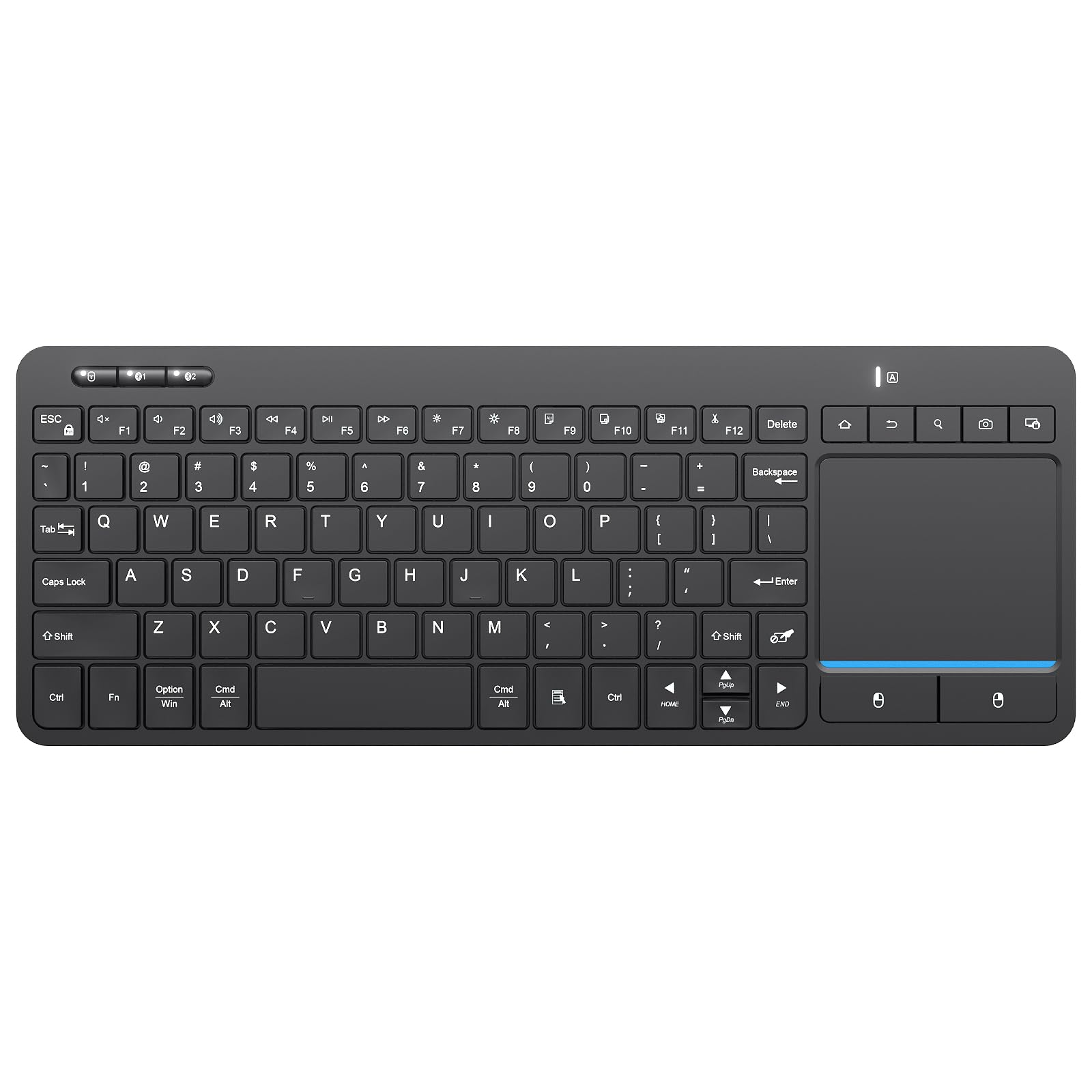
3. Bnnwa Multi-Device Wireless Bluetooth Keyboard with Touchpad
One board that removes the mouse entirely with a multi-touch trackpad built in.
This is the keyboard for anyone who controls a TV, a home-theater PC, or an Android setup from the couch. It pairs a full QWERTY layout with a multi-touch trackpad that supports pointing, zooming, and scrolling gestures, so you never need a separate mouse. It connects via Bluetooth or a 2.4 GHz USB receiver with a 33-foot operating range, and you can flip between three devices with a single key press.
Build quality punches above its price — owners describe it as solid and well-made, a near-perfect upgrade from the popular Logitech K400. The keys are quiet, and switching between Windows, Mac, Dex, and a Firestick works smoothly across three paired devices. The trackpad is sensitive and responsive for everyday navigation, and the compact layout keeps it easy to carry for travel or library work.
The mixed feedback centers on two things: battery life and the smaller-than-average keys. With 2x AAA batteries, one owner reported getting only 2-3 weeks unless you power it off between uses, while another went through three battery changes in a week. The compact layout also means a small right shift key and tight spacing between the trackpad and keys, which takes getting used to for long sessions. Buy it for light-to-medium couch duty, not full-time desk work.
Built for the Couch
- Multi-touch trackpad for mouse-free control
- 33-foot wireless range
- Quiet keys with solid build
- Bluetooth + 2.4G dual connection
Know Before Buying
- Battery drains fast unless powered off
- Small shift key and tight spacing
Best for: HTPC and TV control where a mouse is a hassle.
Not for: all-day typists — the compact spacing gets tiring.
4. DETUOSI Universal 8.0 Inch Android Tablet Case with Keyboard

A protective folio and detachable Bluetooth keyboard in one slim package for 8-inch tablets.
This is less a standalone keyboard and more an all-in-one armor for an 8-inch tablet. The synthetic leather folio wraps your device with four elastic pull-loop corner buckles that hold it firmly without shaking, and the keyboard detaches magnetically so you can use it separately or leave it attached. The integrated stand folds into multiple positions for typing, reading, or watching, and a magnetic strap keeps the whole case closed when you throw it in a bag.
It fits a wide range of 7.9-8.7 inch tablets — from iPad Mini models to Samsung Tab 8.0 and Fire HD 8 — and the slim 5mm keyboard has a 10-meter Bluetooth range. Owners who use it daily with a work tablet report it still functions beautifully nearly a year later, and the stand is sturdy enough for regular use. For the price, it gives you both protection and typing capability in one purchase.
The durability is the recurring concern. Several owners had the plastic corner holders or the back stand break within weeks — especially when the case gets stuffed into an over-packed backpack. There’s also no rear camera hole, so you’ll need to pop the tablet out for photos. This is a solid budget case-and-keyboard combo if you treat the corners gently.
What it delivers: full protection plus a detachable 10-meter Bluetooth keyboard for 7.9-8.7 inch tablets.
The honest limit: corner clips and stand can fail under heavy abuse — handle gently.
5. Doohoeek Universal Bluetooth Keyboard for Samsung Galaxy Z Fold

A pocket-book-sized board with an any-angle kickstand built for folding phones.
Designed specifically for big-screened phones like the Samsung Galaxy Z Fold and the iPad mini, this miniature keyboard measures just 7.68 x 3.35 inches and weighs 174 grams — small enough to slip into a purse or jacket pocket. It pairs with up to two devices via Bluetooth, and you switch between them by pressing Fn + 1 or Fn + 2. The fold-out leather cover doubles as a sturdy stand that adjusts to any angle for typing or viewing.
Owners are consistently surprised by the build quality for the price, calling it sleek, light, and sturdy with responsive keys and a reliable, lag-free Bluetooth connection. The orange accent keys help in dim light, and the keyboard works across Android, Windows, and iOS. As a travel companion, it’s been described as a “mini typewriter” that serves a fraction of the cost of a dedicated folding phone keyboard.
The catch is the learning curve. With only 59 keys, there’s a left-hand spacebar, an off-center layout, and punctuation (apostrophes, quotes) that requires the Fn key — one owner found it frustrating for dialogue-heavy writing. There’s no backlight and no trackpad, and you may need a hard reset if your device stops detecting it. It’s best for short-form replies and notes, not marathon typing sessions.
Standout strength: genuinely pocketable at 174g with a slick leather kickstand case.
Who it fits: heavy phone typists and Z Fold owners who want real keys on the go — but expect a real adjustment period.
6. Kenkor Universal Wireless Keyboards Portable Mini Keyboard

A wallet-sized Bluetooth board with an 80-hour battery that pairs to phones and tablets.
At 7.68 x 3.34 inches and 193.4 grams, this keyboard is the same footprint as a small wallet and matches the exact proportions of an iPad mini. It folds into a slim package with a PU leather case that doubles as an adjustable stand, and The built-in 180 mAh rechargeable battery delivers more than 80 hours on a single full charge. — with a 2-3 hour charge time via the included Type-C cable. It connects to Android, Windows, and iOS and pairs with fire tablets and smart TVs too.
Real depressible keys make it easier on the fingers than typing on a phone screen. One owner who struggled with a tablet that only registered pen touches found this keyboard fixed the problem entirely, pairing easily and including a stand for the tablet or phone. It survived a year of reliable use including a drop, and the keys even come off for cleaning after sticky spills. One buyer mentioned it halved their weekly report-typing time.
The size is the main limitation. Buyers with XL hands found it too small for fast typing, though ideal for pocket or backpack use. The smaller layout also puts some keys in unexpected places, which takes getting used to — one 64-year-old owner noted the adjustment but loves using it from a recliner to control a computer. If you have large hands or type for hours daily, the full-size options above will serve you better.
What Makes It Great
- 80+ hours per charge
- Real depressible keys for comfortable typing
- Adjustable leather stand included
- Survives drops and cleaning
Consider This
- Tight for XL hands
- Small keys take adjustment time
Pick this for: pocket-sized portability with a battery that outlasts a workweek.
skip it if: you have larger hands and type fast all day — you’ll want full-size keys.
7. Arteck Multi-Device Ergonomic Wireless Bluetooth Keyboard

A full-size board with a detachable magnetic wrist rest that connects three ways.
For all-day desk work, comfort is king, and this Arteck delivers with a cushioned, detachable palm rest and a wave design that positions your wrists and forearms in a natural, relaxed angle without being too radical to adjust to. It’s the rare keyboard at this level that connects three ways — a nano USB-A receiver, a nano USB-C receiver, and true Bluetooth — so you can pair it with a desktop PC, a laptop, and a phone simultaneously and switch between them with a single button press.
The battery life is the headline. One owner who used it 10+ hours a day for a full year only had to charge it four times, and another reported about a month of use per charge. A buyer who runs a team was so impressed they bought one for every member, calling the magnetic wrist rest superior to keyboards costing several times more. It’s quieter and more responsive than the Logitech K350 it replaced, with a rechargeable battery and a charge indicator light.
Two honest caveats: some owners notice the occasional missed space bar, and the key paint can wear off over time with heavy use. One buyer with pre-existing hand pain found no ergonomic benefit, and an accountant had to switch back because the number pad occasionally missed keys like the 0. If you want a comfy multi-device workhorse with a great wrist rest, this is it.
Built for the Office
- Detachable magnetic palm rest
- Triple connection: USB-A, USB-C, Bluetooth
- Charged only 4 times in a year of heavy use
Keep in Mind
- Occasional space bar misses
- Key paint can wear with heavy daily use
Reach for this if: you sit at a desk all day and want wrist support plus three-way connectivity.
Look elsewhere if: precise number-pad entry is critical — a few owners saw missed keys.
8. Lenovo Multi-Device Wireless Bluetooth Keyboard

An ultra-slim 180g board with responsive 1.3mm travel keys for fast typists.
Weighing just 180 grams and measuring 0.22 inches thick, this Lenovo is built for the on-the-go professional who types fast. The low-profile keys have a 1.3mm travel distance, which owners say is great for hitting 100+ words per minute with a comfortable, quiet, and responsive feel. It connects up to three devices simultaneously via Bluetooth or USB-C, letting you move between an Android tablet, a phone, and a laptop instantly.
The 12 customizable shortcut keys work with Android and iOS tablets for quick access, and the slim design with a built-in riser keeps your wrists at a comfortable angle. One owner switched to this from both the Logitech KTG 2 (which uses a coin battery) and the Apple Magic Keyboard (which they found heavy), calling this the better balance — clicky, light, and USB-C rechargeable. The battery is rated for up to 60 hours of continuous use per charge..
Two things hold it back. There are no function keys, which is a dealbreaker for some — though fine if you never use F-keys. And a couple of owners reported Bluetooth connectivity failing after a couple of weeks, requiring restarts, though this appears occasional rather than widespread. It pairs easily with a Samsung tablet, and the compact size is just big enough for comfortable touch typing.
Why it stands out: 1.3mm key travel in a 180g body makes it one of the lightest fast-typing boards here.
Who it’s for: travelers who want low-profile keys — as long as you can live without a dedicated F-row.
9. Ghajz Portable Foldable Keyboard and Mouse Combo
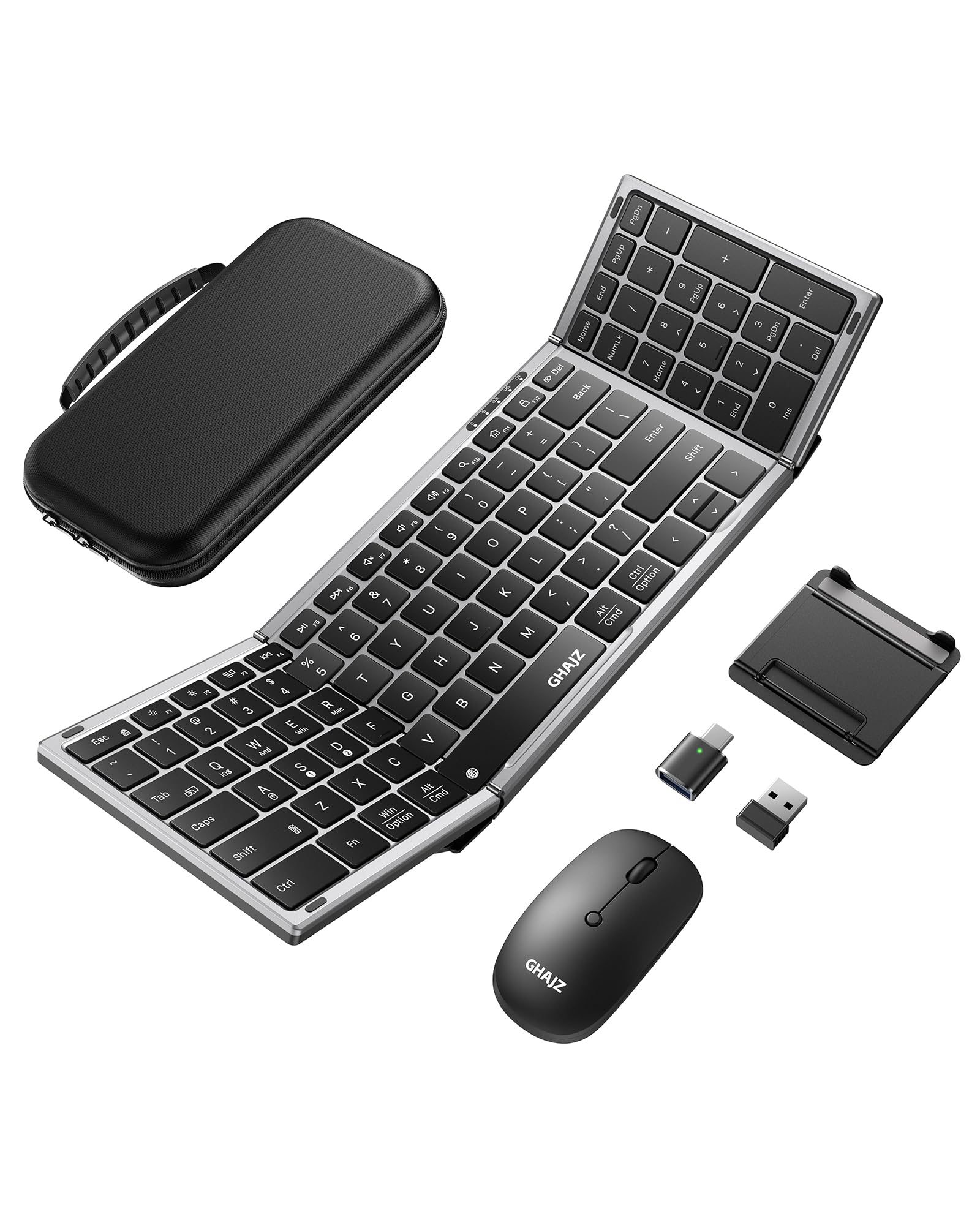
A full-size folding keyboard plus mouse with four connection options for the road.
This is the complete mobile office. The Ghajz combo includes a full-size folding keyboard that unfolds to 13.4 x 4.5 inches, a matching mouse, a folding stand for your phone or tablet, and a rugged 12 x 5.5 x 1.5-inch case to carry it all. With four connection options — two Bluetooth channels, a USB-A receiver, and a USB-C converter — it connects to laptops, tablets, and phones even when a device only has a USB-C port. You can switch between three devices with one click.
The unique keyboard lock built into the hinge secures the fold, so you can rest it on your lap without a table — handy for airports, cafes, or outdoor travel. The aluminum hinges are rated for over 100,000 folds., and the board automatically magnetically locks closed.. Owners say the silent design reduces typing noise by 90%., plus the mouse offers three adjustable DPI settings (800/1200/1600). A full charge provides up to 150-200 days of standby time., with auto-sleep after 10 minutes of inactivity.
What wins people over is value and portability. Buyers consistently praise the fast, stable Bluetooth, the comfortable typing experience, and how compactly it folds to save space in a bag — ideal for remote work, study sessions in libraries, and cafe workdays. The case stores everything neatly. Just be careful not to use a fast charger with it (the manufacturer warns it can damage the battery), and don’t lock the hinge while opening or folding, which could damage the lock cylinder.
Complete Travel Kit
- Keyboard + mouse + stand in one case
- Four connection options including USB-C
- 150-200 days standby battery
- Lap-friendly hinge lock
Handle With Care
- Avoid fast chargers — they risk battery damage
- Don’t lock the hinge mid-fold
Choose this if: you need a mouse and keyboard together for travel or remote work.
Think twice if: you only need a keyboard — the combo adds bulk you may not carry.
Understanding the Specs
Key Count and Layout
Key count tells you how complete your typing surface is. A 109-key board includes a full number pad for spreadsheets, while a 59-key mini means Fn-combinations for punctuation and fewer dedicated keys. Full-size doesn’t always mean better — it depends on whether you value a number pad or pocket portability.
Battery Type and Life
Rechargeable lithium boards (like the Arteck HB305-2 with 6-month life or the Ghajz with 150-200 days standby) save you from buying batteries but need charging. AAA-powered boards like the Logitech K480 (24-month rated life) last longer between swaps but add ongoing cost. Look for a charge indicator so you’re not caught mid-work.
FAQ
Will any Bluetooth keyboard work with my Android tablet?
Why do some keyboards need a USB receiver instead of Bluetooth?
How do I switch between devices on a multi-device keyboard?
How long does a rechargeable keyboard battery actually last?
Are compact keyboards good for touch typing?
What does a keyboard with a trackpad give me?
Can I use an Android keyboard with an iPad or iPhone?
Is a foldable keyboard with a mouse worth the extra bulk?
Final Thoughts: The Verdict
For most people, the android keyboards winner is the Logitech K480 because it pairs a full-size typing surface, a built-in tablet cradle, and easy three-device dial switching with durable, spill-resistant construction. If you want a lightweight full-size board with a number pad, grab the Arteck HB305-2. And for travel that needs a mouse too, the Ghajz foldable combo is the complete kit to reach for.
How We Picked
We do not accept paid placement. Every pick is matched to a real buyer and a real use-case; we do not hands-on test units.
Sources & Methodology
Specifications: manufacturer listings and product documentation. Review insights: verified customer reviews, as of August 2026. Pricing: not shown on this page (it changes often); check the current price via the retailer link.
As an Amazon Associate, Gadgets Feed earns from qualifying purchases. This does not affect which products we feature.