
That spinning wheel of death every time you open an app isn’t your internet—it’s your old streaming stick gasping for air. An Android Media Streaming Device is the only way to get the full Google Play ecosystem, sideloading capabilities, and a proper TV interface that doesn’t treat you like a captive ad viewer. The difference between a cheap smart TV OS and a dedicated Android TV box is measured in seconds per launch and years of updates.
I’m Min — the co-founder and writer behind Gadgets Feed. I’ve spent years tracking SoC benchmarks, Dolby Vision certification lists, and RAM vs. storage trade-offs across every Android TV platform on the market, so you know exactly which chipset delivers smooth playback and which leaves you buffering..
Whether you want to escape a sluggish TV interface, unlock Dolby Atmos without buying a new soundbar, or finally sideload Kodi without workarounds, this guide to the best android media streaming device cuts through the spec sheet noise to find your perfect match.
How To Choose The Best Android Media Streaming Device
Not all Android TV boxes are created equal. A quad-core CPU with 1GB RAM might struggle with Dolby Vision playback, while a Tegra X1+ unit chews through 4K remux files. Here’s what separates a smooth experience from a frustrating one.
RAM & Storage Capacity
2GB of RAM is the minimum for stutter-free 4K streaming, especially if you switch between Netflix, YouTube, and Plex without closing apps. Storage matters for app installs—8GB fills up fast when you add games or sideloaded apps, while 32GB gives you breathing room. The NVIDIA Shield Pro’s 3GB RAM handles heavy workloads, but the Xiaomi Mi TV Stick’s 2GB is adequate for standard streaming.
Video Codec & HDR Support
Dolby Vision and HDR10+ are the gold standards for color depth and contrast. AV1 decoding is a future-proofing feature—services like YouTube are moving to AV1 for better compression at lower bitrates. Devices without AV1 support (like the TiVo Stream 4K) will eventually struggle with modern streams. Check for VP9 Profile 2 for smooth 4K YouTube playback.
Connectivity: Wi-Fi 6 vs. Ethernet
Wi-Fi 6 (802.11ax) dramatically reduces buffering in congested homes with multiple devices. The Onn 4K Plus and Google TV Streamer include it, while older Chromecasts rely on Wi-Fi 5. If your router is far from your TV, look for a device with an Ethernet port—the NVIDIA Shield Pro has Gigabit Ethernet, making it ideal for high-bitrate local streaming.
Quick Comparison
On smaller screens, swipe sideways to see the full table.
| Model | Category | Best For | Key Spec | Amazon |
|---|---|---|---|---|
| NVIDIA Shield TV Pro | TV Box | Power Users & Gamers | 3GB RAM, Tegra X1+ | Amazon |
| Google TV Streamer 4K | TV Box | Android Users & Smart Home | 32GB Storage, Wi-Fi 6 | Amazon |
| Onn 4K Plus | TV Box | Budget Enthusiasts | 2GB RAM, Wi-Fi 6 | Amazon |
| Xiaomi Mi TV Stick 4K 2nd Gen | TV Stick | Travel & Portability | 2GB RAM, AV1 Decoding | Amazon |
| Google Chromecast with Google TV | TV Stick | Simplicity & Casting | 4K HDR, Compact | Amazon |
| Roku Streaming Stick 4K | TV Stick | Ease of Use | 16GB Storage, Long-Range Wi-Fi | Amazon |
| TiVo Stream 4K | TV Stick | Live TV Integration | 8GB Storage, Dolby Vision | Amazon |
In‑Depth Reviews
1. NVIDIA Shield TV Pro

The NVIDIA Shield TV Pro is the undisputed king of Android TV hardware. Its Tegra X1+ processor delivers AI upscaling that transforms 1080p content into near-4K clarity—a feature no other Android streaming device offers. With 3GB of RAM, app switching is instant, and the Gigabit Ethernet port ensures zero buffering even with 4K remux files over local Plex servers.
Dolby Vision and Dolby Atmos support are fully certified, and the dual USB 3.0 ports let you attach external drives for media playback or even a USB DAC for high-res audio. The remote is backlit and motion-activated, with a locator feature that saves you from couch-cushion searches. Built-in Chromecast and Google Assistant complete a package that feels years ahead of its competitors.
The premium pricing reflects the hardware, but for anyone who demands the absolute best—gamers using GeForce Now, audiophiles with USB DACs, or home theater enthusiasts running Plex Media Server directly on the box—the Shield pays for itself in flexibility. It remains the only Android TV device that serious buyers should consider without compromise.
Why it’s great
- AI upscaling dramatically improves HD content clarity
- Gigabit Ethernet and USB 3.0 for local media setups
- Fully certified Dolby Vision and Dolby Atmos
Good to know
- Higher price point than most streaming sticks
- 16GB internal storage fills up quickly with large games
- Remote backlight can be overly sensitive
2. Google TV Streamer 4K

The Google TV Streamer 4K represents the biggest leap forward in Google’s streaming hardware since the Chromecast with Google TV. A 22% faster processor and double the memory of the previous generation mean app launches feel snappy rather than sluggish. The 32GB of storage is a generous upgrade, letting you install plenty of games and apps without running out of space.
Wi-Fi 6 support keeps buffering minimal even in busy households, and the redesigned remote lets you find lost devices by making them ring—a small but life-saving detail. The customizable button opens your favorite app instantly, and the home panel integrates smart home controls so you can dim lights or check a camera feed without interrupting your show.
Dolby Vision and Dolby Atmos are fully supported, and the Google TV interface presents recommendations across all your subscriptions in a unified row layout. It’s not as powerful as the NVIDIA Shield for local media or gaming, but for pure streaming convenience and smart home integration, this is the best mid-range option available right now.
Why it’s great
- 32GB storage leaves room for apps and games
- Wi-Fi 6 reduces buffering in congested networks
- Lost remote finder is genuinely useful
Good to know
- Ethernet port is limited to 100Mbps
- No USB ports for expandable storage
- Requires HDMI 2.1 cable (sold separately)
3. Onn 4K Plus Streaming Device

The Onn 4K Plus punches well above its weight class. With 2GB of RAM and 16GB of internal storage, it offers smooth 4K UHD streaming with Dolby Vision and Dolby Atmos support at a price that undercuts most competitors. The Wi-Fi 6 (802.11ax) connection keeps streams stable even when multiple devices are active on the same network.
Google TV is the operating system here, so you get the same curated recommendations and cross-app search you’d find on Google’s own hardware. The included Google Assistant voice remote works reliably, and the 16GB storage means you can install a solid library of apps without worrying about space. It lacks AV1 decoding, which may affect future YouTube streams, but current content plays flawlessly.
The trade-off is in build quality—the box feels lightweight, and the remote doesn’t have the premium heft of Google’s offering. However, for buyers who want Dolby Vision, Wi-Fi 6, and reliable performance without spending premium money, the Onn 4K Plus is a compelling choice that outperforms its sticker price.
Why it’s great
- Wi-Fi 6 for reliable high-speed streaming
- 2GB RAM ensures smooth app switching
- Dolby Vision and Atmos at a budget-friendly price
Good to know
- No AV1 decoding support
- Build feels less premium than competitors
- Firmware updates may lag behind Google’s official devices
4. Xiaomi Mi TV Stick 4K 2nd Gen
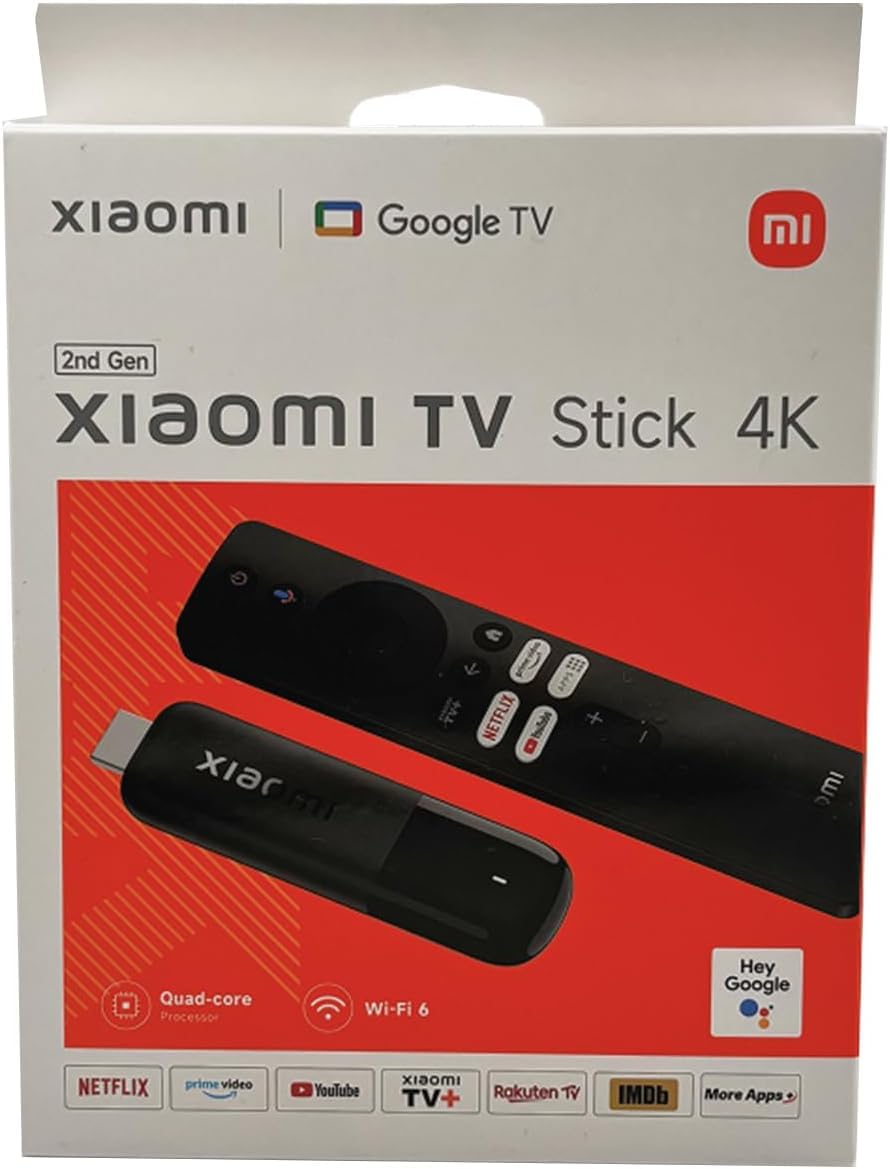
The Xiaomi Mi TV Stick 4K 2nd Gen is one of the smallest Android TV sticks available, yet it packs AV1 decoding—a feature absent from many larger, more expensive devices. This means future YouTube and Netflix streams will play smoothly without requiring hardware upgrades. The quad-core processor handles 4K HDR content without stuttering, and 2GB of RAM keeps the Android TV 11 interface responsive.
Bluetooth 5.2 and dual-band Wi-Fi ensure a stable connection, while the 360-degree IR remote can control your TV’s power and volume without line-of-sight. Chromecast built-in lets you cast from your phone effortlessly. The 8GB storage is the main limitation—you’ll fill it quickly if you install games—but for a pure streaming device, it’s adequate.
Dolby Vision and Dolby Atmos support make this a strong candidate for travelers or anyone with a secondary TV. The compact form factor disappears behind your display, and the price makes it an easy impulse purchase. Just be aware that 8GB means you’ll need to manage your app library regularly.
Why it’s great
- AV1 decoding future-proofs streaming
- Compact and portable design
- Full Android TV 11 with Play Store access
Good to know
- 8GB storage fills up fast
- No Ethernet port
- Wi-Fi range could be better
5. Google Chromecast with Google TV

The Chromecast with Google TV (HD version) remains one of the most straightforward streaming solutions on the market. It plugs directly into your HDMI port, connects to Wi-Fi, and instantly presents a clean Google TV interface with personalized recommendations across your subscriptions. The voice remote with Google Assistant lets you search by mood, genre, or actor hands-free.
With support for up to 4K HDR, Dolby Vision, and Dolby Atmos, picture quality is excellent despite the compact form factor. The included pouch and cleaning cloth are thoughtful travel accessories. It’s compatible with almost any TV with an HDMI port, and casting from your phone is seamless thanks to built-in Chromecast technology.
The main drawbacks are limited storage and the absence of AV1 support. It’s also slower than the newer Google TV Streamer 4K, with less RAM and an older processor. However, for the price, it delivers a polished streaming experience that rivals devices costing twice as much, especially if you primarily use mainstream apps.
Why it’s great
- Simple plug-and-play setup
- Clean Google TV interface with cross-app search
- Compact enough for travel
Good to know
- Limited internal storage
- No Wi-Fi 6 support
- Processor lags behind newer models
6. Roku Streaming Stick 4K

The Roku Streaming Stick 4K is the easiest streaming device to set up and use, period. The long-range Wi-Fi receiver ensures a strong signal even in rooms far from your router, making it ideal for older TVs or basements. Dolby Vision and HDR10+ support deliver vibrant colors and sharp detail, and the interface is refreshingly simple—no bloatware, no complicated menus.
The voice remote controls TV power and volume, and the Roku platform offers 500+ free live TV channels through the Roku Channel. You can take it on trips without logging into someone else’s device, and the compact stick design won’t block neighboring HDMI ports. Setup takes under five minutes.
The trade-off is that Roku’s OS isn’t Android TV, so you lose sideloading, the Google Play Store, and certain apps like Apple TV (which is available but through different channels). It’s also slower than the NVIDIA Shield when launching apps. But for pure ease of use and reliable performance, Roku remains a top choice for non-technical users.
Why it’s great
- Long-range Wi-Fi receiver for distant rooms
- 16GB storage for ample app space
- Simplest interface on the market
Good to know
- Not Android TV—no Google Play or sideloading
- Slower app loading than high-end competitors
- Missing some niche streaming apps
7. TiVo Stream 4K

The TiVo Stream 4K is built around a unique value proposition: it aggregates live TV channels (Pluto TV, Sling, Locast, and over-the-air via Tablo) into a single unified guide that mimics traditional cable. The TiVo experience integrates Netflix, Prime Video, Disney+, and Peacock into one search, while Google Assistant handles voice commands.
Dolby Vision and Dolby Atmos support ensure premium video and audio quality, and the remote features re-mappable buttons for quick access to your favorite apps. The USB-C port allows external storage for media files, and at this price point, the feature set is impressive—including live channel recommendations based on your viewing history.
However, recent updates have made the live TV integration more complex, and the 8GB storage fills up quickly. The Android TV interface feels cluttered compared to Roku, and some apps (like Apple TV and YouTube TV) aren’t fully integrated into the TiVo guide. It’s best for cord-cutters who watch a lot of live TV and want a single interface.
Why it’s great
- Unified live TV guide with Pluto, Sling, and more
- Dolby Vision and Dolby Atmos support
- Re-mappable remote buttons for customization
Good to know
- 8GB storage is very limited
- Live TV integration has become clunkier with updates
- Missing some major apps like Apple TV
FAQ
Can an Android TV device replace my cable subscription?
Why does RAM matter more for 4K streaming than the processor?
Is Wi-Fi 6 worth it for a streaming stick?
Final Thoughts: The Verdict
For most users, the best android media streaming device winner is the Google TV Streamer 4K because it balances 32GB storage, Wi-Fi 6, and smooth performance at a palatable price. If you want AI upscaling and Plex server capabilities, grab the NVIDIA Shield TV Pro. And for budget-conscious buyers who prioritize Dolby Vision and Wi-Fi 6, nothing beats the Onn 4K Plus.