
The typical home printer feels like a relic from a wired world — requiring a dedicated PC, proprietary drivers, and a ritual of paper jams to print a single document from your phone. An Android printer eliminates this friction, turning your smartphone or tablet into the command center for all your print, scan, and copy needs, whether you’re shipping a package from your living room or printing a school project from the kitchen table.
I’m Min — the co-founder and writer behind Gadgets Feed. I’ve spent countless hours cross-referencing connectivity protocols, ink system architectures, and real-world print speeds to separate the truly wireless-friendly models from those that merely claim to be.
This guide cuts through the noise to help you find the best android printer for your specific home or small office needs, focusing on setup simplicity, ongoing cost, and reliable mobile app performance.
How To Choose The Best Android Printer
Selecting the right Android printer means looking beyond the brand name and focusing on how the machine communicates with your phone. Not all “wireless” printers are created equal when it comes to Android compatibility.
Connectivity is King: Wi-Fi vs. Wi-Fi Direct
Standard Wi-Fi requires both your phone and the printer to be on the same home network. This works great for most households. Wi-Fi Direct, however, creates a direct peer-to-peer link between your Android device and the printer without a router — a lifesaver in dorms, temporary offices, or areas with spotty network infrastructure. If you move between locations, prioritize a model with robust Wi-Fi Direct support.
Ink Ecosystem: The Long-Term Cost Decision
The upfront price of the printer is often a decoy. The real cost lives in the ink or toner. Cartridge-based printers (HP, Canon) offer low entry prices but high per-page costs, while supertank printers (Epson EcoTank) demand a higher initial investment but slash ink costs to pennies per page. For high-volume Android printing — like school worksheets or shipping labels — a thermal or supertank printer delivers massive savings over time.
App Ecosystem and OS Compatibility
The printer’s mobile app experience defines your daily usability. Look for models that natively support the Mopria Print Service (the Android standard) and Apple AirPrint for when a friend or family member with an iPhone needs to print. A polished app like Brother Mobile Connect or Canon PRINT makes scanning, print settings, and ink monitoring genuinely intuitive, whereas a clunky app can turn a simple task into a frustrating ordeal.
Quick Comparison
On smaller screens, swipe sideways to see the full table.
| Model | Category | Best For | Key Spec | Amazon |
|---|---|---|---|---|
| Brother MFC-J1410DW | Inkjet All-in-One | Home Office Productivity | 16 ppm Black / 9 ppm Color | Amazon |
| Epson EcoTank ET-2803 | Supertank Inkjet | Ultra-Low Ink Costs | 4,500 Black / 7,500 Color pages per refill | Amazon |
| HP Envy Photo 7975 | Photo Inkjet | Borderless Photo Printing | 15 ppm Black / 10 ppm Color | Amazon |
| Canon PIXMA TR7120 | Inkjet All-in-One | Duplex & ADF Scanning | 14 ppm Black / 9 ppm Color | Amazon |
| Canon PIXMA TS7720 | Home Inkjet | Ease of Use & Touchscreen | 15 ppm Black / 10 ppm Color | Amazon |
| MUNBYN RW403B | Thermal Label | Shipping & Label Printing | 180 ppm Monochrome | Amazon |
| HP DeskJet 2755e | Entry Inkjet | Budget Home Use | 7.5 ppm Black / 5.5 ppm Color | Amazon |
In‑Depth Reviews
1. Brother Work Smart MFC-J1410DW

The Brother MFC-J1410DW hits the sweet spot for the home office user who needs a reliable workhorse. Its automatic duplex printing and 20-sheet ADF mean you can run through multi-page documents without standing over the machine, and the 150-sheet paper tray reduces the frequency of reloads during busy workdays.
From an Android perspective, the Brother Mobile Connect app offers one of the most polished mobile printing experiences available. You can scan directly to Google Drive or Dropbox, monitor ink levels from your phone, and manage print queues without ever touching the printer’s control panel. The 2.7-inch color touchscreen makes local navigation intuitive when you do walk over.
Print speeds of 16 ppm black and 9 ppm color are competitive for this class, and the initial page print time of roughly 6.2 seconds black means minimal waiting. The LC501 ink cartridges are reasonably priced, and users report the starter cartridges lasting several months under normal use, making this a smarter long-term value than most entry-level HP models.
Why it’s great
- Fast print speeds with automatic 2-sided printing
- Excellent Brother Mobile Connect app with cloud scanning
- Compact footprint for the feature set
Good to know
- Setup requires some patience for network configuration
- ADF is single-sided, not duplex
2. Epson EcoTank ET-2803

The Epson EcoTank ET-2803 represents a paradigm shift away from the cartridge subscription model.
For Android users, the Epson Smart Panel app provides a straightforward wireless printing experience via Mopria and AirPrint support. The Micro Piezo Heat-Free technology delivers impressive print quality, especially for color photos, without the smudging issues that sometimes plague thermal inkjets. Users consistently report that the print quality rivals much more expensive photo-centric printers.
The main caveat is the wireless connectivity which, based on user feedback, can be finicky to establish initially. Several users report that the standard installation software fails to find the printer on the network, requiring a manual TCP/IP configuration via the printer’s IP address. Once connected, however, it’s stable. The small monochrome screen is functional but minimal compared to the touchscreens on competitors.
Why it’s great
- Dramatically lower cost per page than any cartridge printer
- Excellent photo and document print quality
- Lightweight and compact design
Good to know
- Wi-Fi setup can require manual TCP/IP configuration
- No automatic document feeder
3. HP Envy Photo 7975

The HP Envy Photo 7975 is designed for the family that prints as many photos as they do documents. Its dedicated photo tray and borderless printing capabilities make it a strong contender for anyone who values true-to-screen color reproduction on glossy paper, and the AI-enabled web printing feature cleverly strips out ads and unnecessary blank pages from web articles before printing.
Android connectivity is handled through the HP Smart app, which guides you through a typically quick setup process — most users report being operational within 10 minutes. The 2-way duplex printing and auto document feeder make it suitable for the occasional multi-page document, though its real strength lies in output quality rather than raw speed.
It’s important to note that while the print quality for photos is excellent, the reliance on HP’s Instant Ink subscription model means your long-term costs depend on your printing volume. For light users, the included 3-month trial is fine, but heavy photo printing can make the standard cartridge costs add up. Some users have reported reliability issues with paper jams and firmware-related connectivity dropouts after several weeks of use.
Why it’s great
- Exceptional borderless photo print quality
- Dedicated photo tray for different paper types
- AI-powered web page optimization
Good to know
- High per-page photo printing costs without Instant Ink
- Some user reports of paper jam issues
4. Canon PIXMA TR7120

The Canon PIXMA TR7120 is a value-oriented all-in-one that punches above its weight by including an auto document feeder and automatic duplex printing — features typically reserved for more expensive office-oriented printers. The 1.42-inch monochrome OLED display is small but crisp, providing quick visual feedback on ink levels and printer status.
Android users benefit from robust Mopria and Apple AirPrint support, along with the Canon PRINT app for direct mobile management. The hybrid ink system uses just two cartridges (one pigment black, one color combo) which simplifies replacement but does mean that if any one color runs out, the entire tri-color cartridge must be swapped. This is a trade-off that budget-conscious buyers should factor into their cost calculations.
The print speeds of 14 ppm black and 9 ppm color are perfectly adequate for a home office mixer. Users report that the wireless setup is straightforward and that the paper input tray, while not massive at roughly 50-100 sheets, handles a variety of media without jamming. The ADF is single-sided, but for a printer at this price point, having any ADF at all is a significant advantage over many competitors.
Why it’s great
- ADF and auto duplex at a competitive price
- Stable dual-band Wi-Fi connectivity
- Compact and stylish design
Good to know
- Single tri-color cartridge leads to higher replacement cost per color
- No touchscreen — small OLED display only
5. Canon PIXMA TS7720

The Canon PIXMA TS7720 prioritizes user-friendliness above all else. The 2.7-inch LCD touchscreen is larger and more responsive than what you typically find at this price tier, making menu navigation, wireless setup, and maintenance tasks genuinely intuitive. Even users who are not technically inclined find the out-of-box experience smooth, thanks to the streamlined setup process.
Android printing is handled through the Canon PRINT app, which is well-organized and supports both standard document printing and creative photo projects with borderless options. The printer supports automatic duplex printing, which is a welcome inclusion for a home-oriented model, though the lack of an ADF means multi-page scanning must be done one page at a time on the flatbed.
Print quality is solid for both text and photos, though some users have noted that colors can appear slightly less vivid than Canon’s premium 5-ink models. The default auto-power-off setting (4 hours of inactivity) can be frustrating if you forget to enable the auto-power-on feature in the settings menu. With two easy-to-replace ink cartridges, maintenance is simple, but the starter cartridges included in the box are light and will need replacement fairly quickly.
Why it’s great
- Large, responsive 2.7-inch touchscreen display
- Fast print speeds and automatic duplex
- Compact design with versatile media support
Good to know
- No automatic document feeder for scanning
- Starter ink cartridges run out quickly
6. MUNBYN Bluetooth Thermal Label Printer RW403B
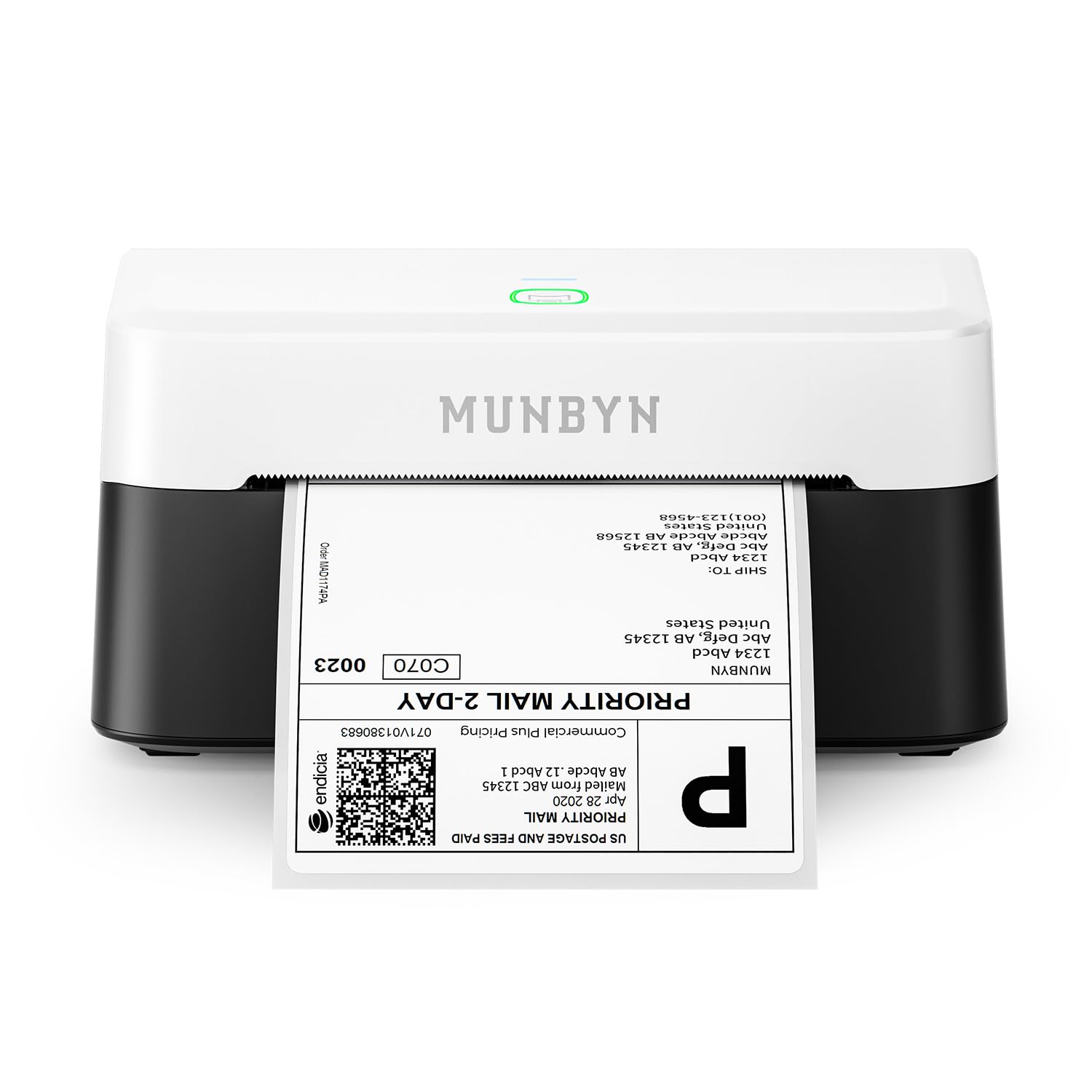
The MUNBYN RW403B isn’t a general-purpose document printer — it’s a specialized thermal label printer built for the shipping and e-commerce workflow. It communicates directly with your Android device via Bluetooth, printing 4×6 shipping labels, inventory tags, and barcode stickers with zero ink or toner costs. The thermal technology uses heat to mark the paper, so your only consumable is the label roll itself.
The printer integrates seamlessly with major shipping platforms like FedEx, UPS, USPS, Amazon, Shopify, and Etsy through the Munbyn Print app, which offers over 3,500 design elements and 2,000+ templates. The DAC Dynamic Algorithm chip auto-calibrates to eliminate label misalignment, and the whisper-quiet 60 dB operation means it won’t disrupt your home office during late-night packing sessions.
With a print speed of 180 ppm for monochrome labels and a rated lifespan of 970,000 labels, this is a machine built for small business durability. The near-zero jam rate (less than 0.01%) and 0.1 mm font legibility ensure that your labels are consistently scannable and professional. It’s a niche device, but for anyone shipping products from home, it pays for itself by eliminating the time and material waste of printing, cutting, and taping paper labels.
Why it’s great
- No ink or toner — thermal printing only
- Bluetooth direct connection to Android
- Fast 180 PPM print speed and 970,000 label lifespan
Good to know
- Only prints monochrome labels, not documents
- Requires label roll stand for best results
7. HP DeskJet 2755e

The HP DeskJet 2755e is the entry-level gateway into Android-compatible printing. It covers the core functions — print, scan, copy — through a simple, compact chassis that fits on a bookshelf. The dual-band Wi-Fi with self-reset technology helps maintain a stable connection, and the HP Smart app provides a guided setup that, while occasionally time-consuming, works reliably for most users.
With print speeds of 7.5 ppm black and 5.5 ppm color, this is not a printer for heavy-volume users. It’s best suited for occasional printing of recipes, forms, travel documents, and the odd school assignment. The 60-sheet input tray is adequate for light use, and the printer supports a range of media including labels, envelopes, and photo paper up to 1200 DPI resolution.
The most divisive aspect of this printer is the HP Smart app and the Instant Ink ecosystem. Users who are comfortable with app-based setup and firmware updates generally have a positive experience. Those who prefer a simpler, more direct connection sometimes struggle with the HP app’s requirements. The manual duplex (you flip the paper yourself) is a cost-saving measure, and the plastic build feels less premium than the Canon or Brother alternatives at this price tier.
Why it’s great
- Lowest upfront cost for wireless printing
- Compact size fits easily in small spaces
- Dual-band Wi-Fi for better connectivity
Good to know
- Slow print speeds for high-volume tasks
- Setup process can be frustrating without tech skills
FAQ
Can I print from any Android app using Mopria?
What is the difference between Wi-Fi and Wi-Fi Direct for Android printing?
Why does my Android printer keep disconnecting from Wi-Fi?
Final Thoughts: The Verdict
For most users, the best android printer winner is the Brother MFC-J1410DW because it combines fast automatic duplex printing, a polished mobile app, and competitive ink costs without the setup headaches that plague many competitors. If you want the absolute lowest cost per page and don’t mind a finicky initial Wi-Fi setup, grab the Epson EcoTank ET-2803. And for small business owners shipping products from home, nothing beats the MUNBYN RW403B for its inkless thermal printing and seamless Android Bluetooth integration.