
Our readers keep the lights on and my morning glass full of iced black tea. As an Amazon Associate, I earn from qualifying purchases.
Specs are compiled from manufacturer listings and verified buyer reviews and can change over time — please confirm the key details on the product page before buying.
You don’t have to spend a fortune to get a tablet that streams, browses, and plays casual games — but the difference between a smart buy and a dud depends on three things: how long it lasts on a charge, how much actual memory it has, and whether the charging port will fail in six months. This guide compares five sub-$100 models from EDDBNi, CALLSKY-NOTE, Aobante, WXUNJA, and JIKOCXN using published specs and real owner reviews, so you know where the corners are cut.
I’m Min — the founder and writer behind Gadgets Feed. This guide is built by comparing the manufacturers’ published specifications and the patterns across verified customer reviews, so you get each pick’s real strengths and trade-offs instead of marketing spin.
We look at current sub-$100 models from EDDBNi, CALLSKY-NOTE, Aobante, WXUNJA, and JIKOCXN, covering display size, battery life, RAM, storage, and the common durability issues owners mention — helping you confidently choose the right android tablets under $100 for your family.
Quick Picks
- WXUNJA Android 15 Kids Tablet, 10.1 Inch, Octa-Core Processor, 6000mAh Battery — Best Overall
- JIKOCXN Kids Tablet, Android 16, 10 Inch Octa-Core, 24GB RAM, 64GB ROM — Most Powerful
- Aobante Tablet 10 Inch, 2025 Android 15, 18GB+128GB, 1TB Expand, Widevine L1 — Best Storage
- EDDBNi Kids Tablet Android 15, 10 Inch, Quad Core, 6GB RAM, 64GB, 6000mAh — Value Pick with Stand
- CALLSKY-NOTE Kids Tablet 8 Inch Android 15, Octa-Core, 12GB RAM, 64GB ROM — Compact & Portable
How To Choose The Best Android Tablets Under $100
Shopping for a rock-bottom priced Android tablet means knowing where corners get cut. The processor and screen are usually fine for basic tasks, but the battery, storage, and charging port are common weak points. Here is what actually separates a keeper from a disappointment.
Battery Capacity (mAh) versus Battery Life (Hours)
The milliampere-hour (mAh) rating tells you the size of the fuel tank, while the battery life (hours) tells you how far that fuel gets you under normal use. A 4000mAh battery is the bare minimum and will give you around 5 hours of mixed use. A 6000mAh battery is a meaningful step up, typically delivering 8 hours or more. Look at both numbers together — a tablet with 6000mAh that claims only 6 hours may be less efficient than one with the same capacity claiming 8 hours.
Real RAM versus Virtual RAM
Many budget tablets advertise huge numbers like 18GB or 24GB of RAM. That figure blends actual physical memory (the RAM chips soldered onto the board) with virtual RAM (a portion of the storage drive repurposed as temporary memory). The real, physical RAM is usually the smaller number — 3GB, 4GB, or 6GB. When you see something like “18GB (6+12GB)”, the 6GB is real and the 12GB is virtual. Virtual RAM is better than nothing for keeping a few extra apps open, but it is much slower than real RAM and will not make a game run faster.
Durability and the Charging Port
On a sub-$100 tablet, the charging port is often the first thing to fail. Multiple owner reviews mention that the tablet stops charging or turns on after a few months, usually because the USB-C port is poorly soldered to the main circuit board. A built-in protective case (common on kids models) helps with screen cracks from drops, but it does nothing for a loose port. If the reviews consistently mention charging failures, that is a red flag to scroll past.
Quick Comparison
| Model | Best For | Screen | Battery | RAM / Storage | Amazon |
|---|---|---|---|---|---|
| WXUNJA Android 15 Kids Tablet | All-around kids tablet with strongest battery | 10.1-inch 1280×800 | 6000mAh / 9 hours | 21GB (3+18) / 64GB | $99.99Amazon |
| JIKOCXN Kids Tablet | Best performance for heavier apps | 10.1-inch | 6000mAh / 6 hours | 24GB (4+20) / 64GB | $83.92$88.34Amazon |
| Aobante Tablet 10 Inch | General-purpose streaming and browsing | 10-inch 1280×800 | 6000mAh / 6 hours | 18GB (6+12) / 128GB | $84.99Amazon |
| EDDBNi Kids Tablet | Budget pick with a stand and case | 10.1-inch 1280×800 | 6000mAh / 8 hours | 6GB / 64GB | $69.99Amazon |
| CALLSKY-NOTE Kids Tablet 8 Inch | Smallest, most portable kids tablet | 8-inch 800×1280 | 4000mAh / 5 hours | 12GB (4+8) / 64GB | $69.99Amazon |
In‑Depth Reviews
1. WXUNJA Android 15 Kids Tablet, 10.1 Inch, Octa-Core Processor, 6000mAh Battery

The kids slate that delivers 9 hours of battery life (versus the JIKOCXN’s 6 hours) on the same 6000mAh battery.
What makes this the top pick is the battery. With a 6000mAh cell and a rated battery life of 9 hours, it beats every other tablet in this price bracket — the similar-sized JIKOCXN model manages only 6 hours on the same 6000mAh capacity, which suggests the WXUNJA’s software is more efficient at managing power. You get enough juice for a full day of school and car rides without hunting for an outlet.
The octa-core processor runs at 2.0 GHz, which the manufacturer claims is 40% faster than a normal processor, and the 21GB of RAM (3GB real plus 18GB virtual) handles educational apps and YouTube without much stutter. Buyers report the screen is bright and the eye-protection mode reduces blue light, though one reviewer noted the speaker volume is quiet on some YouTube content even at max. The included silicone case with an adjustable stand adds drop protection, and the parental controls let you set screen time limits and approve apps — a genuine peace-of-mind feature.
The main trade-off? The real RAM is only 3GB, which is the lowest physical memory of any pick here. If your kid plays heavier games or opens many apps at once, the lack of real RAM will cause slowdowns that virtual memory cannot fully fix.
What it does best
- Best battery life in class at 9 hours (the JIKOCXN offers 6 hours on the same capacity)
- Sturdy silicone case with adjustable stand included in the box
- Runs Android 15 with ad-blocking and strong parental controls
Where it falls short
- Real physical RAM is only 3GB — virtual RAM (18GB) helps but is slower
- Speaker volume is low on some apps, as owners mention
- 2.4/5GHz dual-band WiFi, but no WiFi 6 support
The daily driver pick for most families: if you want the longest battery life and a proven protective case package, the WXUNJA is the most balanced choice in this budget tier.
The catch to know: the 3GB real RAM means it will struggle with graphic-heavy games — stick to educational apps and video streaming for the smoothest experience.
2. JIKOCXN Kids Tablet, Android 16, 10 Inch Octa-Core, 24GB RAM, 64GB ROM

The only tablet here that ships with Android 16 and the highest real RAM count at 4GB.
If you want the newest operating system and the most physical memory you can get under $100, the JIKOCXN is your pick. It runs Android 16 (the latest version, while most rivals still ship with Android 15), and its 4GB of real RAM (plus 20GB of virtual) is a full gigabyte ahead of the WXUNJA. That extra physical memory gives it a noticeable edge when switching between learning apps, cartoons, and video calls without reloading everything each time.
Reviewers praise the 10-inch screen, the included protective case with a built-in stand, and the pre-installed screen protector. One owner noted the dual cameras are “fine for kid selfies and video chats” but not iPad quality. The octa-core T606 processor handles most games well, though a buyer reported that a 4-year-old’s drop from just 6 inches with the case on damaged the internal display — a reminder that “sturdy” has limits on a tablet.
The big catch is the 90-day warranty, which is the shortest of any tablet on this list. After three months, you are on your own for repairs or replacements.
Reasons to choose it
- Runs Android 16 — newer OS than any competitor here
- Highest real RAM at 4GB — better for multitasking between apps
- Bright 10-inch screen with a pre-installed screen protector and thick case
Reasons to think twice
- 6-hour battery life (the WXUNJA offers 9 hours with the same 6000mAh cell)
- 90-day warranty is very short — customers note fragility from low drops
- Virtual RAM (20GB) inflates the spec sheet; real performance depends on the 4GB physical chips
Best for families who want the freshest OS and don’t need all-day battery: the Android 16 and 4GB real RAM make this the snappiest pick, perfect for a child who switches between apps frequently.
Look elsewhere if: you need a full day of use away from a charger — the WXUNJA manages 9 hours on the same 6000mAh capacity, versus the JIKOCXN’s 6 hours.
3. Aobante Tablet 10 Inch, 2025 Android 15, 18GB+128GB, 1TB Expand, Widevine L1
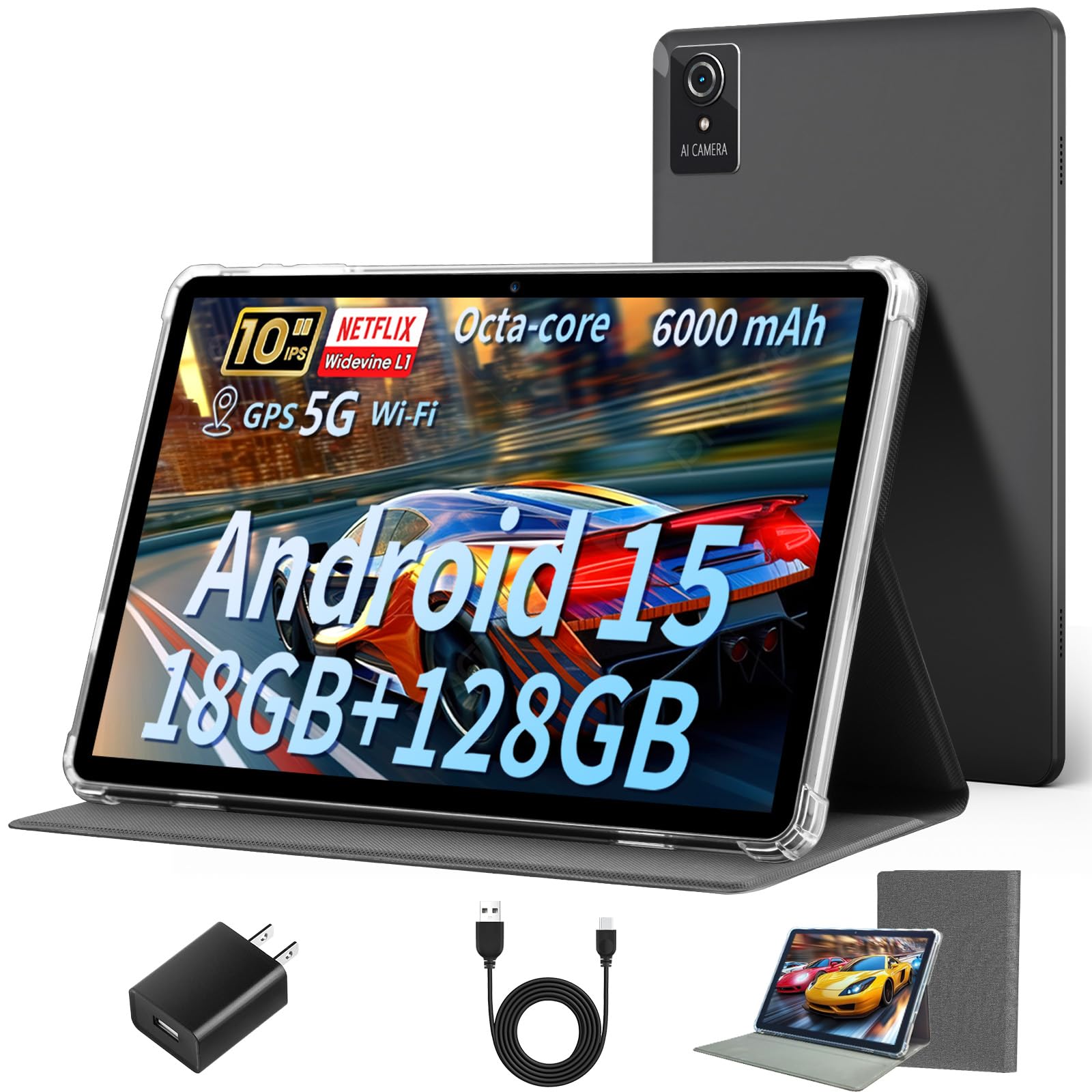
The only pick with native 128GB built-in storage — compared to the 64GB on the EDDBNi and most others.
If you plan to download movies, shows, and offline content for travel, this is the tablet to get. The Aobante comes with 128GB of built-in storage (the EDDBNi and most others top out at 64GB), and you can add up to 1TB more via a microSD card. The 18GB of RAM (6GB real plus 12GB virtual) gives it 6GB of real physical memory — the EDDBNi also has 6GB, and the WXUNJA has 3GB.
The Widevine L1 certification means this tablet can stream Netflix, Amazon Prime, and Disney+ in high definition (HD), not the standard definition (SD) you get on most budget tablets without that certification. That alone makes it a much better choice for a teen or adult who watches a lot of streaming video. The 6000mAh battery is rated for 6 hours, which is average for this group. Reviewers point out the screen is viewable from all angles and the WiFi 6 connection is stable and fast — a clear step ahead of the 2.4GHz-only WiFi on the EDDBNi.
However, one buyer mentioned that after 4 months of regular use, the tablet stopped turning on, with the power-up screen flashing and then going dead. That is a durability red flag that matches the pattern seen on other budget tablets. The screen also uses a plastic display with a pre-installed screen protector that scratches easily, and the charger port is located on the top edge, which some find awkward.
what separates it
- 128GB built-in storage — the EDDBNi and others have 64GB
- Widevine L1 certification enables HD streaming on Netflix and Prime Video
- WiFi 6 and Bluetooth 5.4 for faster, more reliable connections
What holds it back
- Several shoppers say the tablet stops working after 4 months — a reliability concern
- Plastic screen with a pre-installed protector that scratches easily
- No built-in protective case like the kids-oriented models include
Best for the streaming-heavy user: the 128GB storage and Widevine L1 certification make this the go-to choice for anyone who wants to download and watch HD Netflix on a budget.
skip it if: durability is your top concern — the failure reports at the 4-month mark are hard to ignore compared to the more consistent WXUNJA.
4. EDDBNi Kids Tablet Android 15, 10 Inch, Quad Core, 6GB RAM, 64GB, 6000mAh
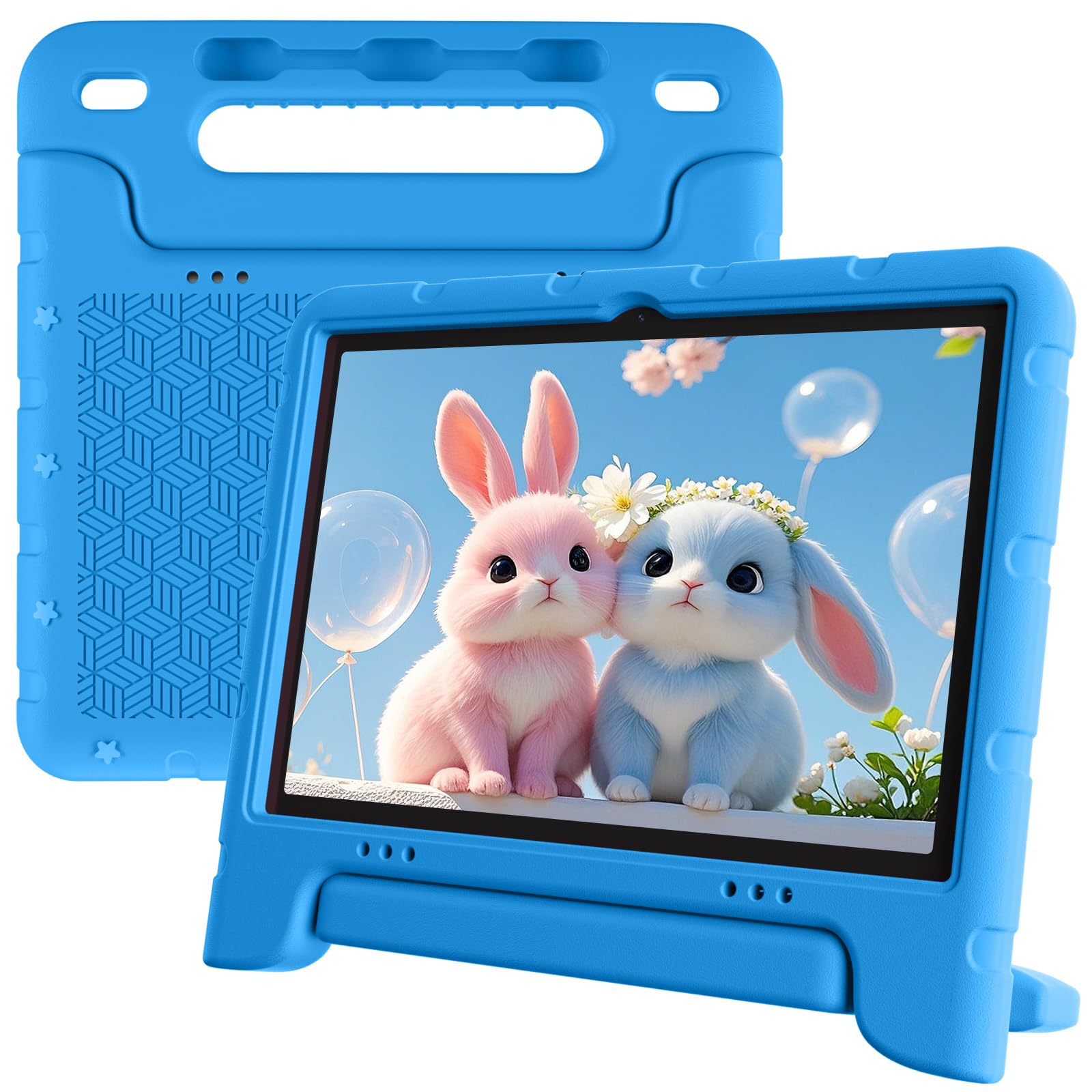
A solid 8-hour battery and a built-in stand for the lowest price in this lineup.
It also comes with a sturdy bumper case and an adjustable stand, so your child can watch videos hands-free right from the start. The 6GB of RAM (all physical, no virtual numbers to parse) and 64GB of storage (upgradeable to 1TB via microSD) are enough for educational apps, light games, and cartoons.
The 10.1-inch IPS display runs at 1280×800 pixels, which is the same resolution as the pricier WXUNJA. The dual cameras (5MP front, 8MP rear) are adequate for video calls and snapshots. The main downside is older connectivity — it only supports 2.4GHz WiFi, which is noticeably slower than the WiFi 6 found on the Aobante. If your home network uses dual-band or mesh routers, the tablet will be stuck on the slower band, which can cause buffering on HD video. Buyers also report that the screen can be slow to respond to touch, and one owner reported “both tablets stopped charging and working within 6 months.”
For the price, you get a decent 10-inch screen and great battery life, but the reliability reports around the charging port are consistent enough to give you pause.
What works
- 8-hour battery life is excellent for the price point
- Bumper case and adjustable stand are included — no extra accessories needed
- Full 6GB physical RAM — no virtual RAM marketing confusion
What does not
- 2.4GHz-only WiFi — no 5GHz band for faster streaming
- Multiple buyers report charging failures within 6 months
- Touchscreen responsiveness issues noted in reviews
The budget entry for the least demanding use: if you need a large screen and long battery on a tight budget, the EDDBNi gets the basics right — just plan for a potential charging port failure down the road.
Reach for the WXUNJA instead if: reliability matters more than saving a few dollars — the WXUNJA costs a bit more but has fewer failure reports and dual-band WiFi.
5. CALLSKY-NOTE Kids Tablet 8 Inch Android 15, Octa-Core, 12GB RAM, 64GB ROM

The smallest and lightest tablet here, purpose-built for tiny hands and travel bags.
If your child is between the ages of 3 and 7, an 8-inch screen is often a better fit than a 10-inch slab — it is lighter, easier to grip, and fits in most backpack pockets. The CALLSKY-NOTE measures 8 inches diagonally with a 800×1280 IPS display and comes with an EVA protective case that owners mention survived rough play by a 3-year-old. It also includes an anti-glare screen protector and an adjustable strap for secure handling in the car or on a plane.
The octa-core A523 processor handles educational apps and YouTube well, though multiple customers note it can be slow and glitch at times, especially when connecting to WiFi or opening heavier games. The 12GB of RAM (4GB real plus 8GB virtual) and 64GB of storage (expandable to 2TB) are adequate for a young child’s app library. For a short flight or a restaurant visit, it is usually enough, but do not expect it to last a full school day.
A serious downside: a buyer reported that the charger failed within one month, the battery drained quickly, and the tablet was dead within three months. The durability pattern here mirrors the EDDBNi — the low price comes with a higher risk of early failure.
Why it appeals
- 8-inch form factor is ideal for preschool-age children and travel
- WiFi 6 support — faster than the 2.4GHz-only EDDBNi, on par with the Aobante
- Durable EVA case with anti-glare screen protector and adjustable strap included
Why it might disappoint
- 4000mAh battery delivers only 5 hours — shortest runtime of any pick here
- Reviewers point out it can be slow and glitchy, especially on WiFi
- Reports of chargers failing and tablets dying within 3 months
Best for very young children who need a portable, protected device: the small screen and durable case make this a good first tablet for a toddler or preschooler.
Not the right pick for: anyone who needs more than 5 hours of use between charges or wants a tablet that will survive a year without issues — the WXUNJA or Aobante are stronger long-term bets.
Understanding the Specs
Milliamp-Hours (mAh)
This is the energy capacity of the battery. Think of it as the size of the gas tank. A higher number means more energy stored. A 6000mAh battery can run a tablet for 6 to 9 hours depending on how efficient the screen and processor are. A 4000mAh battery will typically last 4 to 6 hours. Always compare the mAh and the rated battery life in hours together — a tablet with 6000mAh that only lasts 6 hours is less power-efficient than one that lasts 8 hours on the same 6000mAh cell.
RAM (Real vs Virtual)
RAM (Random Access Memory) is the tablet’s short-term memory for apps you are actively using. More RAM means you can switch between apps without them reloading. Real RAM is actual memory chips on the board. Virtual RAM borrows a chunk of the storage drive and treats it like memory, but it is much slower. When you see “18GB (6+12GB)”, the 6 is real RAM and the 12 is virtual. For a smooth experience under $100, aim for at least 4GB of real RAM — anything less will feel sluggish with more than a few apps open.
Widevine L1 Certification
This is a digital-rights management (DRM) level that determines the quality at which streaming services like Netflix, Amazon Prime, and Disney+ deliver video to your tablet. Widevine L1 means the tablet can play HD (high-definition) and sometimes Full HD content. Tablets without L1 certification are often limited to standard definition (SD) streaming, which looks noticeably blurry on a 10-inch screen. If you plan to watch Netflix, make sure the tablet has Widevine L1.
WiFi Generation (2.4GHz vs 5GHz vs WiFi 6)
Older budget tablets often support only 2.4GHz WiFi, which is slower and more prone to interference from neighbors’ networks and household appliances like microwaves. WiFi that also supports 5GHz gives you a faster, more stable connection, especially for streaming video. WiFi 6 (the newest generation) adds even better performance in crowded homes with many devices connected at once. For a tablet under $100, WiFi 6 is a premium bonus — 5GHz support is the realistic minimum for a good experience.
FAQ
Can a $100 Android tablet run Netflix in HD?
How long do these budget kids tablets usually last before breaking?
What does “18GB (6+12GB) RAM” actually mean?
Is a 10-inch tablet too big for a 4-year-old?
Can I use these tablets for schoolwork and typing documents?
Do these tablets come with a screen protector pre-installed?
Which tablet has the best parental controls?
Can I expand the storage on all of these tablets?
Which tablet is best for video calls with grandparents?
Is Android 16 much better than Android 15 on a budget tablet?
Final Thoughts: The Verdict
For the majority of shoppers, the android tablets under $100 winner is the WXUNJA Android 15 Kids Tablet because it delivers the longest battery life (9 hours on a 6000mAh cell), a sturdy case and stand, and strong parental controls — all at a price that undercuts the competition’s typical trade-offs. If you want the newest Android OS and the most real RAM for multitasking, grab the JIKOCXN Kids Tablet. And for the streaming-focused household that needs 128GB of storage and HD Netflix support, the standout is the Aobante Tablet 10 Inch.
How We Picked
We do not accept paid placement. Every pick is matched to a real buyer and a real use-case; we do not hands-on test units.
Sources & Methodology
Specifications: manufacturer listings and product documentation. Review insights: verified customer reviews, as of July 2026. Pricing: not shown on this page (it changes often); check the current price via the retailer link.
As an Amazon Associate, Gadgets Feed earns from qualifying purchases. This does not affect which products we feature.
Product prices and availability are accurate as of the date/time indicated and are subject to change. Any price and availability information displayed on Amazon at the time of purchase will apply to the purchase of this product. As an Amazon Associate I earn from qualifying purchases.
CERTAIN CONTENT THAT APPEARS ON THIS SITE COMES FROM AMAZON. THIS CONTENT IS PROVIDED "AS IS" AND IS SUBJECT TO CHANGE OR REMOVAL AT ANY TIME.
Amazon and the Amazon logo are trademarks of Amazon.com, Inc. or its affiliates.