
Streaming should be instant, not a loading wheel waiting game. The right TV stick decides whether your 4K screen delivers silky smooth HDR playback or a frustratingly slow interface that makes you miss the days of cable.
I’m Min — the co-founder and writer behind Gadgets Feed. I’ve spent countless hours parsing through the spec sheets and real-world performance data of the latest streaming sticks to separate the genuinely fast from the merely adequate.
Whether you are looking to cut the cord or upgrade a sluggish smart TV, finding the best android tv stick means balancing processing power, storage space, and codec support for a fluid, future-proofed experience.
How To Choose The Best Android TV Stick
The streaming stick market is crowded with lookalikes, but the real differentiators live deep in the specifications. A fast Wi-Fi chip is useless if the processor chokes on HDR metadata, and plenty of storage means nothing if the RAM is too low to keep apps in memory. Here are the three factors that will actually define your daily experience.
Processor and RAM — The Real Engine
Every Android TV stick relies on its system-on-chip (SoC) to decode 4K video and handle the interface. A quad-core CPU clocked at 2.0GHz or higher is the baseline for stutter-free navigation. Pair that with at least 2GB of RAM — 1GB models will struggle to keep more than one or two apps in memory, forcing constant reloads. The NVIDIA Shield Pro uses the Tegra X1+ chip, which remains the performance king, but newer 6nm chips like the one in the Xiaomi TV Stick 4K 2nd Gen offer excellent efficiency and speed for standard streaming.
Storage Capacity — App Bloat Is Real
An Android TV stick with only 8GB of internal storage fills up shockingly fast. The operating system reserves about half of that, leaving you with 3GB to 4GB for apps. If you plan on installing Netflix, Disney+, Prime Video, Hulu, and a couple of games, you will hit the wall quickly. Models with 16GB or 32GB of storage provide a much better long-term experience, allowing you to install sideloaded apps, keep cached data for faster loading, and avoid the dreaded “storage full” notification. The Google TV Streamer and Xiaomi TV Box S 3rd Gen lead the pack here with 32GB.
Video and Audio Codec Support
Not all 4K sticks are created equal when it comes to picture quality. The minimum you should accept is support for 4K HDR10. For a truly premium experience, look for Dolby Vision, which dynamically adjusts brightness and color scene-by-scene, and HLG for broadcast content. On the audio side, Dolby Atmos and DTS:X passthrough are critical if you own a soundbar or AV receiver. The NVIDIA Shield Pro and the Xiaomi TV Box S 3rd Gen both support these high-end audio formats, ensuring your home theater investment is fully utilized.
Quick Comparison
On smaller screens, swipe sideways to see the full table.
| Model | Category | Best For | Key Spec | Amazon |
|---|---|---|---|---|
| NVIDIA Shield Pro | Premium Box | Ultimate performance & AI upscaling | Tegra X1+ / 3GB RAM / 16GB | Amazon |
| Google TV Streamer | Mid-Range Box | Clean UI & smart home control | 22% faster processor / 32GB | Amazon |
| Xiaomi TV Box S 3rd Gen | Mid-Range Box | Value with 32GB storage | 2.5GHz Quad-Core / 32GB | Amazon |
| XIAOMI TV Stick 4K 2nd Gen | Mid-Range Stick | Portability & Wi-Fi 6 | 6nm Quad-Core / 8GB / Wi-Fi 6 | Amazon |
| Phantom Dcolor GD1 | Mid-Range Stick | 16GB storage on a stick | Amlogic S905Y4-B / 2GB RAM / 16GB | Amazon |
| TiVo Stream 4K | Budget Stick | Live TV integration & value | 8GB storage / DTS audio | Amazon |
| OptiSigns OptiStick | Business Stick | Digital signage & remote management | Amlogic Quad-Core / 16GB | Amazon |
In‑Depth Reviews
1. NVIDIA Shield Android TV Pro

The NVIDIA Shield TV Pro sits alone at the top of the Android TV hierarchy thanks to its Tegra X1+ processor and 3GB of RAM. This hardware configuration enables real-time AI upscaling that transforms 1080p and 720p content into near-4K clarity with surprisingly natural results. The 16GB of internal storage is a modest concession, but the two USB 3.0 ports let you connect external drives or even a USB DAC for high-resolution audio playback.
On the audio-visual front, the Shield Pro supports Dolby Vision, Dolby Atmos, and DTS:X passthrough, making it the only stick-class device that can feed a true 7.2.4 home theater setup without downmixing. Plex Media Server runs natively on the device, allowing it to serve media to other devices on your network. The redesigned remote includes motion-activated backlit buttons and a locator function, though its premium price positions it firmly for enthusiasts who demand uncompromised performance.
For gamers, the Shield TV Pro connects to NVIDIA GeForce NOW for cloud gaming and supports native Android game streaming with a Bluetooth controller. The build quality is dense and solid, with a clean matte finish that blends into any entertainment center. This device receives consistent long-term firmware updates, something many cheaper sticks abandon after a single release cycle.
Why it’s great
- AI upscaling dramatically improves lower-resolution content on 4K screens
- Dolby Vision and Atmos passthrough with full DTS:X support
- Two USB 3.0 ports for external storage and peripherals
Good to know
- 16GB storage fills quickly if you install many games
- Premium pricing puts it above casual streaming needs
2. Google TV Streamer 4K

The Google TV Streamer 4K represents a substantial generational leap over the older Chromecast with Google TV. It packs a 22% faster processor and double the memory of its predecessor, translating to snappy app launches and buttery-smooth navigation through the Google TV interface. The standout upgrade is the 32GB of internal storage, giving you ample space for large apps like Netflix, Hulu, and sideloaded IPTV clients without the constant maintenance of deleting cached data.
Picture quality benefits from Dolby Vision HDR and support for Dolby Atmos audio, though the streamer lacks DTS:X passthrough. The redesigned remote features a customizable button that can be mapped to launch a favorite app or open the new home panel for smart device controls. The integrated Ethernet port on the streamer itself (not just the power brick) ensures a hardwired connection for users with congested Wi-Fi environments, a feature that streaming stick purists will appreciate.
Smart home integration is the defining differentiator here. The home panel lets you view live camera feeds, dim lights, and control thermostats without leaving your movie. Google TV’s recommendation engine aggregates content across your subscribed services, presenting a unified watchlist. The omission of a backlit remote is a minor oversight, but the overall package is the most polished mid-range option available for the Google ecosystem.
Why it’s great
- 32GB of storage eliminates app space anxiety
- Dedicated Ethernet port for stable wired connections
- Built-in smart home panel for camera and device control
Good to know
- No DTS:X audio passthrough for home theater enthusiasts
- Remote lacks backlighting for dark room use
3. Xiaomi TV Box S 3rd Gen

Xiaomi’s TV Box S 3rd Gen delivers 32GB of storage and 2GB of RAM in a compact box form factor at a strikingly competitive price point. The quad-core CPU clocked at 2.5GHz handles 4K 60FPS decoding without breaking a sweat, and the ARM G310 V2 GPU ensures the Google TV interface stays fluid even after weeks of uptime. The box runs Google TV without Amazon’s ad-heavy skin, which review owners consistently cite as a major relief for a clean, bloat-free experience.
On the connectivity side, this unit features HDMI 2.1 output, dual-band Wi-Fi, Bluetooth 5.2, and a single USB 2.0 port. The inclusion of Dolby Vision and HDR10+ with Dolby Audio and DTS:X surround sound makes it a proper home theater companion at a fraction of the NVIDIA’s price. The package includes an HDMI cable and a power adapter, which streaming sticks often omit, saving you an additional purchase.
The remote is the weakest link in an otherwise excellent package. Owners report that the included remote feels cheap and lacks the ergonomic polish of Google’s own remote or Xiaomi’s earlier models. Some users have replaced it with a third-party remote, but the box’s core streaming performance is so strong that the remote compromise feels acceptable within its tier. For anyone looking to leave the Fire TV ecosystem without spending premium money, this is the most logical upgrade path.
Why it’s great
- 32GB storage at a mid-range price is exceptional value
- Supports Dolby Vision, Atmos, and DTS:X for full audio-visual immersion
- Clean Google TV interface with no forced ads or bloatware
Good to know
- Included remote feels less premium than competitors
- USB 2.0 port limits external drive read/write speeds
4. XIAOMI TV Stick 4K (2nd Gen)

The Xiaomi TV Stick 4K 2nd Gen pivots to a stick form factor and is the first in this guide to utilize a 6nm quad-core processor, which delivers excellent energy efficiency and sustained performance without thermal throttling. The addition of Wi-Fi 6 is the headline feature here — if you have a compatible router, you’ll notice faster channel switching and less buffering during peak household usage compared to older AC Wi-Fi sticks. The stick supports Dolby Vision and HDR10+ alongside Dolby Atmos and DTS:X for audio.
Storage remains at 8GB, which is the limiting factor for heavy app users. With roughly 4GB free after system files, you’ll need to manage your app library carefully or rely on streaming from the cloud. The Google TV interface is identical to the larger Xiaomi box, providing personalized content rows and voice search through the included Bluetooth remote. The stick’s ultra-portable design means you can easily throw it in a bag to upgrade a hotel TV or a second display.
Real-world performance is snappy, with reviewers noting it is noticeably more responsive than the Amazon Fire Stick 4K Max, particularly in terms of app loading and interface fluidity. The remote lacks a dedicated volume rocker, relying instead on the TV’s HDMI-CEC controls, which some users find less intuitive. For a portable streaming solution that prioritizes Wi-Fi performance and comes from a trusted brand, this stick hits a sweet spot between portability and power.
Why it’s great
- Wi-Fi 6 support ensures stable streaming in crowded networks
- 6nm processor runs cool and efficient for sustained playback
- Ultra-compact design ideal for travel and portable use
Good to know
- 8GB storage limits app installation and caching
- Remote lacks dedicated volume buttons, relies on HDMI-CEC
5. Phantom Dcolor GD1
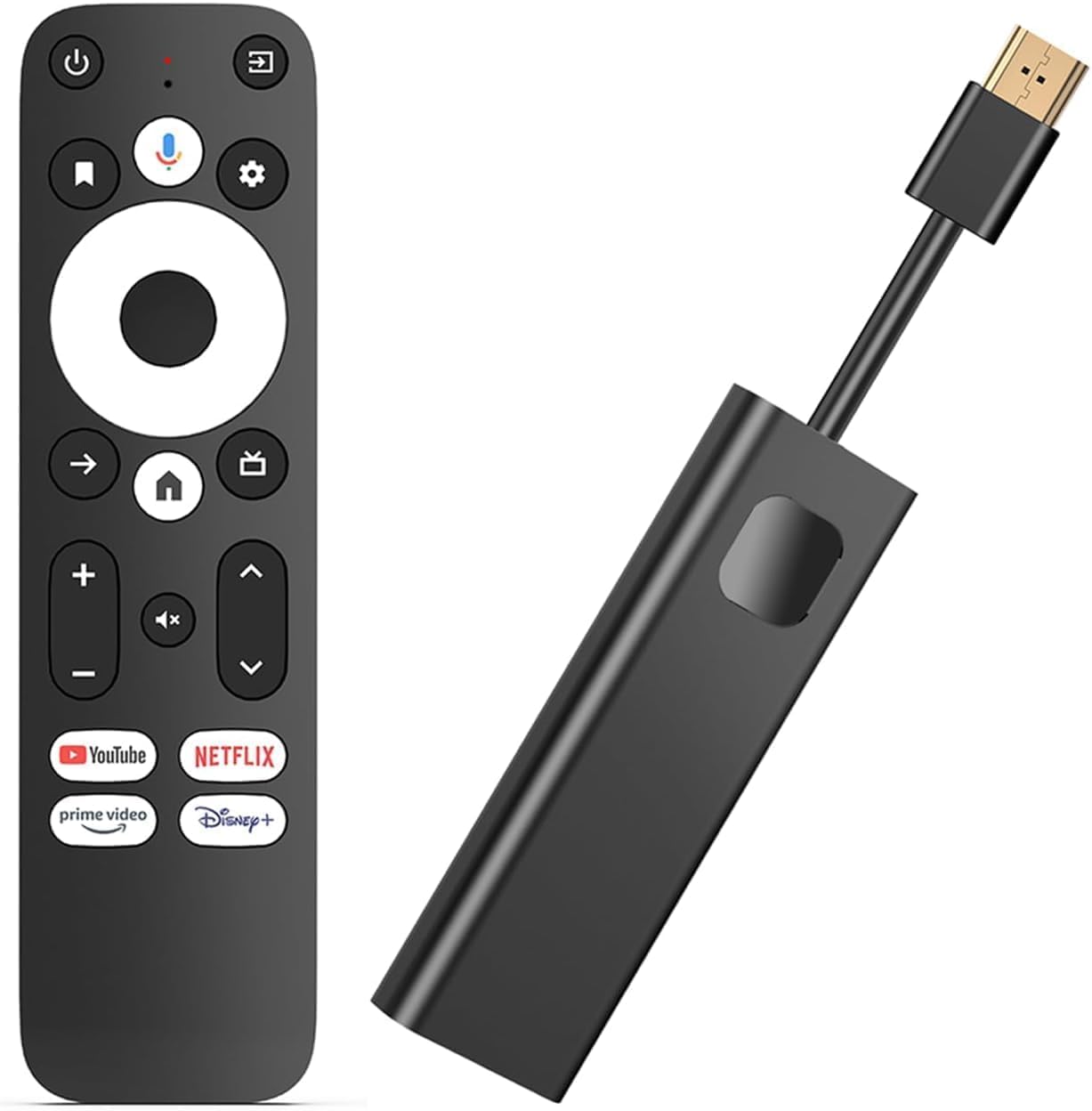
The Phantom Dcolor GD1 is a dark horse entry that packs a surprising hardware punch for its price tier. At its core is the Amlogic S905Y4-B ARM quad-core processor clocked at 2.0GHz with 22,000 DMIPS, paired with 2GB of LPDDR4 RAM and 16GB of eMMC storage. This combination puts it ahead of most budget sticks in terms of raw processing headroom, allowing it to handle 4K HDR10+ streaming with Dolby Audio without stuttering. The stick supports dual-band Wi-Fi 802.11ac and includes Bluetooth for wireless peripherals.
One of the more practical design choices is the USB-C power input, which makes it easy to power the stick using a common cable rather than a proprietary barrel connector. The included voice remote has built-in Google Assistant and Chromecast functionality, letting you cast from your phone or tablet with a single tap. Review owners highlight that it revived an older smart TV that had become painfully slow, breathing new life into a display that otherwise felt obsolete.
There are a few caveats worth noting. The device locks down certain Android settings by default, including developer mode, which may frustrate users who want to sideload non-Play Store apps. At least one reviewer reported a unit that died during a factory reset, though the majority of feedback points to stable, reliable performance. For users who want a stick with twice the storage of most budget options and a capable chipset, the GD1 represents a compelling value proposition that competes well against established brands.
Why it’s great
- 16GB eMMC storage provides ample space for apps and data
- USB-C power input for convenient cable management
- Google Assistant and Chromecast built-in for easy casting
Good to know
- Developer mode and some settings are restricted by default
- Mixed reliability feedback; some units encountered early failures
6. TiVo Stream 4K

The TiVo Stream 4K is a budget-tier stick that punches above its weight class primarily due to its unique software integration. The Android TV interface is overlaid with TiVo’s own discovery layer, which aggregates content from apps like Netflix, Prime Video, Disney+, and Peacock into a unified search and recommendation feed. This is particularly valuable for users who subscribe to multiple services and want to stop hunting through individual apps to find something to watch. The stick also integrates free live TV channels from Pluto TV and Sling TV into its guide.
Hardware is basic but adequate for the price: 8GB of storage, 2GB of RAM, and support for 4K HDR with Dolby Vision and Dolby Atmos passthrough. A rare inclusion at this level is DTS audio support, which the vast majority of budget sticks omit. The remote is a standout feature, with remappable buttons and a dedicated TiVo button for quick access to the discovery interface. The stick requires a strong Wi-Fi signal, as there is no Ethernet option, and the initial setup can take over an hour if you need to link multiple streaming accounts.
The biggest long-term concern is software support. TiVo has been acquired and its streaming strategy has shifted several times, leading to uncertainty about future updates. The Android TV interface is now a few versions behind the latest releases. For users who want a simple, live-TV-centric experience and are willing to accept a shorter update lifespan, the TiVo Stream 4K remains an excellent entry-level pick, especially for its DTS-friendly audio output.
Why it’s great
- TiVo discovery engine unifies streaming content into one guide
- DTS audio support is rare at this price point
- Remappable remote buttons for customized shortcuts
Good to know
- Software updates may be infrequent due to corporate changes
- Lacks Ethernet port; requires strong Wi-Fi for stable 4K streaming
7. OptiSigns OptiStick

The OptiSigns OptiStick is an Android-based streaming device purpose-built for commercial digital signage rather than living room entertainment. It ships with the OptiSigns player pre-installed, allowing you to remotely manage screen content through a cloud portal. The hardware is modest — an Amlogic quad-core CPU with 2GB DDR4 RAM and 16GB eMMC storage — but it is engineered for 24/7 reliability in business environments like retail stores, restaurants, and waiting rooms. Support for 4K HDR and AV1 decoding ensures crisp playback of high-resolution signage content.
The stick includes both Wi-Fi and Ethernet connectivity, giving IT managers flexibility in network deployment. The OptiSigns ecosystem offers over 160 integrated apps and 5,000+ ready-made templates, enabling quick content creation for menus, promotions, or schedules. A free plan supports up to three screens, though it includes OptiSigns branding on the display. The stick can also be used as a standard Android TV device, but its operating system is locked into the OptiSigns environment as the primary interface.
This device has found an unexpected niche in personal care settings. One reviewer reported using it for over 16 months in an assisted living facility to display schedules, meal times, and family photos for a relative with memory loss — dramatically reducing confusion and anxiety. For businesses or care facilities that need a turnkey signage solution without the complexity of a full media server, the OptiStick delivers a focused, reliable experience that standard streaming sticks cannot replicate.
Why it’s great
- Pre-installed OptiSigns player with cloud-based remote management
- Ethernet and Wi-Fi connectivity for flexible network deployment
- Designed for 24/7 operation in commercial and care environments
Good to know
- Required OptiSigns subscription for full feature access
- Not designed for standard consumer streaming out of the box
FAQ
Can I use a Bluetooth keyboard or game controller with an Android TV stick?
What happens if my Android TV stick runs out of storage space?
Is Wi-Fi 6 worth paying extra for on a streaming stick?
Final Thoughts: The Verdict
For most users, the best android tv stick winner is the Google TV Streamer 4K because it strikes the ideal balance of 32GB storage, polished software, and built-in Ethernet for a reliable, lag-free streaming experience. If you want uncompromised home theater performance with AI upscaling and DTS:X passthrough, grab the NVIDIA Shield Pro. And for a budget-friendly clean Android experience without Amazon bloat, nothing beats the Xiaomi TV Box S 3rd Gen.