
Our readers keep the lights on and my morning glass full of iced black tea. As an Amazon Associate, I earn from qualifying purchases.
Specs are compiled from manufacturer listings and verified buyer reviews and can change over time — please confirm the key details on the product page before buying.
If you want a frame that plays video and moving photos instead of just sitting there frozen, three things decide whether you will love it or resent it: how easy it is for your family to send you pictures, whether it needs a monthly subscription, and whether the screen is big enough to actually see from across the room. Get those right and you get a living window into the people you love. Get them wrong and you get a dusty rectangle.
I’m Min — the founder and writer behind Gadgets Feed. This guide is built by comparing the manufacturers’ published specifications and the patterns across verified customer reviews, so you get each pick’s real strengths and trade-offs instead of marketing spin.
The picks below are sorted by who each one actually suits, from the gifting favorite to the gallery-sized wall piece, so you can match the frame to the room and the family member. Here is the honest breakdown of the best animated picture frame.
Our Picks at a Glance



How To Choose The Best Animated Picture Frame
An animated picture frame only earns its place on your shelf if the people you love can get pictures onto it without calling you for help. That single test rules out more frames than any spec-sheet comparison ever will. Before you compare screens, settle the sharing question first.
Decide who is sending the photos
If your parents or grandparents are the ones receiving the frame, look for an app that a non-technical person can navigate, plus an email or web upload option as a backup. A frame that only accepts uploads from a phone app puts the burden on you every time. A frame that also accepts email lets an aunt or a cousin drop in a picture without ever downloading anything.
Check whether you keep paying after you buy
Subscriptions are the quiet trap in this category. Some frames advertise unlimited cloud storage but actually cap the free tier, which means the frame you bought can start pushing you toward a paid plan later. The cleanest setup is a frame that stores your photos on its own internal memory and charges nothing, ever. Read the feature list line by line and look for the words “no subscription fee” rather than trusting the headline.
Match the screen to the wall
A 10-inch frame belongs on a side table where you pass it every day. A 15.6-inch or 21.5-inch frame belongs on a wall you look at from across the room. Bigger screens also mean older eyes can see the faces clearly without leaning in, which is often the whole reason someone buys one of these as a gift.
Quick Comparison
| Model | Best For | Screen Size | Storage | Video Support | Amazon |
|---|---|---|---|---|---|
| Aura Carver★ Best Overall | Gifting and easy family sharing | 10.1 inches | Unlimited (free cloud) | Up to 30 seconds | Amazon |
| Uhale 10.1″Best Value | Budget first frame | 10.1 inches | 16 GB + microSD | Photo and video sharing | Amazon |
| Nixplay 10.1″Best for Nixplay Households | Nixplay app households | 10.1 inches | 32 GB built-in | Photo and video playlists | Amazon |
| Canupdog 16″ | Large screen on a modest budget | 16 inches | 32 GB + microSD to 128GB | 15-second clips | Amazon |
| Humblestead 15.6″ | Big screen and heavy storage | 15.6 inches | 64 GB + SD slot | Clips up to 15 seconds | Amazon |
| PhotoSpring 10″ | Long video clips without fees | 10 inches | 32 GB | Up to 5 minutes (1GB) | Amazon |
| Flyruit Frameo 15.6″ | Shared Frameo app families | 15.6 inches | 32 GB + SD/USB | MP4 video | Amazon |
| BIGASUO Frameo 15.6″ | Storage per dollar | 15.6 inches | 64 GB + SD/USB | 15-second clips | Amazon |
| FANGOR 21.5″ | Wall art and signage scale | 21.5 inches | 64 GB + SD/USB | Up to 2 minutes | Amazon |
In‑Depth Reviews
1. Aura Digital HD Picture Frame, Carver Black
Our pick — over 4.5★ from 13,500+ verified ratings; the strongest balance of quality and price.
The 10.1-inch frame with one-minute setup and free unlimited cloud storage, built for grandparents who have never connected anything to WiFi.
This is the one you hand to a grandparent who has never connected anything to WiFi in their life. Aura claims a one-minute setup, and the review pages back that up hard — easy setup is the thing buyers praise most by a wide margin, with ease of use right behind it. You add the frame to the free Aura app, invite family by text or email, and pictures start landing on the glass from anywhere.
The storage story is the real differentiator. There is no subscription fee, and the cloud library is unlimited, so you never hit a wall where the frame asks you to pay more to keep your own photos flowing. Video clips play with sound for up to 30 seconds, and the frame handles iOS live photos, so a bouncing toddler or a dog mid-zoom actually moves. The 10.1-inch HD screen is calibrated for color and adjusts its own brightness to the light in your room, which is why it holds up next to a lamp in the evening without washing out.
The catch buyers raise most honestly is value — plenty call it worth it, and a slice of the reviews feel the price tag is steep for the size. That is a fit question, not a defect: families report the Aura frame in one home with unlimited photos flowing in from two frames using the same app, and they specifically call out the picture quality and the ability to send custom cards from a phone instantly across the country. Aura edges out the Uhale and Nixplay 10-inch frames on the one number that matters most here — a 10.1″L x 12.7″W footprint versus the Uhale’s 10.43″L x 7.28″W — giving the Aura the wider presentation stance. One small thing to know: bulk-uploading old backups is fiddly, since email attachments cap out quickly.
What wins people over
- Setup that grandparents genuinely finish alone, with easy setup the top-rated strength
- Free unlimited cloud storage with no subscription ever
- Up to 30 seconds of video with sound, plus iOS live photo support
- Auto-brightness display that reads well in a dim room
Where it stings a little
- Bulk-uploading a big photo archive through email is awkward; texting works better, and true drag-and-drop from a computer is missing
- The stand is cast metal and takes a firm hand to seat — stable once in, but not a one-second job
Reach for this if: you want to preload a gift, send it in the box, and know the receiver will be looking at moving pictures within minutes of opening it.
Look elsewhere if: you are purely chasing screen inches for the money — the larger 15.6-inch frames further down give you far more glass.
2. Uhale Digital Picture Frame, 10.1-inch HD Touch Screen
A 10.1-inch 1280×800 IPS touchscreen with a 178° viewing angle, 16GB of storage, and no subscription fees.
Here is the one that makes the case that the whole category is overpriced. Buyers report setup under five minutes, and the recurring theme in the feedback is that this frame behaves like models costing far more — the value conversation comes up often, and it lands positive. The 10.1-inch 1280×800 IPS panel gives you a wide 178° viewing angle, so the picture holds up whether you are straight on or walking past at an angle.
Sharing is handled through the Uhale app on iOS or Android, and the touchscreen itself is genuinely usable for navigating photos, videos, slideshows, and settings. Auto-rotation means a portrait shot flips itself the right way without you diving into menus. Privacy gets real attention too: point-to-point transmission and end-to-end encryption protect the stream, and the frame is CCPA and GDPR compliant and TRUSTe certified. There is 16GB built in, a microSD slot for up to 32GB, and no hidden software fees or subscriptions.
The honest reason this sits at the value tier rather than the top: a small share of the feedback describes frames that stopped working after about a month, and that reliability thread is why buyers should test the setup quickly after it arrives. Most, however, describe a frame still running fine a year in. One buyer summed the value case plainly — “Setup under 5 min. Functions better than expected for price; comparable frames cost +. Would buy another.” Contrast that with the Aura above: the Uhale gives you a wider 178° viewing angle and a touchscreen at a fraction of the spend, but it cannot match the Aura’s one-minute-out-of-the-box polish for a non-technical grandparent.
The clincher for gifters: it arrived at a funeral and did the quiet, heavy lifting of holding a family’s memories in the room — that kind of moment is what these frames are really for.
Buy it if you want the gift-frame experience without the premium frame outlay, or you are buying a second frame for a bedroom or office.
Pause if you need rock-solid long-term reliability — a handful of owners mention early failures, so buy from a seller with an easy return window.
3. Nixplay 10.1″ WiFi Digital Photo Frame
A 10.1-inch 1280×800 touchscreen with Nixplay-SenseMe motion sensing and Alexa support, for households already on the Nixplay app.
The 10.1-inch IPS HD touchscreen runs at 1280 x 800 in a 16:10 aspect ratio, and the panel keeps photos high-definition, rich, and vivid across a wide viewing angle. Build is plastic, dimensions are a compact 9.56″L x 7.47″W, and it can sit on a desk or go on the wall in portrait or landscape, rotating content automatically either way. Setup is the standout: quality and easy setup are the twin strengths buyers talk about most, and the app lets you invite multiple people to upload straight to the frame, connect several frames on one account, or simply log in on desktop or email photos in.
Nixplay-SenseMe is the feature that separates this from the pack — a smart sensor that wakes the frame when you walk into the room and puts it to sleep when you leave, which keeps the display from glowing at an empty wall. It works with Amazon Alexa, so you can ask for the playlist you want, and old Nixplay photos migrate to a new frame with one click. Note the SD card is not supported here, so everything rides on the 32GB built-in plus the cloud account.
Here is the catch, and it is a significant one for storage-hungry families: the advertised unlimited cloud storage is not unlimited from the start. The free tier is 500MB — roughly 800 photos — and beyond that the unlimited plan runs the buyer a yearly subscription. One owner found the 32GB internal storage effectively unusable and needed the paid plan to keep going. If you already pay for Nixplay Plus, this frame is smooth. If you are starting fresh and resent a subscription, the Aura above is the cleaner no-fee path, and the Flyruit and BIGASUO frames lean on their generous built-in memory instead.
The word from owners: this frame draws repeat ApoloSign buyers who came for a Nixplay-compatible experience at a gentler price, and they are not disappointed once the app clicks.
The one snag: the 500MB free cloud limiter and the push toward a paid plan — budget for that if you upload heavily.
4. Canupdog 16 Inch Large Digital Picture Frame

A 16-inch 1920×1080 IPS touchscreen with a motion sensor and 32GB of storage, expandable to 128GB via microSD.
The size is the point here. A 16-inch HD 1920×1080 IPS panel with wide viewing angles is genuinely visible from across a room, and older family members get the whole benefit — this is a frame older people can read without leaning in, which is exactly what the buyers on record say about it. A user-friendly touchscreen keeps it usable for non-techies. Frame it in wood, keep it borderless, and photos present edge-to-edge with no fat bezel stealing the image.
Sharing runs through the free Vphoto app on Android and iOS. There is 32GB built in and it takes a microSD card up to 128GB for expansion, so storage is genuinely generous. Auto-rotation reads the orientation of each photo and corrects it whether the frame is wall-mounted or standing on a table. The included motion sensor wakes the screen when you walk past and shuts it off when you leave, saving energy and sparing you the sight of a lit frame in an empty room.
The track record is solid but not spotless. Buyers consistently love the look, use, and image quality, but a reliability thread runs through the feedback — some owners describe the screen cutting out after months and needing a reset. The saving grace is support: one customer’s frame cut off around the six-month mark, and after a quick video, the manufacturer shipped a replacement within two days. One legit quirk to plan for is the short power cord, which limits where you can place it. Upload options cover the bases, from app to SD card to email, with multi-contributor link sharing so the whole family can feed it.
The family angle: this is the one people gift to elderly parents and then immediately buy a second for themselves — the 16-inch screen earns that reaction.
Choose this if: you want the biggest honest screen in the mid-tier and value a wood frame and a motion sensor over app polish.
Skip if: the short power cord would force you to mount it somewhere away from an outlet — the placement constraint is real.
5. Humblestead 15.6″ Digital Picture Frame

A 15.6-inch 1920×1080 IPS touchscreen with 64GB of built-in storage, expandable via SD card.
The screen and the storage are the two headline numbers, and both are strong. You get a 15.6-inch 1920×1080 IPS touchscreen with a full-angle view, and a massive 64GB of built-in storage that expands via SD card. Customers note the picture is vivid and the interface is simple enough to set up and run without a manual, and one owner specifically notes it is visible from 15 feet away — which is the whole reason a frame this size exists.
Sharing is handled through the AiMOR app, syncing photos and short clips of up to 15 seconds from your phone, and unlimited family members can join and contribute. The frame auto-rotates for portrait or landscape, and a reserved mounting hole lets you hang it on the wall or stand it on a desk. For a gift, the sweep of occasions is covered — parents, grandparents, new couples, graduates, and long-distance families all show up in the pitch. It arrives with a one-year warranty and support in six languages including English, German, Spanish, French, Italian, and Japanese.
What the feedback flags most reliably is the app’s limitations. Uploads only pull photos that live on your phone, not from cloud folders, and new pictures always append to the end of an album with no option to slot them in at a chosen position. A couple of owners also mention pop-up ads inside the app. None of that breaks the frame — the pictures still get there and look great — but if you are organizing a big library album by album, the app will frustrate you a little. The extra leg included for tabletop use is a thoughtful touch that the tighter 10-inch frames above do not offer.
Great for: big families who send a steady stream of photos and want years of headroom before they think about storage again.
Worth knowing: the app is simple rather than powerful — no inserting photos mid-album, no cloud-folder uploads, and a few pop-up ads along the way.
6. PhotoSpring 10″ WiFi Digital Picture Frame

A 10-inch frame that plays videos up to 1GB — roughly five minutes — with 32GB of storage and no subscription fees.
This is the video champion of the group. Most animated frames cap clips at 15 to 30 seconds; PhotoSpring supports videos up to 1GB, roughly five minutes long, and plays them back in HD. If your family sends longer recordings — a birthday speech, a recital, a grandchild telling a whole story — this is the one that can hold the whole thing. It also brings a genuinely family-first approach: multiple people can send photos to a single frame at once, and you can push memories to several frames at the same time.
Setup is rated a snap, done through a touchscreen interface, with three ways to feed it pictures — email, app, or web browser — plus importing from a USB stick. The 10-inch screen sits in a wood frame, has 32GB of storage, and runs a 16:10 aspect ratio. The company’s “no subscription fees” promise is unqualified: the frame is fully featured from the start, and there is nothing to pay later. Owners describe loading 2,000 photos and 12 videos and only filling the frame to about 18% capacity, which tells you the storage goes a long way.
Two honest limitations deserve a spot in the conversation. The Sound is handled by rear-facing speakers that owners describe as mediocre — fine for ambience, not for a movie night. And the shuffle feature tends to grab a run of consecutive photos from the same album, so it does not feel truly random across your library. Meanwhile the frame’s customer service is the standout note in the feedback, with multiple buyers describing parts replaced and photos migrated back to the frame within a week. If you value five-minute video clips and a manufacturer that answers, this is a compelling pick — even if a 15.6-inch screen beats it on sheer size for the same money.
Reasons to like it
- Five-minute video playback with sound, the longest in the group
- No subscription, ever — full feature set included
- Three upload paths: email, app, or web browser
- Family-first design with multiple simultaneous senders
Reasons to think twice
- Rear speakers mean sound is soft and directional
- Shuffle repeats consecutive photos instead of mixing your whole library
The frame to buy if video is the whole point and you want it playable in full, not the curated 15-second clips most competitors allow.
What you trade: audio quality and true random shuffle in exchange for that longer-video capability.
7. Flyruit Frameo 15.6″ Digital Picture Frame

A 15.6-inch 1920×1080 IPS touchscreen running the Frameo app, with 32GB of storage plus SD and USB transfers.
The 15.6-inch 1920×1080 IPS FHD touchscreen delivers the kind of detail phones promise and TVs deliver — buyers describe it as crisp, and the resolution lets you see fine detail in a photo. Frameo handles sharing, and the platform is one of the biggest names in this space, so if any of your family already uses a Frameo frame, nothing new to download — same app, same familiar interface, invite unlimited members.
Storage lands at 32GB built-in, expandable via a full-size SD card or USB drive, and the frame holds thousands of photos. Two features earn extra points. First, the frame accepts non-WiFi transfers too — drop a full-sized SD card or USB drive into it, or run a USB-C cable from your computer, so the whole thing works without ever connecting to the internet. Second, its greeting and reaction features let you send a themed birthday wish or reply with emojis on a photo someone loads. The 16:9 aspect ratio makes it feel like a mini television when photos and videos cycle through.
The single most important caveat: this frame only connects to 2.4GHz WiFi, so if yours is a 5GHz-only network, plan for the SD-card or USB-C route instead. That is a setup constraint, not a flaw. Beyond that, feedback is glowing — easy setup, vivid picture quality, and value for the money all show up frequently, with buyers often noting that the frameo backbone makes shared family uploads painless. The 10-photo upload-at-a-time limit in the app is a minor annoyance when you are loading a big batch.
Best for households already on Frameo: the app is the same familiar one, so a giftee who owns a Frameo frame gets an instant match and no learning curve.
One to pick if you want the biggest Frameo-compatible screen with the option to sidestep WiFi entirely.
But check your WiFi first — this frame only rides 2.4GHz, and a 5GHz-only network means running it on SD card or USB instead.
8. BIGASUO Frameo 15.6″ Digital Picture Frame with 64GB

The biggest built-in memory on the list, in a 15.6-inch screen people will actually watch.
If you have been watching the two 15.6-inch frames above battle it out, this one lands the winning punch on storage. Built-in memory here is 64GB — double the 32GB in the Flyruit frame — and the manufacturer says that holds up to 100,000 photos. The 15.6-inch 1920×1080 IPS touchscreen keeps the same wide viewing angle and sharp clarity, wrapped in a black-and-white frame that suits most rooms.
Sharing runs on the Frameo app for iOS and Android. Whip the frame onto WiFi and family can push photos and short 15-second video clips from anywhere, add captions, and share a QR code so friends can upload directly. Multiple frames can share the same software ecosystem, so you can manage several from one account. Buyers describe the setup as quick, the upload paths as varied (app, SD card, or USB drive), and the picture as sharp and bright — the kind of thing people note about a frame they see every day.
One real limitation to plan around: the frame prefers a 32GB SD card or USB drive, and larger drives like 64GB or 128GB may not work reliably — it says so plainly in the product notes. Some photos also need a quick in-app edit to display in the correct orientation, which adds a small step to the upload process. WiFi connectivity earns a mixed reputation in the feedback, but the frame draws consistent praise for build and image quality, and owners describe it as an easy recommendation for anyone gifting a photo frame to a parent or partner.
The straightforward choice when you want the most built-in memory on a 15.6-inch screen without fiddling with external drives.
Just note: stick to a 32GB SD card or USB drive if you plan to import that way — bigger drives may not play nicely.
9. FANGOR 21.5″ Large Digital Picture Frame
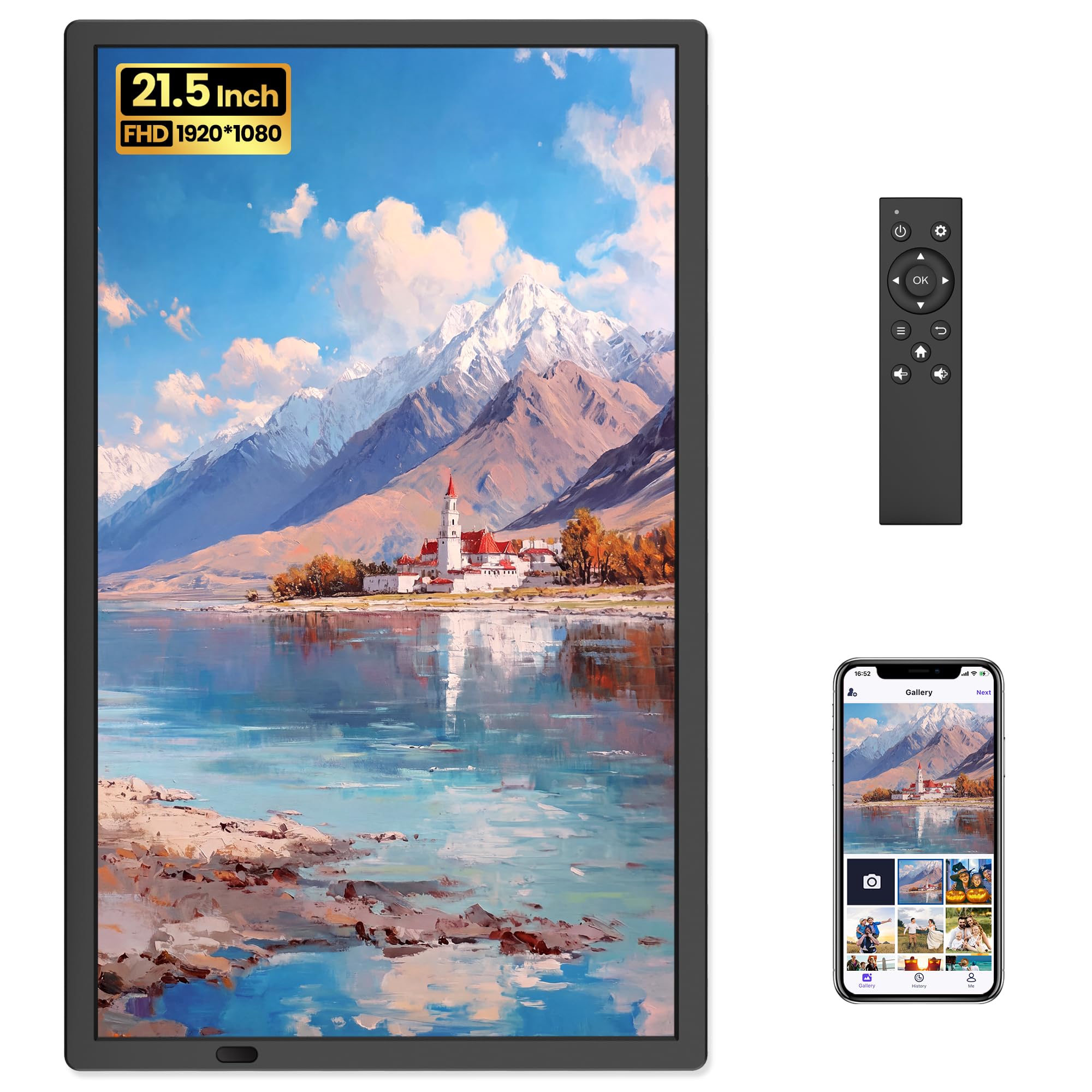
The wall piece — a 21.5-inch screen you control from the couch with a remote.
This is the frame you hang rather than set down. A 21.5-inch 1920×1080 FHD display is nearly the size of a small TV, and the anti-glare matte finish is deliberate — artwork displays like a real print under glass, so it works as a gallery piece as much as a family photo board. The extra real estate means an old photo from 40 years ago gets the space to be seen, and the panel handles both horizontal and vertical setups.
Since this frame is often mounted high on a wall, FANGOR skipped the touchscreen entirely in favor of the included remote. You adjust settings, switch slideshows, and manage display modes without reaching for the frame at all — which is also the answer to fingerprints on the glass. Photos and videos flow in via the Uhale app from your phone, and it accepts a mix of up to 2-minute videos. Through the Uhale web tool you can send up to 500 photos at once, well beyond the 100-photo app cap. There is 64GB built in, holding 160,000+ photos, with SD and USB ports for more. And there are no subscription fees — every feature is free.
The honest caveats are worth naming before you mount this on a wall. Reliability feedback is split — some reviewers point out a frame that stopped working, while others describe running it daily for months without a hitch. The remote is essential, not optional, since there is no touchscreen. And owners note the video can look slightly choppy, and you cannot delete images through the app. That said, on the numbers that matter for the money — 21.5-inch screen, 64GB, remote control, no fees — nothing else in this group comes close on scale. Buyers pick this one, in their own words, for looking at from the dinner table, and they say it is worth it.
Why it earns the wall
- 21.5-inch FHD display, by far the largest in the group
- Anti-glare matte finish that reads like a printed artwork
- Remote control handles a high-mounted frame without touching it
- 64GB built in, free features, no subscription ever
What to weigh
- No touchscreen at all — everything runs through the remote
- Slightly choppy video and no in-app deletion of photos
- A handful of shoppers say frames that stopped working over time
Where it belongs: on the big living-room wall or in a café, restaurant, or office where you want a rotating display you never have to touch.
What fits best: a buyer who wants maximum screen for the outlay and does not need a touchscreen, because everything about this frame is built for the remote.
Understanding the Specs
Screen size and resolution
Screen size is measured diagonally in inches, and it is the first thing that decides where the frame belongs. A 10-inch frame sits comfortably on a nightstand or kitchen counter. A 15.6-inch frame is built for a wall or a sideboard. A 21.5-inch frame is essentially a small television and belongs where people look from a distance. Resolution — usually listed as 1280×800, 1920×1080, or simply 1080p — tells you how sharp that screen is. A higher resolution on a larger screen keeps faces and details crisp instead of soft. IPS panels are worth looking for, because they keep colors accurate when you view the frame from the side rather than straight on.
Storage and video length
Storage is the space the frame has for your photos and videos, listed in gigabytes (GB). Frames here carry anywhere from 16GB to 64GB of built-in memory, and many accept a memory card or USB drive to expand it. Video length is a separate spec, and it matters more than most buyers expect. Some frames play only short clips under 30 seconds; others handle full minutes of footage. If your family records longer videos, look at the video spec line as carefully as the screen size. A frame that claims “video support” without a length is worth checking before you buy.
FAQ
Do I need WiFi for an animated picture frame to work?
Do these frames require a monthly subscription?
How do I send photos to someone else’s frame?
What is the difference between a “digital picture frame” and an “animated picture frame”?
Will a frame play videos or just static photos?
Can multiple family members upload to the same frame?
What should I look for if I am buying a frame for a grandparent?
Do these frames need to stay plugged in?
Can I use an SD card or USB drive instead of the app?
Is 1080p enough for a large digital frame?
Final Thoughts: The Verdict
For most families, the animated picture frame that gets the whole job done is the Aura Carver — its one-minute setup, free unlimited cloud storage, and 30-second video playback make it the easiest frame to give and to live with. If you want the front-row seat without the premium spend, the Uhale 10.1-inch frame performs like a frame costing far more. And for wall-scale presence, the FANGOR 21.5-inch frame turns photos and video into living artwork you control from the sofa.
One last nudge: the Aura Carver has built a genuinely devoted following — it carries a 4.7-star rating on Amazon, so if you are torn between two picks, start there and work down. Whichever frame you choose, buy from a seller with an easy return window and test the setup the day it arrives — that five-minute check is the whole insurance policy on a gift like this.
How We Picked
We do not accept paid placement. Every pick is matched to a real buyer and a real use-case; we do not hands-on test units.
Sources & Methodology
Specifications: manufacturer listings and product documentation. Review insights: verified customer reviews, as of September 2026. Pricing: not shown on this page (it changes often); check the current price via the retailer link.
As an Amazon Associate, Gadgets Feed earns from qualifying purchases. This does not affect which products we feature.