4 Best ANSI US Keyboard | Typing That Doesn’t Fight You

Our readers keep the lights on and my morning glass full of iced black tea. As an Amazon Associate, I earn from qualifying purchases.

Specs are compiled from manufacturer listings and verified buyer reviews and can change over time — please confirm the key details on the product page before buying.

You know the frustration: you buy a keyboard, plug it in, and the Enter key is the wrong shape, or a punctuation key sits somewhere you don’t expect. Your muscle memory trained on the standard US layout, and anything else slows you down. You need a board that matches that layout exactly—the ANSI (American National Standards Institute) standard—so every key is right where you learned it.

I’m Min — the founder and writer behind Gadgets Feed. This guide is built by comparing the manufacturers’ published specifications and the patterns across verified customer reviews, so you get each pick’s real strengths and trade-offs instead of marketing spin.

You will choose between silent membrane for a quiet office and hot-swappable mechanical for customizable gaming feel. A reliable ansi us keyboard depends on matching your daily use with the right switch type and connectivity.

Our Picks at a Glance

Geeky GK61 60%
Best OverallGeeky GK61 60%4.4★245 ratingsTrue hot-swappable mechanical switches at a low price—the GK61 proves you do not need to spend a lot to swap switch types.Check Price on Amazon

How To Choose The Best ANSI US Keyboard

Picking the right keyboard starts with three decisions: the physical layout size (how many keys you get on your desk), the switch type, and the connection method. A 60% board saves desk space but drops the function row and arrow keys, while a full-size 100% keeps a numpad (right-side number pad for entering data). Membrane keys are quiet and budget-friendly, whereas mechanical switches offer a tactile feel and longer lifespan—mechanical switches are typically rated for 50 million to 100 million presses. Wireless models add freedom but need battery management; wired boards guarantee zero latency.

Layout Size and Key Count

The first thing to check is how many keys you actually need day to day. A 60% layout with 61 keys is ultra-compact and great for travel or minimalist setups, but you lose dedicated arrow keys and the number row above the letters. A 65% board adds back arrows and a few navigation keys with 68 keys, splitting the difference. Full-size 100% boards pack 104 keys and a numpad, which is ideal if you frequently enter data or use shortcuts that rely on the number pad.

Switch Type and Feel

Mechanical switches give you a distinct click or bump and can last for tens of millions of presses, and many boards let you swap them without soldering (that is, hot-swappable) for easy customization. Membrane switches are quieter and softer, which some find better for shared spaces or late-night typing. The trade-off is that membrane keyboards are usually cheaper but cannot be repaired switch by switch if one fails.

Connectivity and Extra Features

Wired USB-C keyboards offer a reliable, lag-free connection with no batteries to charge. Wireless options split into 2.4GHz (using a small USB receiver) and Bluetooth, with some models supporting both so you can switch between a PC and a tablet. RGB lighting (per-key colored backlight) is common, ranging from fixed rainbow colors to full 16.8 million color customization through software. A high polling rate of 1kHz delivers a fast 1ms response time (the keyboard reports to your PC every millisecond), which competitive gamers notice.

Quick Comparison

Model Best For Layout / Keys Switch Type Connectivity Amazon
Geeky GK61★ Best Overall Budget-friendly hot-swap gaming 60% / 61 keys Mechanical (hot-swappable) Wired USB-C Amazon
Glorious GMMK 3 Full customization & full-size use 100% / 104 keys Mechanical (hot-swappable) Wired USB-C Amazon
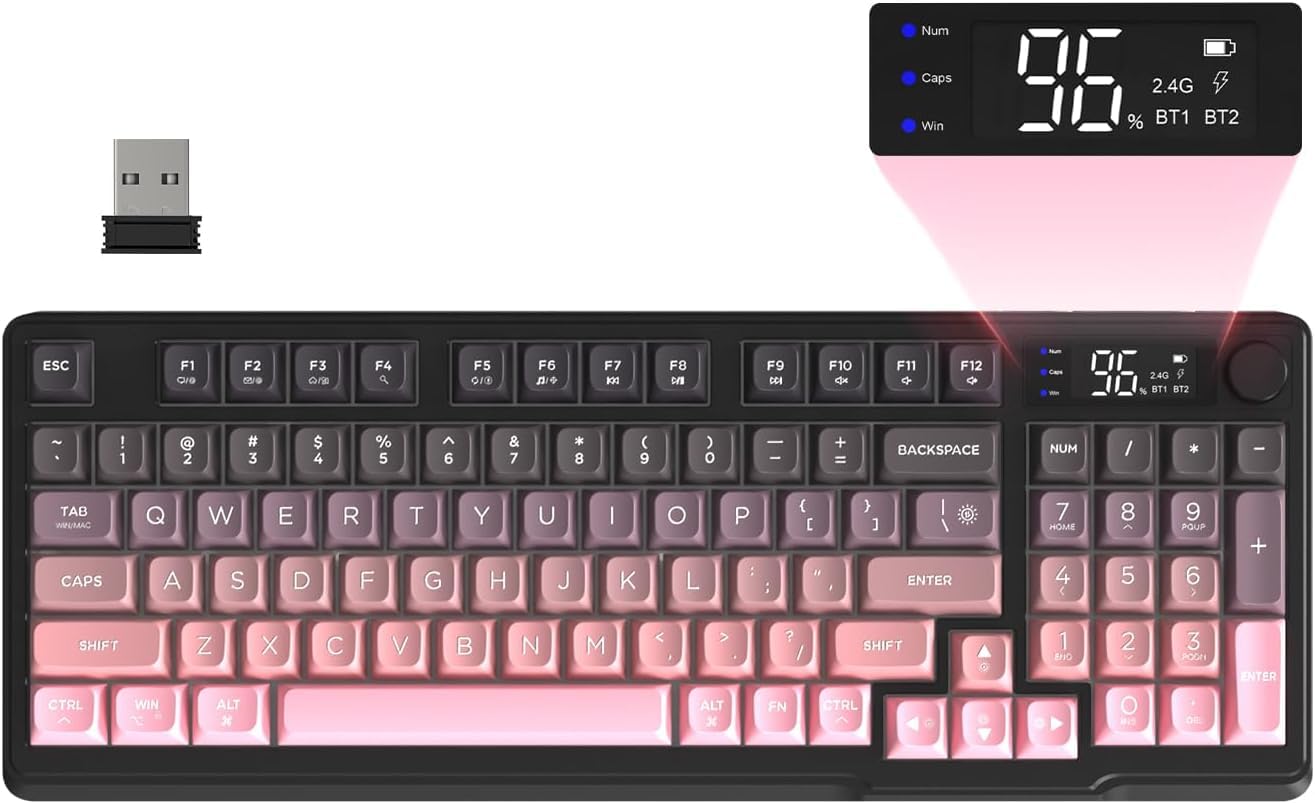
FREEWOLF M96 Wireless office & quiet typing Compact 94 keys Membrane 2.4GHz / Bluetooth Amazon
Geeky GK65 SE Compact build with arrow keys 65% / 68 keys Mechanical (soldered) Wired USB-C Amazon

In‑Depth Reviews

★ Best Overall

1. Geeky GK61 60%

Our pick — over 4★ from 200+ verified ratings; the strongest balance of quality and price.

61 KeysHot-Swappable

True hot-swappable mechanical switches at a low price—the GK61 proves you do not need to spend a lot to swap switch types.

The GK61 uses a 61-key 60% layout that measures just 11.42 inches wide and weighs very little, freeing up desk space for wide mouse swipes. The included switch and keycap pullers let you remove switches without soldering, so you can swap in a heavier tactile switch for typing or a faster linear switch for gaming, and change keycaps to match your setup.

The multicolor RGB lighting (backlighting behind each key) hits 16.8 million colors and can be customized into twenty preset patterns through the software. The 1kHz polling rate delivers a 1ms response time (your key presses register every millisecond), which speeds up fast-paced shooters compared to slower boards. The pre-lubed stabilizers (tubes under large keys) reduce the rattle sound that the spacebar and shift keys often produce on cheaper builds. Owners mention that after a year of daily use, “not a single problem has came up,” underlining reliability for such a low entry price.

The catch: the included mechanical silver switches are linear and sensitive (they trigger with very light pressure), so if you rest your fingers heavily on the keys you may trigger accidental presses. The 60% layout also lacks dedicated arrow keys and a function row, which some users find frustrating for spreadsheet navigation or typing-heavy workflows.

Why It Impresses

  • Hot-swappable sockets let you swap switches without soldering tools
  • Compact 11.42″ x 4.02″ footprint leaves room for large mouse movements
  • Pre-lubed stabilizers keep the spacebar and shift keys from rattling

Where It Cuts Corners

  • 60% layout means no arrow keys or function row without using Fn (function) layer key combinations
  • Linear silver switches can be too sensitive for heavy-handed typists

Reach for this if: You are on a tight budget but refuse to give up hot-swappable mechanical switches and want a board that fits in a backpack for LAN parties or study sessions.

Look elsewhere if: Your daily workflow relies on arrow keys or the number pad—the 61-key layout will force awkward Fn (function) key combinations that slow you down.

2. Glorious Gaming – GMMK 3

100% Full SizeHot-Swappable

Change the typing feel without buying a new keyboard—the GMMK 3 uses a modular gasket system (MGS) that lets you swap internal parts.

The GMMK 3 gives you nine points of modularity (multiple swappable internal parts) so you can change the look, sound, and feel over time, not just the keycaps. Its Modular Gasket System (MGS), a block-like structure inside, lets you choose between a firmer or more flexible typing feel depending on your mood or game. The aluminum switch plate balances stiffness with a neutral sound profile, and you can swap in other material plates to tune the acoustics further.

You get an ANSI US layout with 104 keys in a full-size 100% frame measuring 18.2 inches wide. That means a numpad, arrow cluster, and function row without needing a separate keypad. The GPBT doubleshot keycaps (molded in two layers so the legends never wear off) keep your RGB shine-through crisp while resisting the greasy shine of standard keycaps. A programmable knob on the top-right lets you twist for volume, press for play/pause, or assign a custom action through the Glorious CORE software.

Buyers report that the Fox switches feel clicky and responsive even after 24 hours of use, and the build quality feels solid compared to the Geeky GK61 below. One caveat: the punctuation keycap legends place secondary symbols side-by-side at the top instead of stacked on the left, which may take adjustment if you have decades of muscle memory trained on the standard layout.

Built to Last, Not to Guess: The GMMK 3 stands out because its 104-key count and aluminum body give it a premium weight of 2.6 pounds, so it stays planted during intense gaming sessions. The hot-swappable switches mean you can replace a worn switch with a new one using the included tool, avoiding the soldering hassle that cheaper mechanical boards require.

The Modular Catch: You are paying for customization freedom—the board ships with Fox linear switches pre-installed, but if you want a completely silent or clicky build from the start you will need to buy additional switches separately.

Programmers, competitive gamers, and heavy data entry users: this is your single full-size keyboard you can fine-tune over years. The modular gasket system and the numpad make it worth the space.

Travel frequently or need a compact layout for a small desk? The 18.2-inch width and 2.6-pound weight make this more of a desk anchor than a portable companion.

Wireless Power

3. FREEWOLF M96 Wireless

Membrane3000mAh Battery

A 3000mAh battery and quiet membrane keys make the M96 the longest-lasting wireless option for noise-sensitive spaces.

Noise-sensitive environments call for a different approach, and the M96 delivers with creamy membrane (a soft rubber-dome feel) keys that buyers describe as “smooth, quiet” and “nearly silent.” The ball-shaped PBT keycaps (a tougher plastic that resists wear) fit your fingertip curve naturally, helping you type longer without fatigue. The compact 94-key ANSI layout keeps the number pad and offset arrow keys while trimming the width compared to a full 100% board, saving desk space.

Wireless flexibility is the headline here: the board supports 2.4GHz connection (via the included USB receiver) and Bluetooth, letting you toggle between up to three paired devices with a single switch. The built-in 3000mAh battery, which customers note seems to last forever for school and gaming days, automatically enters sleep mode after three minutes of inactivity to conserve power. A small LCD smart screen on the upper-right shows the keyboard status, and a media knob lets you adjust volume or lighting brightness by pressing and holding the knob for about five seconds.

Compared to the Geeky GK61 above, the M96 packs 94 keys to the GK61’s 61—a gain of 33 more keys—but uses membrane switches instead of hot-swappable mechanical ones. That limits repair options if a key fails. The rainbow backlight is fixed in color (you cannot switch to a single static color) and the keycaps are not shine-through, meaning you will see the LED glow around the caps rather than through the letters.

The Silent Workhorse Argument: The 3000mAh battery combined with auto-sleep means you can use this wirelessly for days without reaching for the charging cable, and the media knob lets you mute a call or adjust volume without alt-tabbing out of your game.

The Membrane Limitation: You cannot swap individual switches if one wears out—the entire keyboard would need replacement—and gamers who prefer a crisp tactile bump may find the creamy feel too mushy for competitive play.

Grab this for: A quiet wireless office setup, shared dorm rooms, or engineering workflows where you need a numpad but not the bulk of a full-size keyboard.

Pass if: You want to customize switches or you need per-key RGB lighting—this board keeps the rainbow fixed and limits you to membrane-only feel.

Compact Arrow

4. Geeky GK65 SE 65%

68 KeysSoldered Switches

A 65% board with a dedicated arrow cluster—the GK65 SE gives you navigation keys without a full-size footprint.

The GK65 SE splits the difference between the ultra-compact GK61 and a full-size board: at 12.2 inches wide, it adds a dedicated arrow cluster and a small navigation block while keeping a compact profile that still leaves room for your mouse. The red mechanical switches are linear, meaning they travel straight down without a tactile bump, which gamers often prefer for double-tapping or rapid key presses. The doubleshot keycaps (two layers of plastic fused together) ensure the legends stay sharp even after heavy daily use, and the OEM profile (a standard sculpted shape) means the rows are slightly curved to match your fingers’ natural reach.

One major point of confusion, however: reviewers point out that “it is DEFINITELY NOT hot swappable and has soldered switches,” despite product descriptions that imply otherwise. That means once a switch breaks, you need a soldering iron to replace it—no plug-and-pull convenience like the GK61 offers. The 1kHz polling rate and 1ms response time still apply, so the board itself responds quickly in games, but the lack of hot-swap limits its long-term value for churners.

At 580 grams and 12.2 inches in width, the GK65 SE is about 0.78 inches wider than the GK61 (which is 11.42 inches wide) while adding 7 keys—a trade-off that works well if you need arrow keys but want to keep a small desk footprint. The 16.8 million color RGB customization works through the same software as the GK61, giving you twenty lighting patterns to choose from.

High Points

  • 65% layout adds arrow and navigation keys while staying under 13 inches wide
  • Red linear switches offer smooth, fast key travel for gaming
  • Doubleshot keycaps resist fading and shine over time

Low Points

  • Switches are soldered in place—no hot-swap despite some product text suggesting otherwise
  • Only 20 ratings so far, making long-term reliability harder to gauge

Best situated for: Gamers who want arrow keys in a compact form factor and do not plan to swap switches—the red linear switches are pre-installed and sound satisfying for fast-paced titles like Overwatch.

skip it if: Hot-swap functionality is a must-have for you—the GK61 above gives you true switch swapping for a similar price, while this board requires soldering tools to change a broken switch.

Understanding the Specs

Layout Size and Key Count

The key count (61, 68, 94, or 104) directly dictates how much desk space the keyboard needs and whether you have dedicated arrow keys, a function row, and a numpad. A 60% layout at 61 keys is the most portable but forces Fn-layer combos (pressing Fn plus another key) for arrows, while a 100% layout at 104 keys gives you everything but takes up 18 inches of desk width. You choose between them based on whether you value mouse-swing space or number-pad convenience more.

Switch Type and Hot-Swap

Mechanical switches offer distinct tactile or linear feel and can last tens of millions of presses. Hot-swappable boards let you change switches without soldering, so you can tune the weight and sound per key. Membrane switches are quieter and cheaper but cannot be individually replaced. The trade-off is that membrane boards are softer to type on but become e-waste if one switch fails, while mechanical hot-swap boards let you repair or upgrade individual keys.

FAQ

What does ANSI US keyboard layout mean?
ANSI US refers to the standard key arrangement used in the United States: a horizontal Enter key (instead of the ISO layout’s L-shaped Enter), a wider left Shift key, and a single row of punctuation keys beside the main letters. It ensures that every key and symbol sits exactly where American and Canadian typists expect it.
Will a 60% keyboard work for daily work without arrow keys?
Yes, because you can hold the Fn key and press W, A, S, D or I, J, K, L to act as arrow keys. However, if you frequently navigate spreadsheets or edit text with arrow keys, a 65% or larger layout with dedicated arrows feels more natural and faster to use.
Can I use an ANSI keyboard with a Mac or a PS5?
It depends on the specific model. The Geeky GK61 and GK65 SE list compatibility with PC, Mac, PS5, XBOX, and tablets. The FREEWOLF M96 works with Windows, Mac OS, iOS, Android, and Linux, but for game consoles like PS4 or Xbox you may need a separate adapter. Always check the product’s compatible devices list before buying.
How long do mechanical switches last compared to membrane ones?
Mechanical switches are typically rated for 50 million to 100 million keystrokes per switch, while membrane keyboards often last between 5 million and 10 million presses before the rubber dome wears out. That is why mechanical boards tend to outlast membrane ones by a significant margin—years longer under daily typing use.
What does a 1kHz polling rate mean for gaming?
A 1kHz polling rate means the keyboard reports its key state to your PC every 1 millisecond. This translates to a 1ms response time, which competitive gamers notice as more immediate key registration compared to 125Hz or 250Hz boards that add 4ms to 8ms of delay. For casual gaming the difference is subtle, but in fast-paced shooters every millisecond counts.
Are hot-swappable switches worth the extra cost?
Yes, if you like to fine-tune your keyboard feel over time. Hot-swap sockets let you replace a single switch—say a worn-out key or a switch that feels too stiff—without desoldering the entire board. If you plan to use the keyboard for years without modifying it, soldered switches are perfectly adequate and often cost less.
How do I clean an ANSI mechanical keyboard?
First, unplug the keyboard. Use the included keycap puller to remove all keycaps and soak them in warm soapy water. Wipe the switch tops and the board frame with a slightly damp microfiber cloth, avoiding moisture getting into the switches. For crumbs or dust between switches, use a compressed air can. Let the keycaps dry fully before snapping them back on.
Is a wired or wireless keyboard better for gaming?
Wired keyboards have a consistent 1ms response time and no battery concerns, making them the most reliable choice for competitive gaming. Modern 2.4GHz wireless keyboards like the FREEWOLF M96 have very low latency but require charging or battery replacement. Bluetooth adds slightly more latency and can suffer from interference, so it is best for casual use or office work.

Final Thoughts: The Verdict

Across the board, the best ansi us keyboard is the Glorious GMMK 3 because its modular gasket system and 104-key full-size layout give you the freedom to reshape the typing feel and sound over years of use. If you want a compact budget board with genuine hot-swappable switches, grab the Geeky GK61. And for quiet wireless typing with long battery life and a numpad, the FREEWOLF M96 is the quietest path to a clutter-free desk.

How We Picked

We do not accept paid placement. Every pick is matched to a real buyer and a real use-case; we do not hands-on test units.

Sources & Methodology

Specifications: manufacturer listings and product documentation. Review insights: verified customer reviews, as of July 2026. Pricing: not shown on this page (it changes often); check the current price via the retailer link.

As an Amazon Associate, Gadgets Feed earns from qualifying purchases. This does not affect which products we feature.

Related Guides

Please use a real email you check. If it's fake or mistyped, your message won't reach us and we can't reply — wrong addresses are rejected automatically.