
That ceiling light reflecting directly off your screen, the sunbeam turning your spreadsheet into a mirror, or the overhead office strip washing out your deadline document — the wrong monitor turns every screen glare into a daily productivity battle.
I’m Min — the co-founder and writer behind Gadgets Feed. After analyzing hundreds of product data sheets, customer reviews, and technical specifications across dozens of models, this guide ranks the monitors whose matte or anti-glare coatings actually deliver on their promise of reduced reflection and sustained legibility.
Every panel here was selected and ranked based on measurable specs like panel type, brightness in nits, contrast ratio, and real-world anti-glare effectiveness from verified buyers. best anti-glare monitor choices range from budget office workhorses to premium OLED powerhouses.
How To Choose The Best Anti-Glare Monitor
Not every monitor labeled “anti-glare” handles reflections equally. The coating type, panel technology, and peak brightness all interact to determine how well a screen performs in a brightly lit room or one with direct window exposure. Here’s what actually matters when comparing models.
Brightness Matters More Than You Think
A monitor’s brightness, measured in nits or candela per square meter, directly fights ambient light. A 250-nit display will wash out in a sunlit room, while a 600-nit or 1200-nit panel retains contrast and legibility even with strong overhead lighting or windows nearby. For serious anti-glare performance, look for at least 350 nits as a starting point.
Matte vs Glossy: Coating Quality Varies
A matte finish diffuses light rather than reflecting it, but poor matte coatings can introduce a grainy or hazy appearance. Higher-quality matte coatings — found on premium IPS and QD-OLED panels — strike a better balance between reflection reduction and image sharpness. Some “anti-glare” screens use a semi-gloss finish that reflects less than a full gloss panel but still shows distinct light sources.
Panel Type Affects Glare Perception
IPS panels typically have lower native contrast ratios (around 1000:1 to 1500:1), which means a light source washing out the screen is more noticeable. QD-OLED panels, with infinite contrast ratios, make anti-glare coatings feel more effective because deep blacks remain black even in bright rooms. VA panels sit in the middle, offering better contrast than IPS but slower response times.
Quick Comparison
On smaller screens, swipe sideways to see the full table.
| Model | Category | Best For | Key Spec | Amazon |
|---|---|---|---|---|
| Samsung Odyssey OLED G6 | Gaming | Top-tier gaming with zero reflection | QD-OLED / 360Hz | Amazon |
| Dell 27 Plus 4K S2725QS | Productivity | All-day office and creative work | 120Hz / 4K IPS | Amazon |
| LG 27UP650K-W | Productivity | 4K multitasking with ergonomic stand | 4K IPS / DisplayHDR 400 | Amazon |
| UPERFECT 4K Portable | Portable | Travel monitor with ultra-high brightness | 4K / 600 nits | Amazon |
| BenQ GW2490T | Value | Budget-friendly eye-care workstation | 24″ IPS / 100Hz | Amazon |
| Dell SE2725HM | Value | Affordable home office with solid matte coating | 27″ IPS / 100Hz | Amazon |
| HP V24v G5 | Value | Entry-level school or business monitor | 24″ VA / 75Hz | Amazon |
| Newsoul 4K Portable | Portable | Ultra-bright outdoor mobile setup | 4K / 1200 nits | Amazon |
In‑Depth Reviews
1. Samsung 27” Odyssey OLED G6 (G60SD)

The Samsung Odyssey OLED G6 uses a QD-OLED panel with a specialized anti-glare coating that Samsung calls Glare Free technology. This coating is dramatically more effective than the standard matte coatings on IPS monitors — it diffuses reflections without adding the hazy, grainy texture that plagues budget matte screens. Combined with the infinite contrast ratio of OLED, the monitor maintains perfect blacks even when a bright window is directly behind the user.
Gamers will appreciate the 360Hz refresh rate and 0.03ms GtG response time, which eliminate motion blur in competitive titles. The Dynamic Cooling System uses a pulsating heat pipe to prevent burn-in, a common concern with OLED panels. Verified reviewers report improved performance in first-person shooters and note that the anti-glare coating makes long gaming sessions far more comfortable than glossy OLED panels from other manufacturers.
On the connectivity front, this monitor includes HDMI 2.1 and DisplayPort 1.4 with DSC, though some users note the HDMI port is limited to 2.0 bandwidth — requiring DisplayPort to hit the full 360Hz at QHD resolution. The built-in CoreLighting adds ambient lighting, and the 3-year warranty covers burn-in. For anyone who wants premium anti-glare combined with elite gaming performance, this is the top recommendation.
Why it’s great
- Best-in-class anti-glare coating among all OLED monitors
- Infinite contrast ratio ensures deep blacks in bright rooms
- 360Hz / 0.03ms response ideal for competitive gaming
- 3-year warranty with burn-in protection
Good to know
- HDMI port is 2.0, not true 2.1 for full bandwidth
- Requires DSC on DisplayPort for 360Hz at QHD
- Built-in speakers don’t work in HDR mode
2. Dell 27 Plus 4K Monitor S2725QS

The Dell S2725QS combines a 4K IPS panel with a high-quality matte anti-glare coating that earned praise from reviewers for handling office lighting without introducing graininess. At 350 nits brightness and a 1500:1 contrast ratio, this monitor delivers solid contrast for an IPS panel while keeping reflections under control. The 120Hz refresh rate is a meaningful upgrade over standard 60Hz office monitors, making scrolling and cursor movement noticeably smoother.
Dell’s ComfortView Plus reduces blue light emissions to 35% or less without the yellowish tint that plagues older blue-light filters, and it remains active at all times. The stand offers height, tilt, swivel, and pivot adjustments — a critical ergonomic feature for all-day use. Built-in speakers with deeper frequency response than the previous generation provide decent audio for video calls, though external speakers remain preferable for media consumption.
Reviewers consistently highlight the crisp text rendering and wide viewing angles, which matter for spreadsheet work and document editing. A minor downside is a slight matte grain visible on solid white backgrounds in dark rooms, but this is typical for high-quality matte IPS panels. For professionals who need 4K resolution with a reliable anti-glare coating, this is an excellent balance of price and features.
Why it’s great
- High-quality matte coating with minimal grain
- 120Hz refresh rate for smooth productivity workflows
- Full ergonomic stand with height, tilt, swivel, pivot
- Built-in speakers with improved audio
Good to know
- 350 nits may feel dim in very bright sunlit rooms
- Some units exhibit a slight yellow tint
- Not ideal for fast-paced competitive gaming
3. LG 27UP650K-W 27-inch Ultrafine 4K

LG’s 27UP650K-W packs a 4K IPS panel with 400 nits peak brightness and DisplayHDR 400 certification into a package with one of the better matte anti-glare coatings in the mid-range segment. The higher brightness level directly helps overcome ambient light, making the anti-glare coating more effective than on 250-nit monitors. The 95% DCI-P3 color gamut makes this monitor suitable for photo editing and design work where color accuracy matters.
The ergonomic stand provides height, tilt, and pivot adjustments, and the inclusion of both HDMI and DisplayPort cables out of the box reduces setup friction. Reviewers who use this monitor for stock trading and spreadsheet work praise the crisp text rendering and the reduction in eye strain compared to glossy laptop screens. The Black Stabilizer feature brightens dark scenes, useful for shadow detail in games and video content.
Connectivity is limited to HDMI and DisplayPort — there is no USB-C input, which may be a dealbreaker for users who want single-cable connection to a laptop. The response time at 5ms is fine for productivity but not ideal for high-refresh-rate gaming. For a dedicated 4K office monitor with effective anti-glare and strong color performance, this LG model delivers excellent value.
Why it’s great
- 400 nits brightness fights ambient light effectively
- 95% DCI-P3 color gamut for accurate color reproduction
- Full ergonomic stand with height and pivot adjustment
- DisplayHDR 400 for improved dynamic range
Good to know
- No USB-C port for single-cable laptop connection
- 60Hz refresh rate limits gaming appeal
- White color and stand may not match all setups
4. UPERFECT 4K Portable Monitor 14.5″
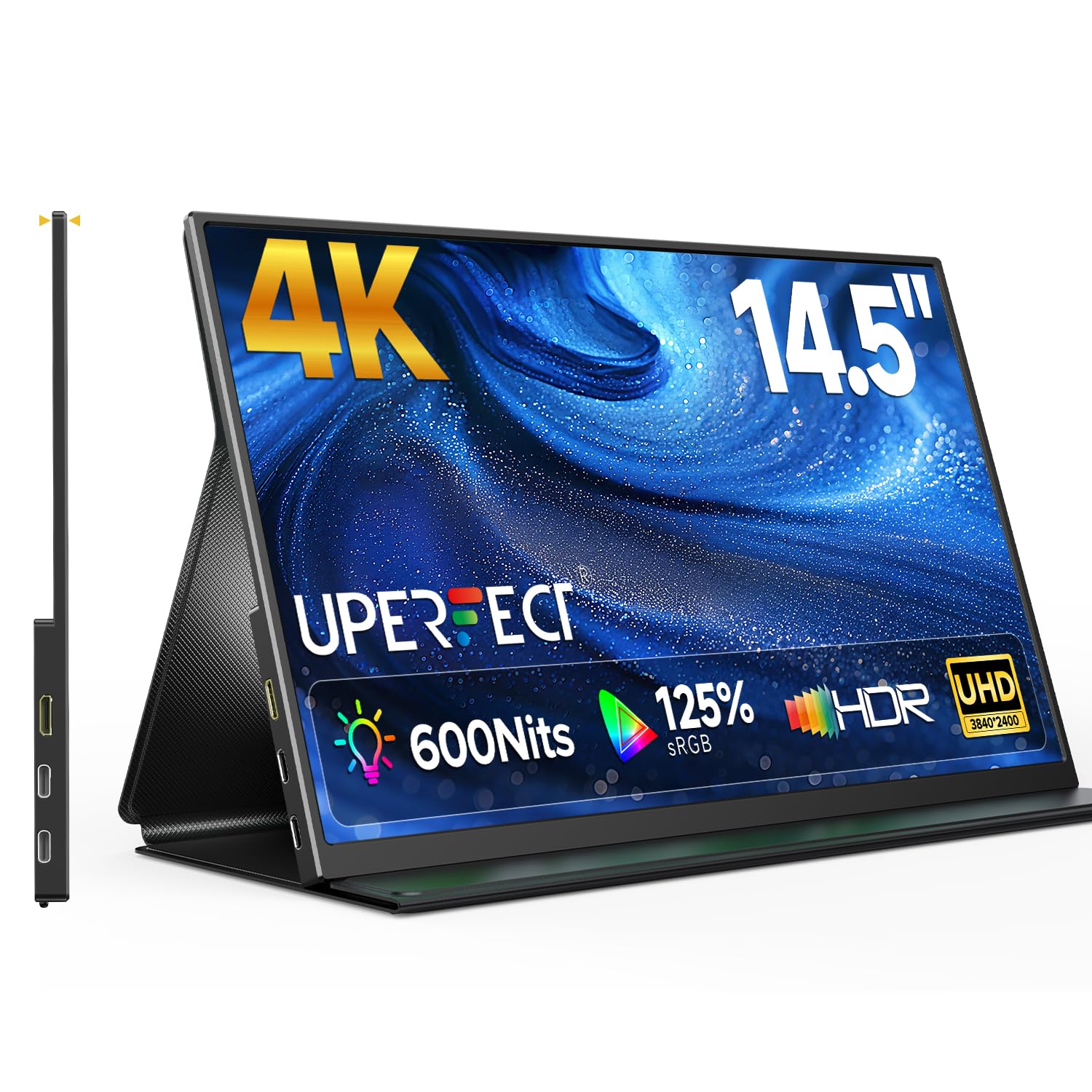
The UPERFECT 4K portable monitor distinguishes itself with a 600-nit brightness rating on a matte IPS panel, making it one of the brightest portable displays available for combating glare in coffee shops, co-working spaces, or near windows. The 16:10 aspect ratio provides extra vertical screen real estate compared to standard 16:9 monitors, which is noticeable when editing documents or browsing websites. The 2000:1 contrast ratio is higher than typical portable monitors, delivering deeper blacks.
At just 0.2 inches thick and weighing one pound, this monitor fits easily into a laptop bag alongside a 13- or 14-inch laptop. The foldable leather smart cover doubles as a stand, and the metal frame provides a premium feel. Connectivity includes dual USB-C ports and a Mini HDMI port, with plug-and-play compatibility for laptops, tablets, and smartphones. The 125% sRGB color gamut ensures colors look punchy without being oversaturated.
Reviewers note that the monitor works reliably with Samsung and iPhone devices via USB-C, though some laptops may require an external power source for sustained brightness. The built-in speakers are weak, and the control button is reported to be finicky. For a portable monitor that can actually be used in bright environments without reflections washing out the screen, this UPERFECT model is a standout choice.
Why it’s great
- 600 nits brightness paired with matte coating
- Ultra-slim and lightweight at 1 lb
- 2000:1 contrast ratio for deep blacks
- Plug-and-play USB-C and Mini HDMI
Good to know
- Built-in speakers are not strong
- Control button can be finicky
- Some devices may need external power at max brightness
5. BenQ GW2490T 24″ 100Hz

BenQ’s GW2490T is a 24-inch 1080p IPS monitor built around the company’s extensive eye-care technology, including a matte anti-glare coating, low blue light filter, flicker-free backlight, and adaptive brightness called Brightness Intelligence Technology. The combination of these features makes this monitor one of the most comfortable options for users who spend 8+ hours daily in front of a screen. The edge-to-edge display design minimizes bezel distractions.
The 100Hz refresh rate is a meaningful upgrade from standard 75Hz and 60Hz monitors, making document scrolling and cursor movement noticeably smoother. The height-adjustable stand with tilt, swivel, and pivot capabilities allows precise ergonomic positioning. The 99% sRGB color gamut ensures colors look accurate, and the IPS panel provides wide 178-degree viewing angles that are useful for collaborative work.
Built-in speakers are included, though they are weak by modern standards — adequate for system sounds and video calls, but not for media consumption. The base of the stand is notably large, taking up significant desk space, which some reviewers found problematic in compact setups. For a budget-friendly anti-glare monitor with comprehensive eye-care features, the BenQ GW2490T is an excellent choice for office workers and students.
Why it’s great
- Brightness Intelligence adapts to ambient light
- Flicker-free and low blue light certified
- 100Hz refresh rate for smoother work
- Full ergonomic stand with height, tilt, swivel, pivot
Good to know
- Stand base is very large
- Built-in speakers are weak
- 1080p resolution on a 24-inch panel
6. Dell 27 Monitor SE2725HM

The Dell SE2725HM is a 27-inch 1080p monitor that delivers enterprise-grade matte anti-glare coating at a consumer-friendly price point. The panel uniformity and color temperature consistency out of the box impressed reviewers, who compared it favorably to more expensive Dell business monitors. The 100Hz refresh rate with AMD FreeSync support makes this monitor capable of handling light gaming alongside productivity work.
Dell’s ComfortView Plus reduces blue light emissions without the yellow cast that plagues older blue-light filters, and the TÜV Rheinland 3-star certification confirms the eye-comfort credentials. The built-in power supply eliminates the external power brick, and the cable management system keeps the workspace tidy. The VESA mount placement is centered, which ensures balanced weight distribution when using monitor arms.
Connectivity is limited to HDMI and VGA — there is no DisplayPort or USB-C, and no built-in speakers or USB hub. The 250-nit brightness is adequate for typical office lighting but will struggle in very bright rooms with direct sunlight. For a budget-conscious buyer who wants a reliable anti-glare 27-inch monitor for spreadsheets, coding, and general office work, this Dell model offers strong value.
Why it’s great
- Excellent panel uniformity and color consistency
- Centered VESA mount for balanced arm installation
- 100Hz FreeSync for smoother work and light gaming
- Built-in power supply and cable management
Good to know
- No DisplayPort or USB-C connectivity
- 250 nits may be dim in very bright rooms
- No built-in speakers
7. HP V24v G5 24″ FHD Monitor
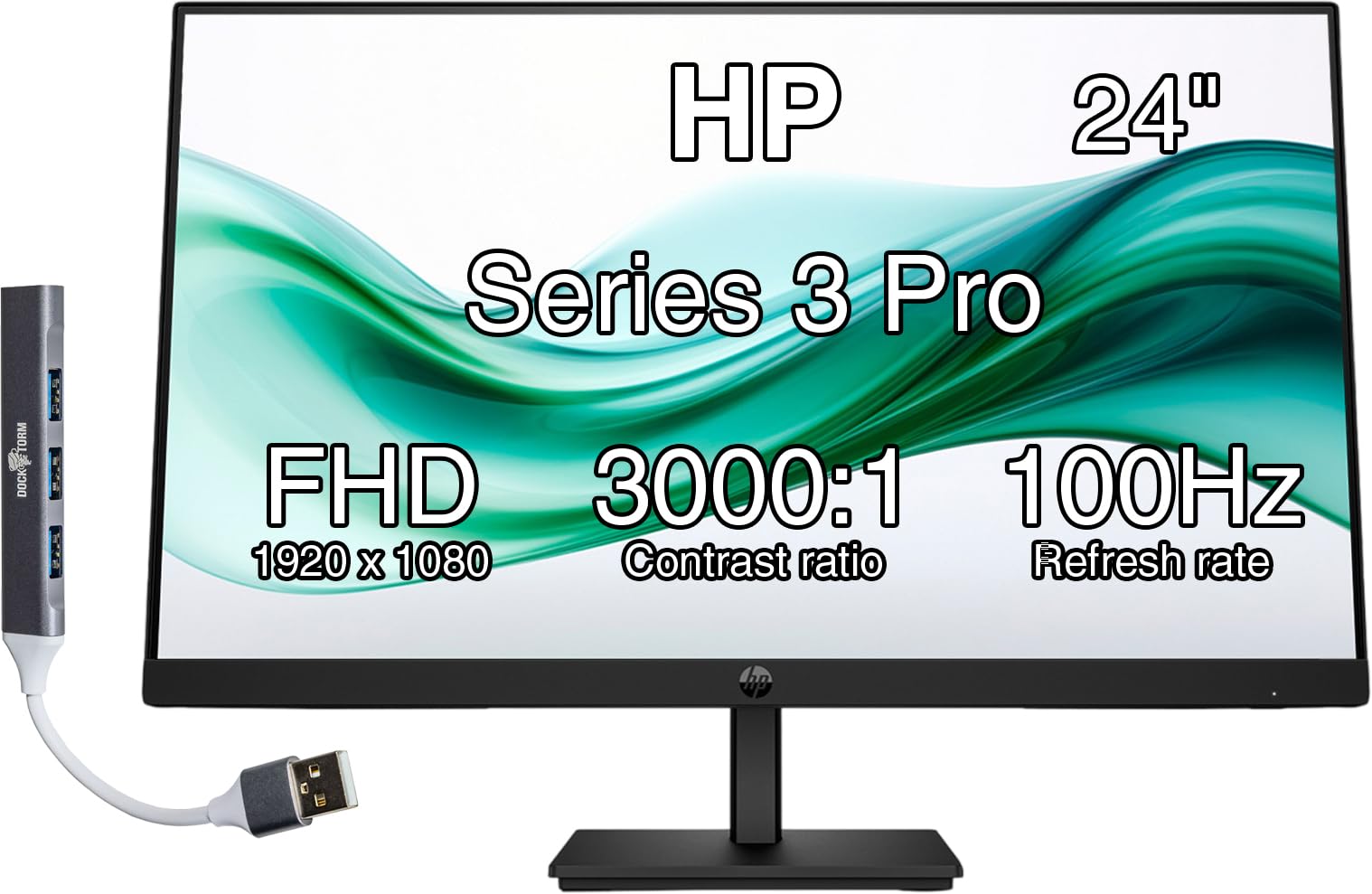
The HP V24v G5 is a budget-focused 24-inch 1080p monitor that uses a VA panel with a 3000:1 contrast ratio — significantly higher than the 1000:1 typical of IPS monitors. This higher contrast helps the anti-glare matte coating feel more effective, because darker blacks mean less light is reflecting off the screen. The 75Hz refresh rate with AMD FreeSync support provides a modest upgrade over standard 60Hz monitors for smoother scrolling.
The three-sided micro-edge bezel design looks modern on a desk, and the cable management system keeps wires organized. The Joypad OSD button makes navigating settings intuitive. The monitor includes both HDMI and VGA inputs, though the lack of DisplayPort limits connection options for modern laptops. The included Dockztorm Data Hub adds USB connectivity, but it is a separate peripheral rather than integrated.
Reviewers report that the monitor works well for home office use and light gaming, with smooth performance and clear image quality for the price point. The tilt adjustment only offers tilt, with no height or swivel adjustment. The 250-nit brightness is standard for this price tier but limits performance in brightly lit rooms. For a no-frills anti-glare monitor at the lowest possible entry price, the HP V24v G5 gets the job done.
Why it’s great
- 3000:1 VA contrast ratio for deeper blacks
- Three-sided micro-edge bezel design
- 75Hz FreeSync for smoother motion
- Includes Dockztorm Data Hub for USB connectivity
Good to know
- No height or swivel adjustment
- No DisplayPort input
- 250 nits brightness is modest
8. Newsoul 4K Portable Monitor 16″ 1200Nits

The Newsoul 4K portable monitor pushes brightness to 1200 nits peak, making it one of the brightest portable displays available and effectively overpowering even direct sunlight reflections. The matte IPS panel with 2000:1 contrast ratio delivers 4K resolution at 3840×2400 in a 16:10 aspect ratio, offering detailed images without the haze that plagues lower-quality matte coatings. The 145% sRGB wide color gamut ensures vibrant, accurate colors.
The aluminum alloy shell provides better heat dissipation than plastic alternatives, and the VESA mount compatibility allows flexible positioning on arms or walls. The protective case uses PU magnetic material that doubles as a stand, and the monitor is slim and lightweight enough for daily travel. Connectivity includes two USB-C ports and one Mini HDMI port, supporting plug-and-play connections to laptops, phones, and gaming consoles.
Reviewers emphasize that the 1200 nits peak brightness requires white background content and a power connection to achieve — it is a peak measurement, not sustained. The FreeSync support works via USB-C and HDMI, though some users report dropouts above 48fps with FreeSync enabled. The built-in speaker is basic and best used only for system sounds. For professionals who need to work outdoors or in extremely bright environments, this monitor’s brightness is transformative.
Why it’s great
- 1200 nits peak brightness overpowers sunlight glare
- 4K 3840×2400 resolution in 16:10
- Aluminum alloy shell for heat dissipation
- VESA mount compatible with protective case
Good to know
- Peak brightness requires power connection and white content
- FreeSync can cause dropouts above 48fps
- Built-in speaker is basic
FAQ
What brightness level do I need for an anti-glare monitor in a bright room?
Does a matte anti-glare coating reduce image sharpness or color quality?
Can I use a glossy monitor in a bright room if I add a screen filter?
Why would I choose a QD-OLED anti-glare monitor over a standard matte IPS monitor?
Final Thoughts: The Verdict
For most users, the best anti-glare monitor winner is the Samsung Odyssey OLED G6 because its QD-OLED anti-glare coating delivers near-zero reflections with image quality that no IPS or VA monitor can match. If you want a dedicated productivity monitor with a 4K resolution and a high-quality matte coating, grab the Dell 27 Plus 4K S2725QS. And for a portable anti-glare solution that works in extremely bright environments, nothing beats the Newsoul 4K Portable Monitor with its 1200 nits peak brightness.