
Our readers keep the lights on and my morning glass full of iced black tea. As an Amazon Associate, I earn from qualifying purchases.
Specs are compiled from manufacturer listings and verified buyer reviews and can change over time — please confirm the key details on the product page before buying.
Apartment living means you share hallways, walls, and — if you are not careful — a front-door key that ends up in the wrong hands. Handing out spares to roommates, guests, or a super becomes a minor headache every time someone moves out. A keyless lock solves that: you trade the metal key for a code, a fingerprint, or your phone, so you never worry about lost keys or making copies again.
I’m Min — the founder and writer behind Gadgets Feed. This guide is built by comparing the manufacturers’ published specifications and the patterns across verified customer reviews, so you get each pick’s real strengths and trade-offs instead of marketing spin.
The right lock secures your home without forcing you into one access method. Use this guide to find the best apartment door locks that match your door, your budget, and your daily routine.
Quick Picks
- Philips Wi-Fi Door Lock (DDL242X-1HW) — Best Overall
- Kwikset SmartCode 270 — Grade 2 Security
- Philips Fingerprint Keyless Entry (DDL210X) — Fingerprint Fast
- Veise VE017 Fingerprint Smart Door Lock — Feature-Packed Value
- Kwikset Powerbolt 240 — Budget Workhorse
- HIDALIFE Keyless Entry Door Lock (HL668) — Touchscreen Plus Handle
- TEEHO TE003 Keyless Entry Keypad Door Lock — Budget Pick
How To Choose The Best Apartment Door Locks
Most apartment dwellers walk into a hardware store and grab the cheapest electronic lock they see. That often leads to jams in cold weather, dead batteries at the worst moment, or a lock that simply won’t fit a rental-grade door. Focus on these factors to land on a lock that works reliably every day.
Access Methods That Actually Work
You do not need every unlock option, only the ones you will use daily. A keypad entry is the minimum — look for one with a backlit keypad (LED lights that illuminate the keys at night) so you are not fumbling in the dark. Fingerprint readers save you from remembering a code, but make sure the sensor is reliable; some struggle with dry or wet fingers. App-based locks add remote access, but in an apartment you probably do not need a Wi-Fi lock unless you want to let in a dog-walker while you are at work. A simple Bluetooth lock (which connects to your phone wirelessly over short distances) often works fine within range.
Fit and Installation for Apartment Doors
Apartment doors are not always standard. Measure your door thickness first — most locks fit doors between 1-3/8 inches and 1-3/4 inches thick. Also check the backset (the distance from the door edge to the center of the deadbolt hole), typically 2-3/8 or 2-3/4 inches. If your door has a shallow hole for the deadbolt catch (the metal plate that the bolt slides into), some electronic locks require a deeper one. The Kwikset Powerbolt 240, for example, needs a 1 cm deeper deadbolt hole than a standard mechanical lock, so measure before you buy.
Battery Life and Power Alerts
An electronic lock without batteries is useless. Look for a lock that gives clear warning before it dies — a red indicator light or a beeping sound when power drops below a certain threshold (like the Philips DDL210X that alerts you below 20% power). Most locks use 4 AA batteries and claim 12 months of life, but real-world battery drain varies based on how often you use the motorized deadbolt. Avoid locks that show no battery gauge at all, because you will not know until the lock stops responding.
Security Certifications and Build Materials
You do not need a bank-vault deadbolt, but you do want a lock that resists basic break-in techniques. BHMA (Builders Hardware Manufacturers Association) grades tell you the lock’s tested strength: Grade 2 is a higher rating than Grade 3 and is the balance for apartment use. Look for a metal deadbolt, not a plastic one — some budget locks use plastic casings that wear out in direct sunlight. The Kwikset SmartCode 270 carries BHMA Grade 2 certification, meaning it meets higher standards for security and durability compared to typical Grade 3 locks.
Weather Resistance for Exterior Doors
If your apartment door opens to the outside, rain, snow, and sun can kill a lock quickly. An IP54 rating (a standard that measures protection against dust and splashing water) tells you the lock can handle rain and dust — the TEEHO TE003 carries this rating. The real-world test is cold weather: some electronic locks jam when temperatures drop because the lubricant thickens or the internal components contract. Buyer reviews of the TEEHO TE003 note it jams in cold climates, so if you live somewhere with harsh winters, look for a lock that has proven itself in those conditions.
Quick Comparison
On smaller screens, swipe sideways to see the full table.
| Model | Best For | Access Methods | User Codes | Battery Life | Amazon |
|---|---|---|---|---|---|
| Philips Wi-Fi (DDL242X-1HW) | Remote control & voice commands | App, Fingerprint, Code, Key, Voice | Up to 100 | ~12 months (8 AA) | $79.98$109.99Ends inAmazon |
| Kwikset SmartCode 270 | Grade 2 security & long code list | Touchpad, Key | Up to 50 + 10 one-time | 12 months (4 AA) | $98.00$128.00Amazon |
| Philips 1000 Series (DDL210X) | Fast fingerprint access | Fingerprint, Code, Key | Unlimited one-time codes | ~12 months (4 AA) | Amazon |
| Veise VE017 | App controls & activity logs | Fingerprint, App, Code, Fob, Key, Voice | Unlimited (remote codes) | ≥12 months (4 AA) | $49.99$69.99Amazon |
| Kwikset Powerbolt 240 | Simple keypad on a budget | 5-button Keypad, Key | Up to 12 + 2 one-time | 12 months (4 AA) | $43.29Amazon |
| HIDALIFE HL668 | Touchscreen with handle | Touchscreen Keypad, Key | — | — | $45.10$47.48Amazon |
| TEEHO TE003 | Knob-style with water resistance | Keypad, Key | Up to 20 + one-time | 1 year (4 AA) | $47.99$65.99Limited time dealAmazon |
In‑Depth Reviews
1. Philips Wi-Fi Door Lock (DDL242X-1HW)

This lock lets you unlock from anywhere without a separate hub.
The Philips Wi-Fi smart lock skips the extra gateway — the lock has built-in Wi-Fi (connected to your 2.4Ghz home network, with a range of up to 65 feet from the router), so you lock and unlock your front door from anywhere through the Philips Home Access app. No extra gadgets to buy or setup steps to run. You get five ways in: fingerprint, passcode, physical key, app, or voice command with Alexa or Google Assistant. For apartment dwellers who want to let in a guest or a dog-walker while they are miles away, this is the decisive advantage over the simpler Philips 1000 Series below.
You can create up to 100 custom passcodes (including temporary one-time codes that expire), and the auto-lock timer adjusts from 10 to 180 seconds. Buyers report the fingerprint scanner is “very fast and accurate” and that the lock replaces four other brands they tested. One reviewer noted the app’s time scheduling requires “annoying scrolling” and you cannot set an end time past midnight, a minor software quirk. The lock uses 8 AA batteries (not included) and runs on a motorized bolt that auto-locks — but the lock does not detect if the door is actually closed. The bolt extends either way, so make sure the door is shut before walking away.
Why it wins
- Built-in Wi-Fi means no extra hub to buy or configure
- Up to 100 passcodes with temporary and scheduled options
- Fingerprint scanner is responsive and fast, per multiple reviews
- Voice control works with Alexa and Google Assistant
The trade-offs
- No door sensor — bolt extends even if door is open
- Auto-lock timer can only go up to 3 minutes
- Uses 8 AA batteries, while most competitors here use 4 AA batteries
Reach for this if: You want to control access from anywhere — remote unlock via app, voice, or fingerprint — without buying a separate gateway.
Look elsewhere if: Your door is often left ajar, since the auto-lock extends the bolt regardless of whether the door is shut.
2. Kwikset SmartCode 270

A higher-security keypad lock with room for a large household or frequent guests.
If security is your top concern, the SmartCode 270 carries BHMA Grade 2 certification, while many entry-level locksets are Grade 3. That means the deadbolt resists kick-in attempts better than the entry-level locks you find at big-box stores. You get up to 50 user codes plus 10 one-time codes, which is plenty for a family plus a rotating cast of guests or service providers. The auto-lock timer gives you five timing options (30 seconds, 1, 3, 5, or 10 minutes), so you can set it to lock just a few seconds after the door closes.
Owners mention the lock is “a bit noisy on the lock and unlock” — one reviewer calls it a bonus at night since you hear it engage. The touchpad lights up with bright LEDs when you tap it, so you see the keys at night without a porch light. Unlike the Powerbolt 240 that some owners say switched from metal to plastic casing, the SmartCode 270 uses a mix of metal, zinc, and plastic, and customers note the matte black finish is “chip and scratch resistant.” The downsides: at 3.31 pounds it is one of the heavier locks here, and a small number of reviewers point out the deadbolt gets stuck and flashes a red light five times, refusing to lock or unlock.
Strong points
- BHMA Grade 2 certification for higher security than typical Grade 3 locks
- 50 user codes and 10 one-time codes, versus 12 user codes and 2 one-time codes on the Powerbolt 240
- Auto-lock timer gives you five intervals including a 30-second option
- SmartKey security lets you re-key the lock in seconds with any KW1 key
Watch out for
- Some units reportedly stick and flash red, refusing to operate
- No fingerprint, app, or voice control — keypad and key only
- Heavier than most at 3.31 pounds
Grab it if: You share codes with many people (roommates, cleaners, guests) and want a lock that outlasts a typical Grade 3 model.
skip it if: You need fingerprint or remote app access — this is a pure touchpad lock without wireless connectivity.
3. Philips Fingerprint Keyless Entry (DDL210X)

The fingerprint reader works reliably in under half a second.
The Philips 1000 Series puts a biometric fingerprint sensor (a scanner that reads the unique ridges on your fingertip) at the center of the experience. The maker claims up to 99.99% accuracy and it recognizes your print in just 0.3 seconds. Buyers confirm the fingerprint pad works even when they “never register on anything,” and one reviewer who tested multiple smart locks calls this “the one to get.” You also get unlimited one-time PIN codes — generate temporary codes for guests and they expire after one use, no manual cleanup needed. Voice prompts walk you through setup in English, French, or Spanish, so you do not need the manual.
Find it more compact than the HIDALIFE model, which is 8.3 x 7.7 x 3.8 inches versus the Philips’s 6.29 x 2.79 x 0.63 inches — a size difference that matters on a narrower door surface. Battery life is long enough that one reviewer switched from a Kwikset Halo that needed battery changes every 6 weeks. The lock is not smart — it has no Wi-Fi or Bluetooth connectivity. The fingerprint data and codes live entirely on the device, which is a privacy plus but means you cannot remotely check who came home or unlock from the office. A few shoppers say the app only generates one-time codes and lacks remote unlock or Alexa integration, features you would need to step up to the Philips Wi-Fi model.
What stands out
- Fingerprint sensor is fast (0.3 seconds) and reliable per real-world reviews
- Voice-guided setup eliminates manual fumbling
- Unlimited one-time PIN codes for temporary access
- Quiet operation mode (configurable silent mode)
Keep in mind
- No app-based remote control or Alexa/Google integration
- Fingerprint recognition may struggle with children under 6 and adults over 65
- Auto-lock does not know if the door is shut — bolt extends regardless
Best if: You are tired of codes and keys and want a fingerprint-first lock that opens nearly instantly.
Not for you if: You need to unlock from your phone or check who came and went while you were out.
4. Veise VE017 Fingerprint Smart Door Lock
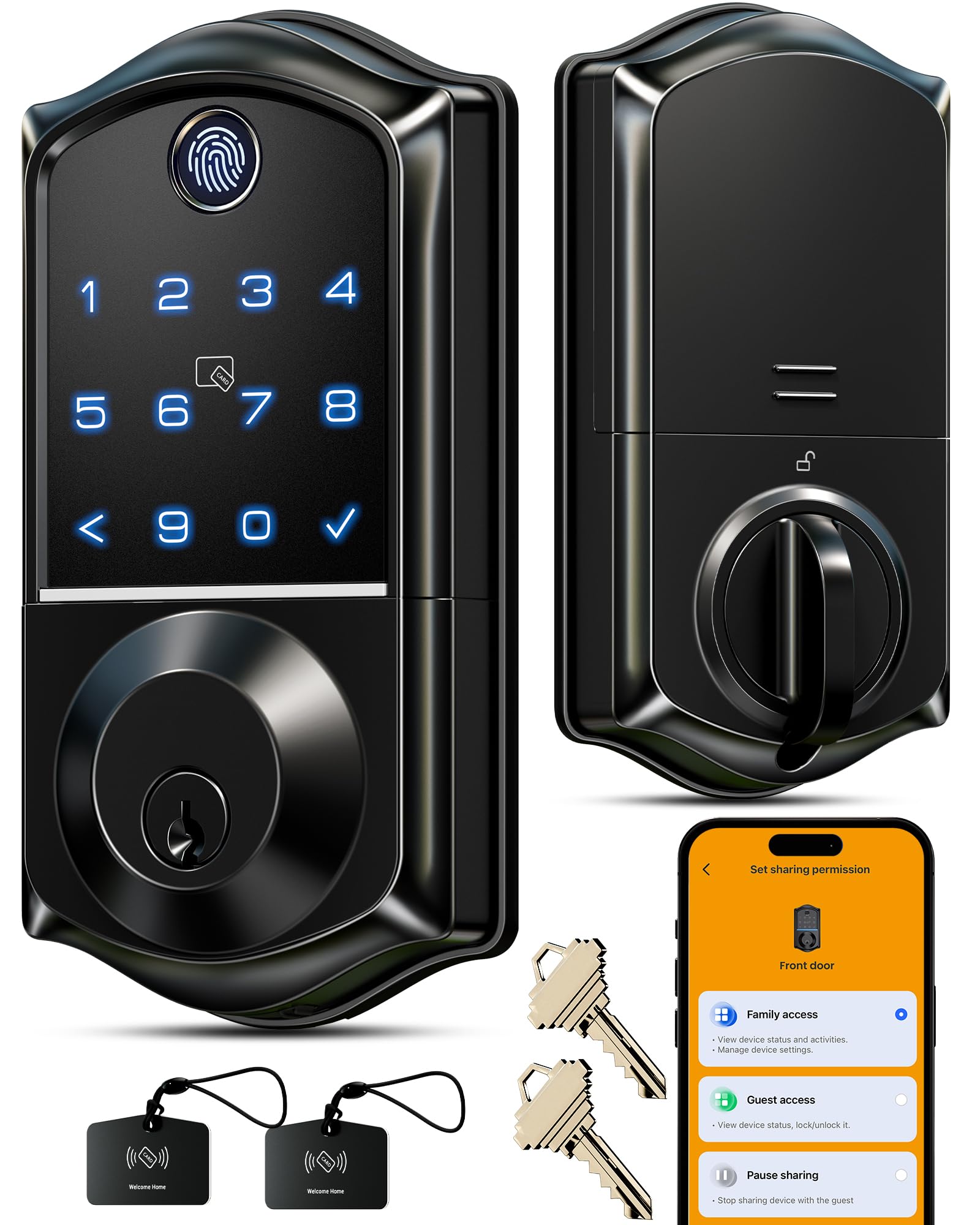
An app-connected lock that brings remote access without a premium price.
The Veise VE017 packs an unusual number of access methods at its price point: fingerprint (using Swedish FPC sensor technology for fast reading), app control via the KK Home app, up to 20 user codes, a pair of IC key cards (small plastic cards with a chip that you tap on the lock), a physical key, and voice-control with Alexa or Google Assistant (when paired with the separately-sold Veise G1 Wi-Fi Gateway). The fingerprint reader uses an on-device AI chip that verifies in under 0.2 seconds, and the maker claims the system “continuously learns and refines recognition patterns” with each use. Buyers report installation took “maybe 20 minutes tops” and that the app is “great and simple to use.”
The lock supports 4 types of codes: one-time, duration-based, permanent, and recurring, so you can hand out a code that works only for the cleaning crew on Tuesdays. Access logs are stored locally with AES128 encryption (a strong data-scrambling standard) and the lock sends real-time alerts when someone enters a wrong code or opens the door. The catch: the app’s remote access often fails when you are away from home, several owners mention, and the Bluetooth connection limits range when you are not using the Wi-Fi gateway. At 1.02 kilograms (about 2.25 pounds) it is lighter than the Kwikset SmartCode 270 (3.31 pounds) but lacks that lock’s BHMA Grade 2 security rating — the Veise carries ANSI Grade 3, which is the standard entry-level grade. US-based lifetime support and a 2-year warranty back the lock, and multiple reviewers praise customer service agent Carla for quick replacement handling.
Packed with features
- Fingerprint, app, code, card, key — 8 unlock methods in one device
- Smart user management via KK Home app with activity logs
- 4 password modes: one-time, duration, permanent, recurring
- AES128 encrypted local storage protects your data
Trade-offs
- Remote access can be unreliable per buyer reviews
- Wi-Fi Gateway needed for voice control and true remote functions
- Only ANSI Grade 3 rather than Grade 2
Great for: Anyone who wants an app-connected lock with fingerprint and phone control but does not want to pay for a premium brand.
Better options if: Remote access reliability is a hard requirement — the Philips Wi-Fi lock is more dependable for always-on app control.
5. Kwikset Powerbolt 240
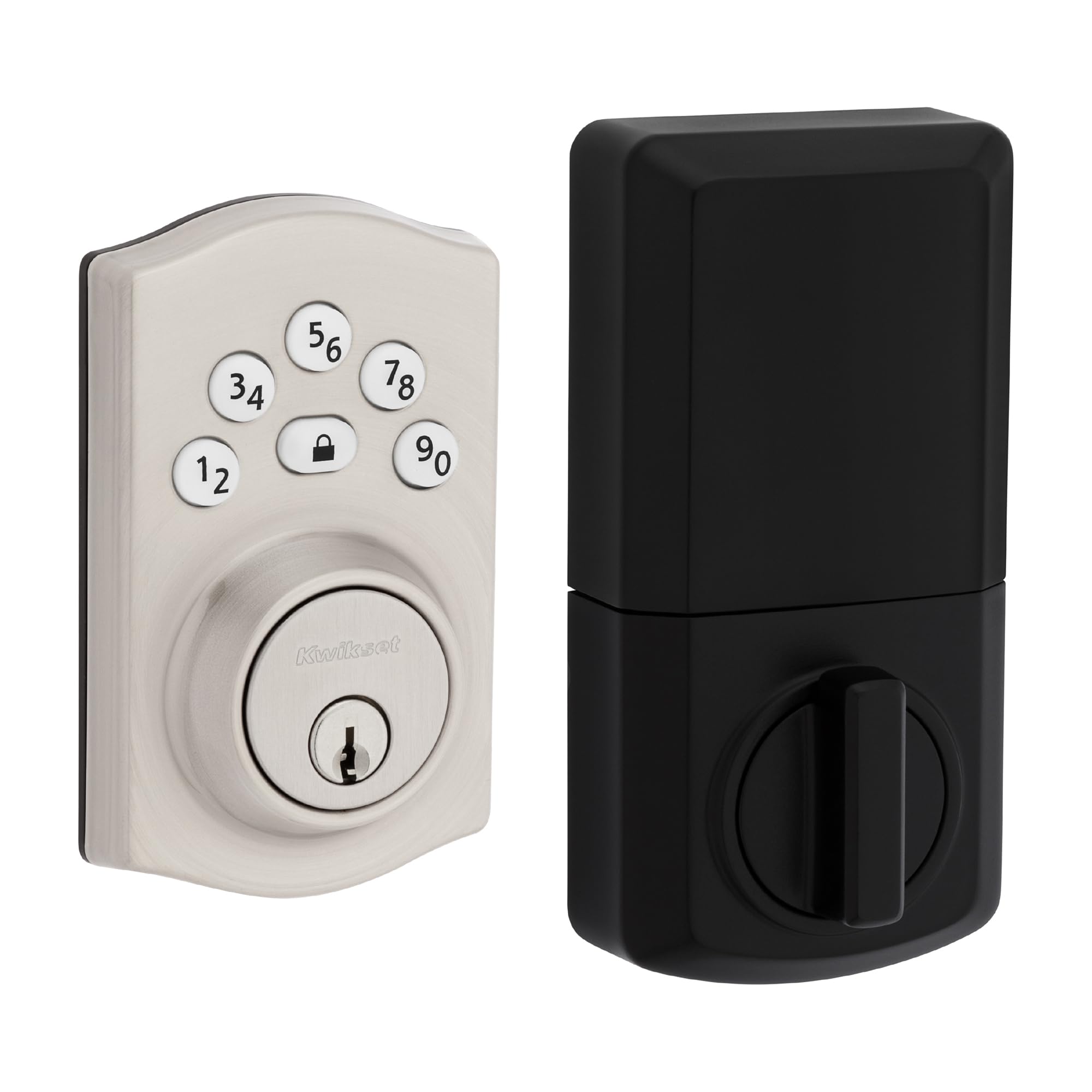
A no-app deadbolt that keeps it simple and keeps the cost low.
The Powerbolt 240 is the basic keypad lock that skips the extras: no fingerprint scanner, no phone app, no voice control. You get a 5-button keypad (numbers 1-5, each mapped to two digits — press 1 for “A” and “B”) and a mechanical key backup. Programming lets you set up to 12 user codes, 2 one-time codes, and one master code, which is enough for a small household plus a guest code. The auto-lock timer can be set to 30 seconds, 1, 3, 5, or 10 minutes, so you decide when it locks behind you. Customers note installation takes under 20 minutes and the lock “just works” — fast unlock in under 1 second, no app fussing.
The catch is the build. Multiple reviewers point out the “plastic button cap failed at 11 months in sun” — the buttons on the keypad are not metal, and direct sunlight wears them down over time. A reviewer who bought six of these notes the first three were all metal parts but “the last 3 were plastic and configured differently.” If your door gets direct afternoon sun, this may not last. Also note the lock needs about 1 cm deeper deadbolt hole than a standard lock — measure your door’s existing hole depth before buying, or you may need to drill a deeper recess. Some shoppers say the lock fails to unlock fully after a few weeks, leaving family members locked out.
You get
- Simple keypad entry — no smartphone or app required
- Auto-lock with 5 timing intervals for customizable security
- Intrusion alarm after 3 wrong code entries locks the keypad for 1 minute
- Vacation mode disables all keypad access while you are away
Be aware
- Plastic keypad cap degrades in direct sunlight, per buyer reports
- Lock requires a deeper deadbolt hole than standard doors
- No fingerprint, app control, or voice commands
Good choice if: Your budget is tight and you want a basic one-touch deadbolt — and your door does not sit in direct sunlight.
Pass if: Your apartment door faces south or west and gets hours of sun per day, because the plastic buttons may not survive a year.
6. HIDALIFE Keyless Entry Door Lock (HL668)

A touchscreen lock with a handle — useful when your hands are full.
Most electronic deadbolts sit alone and require a separate door handle. The HIDALIFE HL668 comes as a complete set with a lever handle, so it replaces both your old lock and doorknob in one install. The touchscreen keypad uses a blue backlight so you see the numbers in the dark, and the anti-peep password lets you type random digits before and after your real code to hide it from anyone watching. The lock is made from zinc alloy, which buyers describe as “solid alloyed metal” that looks expensive. The pass-through feature (called “Passage Mode”) lets you disable the code entirely during parties, so guests open the door without needing a code.
At 8.3 x 7.7 x 3.8 inches, it is a larger unit than the TEEHO TE003 at 5.43 x 3 x 3.5 inches. That bulk means it may not fit on a narrow door or one with existing trim close to the latch hole. A significant buyer risk: several reviews describe a critical failure after just 2 days, with the interior opening mechanism stopping and the key backup also failing, leaving the owner locked out. The same reviewer reports no phone support — only email, with no reply in 9 hours. The numbers on the touchscreen do not glow when idle, so some buyers report a delay: you must touch the panel first to wake the lights, then enter your code.
What works
- Comes with a door handle — replaces both lock and knob
- Zinc alloy build feels solid and premium
- Passage mode disables code entry for parties or gatherings
- Anti-peep password hides your code from observers
Risks to know
- Reported total failure after 2 days, with no phone support available
- Touchscreen does not glow continuously — you have to tap to wake it first
- Large frame (8.3 x 7.7 x 3.8 inches) may be too big for narrow doors
Consider it if: You want a single product that brings both a handle and a touchscreen lock with a premium look — and you are comfortable with the reliability risk.
Choose something else if: Reliability is your top concern — multiple reviews report total lockout failure early in the product’s life.
7. TEEHO TE003 Keyless Entry Keypad Door Lock
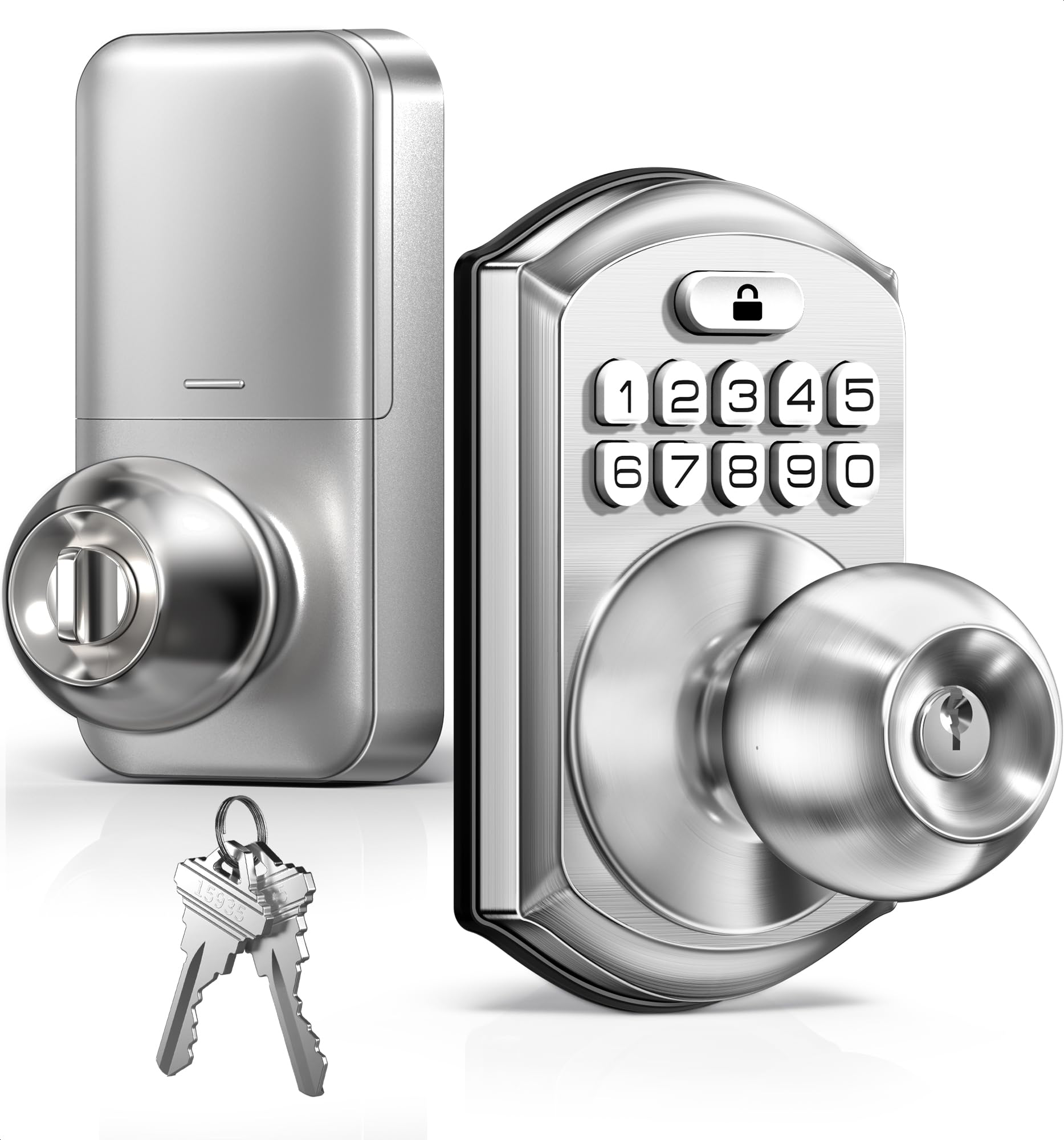
A compact knob lock that packs IP54 weather protection.
The TEEHO TE003 is a keypad door knob — not a deadbolt, but a full handle-and-lock knob. It meets IP54 standards (meaning it is protected against dust ingress and water splashes from any direction), so it can sit on a door that opens to the elements. The aluminum alloy keypad and stainless steel handle give it a durable feel, and the lock is ANSI Grade 3 certified, meeting the basic industry standard for residential security. You get up to 20 user codes plus one-time temporary codes, and the anti-peeping password feature, which allows you to type random digits before your real code to hide it from onlookers. Auto-lock can be adjusted from 10 to 99 seconds, and one-touch locking happens when you hold any keypad number down for 2 seconds.
The small footprint — 5.43 x 3 x 3.5 inches — makes it easy to fit on narrow doors where the larger HIDALIFE unit would not. However, several buyers warn that the lock jams in cold weather, and one report says battery life drops to “under 2 weeks” in those conditions. A reviewer who tried to get warranty support describes it as “unresponsive.” This makes the TE003 a risky pick for anyone in a northern climate with freezing winters. The maker offers a 2-year warranty and lifetime customer service (phone support Monday-Friday 9 AM-5 PM PST, 24/7 email), but buyer experience suggests it can be hard to reach. Good for a mild-climate back or side door, less suitable for a main entrance in the snow belt.
What you get
- IP54 rated against rain, splashes, and dust — suitable for exterior doors
- Compact knob design fits tighter spaces than handle-style locks
- 20 user codes plus one-time codes for guest access
- Auto-lock adjustable from 10 to 99 seconds
Heads up
- Known to jam in cold weather per multiple buyer reviews
- Battery life reportedly drops dramatically in low temperatures
- Warranty support responsiveness is questioned by some users
Use this for: A back or side door in a mild climate where you want a small, weather-resistant knob lock at a low entry cost.
Do not use for: Your main front door in an area with freezing winters — cold-weather jams and battery drain are real reported problems.
Understanding the Specs
BHMA Grade (Security Rating)
The Builders Hardware Manufacturers Association grades locks from 1 to 3, with Grade 1 being the highest commercial security standard. For an apartment, Grade 2 is the balance and is a higher rating than Grade 3. The Kwikset SmartCode 270 carries this grade, meaning the deadbolt better resists kick-in attacks than the typical Grade 3 models found at a lower price point. An ANSI Grade 3 or BHMA Grade 3 rating is fine for interior doors or low-risk entrances, but it is the minimum standard and offers less resistance to force.
Auto-Lock Timer Range
Auto-lock automatically secures your door after you close it, but the timing varies widely. Cheaper locks may only lock at a fixed 30 seconds; better models let you choose from several intervals — the Kwikset Powerbolt 240 offers 30 seconds, 1, 3, 5, or 10 minutes. The longest range we see here is 10 to 180 seconds (up to 3 minutes) on the Philips Wi-Fi lock. Pick one with multiple options so you can match the timing to your daily rhythm — short for quick exits, longer if you frequently pop out to take out the trash.
Battery Life and Power Announcements
All the locks here run on AA alkaline batteries — typically 4 batteries for keypad-only models, 8 for the Philips Wi-Fi lock that also powers its Wi-Fi radio. The claimed 12-month battery life is a baseline, but real-world use varies: a lock that cycles dozens of times a day will drain faster, and cold weather shortens battery life dramatically (the TEEHO TE003 reportedly lasts under 2 weeks in winter). Look for a lock that gives you advance notice — a red indicator light at 15-20% power remaining (the TEEHO and Philips locks do this) — so you are not stuck fumbling with a dead battery.
Fingerprint Sensor Speed
Fingerprint locks use optical or capacitive sensors (like the one on your phone) to read your fingerprint. The speed is measured in seconds — the Philips 1000 Series claims 0.3 seconds, the Veise VE017 claims under 0.2 seconds. Speed matters because a slow sensor makes you pause a beat before the door unlocks. But accuracy matters more: the Veise uses a Swedish FPC sensor, and the Philips uses a biometric scanner with up to 99.99% claimed accuracy. A fast but inaccurate sensor will leave you pressing repeatedly. Real-world reviews are the best check — the Philips is widely praised for working where other sensors failed.
FAQ
Will an electronic door lock fit my apartment door?
What happens when the batteries die and I am locked out?
Can my landlord or property manager override my electronic lock?
How many codes do I actually need for an apartment?
What is the difference between a knob lock and a deadbolt lock?
Can I use a smart lock with my existing door handle?
Why does my electronic lock freeze or jam in winter?
Is a fingerprint lock more secure than a keypad lock?
Can I install an electronic lock myself without a locksmith?
How do I delete old codes after a roommate or guest moves out?
Final Thoughts: The Verdict
For the majority of shoppers, the best apartment door locks winner is the Philips Wi-Fi Smart Lock because it delivers remote access, a responsive fingerprint reader, and voice control through built-in Wi-Fi — no extra hub required. If you want the strongest deadbolt without any app or fingerprint features, grab the Kwikset SmartCode 270 with its BHMA Grade 2 certification and 50 user codes. And for a budget-friendly fingerprint lock that still offers app controls and unlimited temporary codes, the Veise VE017 packs more features per dollar than anything else in this lineup.
How We Picked
We do not accept paid placement, and we did not hands-on test every unit. Instead, we match each pick to a real buyer and use-case by comparing the manufacturers’ published specifications against the patterns in verified customer reviews — so you get each pick’s real strengths and trade-offs instead of marketing copy.
Sources & Methodology
Specifications: manufacturer listings and product documentation. Review insights: verified customer reviews, as of July 2026. Pricing: not shown on this page (it changes often); check the current price via the retailer link.
As an Amazon Associate, Gadgets Feed earns from qualifying purchases. This does not affect which products we feature.
Product prices and availability are accurate as of the date/time indicated and are subject to change. Any price and availability information displayed on Amazon at the time of purchase will apply to the purchase of this product. As an Amazon Associate I earn from qualifying purchases.
CERTAIN CONTENT THAT APPEARS ON THIS SITE COMES FROM AMAZON. THIS CONTENT IS PROVIDED "AS IS" AND IS SUBJECT TO CHANGE OR REMOVAL AT ANY TIME.
Amazon and the Amazon logo are trademarks of Amazon.com, Inc. or its affiliates.