
Our readers keep the lights on and my morning glass full of iced black tea. As an Amazon Associate, I earn from qualifying purchases.
Specs are compiled from manufacturer listings and verified buyer reviews and can change over time — please confirm the key details on the product page before buying.
A smart home hub should make your lights, locks, and sensors respond instantly from anywhere. Too often, that promise collapses into a pile of dongles and a phone full of abandoned apps. per verified buyer reviews the top app-controlled hubs to find which ones actually deliver reliable control without locking you into a costly ecosystem.
I’m Min — the founder and writer behind Gadgets Feed. This guide is built by comparing the manufacturers’ published specifications and the patterns across verified customer reviews, so you get each pick’s real strengths and trade-offs instead of marketing spin.
We’ve focused on systems where the mobile app is the true command center, ranking them for reliability, compatibility, and ease of use to find the best app controlled home automation system.
Our Picks at a Glance



How To Choose The Best App Controlled Home Automation System
Before you pick a hub, you need to know what job it will do. A system built for a single bedroom of smart bulbs is very different from one that can secure a four-bedroom house and manage a dozen different device types. Your hub choice sets the ceiling for your entire smart home’s capabilities.
Compatibility is the real kingmaker
The most common buyer regret is a hub that can’t communicate with devices you already own. Check which wireless languages the hub speaks before anything else. Zigbee and Z-Wave are two popular mesh standards for battery-friendly sensors, while Matter is the new universal protocol designed to let different brands work together. If your gear only speaks one language, your hub better speak it too.
Local processing vs. cloud dependency
Many cheap systems require an internet connection for every command, which means a Wi-Fi outage turns your smart home into a dumb one. Hubs with local processing run your automations inside the unit itself, so your lights still respond to motion sensors even when the cable goes down. This also keeps your usage data off remote servers, which matters if privacy is a priority.
The cost of the ecosystem
Some systems hide the real price in subscriptions. Be sure to check if basic features like mobile alerts or voice control are locked behind a monthly fee. A pricier hub with no subscription often proves cheaper and more flexible over time.
Quick Comparison
| Model | Best For | Hub Protocol | Voice Assistants | Smart Bulbs Included | Amazon |
|---|---|---|---|---|---|
| Philips Hue Starter Kit★ Best Overall | Easy, reliable lighting | Zigbee | Alexa, HomeKit, Google | 4 | Amazon |
| Aqara Hub M1S Gen 2Best Value | Budget sensors & alarm | Zigbee 3.0 | Alexa, HomeKit, Google | — | Amazon |
| Aqara Smart Hub M200Most Versatile | Multi-protocol flexibility | Zigbee, Wi-Fi, IR, Thread | Alexa, HomeKit, Google | — | Amazon |
| Lutron Caseta Dimmer Kit | Rock-solid light switches | Proprietary RF | Alexa, HomeKit, Google | — | Amazon |
| SkylinkNet Alarm System | No-fee security alarms | Proprietary Wireless | App Only | — | Amazon |
| Lutron Caseta Diva Kit | No-neutral wire dimmers | Proprietary RF | Alexa, HomeKit, Google | — | Amazon |
| Hubitat Elevation C-8 Pro | Local privacy power users | Z-Wave, Zigbee, Matter | Alexa, HomeKit, Google | — | Amazon |
| Home Assistant Green | Ultimate DIY flexibility | Ethernet, USB (add-ons) | Alexa, Google, Siri | — | Amazon |
| Ring Alarm 14-Piece | Whole-home security | Proprietary Wireless | Alexa | — | Amazon |
In‑Depth Reviews
1. Philips Hue White Ambiance Smart Bulb Starter Kit
Our pick — over 4.5★ from 800+ verified ratings; the strongest balance of quality and price.
The lighting system that makes every other smart bulb feel like a toy.
This kit gives you the full start-to-finish experience: four A19 LED bulbs that fit standard table lamps, plus the Hue Bridge that controls them. The magic is in the bridge — it uses the Zigbee protocol to create a dedicated, reliable mesh network that doesn’t clog up your Wi-Fi, and it can manage up to 50 lights in total.
What wins people over is the sheer dependability. Set a schedule to dim the lights at night and fade them in the morning, and it just happens, day after day. You can control everything from the Philips Hue app or your voice via Alexa, Apple HomeKit, or Google Assistant. The kit even pairs with Nest or Samsung SmartThings for broader automation.
The white ambiance bulbs let you shift the color temperature, so you can have a bright daylight feel for work and a soft, dimmed yellow for winding down. Owners mention that the bridge must connect to your Wi-Fi router, and some find the initial setup takes around 30 minutes. It’s not the cheapest way to light a room, but for the crowd favorite — 4.7 stars across 800+ owners — the reliability is what keeps people loyal.
Where It Shines
- Rock-solid hub connectivity with Zigbee mesh.
- Voice control for Alexa, HomeKit, and Google.
- Expands to 50 bulbs and adds motion sensors.
Honest Trade-offs
- Costs more upfront than budget brands.
- Bridge needs a wired connection to your router.
- App updates can occasionally feel slow.
The pick for most homes: If you want smart lighting that feels premium without a steep learning curve, this is the benchmark.
Look elsewhere if: You have a tight budget or want to control non-lighting devices like locks and thermostats with the same hub.
2. Aqara Hub M1S Gen 2
A tiny command center that adds security and sensors on a budget.
This little puck is the backbone of a surprisingly capable system. It connects to your router via a secure 2.4 GHz Wi-Fi network and uses Zigbee 3.0 to link up to 128 Aqara devices — that’s sensors, buttons, and door contacts all reporting back to one brain. It’s a great starting point for a DIY security setup without a subscription.
Buyers report the setup is genuinely easy, with the Aqara Home app getting you up and running quickly. The built-in 2-watt speaker doubles as an alarm or doorbell, and the built-in RGB light with 18 LEDs functions as a customizable nightlight. It supports Apple HomeKit, Google Assistant, Alexa, and IFTTT for flexible automation.
The honest catch is connectivity. A recurring theme in the data is that some users experience intermittent connection drops, and it’s critical to have the hub within 400 inches of your router. It’s a powerful tool, but it demands a solid network foundation. This is a good first step if you’re building an Aqara ecosystem, though it’s not the hub for third-party Zigbee devices.
A savvy starting point: The nightlight feature and alarm capabilities pack a lot of value into a small, low-cost device.
Know the limits: It doesn’t support Wi-Fi 6 and requires you to disable 5 GHz Wi-Fi during setup, which can be a sticking point for some routers.
3. Aqara Smart Hub M200
The Swiss Army knife for mixed-brand smart homes.
This is a step up in ambition from the M1S. The M200 acts as a Matter Controller and Thread Border Router, meaning it’s built to bridge the gap between newer Matter devices and your existing gear. It connects them into the Aqara Home app and syncs with Home Assistant, Apple HomeKit, Alexa, and Google Home.
Its a neat extra is the 360° IR blaster. This lets you control traditional remote-controlled devices like TVs and air conditioning units, and it even provides status feedback. Pair it with an Aqara Temperature and Humidity Sensor, and it can function as an AC thermostat exposed to Matter. It supports up to 40 Aqara Zigbee devices and 40 Thread devices.
Setup flexibility is a highlight, with dual-band Wi-Fi and Power over Ethernet support. Owners find it works wonderfully with Home Assistant, but note the setup can be finicky, and it requires IPv6 addressing for the Matter protocol, which can be a hurdle on some networks. It’s a powerful, forward-looking hub, but it asks for a bit more technical patience.
Built for the future: The Matter and Thread support ensures this hub won’t feel outdated as your device collection grows.
Who should skip it: If you want a truly plug-and-play experience or rely on Android-only networks that block IPv6, this might frustrate you.
4. Lutron Caseta Smart Dimmer Starter Kit

The gold standard for light switches that simply never fail.
If you want your smart lighting to feel as reliable as a normal light switch, this is the system. The key difference is the hub: it works without Wi-Fi, using its own ultra-reliable connection so your dimmer responds instantly without slowing down your other devices. One dimmer switch can make all the lights on that circuit smart, not just one bulb.
This kit includes the smart hub, one in-wall dimmer switch, and a Pico remote. That remote is a clever addition — you can mount it on a wall bracket anywhere in the house to create a second switch location without running any new wires. It works up to 30 feet through walls and has a 10-year battery life, and each hub can pair with up to 10 remotes per smart product.
The app provides scenes, scheduling, geofencing, and smart-away features. Installation is straightforward because no neutral wire is required, and it works with up to 150W LED and 600W incandescent bulbs. The functionality and ease of installation are what owners praise most. There’s no subscription needed for the core features, which adds to its long-term value, even if the upfront cost is higher than a simple smart bulb.
Why It’s a Classic
- Super-fast, reliable RF connection that doesn’t touch your Wi-Fi.
- Requires no neutral wire for installation.
- Works with a huge range of ecosystems (Alexa, Home, Google, Ring).
Things to Note
- It’s pricier than simple smart plugs or bulbs.
- The included wallplate is basic, and the bridge is quite light.
- Some low-voltage LEDs can flicker at very low dim levels.
Reach for this if… You’re a homeowner who wants dependable, permanent smart switches over smart bulbs.
Consider the alternative: If you’re renting and can’t change the wiring, a plug-in smart bulb system like the Philips Hue is more practical.
5. SK-200 SkylinkNet Wireless Alarm System

A security system that guards your home without a monthly ransom.
This system is a direct answer to the subscription fatigue that plagues modern security. It arms and disarms via the Skylink Smartphone App, sends push notifications the moment activity is detected, and charges absolutely no monthly fees or contracts. It’s a DIY setup that you can install yourself with minimal fuss.
Connectivity is handled wirelessly, and you can add up to 100 sensors and controllers over time. The sensors are self-adhesive and run on lithium batteries with a stated average life of 4,320 hours (around six months of typical use). The app allows you to arm and disarm and see the status of each sensor from anywhere.
You get instant smartphone alerts and can add devices right from the app, which owners praise as the easiest part of setup. But reliability is mixed: some users report the hub occasionally needs a reset, and the mobile app can be less sturdy on Android. Also, the kit ships with only two door sensors and one motion sensor, so you may need to buy extras to cover every entry point in a larger home.
A simple warning system: The loud alarm and instant phone alerts give you real confidence for a minimal investment.
Who it’s not for: If you expect a polished, flawless app experience on every phone or need outdoor-rated sensors, this budget pick will feel limited.
6. Lutron Caseta Diva Smart Dimmer Starter Kit

The smart dimmer that hides in plain sight with a familiar paddle switch.
This kit takes the rock-solid Caseta system and gives it a more traditional look. The Diva paddle switch is a design classic, so it blends smoothly with the other switches in your home instead of looking like a piece of futuristic tech. You get the same smart hub, the Pico remote, and a pedestal to set the remote on a nightstand.
The core benefit is the same: the hub works without Wi-Fi for ultra-fast, reliable performance, and the dimmer requires no neutral wire, making installation possible in older homes where other smart switches won’t work. It connects with Alexa, Apple HomeKit, Google Home, and Ring, and the Lutron app handles scenes, scheduling, and geofencing.
Reliability is the dominant theme in owner feedback — the system is described as rock solid and dependable, with smooth dimming and perfect schedule adherence. You can add a second switch location anywhere in under 15 minutes by mounting the Pico remote on the wall or keeping it on a table. Note that the wallplate is sold separately, and the hub connects via micro-USB and Ethernet rather than Wi-Fi.
Why Owners Love It
- Classic paddle design that fits any decor.
- Works without a neutral wire.
- Instant response with local processing on the hub.
Before You Buy
- Wallplate is not included in the box.
- The hub needs a wired Ethernet connection.
- Some LED bulbs may not dim down to the lowest level.
Pick this if… You prefer the look of a standard paddle switch but want premium smart home control behind it.
Think twice if… You want to avoid any new wiring; this kit requires replacing a physical wall switch, unlike a plug-in bulb system.
7. Hubitat Elevation C-8 Pro
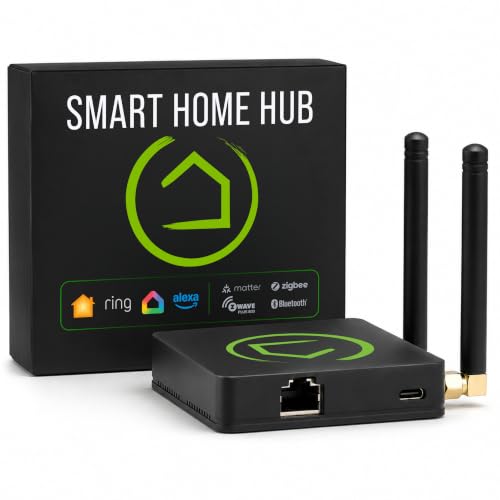
The brain for smart home tinkerers who refuse to trust the cloud.
This is a serious piece of hardware for a serious hobbyist. The Hubitat Elevation C-8 Pro runs all of its automations locally inside the unit, so your lights, locks, and thermostats keep working even when your internet goes down. It supports Matter 1.5, Z-Wave 800 Series with Long Range, Zigbee 3.0, and Bluetooth, making it among the most flexible platforms for a mixed-device home.
The standout feature is the text-to-automation engine. Connect devices and the hub builds routines for you automatically, while the Rule Machine offers unlimited customization with complex conditions and multiple triggers. There are no mandatory subscriptions — local processing, platform features, and continuous software updates are all included.
Compatibility is the thing owners praise most, particularly its ability to connect older Z-Wave and Zigbee devices that other hubs abandon. However, the ease of use is a mixed bag. The interface is powerful but not pretty, and the learning curve is steep. While it works with Alexa and Google Home, some owners found Alexa integration to be incomplete, especially with legacy devices.
The ultimate control freak’s tool: class-leading privacy, speed, and device compatibility for those who want to micromanage every rule.
Not for the casual user: If you expect a simple app with pretty graphics, this hub’s complexity will be a barrier rather than a feature.
8. Home Assistant Green

The official gateway to the most powerful open-source smart home platform.
This is the easiest way to enter the world of Home Assistant, an open-source platform with nearly endless customization. The Green unit comes with Home Assistant already installed, so you just plug in the power supply and an Ethernet cable and you’re off. It packs a quad-core processor, 32GB of storage, and 4GB of RAM into a small, silent, fanless design.
The goal is to be the one hub for your whole home, cutting down on the clutter of multiple apps and bridging devices from different brands. Your data stays local on the device, and you can view, share, and export it freely. It’s very power-efficient, using only a couple of watts, and it can be expanded with Z-Wave, Zigbee, and Thread USB dongles if you need more radios.
Setup is the most-praised aspect — the ease of getting it up and running is a huge win for beginners. It auto-discovers many devices on your network, and the HomeKit Bridge lets you control non-Apple gadgets with Siri. The trade-off is the learning curve; owners mention that customizing advanced automations takes time and patience, and the default hardware may need extra USB antennas to reach far-flung devices.
The Big Wins
- Privacy-focused local control in an official, supported device.
- Works with thousands of integrations and protocols.
- No mandatory subscriptions or cloud paywalls.
The Real Cost
- Requires a genuine willingness to learn and tinker.
- You may need USB antennas for every protocol you want.
- Mixed-brand setups are not always plug-and-play.
A project worth starting: Perfect for a homeowner who wants to build a truly custom smart home and enjoys learning as they go.
If you’d rather not: Someone seeking instant gratification from a simple app will find this platform overwhelming.
9. Ring Alarm 14-Piece Kit
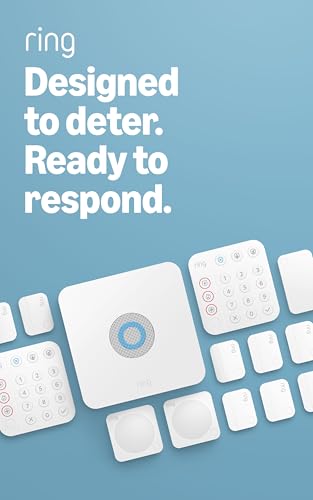
The full-house security net that feels professional but installs DIY.
This kit is built for a 2 to 4 bedroom home, giving you a complete security system right from the start. It includes one Base Station, two Keypads, eight Contact Sensors, two Motion Detectors, and one Range Extender. Everything is wireless, so you can set it up without drilling holes, and the Ring app is your command center for arming, disarming, and monitoring.
The base station keeps your system online even if your Wi-Fi drops, using a cellular backup when you pair it with a compatible Ring Protect Plan. That subscription (sold separately) also open up professional 24/7 monitoring for police, fire, and medical response, plus the ability to arm from anywhere. It’s a flexible system that you can expand with additional sensors over time.
The ease of use is a huge selling point, with an intuitive app that connects smoothly, and the quality of the hardware is top notch. The system runs on batteries that last for months, and it’s better with Alexa — you can arm and disarm with your voice. While connectivity is generally reliable, some owners note occasional sensor connection issues. It’s a strong choice if you value professional monitoring options and a sturdy, branded ecosystem.
confidence
- Comprehensive 14-piece coverage for a whole home.
- Cellular backup keeps it armed during outages.
- Optional professional monitoring is available.
To Keep in Mind
- Best features require a Ring Protect subscription.
- The door contacts are visible on your door frames.
- Requires Android 10+ for the app.
Choose this for security: If your priority is protecting your home with a polished, expandable system, this is the most complete package.
Look elsewhere for: A budget-friendly system with zero ongoing costs — the Skylink option above keeps things totally free.
Understanding the Specs
Hub Protocols: Zigbee & Z-Wave
These are wireless languages that many smart sensors and bulbs use to talk to a hub. They create a private mesh network between your devices, which keeps them from jamming up your home Wi-Fi. A hub that speaks both is more flexible, letting you mix and match devices from different brands.
Local Processing vs. Cloud
A hub with local processing runs your automations inside the device itself. This means your rules execute in milliseconds and keep working when the internet fails. Cloud-based systems send commands to a remote server, which can be slower and stops working entirely if your connection goes down.
FAQ
What is the difference between Zigbee and Z-Wave?
Will an app controlled home automation system work without internet?
Do I need a neutral wire for smart switches?
What exactly does the Matter protocol do?
Is a smart home hub better than individual smart bulbs?
What is the benefit of a no-subscription system?
Can I control my system with voice assistants?
How many devices can I connect to one hub?
Are these systems hard to install for a renter?
Final Thoughts: The Verdict
Across the board, the app controlled home automation system winner is the Philips Hue Starter Kit because it offers the most reliable, beginner-friendly path to smart lighting with the easiest setup and broadest voice control. If you want professional-grade security with monitoring options, grab the Ring Alarm 14-Piece Kit. And for the ultimate tinkerer who values privacy and local control above all else, the Hubitat C-8 Pro or Home Assistant Green are the ones to reach for.
How We Picked
We do not accept paid placement. Every pick is matched to a real buyer and a real use-case; we do not hands-on test units.
Sources & Methodology
Specifications: manufacturer listings and product documentation. Review insights: verified customer reviews, as of August 2026. Pricing: not shown on this page (it changes often); check the current price via the retailer link.
As an Amazon Associate, Gadgets Feed earns from qualifying purchases. This does not affect which products we feature.