
Fumbling for a wall plate in the dark is a habit that dies the minute you install a switch that lives in your phone. Forget the routine of walking to every room to toggle a lamp — the real upgrade is building a lighting schedule that adapts to your comings and goings without you lifting a finger. The market is flooded with Wi-Fi-enabled paddles that promise hands-free control, but the difference between a switch that feels like a toy and one that becomes a permanent part of your smart home comes down to three things: neutral wire compatibility, consistent app responsiveness, and the depth of your automation options.
I’m Min — the co-founder and writer behind Gadgets Feed. I have spent countless hours cross-referencing technical specifications, customer reliability data, and ecosystem compatibility to separate the switches that actually deliver on their promise from those that will frustrate you after the first week.
After parsing dozens of real-world user reports and spec sheets, I built this guide to help you find the best app controlled light switch for your home without wasting money on a device that drops its connection or requires a complicated rewire.
How To Choose The Best App Controlled Light Switch
Every smart switch in this category requires a specific electrical setup, runs on a specific Wi-Fi band, and serves a specific automation role. Ignore these foundational details and you will end up with a switch that either will not fit in your wall box or will drop offline the moment you leave the house.
Neutral Wire: The Non-Negotiable Gatekeeper
The single biggest compatibility pitfall is the neutral wire — a white wire bundled at the back of your wall box. Every switch in this roundup requires a neutral wire to power its Wi-Fi radio and logic board. If your home was built before the mid-1980s, you might have switch boxes that only carry a hot wire and a load wire, with no neutral in sight. Opening the box and seeing only two wires means a smart switch is not an option without hiring an electrician to run a new line. Always, always verify the presence of a neutral bundle before purchasing anything.
Ecosystem Lock-In: Which Assistant Works For You
Not all switches support all platforms. If you use Apple HomeKit and Siri, you must buy a switch that explicitly lists HomeKit compatibility — models that only mention Alexa and Google Assistant will not show up in your Apple Home app. Alexa and Google Home users have the widest pool of options, but even then, some budget switches use custom apps that do not integrate as smoothly with routines as premium brands do. Decide your primary voice assistant first, then filter your switch choices down to that ecosystem.
Dimmer or Standard On/Off: Know Your Bulbs
A dimmer switch adds ambiance control but imposes strict limits on bulb types. Dimmable LED and CFL bulbs work fine, but a standard dimmer will destroy a non-dimmable LED bulb and cause flickering or buzzing. If your light fixtures use smart bulbs (like Philips Hue), do not pair them with a dimmer — the smart bulb’s own circuitry will conflict with the dimmer’s voltage cutting, leading to erratic behavior. A simple on/off switch is the safer choice when you want to keep your existing smart bulbs.
Quick Comparison
On smaller screens, swipe sideways to see the full table.
| Model | Category | Best For | Key Spec | Amazon |
|---|---|---|---|---|
| TREATLIFE HomeKit | Mid-Range | Apple HomeKit / Siri users | 10 Amp rating, neutral wire required | Amazon |
| Kasa Smart HS200-2 | Mid-Range | 2-gang upgrade for reliability | 15 Amp, 2.4GHz Wi-Fi, UL certified | Amazon |
| Minoston MT10W | Mid-Range | Bathroom fan / countdown timer | 15 Amp, 6 preset timer options | Amazon |
| Lesim 2-Gang | Premium | Dual-circuit control on a budget | 15 Amp, Alexa / Google Assistant | Amazon |
| TP-Link Tapo S500 | Premium | Bulky multi-pack / smart home starter | 15 Amp, Tapo app / Away Mode | Amazon |
| meross Smart Dimmer | Premium | HomeKit + dimmable ambiance | 4 Amp, 1%-100% dimming range | Amazon |
| Kasa Smart Plug HS103P4 | Budget-Friendly | Outlets, lamps, no-hassle control | 15 Amp, 2.4GHz Wi-Fi, 4-pack | Amazon |
In‑Depth Reviews
1. TREATLIFE Apple HomeKit Smart Switch

The TREATLIFE HomeKit switch is the rare budget-friendly model that brings native Apple HomeKit support without requiring a separate hub. Pairing via Siri is seamless — just scan the HomeKit code and your lights appear in the Apple Home app instantly. The physical rocker feels solid with a satisfying click, and the included screwless wall plate gives it a clean, flush look that matches modern home decor.
Under the hood, this switch runs on a 2.4GHz Wi-Fi connection and carries a 10 Amp rating, which limits it to lighting circuits (not heavy appliances). The Treatlife app integrates with Alexa and Google Assistant too, but the star feature for iOS users is the ability to trigger lights through geofencing automations in the Apple Home app — lights turn on as you pull into the driveway without any extra steps.
Owners report rock-solid reliability after months of use, with the occasional hiccup only during initial Wi-Fi pairing. The neutral wire requirement is strict, but the wiring diagram and included wire nuts make installation straightforward for anyone who has swapped a standard switch before.
Why it’s great
- True native HomeKit compatibility without a bridge
- Fast app response and reliable Siri voice commands
- Sleek screwless faceplate included in the box
Good to know
- Requires neutral wire — not for older homes
- 10 Amp rating limits use to lighting, not heavy loads
- Switch body is deep and may not fit shallow boxes
2. Kasa Smart Switch 2-Gang HS200-2

The Kasa HS200-2 solves a specific pain point: upgrading a dual-switch faceplate without cramming two separate smart switches into one box. This single unit houses two independent relays, each rated at 15 Amps, so you can control a ceiling light set and a fan on the same circuit without needing extra space. The Kasa app walks you through setup with guided wiring diagrams that actually show you which screw terminal connects to line versus load.
Reliability is where Kasa earns its reputation. Users consistently report zero drop-offs, instant command response, and seamless integration with Alexa, Google Assistant, and Samsung SmartThings. The Away Mode randomly toggles lights to simulate occupancy, a feature that works even when you forget to set a schedule. The physical rocker paddles glow softly when the lights are off, making them easy to locate in a dark room without being blinding.
The biggest trade-off is that the 2-gang design is slightly wider than a standard decora plate, so it may not fit into some older retrofit boxes without trimming the drywall. The switch also requires a neutral wire and 2.4GHz Wi-Fi, and the included wall plate only ships as a single piece — buying extra gangs means sourcing a compatible plate separately.
Why it’s great
- Dual relays in one gang slot save wall box space
- Rock-solid connection — no random offline episodes
- Glow indicator makes switch easy to find at night
Good to know
- 2-gang form factor may be tight in shallow retrofit boxes
- Color is slightly off-white, unmatched with some brands
- No 3-way support — single pole only
3. Minoston Countdown Timer Switch MT10W
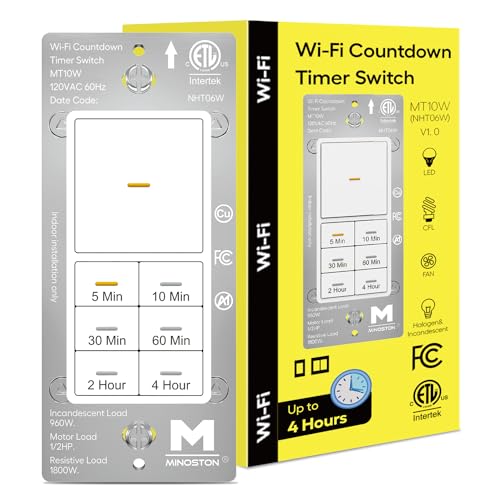
The Minoston MT10W is not a general-purpose on/off switch — it is a specialty countdown timer designed specifically for bathroom exhaust fans and heaters. The front panel has seven physical buttons with six preset timer options (5, 10, 30 minutes, 1, 2, or 4 hours), plus a dedicated on/off button that bypasses the timer. This makes it perfect for scenarios where you want the fan to run for exactly 20 minutes after a shower and then shut off automatically, without having to dig out your phone.
Behind the panel, the switch is rated for 15 Amps and 1/2 HP motor loads, so it can handle ceiling fan motors without buzzing or overheating — a problem common with standard smart switches driving inductive loads. The Smart Life app adds the ability to set custom countdown durations beyond the preset options, and it integrates with Google Home and Alexa for voice control. The seven buttons feature adjustable amber LED backlighting that can be dimmed or turned off entirely through the app.
Setup is straightforward for anyone comfortable with a neutral wire, but the switch lacks a physical wall plate in the box (buy one separately). Some users report that the timer memory defaults to the last preset used when pressing the physical button, which can override an app-based automation if you are not careful.
Why it’s great
- Hardwired countdown buttons for instant timer activation
- Rated for motor loads — safe for fans and heaters
- Adjustable amber backlighting with app control
Good to know
- No wall plate included — must be purchased separately
- Physical button overrides app schedules if not careful
- ESPHome / HomeAssistant support is limited
4. Lesim Smart Light Switch 2 Gang (Rose Metal)

The Lesim 2-Gang stands out visually with its Rose Metal finish — a warm bronze tone that contrasts with the sea of white plastic switches on the market. The unit packs two independent rocker switches side by side, each controlling a separate circuit, and the included 2-gang wall plate has a smooth, fingerprint-resistant surface. The brass or copper contact material supports a full 15 Amp rating, so you can safely control high-wattage fixtures without worrying about contact overheating.
On the software side, the Lesim pairs with the Smart Life app and responds to Alexa and Google Assistant with typical sub-second latency. Users praise the group control feature that lets you bind multiple Lesim switches to a single voice command (“Alexa, turn off the whole house”). The physical rockers are wide and easy to press even in the dark, and the switch fits flush against the wall without the bulky protrusion some budget models suffer from.
The Achilles’ heel is long-term durability. Multiple verified buyers report switches failing after 9-12 months, either going unresponsive or refusing to toggle manually. The brand does honor replacements, but the reliability gap between Lesim and a TP-Link or Kasa unit is noticeable. If you are buying a single unit for a low-traffic area, the aesthetics are worth it — for 24/7 high-use rooms, stick with a more proven brand.
Why it’s great
- Unique Rose Metal finish elevates the look of any room
- Full 15 Amp rating suits high-wattage fixtures
- Group control makes whole-home voice commands easy
Good to know
- Long-term reliability is inconsistent — some fail at 12 months
- No Apple HomeKit support
- Requires neutral wire and 2.4GHz Wi-Fi only
5. TP-Link Tapo Smart Light Switch S500 (4-Pack)

The Tapo S500 4-pack is the most cost-effective way to wire an entire floor with smart switches in one purchase. Each switch is a standard single-pole design with a 15 Amp copper contact rating and UL certification, so you are not sacrificing safety for the bundle discount. The Tapo app supports Away Mode for random light patterns, scheduling that can sync with sunrise/sunset times, and grouping so you can label each switch by room.
One hidden advantage for tinkerers: the S500 runs on an ESP32-based platform that is compatible with ESPHome and LibreTiny firmware. Advanced users can flash custom firmware to decouple the physical button from the relay, letting the switch control smart bulbs directly without cutting power to them. This opens up a level of flexibility that most competing models in this price segment do not offer.
On the downside, the physical button has a slightly mushy feel compared to the crisp click of the Kasa line. A few user reports mention an occasional unregistered tap — pressing the paddle does nothing, requiring a second press. The Tapo app is functional but cluttered with upsells for other Tapo devices, which can be annoying when you just want to check your light status.
Why it’s great
- Bulk 4-pack lowers per-switch cost significantly
- ESP32-based platform allows custom firmware like ESPHome
- Away Mode and sunrise/sunset scheduling built in
Good to know
- Physical button feel is mushy, not crisp
- App interface has promotions for other Tapo products
- Occasional missed tap if not pressed squarely
6. meross Smart Dimmer Switch (2-Pack)
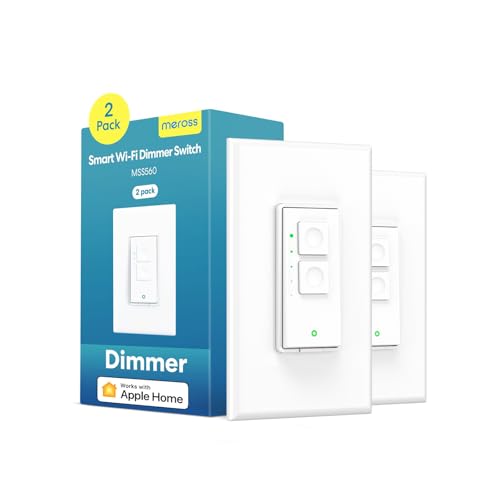
The meross Smart Dimmer is the only dimmer in this roundup with native Apple HomeKit support, making it the go-to choice for Siri users who want to say “Hey Siri, dim the living room to 40 percent.” The dimmer uses a single push-and-hold rocker paired with five fixed brightness levels that cycle on each press (20%, 40%, 60%, 80%, 100%). The 1%-100% app slider gives you finer control, though the physical button is limited to those preset steps.
Power compatibility requires attention: the switch supports incandescent bulbs up to 400W and dimmable LED/CFL bulbs up to 150W. It cannot drive smart bulbs — pairing a smart bulb with a dimmer causes flickering and eventual failure because both devices try to modulate voltage. The meross app includes sunrise/sunset scheduling and geofencing that works even without an internet connection if the commands are stored locally on the switch.
Installation is simple for anyone familiar with a neutral wire, but the switch body is deep at roughly 1.6 inches. Several users found it too long for shallow retrofit boxes, forcing them to push excess wiring deeper into the wall cavity. The tactile click of the rocker is satisfying, and the switch has been reported to stay reliably online for years without a single dropout.
Why it’s great
- Full HomeKit integration with fine 1%-100% slider dimming
- Reliable long-term connectivity — no dropouts reported
- Local scheduling works even during internet outages
Good to know
- Physical button limited to five brightness steps
- Cannot be used with smart bulbs — only dimmable LEDs
- Deep body may not fit shallow electrical boxes
7. Kasa Smart Plug HS103P4 (4-Pack)
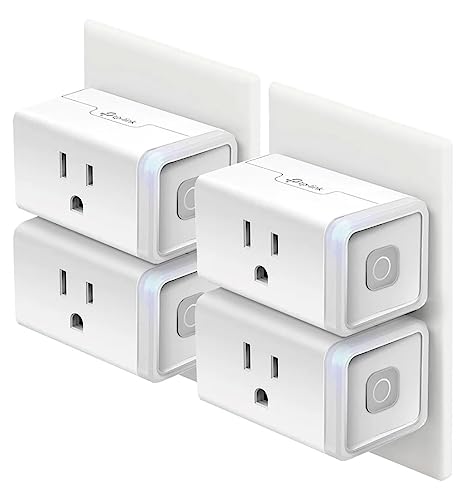
If your home has older wiring without a neutral wire, a smart plug is the practical alternative to a wall switch. The Kasa HS103P4 plugs directly into any standard outlet and gives you the same app-based and voice control functionality without any electrical work.
Setup is famously simple: plug in, open the Kasa app, press the button on the plug, and wait for the blinking Wi-Fi indicator to confirm pairing. The Kasa app integrates with Alexa, Google Assistant, and SmartThings, and the scheduling engine lets you set a countdown timer or weekly recurring on/off patterns. The physical button on the side of the plug also allows manual override — useful if your phone is not within reach.
The trade-off is that a plug takes up a physical outlet slot, blocking the second receptacle in many configurations. The white plastic housing is compact but the LED indicator is surprisingly bright; users in bedrooms often cover it with electrical tape to avoid light pollution. One other limitation: these plugs do not support energy monitoring, so you cannot track kilowatt-hour usage through the app.
Why it’s great
- No neutral wire needed — works with any grounded outlet
- 4-pack delivers exceptional per-device value
- Reliable Kasa app with robust scheduling engine
Good to know
- Occupies a full outlet — blocks the second receptacle
- Bright LED may be distracting in bedrooms at night
- No energy monitoring or power usage tracking
FAQ
Can I use an app controlled light switch without a neutral wire?
Why does my app controlled switch keep dropping offline?
Can I pair a smart switch with a smart bulb?
Final Thoughts: The Verdict
For most users, the best app controlled light switch winner is the TREATLIFE Apple HomeKit Smart Switch because it balances native Apple smart home integration with an affordable price tag and rock-solid daily performance. If you want a dual-circuit upgrade without sacrificing wall box space, grab the Kasa Smart Switch 2-Gang HS200-2. And for a dedicated countdown timer that automates your bathroom fan or heater, nothing beats the Minoston MT10W.