
Our readers keep the lights on and my morning glass full of iced black tea. As an Amazon Associate, I earn from qualifying purchases.
Specs are compiled from manufacturer listings and verified buyer reviews and can change over time — please confirm the key details on the product page before buying.
A power cut hits mid-save — your PC dies, your router goes quiet, and you lose the last hour of work. An uninterruptible power supply (a standby battery that kicks in the instant the grid drops) turns that panic into a calm shutdown. The trick is picking the right capacity, outlet count, and battery type for your specific electronics.
I’m Min — the founder and writer behind Gadgets Feed. This guide is built by comparing the manufacturers’ published specifications and the patterns across verified customer reviews, so you get each pick’s real strengths and trade-offs instead of marketing spin.
You want a battery backup that keeps your gaming PC, home office, or Wi-Fi running during power flickers without sorting through confusing specs. This breakdown of the best aps battery backup uses real numbers and honest buyer experiences, not marketing fluff.
Our Picks at a Glance


How To Choose The Best UPS Battery Backup
Before you pick a unit, get a sense of the VA (volt-amps) you need. A desktop PC with a monitor needs at least 600VA to give you a few minutes to save your work. If you are adding a modem, router, and a NAS drive, step up to 850VA or more. The higher the VA, the more equipment you can keep running during an outage.
Match the power output to what you plug in
The watt rating is the real-world cap on how much gear a UPS can actually handle. A unit rated for 360W will handle a basic office PC and a couple of peripherals, but a gaming rig with a big GPU can pull 500W or more on its own. Check the power supply rating on your computer and add 20% for monitors and accessories — then find a UPS whose watt spec beats that total.
Choose between simulated and pure sine wave
Simulated sine wave (a stepped approximation of a wall outlet’s power) works fine for most desktop PCs, routers, and basic electronics. Pure sine wave (an exact electrical copy of grid power) is essential for gear with Active PFC power supplies — common in newer gaming PCs, servers, and some high-end monitors. Plug a PFC device into a simulated sine wave UPS and it may shut down immediately or buzz loudly. Check your PC’s power supply specs; if it says “Active PFC,” go pure sine wave.
Count your outlets — and the spacing between them
A UPS with eight or twelve outlets sounds generous, but many of those are surge-only, not battery-backed. The data sheet will list exactly how many outlets provide battery backup and how many are just surge protection. A common annoyance: bulky “wall wart” power adapters (like those on routers and modems) can block adjacent outlets, so look for units with wide-spaced sockets or at least a couple of widely spaced battery-backed outlets.
Quick Comparison
| Model | Best For | VA / Watts | Battery Outlets | Wave Type | Amazon |
|---|---|---|---|---|---|
| CyberPower ST900U★ Best Overall | Gaming PC & Home Theater | 900VA / 500W | 6 | Simulated Sine Wave | Amazon |
| APC BX850MBest Value | Advanced PC Protection | 850VA / 510W | 4 | Simulated Sine Wave | Amazon |
| CyberPower CP850PFCLCDPure Sine Wave | Active PFC Gaming PC | 850VA / 510W | 5 | Pure Sine Wave | Amazon |
| Tripp Lite BC350 | Modem & Router Backup | 350VA / — | 3 | Simulated / PWM Sine | Amazon |
| Staples TECH 650VA | Home Office Desktop | 650VA / 360W | 8 | Simulated Sine Wave | Amazon |
| SKE 600VA | Budget-Conscious Setup | 600VA / 360W | 6 | Simulated Sine Wave | Amazon |
| Tripp Lite AVR550U | Brownout-Prone Areas | 550VA / 300W | 4 | PWM Sine Wave | Amazon |
| APC BE700G3 | Compact Home Office | 700VA / 420W | 4 | Simulated Sine Wave | Amazon |
| GOLDENMATE 1000VA | Long-Life Reliable Backup | 1000VA / 600W | 8 | Pure Sine Wave | Amazon |
In‑Depth Reviews
1. CyberPower ST900U Standby UPS
Our pick — over 4.5★ from 850+ verified ratings; the strongest balance of quality and price.
This unit protects a gaming rig and your whole desk without costing a fortune.
For a mid-range price, you get 900VA and 500W of backup power — enough to cover a gaming PC, monitor, and networking gear during a short outage. It packs a total of 12 outlets, with six providing battery backup and six providing surge-only protection. Four of those outlets are spaced widely apart so you can fit those bulky power bricks without losing a socket. The build quality wins praise from owners, with many noting it saves their PC and PS5 from power drops.
The unit uses a simulated sine wave (a type of power output that works fine for standard desktop PCs and consoles but not for Active PFC power supplies, which need a pure sine wave). It also has a GreenPower UPS design that cuts energy waste when the power is stable. A three-year warranty covers the unit and the battery, plus a connected equipment guarantee covers your gear if the UPS fails to protect it.
Some owners mention the alarm beep is annoying, but buyers report it can be disabled easily. Others note runtime is around 10-20 minutes under load, which is enough for a safe shutdown rather than hours of continued work.
What owners love most
- Considered a reliable workhorse that handles power interruptions without drama
- 12 total outlets give tons of flexibility for a desk setup
- Value for money stands out — owners mention it gives a lot for the price
Points to know before buying
- Alarm beep can be irritating (though it can be turned off)
- Not suitable for Active PFC gaming PCs without a pure sine wave
Reach for it if… you need a lot of outlets and reliable backup for a standard desktop PC, console, or home theater without going premium on price.
Look elsewhere if… your computer has an Active PFC power supply — you need pure sine wave output to keep it happy.
2. APC 850VA/510W Pro UPS (BX850M)
Automatic Voltage Regulation (AVR) that corrects low power without draining the battery.
This unit delivers 850VA and 510W — a step up in raw power for home office gear. It provides over 29 minutes of runtime at a 100W load, which means a desktop PC and monitor have several minutes to save and shut down safely. The eight outlets split into four battery-backed and four surge-only, plus it adds coaxial and Ethernet surge protection for incoming cable and network lines. The silent operation is a big plus for owners, though some note the unit can be audible when the fan kicks on.
What sets this apart from simpler models is Automatic Voltage Regulation (AVR). It corrects low voltages (brownouts) starting at 88V and surges of up to 13% without switching to battery, which saves the battery for real outages. The LCD display gives real-time readings on battery charge, load, and estimated runtime. The battery is user-replaceable (RBC17, sold separately), which extends the unit’s life. For many, the brand’s reliability is the deciding factor — a long-time owner in their reviews states it is the safest line of defense for electronics.
A small number of owners experienced defects early on, but most report the unit running flawlessly for years.
The strengths
- AVR corrects brownouts without draining the battery, extending backup runtime
- 8 outlets with coaxial and Ethernet surge protection
- User-replaceable battery and Energy Star certified for efficiency
The trade-offs
- Fan noise is noticeable under heavy load
- Occasional early failures reported, though support eventually replaces units
Best for brownout-prone areas: the AVR keeps your gear running cleanly without tapping into backup power for every dip.
Skip if… you need pure sine wave for a modern gaming PC — this unit uses simulated sine wave.
3. CyberPower CP850PFCLCD PFC Sinewave UPS
The pure sine wave that keeps Active PFC gaming PCs running without a hitch.
If you have a modern PC with an Active PFC power supply, this is the unit to pick. It delivers 850VA and 510W with pure sine wave output, which is exactly what those power supplies need. The 10 outlets split into five battery-backed and five surge-only. The color LCD panel tilts up to 22 degrees and shows real-time battery and power data so you always know where things stand. Owners consistently report that the unit functions flawlessly through power outages, with one describing it as “reliable 177 times over.”
AVR (Automatic Voltage Regulation) smooths out minor voltage dips and spikes without switching to battery, which protects the battery’s lifespan. The unit is also Energy Star certified and runs quietly in normal operation. A notable design point: the upright mini-tower form factor saves desk space compared to a sprawling flat unit. The price is higher than the ST900U, but the pure sine wave output is non-negotiable for certain hardware.
Some owners find the outlets too closely spaced for bulky adapters, and the fan is audible during battery operation.
Why pick this one
- Pure sine wave is essential for Active PFC power supplies in modern PCs
- Color LCD panel provides clear at-a-glance system status
- Space-saving tower design fits on a desk without wasting space
What to consider
- Outlet spacing is tight for large power bricks — you may need a short extension cord
- Fan noise is noticeable when the battery kicks in
The smart choice for: anyone running a desktop with Active PFC — this is the lowest-cost pure sine wave unit that works reliably.
Think twice if… your setup is all standard power supplies; the simulated sine wave units above will save you money for the same backup benefit.
4. GOLDENMATE 1000VA/600W Lithium UPS

A lithium-iron-phosphate battery that lasts over a decade and 5000 charge cycles.
This is the only unit in the list using a LiFePO4 battery instead of traditional lead-acid. The LiFePO4 battery is rated for over 10 years and 5000 charge cycles, with a total cost of ownership more than 40% lower than lead-acid over the long run. It delivers 1000VA and 600W of pure sine wave output, making it suitable for PCs, workstations, and network gear that need clean power. The eight outlets all provide both battery backup and surge protection.
Built-in Battery Management System (BMS) monitors voltage and temperature, and the cooling fan operates at below 50 dB during heavy use. The intelligent LCD panel shows real-time status and automatically halts charging if limits are exceeded. Owners praise its reliability and power quality — the most-mentioned aspect in reviews is reliability, with 185 positive mentions. Several note it handles multiple power dips and outages without issue.
A small number of customers note that runtime varies (some get up to 5 hours on low loads, others less) and that customer service can be slow for returns. The unit is heavier than lead-acid alternatives at 4.8 kg (over 10.5 pounds).
Standout features
- LiFePO4 battery rated for over 10 years and 5000 cycles
- Pure sine wave output at 1000VA / 600W covers most home setups
- 8 battery-backed outlets and a clear LCD display
Downsides
- Heavier than competing units — consider your mounting location
- Customer service turnaround can be slow for warranty issues
Best for long-term value: the lithium battery means you won’t be shopping for a replacement in two years.
Look elsewhere if… you want a cheaper upfront cost for a PC you plan to upgrade soon — lead-acid units are fine for shorter ownership.
5. APC 700VA Back-UPS BE700G3

Small enough for a dorm desk but carries 420W to keep a PC and modem alive.
This 700VA / 420W unit is designed for compact spaces — apartments, dorms, or small workspaces. It delivers up to 29 minutes of runtime when powering a 100W load, which is enough for a router and a couple of modems to stay online through a typical flicker. The six outlets include four battery-backed and two surge-only. Uniquely, it also has USB-C and USB-A ports (5V/3A shared) for charging phones and tablets directly from the UPS.
The unit is wall-mountable and has a low-profile design that fits under a desk edge. The battery is non-replaceable according to most owners, though a teardown shows it can be accessed with four screws. The casing is plastic but feels solid. Owners praise its surge protection and compact size, with many noting it keeps their home internet running without interruption during short power losses.
A recurring note from owners: the battery is not user-replaceable, meaning the whole unit needs replacement when the battery wears out (typically 3-5 years). A few report early failure within days, though most units work well for years.
What stands out
- Very compact footprint that mounts under a desk or on a wall
- USB-C and USB-A ports for charging mobile devices during an outage
- 30-minute runtime at 100W handles a full networking stack
Beware
- Non-replaceable battery is a planned-obsolescence concern
- Some units arrive defective — check it immediately on receipt
Ideal for renters and small spaces: the wall-mount design saves valuable floor space.
Not for long-term owners: if you plan to keep a UPS for 5+ years, a user-replaceable battery model costs less in the long run.
6. Staples TECH 650VA UPS
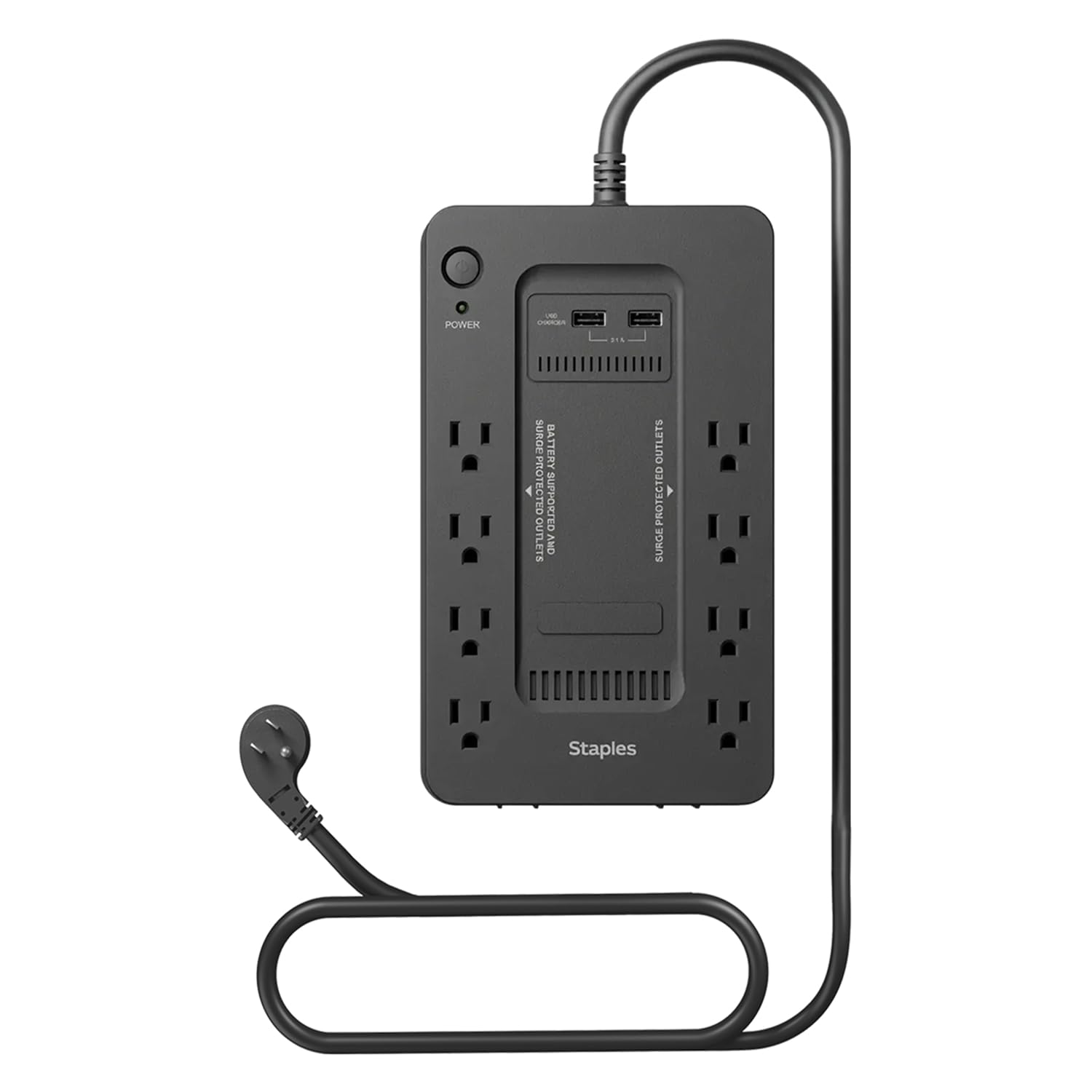
A budget-friendly 360W unit with eight outlets for a basic desktop and peripherals.
This 650VA / 360W standby UPS is built for basic home office setups: a desktop computer, modem, and router. It has eight total outlets (battery-backed and surge-only) packed into a compact footprint that slides under a desk. The unit uses a lead-acid battery and simulated sine wave output, which is standard for this price tier. Reviewers point out it works perfectly for brief outages — one buyer in Florida uses it to keep their Eero internet running during summer storms.
The design is straightforward: plug it in, plug your devices into the battery-backed outlets, and you are good to go. In reviews, the most positive feedback centers on value for money, with several noting it does exactly what a UPS should for the price. The unit does not have AVR or an LCD screen, so you are getting pure backup protection without extras.
The main annoyance owners call out: the unit beeps continuously when the power is off until it comes back. That is useful for critical infrastructure but irritating in a home office with frequent blips. The product size is 7.88 x 14.13 x 4.63 inches, which is noticeably larger than the Tripp Lite BC350 — a 58% larger footprint.
The upside
- 8 outlets give a lot of capacity for the price
- Compact vertical shape fits under most desks
- Simple plug-and-play setup for non-tech users
The catch
- Constant beeping during an outage can be maddening in a quiet office
- No AVR means it switches to battery for any voltage sag
Great for first-time buyers: low price and easy setup make it a gentle introduction to UPS ownership.
skip it if… you are in an area with frequent short blips — the beeping will drive you nuts.
7. Tripp Lite 550VA AVR550U

Automatic voltage regulation keeps your gear running clean during brownouts.
This 550VA / 300W unit packs AVR, which continuously corrects voltages as low as 89V and as high as 145V back to a stable 120V. That is a rare feature at this price tier. It has eight outlets (four battery-backed, four surge-only) in a compact package. The unit uses PWM sine wave output in battery mode — a middle ground between simulated and pure sine wave. Owners consistently say it is worth the money to protect equipment.
The build quality is solid: keyhole mounting tabs for wall installation, user-replaceable batteries (RBC51, sold separately), and RJ45 port protection for data line surges. It also includes a USB port for the free PowerAlert software, which enables automatic system shutdown. An owner in reviews notes it saved their satellite system from restart lag time when the generator kicks in.
The main complaint: a strong plastic smell from the charging process that lasts for a month. It is a minor gripe but worth knowing if you are sensitive to odors.
Why choose it
- AVR corrects both brownouts and overvoltages without draining the battery
- 8 outlets and mounting tabs for permanent installation
- USB connectivity for automatic system shutdown
What to note
- Strong plastic smell during first month of use
- 300W is limited for anything beyond a basic desktop and modem
Best for brownout-prone areas: the AVR keeps your PC running clean during dips, saving the battery for real blackouts.
Not for heavy loads: 300W will not handle a gaming PC or multiple monitors.
8. SKE 600VA/360W UPS

An affordable 360W UPS with a bright LCD for monitoring power at a glance.
This 600VA / 360W unit offers an LCD screen that displays input voltage, output voltage, battery capacity, and load capacity — all with an auto-extinguish feature after 30 seconds. It has six outlets, all with battery backup and surge protection. The tower form factor stands upright, saving desk space. The price is low, making it a popular entry-level choice for protecting a basic desktop PC and networking gear.
Owners consistently praise the value for money and the compact size. The free management software enables unattended system shutdown during extended outages. Some reviews say it protects reliably for about a year, though a portion of shoppers say it stops working within that timeframe. Power reliability is the most-discussed aspect, with mixed feedback — some love it, others feel it is not powerful enough for their needs. The spacing between outlets is tight; bulky adapters may block adjacent sockets.
The beeping alarm can be silenced by tapping the on key, which the display will show as “silent state.” The unit uses a cooling fan for high-power demands.
Pros
- Clear LCD screen shows real-time power data
- Affordable entry point for a desktop UPS
- Cooling fan handles higher loads without overheating
Cons
- Mixed reliability reports — some units fail within a year
- Outlet spacing is too tight for larger power adapters
Best for low-risk setups: if you just need backup for a modem and router, this is the cheapest way to get an LCD.
Think twice if… you rely on this for critical work — the failure rate is higher than the premium options above.
9. Tripp Lite 350VA Mini UPS BC350

The smallest UPS in the list — 5 x 7.99 x 2.99 inches — for a modem and router only.
This 350VA unit is purpose-built for low-power devices. Three of the six outlets provide battery backup, while the other three are surge-only. It has a 316-joule suppression rating (the amount of energy the surge protector can absorb in an instant). The size difference from the Staples TECH is massive — 58% smaller by dimensions — which makes it a great fit for a cramped desk or a wall mount. Buyers report it is a light-duty device, ideal for keeping a fiber-to-RJ45 converter and internet gear running for over 12 hours during a power outage.
The battery is user-replaceable (a sealed lead-acid cell), which extends the unit’s life. It runs silently in both line and battery modes, with an alarm that sounds only for low battery or faults. The internal battery has an average life of 12 minutes under full load, but for a modem and router, owners mention runtime measured in hours. As one buyer put it: “This is a light duty device.”
The main limitation: 350VA has a 2.6x gap compared to the CyberPower ST900U’s 900VA. Three battery-backed outlets are few, and the spacing is too tight for bulky smart plugs like Kasa units. The unit runs a PWM sine wave in battery mode rather than a pure sine wave.
Strengths
- Ultra-compact size fits in tight spaces and mounts on a wall
- User-replaceable battery keeps it out of the landfill
- Silent operation with alarm only for faults
Weaknesses
- Too underpowered for a desktop PC with a monitor
- Outlet spacing is too close for bulky adapter plugs
The right pick for: keeping a single modem and router alive for hours during an outage — the compact size is unbeatable.
Look elsewhere if… you need to back up a computer; this unit simply does not have the power.
Understanding the Specs
VA vs Watts — What Actually Matters
VA (volt-amps) is the measure of the UPS’s total electrical capacity, but the watt rating tells you the real-world limit. A 900VA unit rated at 500W will handle a 500W load, not a 900W one. The difference is due to “power factor” (how efficiently the electronics use the electricity). Always match the watt rating to your connected equipment’s power draw, not the VA number. For a typical home office, add up the wattage of your PC (300-500W), monitor (30-60W), and router (10-20W) to find the minimum UPS watt rating you need.
Simulated vs Pure Sine Wave
Simulated sine wave (also called stepped or modified sine wave) generates a blocky approximation of the grid’s smooth power wave. It works fine for standard desktop PCs, monitors, and most routers. Pure sine wave produces an exact electrical copy of what comes out of your wall outlet. Sensitive gear — especially Active PFC power supplies found in modern gaming PCs and servers — can shut down, buzz loudly, or even be damaged by simulated sine wave output. If your PC’s power supply says “Active PFC” on the label, choose a pure sine wave UPS.
FAQ
How long will a UPS battery backup keep my PC running?
Can I replace the battery in a UPS myself?
What is the difference between surge-only and battery-backed outlets?
Will a UPS work with a generator?
How often should I replace the UPS battery?
Do I need a pure sine wave UPS for a gaming PC?
Can a UPS protect my electronics from lightning strikes?
What does the beeping alarm mean on a UPS?
Final Thoughts: The Verdict
For the majority of shoppers, the best aps battery backup winner is the CyberPower ST900U because it delivers 900VA / 500W with 12 outlets at a price that beats units with half the capacity. If you need pure sine wave for an Active PFC gaming PC, grab the CyberPower CP850PFCLCD. And for a compact unit that keeps your modem and router alive for hours while fitting in a backpack, the Tripp Lite BC350 is the one to reach for.
How We Picked
We do not accept paid placement. Every pick is matched to a real buyer and a real use-case; we do not hands-on test units.
Sources & Methodology
Specifications: manufacturer listings and product documentation. Review insights: verified customer reviews, as of July 2026. Pricing: not shown on this page (it changes often); check the current price via the retailer link.
As an Amazon Associate, Gadgets Feed earns from qualifying purchases. This does not affect which products we feature.