
Our readers keep the lights on and my morning glass full of iced black tea. As an Amazon Associate, I earn from qualifying purchases.
Specs are compiled from manufacturer listings and verified buyer reviews and can change over time — please confirm the key details on the product page before buying.
An aqua computer mouse is a specific breed: it pairs a translucent or light-blue shell with the practical needs of a daily driver. You want the nostalgic or fresh look without giving up precise tracking, a comfortable grip for long sessions, and a connection that does not drop. This guide cuts through the aesthetic noise to find the mice that actually perform.
I’m Min — the founder and writer behind Gadgets Feed. This guide is built by comparing the manufacturers’ published specifications and the patterns across verified customer reviews, so you get each pick’s real strengths and trade-offs instead of marketing spin.
From the liquid-filled Frutiger Aero retro piece to workhorse wireless models, here are the best aqua computer mouse options that pair eye-catching blue design with dependable everyday performance.
Our Picks at a Glance

How To Choose The Best Aqua Computer Mouse
An aqua-colored shell is the hook, but a mouse earns its place on your desk through the parts you cannot see. Before you fall for a pretty blue gradient, check the sensor, the connection method, and how the battery is powered.
Prioritize the Sensor and DPI
The DPI (dots per inch) setting controls how far the cursor travels across the screen for each inch you move the mouse. A higher DPI means less desk space needed for the same cursor movement, which helps on large monitors. Look for adjustable DPI levels, like the TECKNET’s five settings from 800 to 2600, so you can tune the speed to your workflow. For basic office tasks, a fixed 1600 DPI like the HP X3000 is perfectly smooth — you just lose the flexibility to switch speeds on the fly.
Match the Connection to Your Setup
You have two ways to connect a wireless mouse: a USB receiver dongle or Bluetooth. A 2.4GHz USB receiver (a small plug-in that sends a stable signal) usually gives you the most lag-free connection, but it takes up one of your laptop’s USB-A ports. Bluetooth frees that port and works with tablets and phones, though pairing can sometimes be less instant. Decide if you need to switch between two devices or just want a simple single connection, then pick accordingly.
Battery Life: The Real Cost of Ownership
Battery life claims vary wildly, from 6 months to 2 years, so read the fine print. A single AA battery that lasts 24 months, like the TECKNET and Logitech, is a set-and-forget solution. A rechargeable model, like the Normdecos with its built-in 800mAh battery, eliminates battery waste entirely but requires you to plug it in every few weeks. The trade-off is between convenience of charging and the inconvenience of hunting for spare AAs.
Quick Comparison
| Model | Best For | Connectivity | DPI | Battery Life | Amazon |
|---|---|---|---|---|---|
| TECKNET Wireless Mouse★ Best Overall | High-value daily driver | 2.4GHz USB-A | 2600 (adjustable) | 24 months | Amazon |
| Incase Modern Mobile MouseSleek Travel Pick | Premium travel & low-profile | Bluetooth | — | 6 months | Amazon |
| HP X3000 G3 Wireless Mouse | Ambidextrous travel companion | 2.4GHz USB-A | 1600 | 15 months | Amazon |
| RAPIQUE Bluetooth Wireless Mouse | Multi-device Bluetooth switching | Dual Bluetooth + 2.4GHz | — | 1 AA battery | Amazon |
| Logitech Signature M550 L | Large hands & silent clicks | Bluetooth + Logi Bolt USB | — | 24 months | Amazon |
| Normdecos Bluetooth Mouse | Rechargeable multi-mode use | BT 5.2 & 3.0 + 2.4GHz USB-A/C | 1600 (adjustable) | 90-day standby | Amazon |
| Frutiger Aero Aqua Mouse | Retro liquid-filled aesthetics | Bluetooth + 2.4G | — | Rechargeable (under 2h charge) | Amazon |
In‑Depth Reviews
1. TECKNET Wireless Mouse
Our pick — 4.5★ from 78,500+ verified ratings; the strongest balance of quality and price.
The high-value all-rounder that outlasts mice twice its price.
Its headline feature is a 24-month battery life on a single AA battery. Combined with an on/off switch and a power-saving mode, you can genuinely forget this mouse runs on power at all. It delivers the core office experience without fuss, which explains why it has earned its reputation as the crowd favorite across tens of thousands of owners.
Comfort comes from the contoured shape and rubber side-grips that give your thumb a resting spot. Five adjustable DPI levels (800/1200/1600/2000/2600) let you toggle between precise document work and fast cursor sweeps with one button. It connects via a USB mini-receiver with up to 49 feet of range, ideal for living-room PC setups.
The honest trade-offs are the small footprint (4.09″L x 1.88″W) and a fast sleep mode that takes 30-45 seconds to wake. Owners who used it daily for years report the battery cover eventually detaches and connectivity hiccups appear as the battery dies — a cue to use rechargeable AAs. Buyers report: “Durable daily use 2018-2024; balanced sensitivity, good double-click, normal noise.”
What wins people over
- Quality is the top praise, with over 7,000 owners noting solid build and crisp clicks
- 24-month battery life means you rarely touch the battery compartment
- Adjustable DPI up to 2600 offers real flexibility for different screens
What to know before buying
- Compact size may cramp users with larger hands
- Battery life draws mixed feedback — some report it drains fast
- AAA battery not included; you supply your own
Reach for this if: you want maximum value and a dependable daily mouse without obsessing over aesthetics.
The only catch: its small footprint suits medium hands best, and fast sleep wake times can test your patience.
2. Incase Modern Mobile Mouse
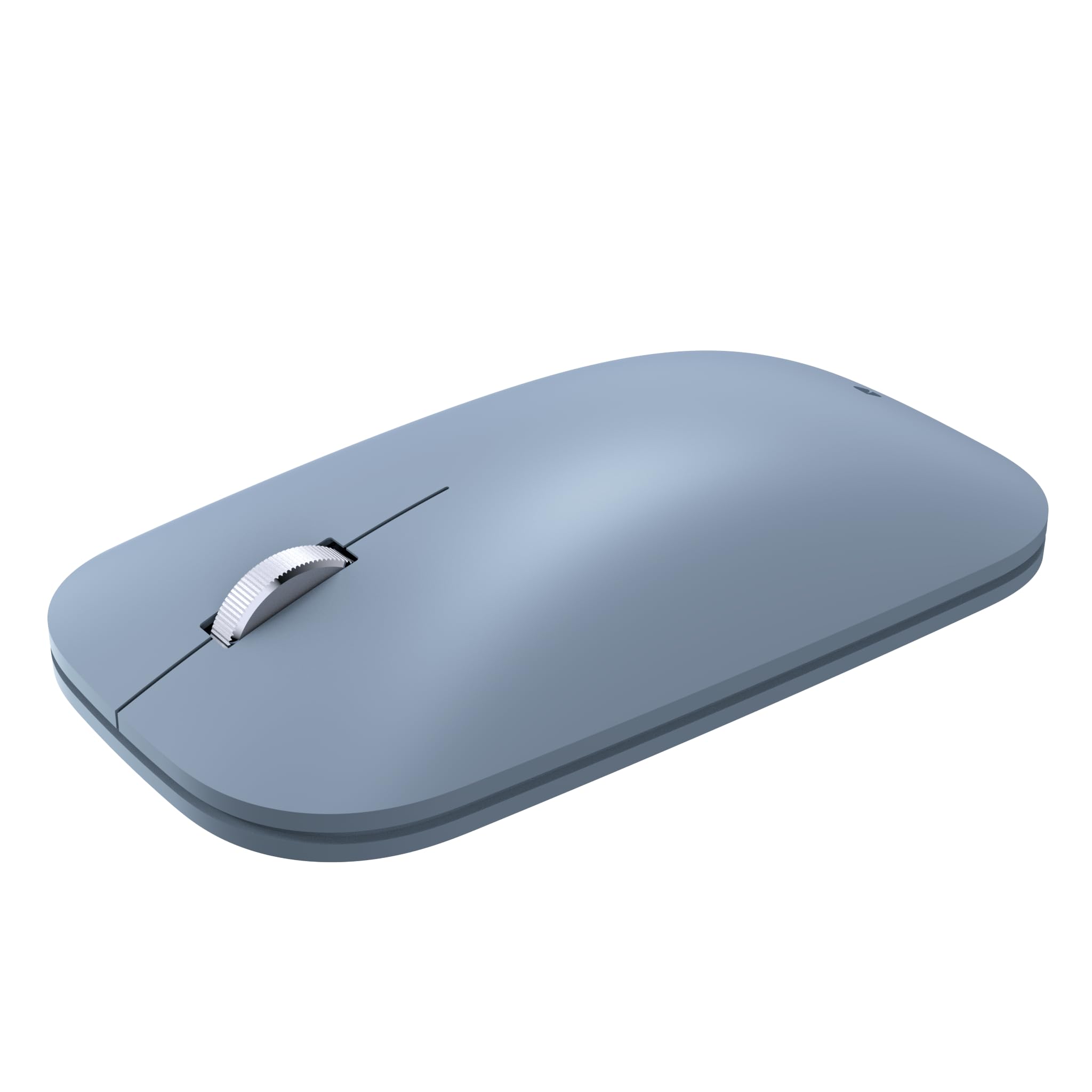
The featherlight ice-blue slab that vanishes into a backpack sleeve.
Designed by Microsoft, this mouse is all about the slim, low-profile silhouette. At 5.3″L x 3.5″W and lightweight enough to forget in a bag, it targets the commuter who values tidy desk space and easy packing over a palm-filling grip. It pairs over Bluetooth with no dongle to lose, and it is ambidextrous, so lefties get the same shape as righties.
The BlueTrack Technology sensor is the quiet hero here — it delivers laser-like precision on nearly any surface, from a glossy café table to a fabric couch arm, so you are not hunting for a mousepad. Owners consistently note the firm, satisfying click and accurate tracking, with several praising how it matches the original Microsoft Surface Mouse performance for a lower price. One owner has been through a second unit after dropping and breaking the first after three years of daily use — a durability vote of confidence.
Battery life lands at 6 months on a single AA, which is shorter than the TECKNET’s 24 months but reasonable for a travel-focused device. The 5.3″L profile is compact, so those with large hands may find it a stretch, though the review consensus is that comfort holds up for long sessions. The recurring positive is ergonomics — it is the most-mentioned trait, praised for refined feel and precision.
Premium feel, portable size: This is the pick for travelers and minimalists who want a refined, low-profile companion that connects instantly via Bluetooth.
Sizing note: The compact shape and 6-month battery are the trade-offs — large-palm users should try before committing.
3. RAPIQUE Bluetooth Wireless Mouse

The desk-switcher that hops between two Bluetooth devices and a USB dongle.
This mouse solves a specific headache: juggling a laptop and a desktop or tablet on one desk. It lets you switch easily between two Bluetooth devices and one 2.4G USB receiver connection, so a single click moves you from your MacBook to your iPad without unplugging anything. At 65 g, it is one of the lightest options here., and the R09 shape follows a right-hand ergonomic curve with a raised body and thumb rest for relaxed long sessions.
The buttons are quiet, which helps in shared offices, libraries, and late-night workspaces where loud clicks draw stares. Owners mention: “Good product, ergonomic, the size is perfect, smooth and quiet, outstanding durability, responsive and a great value for the money.” They also describe the Bluetooth connection as smooth, pairing easily with Mac and Windows, and the 2.4GHz receiver (a USB dongle) works as a fallback without needing drivers.
Functionality is the most-praised trait here, with owners confirming it handles office work and class assignments with speed and reliability. The mixed notes cluster around value and battery life — some find it worth every cent, others wish the AA battery lasted longer, and a small group calls it a waste of money. For a multi-device workflow, the convenience of instant switching usually outweighs the battery quibble.
Best for the multi-device crowd: If you live between a laptop and a tablet, the triple-connection flexibility is a genuine time-saver.
Think twice if: you have large hands (the size is described as “perfect” by average-palm owners) or you want a battery that lasts over a year.
4. Logitech Signature M550 L

The full-size comfort king built for larger hands and hushed offices.
The M550 L is explicitly a full-size mouse for larger hands — a relief if every other wireless mouse leaves your palm hovering over the mousepad. Its contoured shape, soft thumb area, and rubber side grips keep your hand snug and in place through extended workdays. At 111.2 g, it feels substantial without being heavy., and the large footprint (by design) fills a big palm properly.
Two features make it stand out. First, SilentTouch technology reduces click noise by 90 percent versus standard mice. — a meaningful upgrade for anyone on long calls or sharing a quiet space. Second, the SmartWheel lets you flick between line-by-line document scrolling and fast, free-spinning long-page scrolling, a genuine productivity boost for web research. It connects via Bluetooth Low Energy or the Logi Bolt USB receiver, and it ships with the AA battery included (which lasts up to 24 months).
Quality is the most-mentioned trait, with owners praising durable construction — one dropped it off a desk several times with no damage. The size gets positive reviews specifically for larger hands, though a 5’9″ reviewer found the large too big and the small too small, landing exactly between sizes. Ergonomics draws mixed feedback, so palm-comfort is personal; the battery life is a clear win on paper, and owners confirm it lasts.
Grab it if: you have larger hands, want near-silent clicks, and would rather not think about batteries for two years.
skip it if: your hand falls in the awkward middle zone, or you need a true travel-sized companion.
5. Normdecos Bluetooth Mouse with Jiggler
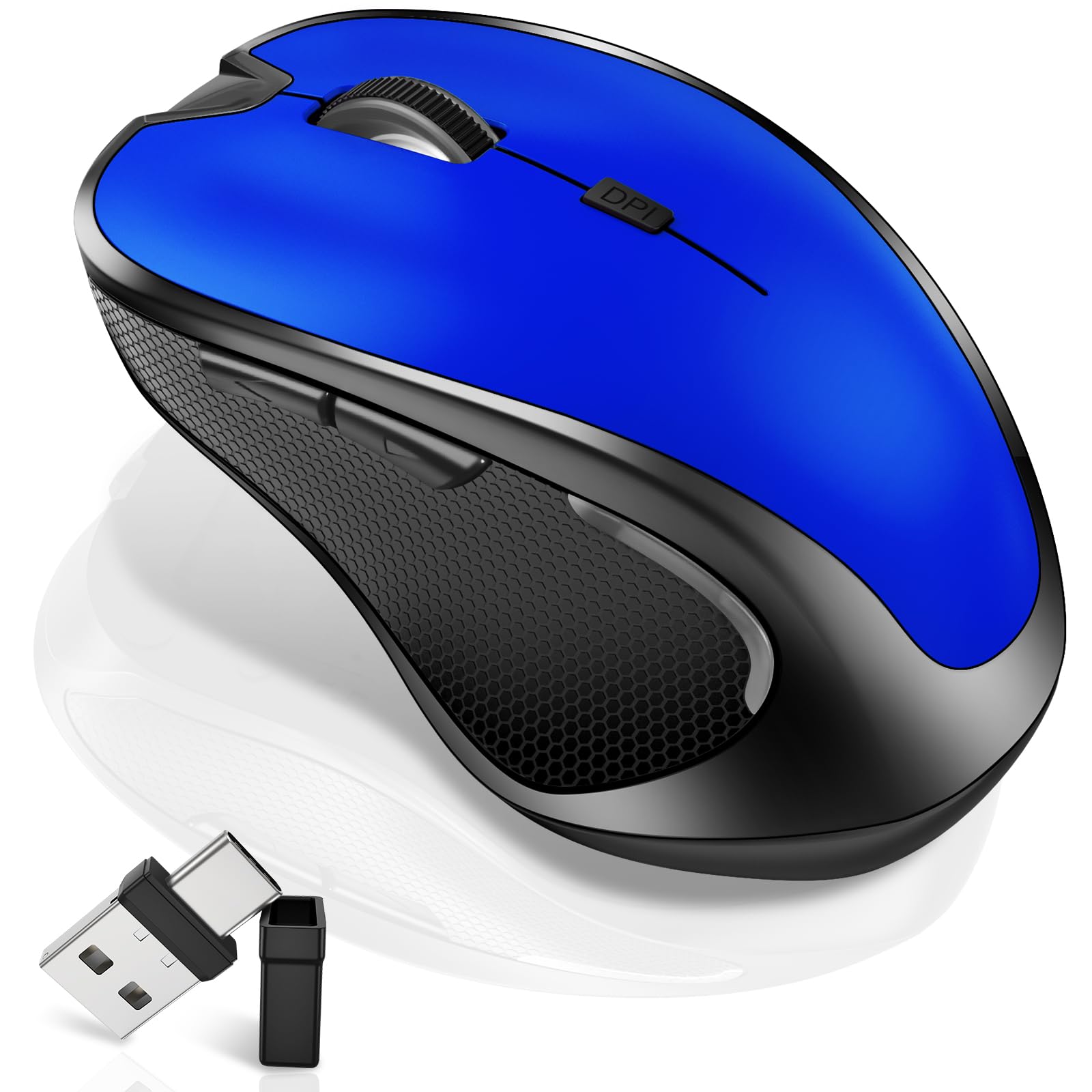
The rechargeable workhorse with a built-in jiggler for remote sessions.
The defining trick here is the jiggler mode: a long press of 3 seconds switches on a random pointer movement that stops your computer from sleeping. That is a niche lifesaver for online meetings, long downloads, or remote desk sessions where you need the screen to stay active without touching the mouse. It is a feature no other pick in this list offers, and it works alongside three adjustable DPI levels (800/1200/1600).
Connectivity is its second superpower — it supports four modes total: Bluetooth 5.2, Bluetooth 3.0, plus 2.4GHz USB-A and 2.4GHz USB-C via a dual-port 2-in-1 receiver. That means it slots into modern laptops without an adapter and pairs with nearly any OS from Windows to Chrome OS to Android tablets. Its 800mAh Li-polymer battery charges in 2-4 hours, lasts 3-4 weeks of typical use (8 hours daily), and holds a 90-day standby.
Owners highlight the solid build and comfortable grip, with one noting it glides smoothly through the hand and is “very durable.” A petite female reviewer found it fits her hand comfortably, praising the rechargeable design that works while charging. The catch: connectivity and compatibility draw mixed feedback — most pair easily with MacBook and iPad, but some report it stops working intermittently, so the connection is not the most reliable here.
For the remote worker: The jiggler mode and USB-C receiver make this the most versatile pick for laptop users who bounce between devices.
The trade-off: Occasional connectivity hiccups and the need to remember to recharge every few weeks.
6. Frutiger Aero Aqua Mouse

The liquid-filled nostalgia trip that floats a globe and a clownfish under your palm.
This is the mouse that defines the “aqua” niche. Inside a clear blue shell, a liquid-filled section holds a floating Frutiger Aero globe and a clownfish — a direct tribute to the Windows 7/Vista-era aesthetic that dominated the 2000s. It is a desk accessory first and a tool second, and owners are unanimous that the appearance is the star, with soothing colored lights and glossy transparent textures that look best in the dark.
Beneath the novelty, it works as a modern wireless mouse. You can switch between Bluetooth and 2.4G wireless (a USB dongle connection) using the included dongle, and the built-in battery fully charges in under 2 hours via USB-C, giving you all-day use — one owner reported 4 gaming sessions on a single charge with no lag. It works with Windows (98 to 10), Mac OS X, iOS, and Android, so you can use it on tablets and smartphones, not just PCs.
Owners describe it as sturdy, well-made plastic with a nostalgic click and responsive underside lighting. The honest limitations: it is a larger device that can cramp smaller hands, it is not built for FPS gaming (high click resistance and a stiff scroll wheel tire the hand), and a long session in a tight grip gets uncomfortable. But for its purpose — a joyful, functional nod to the Frutiger Aero era — it delivers exactly what is promised.
Buy it for the vibe: This is the one to grab if you want your desk to spark joy and nostalgia, with perfectly serviceable everyday performance.
Skip it for: serious gaming or marathon grip sessions — the aesthetics come before ergonomic refinements.
7. HP X3000 G3 Wireless Mouse

The no-frills dependable blue mouse that works for either hand.
The HP X3000 keeps things simple and effective. Its ambidextrous design and 3-button navigation make it a genuinely universal option for shared desks or left-handed users, and the 1600 DPI optical sensor (a light-based tracker) delivers smooth, lag-free tracking on virtually any surface thanks to LED multi-surface technology. The 2.4GHz USB-A connection reaches up to 30 feet, and the nano receiver stores inside the mouse for travel.
At 15 months of battery life on a single AA battery, it trails the TECKNET’s 24-month claim but still means you replace the battery roughly once a year. It is a lightweight, portable pick — one owner called it “great value” for everyday work and home use, praising quick connect and smooth response. The 7.8″L x 5.12″W footprint makes it roughly double the physical size of the compact TECKNET (4.09″L x 1.88″W), so it occupies more desk space but feels more substantial.
Quality is what wins buyers over here, with durability flagged as the recurring negative — it is a budget-tier device, so treat the body with care. The most practical caveat: the on/off switch is tiny and hard to operate without a fingernail, and the size draws mixed feedback. Customers note: “Works great a little on the small side so if you have big hands or prefer the mouse to fit your whole hand you may not like this mouse.”
Solid and simple: A dependable budget pick for ambidextrous users who want plug-and-play reliability without extra features.
Look elsewhere if: you have large hands, want adjustable DPI, or dislike fiddly tiny switches.
Understanding the Specs
DPI and Sensitivity
DPI (dots per inch) is the number of pixels your cursor crosses for every inch you move the mouse on your desk. A higher DPI, like the TECKNET’s 2600, means you can sweep across a large monitor with a small hand movement. Adjustable DPI lets you switch speeds on the fly — slow for precise photo editing, fast for browsing. A fixed 1600 DPI, found on the HP and Normdecos, is smooth and reliable for standard office tasks, just not customizable.
Connection Types
Wireless mice fall into two camps. A 2.4GHz USB receiver dongle offers the most stable connection with minimal lag, but it occupies a USB-A port. Bluetooth connects without a dongle, works with tablets and phones, and frees up your ports, but pairing can occasionally add a step. Some mice, like the RAPIQUE and Normdecos, offer both — the flexibility to use Bluetooth for a tablet and the receiver for a PC, switching with a button.
FAQ
Will an aqua computer mouse work with my MacBook and iPad at the same time?
What does the jiggler mode on the Normdecos mouse actually do?
How long does the Frutiger Aero mouse battery last on a full charge?
Are the TECKNET and HP mice truly wireless, and do they need batteries?
Is the liquid in the Frutiger Aero mouse safe, and can it leak?
Which aqua mouse is best for large hands?
Can I use these mice for gaming?
How do I charge the Normdecos mouse, and can I use it while charging?
What is the difference between 2.4GHz and Bluetooth on these mice?
Which of these aqua mice has the longest battery life?
Final Thoughts: The Verdict
For most people, the aqua computer mouse winner is the TECKNET because it pairs a genuinely impressive 24-month battery life and adjustable 2600 DPI with a price that undercuts the competition — it is the crowd favorite for a reason. If you want a silent, full-size mouse that truly fits larger hands, grab the Logitech Signature M550 L. And for the pure Frutiger Aero nostalgia trip with a liquid-filled globe under your palm, the Skeuoss Aqua Mouse is the one to reach for.
How We Picked
We do not accept paid placement. Every pick is matched to a real buyer and a real use-case; we do not hands-on test units.
Sources & Methodology
Specifications: manufacturer listings and product documentation. Review insights: verified customer reviews, as of August 2026. Pricing: not shown on this page (it changes often); check the current price via the retailer link.
As an Amazon Associate, Gadgets Feed earns from qualifying purchases. This does not affect which products we feature.