
Dropping consecutive inputs in a fighting game because your stick’s throw is too long or your lever gate is too loose is the fastest way to blow a round. The right arcade fight stick eliminates input lag, delivers tactile feedback via components like Sanwa Denshi buttons or low-profile optical switches, and sits solidly on your lap or desk so your execution is repeatable round after round. From classic 8-way joystick layouts to modern all-button leverless designs, the fight stick you pick determines whether your motion inputs are clean or your charge moves buffer without fail.
I’m Min — the co-founder and writer behind Gadgets Feed. I’ve spent hundreds of hours analyzing stick dimensions, button actuation forces, PCB polling rates, and console compatibility matrices across the full price spectrum to understand exactly what separates a tournament-ready controller from a frustrating one.
Inside this guide I break down key engineering decisions — from Sanwa versus Hayabusa lever feel to all-button optical switch travel distances — so you can confidently choose the best arcade fight stick for your competitive setup and skill progression.
How To Choose The Best Arcade Fight Stick
Not all fight sticks are built for tournament execution. The cheapest entry-level models use generic switches with high actuation force and loose levers, while premium sticks rely on Japanese arcade-grade components from Sanwa Denshi or HORI Hayabusa. Focus on lever type, button technology, platform compatibility, and build weight to avoid buying a stick that feels numb or drifts on your lap.
Lever Type: Square Gate vs. Octagonal vs. Leverless
Most stock fight sticks come with a square gate restrictor inside the joystick base. Square gates give clean diagonal detection because the gate corners physically guide the lever into neutral. Octagonal gates make quarter-circle motions feel smoother but can cause missed inputs on games that require strict corner-neutral-corner sequences. Leverless all-button controllers replace the joystick with four directional buttons, eliminating gate confusion entirely — your thumb and ring finger tap cardinal directions independently, which many high-level players prefer for instant blocking and buffering in games like Street Fighter 6 or Tekken 8.
Button Technology: Sanwa Denshi vs. Optical vs. Mechanical
Sanwa Denshi OBSF buttons are the gold standard — 30mm diameter, 100 gram actuation force, and a tactile microswitch click that provides audible feedback without being mushy. Optical switches, like the low-profile linear units inside the Razer Kitsune, use a light beam to register presses at around 1mm travel, which reduces finger fatigue over long sets. Standard mechanical keyboard switches (often Kailh low-profile) appear on budget leverless controllers; they are quieter but lack the crisp snap that arcade purists prefer for precise double-taps.
Platform Compatibility and Tournament Lock
If you compete on PlayStation 5, you need a fight stick with native PS5 support — not an adapter chain that adds latency. Sticks officially licensed for PS5, like the HORI Fighting Stick Alpha or Nacon Daija, include the authentication chipset required for native input. Tournament lock switches disable the Options and Home buttons so you never accidentally pause mid-match, which is essential for EVO or local FGC events. PC players have broader options but should verify XInput support and avoid sticks that require an active controller pass-through.
Weight and Lap Ergonomics
A fight stick that slides around during intense execution is a liability. Premium sticks like the Victrix Pro FS weigh nearly 8 pounds thanks to an aircraft-grade aluminum chassis, which anchors the controller on your lap or a table even during aggressive wrist movements. Lighter sticks around 2–3 pounds are portable but may need a non-slip mat or desk edge to stay put. Look for a textured palm rest or built-in foam lap pad if you play sessions longer than an hour — direct contact with a sharp bottom edge can cause wrist discomfort.
Quick Comparison
On smaller screens, swipe sideways to see the full table.
| Model | Category | Best For | Key Spec | Amazon |
|---|---|---|---|---|
| Razer Kitsune | Leverless | Low-profile optical play on PS5/PC | Linear optical switches, 1mm actuation | Amazon |
| Nacon Daija | Premium Stick | PS5/PS4/PC with Sanwa parts | Sanwa joystick + 8 action buttons | Amazon |
| HORI Fighting Stick Alpha | Tournament Stick | Official PS5/PC tournament play | Hayabusa lever + buttons, 6.5 lbs | Amazon |
| Victrix Pro FS | Esports Grade | Tournament durability and ergonomics | Aircraft-grade aluminum, Sanwa buttons | Amazon |
| MAYFLASH F300 Elite | Multi-Platform | Cross-console use with Sanwa parts | Sanwa joystick + 9 buttons, 3.5 lbs | Amazon |
| 8Bitdo Retro Arcade Stick | Wireless | Switch/PC casual and retro gaming | Bluetooth + 2.4G + wired, 40h battery | Amazon |
| Sehawei Haute42 T16 | Budget Leverless | Affordable leverless entry with hot-swap | 16 keys, Kailh low-profile switches, 1ms | Amazon |
In‑Depth Reviews
1. Razer Kitsune

The Razer Kitsune redefines the leverless category by integrating low-profile linear optical switches into a chassis that is only 0.76 inches thick. The optical actuation registers at roughly 1mm of travel with zero debounce latency, which means dash cancels and instant blocking inputs happen the moment your finger touches the pad — no plunger bottom-out required. The quad movement button layout replaces the traditional joystick entirely, so charge partition characters like Guile or Chun-Li in Street Fighter 6 can buffer sonic booms and lightning legs without any lever gate interference.
Weighing just 1.7 pounds, the Kitsune is the most portable tournament-grade controller in this lineup — it slides easily into a backpack alongside a laptop. The removable aluminum top plate supports Razer Customs vinyl wraps or a downloadable template for custom artwork, and the tournament lock switch physically disables non-essential buttons to prevent accidental pauses during bracket matches. The detachable USB-C cable includes a security clasp that prevents the cable from being yanked loose mid-set.
The optical switches are near-silent compared to Sanwa microswitches, which is a major advantage if you practice late at night or in shared housing. However, the matte black finish attracts fingerprints and dust more readily than textured or painted alternatives. The Kitsune does not include a carrying case, and some players find the lack of joystick physically disorienting during the first week of adaptation — plan for a two-hour daily training period to rebuild muscle memory if you are moving from a traditional stick layout.
Why it’s great
- Ultra-thin leverless design fits in a backpack
- Optical switches respond faster than any mechanical arcade button
- Tournament lock switch eliminates accidental pauses
- Detachable USB-C with security clasp
Good to know
- Matte finish attracts oil and dust quickly
- No carrying case included
- Leverless layout requires a dedicated training period for stick veterans
2. Nacon Daija

The Nacon Daija is built around genuine Sanwa Denshi components — the same JLF-TP-8YT joystick and OBSF-30 buttons found in countless EVO top-8 stations. The stick uses a square gate out of the box, which provides the cleanest diagonal detection for games like Guilty Gear Strive and Tekken 8. The action buttons are spaced 30mm apart with a slight concave surface that centers your fingertip naturally, reducing missed inputs during rapid multi-button sequences like Roman cancels.
At 7.7 pounds with a textured palm rest, the Daija stays planted on a desk or lap even during aggressive wrist flicks. The front plate is fully customizable — three faceplate options ship in the box, and a downloadable template lets you print custom artwork. The 3-meter detachable USB-A to USB-C cable gives you plenty of slack for tournament setups, and the internal button lock switch disables the Options and Share buttons to prevent disqualifying interruptions.
One recurring note from tournament players is that the Daija requires a controller pass-through for PS4 compatibility in some legacy games, and the button mapping software for PC/Mac is functional but the UI feels slightly dated compared to competitors. The storage compartment under the top plate is spacious enough to hold a spare ball top or button caps, which is a plus for modders who like to tweak their controller between brackets.
Why it’s great
- Genuine Sanwa joystick and buttons for tournament-standard feel
- Heavy chassis (7.7 lbs) stays locked in place
- Customizable front plate with included templates
- 3-meter detachable cable suits any stage setup
Good to know
- Requires pass-through controller for PS4 in some older titles
- Button mapping software has a basic interface
- Not natively compatible with Xbox consoles
3. HORI Fighting Stick Alpha (Street Fighter 6 Edition)
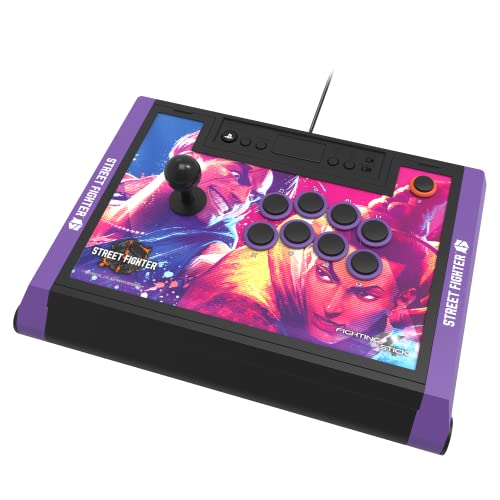
HORI’s proprietary Hayabusa lever uses a slightly lighter spring tension (around 150 grams) compared to the Sanwa JLF (roughly 250 grams), which makes quarter-circle and half-circle motions feel quicker with less wrist fatigue. The Hayabusa buttons have a shorter travel distance and a softer bottom-out than Sanwa OBSF buttons, giving a more cushioned feel that some players prefer for extended lab sessions. The Street Fighter 6 edition includes 18 downloadable high-resolution character images for the top panel, so you can swap artwork to match your main without third-party printing.
The Fighting Stick Alpha weighs 6.5 pounds and includes a built-in cable storage compartment inside the chassis — the USB cable wraps neatly inside so you never lose it during transit. The stick is officially licensed for PlayStation 5 and PlayStation 4, meaning it includes the Sony authentication chip for native compatibility without adapters. The touchpad and headphone jack are functional on PS5, which is rare among third-party fight sticks.
The square gate restrictor is factory-installed, and while the lever is highly responsive, some players note that the stock spring tension feels too loose for precision charge characters — swapping to a 2-pound spring is a common first mod. The buttons produce a distinct clack sound that is louder than the Razer Kitsune’s optical buttons, so the Alpha is less suitable for quiet gaming environments. The stick is wide (15.75 inches), so it may not fit comfortably on a small desk or laptop tray.
Why it’s great
- Light Hayabusa lever reduces wrist fatigue during long sets
- Internal cable storage for tournament portability
- Official PS5 license with touchpad and headphone jack
- Downloadable Street Fighter 6 art for custom top panel
Good to know
- Stock spring tension is too light for charge character mains
- Buttons are louder than optical or Sanwa alternatives
- Wide chassis (15.75 inches) may not suit small desks
4. Victrix Pro FS

The Victrix Pro FS is machined from a single piece of aircraft-grade aluminum, which gives it an exceptionally rigid frame that resists twisting even during the most aggressive stick slams. The chassis weighs 7.8 pounds, but the integrated 6.28-degree wrist slope and a built-in foam lap pad on the back make it comfortable for hours of seated play. The Sanwa Denshi 30mm buttons are mounted directly into the aluminum panel, so there is zero flex or creaking when you press multiple buttons simultaneously.
The Link 2 detachable joystick mechanism uses a Sanwa JLF base with a quick-release clip — you can remove the lever for transport without any tools, which is a huge advantage for players who fly to tournaments. The quick-access back panel opens with an included Allen wrench to reveal a cleanly laid-out interior with screw terminals for easy wire swaps and button replacements. Tournament Mode locks out the control bar buttons so you never accidentally hit the Home or Options button during a match.
The stock Sanwa buttons produce a loud, metallic clack thanks to the aluminum resonance chamber — some players find this satisfying, but others swap in silent buttons (like Qanba Gravity KS) immediately. The foam lap pad is comfortable but attracts lint and pet hair easily. At full retail the Pro FS sits at the top of the price bracket, and the carrying handles on the side are functional but add width that makes packing the stick into a standard backpack challenging.
Why it’s great
- Aircraft-grade aluminum frame is virtually indestructible
- Tool-free detachable joystick for tournament travel
- Integrated wrist slope and foam lap pad improve ergonomics
- Back panel with Allen wrench access for easy modding
Good to know
- Metal chassis amplifies button sound significantly
- Foam lap pad attracts lint and dust
- Side handles make packing into standard backpacks inconvenient
5. MAYFLASH F300 Elite
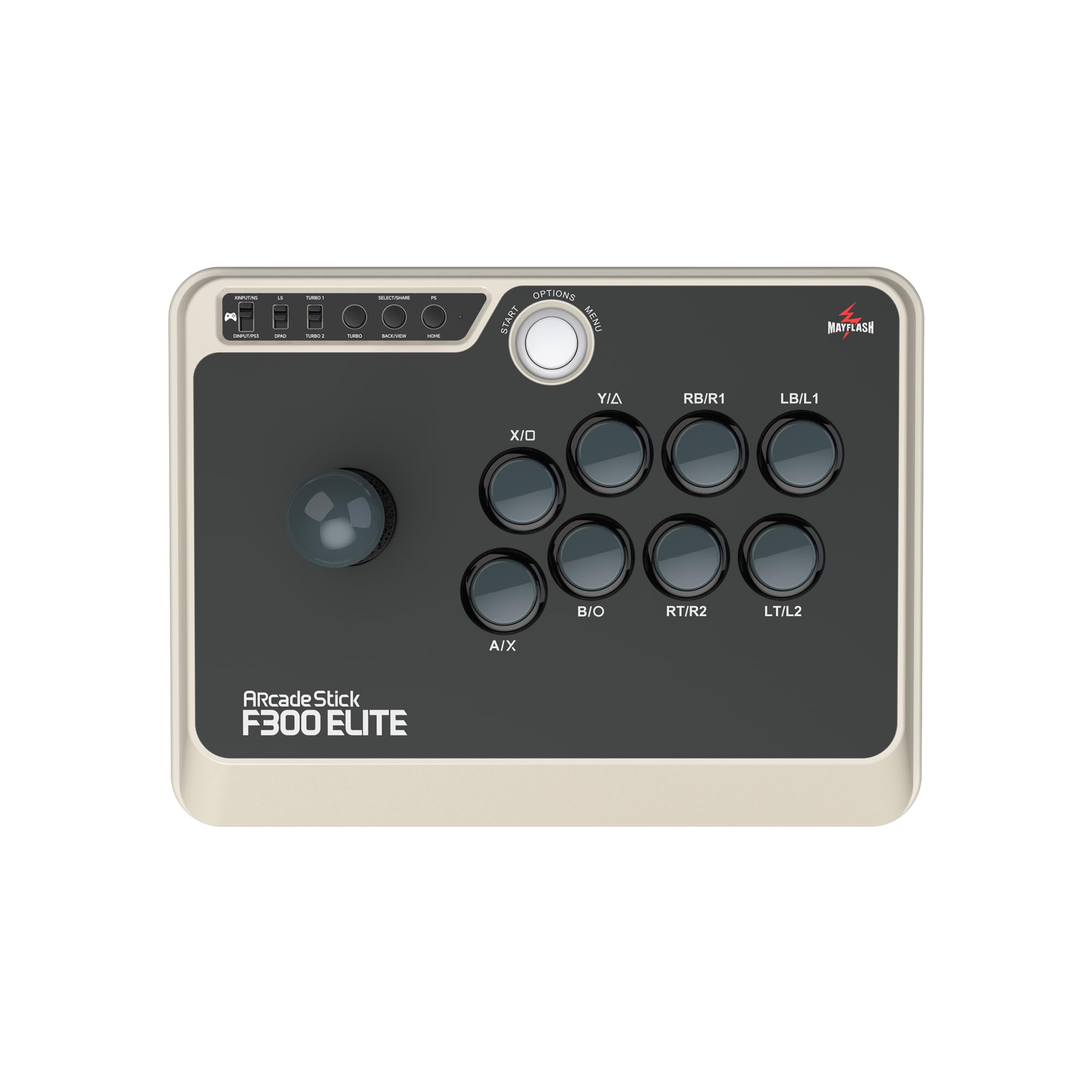
The MAYFLASH F300 Elite ships with a genuine Sanwa JLF joystick and Sanwa OBSF-30 buttons, which puts its core components on par with sticks costing twice as much. The body weighs around 3.5 pounds and measures 11.8 by 8.8 inches, making it noticeably smaller than the Nacon Daija or HORI Alpha — this compact footprint works well on cramped desks or for players who prefer a stick that rests entirely on their thighs without overhang. The square gate is standard, and the interior is pre-drilled for easy swapping to an octagonal or circular gate.
Console compatibility is the F300 Elite’s standout feature: it works with Nintendo Switch, PS3, PS4, Xbox One, Xbox Series S/X, Xbox 360, PC, macOS, Steam Deck, and Android out of the box. The included USB cable is over 9 feet long, and the stick supports both XInput and DInput on PC without driver installation. PS5 and Xbox Series X native play requires an optional Magic-S adapter, but for players who switch between last-gen consoles and PC, this is the most versatile wired option available.
Some reviewers note that the stick requires plugging in a wired controller for PS4 and Xbox authentication — a minor extra step that tournament organizers may flag. The stock art panel is a simple black/tan design that lacks the premium feel of metal or thick acrylic, though MAYFLASH offers replacement faceplate templates online. The chassis is sturdy but light enough that aggressive players may need to stabilize it with a desk edge or non-slip pad.
Why it’s great
- Genuine Sanwa components at a mid-range price point
- Widest console compatibility in this guide (Switch to Android)
- Compact size suits small desks and lap play
- Easy internal access for gate and button mods
Good to know
- Requires controller pass-through for PS4/Xbox authentication
- Chassis is light (3.5 lbs) and may slide without grip
- Stock artwork is basic and not customizable without third-party printing
6. 8Bitdo Retro Arcade Fight Stick
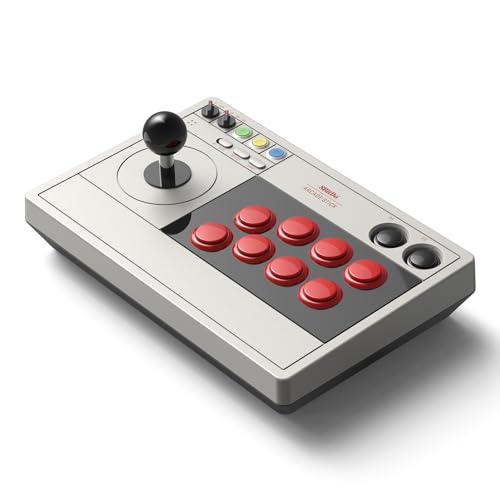
The 8Bitdo Retro Arcade Stick stands out as the only wireless option in this guide, offering Bluetooth, 2.4G, and USB-C connectivity in a single device. The 2.4G mode delivers a 40-hour battery life with near-wired latency, while Bluetooth mode lasts 30 hours — both figures are measured with the stock 1000 mAh battery. The stick is compatible with Nintendo Switch, Switch 2, and Windows PC, and the dynamic button layout changes its visual mapping when you switch between Switch and X-Input modes, so you always know which button corresponds to which face action.
Ultra-moddability is a key design feature: the 30mm and 24mm arcade button mounts accept Sanwa, HORI, or Seimitsu drop-in replacements, and the joystick mounting plate is universal, supporting virtually any lever including the Sanwa JLF. The included 2.4G receiver stores inside a hidden compartment in the stick’s body, so you never lose the dongle. The 8BitDo Ultimate software lets you remap every button, create macros (including two dedicated macro buttons P1/P2), and save multiple controller profiles that you can switch on the fly.
The stock buttons and lever are not Sanwa-grade — they are 8Bitdo’s own components, which feel slightly spongier and less responsive than Japanese arcade parts. The 8-way joystick uses a rubber pad rather than a microswitch, so the tactile click feedback is absent, making it harder to confirm directional inputs by feel. The plastic body weighs roughly 2.4 pounds, which is light enough to be portable but requires two hands to operate without shifting during intense matches.
Why it’s great
- Wireless 2.4G with 40-hour battery life and low latency
- Universal mounting plate accepts any aftermarket lever
- Two dedicated macro buttons for complex input sequences
- Hidden dongle compartment prevents receiver loss
Good to know
- Stock buttons and lever feel spongy compared to Sanwa parts
- Plastic chassis is light and may slide during aggressive play
- Limited to Switch, Switch 2, and PC — no native PlayStation support
7. Sehawei Haute42 T16

The Haute42 T16 is a pure leverless controller with 16 mechanical Kailh low-profile switches arranged in a grid layout, and it is the most affordable entry point into the all-button arcade stick category. The 40nm processing node inside the PCB delivers a claimed 1ms polling latency with over 95 percent frame consistency, which is competitive with sticks costing four times as much. The hot-swappable switch sockets let you replace switches without soldering, so you can experiment with linear, tactile, or clicky Kailh low-profile variants to find your preferred actuation feel.
The acrylic transparent housing includes per-key RGB lighting with multiple effects, and the build-in web configurator allows button layout swaps, SOCD cleaning modes, and turbo settings without installing desktop software. The T16 supports Windows 10+, Steam Deck, PS3, PS4, Switch, Raspberry Pi (Lakka/RetroPie/Batocera), MiSTer, Android, Linux, iPadOS, and macOS — remarkably broad compatibility for a budget controller. The included accessories pack contains a switch puller, extra button caps, and anti-slip pads to fine-tune the surface grip.
The 2.05-pound weight and 0.49-inch thickness make the T16 extremely portable but also prone to sliding on polished surfaces — the included anti-slip pads are essential for stable play. The acrylic shell shows fingerprints and scratches more readily than metal or textured plastic enclosures. Some users report that the Kailh low-profile red switches are noticeably lighter and less tactile than Sanwa OBSF buttons, which may cause accidental presses during tense moments — consider swapping to Kailh Box or Gateron low-profile switches for a firmer actuation point.
Why it’s great
- Most affordable leverless option with true hot-swap support
- Ultra-low 1ms PCB latency for competitive play
- Broad platform support from PC to MiSTer and iPadOS
- Built-in web configurator for SOCD and turbo customization
Good to know
- Light acrylic chassis slides easily without anti-slip pads
- Stock Kailh low-profile switches are lighter than arcade-standard buttons
- Acrylic shell is prone to fingerprints and surface scratches
FAQ
What is the difference between a square gate and an octagonal gate on an arcade stick?
Can I use any arcade fight stick on PlayStation 5 without an adapter?
Is a leverless all-button controller better than a traditional joystick stick?
What causes input lag on a fight stick and how can I minimize it?
How often should I replace the buttons and joystick on my arcade stick?
Final Thoughts: The Verdict
For most players looking to level up their execution in Street Fighter 6, Tekken 8, or Guilty Gear Strive, the best arcade fight stick overall is the Razer Kitsune because its low-profile optical switches deliver the fastest actuation available while the slim leverless chassis fits any backpack and includes a tournament lock switch for competition use. If you prefer a traditional joystick with Sanwa components and wide console support at a mid-range price, grab the MAYFLASH F300 Elite. And for the serious tournament grinder who wants an indestructible aluminum frame and tool-free detachable joystick, nothing beats the Victrix Pro FS.