
Our readers keep the lights on and my morning glass full of iced black tea. As an Amazon Associate, I earn from qualifying purchases.
Specs are compiled from manufacturer listings and verified buyer reviews and can change over time — please confirm the key details on the product page before buying.
Buying an arcade stick is about feel, not just specs. A joystick that feels mushy or buttons that don’t register can turn a winning combo into a frustrating mess. This guide cuts through the specs to give you nine fight sticks that actually hold up in the heat of a match, from budget entry points to tournament-grade metal.
I’m Min — the founder and writer behind Gadgets Feed. This guide is built by comparing the manufacturers’ published specifications and the patterns across verified customer reviews, so you get each pick’s real strengths and trade-offs instead of marketing spin.
Whether you’re chasing your first win or leveling up your tournament game, this roundup highlights the top arcade sticks for every platform and play style.
Our Picks at a Glance



How to Choose Your Arcade Game Joystick
An arcade stick (a joystick in a box with buttons, like a cabinet’s controls) can make your console feel like a real arcade machine. But not every stick suits every player. Some are built for modders, some for couch players, and some for tournament competitors. Your choice depends on your console, how much you want to customize, and if you want a physical lever at all.
Classic Lever or Leverless?
This is the first fork in the road. A classic stick uses a physical joystick the way you remember from the arcade. It’s satisfying, tactile, and feels great for retro games. A leverless controller replaces the lever with a set of directional buttons, letting you tap directions instead of pushing a stick. Leverless types, like the Haute42 below, are praised for faster inputs, but they take time to learn.
Check Compatibility Before You Pay
Not every stick works right from the start on every console. Some are officially licensed for PlayStation 5, meaning they plug in and go. Others, like the MAYFLASH models, are incredibly versatile but may require an extra dongle or adapter for the newest consoles. Always check if the stick needs a converter for your specific system before you order.
Quick Comparison
| Model | Best For | Buttons | Key Features | Platforms | Amazon |
|---|---|---|---|---|---|
| HORI Fighting Stick Alpha★ Best Overall | PS5 Tournament Play | 17 | Hayabusa parts, mod-friendly | PS5, PS4, PC | Amazon |
| Haute42 S13Budget Champ | Leverless Beginners | 13 | Low 1ms delay, hot-swappable | PC, Switch, PS4, More | Amazon |
| 8Bitdo Retro StickCouch Classic | Wireless Couch Play | 12 | Bluetooth/2.4g, 40-hour battery | Switch, PC | Amazon |
| Qanba Drone 2 | Budget PS5 Entry | 2 | Officially licensed, Omron switch | PS5, PS4, PC | Amazon |
| MAYFLASH F300 Elite | Multi-Platform Value | 9 | Sanwa parts, full system support | Switch, Xbox, PS4, PC | Amazon |
| MAYFLASH F700 | PS5 Wireless Modding | 10 | Tri-mode connection, Sanwa-ready | PS5, PS4, Switch, PC | Amazon |
| Qanba Obsidian 2 | Premium PS5 Feel | 16 | Swappable Sanwa tops, heavy build | PS5, PS4, PC | Amazon |
| Nacon Daija | Pro-Endorsed Comfort | 8 | Sanwa parts, palm rest, profiles | PS5, PS4, PC, Mac | Amazon |
| Victrix Pro FS | Competitive Travel | 8 | Aircraft aluminum, detachable lever | PS5, PS4, PC | Amazon |
In-Depth Reviews
1. HORI Fighting Stick Alpha
Our pick — over 4.5★ from 850+ verified ratings; the strongest balance of quality and price.
The PS5 native that opens like a clamshell for easy modding.
The HORI Alpha is the crowd favorite for a reason: it is officially licensed by Sony, so it plugs straight into your PS5, PS4, or PC with zero adapter hassle. Owners rave about the satisfaction of the Hayabusa buttons and lever, describing the response as immediate and without lag, which is exactly what you need when a match is on the line.
What wins people over is the build. The case pops open easily for customization, and you can even swap the top-panel artwork to make it yours. It weighs in at 1500 g, giving it enough heft to stay planted during intense sessions, while the 4-way gate helps keep your inputs precise. The thing everyone notes is that it holds its own against sticks costing far more.
The trade-off is the cable. It is not detachable, and the internal storage hooks can bunch the cord, which a few owners found fiddly. The Hayabusa buttons are also quite sensitive — some prefer to swap in Sanwas for a firmer feel — but that’s part of the fun of an easy-to-mod chassis.
Build & Feel: The quality is the most-praised aspect; it feels dense and premium, with a layout that is comfortable for long play sessions.
Value Check: If you want a native PS5 stick without buying adapters, this is the benchmark—just be ready for a non-detachable cable.
Pick this if: You’re a PS5 player who wants tournament-grade reliability and loves tinkering with artwork and buttons.
Consider elsewhere: If you need a travel-friendly stick with a detachable cable, this isn’t the one.
2. Haute42 S13 Leverless Arcade Stick
The featherweight leverless that teaches you a new way to fight.
If you’re curious about the leverless “hitbox” style, the Haute42 S13 is the cheapest way in. This uses buttons instead of a joystick for movement, and The maker claims an ultra-low 1ms delay with a no-frame-leak rate above 95%, so your taps register instantly.. It’s a transparent acrylic case with RGB lighting and 13 buttons, and it’s small enough for players with smaller hands.
Buyers call it durable and heavily used, with one noting it survived over a year of play without issues. The hot-swappable keys mean you can replace the mechanical switches without any soldering, which is a huge plus for beginners who want to experiment. For basic setup on PC, it’s plug-and-play.
The catch is compatibility. For PS5, you’ll need an adapter and some firmware tweaks, and the small footprint takes getting used to if you plan to rest it on your lap — it’s really built for a desk. But as a way to test the leverless waters without a big investment, it’s a winner.
Why it Wins Fans
- Exceptional value for money—the top praise from owners.
- Hot-swappable switches make DIY modding a breeze.
- Multiple controller modes for wide system support.
Mind the Fit
- Compact size is a poor lap fit for big hands.
- PS5 setup requires a third-party converter.
Reach for this if: You want a low-cost, low-risk entry into leverless controllers.
Look elsewhere if: You need a full-size stick for couch or lap play.
3. 8Bitdo Retro Wireless Arcade Fight Stick
The wireless stick that brings the 80s arcade cabinet to your couch.
The 8Bitdo Retro Stick is all about convenience. It gives you three ways to connect — Bluetooth, 2.4g, and wired USB-C — and the battery lasts a massive 40 hours on the 2.4g connection (30 hours on Bluetooth) with a 4-hour charge time. That means you can leave the cable in the drawer and play for days on end. Owners confirm the solid weight and good battery life, making it ideal for casual couch sessions of Street Fighter Alpha 2.
It’s also incredibly clever with the 8BitDo Ultimate Software, letting you remap buttons, create macros, and even set up two dedicated macro buttons. The dynamic button layout changes its visual labels when you switch from Switch to PC X-Input mode. The tactile feel is a big draw, with players saying it feels just like the cabinets they grew up with.
The joystick works as either a D-pad or an 8-way stick, which is great for fighting games, but it lacks dual joysticks, so it’s a poor pick for games like Mario Maker. Some owners find the stock buttons a bit cheap and unresponsive-feeling, though they’re replaceable. This is a joy for casual play, not a competitive tournament weapon.
Wireless Freedom: The 40-hour battery life combined with a hidden 2.4g receiver compartment makes this the easiest stick here.
Functionality Notes: It’s a 12-button layout, which is fewer than the HORI’s 17, and that’s the trade-off for its affordability and casual focus.
Who it beats: The 8Bitdo beats wired sticks for pure couch comfort; it’s a better fit for retro and casual players than for EVO competitors.
The single caveat: The stock buttons lack the crispness of premium Sanwas from the start.
4. Qanba Drone 2
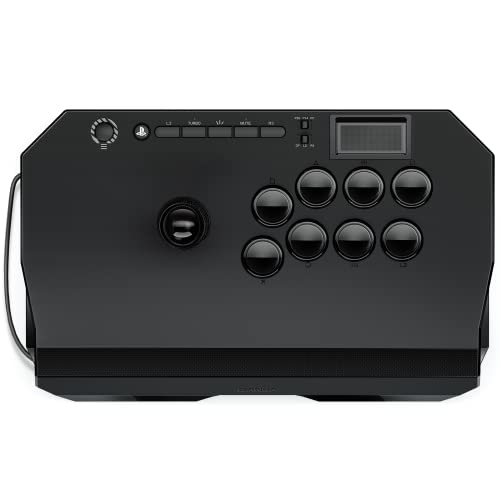
An officially licensed PS5 stick that doesn’t break the bank.
The Drone 2 solves the biggest problem for new console players: getting an officially licensed stick on PS5 without paying a fortune. It’s a Sony-licensed peripheral, so it’s plug-and-play on PS5, PS4, and PC with no converters needed. The lever uses a Qanba OV7 OMRON switch, and owners describe the clicks as aiding muscle memory for techniques like the wavedash in Tekken.
At 3.9 pounds, it’s lighter than most, which makes it ultra-portable. Owners describe it as lightweight but not cheap-feeling, and it’s a favorite starter stick for learning Mishima characters in Tekken 8. It even has a 3.5-mm microphone input with a mute button, so you can keep your headset plugged in.
The main gripes are the button noise — they’re loud and clicky — and the stock buttons are considered swappable upgrades eventually. It also tends to slip on heavy inputs on a smooth desk, so you may want a pad underneath. It’s the perfect “first real stick” for a console gamer.
Compatibility King: Full PS5/PS4/PC support from the start is its standout trait, praised by buyers as the best-valued licensed stick.
Stability Check: It’s light and grippy, but it can slide during aggressive play.
Start here if: You’re a PS5 owner wanting a legitimate licensed stick without premium pricing.
Pass if: You need a heavy, tournament-grade anchor that stays glued to the table.
5. MAYFLASH F300 Elite

The most versatile stick on the list, spanning every console generation.
If you own everything from a Switch to an Xbox, the F300 Elite is the one that covers it all. It’s compatible with Switch, PS4, PS3, Xbox Series X/S, Xbox One, 360, Windows, macOS, Steam Deck, and Android — almost anything with a USB port. It achieves this chameleon act with premium Sanwa components: 9 highly responsive buttons and a precision 4-way joystick.
Owners call the build heavy-duty and appreciate the even weight that feels substantial on the lap. The inside is accessible with six screws, making it a dream for modders, and it’s considered a great value since you don’t need to upgrade the parts. The matte finish also prevents the sticky feeling you get with sweaty hands.
That multi-platform support has a catch: on some consoles, you must plug in a controller to authenticate (verify you’re allowed to play), and the manual’s misprint about the turbo button (a button that auto-repeats your input) could disqualify it in strict tournaments. The stock spring (the part that returns the lever to center) weighs 0.9lb, which some find too loose, so you may need to swap in a heavier one. Still, as a “one stick to rule them all,” it’s tough to top.
What Owners Love
- Premium Sanwa parts included from the start.
- Even, substantial weight keeps it stable.
- Mod-friendly 6-screw access.
The Realities
- May need a controller plugged in for some consoles.
- Turbo button could be an issue in strict tournaments.
Choose this for: Multi-console households that want one quality stick without buying per-system.
Not for: Tournament purists who need simple plug-and-play without extra setup steps.
6. MAYFLASH F700

The wireless upgrade that modders and PS5 players have been waiting for.
The F700 takes everything good about the F300 and adds modern convenience. It supports PS5 (for fighting games like SF6, Tekken 8, MK1, and MK11), PS4, PS3, Switch, Windows, and even macOS and Android. You get three ways to connect: Bluetooth, 2.4g, and wired USB, with a hidden compartment for the 2.4g receiver. Buyers report the wireless dongle works flawlessly with no latency.
Owners describe it as the best first fightstick, citing the easy modding (it’s compatible with Sanwa Denshi buttons and joysticks) and a perfect button layout. The case is larger than the F300, giving it more lap presence, and it includes an L3/R3 button, which is rare on arcade sticks.
There are limitations. It’s specifically for fighting games only, not other game types, and it’s not compatible with Xbox at all (you’d need the F700X for that). The minor gripes are that it slides on a lap. It’s also not an officially Sony-licensed product, so firmware updates might be needed for full PS5 support.
Enjoyment Factor: The most-praised aspect is pure enjoyment — owners simply love using it across PS5, PS4, Switch, and PC.
Wireless Lag: The 2.4g connection is reported to be rock-solid with no noticeable input delay.
Best for: Multi-platform players who want wireless freedom and a dedicated modding platform.
Skip if: You play Xbox, since this model is explicitly incompatible.
7. Qanba Obsidian 2
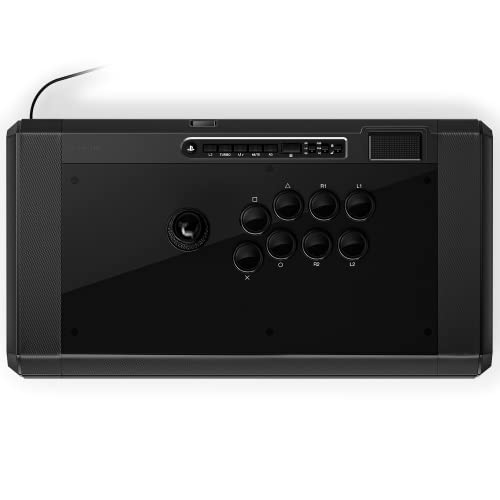
The heavy-hitting premium stick that refuses to budge mid-match.
The Obsidian 2 is for players who want a rock-solid foundation. At 7.4 pounds, it’s one of the heaviest sticks here, and that weight serves a purpose — the extra heft prevents the stick from sliding when you’re mashing out commands. It’s officially licensed by Sony, so it works on PS5, PS4, and PC with a built-in switch to toggle between them. The full control panel includes a touchpad.
You get Qanba 30-mm OBSF buttons and swappable Sanwa JLF joystick tops, letting you customize the feel without opening the case. Owners who tested it at EVO 2024 report no regrets, calling it reliable, accurate, and customizable. The buttons require very little pressure to activate, which is great for fast execution.
The biggest criticism is the size — it’s bulky and some find it too large for their setup. One owner noted the value is questionable compared to building a cheaper Mayflash with Qanba parts. It’s also had reports of internal plastic breaking during shipping. But for pure, planted premium performance, it’s a top-tier choice.
Quality Signal: The build quality is the most-praised element, described as sleek and responsive with excellent buttons.
Weight Trade-off: The 7.4 pounds is a feature for stability but a drawback for portability.
Reach for it if: You want a premium, hefty stick that stays put during intense play.
Think twice if: You need something portable for tournaments — the bulk is real.
8. Nacon Daija

The pro-collaboration stick with a palm rest built for endurance.
Developed with professional gamers, the Nacon Daija’s ergonomics shine in its textured palm rest. It features a textured palm rest that gives you sturdy support, so your hand doesn’t cramp during long sets. It’s officially licensed for PS4, PS5, and PC, and It runs on premium Sanwa joystick and action buttons — the leading brand among pros — for a crisp, durable feel..
It’s a modder’s playground. The buttons are fully configurable using Nacon’s software on PC and Mac, letting you create and save multiple game profiles. You can also swap between two different joystick heads for perfect control and customize the front plate with three faceplate options. The 3.5mm audio jack is a nice touch for direct headset connection.
The recurring praise is how quiet and satisfying the Sanwa buttons are, making it a great pick if you play late at night. The main risks are quality control — one owner received a unit with a loose USB-C port — and the price, which some feel is steep. The grippy rubber bottom is a big plus for keeping it stable.
Responsiveness: The button responsiveness is the standout feature, along with the comfortable palm rest that owners appreciate.
Build Quality: A firm, sturdy build that feels worth the premium when it arrives in perfect condition.
Pick this for: Long sessions where wrist comfort and quiet, satisfying buttons matter.
Be aware: QC hiccups like loose ports are rare but reported; and the price is firmly premium.
9. Victrix Pro FS
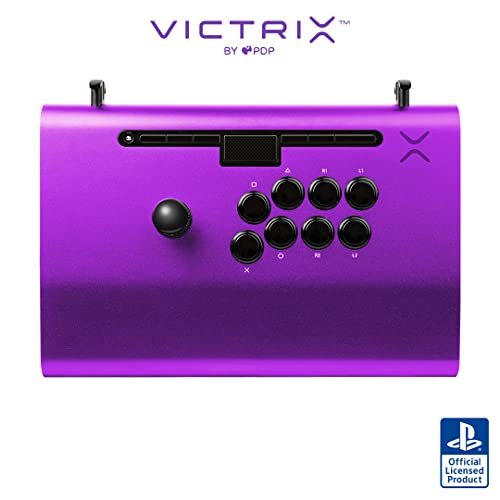
A single piece of aircraft-grade aluminum built to take tournament travel abuse.
The Victrix Pro FS is the pinnacle of arcade stick engineering, machined from a single piece of aircraft-grade aluminum. It’s machined from a single piece of aircraft-grade aluminum, making it incredibly durable for the bumps and drops of travel. It features legit 30mm Sanwa Denshi buttons and a patented Link 2 Detachable Joystick on a Sanwa JLF Base, so you get the gold-standard components in a bulletproof chassis.
The ergonomics are tuned for long competitive sessions, with an integrated 6.28° wrist slope and a built-in foam lap pad on the back. Owners describe it as a “perfect work of art” and “the last arcade stick you will ever need.” with one switching from the HORI Alpha specifically because it was too noisy at night. The quick-access back panel opens with an included Allen wrench for clean, easy mods.
The design extends to travel, with durable carrying handles and cable organizers built right in. Tournament Mode locks out the control bar buttons, preventing accidental disqualifications. The catch is the price — it’s the most expensive here — and a few owners mention reliability concerns over time. But if you want the absolute pinnacle of build quality, this is it.
Quality & Design: The aluminum body and design are the most-praised aspects — it feels like a premium instrument, not a toy.
Ergonomics: The 6.28° wrist slope and lap pad make it the most comfortable stick for marathon sessions.
Choose this if: You’re a serious competitor who travels and wants the most durable, premium-built stick available.
Pass if: You’re on a budget or prefer the lightness and value of a mid-range plastic case.
Understanding the Specs
Button Quantity
More buttons aren’t always better. Standard arcade sticks have 8 face buttons (2 rows of 4). The HORI Alpha has 17, including menu and touchpad controls, while the Haute42 has 13. Count matters for how many extra functions you can map, but 8 quality buttons is all you need for most fighting games.
Connection: Wired vs Wireless
Wireless sticks like the 8Bitdo and F700 offer freedom, but you need to watch latency and battery life. The 8Bitdo boasts 40 hours on 2.4g, while the F700 offers tri-mode. Wired sticks are still the standard for tournaments because they guarantee zero lag and never run out of power mid-match.
Lever Gates: Square vs Octagonal
The “gate” is the plastic piece that limits your joystick’s movement. A square gate is standard for fighting games, offering precise corners for techniques like dragon-punch motions. An octagonal gate, like the one you can install in the Qanba Obsidian 2, gives you smoother diagonal access. It’s a personal preference, and many sticks let you swap them.
Weight & Stability
A light stick is easier to travel with, but a heavy one won’t slide during frantic play. The Qanba Drone 2 is a light 3.9 pounds, making it super portable. The Obsidian 2 is a hefty 7.4 pounds, and the Victrix Pro FS is 7.8 pounds of aluminum. Think about your play surface — a heavy stick on your lap stays put better.
FAQ
What is the difference between an arcade stick and a leverless controller?
Is HORI or Sanwa better for arcade buttons?
Do I need a special adapter for an arcade stick to work on PS5?
Will an arcade stick work with my Xbox or PC?
Why is the octagonal gate important for a joystick?
How heavy should an arcade stick be?
Can I customize the buttons and joystick on my fight stick?
What is a low-latency 1ms delay on an arcade stick?
Are wireless arcade sticks good for competitive gaming?
Is an arcade stick better for fighting games than a regular controller?
Final Thoughts: The Verdict
For most buyers, the HORI Fighting Stick Alpha is the one to beat: it’s officially licensed for PS5, performs on par with pricier sticks, and opens up for easy modding. If you want wireless freedom and retro charm for your Switch, grab the 8Bitdo Retro Stick. And if you’re curious about leverless (button-only) play and want to try it cheaply, the Haute42 S13 is the smart entry point.
How We Picked
We do not accept paid placement. Every pick is matched to a real buyer and a real use-case; we do not hands-on test units.
Sources & Methodology
Specifications: manufacturer listings and product documentation. Review insights: verified customer reviews, as of August 2026. Pricing: not shown on this page (it changes often); check the current price via the retailer link.
As an Amazon Associate, Gadgets Feed earns from qualifying purchases. This does not affect which products we feature.