
Our readers keep the lights on and my morning glass full of iced black tea. As an Amazon Associate, I earn from qualifying purchases.
Specs are compiled from manufacturer listings and verified buyer reviews and can change over time — please confirm the key details on the product page before buying.
The difference between pulling off a perfect combo and dropping it completely is measured in milliseconds. An arcade joystick for Xbox One needs to feel right under your palm, give you crisp directions, and never introduce a lag between your brain and the screen that costs you a match. This guide focuses on seven models that actually deliver on that promise, from fully-wired tournament sticks to wireless options that still keep the response time tight.
I’m Min — the founder and writer behind Gadgets Feed. This guide is built by comparing the manufacturers’ published specifications and the patterns across verified customer reviews, so you get each pick’s real strengths and trade-offs instead of marketing spin.
Whether you play on Xbox One, Series X|S, or PC, finding the right arcade joystick for xbox one means matching your play style to the right button layout, weight, and connectivity for your setup.
Our Picks at a Glance

How To Choose The Best Arcade Joystick For Xbox One
The most common mistake is picking a stick solely because it has a familiar brand name or a low price tag. What actually determines your in-game performance is the build quality of the joystick itself, the type of switches under the buttons, and whether the controller natively supports the Xbox One protocol or requires a dongle or extra cable.
Button Layout and Joystick Type
Traditional fight sticks use a joystick for directional inputs and a row of buttons for punches and kicks. Leverless, or all-button, controllers replace the joystick with a set of directional buttons, which some players find faster for games like Street Fighter 6 and Tekken 8. Both types are compatible with Xbox One, but your personal comfort with a stick versus buttons should be your primary guide.
Connectivity and Latency
Wired connections provide the lowest possible latency because the signal travels through the USB cable with no interference. Wireless options, specifically 2.4G wireless (a dedicated radio frequency connection that avoids Wi-Fi congestion) like the 8BitDo stick, come very close to wired performance while freeing you from the cable. Bluetooth adds convenience but can introduce slightly more input lag, so 2.4G is generally preferred for competitive play on Xbox One.
Component Quality: Sanwa Switches
Sanwa Denshi is the gold standard in arcade components. Their microswitches (small electrical switches that actuate with a light, precise feel) are known for a shorter travel distance and a distinct tactile click. Sticks that use genuine Sanwa parts, like the MAYFLASH F300 Elite and the NACON Daija, tend to be more responsive and last longer than generic buttons, which can feel mushy or inconsistent over time.
Quick Comparison
| Model | Best For | Buttons | Weight | Connection | Amazon |
|---|---|---|---|---|---|
| MAYFLASH F300 Elite★ Best Overall | Reliable Sanwa starter stick | 9 | — | Wired USB | Amazon |
| 8BitDo Arcade StickAlso Great | Xbox-licensed wireless | 15 | 2.49 Kilograms | 2.4G Wireless / Wired | Amazon |
| SUBSONIC Arcade Stick | Budget entry with auto-fire | 8 | 760 Grams | Wired USB | Amazon |
| MAYFLASH F500 FLAT | All-button flat controller | 14 | 2.6 Kilograms | Wired USB | Amazon |
| NACON Daija | Pro-collaborated full-size stick | 17 | 7.7 Pounds | Wired USB | Amazon |
| Turtle Beach Victrix Pro KO | Slim leverless esports | 16 | 2.7 Pounds | Wired USB-C | Amazon |
In‑Depth Reviews
1. MAYFLASH F300 Elite Arcade Stick
Our pick — over 4.5★ from 800+ verified ratings; the strongest balance of quality and price.
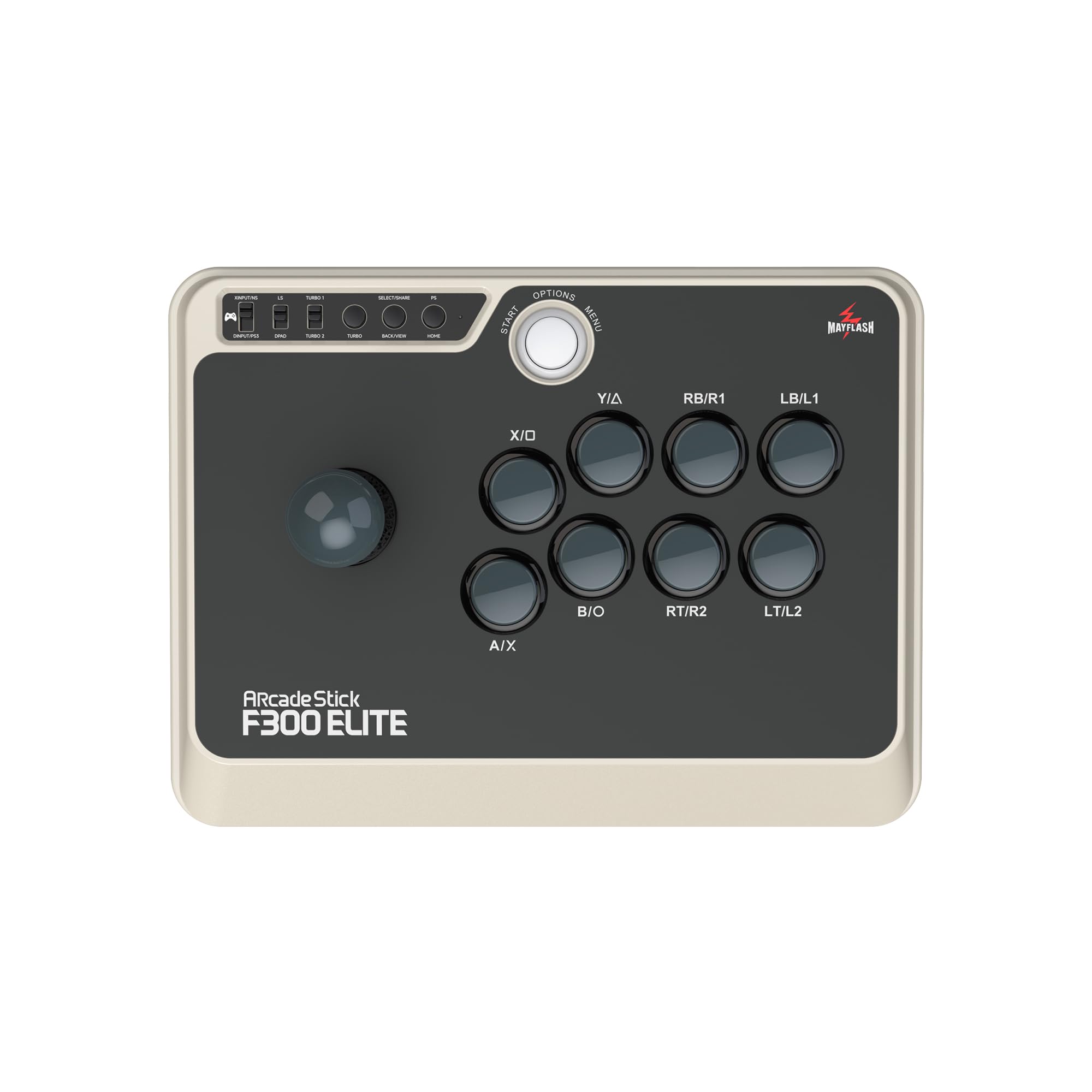
A traditional fight stick that gives you genuine Sanwa parts in a durable, moddable chassis.
The F300 Elite is the entry point into genuine Sanwa components (9 responsive buttons plus a precision 4-way joystick) without jumping to a premium price bracket. Unlike the cheaper SUBSONIC stick which has 8 generic microswitch buttons compared to the F300 Elite’s 9 Sanwa buttons, the F300 Elite uses the same Sanwa OBSF buttons found in tournament-grade cabinets. The joystick is a 4-way precision stick (restricted to up, down, left, right) which eliminates accidental diagonal inputs that can ruin charge moves in games like Guilty Gear Strive.
The chassis is built for modding. You pop open the top to swap the joystick and buttons yourself, which is how many players gradually upgrade from this stick to a full custom build. It is compatible with Switch, Switch 2, Xbox Series X, Xbox One, Xbox 360, PS4, PS3, PC Windows, macOS, Steam Deck, and Android. For PS5 support, you need to buy the MAYFLASH Magic-S Ultimate adapter separately. Turbo functionality is built in for rapid-fire inputs.
Reviewers point out that at 11.81 x 8.86 x 2.2 inches, it is noticeably smaller than the full-size NACON Daija (14.96 x 10.28 x 2.76 inches), which makes it easier to store but slightly less stable on an open lap. The tan-and-black color scheme stands out compared to the all-black options in this list.
What you get for the price
- Genuine Sanwa joystick and 9 Sanwa buttons from the factory
- Easy-to-open chassis for custom modding
- Wide console compatibility including Switch 2 and Steam Deck
Compared to the top pick
- Wired only — no wireless option like the 8BitDo
- Smaller footprint means less stability during intense gameplay
A solid Sanwa starter: the F300 Elite offers premium Japanese components in a moddable chassis at a mid-range price — perfect for players who want Sanwa quality without a premium cost.
Better alternatives: if you need wireless or a larger base, the 8BitDo or NACON Daija serve those needs more directly.
2. 8BitDo 2.4g Wireless Arcade Fight Stick
The first Xbox-licensed wireless stick that matches convenience with real tournament-grade response.
This is the stick that solves the biggest cable tangle on your Xbox One without sacrificing the feel of a serious arcade controller. It connects via 2.4G wireless (a dedicated radio link, not Bluetooth) so you get near-zero latency while sitting on the couch three meters from the console. After a full charge you get 30 play hours — that is roughly an entire weekend tournament session — before it needs 4 hours plugged back in.
The real depth here is modding. You can swap out the 30mm and 24mm buttons easily, and the universal mounting plate supports almost every joystick ever made: Sanwa JLF, Sanwa JLW, and Seimitsu models. That means you can buy a stock unit and upgrade it piece by piece over years. It also has a 3.5mm audio jack and a dedicated mic mute button, which is rare on arcade sticks and matters for party chat on Xbox Live.
Buyers report the build feels solid at 2.49 kilograms (5.5 lbs), which is actually 0.66 kilograms (27%) lighter than the MAYFLASH F700 FLAT Elite, making it easier to rest on your lap during long sessions. The stick supports your own custom profiles through the 8BitDo Ultimate Software, letting you map buttons however you want. It is also wired if you prefer a direct USB connection.
Why it earns the top spot
- Officially licensed for Xbox — no dongle or workaround needed
- 30-hour battery max per charge keeps you playing all week
- Ultra-moddable with support for Sanwa, Seimitsu, and other joysticks
The trade-offs
- 2000g (2kg) weight is lighter than most full-sized sticks, which may slide on a slick desk
- Wired USB connection requires the included 3m cable, cutting off wireless use when charging
Reach for this if: you want an Xbox-licensed wireless stick with easy modding and 30 hours of battery — the 8BitDo delivers the full package without dangling a long cable across your living room.
Look elsewhere if: you need a heavier, lap-gripping base for high-intensity tournaments — the MAYFLASH F700 FLAT Elite or NACON Daija sit more firmly.
3. NACON Daija Arcade Fight Stick

A pro-developed stick with Sanwa parts and a textured palm rest built for marathon sessions.
The NACON Daija was designed in collaboration with professional fighting game players, and you feel that in every ounce of its 7.7-pound frame (that is a heavy, lap-gripping 7.7 pounds — by comparison the Turtle Beach Victrix Pro KO weighs only 2.7 pounds). That weight means the stick stays planted on your lap or table during intense inputs. It is officially licensed for Xbox Series X|S and Xbox One, so you are guaranteed plug-and-play compatibility with no firmware hacks.
It packs 17 buttons total (the highest count in this list) including a lock function to prevent accidental presses during a round. You get a genuine Sanwa joystick and Sanwa action buttons, which means the same microswitches used in competitive arcade cabinets worldwide. The palm rest has a textured finish for grip, and you can switch between two different joystick heads (ball-top and bat-top) to find your preferred control. A 3.5mm audio jack lets you plug a headset directly into the stick for chat audio on Xbox Live.
Owners mention that the detachable 3-meter USB-A to USB-C cable is braided and feels industrial-strength. The full button remapping software works both on Xbox and PC, so you can save game-specific profiles for Street Fighter 6, Tekken 8, or Guilty Gear Strive. The front plate is customizable — you get three different faceplates included, and you can download a template from the NACON website to print your own.
What makes it a pro stick
- 17 buttons with lock function for accidental press prevention
- Genuine Sanwa joystick and action buttons for proven reliability
- 7.7 lbs weight keeps it planted on any surface
The drawbacks
- Wired only — no wireless option for couch play
- Premium price tier may be overkill for casual players
For the serious competitor: the Daija is a full-size tank with Sanwa components and deep customization — built for players who practice daily and want a stick that lasts.
Not for you if: you prefer a lighter, travel-friendly controller or demand wireless connectivity — the Victrix Pro KO or 8BitDo serve those needs better.
4. MAYFLASH F500 FLAT Fight Stick All Button Arcade Controller

A 14-button flat controller with a slim 1.97-inch profile and a unique purple-black design.
The F500 FLAT is a leverless (all-button) controller that measures 14.17 x 9.06 x 1.97 inches — that is 45% wider and 4.49 inches shorter in length than the F700 FLAT Elite (9.76 x 14.8 x 2.48 inches). The low height makes it one of the slimmest options if you pack your stick in a backpack for local tournaments. You get 14 buttons that support Sanwa Denshi replacements, so you can upgrade to the same Japanese microswitches the pros use over time.
Audio chat is supported on Xbox One and Xbox Series X|S when you plug a headset into the 3.5mm jack — you hear background music and online chat through the stick. The turbo function lets you set different speed settings for rapid-fire inputs. The clear acrylic top plate is removable and you can download a template from the MAYFLASH website to insert your own artwork, giving the purple-black base a custom look.
Customers note one important wrinkle: to use the F500 FLAT on Xbox One or Xbox Series X|S, you must plug a wired Xbox controller into the USB slot on the stick itself. This is a standard authentication pass-through method, but it does mean you need an extra controller nearby. It is compatible with PS4, PS3, Switch, Switch 2, PC Windows, macOS, Android, Steam Deck, and even the NEO GEO mini.
The flat advantage
- 14 buttons in a slim 1.97-inch profile for easy transport
- Removable clear acrylic top plate for custom artwork
- Turbo function with adjustable speed settings
Keep in mind
- Requires a wired Xbox controller plugged into the USB slot for Xbox compatibility
- No joystick — purely a leverless button layout
Best for travel and customization: the F500 FLAT is a slim all-button controller with 14 inputs and easy Sanwa upgrades — ideal if you want to carry your stick to locals and swap the artwork monthly.
Skip if: you do not want to deal with the extra wired controller passthrough for Xbox — the 8BitDo or NACON Daija connect directly.
5. Turtle Beach Victrix Pro KO Leverless Fight Stick

A slim leverless esports controller with hot-swappable Cherry MX switches and on-stick customization.
The Victrix Pro KO is a tournament-focused all-button (leverless) controller that measures only 0.88 inches thick — the slimmest profile in this entire list. At 2.7 pounds it is 5 pounds lighter than the NACON Daija (7.7 pounds), making it genuinely portable for packing in a backpack to locals. It comes with 16 moveable and mappable buttons that use hot-swappable Cherry MX Speed Silver RGB switches (mechanical keyboard-style switches you can change without soldering) so you can tune the feel of each button to your preference.
You customize the RGB light rings around each button directly on the stick or through the Victrix Control Hub software. The wired connection uses a 3-meter braided USB-C cable, which provides the lowest possible latency for competitive play. It won the 2024 Best Tech Product award from EVO Awards, which is the largest fighting game tournament in the world — that industry recognition signals it is built for the serious competitor.
Buyers highlight the slim 0.88-inch design as the standout feature — it fits in a laptop bag easily. The Cherry MX Speed Silver switches (linear mechanical switches with a 1.2mm actuation point) respond faster than standard arcade microswitches, though the feel is noticeably different from a traditional Sanwa button. It is compatible with Xbox Series X|S, Xbox One, and Windows PC.
Why it stands out
- Hot-swappable Cherry MX Speed Silver switches — no soldering required
- Slim 0.88-inch profile is the most portable leverless option here
- Customizable RGB light rings on every button
Things to consider
- Wired only — no wireless option despite the portable form factor
- Cherry MX switches feel different from traditional Sanwa arcade buttons
Perfect for the traveling esports player: if you want a slim, wired leverless controller with mechanical keyboard switches and RGB customization, the Victrix Pro KO delivers a unique package.
Choose the F700 FLAT instead if: you prefer the Sanwa button feel, need wireless, or want a heavier base that stays planted.
6. SUBSONIC Arcade Stick Compatible with PS4, Xbox Series X/S, Xbox One, PC, PS3

A budget-friendly wired stick with auto-fire and combo programming for casual arcade fun.
The SUBSONIC stick is the most affordable entry in this list and serves a specific purpose: casual play and practicing basic combos without spending much. It has 8 action buttons with microswitch leaf contacts — smoother and quieter than the cheapest membrane buttons, but not at the same level as Sanwa components found in the F300 Elite or NACON Daija. The heavy-duty steel joystick is also microswitch-based for precise directional inputs.
Two dedicated features set it apart from other budget sticks. The AUTO function triggers very fast repetitive shots automatically — useful for shmups (shoot-em-up games) where you need constant fire. The COMBO function lets you program a sequence of button presses and launch them at the touch of a single button, which can help execute complex special moves in Street Fighter 6 or Tekken 8 while you are still learning the rhythm. The rubberized wrist rest and “Soft Touch” coating make long sessions more comfortable on your palms.
At 760 grams (1.68 pounds), it is the lightest stick in this list — by a large margin compared to the 7.7-pound NACON Daija. That makes it easy to move around, though it will slide on a smooth table during intense inputs. The 3-meter cable gives you plenty of reach from the Xbox One to your lap. The red color scheme is the most visually distinct option here.
The budget advantages
- AUTO and COMBO functions help beginners with rapid fire and special moves
- Rubberized wrist rest and soft-touch coating add comfort
- 3-meter cable gives generous reach from console to chair
Where it cuts corners
- 8 buttons total — fewer inputs than all other sticks in this list
- 760 grams is very light — no anti-slip features for stability
Good for beginners on a tight budget: the SUBSONIC gives you a steel joystick, microswitch buttons, and helpful auto/combo features to learn fighting games without financial risk.
Not for competitive play: serious players who need Sanwa parts, more buttons, or a heavier base should look at the F300 Elite or 8BitDo instead.
Understanding the Specs
Button Quantity and Layout
More buttons means more freedom to map different actions without sacrificing existing controls. An 8-button stick like the SUBSONIC covers the six main attack buttons and two extra functions, but a 17-button option like the NACON Daija adds dedicated home, options, and share buttons plus a lock feature. For competitive fighting games, you typically want at least 8 face buttons for punch and kick variations, plus extra buttons for menus and profile switching.
Weight and Stability
Heavier sticks (like the NACON Daija at 7.7 pounds) stay planted on your lap or desk during fast inputs, which prevents the controller from sliding around mid-combo. Lighter sticks (like the SUBSONIC at 760 grams) are easier to carry but may need a rubber mat or sticky grip pad underneath. The MAYFLASH F700 FLAT Elite and 8BitDo sit in a middle weight range — heavy enough to feel stable but light enough to transport.
Connection Type and Latency
Wired USB connections provide the lowest possible input lag because the signal travels directly through the cable. Wireless 2.4G (a dedicated radio frequency) is almost indistinguishable from wired for most players. Bluetooth adds a small amount of latency that competitive players can notice. If you play fighting games professionally or at locals, a wired or 2.4G connection is standard. For casual play at home, any of the three options works fine.
Switch Type: Sanwa vs Cherry MX vs Generic Microswitch
Sanwa OBSF buttons use a microswitch with a short travel distance and a light actuation force — the standard for Japanese arcade cabinets. Cherry MX Speed Silver switches (found in the Turtle Beach Victrix Pro KO) use a linear mechanical feel with a 1.2mm actuation, similar to a high-end gaming keyboard. Generic microswitch buttons (in the SUBSONIC) work fine for beginners but lack the consistent feel and durability of Sanwa or Cherry MX parts. Upgrading to genuine Sanwa components is the most common first mod for serious players.
FAQ
Will any arcade stick work on Xbox One?
What is the difference between a traditional stick and a leverless all-button controller?
Do I need Sanwa parts for competitive play?
Can I use a wireless arcade stick without input lag?
How do I connect a MAYFLASH F500 FLAT to Xbox One?
What does SOCD mode mean on a leverless controller?
Can I customize the artwork on my arcade stick?
Which arcade stick is best for a beginner on Xbox One?
Final Thoughts: The Verdict
For most people, the arcade joystick for xbox one winner is the 8BitDo 2.4G Wireless Arcade Fight Stick because it combines Xbox licensing, genuine modding capability, and a 30-hour wireless battery in one polished package. If you want a full-size tournament stick with Sanwa components and a heavy lap base, grab the NACON Daija. And for players switching to a leverless layout with premium Sanwa buttons and three-way wireless, the standout is the MAYFLASH F700 FLAT Elite.
How We Picked
We do not accept paid placement. Every pick is matched to a real buyer and a real use-case; we do not hands-on test units.
Sources & Methodology
Specifications: manufacturer listings and product documentation. Review insights: verified customer reviews, as of July 2026. Pricing: not shown on this page (it changes often); check the current price via the retailer link.
As an Amazon Associate, Gadgets Feed earns from qualifying purchases. This does not affect which products we feature.