
Our readers keep the lights on and my morning glass full of iced black tea. As an Amazon Associate, I earn from qualifying purchases.
Specs are compiled from manufacturer listings and verified buyer reviews and can change over time — please confirm the key details on the product page before buying.
Switching from a gamepad to an arcade stick changes how you play, and the right one depends on your console and how much you want to customize. A good fight stick must offer native console compatibility, comfortable controls, and a stable base that won’t slide during intense matches. Here are seven popular fight sticks, from officially licensed models to wireless options, so you can see which fits your setup.
I’m Min — the founder and writer behind Gadgets Feed. This guide is built by comparing the manufacturers’ published specifications and the patterns across verified customer reviews, so you get each pick’s real strengths and trade-offs instead of marketing spin.
You’ll see which lever feels best for Tekken, which one mods easiest, and which one travels well, so your next arcade joystick usb controller purchase finally feels like an upgrade, not a gamble.
Our Picks at a Glance
How To Choose The Best Arcade Joystick USB Controller
Match the fight stick to your console’s native compatibility first, then consider your skill level. Native support avoids adapter lag, and case weight is critical for keeping the stick stable during long lap sessions.
Native Compatibility Vs. Adapters
An officially licensed stick for your console will be plug-and-play. If a stick isn’t natively compatible, you’ll need a dongle or adapter to bridge it, which adds a step and sometimes input lag. Check the compatibility list carefully before you buy, especially if you play on PS5 or Xbox.
The Lever Is The Heart
The lever’s throw length and gate shape define the stick’s feel and execution speed. Japanese levers like Sanwa and Hayabusa have a short throw and quick return to neutral, which is why pros favor them for rapid motions like wavedashing. If you play older shooters or Pac-Man, an octagonal gate (the guide that shapes the lever’s movement) can help you hit diagonals cleanly.
Weight And Stability Matter
A light stick is portable but prone to sliding during aggressive inputs. If you play on your lap, look for a heavier base or rubber grips that stop the fight stick from sliding mid-match. Desk players can often get away with a lighter unit.
Quick Comparison
| Model | Best For | Buttons | Weight | Connectivity | Amazon |
|---|---|---|---|---|---|
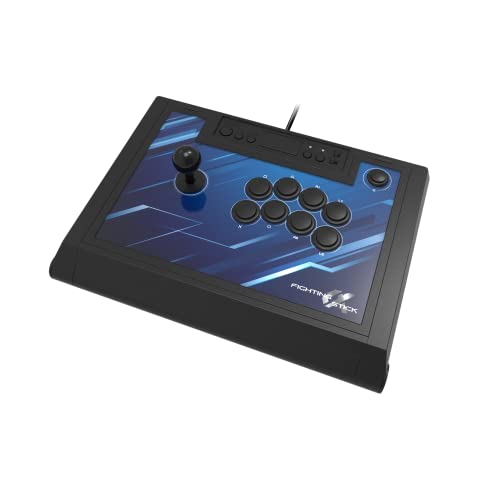
| HORI Fighting Stick Alpha★ Best Overall | PS5/PS4/PC native play | 17 | 1500 g | USB Wired | Amazon |
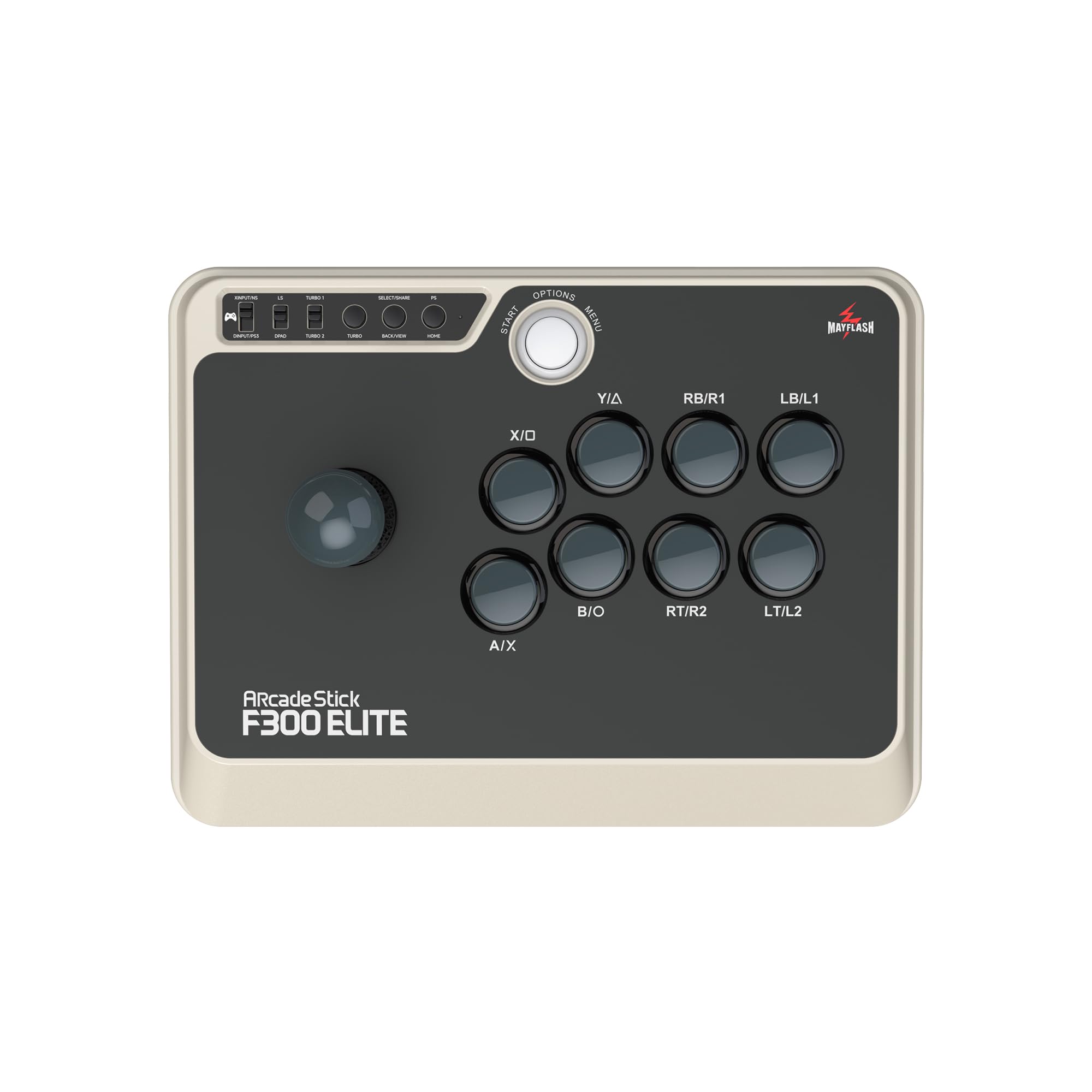
| MAYFLASH F300 EliteBest Value | Multi-platform value | 9 | — | USB Wired | Amazon |
| Qanba N3 Drone 2 | Budget PS5 starter | — | 3.9 lbs | USB Wired | Amazon |
| MAYFLASH F700 | Wireless multi-platform | 10 | 3.3 kg | Bluetooth, 2.4G, USB | Amazon |
| 8Bitdo Retro | Switch/PC casual play | 12 | 2.44 kg | Bluetooth, 2.4G, USB-C | Amazon |
| Qanba Obsidian 2 | Premium lap play | 16 | 7.4 lbs | USB Wired | Amazon |
| Nacon Daija | Pro-level customization | 8 | 7.7 lbs | USB Wired | Amazon |
In‑Depth Reviews
1. HORI Fighting Stick Alpha
Our pick — over 4.5★ from 850+ verified ratings; the strongest balance of quality and price.
The native PS5 workhorse that opens like a clamshell for easy modding.
This is the best value for PS5 players seeking native support and easy modding. It’s officially licensed by Sony, meaning it plugs straight into your PS5, PS4, or PC with zero adapters or setup headaches. Owners call it the workhorse of their collection, and the 17-button layout gives you plenty of flexibility for the top panel.
What wins people over is performance — it’s the most-praised trait by a wide margin. The Hayabusa lever and buttons feel satisfying from the start, though some find the buttons a touch sensitive and need a few sessions to get used to. The case is light at 1500 g, and it uses a clamshell design with a non-detachable cable organizer that makes opening it for repairs a genuine pleasure.
Modding is where this stick shines. The top-panel artwork is replaceable, and the lever measurements are forgiving: a Hayabusa lever sits at 35mm handle-to-plate and 35mm plate-to-base, so buyers report the LS-56-01 (38.5mm) fits perfectly, while the longer LSX-NOBI-01 (43.7mm) is too long. The biggest trade-off? The handles are divots rather than grips, and the cable hooks can bunch the cord — a few owners simply cut them off.
premium shell mods
- Native PS5 support straight from the start
- Clamshell opening makes customization and maintenance easy
- Replaceable top-panel artwork for personal style
bulky for laps
- Hayabusa buttons are sensitive—some swap to Sanwas
- Handles are divots, not true grips
- Cable hooks can bunch the cord
mod-friendly: you want a native PS5 stick that’s a joy to open up and customize, with the crowd behind it — roughly 800+ owners back it at 4.6 stars.
compact purists: you need a heavy base to keep the stick planted during frantic lap play, since this one is on the lighter side.
2. MAYFLASH F300 Elite
Pre-loaded Sanwa parts and near-universal compatibility make this the smart multi-console buy.
If you own more than one console, the F300 Elite is the rare stick that tries to work with all of them. It’s compatible with Switch, PS4, PS3, Xbox Series X, Xbox One, PC Windows, macOS, Steam Deck, and Android, and it pairs with PS5 via MAYFLASH’s Magic-S Ultimate Adapter. Owners consistently say the quality and even, substantial weight make it feel far more premium than its price tier suggests.
The headline here is the parts: 9 highly responsive Sanwa buttons and a precision 4-way joystick, the same components that dominate professional tournament play. Owners mention the matte finish prevents sweaty-palm stickiness, a subtle detail that matters in long sessions. On PC it supports both XINPUT and DINPUT, plus a Turbo function, giving you flexibility without extra software.
The honest catch is console authentication. Users note that on Xbox and PS4, you sometimes need to plug in a controller as a handshake, and the Magic-S adapter is the recommended fix for cleaner PS4/Xbox/PS5 play. A few players also find the stock spring too loose and swap in a 4lb spring with a 25mm actuator to get the arcade feel they want. It’s a 30cm-wide case, so consider your lap space before committing.
wireless low-latency
- Sanwa buttons and joystick included at a value price
- Works across more platforms than almost any rival
- Even weight and dictionary-sized footprint feel solid
stock parts basic
- Console play may need a controller handshake or adapter
- Stock spring feels loose to some; mods required for arcade feel
- Slightly small for wide-legged lap play
wireless value: the multi-system owner who wants tournament-grade Sanwa parts without the premium sticker. The quality and compatibility are the two most-praised traits by a landslide.
pro modders: you’re a PS5-only player who wants native plug-and-play, since this one needs an adapter for PS5.
3. Qanba N3 Drone 2
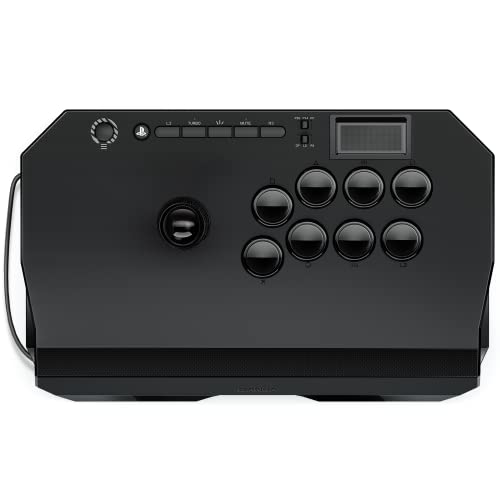
The officially licensed lightweight that gives Mishima players a rhythm to practice to.
If you are new to fight sticks on PlayStation, the Drone 2 is a smart starting point. It is officially licensed by Sony, so it works instantly on PS5, PS4, and PC without any software setup—no drivers to install, just plug and play. Its compatibility is what buyers praise most, and at 3.9 pounds, it is light enough to carry to a friend’s house but still feels sturdy; owners say it is lightweight yet “doesn’t feel cheap.”
The defining trait here is the lever’s audible click. Customers note that the lever clicks provide a satisfying rhythm for Mishima wavedash and Korean backdash practice in Tekken, giving you auditory feedback as you build muscle memory. It ships with authentic Qanba 30-mm B30 buttons and a Qanba OV7 OMRON switch joystick, alongside a full control panel and touch pad. A 3.5-mm microphone input with mute button rounds out the package.
The trade-offs are minor but real. The lever is accurate but noticeably loud, and the cable is non-detachable — a flaw a few owners flag. There’s also slight slippage on the panel during heavy inputs, so you may want a pad underneath. The quick-release screw makes customization easy, and owners confirm it feels better than the original Drone with a grippier panel. It’s a quality starter stick that respects your budget.
budget entry pick: a genuinely capable entry point that’s officially licensed, light, and responsive, with the lever click acting as a built-in practice metronome for Tekken players.
small surface area: the non-detachable cable and slightly loud lever are the trade-offs for this price.
starter budget: the PlayStation newcomer who wants to learn Tekken or Street Fighter without spending big.
big hands: you need absolute silence at night or prefer a detachable cable for tidy storage.
4. MAYFLASH F700

The wireless multi-platform stick that pairs a hidden 2.4G receiver with easy Sanwa modding.
The F700 is the answer for players who refuse to be pinned to one console. It supports PS5 (for fighting games like SF6, Tekken 8, and MK1), PS4, PS3, Switch, Switch 2, Windows, Apple macOS/iOS/iPadOS, Android, SEGA Mega Drive Genesis mini, Astro City mini, NEOGEO mini, Raspberry Pi, and Steam Deck. Three connection methods — Bluetooth, 2.4g, and wired USB — with the 2.4g receiver stowing in a hidden compartment so you can’t lose it.
Owners rave about the experience, calling it a fantastic starter that works from the start across systems. The larger case and good weight (3.3 kg) keep it planted, and there’s zero perceptible latency on the 2.4g dongle — reviewers point out it feels wired. The 10 buttons feel responsive and comfortable, and L3/R3 buttons are present for modern games. Battery life is strong, charging via USB.
Where it genuinely excels is customization. It’s designed to accept Sanwa Denshi buttons and joysticks, so you can swap parts to your preferred feel — one owner’s main stick for 1.5 years, upgraded with a gate change and Sanwa parts. The honest limits: it’s not compatible with Xbox consoles, and it’s strictly for fighting games, not other genres. Minor lap sliding is fixable with a pad, and it lacks official Sony licensing, so PS5 play is limited to fighting titles.
versatile compatibility
- Three connection options with zero-latency 2.4g dongle
- Hidden receiver compartment prevents loss
- Sanwa-compatible for easy part swapping
heavy chassis
- No Xbox support at all
- Fighting games only — other genres unsupported
- Minor lap sliding without a grip pad
multi-platform: the player with a Switch, PC, and PS5 who wants one wireless stick to rule them all, especially for modding.
travel light: Xbox owners or anyone wanting a stick for non-fighting genres.
5. 8Bitdo Retro
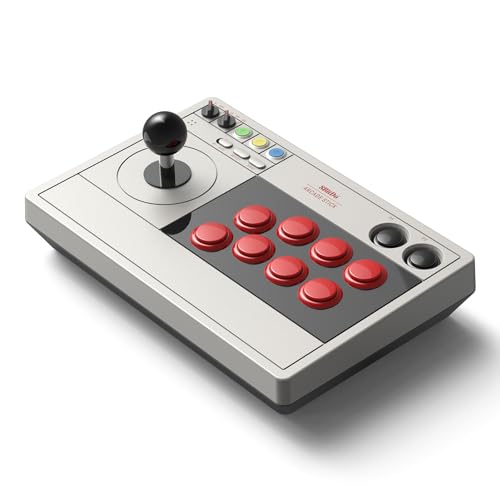
A wireless stick with 40-hour battery life that makes Switch fighting games feel like the 80s.
This is the stick for the couch warrior. The 8Bitdo Retro connects via Bluetooth, 2.4g, or wired USB-C, and the battery life is the standout — buy one and you’ll forget it needs charging for days. Owners say it brings back the arcade feel, with one describing that it makes them feel like they’re back in the 80s and 90s. The solid 2.44 kg weight keeps it planted on your lap.
Its software gives you control beyond the basics. With the 8BitDo Ultimate Software, you can remap any button and set up macros—including 2 dedicated macro buttons (P1/P2) that trigger complex moves with one press. The on-screen button layout updates automatically when you switch between Switch and PC X-Input mode (a standard PC input protocol), so you always see the right controls. You can also set the joystick to act as a D-pad or an 8-direction joystick, which helps in games that need precise directional inputs.
It’s also ultra-moddable: you can swap 30mm/24mm arcade buttons, and the universal joystick mounting plate supports virtually every arcade stick ever made, such as the Sanwa JLF. The honest caveat is that the stock buttons feel cheap and slightly unresponsive to some — they’re replaceable with skill, and shoppers say the lower-quality buttons are expected at this price. It’s ideal for casual play (Street Fighter Alpha 2 on the couch) rather than tournament grind, and less suited to dual-stick or ergonomic titles.
retro compact build
- 40-hour battery on 2.4g, 30 hours on Bluetooth
- Universal mounting plate fits Sanwa JLF and more
- Two dedicated macro buttons via 8BitDo software
narrow button span
- Stock buttons feel cheap and unresponsive to some
- Better for casual couch play than competitive grind
- Poor fit for dual-stick games
retro fans: if long wireless sessions on Switch are your thing and you want software-level macro control without paying premium prices.
wide grips: if you plan to enter tournaments — the stock buttons will likely need upgrading first.
6. Qanba Obsidian 2
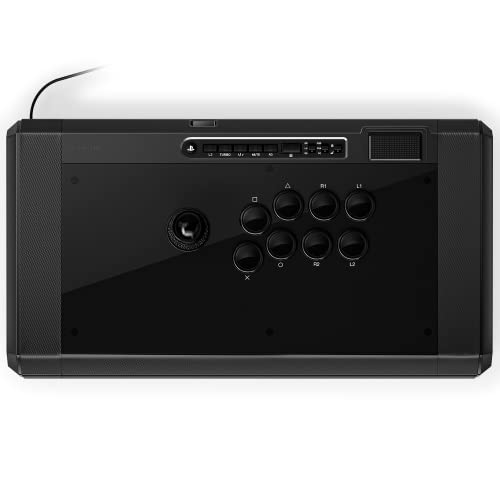
The heavy-duty 7.4-pound lap anchor with a switch to toggle between PS5, PS4, and PC.
For players who plant the stick on their lap and go, the Obsidian 2 is built to stay put. Its 7.4-pound weight prevents movement during even the most frantic inputs, and the extra heft can be reduced by removing a bottom plate if you want to travel lighter. It’s officially licensed by Sony with a dedicated switch between PS5, PS4, and PC — no adapters, no handshakes.
Quality is what owners praise most, and the button feel is a big reason. The Qanba 30-mm OBSF buttons require very little pressure, which means faster inputs with less finger fatigue over long sessions. The swappable Sanwa JLF joystick tops let you choose your preferred grip. The 16-button layout and full control panel with touch pad give you a complete setup, and the 3.5-mm mic input with mute button is there for chat.
The honest trade-off is the size debate — some find it bulky at 19.1 x 10.2 x 4.6 inches, while others say it’s “not too heavy and perfect size” for lap play. Owners who’ve used it at EVO praise its reliability. The recurring gripe is an occasional unit arriving with broken internal plastic, which is disappointing at this price point. One owner, who came out of retirement for it, notes the stock 4-way gate is fine, but 8-way suits their play style better — a quick swap for most.
premium arcade feel
- 7.4 lbs of weight keeps it anchored during play
- Near-zero-pressure OBSF buttons reduce fatigue
- Easy PS5/PS4/PC switch on the fly
pricey investment
- Large footprint isn’t for small laps or desks
- Occasional QC issues with internal plastic
- Value is hotly debated at this price
tournament grade: the intermediate-to-advanced player who wants a serious, heavy stick that won’t budge during tournament-length sessions.
tight budgets: the bulky size if you have limited desk or lap space — measure your setup first.
7. Nacon Daija

A pro-collaboration stick with full button remapping and a lock function for serious matches.
This is the stick developed with professional gamers, and it shows in the details. Officially licensed for PS4, PS5, and PC, the Daija runs on Sanwa joystick and action buttons — the brand pros trust for durability. Owners are blown away by the responsiveness, noting the Sanwa buttons are satisfying and quiet, with a firm, sturdy build that justifies the premium investment.
Customization is the deepest of any stick here. The Nacon software for PC and Mac gives you full button mapping with multiple saved game profiles, so you can switch setups between games in seconds. Three faceplate options (or a printable template) let you change the look, and the lock function prevents accidental presses during tense moments. A textured palm rest keeps your hand planted, and the 3.5mm audio jack connects a RIG headset directly.
The box is generous: a 3-meter detachable USB-A to USB-C cable, two joystick heads (including a bat top), and two tools for quick customization. At 7.7 pounds, it’s a lap anchor like the Obsidian, and the grippy rubber bottom gets specific praise. The honest downsides: the value is the most-mixed aspect, with some finding it not worth the money, and there’s a rare but serious QC report of a loose USB-C port disconnecting on arrival. The button lock and remapping depth, though, make it a powerful choice for grinding ranked matches.
pro-level durability
- Full button remapping with multiple saved profiles
- Lock function prevents accidental presses mid-fight
- Includes 3m detachable cable, two joystick heads, and tools
stiff cable hinge
- Premium price with mixed value opinions
- Rare QC reports of a faulty USB-C port
- Heavy at 7.7 lbs — not for frequent travel
esports ready: you want pro-level software control, a lock function for tournaments, and quiet premium Sanwa parts, and you’re willing to pay for it.
casual play: you’re sensitive to QC lottery — check the USB-C port immediately on arrival.
Understanding the Specs
Lever Throw and Gate
The lever’s throw is the distance it travels before registering an input. Japanese levers have a short throw, which means faster directional changes — crucial for Korean backdashes and dash cancels. The gate is the guide plate inside: a square gate gives you clean 8-way motion, while an octagonal gate makes diagonal inputs (like in Pac-Man or shooters) easier to hit. Some sticks ship with one and let you swap, so check before you buy.
Button Quantity and Feel
Fight sticks range from 8 to 17 buttons. The core set covers the six attack buttons used in most fighters, plus Start, Select, and Home. Extra buttons give you macro options but can crowd the panel. Button feel matters more: Sanwa buttons are the tournament standard with short travel and a crisp click, while Hayabusa buttons are slightly more sensitive. If you’re sensitive to touch, test both — owners often swap one for the other.
FAQ
Will any of these arcade sticks work natively on PS5?
What is the difference between a Sanwa and a Hayabusa lever?
Do wireless arcade sticks have input lag?
How do I know if a lever or button will fit my stick for modding?
Is the MAYFLASH F300 Elite worth it over the standard F300?
Which arcade stick is best for Tekken players?
Can I use these fight sticks on a PC or Mac?
Is a heavier arcade stick always better?
Do these sticks work with Xbox consoles?
How long does the battery last on wireless sticks?
Final Thoughts: The Verdict
For most players, the arcade joystick usb controller winner is the HORI Fighting Stick Alpha because it marries native PS5 support with the easiest modding access at a mid-range price. If you want the broadest console coverage with Sanwa parts included, grab the MAYFLASH F300 Elite. And for a wireless, multi-platform option that still mods like a champ, the MAYFLASH F700 is the one to reach for.
How We Picked
We do not accept paid placement. Every pick is matched to a real buyer and a real use-case; we do not hands-on test units.
Sources & Methodology
Specifications: manufacturer listings and product documentation. Review insights: verified customer reviews, as of August 2026. Pricing: not shown on this page (it changes often); check the current price via the retailer link.
As an Amazon Associate, Gadgets Feed earns from qualifying purchases. This does not affect which products we feature.