
Your wrist flicks, the virtual world spins, and on a cheap spinner, the cursor stutters, overshoots, or simply ignores your input. A poor-quality arcade spinner USB gaming controller doesn’t just break immersion—it destroys your high score on Tempest, ruins the rhythm of Arkanoid, and makes games that demand precise rotary input feel like a mechanical lottery. The difference between a good spinner and a bad one is measured in hundredths of a second of response time, and in the granular feel of a weighted metal flywheel versus a hollow plastic toy.
I’m Min — the co-founder and writer behind Gadgets Feed. I’ve spent hundreds of hours analyzing the internal components, optical encoder CPR ratings, bearing quality, and button actuation force of dedicated spinner controllers to cut through the marketing noise and find what actually delivers the classic rotary arcade feel.
The wrong spinner adds digital lag and mushy buttons. The right one delivers instant, precise tracking. This guide is built to help you choose the best arcade spinner usb gaming controller for your cabinet, ensuring your next game of Tempest or Arkanoid feels like the original arcade floor.
How To Choose The Best Arcade Spinner USB Gaming Controller
Selecting the correct spinner involves more than just picking the first USB-compatible model. Your decision must weigh encoder resolution, physical form factor, and the specific emulation or platform you’re building for. These are the decisive criteria that separate a usable spinner from a great one.
Encoder Resolution (CPR)
The Counter-Per-Revolution (CPR) rating defines how many positional pulses the encoder sends per full rotation of the knob. A low CPR spinner (around 96-200) can feel “granular” or “steppy” on-screen, making precise aiming difficult in games like Tempest. A high CPR spinner (1200+ or even 4096) provides silky-smooth cursor movement. However, higher isn’t always better; some older games expect low-resolution input, and an ultra-high CPR spinner can introduce jitter if the software can’t handle it. Look for a configurable CPR option if you plan on playing multiple emulated titles.
Physical Mounting and Form Factor
Not all spinners fit the same hole. The two most common standards are the standard 28mm button hole and the larger 1 1/8″ drill bit hole used for dedicated arcade controls. The shaft length and the overall height of the spinner unit also matter; a tall unit might interfere with a control panel overlay, while a short one might not reach through a thick wooden cabinet. Ensure the unit you choose matches your panel’s thickness and existing button layout to avoid grinding, sanding, or building a custom mounting plate.
Platform and Software Compatibility
A USB spinner that works perfectly on a Windows MAME rig might require significant configuration on a Raspberry Pi or an Arcade1Up cabinet. Check if the spinner supports X-axis or Y-axis switching directly on the unit (often via a long button press) because different games map rotation to different axis inputs. Also verify if the spinner uses standard USB HID (plug and play for mouse emulation) or requires a proprietary driver and specific MAME.ini edits. Some high-end units offer on-board calibration and CPR dip-switch settings, which are crucial for a seamless, multi-game setup.
Quick Comparison
On smaller screens, swipe sideways to see the full table.
| Model | Category | Best For | Key Spec | Amazon |
|---|---|---|---|---|
| GRS Push & Pull Arcade Spinner Ultra | Premium | Configurable versatility | 128 – 4096 CPR | Amazon |
| Razer Kitsune All-Button | Premium | Modern competitive play | Optical switches | Amazon |
| NACON Daija | Premium | Licensed console play | Sanwa joystick & buttons | Amazon |
| 3 inch LED Trackball RetroArcade.us | Premium | Trackball plus mouse control | 3″ steel ball | Amazon |
| 8Bitdo Retro Arcade Fight Stick | Mid-Range | Multi-platform wireless | Bluetooth + 2.4G + USB-C | Amazon |
| GRS USB Button Hole Spinner | Mid-Range | Compact standard mount | 28mm hole fit | Amazon |
| ThunderStick LED Trackball TS-UTB01 | Budget | Arcade1Up drop-in upgrade | Drop-in for Centipede unit | Amazon |
In‑Depth Reviews
1. GRS Push & Pull Arcade Spinner Ultra

The GRS Push & Pull Arcade Spinner Ultra is the most versatile single spinner unit on this list, featuring a complete aluminum chassis and a configurable Counter-Per-Revolution (CPR) range from 128 all the way up to 4096. This means you can dial in the perfect resolution for Tempest (high CPR for silky aim) or Arkanoid (lower CPR for crisp paddle control) on the fly, without buying a second unit. The push-pull design also doubles as a button, saving precious space on a crowded control panel.
Users consistently report that this spinner integrates seamlessly with ATGames Legends Gamer Pro and modded Arcade1Up cabinets via a direct USB connection to a Raspberry Pi or PC. The included software calibration tool allows you to fine-tune dead zones and sensitivity, and the ability to switch the mouse moving direction between X and Y axis is a critical feature for games that map rotation to different screen vectors. The compact 28mm diameter fits standard button holes without needing a larger drill bit.
While the push-pull action is smooth and the knob feels weighty, some users note that the short included USB cable may require an extender for larger cabinet builds. However, this minor inconvenience is a small price to pay for the unparalleled configurability and build quality. It is the clear winner for the serious arcade enthusiast building a multi-game system that demands precise rotary control across different emulators.
Why it’s great
- Smooth aluminum flywheel and push-pull button mechanism
- Software-calibrated configuration including 128-4096 CPR range
- Standard 28mm button hole size for easy installation
Good to know
- Short USB cable required an extender for some cabinet builds
- No printed documentation; relies on online guides
2. Razer Kitsune All-Button Arcade Controller

The Razer Kitsune is a leverless, all-button arcade controller that replaces the traditional stick with four directional movement buttons. This design eliminates the mechanical travel time and input errors associated with a joystick gate, making it a powerhouse for modern fighting games like Street Fighter 6 and Guilty Gear Strive. The low-profile linear optical switches have a significantly shorter actuation height compared to standard microswitches, providing near-instantaneous response times measured in milliseconds.
The Kitsune’s slim form factor, measuring just 0.76 inches thick, is a marvel of engineering, allowing it to slide easily into a backpack. It features a detachable USB Type-C cable secured with a clasp, preventing accidental disconnections during tournament play. The all-aluminum top plate is removable for custom vinyl wraps, and the Chroma RGB lighting can be customized for aesthetic or functional purposes. It is officially licensed for PS5 and works with PC, with a tournament lock switch that disables all non-essential buttons to comply with fighting game regulations.
While the leverless layout is fantastic for fighting games requiring perfect quarter-circles and charge splits, it is not a traditional spinner or trackball controller. The core complaint from users is the premium price point, which is high even by enthusiast standards. Also, the matte black finish is a notorious fingerprint magnet. For the competitive fighting game player who values speed and precision over classic rotary feel, the Kitsune is an elite choice, but it serves a very different niche than a dedicated spinner.
Why it’s great
- Ultra-responsive low-profile optical switches
- Incredibly slim and portable leverless design
- Tournament lock switch and cable clasp for competitive use
Good to know
- Premium price point, positioning it as a high-end investment
- Matte finish easily shows fingerprints and smudges
3. NACON Daija Arcade Fight Stick

The NACON Daija is an officially licensed PlayStation 5 arcade stick, developed in collaboration with professional fighting game players. It comes equipped with genuine Sanwa Denshi joystick and action buttons, which are the gold standard for arcade parts due to their durability and precise feel. The stick is built around a spacious steel frame that weighs in at 7.7 pounds, providing rock-solid stability on a table or lap during intense play sessions where the stick cannot afford to shift.
Customization is a core feature of the Daija. The front plate lifts open like a car hood, granting immediate access to the internal wiring and PCB without tools. It includes an easy-swap system for the joystick head (ball top or bat top) and Sanwa buttons. The Nacon Daija software for PC and Mac allows full button mapping, dead zone adjustment, and profile creation, saving up to four different configurations directly to the stick’s onboard memory. It also features a 3.5mm audio jack for direct headset connection and a lock switch for tournament safety.
The main drawback for arcade spinner fans is that this is a traditional joystick, not a spinner. While it is the best possible tool for Street Fighter, Tekken, or Mortal Kombat, it cannot replicate the rotary motion needed for Tempest or Arkanoid. The Daija is the definitive choice for the player who wants a premium, mod-friendly, officially licensed stick for competitive console fighting games. Its build quality and Sanwa components are unmatched in this price tier for a standard joystick layout.
Why it’s great
- Genuine Sanwa parts for professional-grade feel and durability
- Tool-free internal access for easy customization and modding
- Officially licensed for PS5, PS4, and PC
Good to know
- Heavy 7.7-pound weight can be cumbersome for travel
- It is a joystick, not a spinner; unsuitable for rotary games
4. 3 inch Arcade Game LED Color Changing Trackball
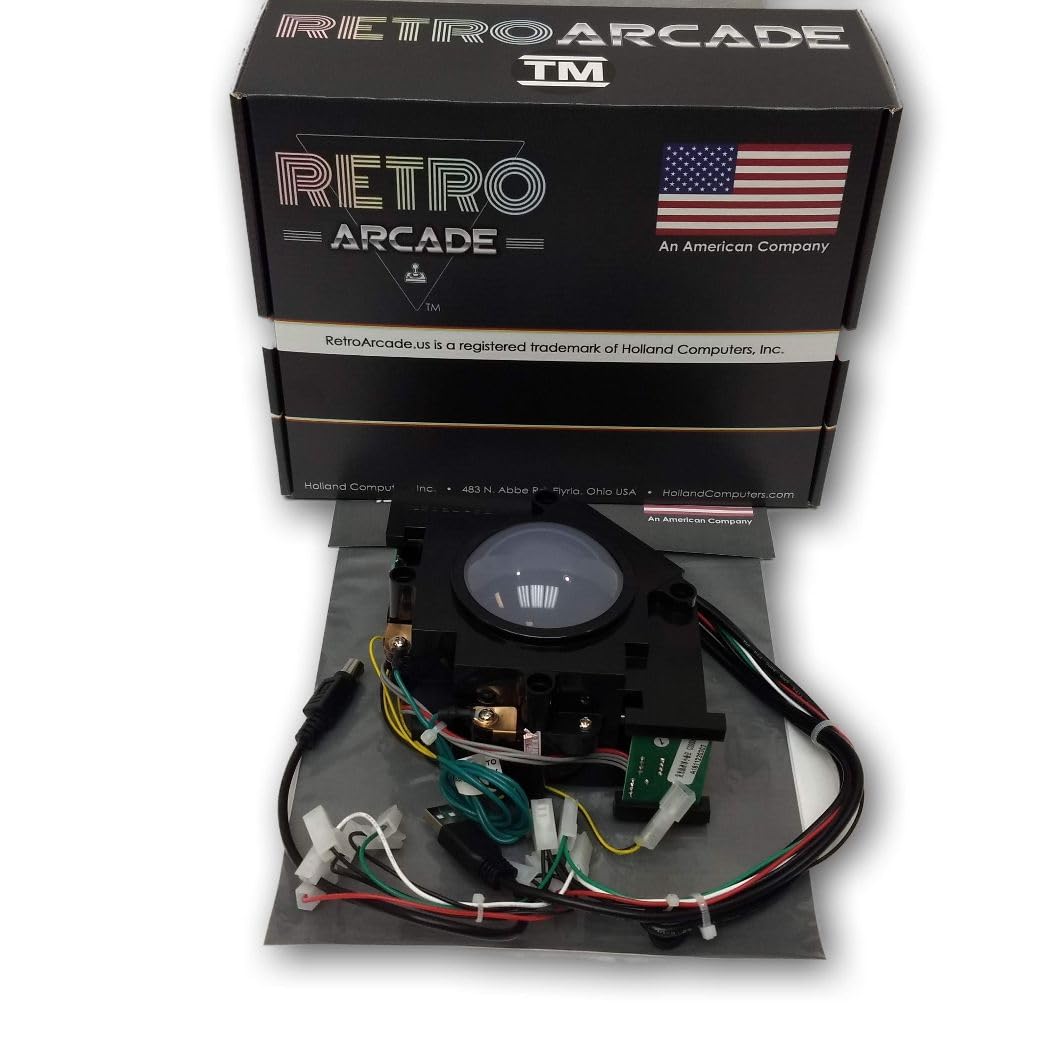
This 3-inch LED trackball from RetroArcade.us is a premium replacement for arcade cabinets that demand a large, solid input device. The ball itself is made of steel, providing significant heft and a smooth, weighted spin that inferior plastic trackballs cannot match. It interfaces via both USB and PS/2 connections, making it backwards compatible with older arcade hardware and embedded systems. The LED color-changing ring not only looks fantastic but clearly indicates the device is powered and active.
Users have successfully integrated this trackball into DIY Golden Tee builds, MAME cabinets running on Retropie, and even as a daily driver desktop mouse for users with coordination issues. The 3-inch diameter is the standard size for games like Golden Tee and Crystal Castles. The optical encoder inside is reported to have no stutter or lag, unlike some Suzo Happ USB versions. A separate 12VDC power adapter is required for the LEDs, which users often repurpose from an old router or peripheral charger.
The biggest hurdle is installation. The trackball requires a mounting plate, which is not included. The rim is also roughly 1mm larger than an Atari flight stick’s trackball hole, potentially requiring minor sanding. Configuration for RetroArch and MAME also requires diving into config files to enable the mouse. For the purist who wants a trackball for its distinct rolling control in golf and puzzle games, this unit delivers solid performance, but it is not a simple plug-and-play spinner for a standard button hole.
Why it’s great
- Smooth, weighted 3-inch steel ball for excellent momentum
- Dual USB and PS/2 connectivity for broad compatibility
- Color-changing LED ring adds aesthetic appeal
Good to know
- Requires a separate mounting plate for installation
- Needs a 12VDC power adapter for the LED lights
5. 8Bitdo Retro Arcade Fight Stick
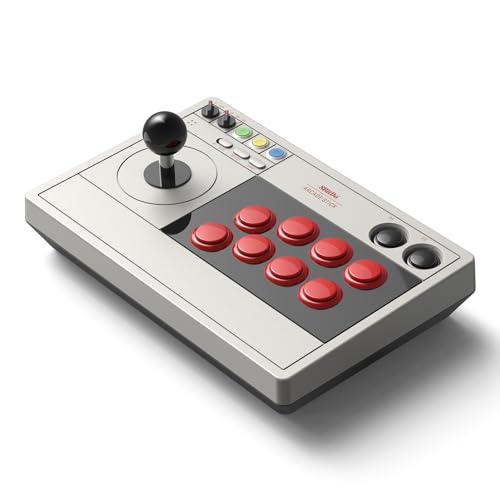
The 8Bitdo Retro Arcade Fight Stick brings wireless freedom to the arcade fight stick category, offering triple connectivity through Bluetooth, a low-latency 2.4G wireless dongle, and a wired USB-C connection. It is natively compatible with both the Nintendo Switch and PC (X-Input), with a dynamic button layout that changes the visual mapping when you switch between platforms. The 40-hour battery life on 2.4G ensures you can play for days on a single charge.
This stick is designed to be ultra-moddable. It supports standard 30mm and 24mm arcade buttons and features a universal joystick mounting plate compatible with Sanwa JLF and other popular aftermarket joysticks. Two dedicated macro buttons (P1/P2) can be configured via the 8BitDo Ultimate Software to execute complex button combinations with a single press. The included 2.4G receiver has a dedicated hidden compartment within the stick’s body for storage, preventing loss.
While the plastic body is sturdy enough for casual to intermediate play, some users note the stock buttons feel slightly unresponsive compared to premium Sanwa alternatives, though they are easily replaced. This stick is the best mid-range option for players who need multi-platform wireless convenience and want a solid foundation for modding. However, it lacks a built-in spinner mechanism, so it remains a dedicated tool for fighting games rather than rotary controlled arcade titles.
Why it’s great
- Excellent value with Bluetooth, 2.4G, and wired USB-C options
- Highly moddable with universal Sanwa-compatible mount
- 40-hour battery life on 2.4G wireless connection
Good to know
- Stock buttons feel slightly cheap and unresponsive
- Plastic build is good but not premium
6. GRS USB Button Hole Spinner

The GRS USB Button Hole Spinner is the champion of compact, drop-in spinners. Its entire mechanism is housed in a small aluminum body that fits snugly into any standard 28mm arcade button hole, requiring no drilling or panel modification. It includes two built-in mouse-click buttons, allowing you to control a spinning game and fire without reaching for separate buttons. The device is plug-and-play on Windows, Mac, Linux, and Raspberry Pi, recognized as a standard USB mouse device.
The small form factor makes it ideal for tight control panels or for adding a spinner to a pre-existing arcade stick like the X-Arcade Tankstick without sacrificing existing button positions. Users report it works well with MAME for games like Tempest, Star Trek, and Omega Race out of the box, with only minor MAME.ini edits needed to set the mouse to ‘1’ and adjust sensitivity per game. The ability to hold both buttons for 10 seconds to swap between X and Y axis is a surprisingly handy feature for different game configurations.
The most consistent criticism is the laughably short 15-inch USB cable, which is fine for a cabinet build but useless for tabletop testing without a USB extender. Also, the included buttons are described as mushy and low-quality compared to dedicated arcade buttons. For the builder who needs a simple, no-drill spinner that works reliably with MAME on any PC and fits the smallest possible footprint, this is a great entry-level component, provided you budget for a quality USB extension cable.
Why it’s great
- Fits any standard 28mm button hole with zero modification
- Plug-and-play USB HID compatibility with all major OS
- X-Y axis swapping via button combo
Good to know
- Extremely short 15-inch USB cable requires an extender
- Integrated buttons feel mushy and low quality
7. ThunderStick LED Arcade Trackball TS-UTB01

The ThunderStick LED Arcade Trackball is a direct drop-in replacement for the notoriously low-quality stock trackball found in Arcade1Up cabinets, particularly the Atari 12-in-1 and Centipede units. The LEDs are color-selectable via a small switch on the board, adding a visual upgrade that the stock hardware lacks. The translucent blue ball allows the light to shine through, creating a striking effect in a dim game room.
The biggest value proposition here is the price, which is a fraction of the cost of a full arcade-grade trackball. Users who made the swap report an immediate improvement in high scores in games like Crystal Castles and Centipede, citing the free-spinning nature and the reduced jitter compared to the default unit. The trackball works via a USB interface board, making it compatible with PC, Mac, and Raspberry Pi for MAME enthusiasts who want a cheap but effective upgrade.
Installation is not truly plug-and-play for all models. Several users noted the need to open the trackball assembly to remove a tumbler switch, and the original stock spinner cord from the Arcade1Up is not needed for 2020 models. The grinding noise on fast spins and the overly sensitive PCB causing jittery movement are common complaints. This is the perfect budget-friendly upgrade for the Arcade1Up owner looking to fix the core input mechanism, but it lacks the refined optical resolution and build quality of the mid-range and premium spinners.
Why it’s great
- Budget-friendly drop-in replacement for specific Arcade1Up models
- Color-selectable LED adds aesthetic appeal
- Significantly smoother than the stock Arcade1Up trackball
Good to know
- Requires modification to remove internal tumbler for compatibility
- Can introduce jitter and grinding noise on fast spins
- Not compatible with Arcade1Up Centipede Legacy unit
FAQ
Can I use a USB spinner with my Arcade1Up cabinet?
What is the difference between a spinner and a trackball for USB arcade controls?
Final Thoughts: The Verdict
For most users, the arcade spinner usb gaming controller winner is the GRS Push & Pull Arcade Spinner Ultra because it offers the broadest configurable CPR range in a solid aluminum body, making it perfect for any rotary game from Tempest to Arkanoid on a multi-game MAME cabinet. If you want a high-end, officially licensed fight stick for PS5 and competitive SF6, grab the NACON Daija. And for a no-drill, compact spinner that fits an existing 28mm button hole, nothing beats the GRS USB Button Hole Spinner.