
Our readers keep the lights on and my morning glass full of iced black tea. As an Amazon Associate, I earn from qualifying purchases.
Specs are compiled from manufacturer listings and verified buyer reviews and can change over time — please confirm the key details on the product page before buying.
Building a PC where the inside looks as good as the frames it pushes means finding fans that cool without sounding like a desk fan, and light up without looking like a disco ball. The real trick is balancing airflow (CFM) against noise while ensuring the lighting software syncs with your motherboard.
I’m Min — the founder and writer behind Gadgets Feed. This guide is built by comparing the manufacturers’ published specifications and the patterns across verified customer reviews, so you get each pick’s real strengths and trade-offs instead of marketing spin.
Whether you are aiming for a whisper-quiet workstation or a showcase build with layered lighting effects, this breakdown of today’s top argb case fans will help you match the right blades to your build goals.
Quick Picks
- Cooler Master MF120 Halo² ARGB 120mm PWM Case Fan — Best Overall
- PANO-MOUNTS 120mm ARGB PWM PC Case Fans 3-Pack — Budget Triple-Pack
- Cooler Master MF140 Halo² 140mm Case Fan — Best 140mm Fan
- Lian Li UNI Fan SL-Infinity 140-Single Pack — Best Infinity Mirror
- Thermaltake CT120 EX ARGB Sync PC Cooling Fan 3-Pack — Cable-Free Champion
How To Choose The Best ARGB Case Fans
Not all glowing fans move the same amount of air. Match the fan’s shape and speed to your case layout and noise tolerance.
Airflow vs. Static Pressure
Airflow (measured in CFM) tells you how much air moves in open space. Static pressure (measured in mmH2O) tells you how hard the fan pushes air through tight gaps like a radiator or a front mesh panel. For a standard case fan setup you want high CFM; for a liquid-cooling radiator you want high static pressure.
Noise and Speed
Fans running at 1800-2100 RPM shift serious air but can sound like a small vacuum. Look for a noise rating under 30 decibels if you want quiet operation during gaming or work. Many fans use PWM (Pulse Width Modulation) to let your motherboard adjust the speed on the fly, so they spin fast when you need cooling and slow to near-silent at idle.
Lighting and Control
The fans use a 5V 3-pin ARGB connector to sync colors with software like ASUS Aura Sync or MSI Mystic Light. Some packs include a hardware controller, while others expect you to use your motherboard’s 5V header. Check that your board has a spare 5V ARGB header before you buy a pack without a controller.
Quick Comparison
On smaller screens, swipe sideways to see the full table.
| Model | Best For | Max RPM | Noise Level | Airflow (CFM) | Amazon |
|---|---|---|---|---|---|
| Cooler Master MF120 Halo² | Dual-loop lighting + quiet operation | 2050 RPM | 27 dB | — | $21.99Amazon |
| PANO-MOUNTS 120mm 3-Pack | Budget triple-pack with SATA adapter | 1800 RPM | 30 dB | 46.9 CFM | $22.99Amazon |
| Cooler Master MF140 Halo² | Big 140mm size + high static pressure | 2050 RPM | 27 dB | 59.51 CFM | $30.99Amazon |
| Lian Li UNI Fan SL-Infinity 140 | Infinity mirror looks + daisy-chain | 2100 RPM | 28 dB | 72.7 CFM | $29.99Amazon |
| Thermaltake CT120 EX 3-Pack | Magnetic daisy-chain + cable-free build | 2000 RPM | 28.5 dB | 57.05 CFM | $49.99$59.99Amazon |
In‑Depth Reviews
1. Cooler Master MF120 Halo² ARGB 120mm PWM Case Fan
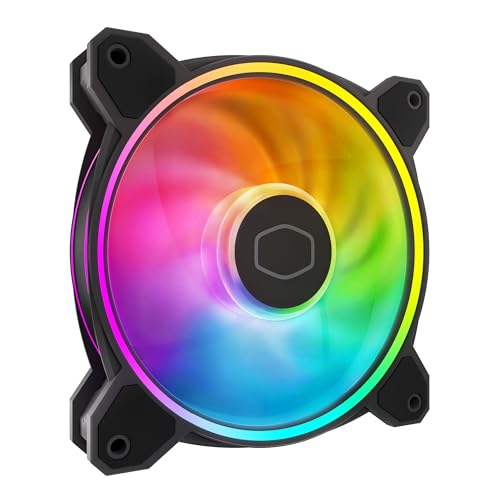
Bright dual-loop rings that stay quiet even at full 2050 RPM speed.
This fan gives you two glowing loops instead of the usual hub-only light, and the frosted blades help spread the color evenly across the whole fan face. At 27 decibels, it is quieter than the 30 dB PANO-MOUNTS fan in this guide. The hybrid frame design makes it easy to install in a case, on a liquid cooler, or on an air cooler without any fitment issues.
The motor spins up to 2050 RPM using a 4-pin PWM header, so your motherboard can dial the speed from zero up to max based on temperature. Buyers report that the fan is “really quiet, very well priced,” though one noted that the proprietary hub connectors “slip out easily” when using the included controller. Many simply daisy-chain the fan directly to the motherboard and use third-party software like SignalRGB instead of the hub.
Why it stands out
- Dual-loop ARGB rings with brighter illumination
- Air balance blades are larger for better airflow
- Whisper-quiet 27 dB noise level at full speed
The catch
- Single-pack only — buying three means three separate units
- Proprietary hub connectors can slip out; skip the hub and wire directly
Grab it if: you want a genuinely quiet fan with vivid dual-loop lighting and don’t mind buying individually.
Look elsewhere if: you need a ready-to-go 3-pack with a controller and hubs included.
2. PANO-MOUNTS 120mm ARGB PWM PC Case Fans 3-Pack
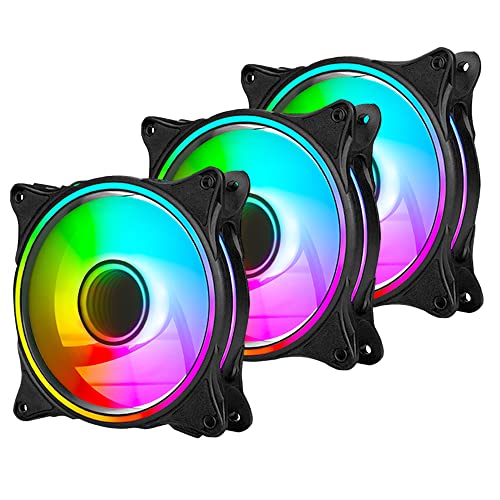
Three bright fans in one box for buyers who want a budget-friendly starter pack.
Each fan has 24 individually controlled ARGB LEDs arranged in a triple light loop, giving you vivid color effects without needing a separate controller. The pack includes a SATA adapter so you can bypass the motherboard’s 5V ARGB header if your board is out of ports. That is a handy workaround for compact or older builds. The fans run from 800 to 1800 RPM via a 4-pin PWM header and push 46.9 CFM of airflow.
The trade-off is noise: at 30 decibels (a measure of sound pressure), versus 27 dB for the Cooler Master MF120 Halo² above. Owners mention that “cords are short; best for MicroATX cases unless using extension cables.” One reviewer on a daughter’s pink build called them “pretty pink fans, good for kids’ first PC.” The Molex connector (a legacy power plug) dangling off the 3-pin ARGB cable is a minor eyesore some buyers simply clip off.
The value edge
- Three fans in one pack at a very low per-fan cost
- Includes SATA adapter for builds without spare ARGB headers
- 24 individually controlled LEDs for smooth effects
Downsides
- 30 dB noise level is louder than premium competitors
- Short cables require extensions for full-size ATX cases
Reach for this if: you are building on a tight budget or setting up a first PC and need three fans at once.
skip it if: you need absolute silence or tall tower case with long cable runs.
3. Cooler Master MF140 Halo² 140mm Case Fan
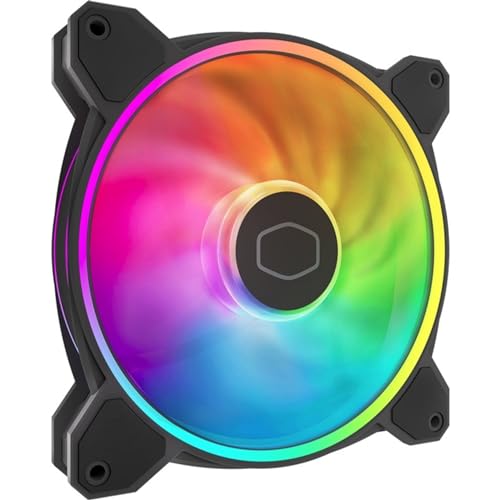
The bigger 140mm version of the Halo² that moves 59.51 CFM while staying at 27 dB.
For builds with 140mm mounting points, this fan delivers more air than the 120mm Halo² without any extra noise — they both sit at the same 27 decibels. The static pressure hits 2.53 mmH2O, making it a strong choice for front-mount radiators or tight mesh panels. The Rifle Bearing is rated for over 160,000 hours, so this fan should outlast several builds.
It uses the same dual-loop ARGB rings and frosted blade design as the 120mm version, so the lighting matches if you mix sizes in one build. Customers note that “one fan DOA but warranty replaced quickly,” a pattern that appears on both Cooler Master Halo² models. The single-pack format means you buy each fan individually, which adds up if you need three or four.
Big fan strengths
- High 59.51 CFM airflow at a very quiet 27 dB
- Rifle Bearing rated for 160,000+ hours of life
- Matches 120mm Halo² lighting for a uniform build look
What to know
- Single pack means higher total cost for multi-fan setups
- One fan DOA reports suggest checking on arrival
Choose this if: you have a 140mm-supported case or radiator and want the quietest high-CFM option.
Look at the 120mm version if: your case only takes 120mm fans or you want to match existing front fans.
4. Lian Li UNI Fan SL-Infinity 140-Single Pack

An infinity mirror effect that wraps 40 LEDs inside a 72.7 CFM airflow frame.
This fan stands out visually with an all-around infinity mirror design that creates a multi-layer glow effect visible from any angle. It pushes a class-leading 72.7 CFM, versus 46.9 CFM for the PANO-MOUNTS fan, while spinning at a max 2100 RPM and producing only 28 decibels. That is 2100 RPM versus 1800 RPM for the budget fans, with higher airflow as well. The daisy-chain design lets you connect up to four fans with one cable using pin-to-pad contacts, cutting cable clutter behind the motherboard.
The catch is the ecosystem: the single pack does not include a controller (a hub that manages lighting and speed), and reviewers point out that the “single pack lacks controller (use 120mm UNI SL-Infinity controller).” You either need a 3-pack controller or the controller from a Lian Li AIO (all-in-one liquid cooler) to adjust lighting. One reviewer also noted that “RGB white shows bluish; red tint yields dimmer white,” so pure white is not perfect.
Performance plus looks
- 72.7 CFM airflow — highest in this lineup
- 40 LEDs per fan with infinity mirror effect
- Daisy-chain up to 4 fans with a single cable
Ecosystem requirements
- No controller in single pack — needs separate Lian Li controller
- White LED color leans slightly blue
Buy this if: the infinity mirror look is your priority and you already have a Lian Li controller or 3-pack.
Pass if: you want a single fan with no extra purchases or perfect white LED rendering.
5. Thermaltake CT120 EX ARGB Sync PC Cooling Fan 3-Pack
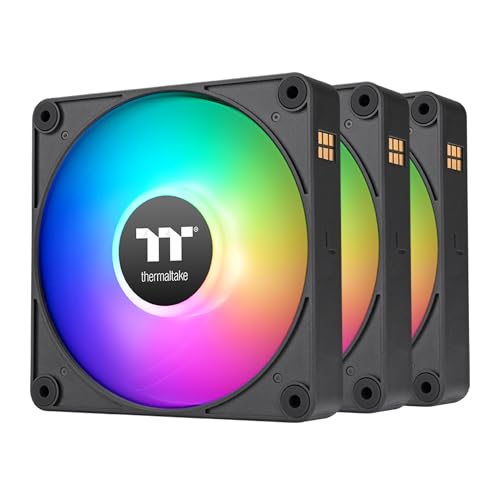
Magnetic connections that let you snap fans together without any cables between them.
Thermaltake’s MagForce 2.0 uses magnets to attach fans to each other in a daisy chain, so you run a single cable from the cluster to the motherboard instead of three separate wires. Each fan has 9 addressable LEDs controlled by your motherboard’s 5V ARGB software. The 57.05 CFM airflow and 2000 RPM max speed put it between the PANO-MOUNTS and Lian Li in raw performance, while the 28.5 dB noise level is respectably quiet.
Buyers love the cable-free look inside the case — one called it “game-changing daisy-chainable fans with magnetic connection, no wires between fans.” However, the same reviewer noted it “gets loud at full speed, quiet at normal speeds.” The 3-pack format is the only way to buy these fans, so you cannot add a single unit later without buying another full pack. That makes it a commitment.
Magnetic magic
- MagForce 2.0 magnetic daisy-chain — zero wires between fans
- 57.05 CFM at a reasonable 28.5 dB
- 9 vibrant addressable LEDs per fan
The commitment
- Only sold in 3-packs — no single-fan option for expansion
- Noise climbs noticeably under heavy load at full speed
Reach for these if: clean cable management is your top priority and you need three fans right now.
Find another option if: you want the flexibility to add one fan at a time or need a quieter full-speed experience.
Understanding the Specs
Airflow (CFM)
Cubic Feet per Minute tells you how much air the fan moves in open space. Higher CFM means more cool air passes over your components each minute. For a standard case with mesh panels, look for 50 CFM or more. The Lian Li SL-Infinity 140 leads here at 72.7 CFM.
Static Pressure (mmH2O)
This measures the fan’s ability to push air through resistance — think radiator fins, dust filters, or tightly packed drive cages. A fan with 2.5 mmH2O or higher is ideal for liquid-cooling setups. The Cooler Master MF140 Halo² hits 2.53 mmH2O.
Noise Level (dB)
Decibels measure how loud the fan sounds. Every 3 dB jump is roughly twice the perceived noise. A fan at 27 dB is whisper-quiet and barely audible inside a case, while 30 dB is noticeable in a quiet room. The Cooler Master MF120 Halo² and MF140 Halo² both sit at a low 27 dB.
PWM Control
Pulse Width Modulation uses a 4-pin header to let your motherboard or software adjust the fan speed in real time. This means the fan can spin slow and quiet when you are browsing and ramp up only when the CPU gets hot under load. All five fans here support PWM.
FAQ
Do I need a separate controller for my ARGB fans?
Can I mix 120mm and 140mm fans in one build?
What does PWM fan speed mean for everyday use?
How many fans can I daisy-chain together safely?
Is a louder fan always a better cooling fan?
What is the difference between 3-pin ARGB and 4-pin RGB headers?
How long do ARGB case fans typically last?
All five of my ARGB fans are the same model but the colors do not match exactly — why?
Final Thoughts: The Verdict
For most buyers, the best argb case fans winner is the Cooler Master MF120 Halo² because it delivers bright dual-loop lighting, a whisper-quiet 27 dB noise floor, and 2050 RPM PWM speed in a single balanced package. If you want the highest airflow in a 140mm size, grab the Cooler Master MF140 Halo² with its 59.51 CFM at the same quiet level. And for a cable-free build with magnetic daisy-chain convenience, the Thermaltake CT120 EX 3-Pack is a clever modern option.
How We Picked
We do not accept paid placement, and we did not hands-on test every unit. Instead, we match each pick to a real buyer and use-case by comparing the manufacturers’ published specifications against the patterns in verified customer reviews — so you get each pick’s real strengths and trade-offs instead of marketing copy.
Sources & Methodology
Specifications: manufacturer listings and product documentation. Review insights: verified customer reviews, as of July 2026. Pricing: not shown on this page (it changes often); check the current price via the retailer link.
As an Amazon Associate, Gadgets Feed earns from qualifying purchases. This does not affect which products we feature.
Product prices and availability are accurate as of the date/time indicated and are subject to change. Any price and availability information displayed on Amazon at the time of purchase will apply to the purchase of this product. As an Amazon Associate I earn from qualifying purchases.
CERTAIN CONTENT THAT APPEARS ON THIS SITE COMES FROM AMAZON. THIS CONTENT IS PROVIDED "AS IS" AND IS SUBJECT TO CHANGE OR REMOVAL AT ANY TIME.
Amazon and the Amazon logo are trademarks of Amazon.com, Inc. or its affiliates.