
A graphic tablet that drifts, lags, or fails to register a subtle pressure shift isn’t a tool—it’s a frustration. For artists, the line between a smooth stroke and a broken one is defined by the tablet’s core specs: pressure sensitivity, screen lamination, and color accuracy. This guide breaks down the real metrics that separate a capable digital canvas from a frustrating plastic slab.
I’m Min — the co-founder and writer behind Gadgets Feed. I’ve spent countless hours dissecting spec sheets, cross-referencing real-world performance data, and analyzing user reports across hundreds of models to identify which technical features actually translate into a better drawing experience.
Whether you are a beginner sketching on a budget or a professional needing a color-accurate production display, this guide will help you find the right best artist graphic tablet for your specific workflow and skill level.
How To Choose The Best Artist Graphic Tablet
Finding the right tablet is about matching the hardware to your specific artistic needs, not just the biggest number on the box. Three critical factors will define your experience: the type of tablet, the quality of the pen and display, and the software ecosystem you use.
Pen Tablet vs. Pen Display
The first major fork in the road is choosing between a screenless pen tablet (like the Huion Inspiroy Frego) and a pen display with a built-in screen (like the XP-PEN Artist 13.3 Pro V2). A pen tablet is more affordable, portable, and forces you to look at your computer monitor, which can reduce neck strain for some. A pen display lets you draw directly on the screen, offering a more intuitive, paper-like experience that is often preferred for detailed work and illustration, but it comes at a higher cost and reduced portability.
Pen Technology and Pressure Sensitivity
The stylus is your primary tool. Key specs here are pressure sensitivity levels and initial activation force (IAF). While 8192 levels is the standard for most professional work, newer models offer 16384 levels for even finer gradation. The IAF, measured in grams, dictates how lightly you can press before the pen registers a mark—a lower IAF (around 2-3g) allows for feather-light strokes. Battery-free pens are universally preferred because they never need charging and maintain consistent weight.
Display Quality and Color Accuracy
For pen displays, the screen is everything. A full-laminated display eliminates parallax—the gap between the glass and the LCD—making the cursor appear directly under the pen tip. Color gamut is crucial for artists whose work will be printed or displayed on high-end monitors. Look for 100% sRGB for web work, and 95%+ DCI-P3 or Adobe RGB for print and video. A Delta E (ΔE) value of less than 2 indicates excellent color accuracy right out of the box.
Quick Comparison
On smaller screens, swipe sideways to see the full table.
| Model | Category | Best For | Key Spec | Amazon |
|---|---|---|---|---|
| Wacom Cintiq Pro 17 | Premium | Professional Studio Work | 17.3″ 4K 120Hz Touchscreen | Amazon |
| XPPen Artist Ultra 16 4K OLED | Premium | Top-Tier Color Accuracy | 15.6″ 4K OLED, 99% Adobe RGB | Amazon |
| XPPen Artist Pro 19 Gen2 | Premium | Large 4K Canvas with Dual Pen | 18.4″ 4K UHD, 16384 Pressure | Amazon |
| Wacom Cintiq 16 | Mid-Range | Reliable Wacom Quality | 16″ 2.5K Display, 99% DCI-P3 | Amazon |
| HUION Kamvas 13 (Gen 3) | Mid-Range | Best Value Pen Display | 13.3″ 1080p, 16384 Pressure, 2 Dials | Amazon |
| XP-PEN Artist 13.3 Pro V2 | Mid-Range | Versatile Dual-Mode Tablet | 13.3″ 1080p, 16384 Pressure, Metal Back | Amazon |
| UGEE UE12 | Entry Level | Budget Pen Display with Screen | 11.6″ 1080p, 124% sRGB, 16K | Amazon |
| Frunsi RubensTab T8 | Entry Level | Standalone Tablet for Beginners | 8″ Standalone, Android 13 | Amazon |
| HUION Inspiroy Frego | Entry Level | Portable Wireless Pen Tablet | 10×6.25″ Area, 24Hr Battery | Amazon |
In‑Depth Reviews
1. Wacom Cintiq Pro 17

The Wacom Cintiq Pro 17 is the gold standard for professionals who demand zero compromises. Its 17.3-inch Ultra HD 4K display with a 120Hz refresh rate delivers buttery-smooth visuals and near-zero latency, making it ideal for intricate line art and fast-paced animation. The 10-bit color depth ensures smooth gradients, and the 10-point multi-touch support allows for intuitive canvas gestures like zoom and rotate, all while drawing directly on the screen with the Pro Pen 3.
The Pro Pen 3 itself is highly customizable, with adjustable grips, button plates, and a balance piece to tailor the weight and feel. The 8192 levels of pressure sensitivity on this model are perfectly tuned, and the low initial activation force captures the lightest whisper of a stroke. The built-in ExpressKeys and on-screen menus keep essential shortcuts accessible without breaking your workflow.
This is a serious investment for a serious studio. The 4K resolution on a 17-inch panel gives you incredible pixel density for detailed work, and the 120Hz refresh rate eliminates any hint of cursor lag. While the stand is sold separately, the display’s build quality, color accuracy, and Wacom’s industry-standard driver support make it the top choice for creative professionals who rely on their tools every day.
Why it’s great
- Stunning 4K 120Hz display with 10-bit color for professional-grade accuracy.
- Fully customizable Pro Pen 3 and multi-touch support.
- Industry-standard driver support and build quality.
Good to know
- Premium price point and stand is sold separately.
- Pen holder placement can interfere with buttons or vents on some setups.
2. XPPen Artist Ultra 16 4K OLED

The XPPen Artist Ultra 16 4K OLED redefines what a drawing display can look like. Its 15.6-inch 4K OLED panel with a 100,000:1 contrast ratio delivers true blacks and incredibly vibrant colors that make your artwork pop. With a 99% Adobe RGB and 98% DCI-P3 color gamut, this Calman-verified display with a Delta E of less than 1.1 is a dream for photographers, print designers, and video editors who need absolute color fidelity.
Beyond the stunning visuals, the X-Touch multi-touch solution is a game-changer for navigation. You can pinch to zoom, rotate the canvas with two fingers, and customize three, four, and five-finger gestures. The dual stylus setup—a standard X3 Pro and a Slim variant—gives you 16K pressure sensitivity and a backup option. The included ACK05 wireless mini keydial adds another layer of productivity with its customizable 40 shortcuts.
The full-lamination and anti-glare etched glass eliminate parallax and reduce glare, while the TÜV SÜD low blue light certification helps reduce eye strain during long sessions. The dual USB-C connections make setup a breeze. For artists and designers who work with color-critical projects, this tablet offers a level of image quality that is hard to beat at this price point.
Why it’s great
- Superb 4K OLED display with industry-leading color gamut and contrast.
- Excellent multi-touch support and customizable gestures.
- Comes with two high-quality styli and a wireless mini keydial.
Good to know
- Not VESA compatible, limiting mounting options.
- The included stand may require stronger adhesive for heavy adjustments.
3. XPPen Artist Pro 19 Gen2

The XPPen Artist Pro 19 Gen2 provides a massive 18.4-inch 4K UHD canvas that is Calman verified. With a wide color gamut covering 99.8% sRGB, 96% Adobe RGB, and 98% Display P3, this display is designed for professionals who need to see every detail and color nuance. The 1.07 billion colors (10-bit) ensure smooth gradients, making it suitable for everything from large format poster design to detailed concept art.
This model truly excels in its included accessories. You get two styli: the X3 Pro Roller Stylus with a unique roller wheel for quick brush size adjustment, and the lightweight X3 Pro Slim Stylus. The ACK05 wireless shortcut remote adds another 10 customizable keys and a dial. This kit saves you from buying essential productivity tools separately, providing a near-complete professional studio setup right out of the box.
The full-laminated, anti-glare etched glass is TÜV SÜD certified to reduce blue light and provides a satisfying paper-like texture. The wing-shaped stand is stable and adjustable. While it is a large and heavy unit not designed for travel, its expansive 4K screen and comprehensive accessory bundle make it a powerful and versatile hub for any artist’s desk.
Why it’s great
- Large 18.4-inch 4K display with exceptional color accuracy.
- Includes two advanced styli and a wireless shortcut remote.
- Solid build quality prevents wobble during intense drawing sessions.
Good to know
- Heavy and not designed for portability.
- No touchscreen functionality.
4. Wacom Cintiq 16

The Wacom Cintiq 16 offers a more accessible entry point to Wacom’s professional line without sacrificing core performance. Its 16-inch IPS display with a 2.5K WQXGA (2560×1600) resolution is a significant step up from standard 1080p panels, providing a crisp and detailed drawing surface. The 100% sRGB and 99% DCI-P3 color coverage ensures your digital artwork is color-accurate for both web and cinematic applications.
The included Pro Pen 3, Wacom’s latest, brings 8192 levels of pressure sensitivity and 60-degree tilt support. The pen is battery-free and highly responsive. The display itself features Wacom’s anti-glare glass, which minimizes reflections without introducing the “sparkle” effect that can be distracting on some etched-glass screens. The built-in fold-out legs provide a stable 20-degree working angle without needing a separate stand.
This is a solid, reliable workhorse. The connection is straightforward via USB-C with DisplayPort Alt Mode. The main trade-off for the lower price compared to the Pro 17 is the lack of a 120Hz refresh rate and the standard 60Hz panel. For artists who value Wacom’s driver stability and pen feel but need a more mid-range budget, the Cintiq 16 is a fantastic choice.
Why it’s great
- Sharp 2.5K resolution and strong color gamut for accurate work.
- Excellent Pro Pen 3 with reliable Wacom driver support.
- Anti-glare glass keeps the screen clear without sparkle artifacts.
Good to know
- No shortcut buttons or dials on the tablet itself.
- No adjustable stand included, and the Pro Pen 3 is considered a stripped-down version by some users.
5. HUION Kamvas 13 (Gen 3)

The HUION Kamvas 13 (Gen 3) is a formidable contender in the mid-range, offering professional-grade features at a fraction of the cost of equivalent Wacom models. The 13.3-inch fully laminated display with HUION’s anti-sparkle Canvas Glass 2.0 virtually eliminates parallax and glare, creating a paper-like drawing experience. The 99% sRGB coverage and factory calibration report ensure your colors are consistent from the start.
HUION’s new PenTech 4.0 is the star here. The 16384 levels of pressure sensitivity and a very low 2g initial activation force (IAF) make it incredibly responsive to the lightest touches. The pen also has three customizable side buttons. The tablet itself is equipped with 5 programmable shortcut keys and two dial buttons, which provide a massive productivity boost for quickly adjusting brush size, zoom, or canvas rotation.
This model supports a single USB-C connection for video and data, simplifying your desk setup. Its compact size makes it easier to transport than larger 16-inch models. For any artist looking to upgrade from a screenless tablet or a lower-spec display, the Kamvas 13 (Gen 3) delivers an outstanding balance of advanced pen technology, screen quality, and physical controls.
Why it’s great
- Excellent PenTech 4.0 with 16384 pressure and ultra-low 2g IAF.
- Dual dials and 5 shortcut keys for efficient workflow.
- Superb parallax-free screen with anti-glare coating.
Good to know
- Screen is moderately dim at 200 nits, and the port side can get warm after extended use.
- The 3-in-1 cable can be cumbersome for some desk setups.
6. XP-PEN Artist 13.3 Pro V2
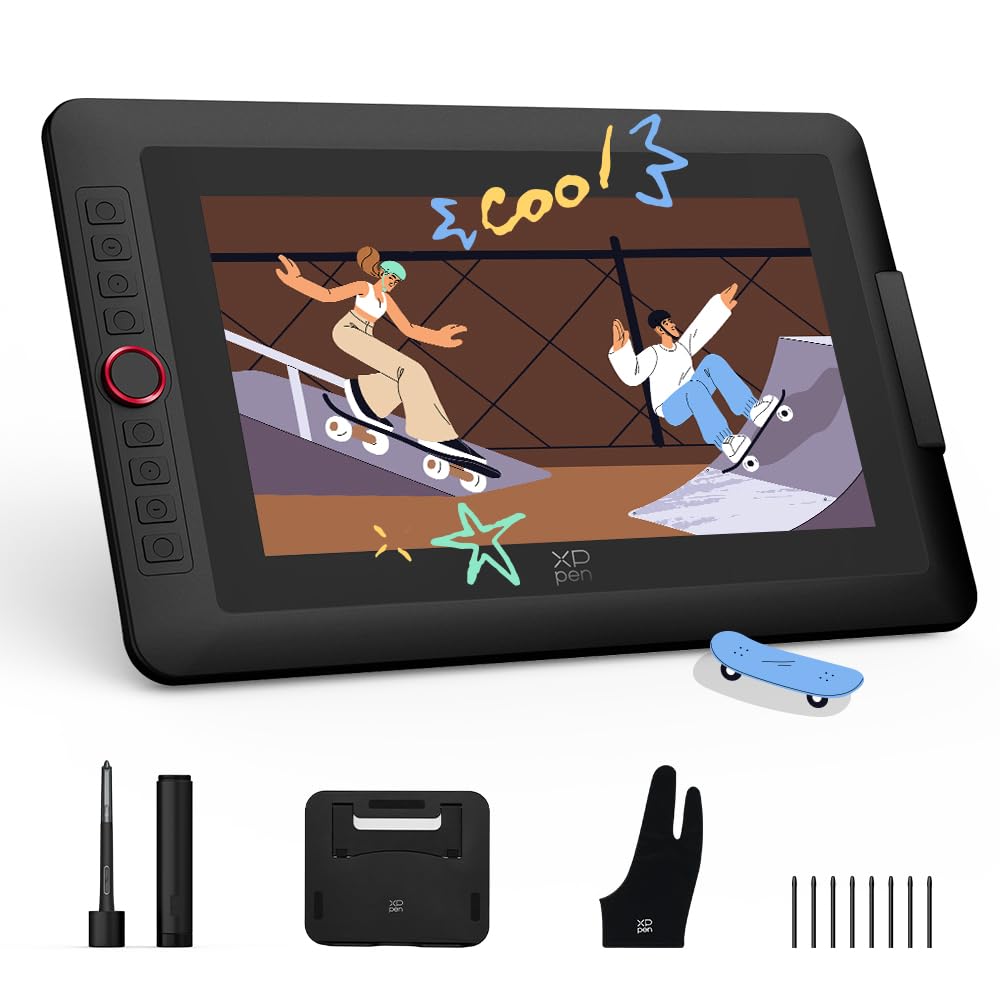
The XP-PEN Artist 13.3 Pro V2 is a versatile workhorse that offers a unique dual-mode functionality. It can operate as a standard pen display or, by turning off the screen, as a traditional pen tablet. This is a fantastic feature for artists who want to save laptop battery or reduce neck fatigue during long sketching sessions, while still having the option of a full display for detailed work. Its premium metal back panel helps keep the screen cool.
At its core is the X3 Pro Smart Chip stylus with an industry-leading 16384 levels of pressure sensitivity. The 13.3-inch 1080p fully laminated screen offers a solid 95% DCI-P3 color gamut. The iconic red dial roller wheel and 8 customizable express keys provide tactile control. The included foldable stand is sturdy and wobble-free, completing a very strong productivity package.
The device supports a clutter-free single USB-C connection on compatible devices, simplifying travel. It’s a complete creator kit out of the box. For artists who move between digital workflows and need a single device that acts as both a primary monitor and a secondary, screen-off sketching surface, this dual-mode capability makes the Artist 13.3 Pro V2 a uniquely smart choice.
Why it’s great
- Unique dual-mode: works as a pen display or a pen tablet.
- Excellent 16384 pressure sensitivity stylus with a digital eraser.
- Solid metal build and a quality foldable stand included.
Good to know
- Some users may need a firmware update for full button functionality on Chromebooks.
- The screen, while good, is a standard 60Hz 1080p panel.
7. UGEE UE12

The UGEE UE12 is a budget-friendly pen display that punches above its weight class, especially for beginners. The 11.6-inch FHD (1920×1080) screen is fully laminated, which is a rare and welcome feature at this price point. This eliminates parallax, making the drawing experience much more precise than non-laminated screens. The claimed 124% sRGB color gamut provides vibrant colors that are very pleasing to the eye.
The battery-free stylus supports 16K-level pressure sensitivity and 60-degree tilt recognition. The pen is well-balanced, and the 8 customizable shortcut keys with a concave-convex design are easy to locate by touch, allowing for efficient blind operation. Connectivity is flexible, with dual Type-C ports for blind plug-in and a 3-in-1 cable for older computers.
While the screen size is small, making it less ideal for large sweeping strokes, it is perfect for detailed work and portability. It supports a wide range of OS including Windows, Mac, and Android devices. For students, hobbyists, or professionals on a tight budget who want the direct drawing experience of a pen display, the UGEE UE12 is a compelling entry point that doesn’t feel cheap in its core functionality.
Why it’s great
- Fully laminated screen at an entry-level price point.
- High 16K pressure sensitivity and tilt support.
- 8 customizable shortcut keys are easy to use by feel.
Good to know
- Small active area may be restrictive for some users.
- Nibs may wear down relatively quickly for heavy-handed artists.
8. Frunsi RubensTab T8
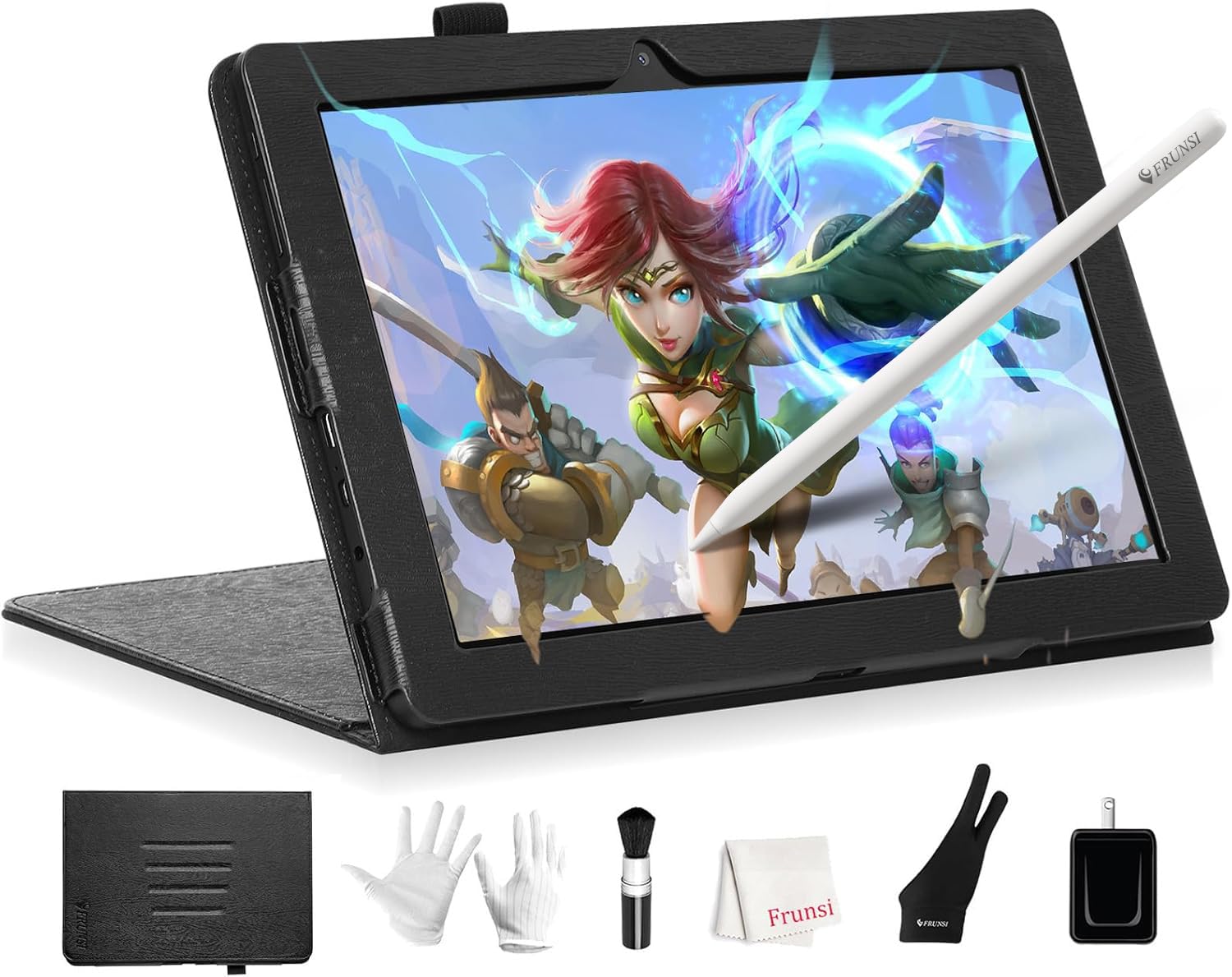
The Frunsi RubensTab T8 is a standalone drawing tablet, meaning it does not require a computer or laptop to function. It runs on Android 13, allowing you to install drawing apps like SketchBook, Krita, and ibis Paint X directly. Its 8-inch display with a 1200×800 resolution is compact but perfectly usable for sketching on the go, and the 4000mAh battery is advertised for up to 20 hours of use.
Powering the device is a quad-core CPU, 4GB of RAM, and 64GB of storage, expandable up to 256GB via microSD. The included stylus offers 2048 levels of pressure sensitivity, which is more than adequate for beginners and casual doodlers. The package is generous, including a detachable keyboard, screen protector, cleaning cloth, and a carrying case.
This is a fantastic entry-level device for children, students, or anyone who wants to start digital drawing without investing in a PC. The ability to use it wirelessly anywhere is its greatest strength. While the 2048 pressure sensitivity and 8-inch screen won’t satisfy a professional, for learning, sketching ideas, and note-taking, it offers incredible convenience and value for those who need a completely self-contained solution.
Why it’s great
- Truly standalone—no computer needed for drawing.
- Comes with a comprehensive kit including case, keyboard, and stylus.
- Excellent value and portability for beginners and kids.
Good to know
- Low 2048 pressure sensitivity level not suitable for professional work.
- Battery life drops significantly under heavy drawing apps, and there can be slight drawing lag.
9. HUION Inspiroy Frego

The HUION Inspiroy Frego is a budget-friendly, minimalist pen tablet (no screen) that focuses on providing a large, smooth drawing surface and exceptional wireless freedom. Its 10 x 6.25-inch active area is generous for its class, rivaling larger and more expensive models. The standout feature is the 24-hour battery life via Bluetooth and the quick 2.5-hour charge time, making it ideal for artists who move between a desk and a coffee shop.
The PenTech 3.0+ technology powers the slim PW550S stylus, offering 60-degree tilt support and a solid drawing feel. The battery-free pen is comfortable and responsive. The minimalist design, with a sloped ergonomic edge and a built-in wrist rest, helps reduce fatigue during long hours. It also supports Android smartphones and iPhones via apps like HiPaint and ibisPaint, giving you a portable mobile art setup.
The main trade-off for its low price is the lack of on-tablet shortcut keys. All shortcuts must be programmed onto the pen’s two side buttons or through the driver software. For artists who prefer a clean, uncluttered workspace and want the freedom of wireless drawing, the Inspiroy Frego offers incredible value, a solid build, and a large active area that feels great to use.
Why it’s great
- Excellent 24-hour wireless battery life.
- Large drawing area in a portable, minimalist frame.
- Works with Android and iPhone for mobile drawing.
Good to know
- No physical shortcut keys on the tablet itself.
- The drawing surface can feel scratchy to some users.
FAQ
What is the difference between a pen tablet and a pen display?
How many pressure sensitivity levels do I really need?
Can I use a drawing tablet with an Android phone or iPad?
Final Thoughts: The Verdict
For most users, the best artist graphic tablet winner is the HUION Kamvas 13 (Gen 3) because it offers outstanding pen technology with 16384 pressure sensitivity and dual dials at a mid-range price that doesn’t compromise on screen quality. If you want a larger 4K canvas and top-tier color accuracy, grab the XPPen Artist Pro 19 Gen2. And for a completely wireless, screen-free drawing experience on a budget, nothing beats the HUION Inspiroy Frego.