
Our readers keep the lights on and my morning glass full of iced black tea. As an Amazon Associate, I earn from qualifying purchases.
Specs are compiled from manufacturer listings and verified buyer reviews and can change over time — please confirm the key details on the product page before buying.
If you want a keyboard that sounds genuinely soothing to type on, the answer is simple: buy a gasket-mounted board with pre-lubed linear switches, and skip anything marketed as clicky. That one decision does more for your ears than any other choice you will make. This guide covers nine boards that get the creamy, thocky sound right — and explains in plain words why each one sounds the way it does.
I’m Min — the founder and writer behind Gadgets Feed. This guide is built by comparing the manufacturers’ published specifications and the patterns across verified customer reviews, so you get each pick’s real strengths and trade-offs instead of marketing spin.
Sound comes from the whole build, not just the switch inside it. A board with foam layers, a soft gasket mount, and lubed parts will thock; a hollow plastic shell will ping no matter what you install. Below you will find the asmr keyboards that get that soft, deep sound right for long typing sessions.
Our Picks at a Glance


How To Choose The Best ASMR Keyboards
The sound you hear when you type is not made by the switch alone. It is made by the whole sandwich of parts inside the case — the plate, the foam, the base, and how tightly it all presses together. Get that sandwich right and even a modest switch sounds deep and rounded. Get it wrong and an expensive switch still sounds hollow.
Start with the mount, not the switch
A gasket mount means the internal plate rests on soft rubber strips instead of being screwed tight to the case. That softness absorbs the sharp ping you hear on cheaper boards. Almost every board here uses a gasket structure, which is exactly why they sound pleasant instead of tinny.
The second half of the recipe is sound-dampening layers. Five layers of filling between the circuit board and the plate is the common figure in this group. Those layers stop the switch from slapping bare plastic, which is where that hollow, cheap rattle comes from.
Learn the three words everyone uses
“Creamy” means a rounded, slightly muffled tone with the sharp edges taken off — think of a soft thud rather than a snap. “Thocky” is a deeper, more wooden version of the same idea, often described as rain on a roof. “Clacky” is brighter and higher-pitched, closer to a crisp click. All three are pleasant; they are just different flavors.
What you want to avoid for a shared office is a genuine clicky switch. A clicky switch has a deliberate metal click on every press, which carries across a room. The boards here lean creamy or thocky, and several are specifically built to stay quiet.
Decide on the layout and the extras
Layout is how many keys you want. A 75 percent board drops the number pad but keeps the arrow keys, which frees up desk space. A 95 or 96 percent board keeps the number pad and squashes everything else closer together. If you type numbers all day, keep the pad. If you game and want arm room, drop it.
The extras that matter most day to day are hot-swap sockets, which let you pull a switch out and push a new one in with no soldering, and a volume knob, which is far faster than hunting for a key combo. A small screen is a nice touch, but treat it as a bonus rather than the reason to buy.
Quick Comparison
| Model | Best For | Keys / Layout | Connectivity | Switch Type | Amazon |
|---|---|---|---|---|---|
| YUNZII C75★ Best Overall | Best all-round thock and battery | 84 keys (75%) | BT 5.0 / 2.4GHz / USB-C | Pre-lubed linear (Candy) | Amazon |
| RK ROYAL KLUDGE R98 ProBest Value | Wired desks that want a numpad | 98 keys (96%) | USB-C wired | Pre-lubed linear (Cream) | Amazon |
| Redragon K719 PROScreen & Knob Pick | Screen and knob on a budget | 95 keys | USB-C / Bluetooth / 2.4GHz | Custom lubed linear (Mambo) | Amazon |
| HITIME x XVX M67 | Topographic light shows | 60% compact | Bluetooth 5.0 / 2.4GHz / USB-C | Pre-lubed transparent linear | Amazon |
| AULA S75 PRO | Deep thock with a screen | 80 keys (75%) | BT 5.0 / 2.4GHz / USB-C | Pre-lubed linear | Amazon |
| SOLAKAKA A99 Pro | Long-runtime full-size work | 97 keys (96%) | BT 5.0 / 2.4GHz / USB-C | LEOBOG star vector linear | Amazon |
| SOLAKAKA A75 | Crystal keycap looks | 81 keys (75%) | 2.4GHz / BT 5.0 / USB-C | LEOBOG caramel latte linear | Amazon |
| AULA F99 Pro Silent | Shared offices and quiet rooms | 96% with numpad | BT 5.0 / 2.4GHz / USB wired | Pre-lubed quiet linear | Amazon |
| ZORNHER ZH980 | Pink desk setups and gifting | 95 keys | Bluetooth 5.0 / 2.4GHz / USB-C | Factory-lubed creamy linear | Amazon |
In‑Depth Reviews
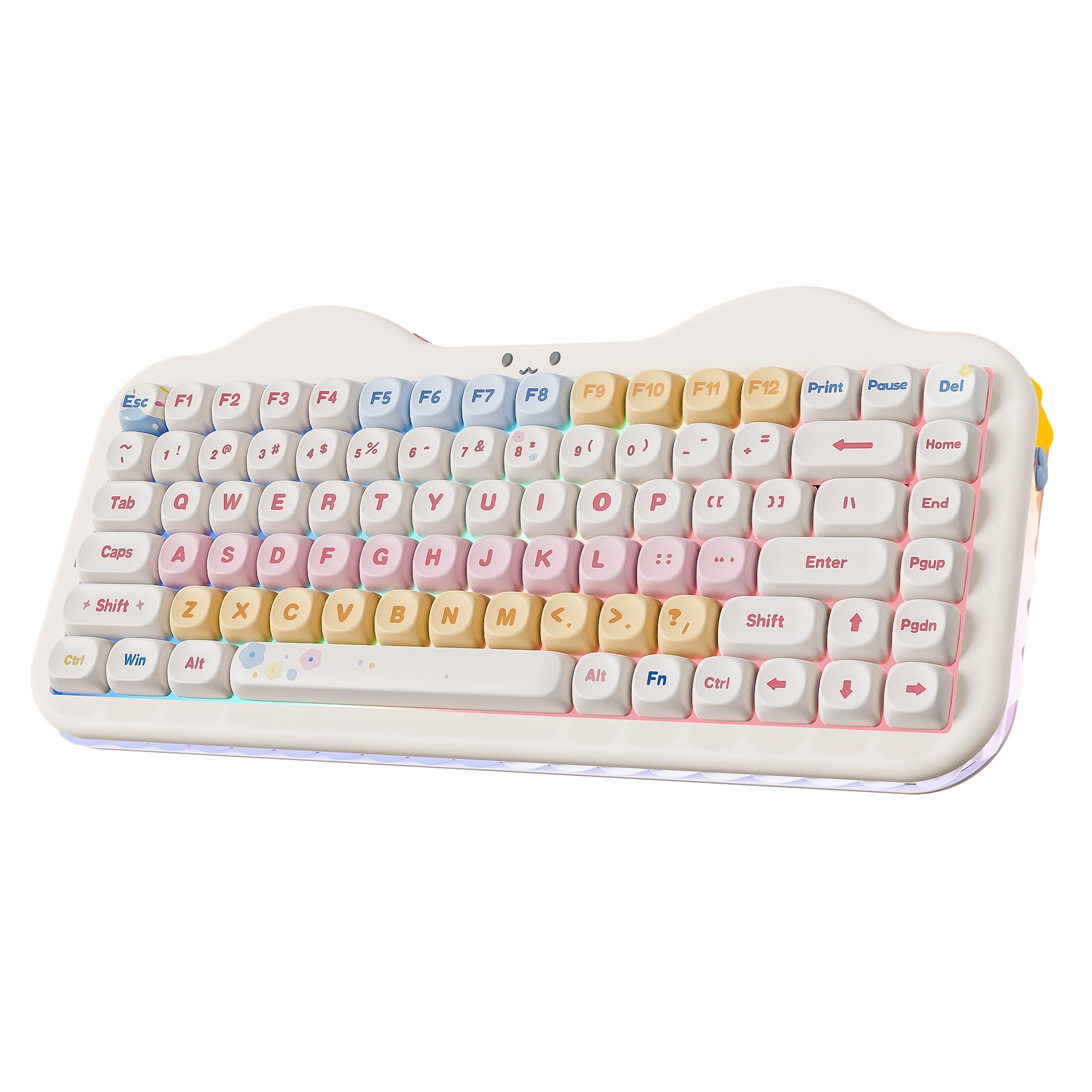
1. YUNZII C75 Cute 75% Wireless Mechanical Keyboard (Beige, Candy Switch)
Our pick — over 4.5★ from 600+ verified ratings; the strongest balance of quality and price.
A cat-themed 75% board with the biggest battery and the creamiest sound in this lineup.
If you type for hours and want one board that does sound, battery, and looks without a compromise, this is the one to start with. It runs on a 5500mAh battery (a measure of how much charge it holds — a large cell for a compact keyboard), so you are not hunting for a cable every few days. Owners put it plainly: “Zero connection issues; 90% battery after hours.”
The 75% layout fits 84 keys into a board that measures 13.2″L x 6.38″W x 1.73″H, which means the arrow keys stay but the number pad goes. That frees real desk space for a mouse swing. A gasket structure with multiple sound-absorbing layers, plus pre-lubed switches and stabilizers, produces a rounded thocky tone instead of a hollow knock. What wins people over most is the build quality — it simply feels more substantial than its price tier suggests.
The switches are hot-swappable and accept both 3-pin and 5-pin types, so you can pull the stock Candy switches and press in something else later with no soldering. It weighs 1.01 kg, and that heft is a big part of why it does not slide or ring — you can feel the difference against the lighter RK ROYAL KLUDGE R98 Pro at 0.8 kg. The one honest catch: a few owners find the RGB settings reset after a full power-off, and the letters themselves are not backlit, so in a dark room you are typing by feel.
What earns the top spot
- A 5500mAh battery that still reads 90% after hours of wireless use.
- Creamy, thocky sound straight from the box — no modding needed.
- Tri-mode: Bluetooth 5.0, 2.4GHz wireless, and USB-C wired, switching across up to 5 devices.
- Hot-swap PCB takes both 3-pin and 5-pin switches, so upgrades are solder-free.
Where it asks a little patience
- No number pad, so heavy number entry takes adjustment.
- The legends sit on top rather than glowing through, which is a nuisance in a dim room.
- Custom RGB can reset itself after the board is powered off.
Reach for this if: you want the deepest creamy sound and the longest wireless runtime in one board, and you can live without a number pad.
Think twice if: you type long columns of numbers or need glowing letters at night.
2. RK ROYAL KLUDGE R98 Pro Wired Mechanical Keyboard, 96% Creamy Gaming Keyboard
The full-number-pad thock board that plugs in and never worries about a battery.
If your desk never moves, a wired keyboard is simpler and this one proves it. The R98 Pro packs 98 keys — the number pad, arrows, and function keys all stay — into a footprint that saves desk space, and it adds five layers of sound-absorbing foam for that creamy tone. Buyers sum up the feel as buttery smooth with a satisfying “thunk-click,” and the typing response holds up for gaming and fast work alike.
Pre-lubed linear switches, a gasket mount, and those foam layers work together to kill the ping and rattle you would normally hear on a board this size.
You also get a detachable aluminum volume knob and four indicator lights for Num Lock, Caps Lock, Win Lock, and Mac mode. The catch buyers mention most is the backlighting: it is dimmer than some owners expect, and the light does not shine through the keycap legends. If you want the characters to glow, this is not the board for that. Durability is also honestly unproven — a first-impression report notes only an hour of use so far, which is fair warning rather than a problem.
The wired trade-off: you give up Bluetooth entirely, and one long-term buyer notes the onboard software is not the most intuitive to learn. In exchange the connection is dead simple — one USB-C cable and you are done, no pairing, no charging.
Who it fits: desk-bound typists and gamers who want a number pad, a volume knob, and a genuinely creamy sound without paying for wireless they will never use.
The straightforward pick: a wired desk warrior with a full numpad, a metal knob, and sound that punches well above its tier.
Skip it only if: wireless freedom is non-negotiable for you.
3. Redragon K719 PRO Wireless 95-Key Gasket Gaming Keyboard, TFT Screen & Knob
A little screen on the keyboard that shows battery, mode, and even your own GIFs.
The built-in TFT display shows battery level and the active connection at a glance. The built-in TFT display (a small color screen) shows exactly that, plus typing status, and it will play custom GIFs or memes. A single knob handles backlight brightness and media playback, and a short press cycles through the on-screen options, so you are not memorizing key combos.
On sound, this is a cushioned, quiet board. Gasket mounting plus thick-lubed custom linear switches and five layers of noise dampening give a soft, silky bounce — owners describe the keys as thocky and wooden rather than metallic, and quiet enough that it will not carry across an open office. The Jade Cloud green-white finish also stands out from the usual black gaming look.
Connectivity is genuinely flexible. Tri-mode means USB-C, Bluetooth, and 2.4GHz wireless, so you can hop from a work laptop to a personal PC to a tablet without re-pairing — one long-time Redragon owner calls that switching between a work laptop and a personal PC the deal-maker. The honest friction is in the software: it is clunky, has grammar errors, and is hard to find in English, though it does work once you fight through it. One owner also notes that pressing the knob engages the screen menu instead of muting, which takes getting used to.
Build and heft: at 830 g it feels solid without being a brick, and the plastic frame flexes little. The one layout quirk worth knowing is the number pad’s small 0 key — the same cramped-numpad note keeps coming up.
Made for: people who juggle more than one device and want a screen and knob doing the mode-switching for them.
Less ideal for: anyone who needs every last setup tool to be polished and English-first from the start.
4. HITIME x XVX M67 Wireless 60% Keyboard, QMK/VIA

A 60% board where the light shines straight through the topographic pattern on each keycap.
Most RGB keyboards glow around the letters. This one is built so the light passes through the printed pattern itself — the maker calls it IMD technology — which is why the topographic design reads as a lit illustration rather than a painted label. There are also 2 LEDs under each stabilizer and 5 on the space bar, so the long keys do not go dark at the ends like they do on cheaper boards.
For quiet typing, it runs a gasket structure with PCB single-key slotting (a cutout under each switch that softens the feel) and four layers of filling squeezed between the circuit board, plate, and switches. The result is a softer, springier keystroke and a creamy, thocky sound with low noise. The transparent pre-lubed linear switches are rated for 80 million keystrokes.
This is the smallest board here — a 60% layout drops the arrow keys and number pad entirely, so it is for minimalists or anyone who wants maximum mouse room. If you rely on a number pad, this is the wrong pick; owners who love it tend to game or work without one. Programmability is a real strength: QMK/VIA support lets you remap any key on macOS, Windows, or Linux, though you must set up your remaps while wired — the change then carries over to wireless and wired both.
What owners rave about
- Light that shines through the keycap pattern itself — a genuinely different look.
- A 4000mAh battery backs tri-mode Bluetooth 5.0, 2.4GHz, and USB-C across up to 5 devices.
- QMK/VIA remapping works across macOS, Windows, and Linux.
- Hot-swap sockets accept 3-pin and 5-pin switches.
What to weigh first
- No number pad and no arrow keys at 60%.
- Key remapping must be done in wired mode.
- A slightly springy key feel, which not everyone prefers.
Your pick if: the glow-through-the-keycap effect is the thing you cannot stop looking at, and you want tiny on the desk.
Not your board if: your daily typing includes numbers or you lean on the arrow keys.
5. AULA S75 PRO Wireless Mechanical Gaming Keyboard with Screen & Knob, 80 Keys
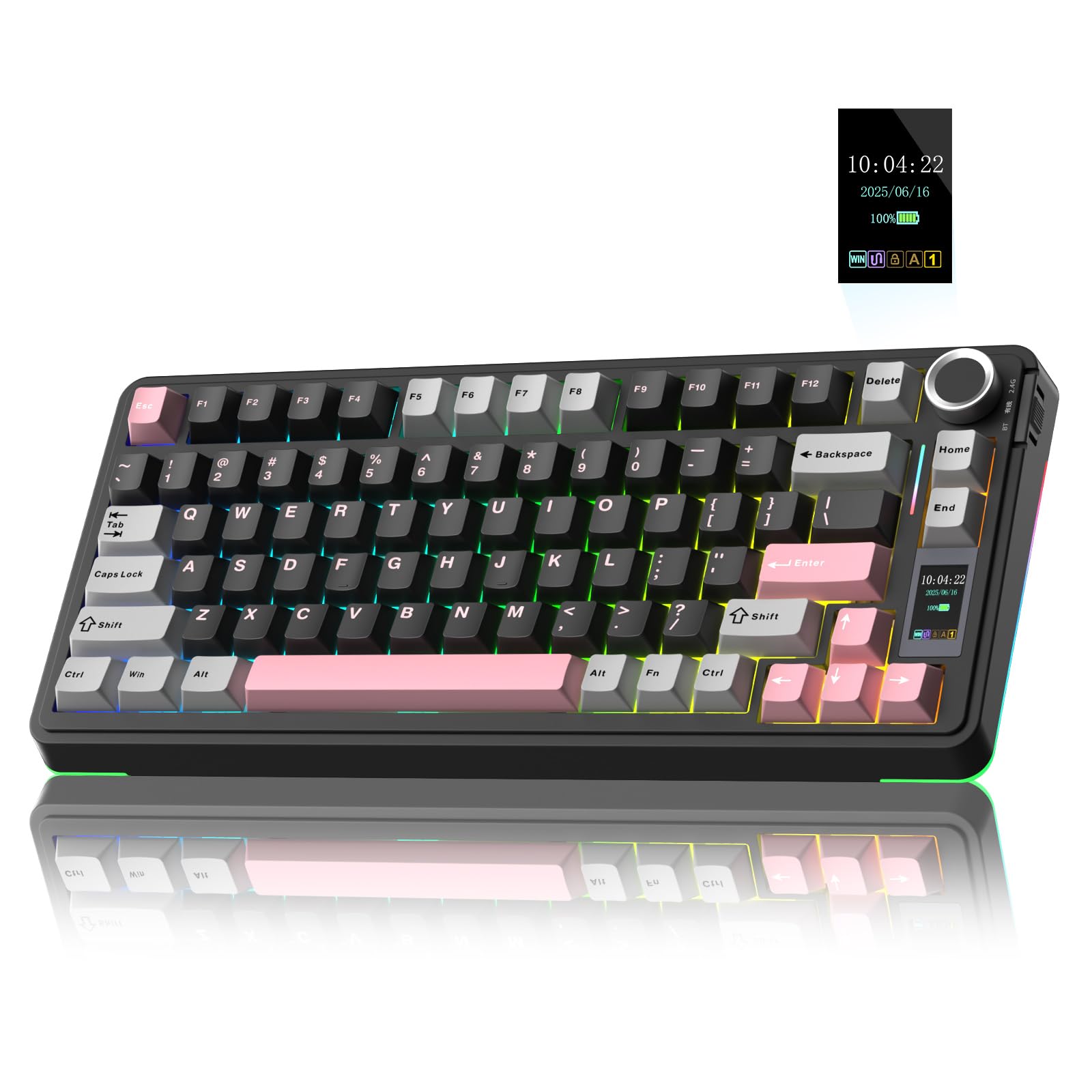
Where the thock runs deepest — one owner calls this board “straight asmr.”
If the sound is the whole point for you, start here. The S75 Pro leans into a crisp, deep thock that sits between a creamy and a clacky tone, and the built-in foam under the space bar means it arrives tuned, not hollow. The pre-lubed stabilizers and switches keep that rhythm even, and the 80-key 75% layout keeps the arrow keys while saving desk space.
You get a LCD screen that updates in real time with battery status, date, time, system, connection mode, and customizable GIFs, plus a multi-function knob to drive volume, brightness, and lighting effects. It is genuinely useful rather than decorative — the screen tells you at a glance which device you are on and how much charge is left. The catch is that setting the GIF or image and calibrating the clock needs a Windows PC in wired mode; on other systems you are stuck with the defaults.
Around back, this is a proper custom board: five layers of filling, an integrated silicone pad, hot-swap sockets for 3-pin and 5-pin switches, and PBT keycaps made with double injection and heat sublimation so they resist fading and sweat. The RGB covers 19 effects across more than 16.8 million colors plus side lighting. Owners do flag two things — the switches ship light, so heavy-handed typists sometimes swap in stiffer springs, and the customizability through software takes a little learning.
Battery reality: runtime is impressive but depends heavily on how much light you run — the noisier the RGB, the shorter the gap between charges.
The sound-first choice: buy this if the rhythmic thock is what you are chasing and you want a screen and knob to match.
Look elsewhere if: you are on a Mac and need to tweak the screen yourself — that setup is Windows-only.
6. SOLAKAKA A99 Pro Mechanical Keyboard with LCD Screen & Metal Knob
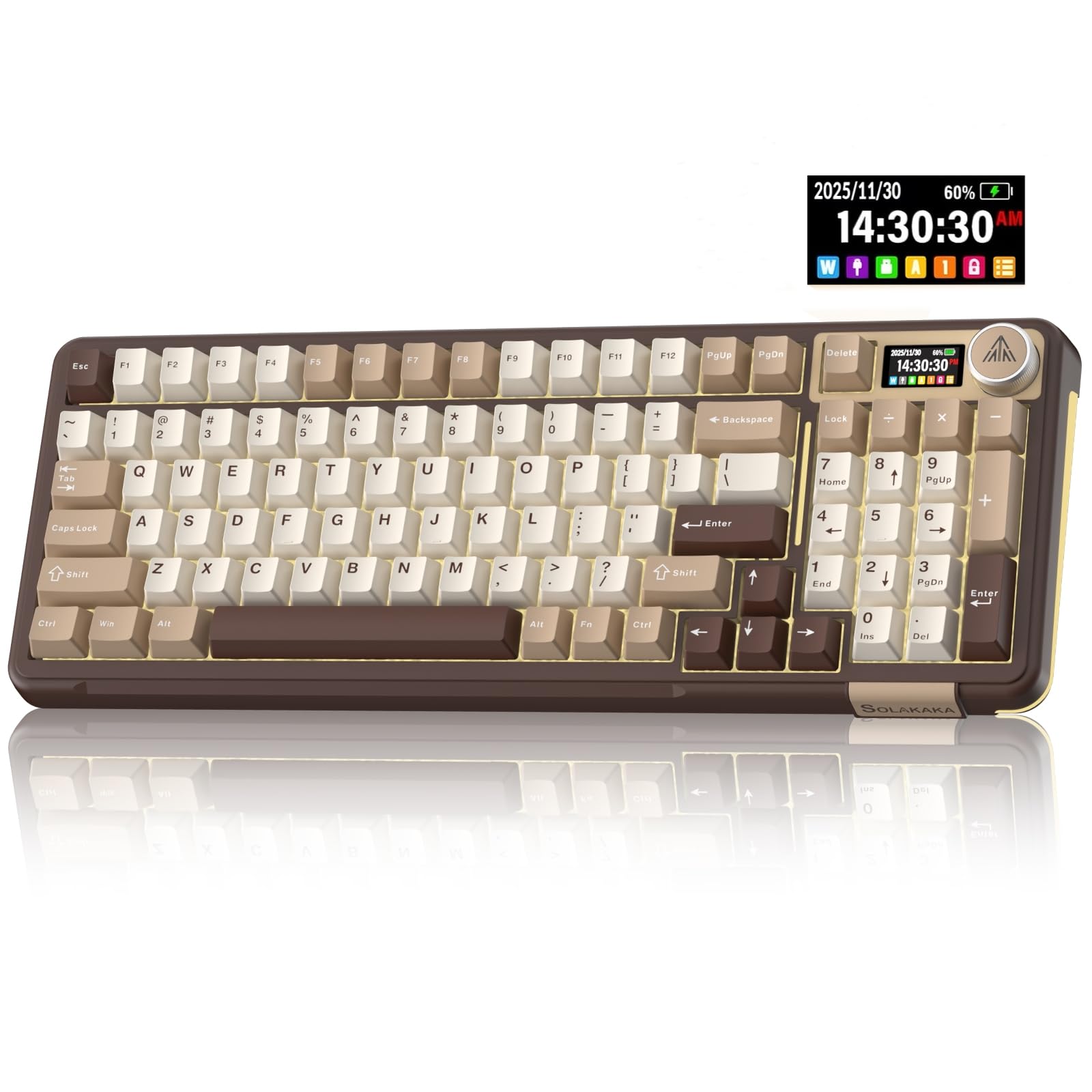
The workhorse with an 8000mAh battery that sips power for days on end.
Charge anxiety disappears here. Its 8000mAh battery is rated for roughly 61 hours with backlighting on and roughly 170 hours with it off. For a full-size board with a number pad, that is the kind of runtime you notice only because you stop thinking about it.
The A99 Pro keeps 97 keys in a 96% layout, including the number pad, arrows, and function keys, while staying compact. The creamy sound comes from a gasket structure with five cushioning layers, a single-key slotting cutout under each switch, and dampening cotton. Pre-lubricated stabilizers and LEOBOG star vector switches keep the keystroke smooth and stable. It is hot-swappable for both 3-pin and 5-pin switches, so you can change the feel without soldering.
Customization runs through a web driver rather than a download — you can set sleep time, remap keys, adjust key sensitivity, add a GIF to the screen, set music-rhythm lighting, and program macros. That is convenient, but the software is the weak spot. Owners run into an outdated interface, occasional macro failures, and heavy-handed security warnings that flag the driver, plus some connection fiddling when changing modes. The keyboard itself earns praise; it is the companion software that draws a shrug.
The setup note: the taller OEM-height keycaps take some get-used-to for anyone coming from a low-profile board — one long-term typist added a wrist rest to bridge the gap, and mentions the small 0 key on the numpad.
Best for: full-size work setups that want a number pad, a metal knob, a screen, and the longest runtime in the group.
Be ready for: configuring your lighting and macros through a web tool that is handy but not the smoothest.
7. SOLAKAKA A75 Wireless Gaming Keyboard with Multifunction Knob
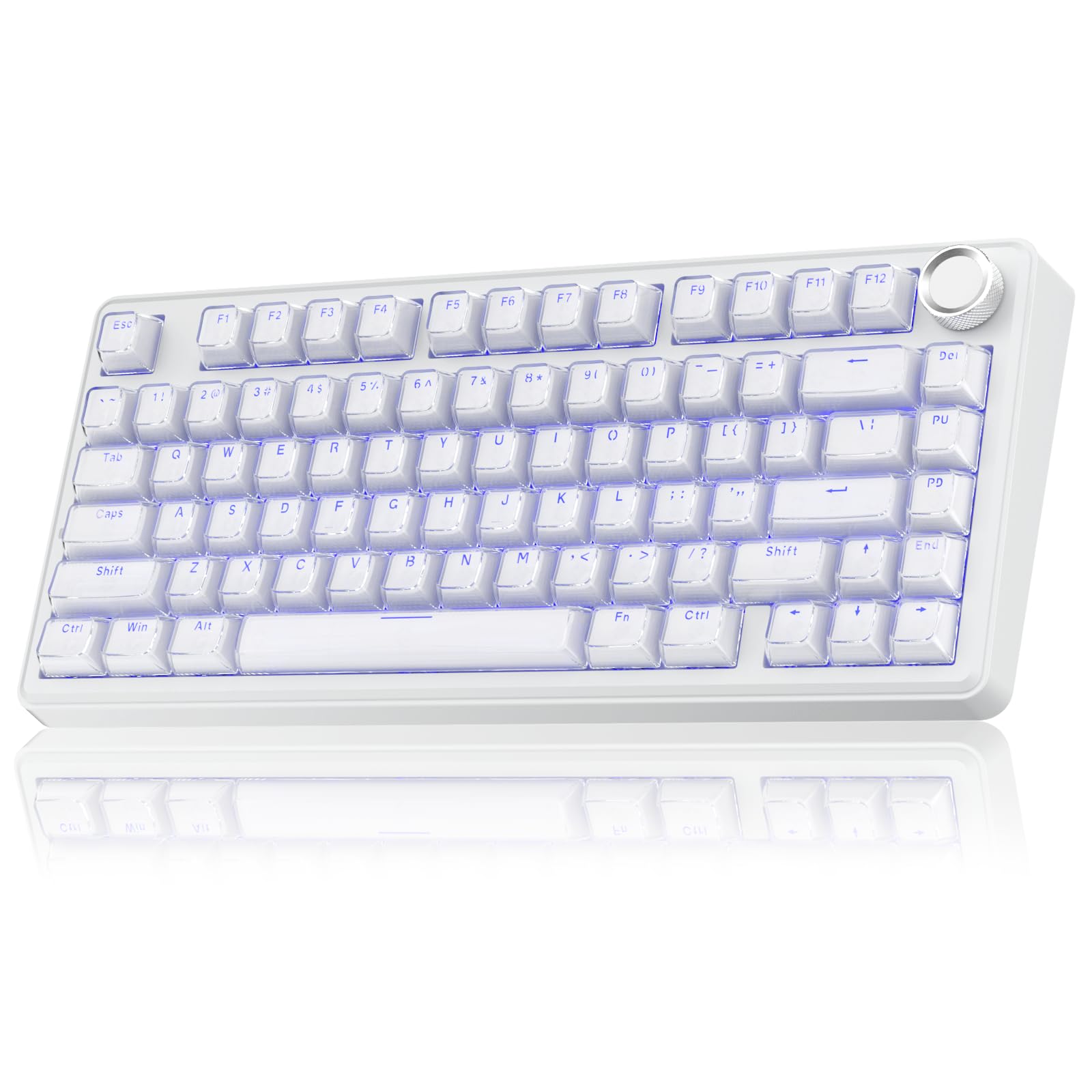
An 81-key board with crystal keycaps that scatter the backlight into a soft glow.
Each cap uses two layers — a clear PC outer shell and an ABS inner — so the transparent shell throws the light around and the printed characters will not fade. Owners keep coming back to how the lighting looks and how durable the caps feel, and the board is built on the same creamy gasket foundation as the rest of this lineup.
Under those caps sits a first-class gasket structure with PCB single-key slotting, a slotted PC positioning board, IXPE shaft-bottom padding, and PET voice-actor padding, all held together with shock-absorbing PO cotton. In plain terms, that stack is what removes the hollow echo and leaves you with a soft, creamy keystroke. The pre-lubricated stabilizers and LEOBOG caramel latte switches keep the feel stable and smooth.
For daily use you get a 4000mAh battery, tri-mode connectivity across 2.4GHz, Bluetooth 5.0, and USB-C with support for up to 5 devices, and a 75 percent layout of 81 keys that keeps the arrow keys. The multi-function knob is smarter than most — a long press switches between gaming and office modes, a short press changes what the knob does, and rotation adjusts the relevant setting. Windows key locking and full N-key rollover help prevent misfires during play.
Worth knowing: the crystal finish means fingerprints and smudges show up more than on a matte cap, so keep the included cloth handy if a spotless desk matters to you.
Pick this for: a 75% board that looks like a lit ice cube and sounds as smooth as it looks.
Consider skipping if: you want a number pad or prefer a matte, smudge-proof surface.
8. AULA F99 Pro Wireless Mechanical Keyboard — Silent Version
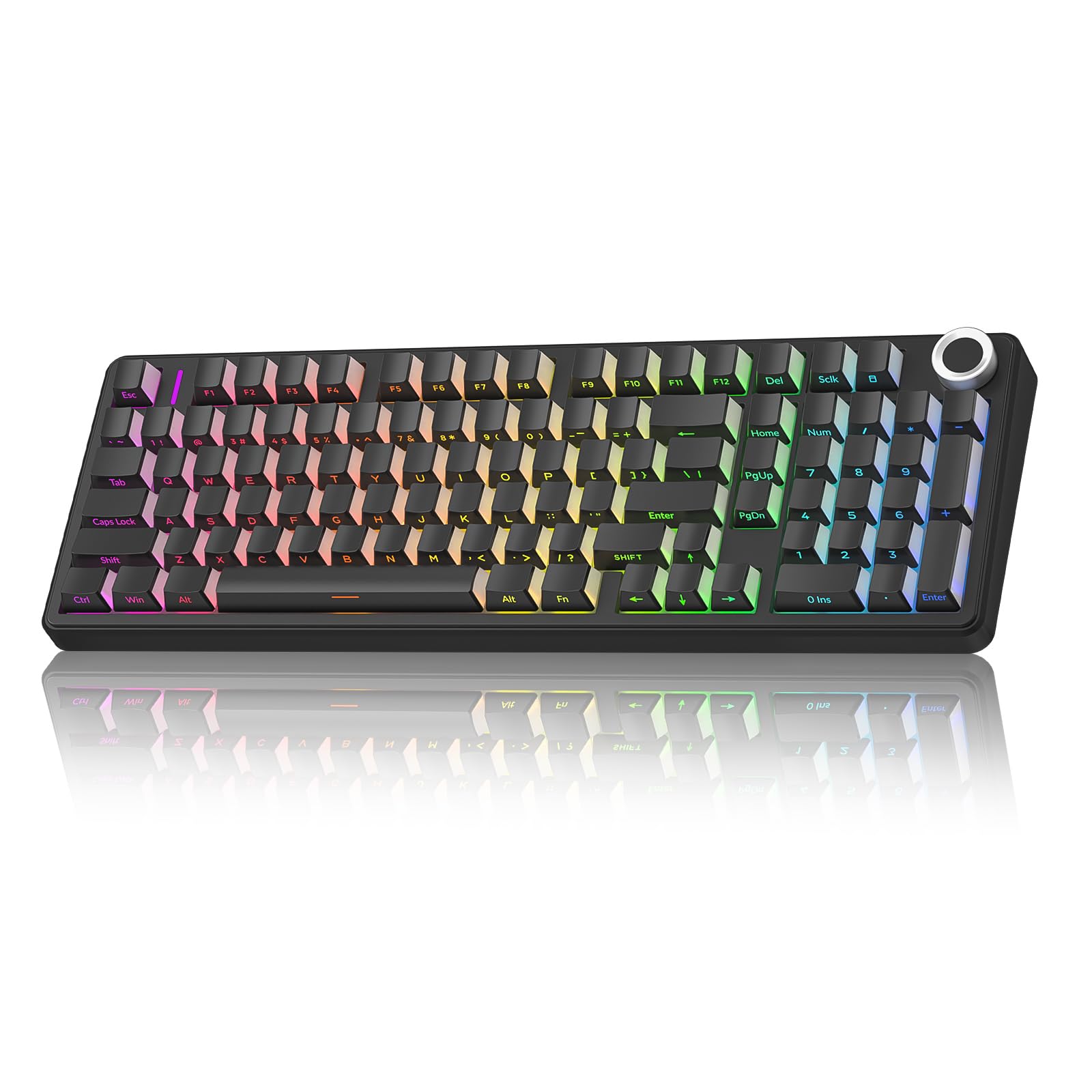
A full board with a number pad that you can type on right next to someone without a second thought.
This is the pick for anyone who loves mechanical sound but cannot make noise. The F99 Pro Silent lives up to its name — typing is described as barely audible, and owners who share a room with a partner or sit in an open office say that is the entire reason they bought it. You keep the rounded, creamy feel without the clatter, which is the hard part to get right.
The quiet does not come at the cost of a number pad. This is a 96% layout with a full numpad and arrow keys, plus a multi-function knob that switches between backlight brightness and multimedia control depending on the mode. Five layers of filling and a gasket structure soak up the noise, and hot-swap sockets let you change switches without soldering. The RGB covers 16 lighting effects with 16.8 million colors, and an 8000mAh battery keeps it going for long stretches between charges.
The solid build is a recurring point — a substantial board that does not slide around. One long-term user working 10-hour chat-support shifts reports a year of flawless operation. The friction here is setup: the instructions are basic, the software is hard to locate, and Bluetooth pairing can take a couple of tries before it clicks.
Layout detail: the number pad’s 0 key is full size here, which is a nice contrast to the cramped pads on some rivals, and the keys carry a light, easy touch.
The office answer: buy this if noise is your number one constraint and you still want a full number pad.
Expect a little setup friction: pairing and software take patience the first time, then settle down.
9. ZORNHER ZH980 Foundation Mechanical Keyboard
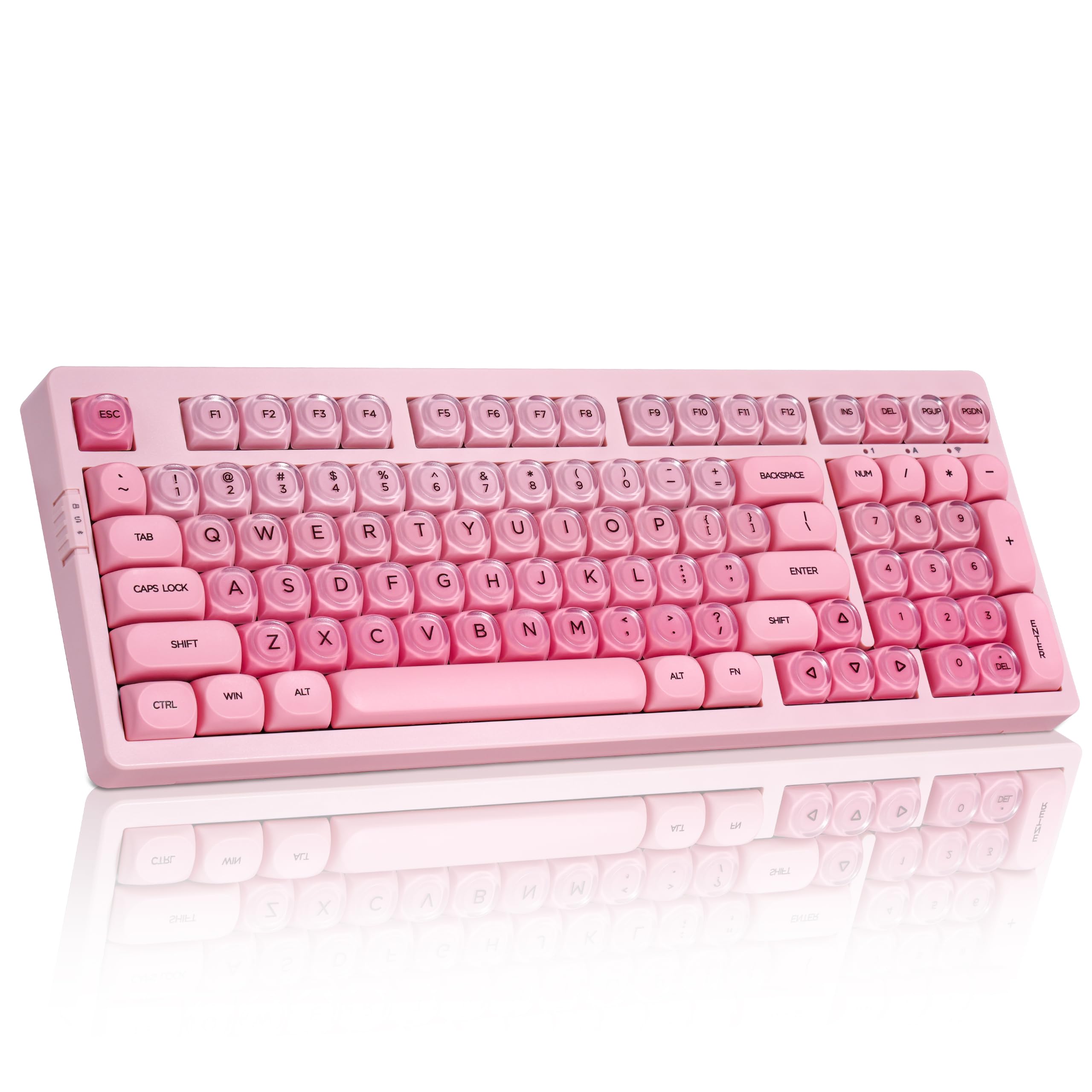
A pink ice-jelly keyboard that sounds like rain on a roof and looks like a gift.
If you want a keyboard that doubles as a desk centerpiece, this is the one. The keycaps blend PBT and PC in a double-shot mold, giving an ice-jelly transparency with a pink gradient the maker likens to a Pink Beach. It keeps a 95% layout with the full number pad, F-row, arrows, and navigation keys, so you are not trading function for looks.
On sound, the factory-lubed creamy linear switches and a gasket mount produce a soft but clearly audible tone — owners describe the thock as rain-like, and the keys as smooth and ultra-soft. It is worth being honest here: this is not a silent board, and the maker says so directly, calling it not suited for ultra-silent environments. If your goal is a hush, look at the AULA F99 Pro Silent above; if your goal is a pleasant, rhythmic sound you can hear, this one delivers.
You get 22 preset RGB modes with south-facing LEDs, a 6000mAh battery, and triple-mode connection over Bluetooth 5.0, 2.4GHz, and USB-C with switching across up to 5 devices. It is hot-swappable for 3-pin and 5-pin switches, has a dual-angle kickstand, and comes with a 1.8m nylon cable, anti-slip feet, and a two-year warranty. At 1.9 kg it is the heaviest board here, which is exactly why it does not budge on the desk. The honest catch is the layout: a few owners wish the shift keys were equal-length and the arrow cluster sat further right, and the keys are sensitive to a light touch.
What makes it stand out
- Ice-jelly pink gradient keycaps that hold their color and resist dirt.
- Full 95% layout keeps the number pad and arrows.
- Heavy 1.9 kg build that stays put, with a 6000mAh battery and 2-year warranty.
The honest trade-offs
- Explicitly not built for ultra-silent spaces.
- Keys can register a light graze, so heavy-handed typists need to adjust.
- A few owners want equal-size shift keys and a wider arrow gap.
Your board if: a pink, jewel-like desk setup matters as much as the typing sound, and you want a number pad.
Keep looking if: you need genuine silence — this one is made to be heard.
Understanding the Specs
Switch type: linear vs. clicky
A linear switch travels straight down with no bump and no deliberate click, which is what produces the smooth, creamy tone ASMR keyboards are known for. A clicky switch adds a sharp metal click on every press that carries across a room. Every board on this list runs a linear switch for exactly that reason — some are tuned quiet, some are tuned thocky, but none are clicky. If a keyboard is advertised as clicky, it is the wrong tool for a shared space or a quiet room.
Gasket mount and sound layers
A gasket mount means the internal plate rests on soft material instead of being bolted to the case, so vibrations do not ring through the shell. Makers then stack foam, cotton, and pads between the circuit board and the plate — five layers is the common count here. Together these absorb the cavity noise that makes cheap keyboards sound hollow. This is the single biggest reason the boards on this list sound deep rather than tinny, and it matters more than the switch brand.
Battery size and runtime
Battery capacity on a wireless keyboard is listed in mAh, which is how much charge the cell holds. Bigger numbers mean longer stretches between charges, but lighting drains it far faster than typing does. Look for how the maker describes runtime in backlit versus non-backlit use — running the RGB at full brightness can cut your wireless sessions dramatically. If a board offers both wired and wireless modes, running a cable during heavy RGB sessions is an easy way to save the battery.
Hot-swap sockets and keycaps
A hot-swap socket lets you pull a switch out and press a new one in by hand — no soldering iron, no desoldering pump. Most boards here accept both 3-pin and 5-pin switches, which covers nearly everything you can buy. Keycap material matters too: PBT is denser and resists the shiny wear and fading that cheaper caps develop. A sturdier cap also changes the sound for the better, giving a lower, more solid note.
FAQ
What makes a keyboard sound creamy or thocky instead of clacky?
Are linear switches quieter than clicky switches?
Will a 75% keyboard work if I need a number pad every day?
Do I need a wired connection for the best typing feel?
How long does the battery last on these wireless keyboards?
Can I change the switches on these keyboards without soldering?
Is Bluetooth good enough for gaming or should I use 2.4GHz?
Do PBT keycaps feel different from cheaper plastic caps?
Will these keyboards work with my Mac as well as Windows?
What size keyboard fits the smallest desk without losing arrow keys?
Final Thoughts: The Verdict
For most people, the asmr keyboards winner is the YUNZII C75 because it nails the creamy, thocky sound and backs it with a 5500mAh battery that still reads 90% after hours of wireless use — a rare combination of sound and endurance in one compact 75% board. If you want the deepest thock and a screen to match, grab the AULA S75 PRO, whose built-in foam under the space bar makes one owner call it “straight asmr.” And if your keyboard sits in a shared office, the AULA F99 Pro Silent is the one to reach for — it keeps the full number pad while typing quietly enough that nobody turns around.
Line the nine up and the pattern is clear: the YUNZII C75 and SOLAKAKA A75 hold the highest owner scores here, while the wired RK ROYAL KLUDGE R98 Pro and the gift-ready ZORNHER ZH980 round out the spread for anyone who wants a number pad or a pink showpiece. Whichever you choose, buy for the mount and the dampening first — that is what your ears actually hear every time you type.
How We Picked
We do not accept paid placement. Every pick is matched to a real buyer and a real use-case; we do not hands-on test units.
Sources & Methodology
Specifications: manufacturer listings and product documentation. Review insights: verified customer reviews, as of September 2026. Pricing: not shown on this page (it changes often); check the current price via the retailer link.
As an Amazon Associate, Gadgets Feed earns from qualifying purchases. This does not affect which products we feature.