
Our readers keep the lights on and my morning glass full of iced black tea. As an Amazon Associate, I earn from qualifying purchases.
Specs are compiled from manufacturer listings and verified buyer reviews and can change over time — please confirm the key details on the product page before buying.
An asset tag printer is the difference between knowing exactly where your gear is and playing a costly guessing game with your inventory. The best asset tag printers balance print crispness, label durability, and connectivity so the tags you make today still tell the truth years from now.
I’m Min — the founder and writer behind Gadgets Feed. This guide is built by comparing the manufacturers’ published specifications and the patterns across verified customer reviews, so you get each pick’s real strengths and trade-offs instead of marketing spin.
From handheld portables to industrial desktop units, we break down the top options to help you find the right asset tag printer for your specific labeling jobs.
Our Picks at a Glance

How To Choose The Best Asset Tag Printer
Before you buy an asset tag printer, think about what you tag, where you tag it, and how often you print. A handheld Bluetooth unit fits a technician’s tool bag, while a desktop thermal printer serves a busy shipping desk.
Match Print Technology to Your Environment
Thermal transfer printers use a ribbon that melts into the label, creating marks that resist fading, water, and oil. Direct thermal printers need no ribbon but produce labels that darken over time. For asset tags that must stay readable for years, thermal transfer is the standard.
Consider Label Material and Size
Asset tags live on cables, equipment, and shelves. Heat shrink tubing wraps around wires, while polyester and vinyl resist chemicals and weather. Check that the printer supports the tape widths and materials your jobs demand before you buy.
Prioritize Connectivity for Your Workflow
Bluetooth lets a phone or tablet drive the printer on site. USB and Ethernet suit fixed desktop stations where software handles batch printing. The right connection keeps the printer where your work is.
Quick Comparison
| Model | Best For | Print Speed | Max Tape Width | Connectivity | Amazon |
|---|---|---|---|---|---|
| Brother PT-D610BTVP★ Best Overall | Versatile office & warehouse | 20 ppm | 1 inch | Bluetooth, USB | Amazon |
| Epson LW-PX300VPBest Value Kit | Industrial kit portability | 6 ppm | 0.7 inch | USB | Amazon |
| Makeid P31SBattery Champion | Battery-powered fieldwork | — | 1 inch | Bluetooth, USB | Amazon |
| Zebra GX420D | High-volume shipping | 170 ppm | 4 inch | USB | Amazon |
| Brady M211 | Rugged mobile use | 0.6 ppm | 0.75 inch | Bluetooth | Amazon |
| CLABEL X1 | Small business product labels | 85 ppm | 4.3 inch | Bluetooth, USB | Amazon |
| Brother QL-820NWB | Networked office labeling | — | 2.4 inch | Wi-Fi, Bluetooth, USB | Amazon |
| Epson LW-PX900PCD | Industrial & electrical ID | — | 1.5 inch | USB | Amazon |
| Zebra ZT411 | Heavy industrial throughput | — | 4 inch | Serial, USB, Ethernet, Bluetooth | Amazon |
In‑Depth Reviews
1. Brother P-Touch PT-D610BTVP
Our pick — over 4.5★ from 350+ verified ratings; the strongest balance of quality and price.
The feature-packed all-rounder that prints crisp labels from your phone or PC with zero fuss.
The Brother PT-D610BTVP keeps retail floors, warehouses, and stockrooms organized without tethering you to a desk. You can type on the full QWERTY keyboard built into the unit, or connect via Bluetooth from an iOS or Android device, plus a USB cable for your computer — so it works whether you are standing at a shelf or at your desk.
Print quality is the thing everyone raves about, and the numbers back it: you get up to 8 lines of text, 17 fonts, 17 font styles, 160 premium frames, and 900 symbols. With 175 pre-loaded business-specific templates, you can produce a professional asset label in seconds. The built-in memory stores up to 90 labels, so frequent reprints of the same asset ID are instant.
The full-color 20-character, 2-line LCD preview lets you catch mistakes before wasting tape, and it runs on 6 AA batteries or an AC adapter. Buyers report “Batteries last through a full 8m cartridge,” meaning you can genuinely go cordless for a big labeling session. It prints at 20 pages per minute in black ink, a speed that outpaces every other handheld here. The label quality itself earns the most praise, with reliability right beside it — this is a machine built for daily volume.
What Owners Love
- Crisp, clear labels with huge template library
- Runs on AA batteries or plug-in AC power
- Bluetooth pairing is fast on iPhones and iPads
The Trade-offs
- Windows 11 driver setup requires a separate app install first
- Keys have slight side-to-side play
The pick for most teams: If you want one versatile printer for bins, pipes, shelves, and assets, this beats the smaller Epson on speed — 20 ppm versus 6 ppm — and adds Bluetooth.
Fair warning: Windows users should budget a few extra minutes for the initial driver dance; it is not plug-and-play on a PC.
2. LABELWORKS Epson LW-PX300VP
A whole labeling workshop in one case, ready to make wire IDs and barcodes from day one.
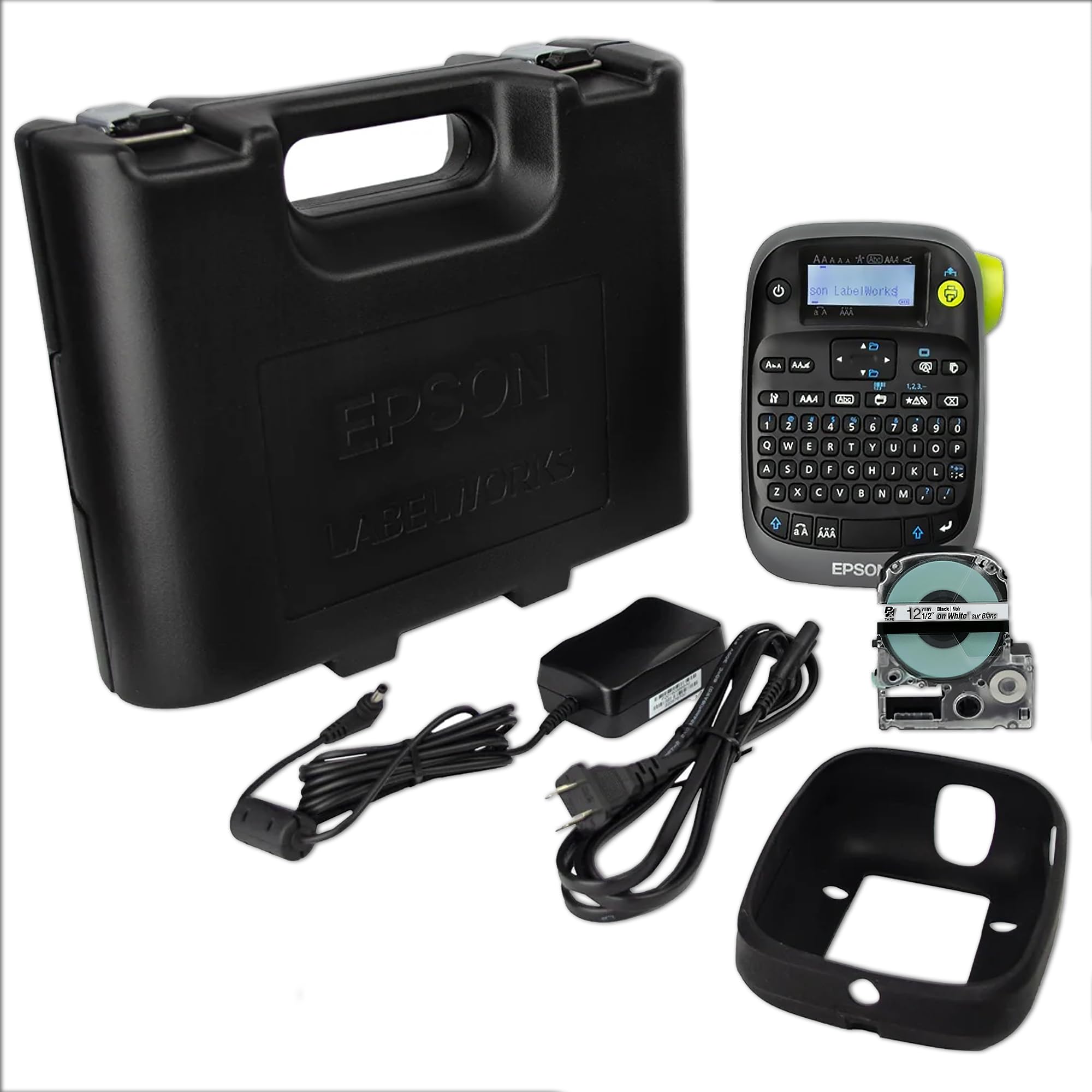
The LW-PX300VP earns its value badge because it arrives as a true complete kit: an AC adapter, a protective drop guard cover, a cartridge of standard industrial tape, a manual, and a durable black carrying case. You pull it from the start and start labeling immediately, which is exactly what busy facilities want.
This printer excels at custom barcodes, wire labels, and general office identification. Its standout feature is heat shrink tubing — owners mention “I’ve used the heat shrink tube on a sizeable project and am so glad I git this printer,” a key feature for anyone doing serious electrical work where labels must survive heat and handling. The large print preview screen saves tape by showing your label before you commit it to print.
Print quality and performance get the most praise here, and the long list of compatible tapes explains why — PET polyester, strong adhesive, removable adhesive, vinyl, self-laminating overwrap, heat shrink, magnetic, and specialty craft options in sizes 6mm through 18mm. The built-in QWERTY keyboard and auto-cutter mean it works fully standalone, no phone required. A lifetime warranty in the US and Canada backs the whole package.
What Wins People Over
- Everything you need is in the box
- Prints heat shrink tube for serious wire ID
- Drop guard cover and sturdy case protect it on site
Honest Limitations
- With 6 batteries loaded it feels heavy
- The dim screen and small manual print are minor gripes
Reach for this if: You want one rugged, case-ready kit that handles barcodes and heat shrink from the start without buying extras.
Look elsewhere if: You need a phone-connected printer — this is a keyboard-driven standalone with USB only, not Bluetooth.
3. Makeid P31S
A cordless field tool that prints sharp, weatherproof labels all day on a single charge.
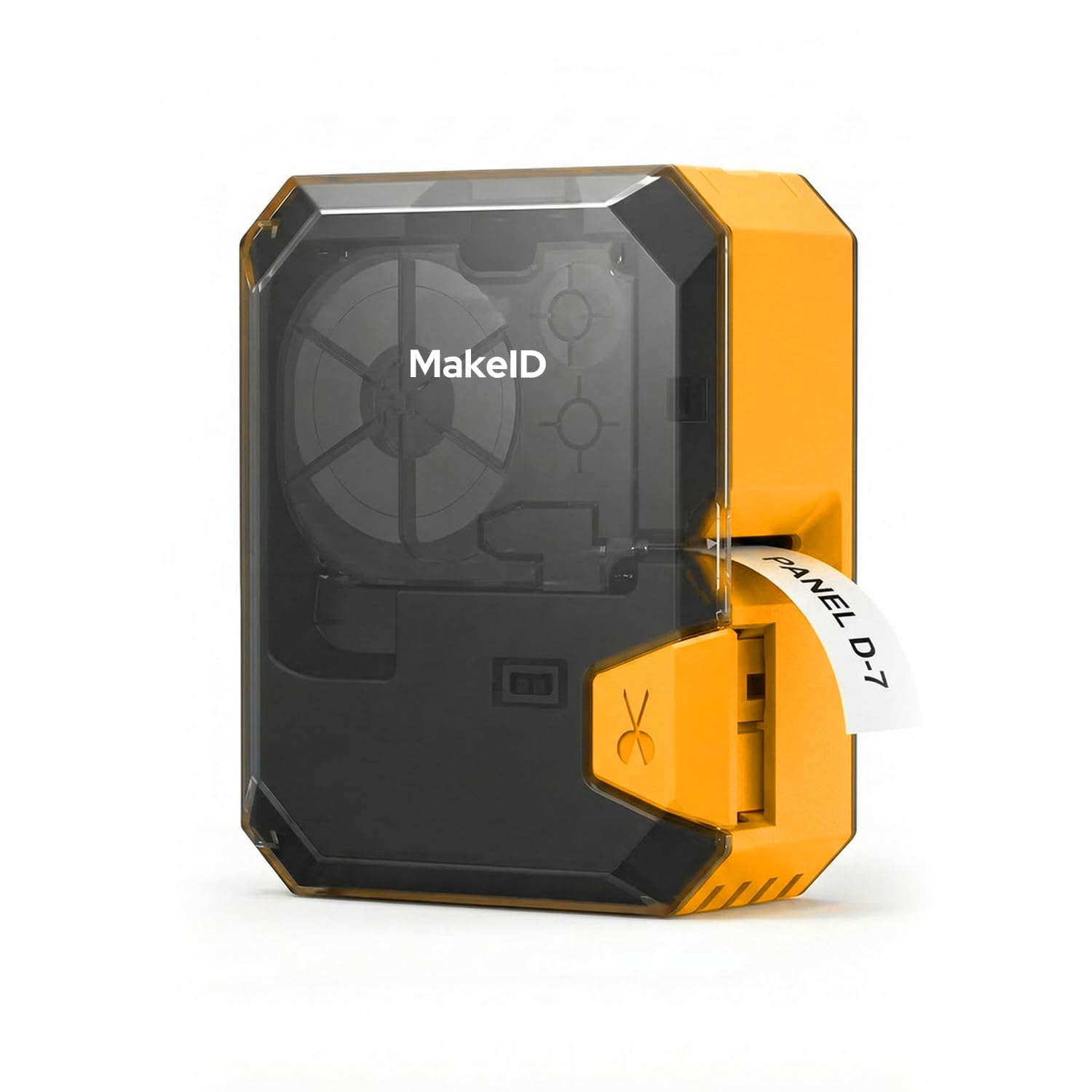
The Makeid P31S is built for the jobsite, where power outlets are scarce and labels must not quit. Its 2600 mAh rechargeable battery delivers up to 90 days of standby, and in real-world use one owner made 150 labels at roughly 75% charge. That is a full day of breaker panel and cable work without hunting for a plug.
Thermal transfer produces 10-year weather-resistant, oil-proof, waterproof labels that withstand harsh temperatures. The 300 DPI print head delivers sharp, smudge-proof text and barcodes at up to 100 labels per minute, and the 1-inch print head handles up to 8 lines for cable schedules, panel labels, and asset tags.
It supports 30+ label sizes across vinyl, self-laminating wraps, PET, nylon cloth, and heat shrink tubing. Connectivity is Bluetooth from a phone or tablet plus USB for PC software, and the app finds the device instantly on iOS. It meets ANSI and TIA/EIA-606-A labeling standards for electrical, datacom, and IT work, backed by 3 years of replacement service. Print quality is the standout praise, with ease of use right behind it.
Why It’s a Field Favorite
- 10-year weather-resistant labels from thermal transfer
- Huge battery capacity with 90 days standby
- Bluetooth pairing is flawless on iPad and iPhone
Small Compromises
- Slightly bulky and sturdy rather than sleek
- No on-screen power meter to check charge level
Built for electricians and IT pros: This one targets anyone tagging breaker panels and Ethernet ports in the field, where the long battery and tough labels earn their keep.
Watch out: The Bluetooth was flawless for some, but connectivity gets mixed notes in the review pages — a minority hit pairing snags.
4. Zebra GX420D (Renewed)
The desktop freight train built to blast out shipping labels at a staggering 170 pages per minute.
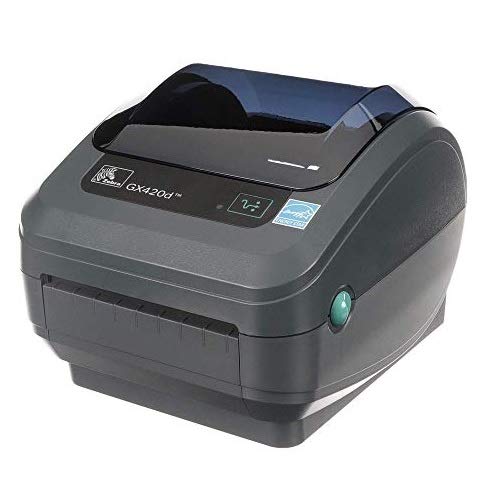
The Zebra GX420D is the speed king of this list, printing at 170 pages per minute in direct thermal mode. That means no ink, toner, or ribbons to buy and replace — it uses heat to mark the label directly, cutting both operating costs and maintenance. This is the printer for a busy warehouse or e-commerce desk churning through UPS, FedEx, and USPS shipping labels without pause.
This printer handles 4-inch shipping and barcode labels, making it ideal for inventory tags, product labels, and asset tracking in retail, warehouse, healthcare, and logistics settings. It connects to a PC over USB, and value for money is the most-praised aspect — the sticker price for this kind of throughput is genuinely tough to top. The catch is that this is a renewed unit, and it shows: the most-discussed topic is reliability, with mixed feedback.
Some customers note a unit that works flawlessly and took less than ten minutes to start using, while others hit snags. The recurring themes are scratches and dents on arrival, plus a setup that rewards technical expertise — the right Zebra driver is essential, since the Windows default driver can produce garbage prints. Think of it as a great engine that demands a little mechanical sympathy.
The Big Wins
- 170 ppm print speed for high-volume days
- No ink, toner, or ribbon costs
- 4-inch width covers shipping and inventory labels
What to Expect
- Renewed units can arrive with cosmetic wear
- Setup needs the right driver, not the default one
- Reliability is a mixed bag in owner feedback
Who it beats and who it does not: It shreds every other pick on shipping speed, but if you lack the patience for driver setup, a plug-and-play handheld is the safer route.
The honest catch: You are buying a renewed workhorse — inspect it on arrival and expect some cosmetic wear as part of the deal.
5. Brady M211

The pocket-sized tank that survives a 6-foot drop and a 250 lb crush while tagging cables on site.
The Brady M211 is built like a tool, not a gadget. It survives a 6-foot drop and a 250 lb crush, so it rides along in a toolbox to every job. Its compact size and all-day battery make it the travel-friendly sidekick for AV, network, and electrical pros who label cables and panels where they stand.
It is powered entirely from your phone — the app handles pairing, preview, spreadsheet import, and even voice-to-text, and it prevents printing if your label won’t fit the tape. The Bluetooth connects quickly, the auto-cutter trims each label, and it can be charged from a USB-C battery bank in the field. Label quality earns the most praise, and it handles regular label material effectively.
The defining trade-off is clear: this printer prints at just 0.6 inches per second and maxes out at 0.75-inch width. It is not built for bulk — it is built for on-the-go precision work. The app gets mixed feedback, with several owners reporting issues on Samsung phones, so iOS users will likely have the smoothest experience. Its tool-grade durability and pro output quality make it the trusted companion for field service.
What Makes It a Tool
- Survives a 6-ft drop and 250 lb crush
- USB-C charging from a battery bank on site
- Auto label cutting and quick Bluetooth pairing
Before You Buy
- Slow 0.6 in/s print speed — not for bulk runs
- Max 0.75-inch width limits bigger tags
- App issues on some Samsung phones
For mobile pros: If your asset tagging happens out in the field and your phone is your office, the M211’s durability and sharp output win the day.
Think twice if: You need a standalone keyboard unit or high-volume throughput — this one is phone-dependent and deliberately slow.
6. CLABEL X1
The desktop label powerhouse for Etsy shops and small brands that need professional, no-fade product tags.
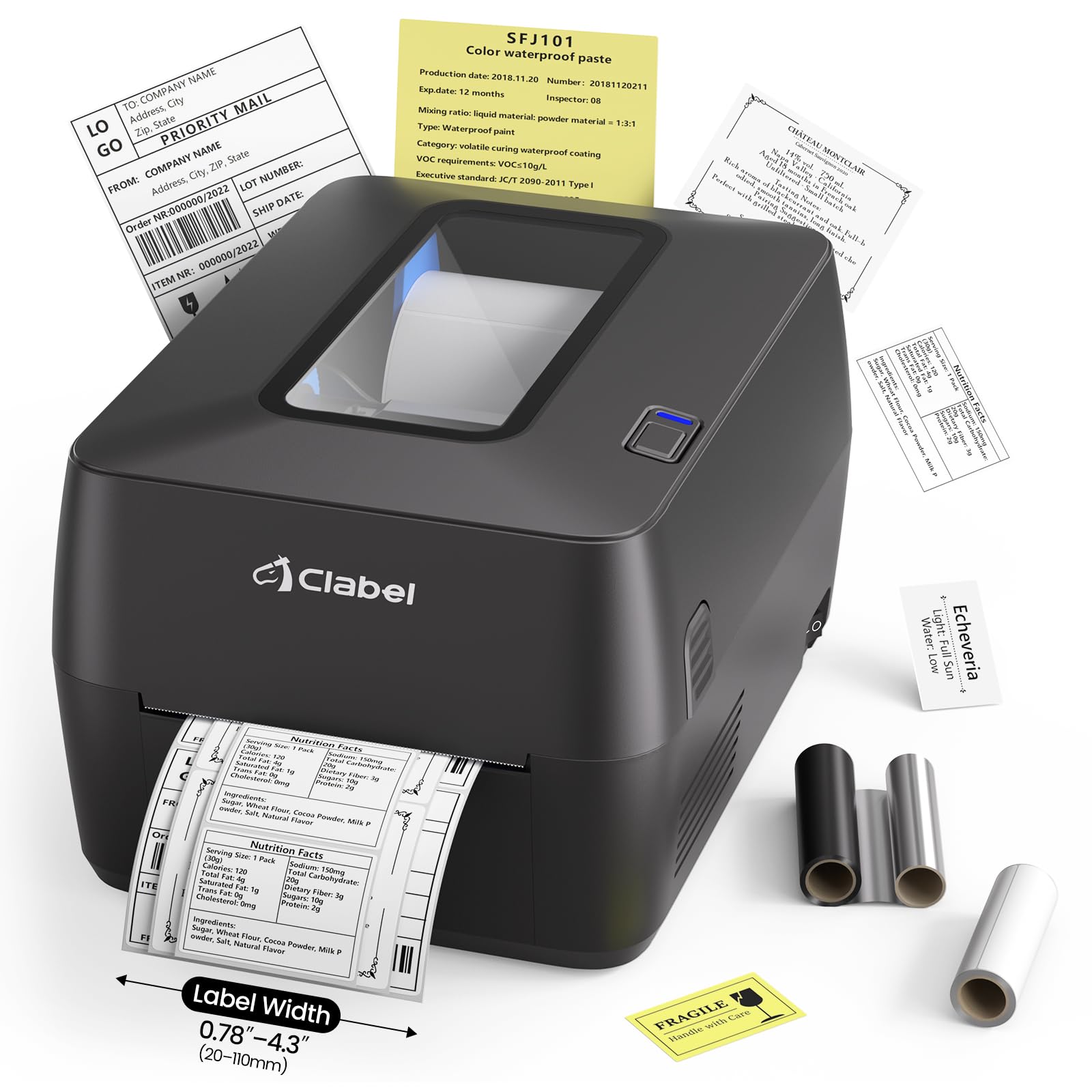
The CLABEL X1 is aimed squarely at growing small businesses that want their product labels to look professionally made. Using thermal transfer technology, it creates waterproof, fade-resistant and scratch-resistant labels — the kind that keep candles, cosmetics, and handmade goods looking polished on a shelf.
It prints at up to 152mm/s (about 85 pages per minute) with a large 5-inch roll capacity, so you change labels less often during shipping and inventory runs. The dual ribbon core support fits both 0.5-inch and 1-inch ribbon cores, working with wax, resin, and wax-resin ribbons across a 20–120mm media width. For freezers, outdoor gear, and labs, you can pair resin ribbon with PET material for waterproof, chemical-resistant, UV-resistant labels.
Setup is genuinely ready-out-of-the-box — the package includes the printer, a roll of 100×100mm thermal transfer coated paper labels, ribbon, power adapter, and USB cable. Both Bluetooth and USB are on board, and the adjustable sensor supports gap, black mark, continuous, and perforated labels. The main caveat is honest: a burned-out pixel marred one owner’s early labels, a reminder that quality control varies. Most feedback, though, praises the clean print quality and reliable Bluetooth connection.
Built for Brands
- Waterproof, fade-resistant, scratch-resistant labels
- 5-inch roll capacity means fewer label changes
- Resin ribbon + PET for harsh environments
Keep in Mind
- An occasional unit ships with a defect early on
- Mac users get PDF-only printing via driver
- Tablets are not supported for the software
Made for creators: If you run a small shop and your packaging is your brand, the X1’s professional output and easy setup are a strong match.
The caveat: Quality control has an occasional miss, so test your first roll of labels before committing to a big run.
7. Brother QL-820NWB

The network-aware label printer that lets an entire office print over Wi-Fi without ink or toner.
The Brother QL-820NWB stands apart with its array of connection options: Bluetooth, Wireless (802.11b/g/n), Ethernet, and even a USB host interface for a scanner. That makes it the pick for check-in stations, front desks, and shared office environments where multiple people need to print from laptops, phones, or tablets.
Speed is a genuine highlight here — it prints up to 110 standard address labels per minute with black text at 300 DPI. It can also print black and red labels using the DK 2251 tape, and handles a maximum label length of 3 feet, which is spectacular for pipe markers or long identification runs. The monochrome LCD screen allows for standalone use without a computer.
The built-in media includes starter rolls: DK1201 die-cut address labels and a continuous roll of red/black tape at 2.4-inch width. The software earns the most praise, with owners noting it works well with Linux and Android systems. But ease of use is the mixed note — network setup benefits from experience with static IPs and drivers. The recurring gripe is the outdated USB-A cable (no USB-C) and a setup process that is not plug-and-play, yet once configured it is a reliable, solid buy.
The Standout Strengths
- Wi-Fi, Ethernet, Bluetooth, and USB host options
- 110 address labels per minute at 300 DPI
- Prints black and red labels on one tape
The Setup Reality
- Network configuration needs driver experience
- Bluetooth connects only one device at a time
- Outdated USB-A cable, no USB-C port
Best for shared spaces: If a busy office or check-in desk needs one printer the whole team can reach over Wi-Fi, this is the most flexible network option here.
The honest ask: It rewards a technically comfortable admin — budget time for the initial network setup before it runs smoothly.
8. LABELWORKS Epson LW-PX900PCD

The professional handheld that prints flawless 10-point text and handles tape up to 1.5 inches wide.
For electricians, contractors, and facility teams, the LW-PX900PCD is the professional-grade choice. It prints perfectly clear 10-point text — a level of legibility that matters when a label needs to stay readable in a data rack for years. It takes tape up to 1.5 inches (36mm) wide, a step up from the 1-inch availability on most handhelds.
The deluxe kit is genuinely complete: a rechargeable lithium-ion battery, AC adapter, USB cable, Label Editor Professional software for Windows, magnetic attachments, starter tape, and an industrial hard case. The magnetic feet stick to metal racks, letting you label server cabinets hands-free. It supports vinyl, polyester, heat shrink tubing, self-laminating wire wraps, and magnetic labels, all backed by a lifetime warranty in the US and Canada.
Print quality leads the praise, with versatility right behind it. It is faster than the alternatives, durable, and meets MilSpec drop standards. Auto tape rewind and 1mm margin settings cut waste and lower costs. The trade-off is the Windows-only software, which some find limiting for logos — and it is not wireless, so there is no mobile app. But for pure industrial labeling output and build, owners say it far surpasses the Dymo Rhino.
The Professional Edge
- Crisp 10-point text and 1.5-inch tape support
- Magnetic attachments stick to metal racks
- Auto rewind and 1mm margins reduce waste
The Limits
- Software is Windows-only with logo limits
- No wireless or mobile app support
- Slightly heavy with a plastic-feeling case
For serious labeling pros: If your job demands wide tapes, heat shrink, and text precision, this is the handheld that outclasses the competition on capability.
skip it if: You need to print from a phone or Mac — this one is tethered to a Windows PC via USB.
9. ZEBRA ZT411
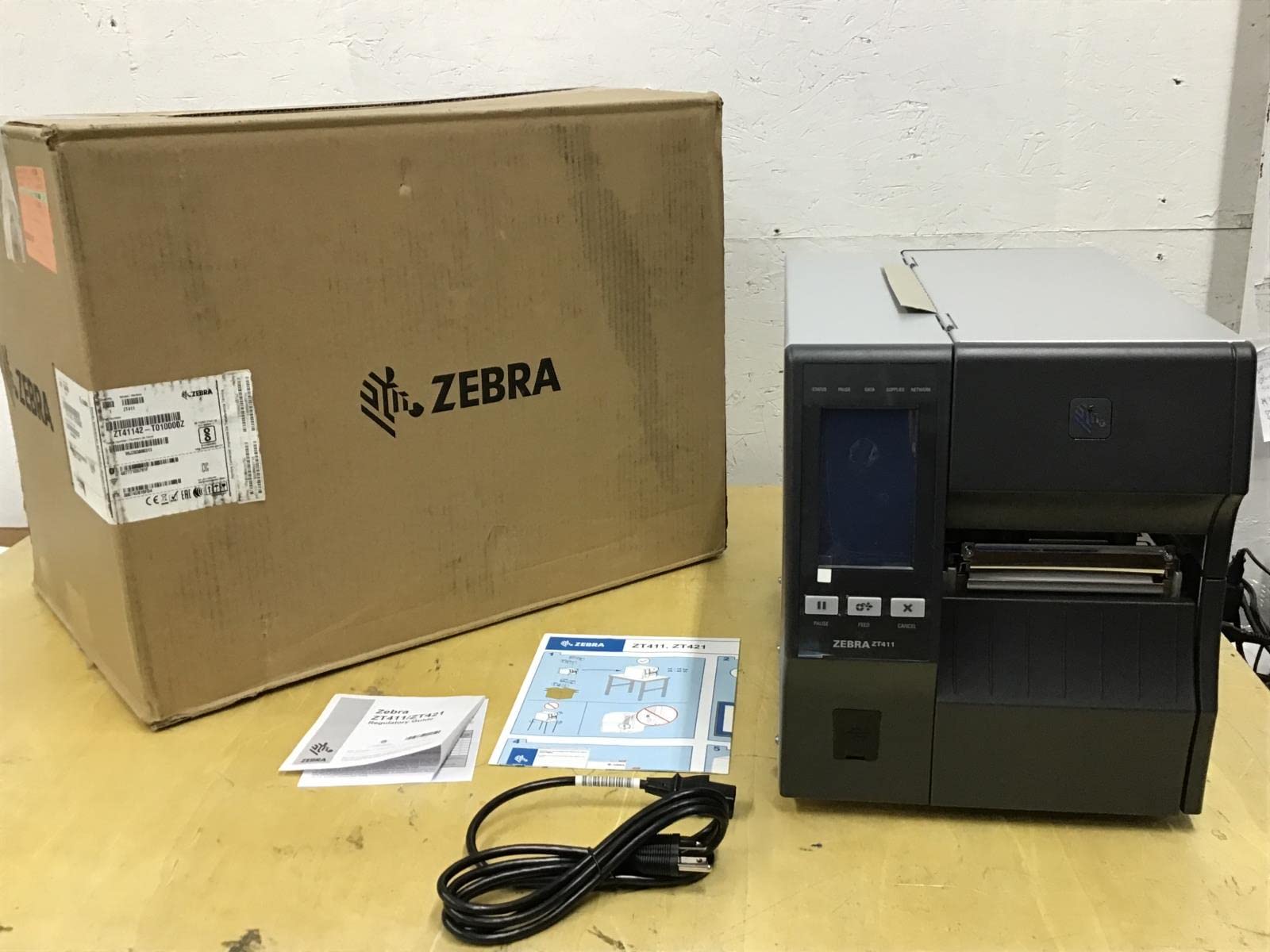
The industrial backbone for facilities that print thousands of durable asset labels every day.
The Zebra ZT411 is the serious industrial investment for operations where labeling volume is measured in the thousands. It prints at 203 DPI across a 4-inch print width using thermal transfer, which means the labels it produces are engineered for longevity and industrial wear. This is the printer you build a production labeling line around, not the one you throw in a tool bag.
Connectivity is fully industrial-spec: Serial, USB, Ethernet, and Bluetooth are all onboard, so it slots into an existing network or a single workstation with equal ease. It uses thermal transfer ribbons for permanent marks and handles heavy continuous workloads without complaint. In practice, reviewers point out printing 100 labels in under a minute once the settings are dialed in on a Mac.
The sentiment here is overwhelmingly positive from operations that run it daily — the ZT410 and ZT411 are reported to work very nicely in deployment. The honest caveat is the standard one with heavy gear: occasionally a unit arrives with a fault, and when that happens, support responsiveness becomes the deciding factor. Shoppers say a mix of excellent experiences and one frustrating case of a non-functioning unit past the return window. For a printer at this level, buying from a responsive seller matters as much as the machine itself.
Industrial Strengths
- 203 DPI with 4-inch thermal transfer print
- Serial, USB, Ethernet, and Bluetooth onboard
- Handles 100+ label batches in under a minute
The Heavy-Gear Reality
- Occasional units arrive non-functional
- Support quality depends on the seller
- A premium investment for serious volume only
The backbone pick: If your facility prints asset tags and shipping labels in high volume all day, this is the workhorse that keeps production moving.
The caution: This is gear you buy with care — a responsive seller and fast inspection on delivery are essential safeguards.
Understanding the Specs
Print Speed (ppm)
Pages per minute measures how many standard labels a printer produces in 60 seconds. A fast desktop unit like the Zebra GX420D at 170 ppm suits a shipping station, while a handheld at 6 ppm prioritizes portability and precision over volume.
DPI and Print Resolution
DPI, or dots per inch, tells you how fine the printed detail is. A 300 DPI print head like the Makeid P31S produces sharper barcodes and small text than a 203 DPI unit, which matters when your asset tag must stay scannable with a handheld reader.
Tape Width and Material
Wider tape (up to 1.5 inches or 4-inch labels) suits panel and pipe ID, while narrow tape fits cable wraps and shelf tags. Material choice — vinyl, PET, or heat shrink — determines whether the label survives oil, weather, and handling.
Thermal Transfer vs. Direct Thermal
Thermal transfer uses a ribbon to bond ink into the label, producing marks that resist fading for years. Direct thermal creates marks by heating the paper itself, which darkens over time. For permanent asset tags, thermal transfer is the durable choice.
FAQ
What is the difference between thermal transfer and direct thermal printing?
Will a Bluetooth label printer work with my phone and tablet?
How long do asset tag labels stay readable outdoors?
What is the best tape for labeling cables and wires?
Can I print barcodes and QR codes with these label makers?
How do I choose between a handheld and a desktop label printer?
What does DPI mean for my labels?
Do these printers work without a computer or phone?
How long does the battery last on a portable label printer?
What is the best label printer for a small business selling products online?
Final Thoughts: The Verdict
For most buyers, the asset tag printer winner is the Brother PT-D610BTVP because it pairs genuine print speed — 20 ppm — with Bluetooth convenience and an class-leading template library. If you want industrial-grade heat shrink and wide-tape capability, grab the Epson LW-PX900PCD. And for field work where battery life and drop-proof build matter most, the Makeid P31S is the one to reach for.
How We Picked
We do not accept paid placement. Every pick is matched to a real buyer and a real use-case; we do not hands-on test units.
Sources & Methodology
Specifications: manufacturer listings and product documentation. Review insights: verified customer reviews, as of August 2026. Pricing: not shown on this page (it changes often); check the current price via the retailer link.
As an Amazon Associate, Gadgets Feed earns from qualifying purchases. This does not affect which products we feature.