
The moment a first layer fails is the moment many new owners of a desktop fabricator realize their purchase is less of an appliance and more of a project. Hours of calibration, a stubborn build plate, and a spool of filament that refuses to stick can kill the creative spark before a single model is finished. That friction is the real barrier to entry.
I’m Min — the co-founder and writer behind Gadgets Feed. My research process for this guide involved comparing print speeds, auto-leveling accuracy, build volume constraints, and material compatibility across dozens of OEM spec sheets and thousands of real user reports to separate the reliable workhorses from the frustrating time sinks.
Every machine reviewed below was selected for its ability to deliver consistent, high-quality results with minimal manual intervention, ensuring your first print is a success rather than a test of patience. This guide examines the market to find the best at home 3d printer for your specific needs.
How To Choose The Best At Home 3D Printer
Selecting a desktop fabricator for personal use is about balancing three variables: the technology type, the build volume, and the ease of getting a successful print out of the box. Beginners often over-prioritize print speed or price while underestimating how much time is lost to poor auto-leveling and a flimsy frame.
FDM vs. Resin: Which Technology Fits Your Space?
Fused Deposition Modeling (FDM) printers melt plastic filament layer by layer, making them ideal for functional parts, durable prototypes, and large projects. Resin printers use a liquid photopolymer cured by UV light, delivering vastly superior detail for miniatures and jewelry but requiring more ventilation and post-processing. For a general-purpose home setup, an FDM machine is the safer, more versatile starting point.
Build Volume and Your Actual Projects
A common mistake is buying a machine with a tiny build plate only to realize a phone case or a small vase must be printed diagonally or cut into pieces. Look at the models you actually want to create — a 220x220x220mm volume handles most hobby projects comfortably, while a 300x300x330mm volume lets you print full-size helmets or large mechanical parts in one piece.
Auto-Leveling and Motion Systems
Manual bed leveling with a piece of paper is a rite of passage that most users would rather skip. Machines with one-click full-auto leveling and a rigid CoreXY motion system dramatically reduce the learning curve. Vibration compensation technology also matters at speeds above 300mm/s, as it prevents ghosting and layer misalignment.
Quick Comparison
On smaller screens, swipe sideways to see the full table.
| Model | Category | Best For | Key Spec | Amazon |
|---|---|---|---|---|
| Bambu Lab A1 Mini Combo | FDM | Multi-color prints | 10,000 mm/s² acceleration | Amazon |
| Bambu Lab P1S | FDM | Enclosed high-speed work | 500 mm/s / 20,000 mm/s² | Amazon |
| ELEGOO Centauri Carbon | FDM | Carbon fiber / advanced materials | 320°C nozzle / enclosed | Amazon |
| FLASHFORGE AD5M Pro | FDM | Quiet enclosed operation | 600 mm/s / 3s quick-swap nozzle | Amazon |
| Creality Ender 3 V3 Plus | FDM | Large-format value | 300x300x330mm build volume | Amazon |
| ELEGOO Mars 5 Ultra | Resin | High-detail miniatures | 9K mono LCD / 18µm XY | Amazon |
| FLASHFORGE Adventurer 5M | FDM | Budget speed workhorse | 600 mm/s / 20,000 mm/s² | Amazon |
| Entina Tina2 Plus | FDM | Kids and absolute beginners | 250 mm/s / fully assembled | Amazon |
| Creality K2 Plus Combo | FDM | Large multi-color projects | 350x350x350mm / 30,000 mm/s² | Amazon |
In‑Depth Reviews
1. Bambu Lab A1 Mini Combo

The Bambu Lab A1 Mini Combo redefines what a budget-friendly compact fabricator can do by bundling the AMS Lite multi-material system directly into the package. With a 10,000 mm/s² acceleration and active flow rate compensation, this machine prints detailed models faster than many larger units while maintaining exceptional surface quality. The full-auto calibration handles Z-offset and bed leveling automatically, eliminating the single biggest source of beginner frustration.
Multi-color printing is the headline feature here, and the AMS Lite handles filament switching with surprising reliability, though users should expect some purge waste between color changes. The printer operates at ≤48 dB, making it genuinely quiet enough for a shared workspace or bedroom. The 1-Clip quick-swap nozzle design simplifies material changes between PLA, PETG, and TPU without tools.
At 22 pounds and a compact footprint, the A1 Mini is portable and easy to store, but the high speed demands a rigid, solid surface to prevent wavy layers during ludicrous mode prints. The Bambu Handy app provides remote monitoring and access to a large model library, though some advanced slicing features are locked behind Bambu Studio. For the price, the combination of multi-color capability, speed, and silence is unmatched.
Why it’s great
- Full-auto calibration for zero manual leveling
- Multi-color AMS Lite included
- Exceptionally quiet operation at ≤48 dB
Good to know
- Requires a very rigid table for high-speed prints
- Multi-color printing generates purge waste
2. Creality K2 Plus Combo

The Creality K2 Plus Combo is the flagship large-format machine for users who need to print full-size helmets, cosplay props, or mechanical parts in one unbroken piece. Its 350x350x350mm build volume is paired with a step-servo motor system that delivers 30,000 mm/s² acceleration and a top print speed of 600 mm/s, making it one of the fastest large-frame printers on the market. The actively heated chamber and 320°C hardened steel nozzle unlock advanced materials like PPA-CF and PA-CF.
The new Creality Filament System (CFS) supports up to four units for 16-color printing, though the core value lies in its intelligent material management and auto-switching between spools. Dual AI cameras monitor for spaghetti failures and foreign objects, sending alerts to your phone. The anti-tilt auto-leveling system uses independent dual Z-axis motors with strain gauge compensation for a flawless first layer every time.
At 27.5 pounds and requiring two people to unbox safely, this is not a casual desktop accessory. Build quality is excellent thanks to the die-cast matrix frame and four linear rods that eliminate layer shift under heavy loads. Assembly instructions can be vague, and some early units have reported Y-axis communication issues that require firmware tweaks, but after initial setup, the print reliability is top-tier.
Why it’s great
- Massive 350mm³ build volume for one-piece prints
- Actively heated chamber and 320°C nozzle
- 16-color CFS multi-material system
Good to know
- Very heavy machine that needs two people to set up
- Initial setup may require firmware adjustments
3. Bambu Lab P1S

The Bambu Lab P1S takes the core speed and reliability of the brand’s ecosystem and wraps it in a fully enclosed, filter-equipped chassis. With a 500 mm/s top speed and 20,000 mm/s² acceleration, it handles PLA, PETG, ABS, and ASA with consistent quality. The enclosure stabilizes chamber temperature for advanced filaments and includes a carbon filter to reduce fumes, making it suitable for indoor use.
Auto bed leveling runs before every print, and the CoreXY motion system delivers layer accuracy that rivals machines costing twice as much. The P1S supports the Bambu AMS for up to 16 colors, though the unit ships without one, so multi-color printing requires a separate purchase. The built-in camera allows remote monitoring, but image quality is modest compared to purpose-built surveillance cameras.
Setup takes about 15 minutes out of the box, and the Bambu Studio slicer streamlines the workflow from design to finished part. The P1S is louder than the A1 Mini during high-speed operation, particularly the part cooling fans. Users report excellent bed adhesion and consistent first layers without glue sticks or tape, though TPU requires careful tuning due to the direct drive extruder’s grip.
Why it’s great
- Fully enclosed for safe ABS and ASA printing
- Auto-leveling before every print cycle
- Fast 500 mm/s with high precision
Good to know
- Multi-color requires separate AMS purchase
- Fan noise is noticeable at high speeds
4. ELEGOO Centauri Carbon

The ELEGOO Centauri Carbon is a fully assembled, pre-calibrated CoreXY printer that arrives ready to print within minutes, making it a standout in the mid-range category. Its 256x256x256mm build volume hits the sweet spot for most hobby projects, and the 320°C brass-hardened steel nozzle enables printing with carbon fiber reinforced filaments and other advanced composites. The enclosed chamber with enhanced cooling ensures stable temperatures for warp-prone materials.
A rigid integrated die-cast aluminum frame minimizes vibrations even at 500 mm/s speeds, and automatic vibration compensation plus pressure advance ensures smooth first layers every time. The built-in chamber camera with dual LED lighting supports real-time monitoring and time-lapse recording. The dual-sided PEI build plate features a PLA-specific surface that delivers excellent adhesion with minimal warping at lower heatbed temperatures.
Users who have logged hundreds of hours on this machine report consistent, error-free operation after initial setup. The ElegooSlicer software is intuitive and supports WiFi file transfer. The only notable downside is that the USB-C cable design on some early units caused communication errors, but replacement units have resolved this issue. For the price, this is the most capable enclosed printer for advanced materials.
Why it’s great
- 320°C nozzle for carbon fiber and advanced filaments
- Die-cast aluminum frame for vibration-free high-speed prints
- Built-in camera with remote monitoring
Good to know
- Some early units had USB-C cable issues
- Tech support response can be slow for replacements
5. FLASHFORGE AD5M Pro

The FLASHFORGE AD5M Pro upgrades the standard Adventurer 5M with a fully enclosed chamber and dual-layer filtration, making it a strong choice for classrooms, studios, and home offices where fumes and noise are concerns. The CoreXY motion system pushes 600 mm/s with built-in vibration compensation that keeps layers smooth and ghost-free. The 220x220x220mm build volume is modest but sufficient for most functional prints and educational projects.
The standout feature is the 3-second quick-swap nozzle system that supports 0.4mm and 0.6mm sizes, allowing rapid switching between detailed prints and faster draft modes. The direct-drive extruder handles flexible TPU smoothly as well as PLA, ABS, PETG, ASA, and carbon fiber filaments. A built-in camera provides remote monitoring via the Maker app and Orca Slicer, while the filament runout sensor and power-loss recovery ensure uninterrupted prints.
Setup takes approximately 10 minutes with one-click auto-leveling. The touchscreen interface is responsive, though the accompanying software lacks detailed guidance for first-time users. Some early units suffered from extruder clogs after a few prints, but FLASHFORGE support has been responsive with replacements. Overall, the AD5M Pro delivers a refined, quiet, and safe printing experience that justifies its position as a premium enclosed machine.
Why it’s great
- Fully enclosed with dual-layer filtration
- 3-second quick-swap nozzle system
- 600 mm/s with vibration compensation
Good to know
- Some early extruder clog reports
- Software lacks beginner guidance
6. Creality Ender 3 V3 Plus

The Creality Ender 3 V3 Plus delivers the largest build volume in the mid-range segment at 300x300x330mm, allowing users to print life-size helmets, large mechanical brackets, or multiple smaller parts in a single batch. The CoreXZ motion system with Y-axis dual motors achieves 600 mm/s and 20,000 mm/s² acceleration, making it 12 times faster than standard entry-level printers. The XZ belt tension is self-adjusting, preventing slippage during high-speed runs.
The direct drive extruder features a bolstered spring and ball plunger design that grips filament tightly without slack, rated for over 1,000 hours of clog-free extrusion. The tri-metal “Unicorn” nozzle integrates the nozzle and throat into a single hardened steel piece, simplifying maintenance and ensuring smooth material discharge. One-tap calibration handles auto Z-offset, leveling, and input shaping automatically, so there is no paper-pulling or screw-turning.
Assembly comes in highly pre-assembled modules, but some units have arrived with gantry alignment issues that require patient tweaking. The power supply ships set to 235V and must be manually switched to 110V for North American users, a step easily missed. Once dialed in, the print quality is excellent for a machine in this bracket, and the massive community support makes troubleshooting accessible.
Why it’s great
- Large 300x300x330mm build volume
- Tri-metal Unicorn nozzle for durability
- One-tap auto calibration
Good to know
- Possible gantry alignment issues on arrival
- Power supply voltage must be manually switched
7. ELEGOO Mars 5 Ultra
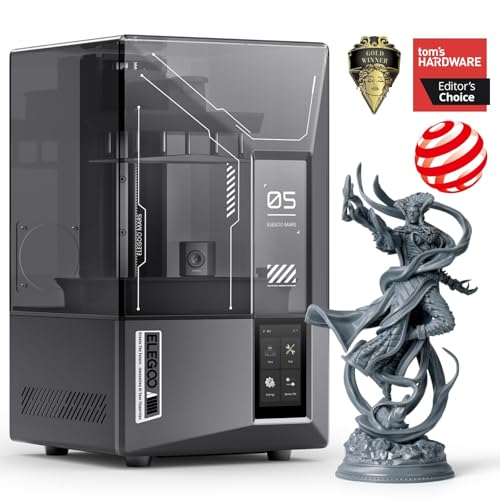
The ELEGOO Mars 5 Ultra is the resin printer for users who demand exceptional detail, featuring a 7-inch 9K mono LCD with an 18µm XY resolution that captures intricate textures and fine features on miniatures, jewelry, and dental models. The revolutionary tilt release technology enables blistering speeds of up to 150mm/h by peeling the model from the release film without delay, maintaining detail accuracy across both fast and slow print modes.
An integrated AI camera acts as a real-time quality inspector, detecting print failures like empty build plates or model warps and alerting the user before wasted time and resin accumulate. A smart mechanical sensor checks for residue on the LCD screen and alarms for resin shortages and leveling failures. Wi-Fi cluster printing allows control of multiple Mars 5 Ultra units from a single device for batch production.
Self-check and automatic leveling make this printer truly plug-and-play for all skill levels. The 6.04 x 3.06 x 6.49 inch build volume is compact but perfectly sized for tabletop gaming armies and detailed prototypes. Ventilation is non-negotiable — resin fumes require a dedicated workspace. A small number of users report UV light failures and build plate adhesion problems that render the unit unusable, highlighting the importance of buying from a seller with good return support.
Why it’s great
- 9K resolution with 18µm XY detail
- 150mm/h tilt release speed
- AI camera for real-time error detection
Good to know
- Requires ventilation — resin fumes are potent
- Some units have UV light failure reports
8. FLASHFORGE Adventurer 5M

The FLASHFORGE Adventurer 5M is a no-frills speed machine that prioritizes raw performance and reliability at a budget-friendly price point. Its CoreXY structure achieves 600 mm/s with 20,000 mm/s² acceleration, and the 50W heating power brings the 280°C nozzle to 200°C in 35 seconds. The full-auto one-click leveling ensures a perfect first layer every time, eliminating the most common cause of print failures for beginners.
The open-frame design means users need a well-ventilated area for ABS and PETG, but the flexible removable PEI steel plate handles PLA, TPU, and even carbon fiber reinforced filaments with the appropriate 0.6mm nozzle. A filament run-out sensor and power-loss recovery system add peace of mind for long overnight prints. Vibration compensation eliminates ghosting, and the 32mm³/s nozzle flow rate keeps extrusion consistent.
Setup takes about 10 minutes from unboxing, and users report hundreds of hours of daily operation without major issues. The 220x220x220mm build volume is standard for the class, and the machine’s small footprint fits easily on a desk. The touchscreen interface is responsive but the instructions could be clearer for absolute beginners. Some users note that WiFi connectivity favors 5GHz networks, which can cause connection drops on mixed-band routers.
Why it’s great
- Extremely fast 600 mm/s print speed
- 35-second nozzle heat-up time
- Filament run-out and power-loss recovery
Good to know
- Open frame requires well-ventilated space
- WiFi can be finicky on mixed-band networks
9. Entina Tina2 Plus

The Entina Tina2 Plus is designed from the ground up for kids and absolute beginners, arriving fully assembled and ready to print within minutes. No calibration, no bed leveling, no complex setup — just load the included TF card with preloaded models and press start. The 250 mm/s print speed is competitive for the entry level, and the ceramic hotend heats up in 40 seconds, reducing downtime between projects.
The Poloprint Cloud app enables WiFi control and provides access to over 1,500 printable models, making it a solid STEM learning tool. The partially enclosed frame separates high-temperature and moving components from direct contact, adding a layer of safety for supervised use. The auto-leveling system and dual Z-axis structure improve print stability, and the PEI spring steel build plate makes part removal easy with a simple flex.
The mini 3D printer fits on a standard desk with its 11.4 x 8.6 x 8.6 inch frame. However, the companion app has received criticism for being slow, limited in functionality, and occasionally losing WiFi registration, which can be frustrating for young users. Only a small sample of white filament is included, so buyers should order extra spools and a trim kit from the start. For its price, the Tina2 Plus offers an incredibly low-friction path into 3D printing for families.
Why it’s great
- Fully assembled and ready to print out of the box
- 40-second ceramic hotend heat-up
- WiFi app with 1,500+ models
Good to know
- App can be slow and loses WiFi registration
- Only includes a small sample of white filament
FAQ
Do I need an enclosure for my first 3D printer?
How much build volume do I actually need for hobby projects?
Is a resin printer better than FDM for detail work?
Final Thoughts: The Verdict
For most users, the at home 3d printer winner is the Bambu Lab A1 Mini Combo because it combines multi-color capability, auto-leveling, and whisper-quiet operation at a reasonable price. If you want a large build volume for one-piece cosplay or mechanical prints, grab the Creality K2 Plus Combo. And for miniature detail enthusiasts who prioritize resolution over convenience, nothing beats the ELEGOO Mars 5 Ultra.