
Our readers keep the lights on and my morning glass full of iced black tea. As an Amazon Associate, I earn from qualifying purchases.
Specs are compiled from manufacturer listings and verified buyer reviews and can change over time — please confirm the key details on the product page before buying.
You are tired of buying a new printer every time the ink runs dry. This guide breaks down the top at-home all-in-one printers that handle your printing, scanning, and copying without draining your wallet on replacement cartridges.
I’m Min — the founder and writer behind Gadgets Feed. This guide is built by comparing the manufacturers’ published specifications and the patterns across verified customer reviews, so you get each pick’s real strengths and trade-offs instead of marketing spin.
You need an at home all in one printer that balances upfront cost with long-term value. These four picks cover every use from heavy weekly printing to occasional school projects.
Quick Picks
- Epson EcoTank ET-2980 — Smartest Investment
- Canon PIXMA TR7120 — Best-Loaded Feature Set
- Canon PIXMA TS7720 — Balanced Performer
- HP Envy 6155 — Budget-Friendly Starter
How To Choose The Best At Home All In One Printer
Picking the right printer for your home means looking past the sticker price. The real cost comes from how much you print, what kind of ink or toner the machine uses, and whether the features save you time. Here are the three things to focus on.
Ink System: Cartridge vs. Supertank
The biggest decision you’ll make is between a traditional cartridge printer and a supertank model (a printer with refillable ink tanks instead of replaceable cartridges). Cartridge printers (like the Canon PIXMA and HP Envy series) have a lower upfront cost but require frequent cartridge replacements. A supertank printer (like the Epson EcoTank) costs more at the start but includes bottles of ink that can last for years—the ET-2980 comes with enough ink for up to 6,600 black pages and 5,500 color pages right in the box.
Print Speed: Pages Per Minute (ppm)
Print speed is measured in pages per minute (ppm), and it matters if you’re printing multi-page assignments or reports. For black-and-white documents, models range from 10 ppm on the entry-level HP Envy 6155 to 15 ppm on the Epson EcoTank ET-2980 and Canon PIXMA TS7720. Color speeds are slower, typically 7 to 10 ppm. If you’re printing a 15-page document, a 15 ppm printer finishes in one minute—a 10 ppm printer takes one and a half minutes.
Key Features That Save Time
Automatic duplex printing (printing on both sides without flipping the page manually) is a must-have if you want to cut paper use in half. A color touchscreen makes navigating settings and checking ink levels much easier than button-only panels. An Auto Document Feeder (ADF — a slot that automatically feeds a stack of pages through the scanner) lets you load a stack of pages for scanning or copying without babysitting each sheet—only the Canon PIXMA TR7120 includes one in this lineup.
Quick Comparison
| Model | Best For | Print Speed (Black) | Ink Type | Display | Amazon |
|---|---|---|---|---|---|
| Epson EcoTank ET-2980 | Low ink costs | 15 ppm | Supertank | Color Touchscreen | Amazon |
| Canon PIXMA TR7120 | Multi-page scanning | 14 ppm | Cartridge | OLED Screen | Amazon |
| Canon PIXMA TS7720 | Fast color prints | 15 ppm | Cartridge | 2.7″ LCD Touchscreen | Amazon |
| HP Envy 6155 | Budget home printing | 10 ppm | Cartridge | 2.4″ Color Touchscreen | Amazon |
In‑Depth Reviews
1. Epson EcoTank ET-2980
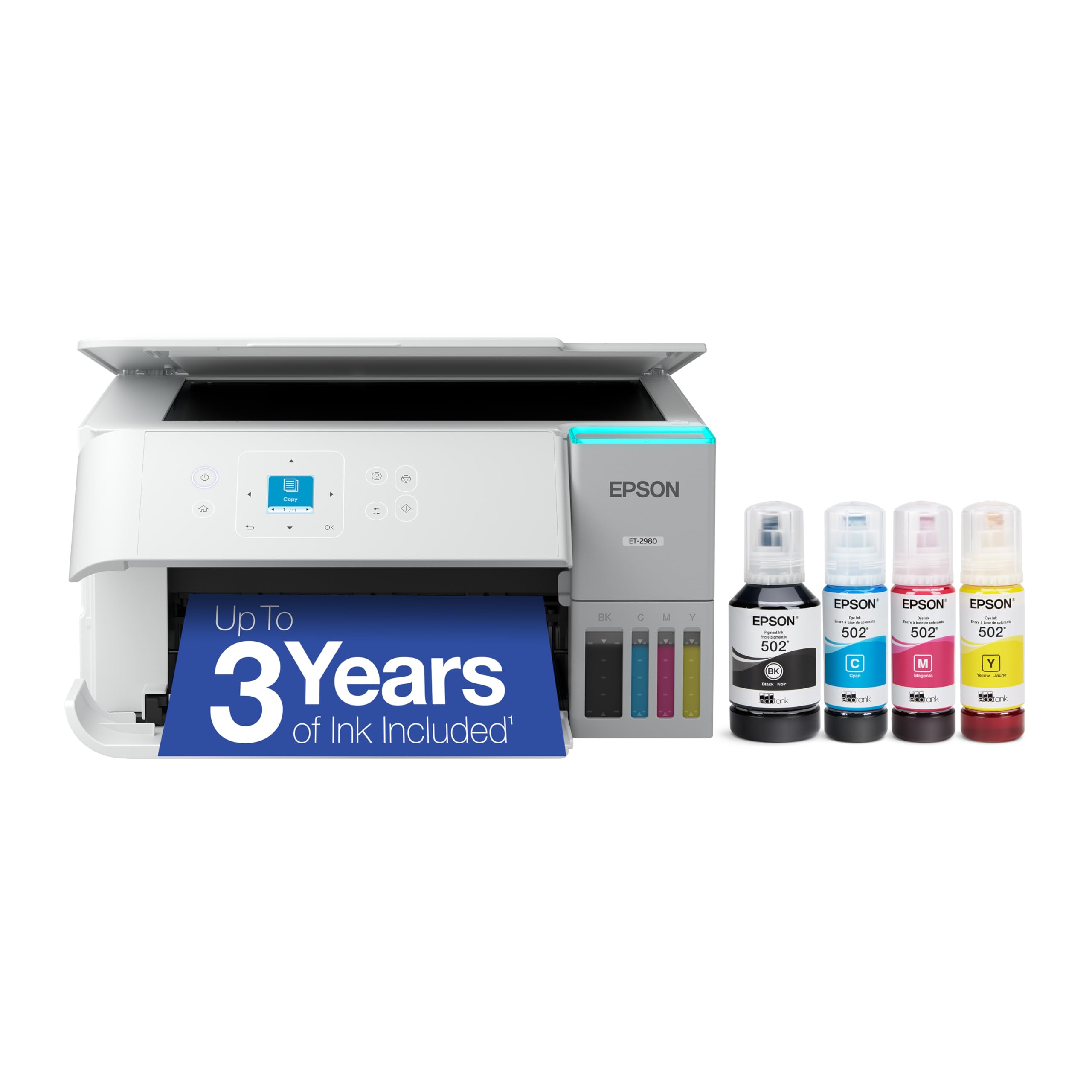
The printer that finally frees you from the cartridge subscription trap
The Epson EcoTank ET-2980 completely changes the math on home printing. Instead of swapping cartridges every few weeks, you refill ink tanks from bottles—and the bottles included in the box hold enough ink for up to 6,600 black pages and 5,500 color pages. That means you can realistically go up to three years before buying more ink, depending on your volume. It prints black documents at 15 ppm (the pages per minute rate), matching the fastest cartridge models in this lineup, while color prints come out at 8 ppm.
Buyers report that setup takes about 45 minutes if you follow the directions closely, but once it’s running, it prints quietly and quickly with no smearing even on glossy photo paper. The 2.7-inch color touchscreen makes navigation simple, and automatic duplex printing (printing on both sides automatically) cuts your paper use in half. At 13.7 inches deep, 14.8 inches wide, and 7.4 inches tall, it sits noticeably deeper on a desk than the HP Envy 6155—that’s a 24% larger depth footprint, so measure your space before buying.
One reviewer noted that their first double-sided page caused a paper jam, though subsequent prints were fine. The ink is Epson’s proprietary EcoTank bottles, and according to the company, using non-genuine ink could void the warranty.
Why It Wins Long-Term
- Comes with enough ink for up to 6,600 black pages and 5,500 color pages right in the box
- Fast 15 ppm black print speed keeps multi-page jobs moving
- Color touchscreen and auto duplex simplify daily use
The Real Trade-Offs
- Higher upfront cost compared to cartridge-based printers
- Larger footprint than many competing models
- Occasional paper jams reported on first use of duplex printing
The smart buy for heavy printers: If you print several times a week—school projects, home office documents, family photos—this supertank design eliminates the frustration of running out of ink and the expense of frequent cartridge replacements.
skip it if your desk is tight: The 13.7-inch depth is substantial; measure your workspace before committing.
2. Canon PIXMA TR7120

The rare compact all-in-one that includes an Auto Document Feeder for multi-page scanning
The Canon PIXMA TR7120 stands out in this lineup because it’s the only model with an Auto Document Feeder (ADF — a slot on top that automatically feeds a stack of pages through the scanner, so you don’t have to lift the lid for every single sheet). That alone makes it a strong choice if you regularly scan or copy multi-page contracts, tax forms, or school packets. It prints black documents at 14 ppm and color pages at 9 ppm, which is 29% faster than the HP Envy 6155’s 7 ppm color speed, making photo-heavy projects noticeably quicker.
One buyer reports they printed 500 pages without a single jam, after replacing an old HP. The compact footprint fits neatly on a small desk, and the 1.42-inch monochrome OLED display (a simple screen that shows text in one color) shows ink levels and printer status at a glance without a full color touchscreen. Automatic duplex printing saves paper, and mobile printing works with Apple AirPrint, Mopria, and the Canon PRINT App. Voice control via Amazon Alexa is also supported—a convenience the other printers here don’t offer.
The catch is ink cost. The four-cartridge system uses separate cartridges for cyan (blue), magenta (pink), yellow, and black, but owners mention that the starter ink runs out quickly and that high-volume pages get expensive. The small paper tray holds only 50 to 100 sheets, so you’ll refill it often if you do large batch jobs.
What Makes It Unique
- Auto Document Feeder for hands-free scanning and copying of multi-page documents
- Color print speed of 9 ppm beats the HP Envy 6155 by 29%
- Voice control compatible with Amazon Alexa
Where It Pinches
- Small paper tray capacity of 50-100 sheets means frequent refills
- Starter ink runs out quickly under moderate use
- Replacement ink is expensive, limiting its value for heavy printing
Your best bet if you scan stacks: The ADF saves real time if your home needs regular multi-page scanning or copying—no other printer here offers it.
Look elsewhere if you print hundreds of pages monthly: The cartridge cost adds up fast; a supertank model like the Epson EcoTank ET-2980 would be cheaper long-term.
3. Canon PIXMA TS7720

A speedy, easy-to-use home printer with a large touchscreen and fast color output
The Canon PIXMA TS7720 delivers a 15 ppm black print speed and 10 ppm color—the fastest color rate in this entire comparison. That means a full-color 10-page photo report finishes in about one minute here, versus roughly one and a half minutes on the HP Envy 6155. The 2.7-inch LCD touchscreen is larger than the HP’s 2.4-inch screen, making menu navigation feel more like using a smartphone. Automatic duplex printing comes standard, and the printer uses just two ink cartridges (PG-285 black and CL-286 color), which simplifies replacements.
Customers note that the setup is straightforward once you connect to your Wi-Fi router through the Canon app, though iPhone and iPad connections can be finicky. One reviewer specifically called it the “Best Canon printer so far” but reported that colors look less vivid with the starter ink cartridges—likely because they’re partially filled trial cartridges. The bottom paper tray must be pulled out manually, which some find less convenient than a fixed tray.
However, a common warning in reviews is that the ink runs out fast. One buyer stated: “Ink hog (empty in 3 days).” That’s the Achilles’ heel of this model—the low upfront cost is offset by frequent, pricier cartridge replacements. Unlike the Epson EcoTank ET-2980, which comes with years of ink included, the Canon’s starter cartridges are meant for low-volume use. If you print a few pages a week, this is a strong mid-range choice. If you print daily, the ink costs will sting.
Strengths
- Fastest color print speed in the group at 10 ppm
- Large 2.7-inch LCD touchscreen for intuitive control
- Only two ink cartridges to replace, keeping maintenance simple
Weaknesses
- Starter ink can empty in just a few days with moderate color printing
- Bottom paper tray requires manual pull-out
- Wireless connection to iPhones and iPads can be inconsistent
Reach for this if you print a few pages weekly: The fast speed and large screen make it a pleasure for light duty, especially color documents.
Not the right fit for high-volume households: Once the trial cartridges run out, replacement costs add up quickly—a supertank printer will save you money if you print dozens of pages a week.
4. HP Envy 6155
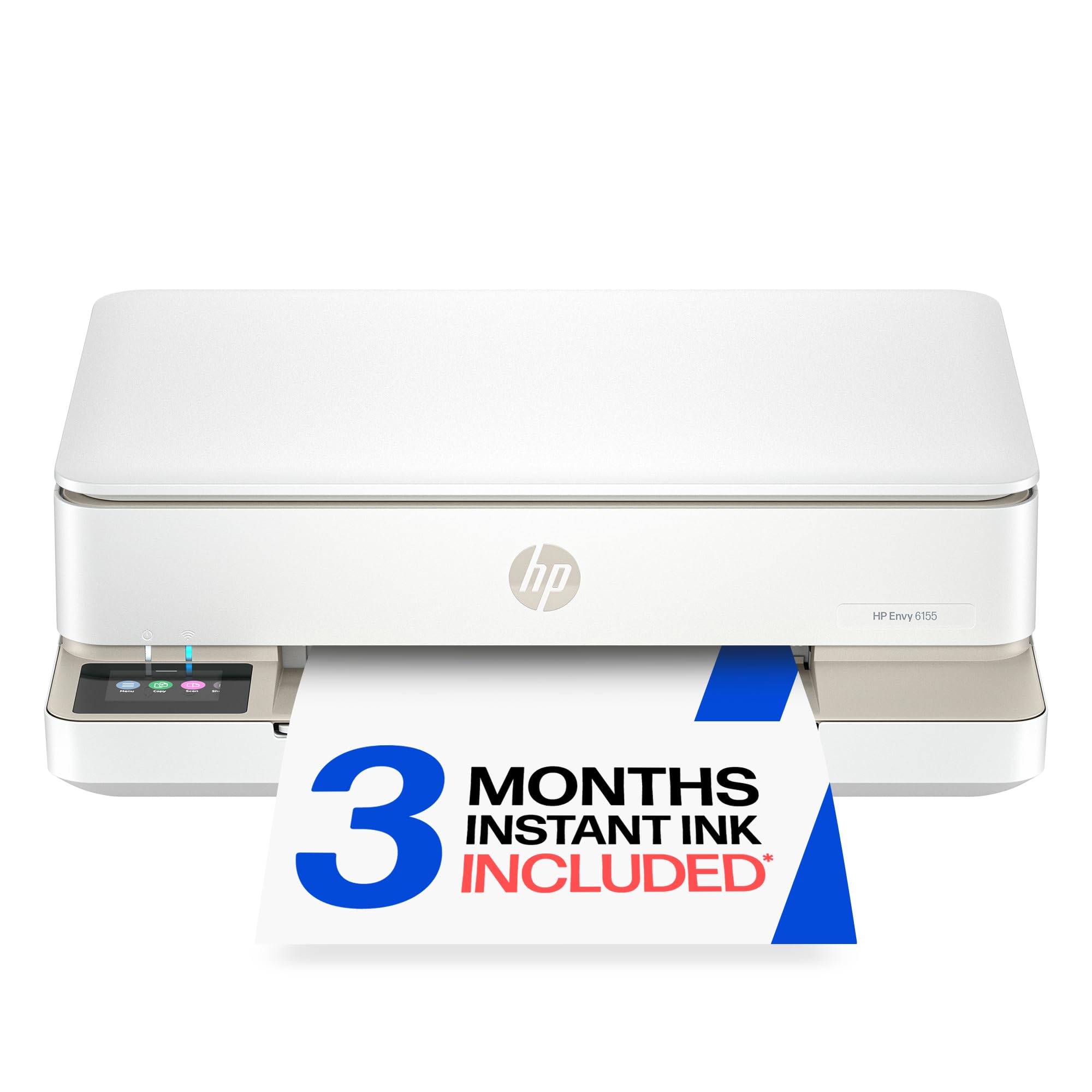
An affordable entry point backed by HP’s Instant Ink subscription to tame running costs
The HP Envy 6155 is built for the buyer who wants a low-stakes introduction to home printing. It prints black documents at 10 ppm and color at 7 ppm—the slowest in this group, but fine for occasional homework or recipe printouts. The 2.4-inch color touchscreen is HP’s most intuitive yet, and the dual-band Wi-Fi (wireless that uses both 2.4 GHz and 5 GHz signals) automatically detects and resolves connection issues, which is a boon for households with multiple devices. Reviewers point out that it replaced 10-year-old HP Envy models without trouble and that setup is easy enough for a 91-year-old to handle.
The headline feature is the three-month trial of HP’s Instant Ink delivery service (a subscription that sends you ink before you run out). The brand claims this service can potentially cut your cost per page by up to 50%—though a monthly fee starts after the trial unless you cancel. The printer also uses HP’s P3 color technology, which according to HP makes prints look as vibrant as they do on your screen, and the HP app lets you print, scan, and copy from your phone. Made from at least 60% recycled plastic, it’s the most environmentally conscious build here.
But there are serious caveats. Some buyers couldn’t connect to their computer or phone at all, and those who did found the printer would occasionally go “offline” for no reason. The initial ink cartridges are small (around 120 pages for black and 75 for color), so you’ll be buying replacements sooner than you might expect. Compared to the Canon PIXMA TS7720’s 15 ppm black speed, the HP’s 10 ppm feels sluggish for multi-page jobs—that’s a 50% speed gap. The printer intentionally blocks non-HP cartridges, so you’re locked into HP’s ecosystem.
What Works
- Three-month Instant Ink trial helps offset cartridge costs early on
- Dual-band Wi-Fi with automatic connection fixes for stable wireless printing
- Very easy setup, even for non-tech-savvy users
What Doesn’t
- Slower print speed: 10 ppm black vs. 15 ppm on the Canon TS7720 (a 50% gap)
- Starter ink cartridges have low page yields—~120 black and ~75 color
- Blocks non-HP cartridges; some users report persistent connection issues
A fine starter for the lowest upfront cost: If you print only a handful of pages each month and want a simple, modern interface, this gets you started without overspending.
Not for anyone who prints regularly: The slow speed, small starter ink, and ecosystem lock-in make it a poor choice for weekly use—a supertank or faster cartridge model will frustrate you less.
Understanding the Specs
Pages Per Minute (ppm)
This is the number of pages the printer can produce in one minute of continuous printing. Black ppm and color ppm are listed separately because color printing is always slower—the print head makes more passes to layer ink. A 15 ppm printer finishes a 30-page document in two minutes; a 10 ppm printer takes three minutes. For home use, anything above 10 ppm black and 7 ppm color is fine for occasional jobs.
Duplex Printing & Ink Systems
Automatic duplex printing flips the page for you so you get print on both sides without manual effort—great for cutting paper waste in half. The ink system is the bigger long-term decision. Cartridge printers (Canon PIXMA, HP Envy) have lower upfront cost but each cartridge runs out and needs replacing. Supertank printers (Epson EcoTank) cost more upfront but include bottles of ink that last for thousands of pages, slashing cost per page dramatically.
Touchscreen & Display
A color touchscreen lets you navigate menus, adjust settings, and check ink levels without a computer. Screen sizes vary from 2.4 inches on the HP Envy 6155 to 2.7 inches on the Canon PIXMA TS7720. Some models use a simpler monochrome OLED display (like the Canon TR7120’s 1.42-inch screen) that displays status info but isn’t a full interactive touch panel.
Auto Document Feeder (ADF)
An ADF is a slot on top of the scanner that automatically feeds a stack of pages—you load up to 20-30 sheets and the scanner pulls them through one by one. Without it, you have to lift the scanner lid and place each page manually. Only the Canon PIXMA TR7120 in this lineup has an ADF, making it the best pick for anyone who regularly scans or copies multi-page documents.
FAQ
Should I buy a cartridge printer or a supertank printer for home use?
How many pages per minute do I really need for home printing?
Will a cheap printer cost me more in the long run on ink?
Do all all-in-one printers work with my phone and laptop?
Is automatic duplex printing worth paying extra for?
What does the HP Instant Ink subscription actually cost after the trial?
Can I use third-party or refilled ink cartridges in these printers?
How do I know if an all-in-one printer will fit on my desk?
What is the difference between a scanner and an Auto Document Feeder?
Do these printers work with glossy photo paper for printing photos?
Final Thoughts: The Verdict
Across the board, the at home all in one printer winner is the Epson EcoTank ET-2980 because its supertank design eliminates the single biggest frustration of home printing—running out of ink and paying a fortune to replace it. If you want the Auto Document Feeder for scanning multi-page stacks without babysitting each sheet, grab the Canon PIXMA TR7120. And for the absolute lowest entry price with a simple touchscreen interface, the HP Envy 6155 is your starting point.
How We Picked
We do not accept paid placement. Every pick is matched to a real buyer and a real use-case; we do not hands-on test units.
Sources & Methodology
Specifications: manufacturer listings and product documentation. Review insights: verified customer reviews, as of July 2026. Pricing: not shown on this page (it changes often); check the current price via the retailer link.
As an Amazon Associate, Gadgets Feed earns from qualifying purchases. This does not affect which products we feature.