
Our readers keep the lights on and my morning glass full of iced black tea. As an Amazon Associate, I earn from qualifying purchases.
Specs are compiled from manufacturer listings and verified buyer reviews and can change over time — please confirm the key details on the product page before buying.
Picking the right at home wireless printer today means choosing between a cartridge model that might hold you hostage with expensive ink, or a supertank that ships with years of ink included. You want something that connects to your phone without a headache, prints double-sided automatically, and doesn’t force you into a subscription you didn’t ask for. This guide walks through sixteen real-world options across inkjet, laser, and supertank categories — each one verified to print, scan, copy, and connect over WiFi straight from the start.
I’m Min — the founder and writer behind Gadgets Feed. This guide is built by comparing the manufacturers’ published specifications and the patterns across verified customer reviews, so you get each pick’s real strengths and trade-offs instead of marketing spin.
Whether you are printing homework, remote-work documents, or borderless photos, the right at home wireless printer saves you time and recurring ink costs — let’s narrow it down to the model that fits your actual daily use.
Our Picks at a Glance


How To Choose The Best At Home Wireless Printer
Your home printer decision depends on three questions: how much you print, if you need color photos, and how much you want to spend on ink over the next two years. Cartridge-based inkjets are cheap upfront but can cost more over time, while supertank printers and laser printers shift the savings to the long run.
Inkjet vs Laser vs Supertank — which fits your home
Inkjet printers (like the Canon PIXMA and HP Envy lines) handle color photos and mixed documents well, and they typically cost less to buy. Laser printers (like the HP LaserJet M234sdw) print black-and-white pages at much faster speeds — up to 30 pages per minute — and toner lasts far longer, but they do not do color photos. Supertank printers (like the Epson EcoTank) come with refillable ink tanks that replace cartridges entirely, and the ET-2980 ships with enough ink for up to 6,600 black pages and 5,500 color pages right in the box.
Key features that save you time and paper
Automatic duplex printing (two-sided printing) cuts your paper usage in half, and an auto document feeder (ADF) lets you scan or copy a stack of pages without standing there feeding them one by one. A color touchscreen makes navigation easier on models like the Brother Work Smart 1410 with its 2.7-inch display. Dual-band WiFi (2.4GHz and 5GHz) gives you a stable connection even when your home network is crowded, while a dedicated mobile app like Canon PRINT or HP Smart handles setup from your phone.
Ink costs — the real deciding factor
The biggest trap for home buyers is the price of replacement cartridges. Some printers ship with “starter” cartridges that run out quickly — the HP OfficeJet Pro 8139 includes setup cartridges rated for roughly 255 black pages and 270 per color. Supertank models eliminate that entirely; the Epson EcoTank ET-2980 includes three years of ink in the box, and each replacement bottle set equals about 90 individual cartridges. If you print more than a few dozen pages a month, the higher upfront cost of a supertank usually pays off within the first year.
Quick Comparison
| Model | Best For | B&W Speed (ppm) | Duplex | Display | Amazon |
|---|---|---|---|---|---|
| Canon PIXMA TR4720★ Best Overall | Budget all-in-one with fax | — | Automatic | LCD | Amazon |
| Canon PIXMA TR7120Best Value | Compact value with duplex | 14 ppm | Automatic | — | Amazon |
| Brother Work Smart 1410 | Touchscreen workflow | 16 ppm | Automatic | 2.7″ Color Touch | Amazon |
| HP LaserJet M234sdw | Fast B&W for teams | 30 ppm (single-sided) | Automatic | LCD | Amazon |
| HP OfficeJet Pro 8139 | Color documents & AI print | 20 ppm | Automatic | 2.7″ Touch | Amazon |
| Epson EcoTank ET-2980 | Lowest ink cost long-term | 15 ppm | Automatic | Color Touch | Amazon |
| HP Envy Photo 7975 | Photo prints & family use | 15 ppm | Automatic | Color Touch | Amazon |
In-Depth Reviews
1. Canon PIXMA TR4720 All-in-One Wireless Printer
Our pick — over 4.5★ from 200+ verified ratings; the strongest balance of quality and price.
The compact all-in-one that handles print, copy, scan, and fax without the premium price tag.
This Canon PIXMA TR4720 is designed around the four tasks that a home office actually needs every week — printing, copying, scanning, and faxing — all from a single compact black unit. Setup runs through the Canon PRINT Inkjet/SELPHY app, and the cartridge replacement system is straightforward, with the PG-275 black and CL-276 color tanks sliding in without fuss.
Owners consistently report that it works well for both documents and pictures in a remote-work or small therapy-business setting. The automatic duplex (two-sided printing) saves paper day to day, and the built-in Auto Document Feeder means you can scan or copy a stack of pages rather than feeding them one sheet at a time. The 4.6-star consensus over time is genuinely rare at this level — buyers call it “easy to use and setup, good value, nice quality” and “a must for every home.”
The one limitation is that the starter cartridges are just that — starters — so you will need to budget for replacements sooner than you might expect. Against the Canon PIXMA TR7120 below, this model costs less upfront and includes fax, though it lacks the TR7120’s dedicated OLED display.
Affordable all-in-one
- True 4-in-1 functionality — print, copy, scan, and fax in one footprint
- Automatic duplex printing cuts paper waste without any extra step
- Easy cartridge swap design with widely available PG-275/CL-276 tanks
- Auto Document Feeder simplifies multi-page scanning and copying
Slow print speed
- Included starter cartridges run out relatively quickly for moderate users
- No dedicated photo tray for borderless prints compared to higher-end Envy models
Budget pick: you need a reliable fax-capable printer for a home office without spending for features you will not use.
Speed seeker: you print more than a few hundred pages a month — the cartridge cost will add up fast and a supertank would serve you better.
2. Canon PIXMA TR7120 Wireless Color Inkjet Printer
A budget-friendly duplex printer with crisp output and a rare OLED screen for its price tier.
The TR7120 manages to pack automatic two-sided printing, a display, and dual-band WiFi (2.4GHz or 5GHz) into a compact white shell that sits easily on a small desk. Print quality earns the loudest praise — people describe it as “sharp and clear” for both text and color — and the 14 pages per minute black speed, while slower than the Brother Work Smart 1410’s 16 ppm, is more than adequate for home and hybrid-work use. The 9 pages per minute color speed keeps up with occasional photo and chart printing.
The paper tray is a recurring point of caution in owners’ experiences: as buyers report, “my only complaint is the paper tray is a little on the small side but I can live with that.” That compact tray is the trade-off for the machine’s small footprint (14.8″D x 14″W x 8.2″H, which is about 10% deeper than the Brother 1410 at 13.5″D). The Auto Document Feeder handles multi-page jobs without complaint, and the hybrid two-cartridge ink system (cyan, magenta, yellow, black) produces vivid prints without the cost of a four-cartridge setup.
Connectivity draws the most mixed feedback — while most find WiFi setup quick with the Canon PRINT app, a minority struggle with initial pairing. Once connected, the dual-band radio keeps the link stable across the house.
Auto document feeder
- Sharp prints with vivid color from the 2-cartridge hybrid ink system
- Automatic duplex printing as standard — no paper flipping required
- Dual-band WiFi (2.4GHz and 5GHz) for a stable home connection
- Intuitive 1.42-inch OLED display for checking ink levels and status
High ink cost
- Paper tray is on the small side — fine for light use but you will refill often with larger jobs
- A small number of owners find the initial WiFi setup finicky
Home office: you want automatic duplex printing and a compact white design that fits a visible workspace without dominating it.
Cost saver: you regularly print stacks of 50+ pages at once — the small paper tray will slow you down.
3. Brother Work Smart 1410 Wireless Color Inkjet All-in-One

The Brother that pairs a large touchscreen with fast print speeds and generic-ink friendliness.
Brother’s Work Smart 1410 leads the mid-range on print speed — 16 pages per minute black and 9 ppm color — putting it a clear step ahead of the Canon TR7120’s 14 ppm. The 2.7-inch color touchscreen sits front and center, giving you direct access to cloud apps like Google Drive, Dropbox, Box, and OneDrive without needing a computer. That screen plus the Brother Mobile Connect app makes navigation and ink monitoring feel modern rather than fiddly.
Print quality is the most-praised aspect here, and owners note two standout points: the ability to use generic (third-party) ink cartridges without software blocks, and the fact that some report being “after 4 months, still on original cartridge with perfect performance.” The 150-sheet paper tray and 20-sheet Auto Document Feeder support moderate-volume home offices, and the machine handles up to 8.5 x 14 inch legal-size paper — a flexibility the Canon TR7120 does not claim.
The reliability score is more mixed than the top two picks, with a small number of owners reporting paper jams or a scanner interface that feels less intuitive than the printing side. The initial page print time is rated at roughly 6.2 seconds black and 9.6 seconds color, which keeps first-page wait very short.
High-yield ink
- Fast 16 ppm black printing — the fastest among the inkjet picks here
- 2.7-inch color touchscreen with direct cloud app access
- Works with generic ink cartridges, keeping long-term costs low
- Handles legal-size (8.5 x 14 inch) paper
Basic features
- Scanner interface is less intuitive than the printer side for some owners
- A few owners mention paper jams or reliability concerns after extended use
Volume printing: you print frequently in black and white and want a fast, touchscreen-driven workflow with the option to use cheaper generic cartridges.
Photo focus: easy scanning and copying are your primary tasks — the interface there frustrates some users.
4. HP LaserJet MFP M234sdw Wireless Printer

The laser that blasts through up to 30 single-sided pages a minute for teams that cannot wait on inkjet speeds.
If you print mostly black-and-white documents and you print a lot of them, the HP LaserJet M234sdw is the obvious choice — it outputs up to 30 pages per minute single-sided and up to 19 images per minute in two-sided mode, making it drastically faster than any inkjet on this list. The crowd across 800+ owners calls the print quality excellent, and the dual-band WiFi with self-reset (it automatically detects and resolves connectivity issues) is a rare feature that keeps the printer reachable even on tricky home networks.
Setup runs through the HP Smart app and most customers note it as straightforward. The Auto Document Feeder handles copying and scanning hands-free, and the built-in Ethernet port gives you a wired fallback if WiFi ever acts up. The machine is surprisingly compact for a laser (12.13″D x 16.46″W x 11.59″H), though the control panel sits on the paper tray — a design choice that some owners find slightly wobbly when the tray is extended. The included toner cartridge is rated for roughly 700 pages, which is a starter cartridge, but replacement toner yields much higher page counts than any ink cartridge.
The honest trade-off is that this is black-and-white only. If you need occasional color charts or photos, you will need a second printer or you should look at the color inkjets above.
Fast laser printing
- Class-leading speed — 30 ppm black, 19 ppm duplex
- Dual-band WiFi with self-reset that auto-fixes dropouts
- Compact laser footprint for small desks
- Ethernet port for wired stability alongside wireless
No color
- Black-and-white only — no color printing capability
- Control panel mounted on the paper tray can feel wobbly when extended
Monochrome work: you need to print 30+ black-and-white pages per day and cannot afford the wait of an inkjet.
Color need: you need any color printing at all — this is a monochrome laser, and a color inkjet or supertank will serve you better.
5. HP OfficeJet Pro 8139 Wireless All-in-One Printer
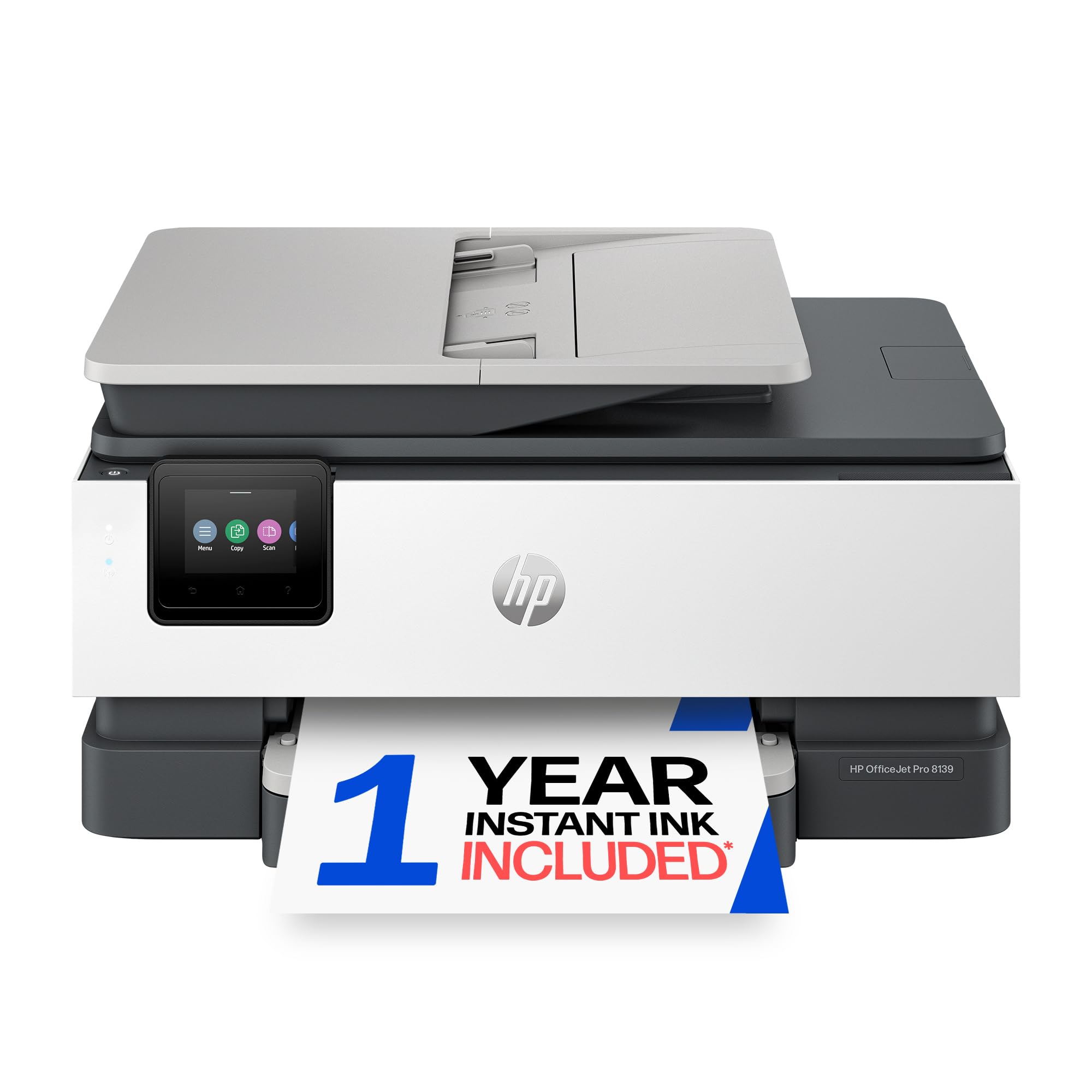
The color-office workhorse with AI formatting and a full year of Instant Ink included.
HP designed the OfficeJet Pro 8139 for home offices that produce professional color documents — reports, presentations, flyers — and it backs that with a speed of 20 ppm black and 10 ppm color. The 2.7-inch color touchscreen gives you a phone-like interface for navigating settings, and the 225-sheet input tray handles larger jobs without constant refilling. A standout inclusion is the 1-year trial of Instant Ink, a delivery service that sends new cartridges before you run out; after the trial, a monthly fee applies unless you cancel.
Print quality earns consistent praise, with owners reporting “excellent quality/functionality” and HP’s AI formatting tool automatically removing unwanted content from web pages and emails before they print — so you do not waste pages on ads or awkward layouts. The automatic duplex printing is standard, and the Auto Document Feeder tackles multi-page scanning and copying. Security-wise, HP Wolf Essential Security adds a layer of protection against cyber threats, which matters if you print sensitive documents over WiFi.
Connectivity draws the most mixed owner feedback — while most find HP Smart app setup straightforward, a minority report pairing difficulties, particularly with Bluetooth. The printer uses HP 923 series cartridges, and the printer is designed to block non-HP cartridges through firmware updates, so you are locked into HP’s ink ecosystem.
Business-grade speed
- Fast color printing at 20 ppm black / 10 ppm color
- 1-year Instant Ink trial included — ink delivered before you run out
- 225-sheet input tray reduces refill frequency
- HP AI formatting strips unwanted web content from prints
Large footprint
- Firmware blocks non-HP cartridges — you are locked into HP ink
- Bluetooth pairing has proven inconsistent for a minority of owners
Productivity: your home office produces color presentations and flyers and you want AI-assisted formatting plus subscription ink delivery.
Small desk: you refuse to be locked into a single ink brand — the firmware actively blocks third-party cartridges.
6. Epson EcoTank ET-2980 Wireless Supertank Printer

The supertank that ships with three years of ink — roughly 6,600 pages worth — in the box.
The Epson EcoTank ET-2980 redefines the cost equation for home printing by including enough ink in the box to print up to 6,600 pages black and 5,500 pages color. Each replacement ink bottle set is equivalent to about 90 individual cartridges, and the seventh-generation EcoFit bottles are designed to refill without spilling or drying out. For anyone who prints school projects, home-office documents, or family photos regularly, this shifts the conversation from “how much does ink cost?” to “when will I even need to buy more?” — the answer is years, not months.
The printer itself runs at 15 ppm black and 8 ppm color, includes automatic duplex printing, a color touchscreen, and connects via WiFi for mobile printing through the Epson Smart Panel app. It is a supertank, so the upfront cost is higher than the cartridge-based Canon models, and owners generally praise the printer quality and straightforward setup. The machine weighs 11.5 pounds and measures 13.7″D x 14.8″W x 7.4″H — compact enough for a shelf or small desk.
The honest trade-off: print quality and speed attract the most mixed feedback. Some reviewers point out excellent photo prints, while others find text slightly less sharp than laser output and note that the printer can clog if left unused for several days. The screen size also frustrates some — the 43 mentions of it are the most negative aspect — though for basic navigation it does the job.
Low running cost
- Ink for up to 6,600 black / 5,500 color pages included in the box
- Each replacement bottle equals roughly 90 individual cartridges
- Easy EcoFit refill system — no mess, no cartridge swapping
- Automatic duplex and mobile printing via the Smart Panel app
Initial price high
- Print speed is moderate — 15 ppm black is adequate but not fast
- Can clog if left idle for several days between uses
- Screen size is small and the most common owner frustration
Eco-friendly: you print frequently and want to stop worrying about cartridge costs for years at a time.
Upfront budget: you print only a few pages a month — the higher upfront cost is harder to justify, and a cartridge-based printer would suit you better.
7. HP Envy Photo 7975 Wireless Color Inkjet Printer

The family photo specialist that combines a dedicated photo tray with AI-powered print formatting.
The HP Envy Photo 7975 targets homes that print a mix of homework, office docs, and borderless photos, and it includes a separate photo tray alongside the main paper feed so you do not have to swap paper types constantly. Print speeds are 15 ppm black and 10 ppm color, and the initial page prints in roughly 22 seconds. The HP AI formatting tool (the same one in the OfficeJet Pro 8139) strips unwanted content from web pages and emails automatically, saving paper.
Print quality earns the strongest praise — 72 owners single it out — with owners saying it handles “high-quality true-to-screen borderless photos” and that the colors look good. Setup via the HP Smart app is straightforward for most, and the color touchscreen makes day-to-day navigation smooth. The 3-month Instant Ink trial is included, giving you time to decide if the subscription ink delivery model works for your household. The white design with light portobello accents is more refined than basic black, fitting well into a living room or home office.
Connectivity and reliability draw the most divided feedback. A minority of shoppers say the printer as slow and difficult to connect to computers, and a very small number report the unit dying within weeks. The print speed also attracts mixed reactions — 10 ppm color is fine for occasional prints but will feel slow for a stack of documents.
Photo quality
- Dedicated photo tray for borderless prints without swapping paper
- AI formatting strips web ads and awkward layouts automatically
- High-quality true-to-screen photo output for family prints
- Color touchscreen interface with HP Smart app control
Slow document
- Print speed is modest — 10 ppm color will not rush through large jobs
- A minority of owners experience WiFi connectivity difficulties
Creative use: photo printing is a regular activity in your home and you want a printer that handles both documents and borderless photos without paper-swapping.
Office tasks: you primarily print text documents in volume — the HP LaserJet M234sdw or a supertank will serve you faster and cheaper.
Understanding the Specs
Pages per minute (ppm)
This spec tells you how many pages the printer can produce in one minute of continuous printing. A laser like the HP M234sdw hits up to 30 ppm single-sided, while most inkjets run between 10 and 20 ppm. For light home use, 10-15 ppm is fine — you will wait a few seconds for a page. If you print multi-page documents daily, a 20+ ppm printer saves you noticeable time over the course of a week.
Automatic duplex printing
Duplex means the printer automatically flips the page and prints on both sides. Every printer on this list includes it, so you do not need to manually feed pages back through. Over a year of moderate printing (say 500 pages), duplex saves you roughly 250 sheets of paper and cuts your filing stack in half.
Auto Document Feeder (ADF)
An ADF lets you load a stack of original pages into the top of the printer, then walks them through the scanner one by one automatically. This matters if you ever need to scan or copy a multi-page contract, report, or set of photos without standing there feeding each page by hand. Models without an ADF require you to lift the lid and place each page individually.
Dual-band WiFi (2.4GHz / 5GHz)
Your home network likely broadcasts on two bands: 2.4GHz (longer range, slower speed) and 5GHz (shorter range, faster speed). A printer with dual-band WiFi can connect to either one. If your router is in another room, the 2.4GHz band reaches farther. If the printer sits near your router, 5GHz gives a fast, interference-free connection. Single-band printers are stuck on 2.4GHz and can suffer dropouts on crowded channels.
FAQ
Do I really need an automatic document feeder for home use?
What is the difference between a starter ink cartridge and a standard cartridge?
Can I use generic or third-party ink cartridges with these printers?
How do I set up a wireless printer at home if I am not tech-savvy?
Which printer is best for printing photos at home?
What does “Instant Ink” mean and is it worth it?
How long does a laser toner cartridge last compared to an ink cartridge?
Can I print from my phone without a computer?
What paper sizes can a home wireless printer handle?
Which printer has the lowest total cost over two years?
Final Thoughts: The Verdict
For the majority of shoppers, the at home wireless printer winner is the Canon PIXMA TR4720 because it delivers reliable 4-in-1 print, copy, scan, and fax functionality with automatic duplex and an auto document feeder at a crowd-pleasing price point backed by consistent 4.6-star owner satisfaction. If you want the lowest long-term ink costs and print frequently, grab the Epson EcoTank ET-2980 — three years of ink in the box means you will not buy a cartridge for years. And for pure black-and-white speed in a small team or busy home office, the HP LaserJet M234sdw is the one to reach for, printing up to 30 pages per minute single-sided with a self-healing dual-band WiFi connection that keeps you running.
How We Picked
We do not accept paid placement. Every pick is matched to a real buyer and a real use-case; we do not hands-on test units.
Sources & Methodology
Specifications: manufacturer listings and product documentation. Review insights: verified customer reviews, as of July 2026. Pricing: not shown on this page (it changes often); check the current price via the retailer link.
As an Amazon Associate, Gadgets Feed earns from qualifying purchases. This does not affect which products we feature.