
Our readers keep the lights on and my morning glass full of iced black tea. As an Amazon Associate, I earn from qualifying purchases.
Specs are compiled from manufacturer listings and verified buyer reviews and can change over time — please confirm the key details on the product page before buying.
If your nightstand looks like a cable spaghetti accident, the fix is not another wall brick — it is a charging station that looks good enough to leave out in the open. The picks below cover three approaches: multi-port USB blocks that run everything from laptops to earbuds, wireless stands built for Apple gear, and bamboo organizers that hide the wires entirely while giving your devices a shelf.
I’m Min — the founder and writer behind Gadgets Feed. This guide is built by comparing the manufacturers’ published specifications and the patterns across verified customer reviews, so you get each pick’s real strengths and trade-offs instead of marketing spin.
You will see which station manages power output when every port is full, which ones fold flat for travel, and which organizers hide the cable mess for good. A station with enough total wattage and the right port mix clears the cable pile off your counter for good.
Our Picks at a Glance


How To Choose The Best Attractive Charging Station
An attractive charging station has to do two jobs at once: power everything you own without slowing down, and look intentional sitting on your counter. Most shoppers get distracted by the port count printed in big letters. The number that actually decides your day is the total wattage — the combined power the station can divide across every device plugged in at once.
Total wattage beats port count
A 245W or 380W station can feed a laptop, two phones, and a watch in one sitting because it has spare power to hand out. A smaller block with the same number of ports but a lower total will split a thin amount across everything. Look for one high-power port (usually USB-C, often labeled PD for Power Delivery) reserved for your laptop, and lower-wattage ports for phones and earbuds.
Wireless or wired
Magnetic wireless stands drop your iPhone, Apple Watch, and AirPods onto pads with no cables to plug in — the trade-off is that they are built around Apple devices. If your household mixes Android phones, tablets, and laptops, a multi-port USB block with USB-C and USB-A ports covers far more ground for the same footprint.
Materials and heat
Charging generates heat, and heat is what shortens the life of batteries and cheap plastic shells. Aluminum and bamboo bodies shed that heat better than plastic and stay looking new through daily wear. Bamboo organizer styles go a step further and hide the power strip and cable slack inside the box itself.
Quick Comparison
| Model | Best For | Total Output | Ports | Build | Amazon |
|---|---|---|---|---|---|
| MEKIOJEO 12-Port 380W★ Best Overall | Powering a whole desk | 380W | 12 (8 USB-C + 4 USB-A) | Aluminum alloy | Amazon |
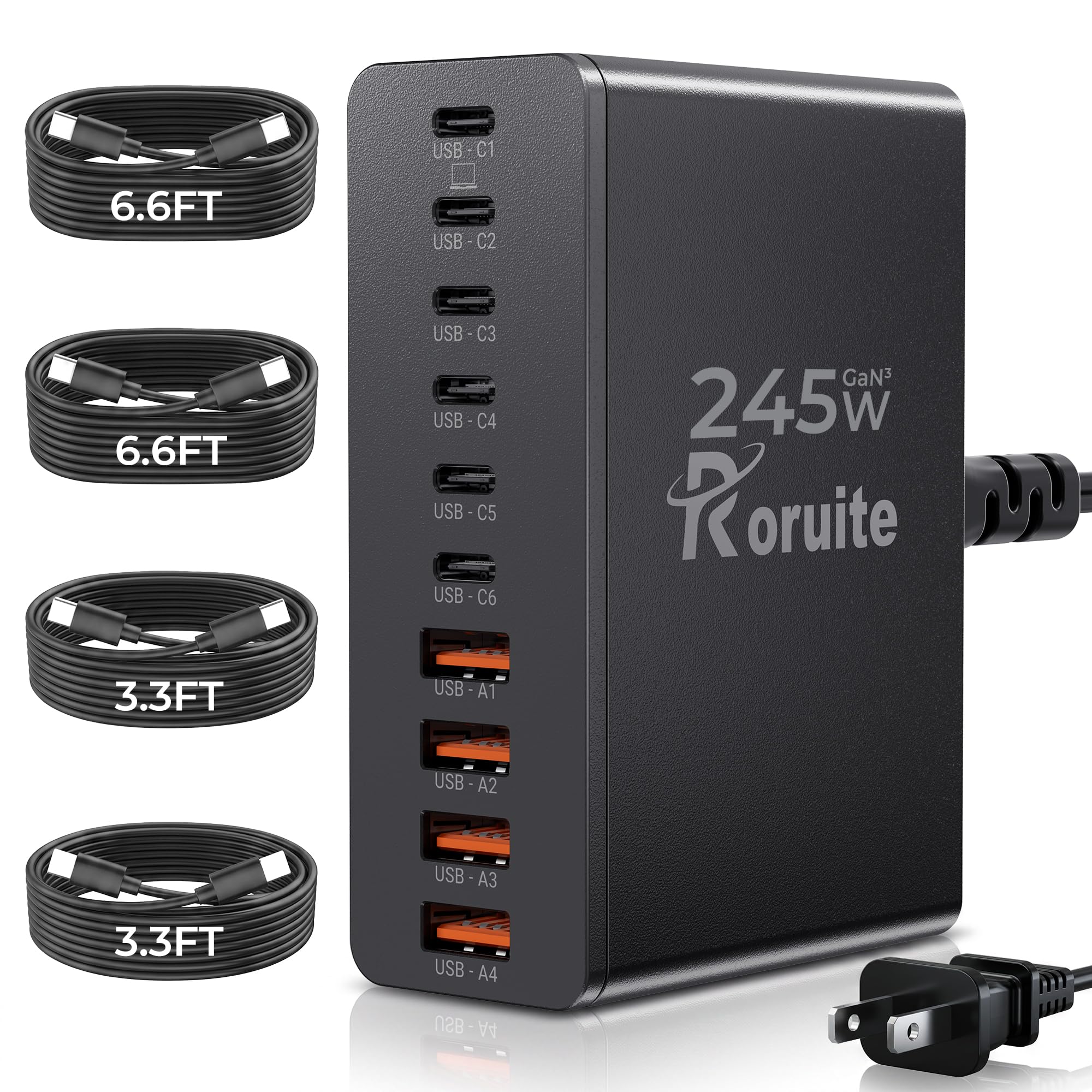
| Roruite 10-Port 245WBest Value | Families on the go | 245W | 10 (6 USB-C + 4 USB-A) | Plastic | Amazon |
| ANJANK 5-in-1 StandBest for Nightstands | Nightstand Apple setups | 18W adapter included | 5-in-1 (2 wired + wireless) | Plastic | Amazon |
| MSTJRY 6-Port Dock | Tidy family charging | 2.4A per port | 6 USB-A | Flame-retardant ABS | Amazon |
| Homde Bamboo Organizer | Hiding the cable mess | — | 6 compartments + drawer | Bamboo | Amazon |
| LISEN Qi2.2 25W 3-in-1 | Traveling Apple users | 25W wireless / 45W adapter | 3-in-1 (phone, watch, buds) | Metal, PVC, silicone | Amazon |
| MobileVision Bamboo Slim | Laptop-plus-device desks | — | Up to 1 laptop, tablets, 3 phones | Bamboo | Amazon |
| Kioson 12-in-1 200W | Home office power hub | 200W | 12 (4 AC + 4 USB-C + 4 USB-A) | Copper, polycarbonate | Amazon |
| Belkin Qi2.2 25W 3-in-1 | Premium Apple nightstands | 25W wireless | 3-in-1 (phone, watch, buds) | Metal, silicone | Amazon |
In‑Depth Reviews
1. MEKIOJEO 12-Port 380W Charging Station
Our pick — over 4.5★ from 850+ verified ratings; the strongest balance of quality and price.
Twelve ports and 380W of headroom — the one block that retires every other charger on your desk.
You can charge a laptop, two phones, a watch, and earbuds all at once without anything slowing down. That’s because you get 380W shared across 12 ports — 8 USB-C and 4 USB-A — with one USB-C port dedicated to 65W for a laptop and several 30W ports for phones and tablets. Power distribution (a chip that re-shares wattage as you plug things in) has serious margin: it runs two ThinkPads at once, one drawing roughly 60W and the other 30W, alongside an iPhone 16 Pro, a Galaxy S24 Ultra, earbuds, a watch, a light, and a battery pack. Buyers report exactly that kind of load, plus the aluminum body staying barely warm through the whole session.
The aluminum alloy enclosure is the same class of metal used in MacBook casings, and the maker states it dissipates heat 40% faster than plastic — so overnight sessions do not cook the shelf underneath. GaN components (Gallium Nitride, a newer chip material that runs cooler and more compact than older silicon) run the show, with the IceShield protection layer guarding against overcharging, overheating, short circuits, overcurrent, and overvoltage. There is a 5ft cord with a standard two-pin North American plug and no transformer brick, and you can stand the station horizontally or vertically.
What wins people over is charging speed, which is by far the most-discussed thing in the feedback and the most praise-heavy. The recurring reality check is scope rather than fault: port 1 is the laptop port, and the other USB-C ports settle at lower wattages, so a second power-hungry laptop will not charge at full speed. As one owner’s setup puts it, this is the “only charging station you will need to charge anything including powerful laptop.”
What earns the top spot
- 380W across 12 ports handles two laptops plus phones, earbuds, and a watch at once
- Aluminum alloy body stays cool under load and resists scratches
- One dedicated 65W USB-C port for laptops; 30W ports for phones and tablets
- 5ft cord reaches awkward hotel outlets; stands upright or flat
The honest limits
- Power is shared — the 65W laptop port gets top priority, so add a second laptop and it charges slower
- Bigger footprint than a single-device brick, though still desktop-friendly
Scale of the thing: if your desk hosts a laptop, two phones, a watch, and earbuds, this is the block that stops the charger shuffle for good.
One caveat: single-laptop households may only ever touch port 1 — the remaining 11 ports are the reason you buy it.
2. Roruite 10-Port 245W GaN Charger Block
Ten ports, 245W, and four cables in the box — family charging without a drawer of tangled spares.
The big draw here is what ships alongside the block: four USB-C to USB-C cables at 6.6ft and 3.3ft, plus a detachable 5ft power cord. That is the closest thing to a plug-in-and-go package on this list, and it makes the 245W total far easier to actually use. The first port handles laptops at 65W max; five USB-C ports run at 20W max each for phones and tablets; four USB-A ports fill in the rest at 20W max.
Against the MEKIOJEO above, you trade raw headroom for convenience. The MEKIOJEO spreads 380W across 12 ports; this one spreads 245W across 10 — a real difference if you plan to run power-hungry laptops alongside everything else. What the Roruite wins on is the bundle and the footprint: it is sleek and light for carrying, and the makers pitch it squarely at family trips where the whole household plugs into one outlet. The car-and-inverter test comes up in the feedback and it holds up quietly there too.
Sizing up the response honestly: build quality dominates the feedback, ahead of charging speed and port quantity. The one caveat that appears more than once is that some users found the included cables less reliable than the station itself, and Apple tablets sometimes want their original charger through certain ports. Neither turns the block into a bad buy — it just tells you to keep a spare cable handy for the fussy devices.
Worth knowing: the included 6.6ft and 3.3ft cables cover most bedside and desk runs without reaching for your own, and the detachable cord stows neatly for travel days.
Before you commit: only the first port feeds a laptop, so desk setups with two laptops should look at the 380W pick instead.
Made for: the household with three or four phones, a tablet, and earbuds that all need feeding from one spot.
Think twice if: your desk runs more than one laptop — 245W shared across 10 ports leaves less spare for a second laptop than the 380W option above.
3. ANJANK 5-in-1 Wireless Charging Station with Alarm Clock
A bedside clock, lamp, and Apple charger rolled into one object — the useful-and-good-looking kind.
Start with the showpiece: a dial-controlled LED display you can dim from 0-100% brightness or switch off entirely, so the clock never glows in your face at 3 a.m. The alarm runs three volume levels, supports 12 or 24-hour time with AM/PM, and gives you a 9-minute snooze. Underneath that, the 7-color night light (red, orange, yellow, green, cyan, blue, purple) dims from 10-100% — enough range to read by or to set a soft glow for the room.
Charging-wise, this is an Apple-only station: a raised magnetic pad holds your iPhone at the right angle (cases under 5mm thick), plus a watch charger and AirPods support via both USB-C and Lightning ports. The makers include an 18W adapter, and the safety set covers overcurrent, overvoltage, overheat, short-circuit, and foreign-object detection. If your household runs Samsung or Android phones, stop here — this station does not charge them.
The feedback leans heavily on the appearance and the dimming behavior, and the night light does exactly what the listing promises. Where it gets mixed is charging pace: the phone pad and especially the watch pad are slow, with the watch side stretching to hours in some reports. If you need a fast morning top-up, this is a bedside companion rather than a speed charger — plug your phone in over dinner instead and let it sit on the pad overnight.
Where it shines
- Fully dimmable clock display down to off — no midnight glare
- 7-color night light adjustable from 10-100% brightness
- Magnetic pad, watch charger, and AirPods ports in one footprint
- 18W adapter included, plus foreign-object detection and overheat protection
Where it disappoints
- Wireless charging runs slow, especially the Apple Watch pad
- Apple-only — Samsung and Android devices are not supported
- Snooze-heavy sleepers may find the alarm too easy to switch off
Right for you if: your nightstand already holds an iPhone, an Apple Watch, and AirPods, and you want one object to charge them and wake you up.
Look elsewhere if: charging speed is the priority — a wired multi-port station will top everything up far faster.
4. MSTJRY 6-Port USB Charging Station Dock
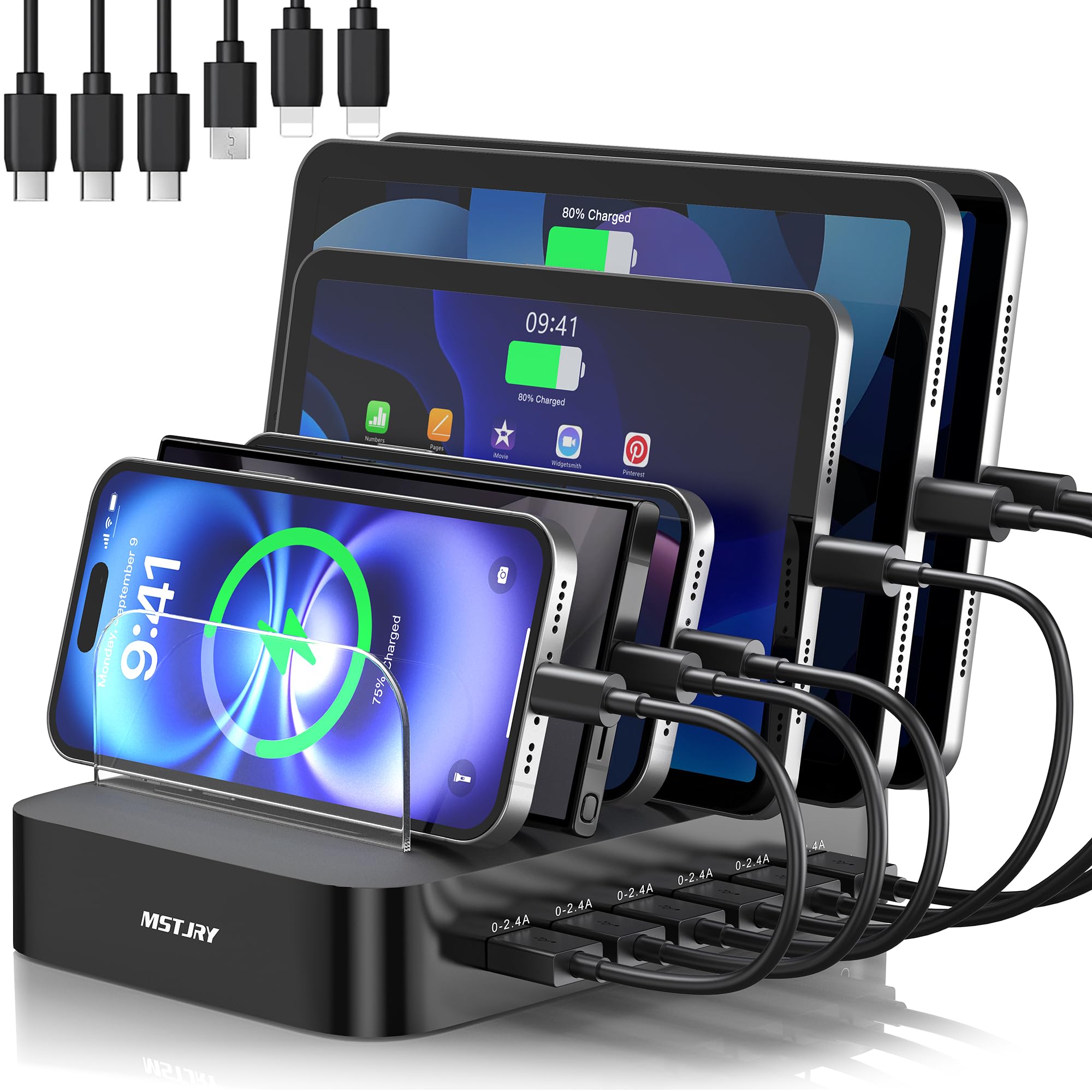
Six slots, seven dividers, and two extra-tall bays built for tablet-shaped bulk.
You can stand six devices upright like books on a shelf, so your desk stays tidy and every screen is visible. That’s the trick to this dock — the layout, not the wattage. It uses 7 removable dividers — five at standard height and two extra-tall ones sized for thick-case iPads and bulky tablets. Each of the six USB ports holds a steady 2.4A output via a smart chip that adapts to each battery, so the phone in slot one and the tablet in slot six are not fighting each other for a trickle. A flame-retardant ABS shell and anti-slip pads round out the build.
The cables come in the box too: two Lightning, three USB-C, and one Micro-USB, covering an iPhone 17 down through older Androids and e-readers. There is a dedicated power switch on the unit itself, which is a genuinely useful detail when a household of six devices wants everything charged and quiet overnight. Six upright slots keep a family’s phones and tablets in one row instead of scattered across the counter.
The honest sizing: charging ports and organization lead the positive feedback, with families and older users both echoing how easy the setup is. The dock measures 2.4A per port rather than total wattage, so it is built for phones and tablets rather than laptops — skip it if your kids want a Chromebook fed overnight. And the speed itself draws a mixed response: some households report fast top-ups, others find the same cable-anywhere setup unremarkable, most likely both true of a dock that distributes power rather than concentrates it.
Desk-clearing win: upright slots with removable dividers turn six devices into one tidy row, and everything gets its own cable instead of a shared charging rotation.
Fit note: if every household phone demands the same fast-charge brick overnight, this dock distributes power rather than concentrating it — great for top-ups, not the fastest single-device charge.
The pick for: kitchens and living rooms where five or six phones and tablets pile up every night and no one wants to hunt for a free plug.
Skip if: your priority is laptop-grade power — this dock is built for phones, tablets, and earbuds, not MacBooks.
5. Homde Bamboo Charging Station Organizer with Drawer

Nobody sees the power strip — that is the entire point of the bamboo box.
This is the pick for the counter that already has devices everywhere; the box hides them. The design puts six slots of different heights and widths along the top for phones and tablets, and a hollow center compartment (12.2 x 6.5 x 3.3 inches) underneath to hide the power strip and charger block itself. Chunky four-wire cable routing holes run through the sides, and the hollow design also lets heat escape while everything charges.
Bamboo construction is the visible upgrade over plastic organizing trays. The maker states it is more sturdy and safer than plastic holders with no odor, and it comes with non-slip pads underneath to stop the whole unit from sliding on a countertop. There is also a pull-out drawer for keys, coins, rings, pens, or spare cables. Buyers describe the bamboo finish as decor rather than a utility item.
One recurring quirk worth knowing before you buy: the bottom drawer sometimes needs a small lift to close cleanly or sits slightly ajar. A small number of owners blame a warp on arrival. The bigger fit question is on the inside — a Steam Deck or a laptop power unit is too tall for the center compartment, so check dimensions before routing a bulky brick in. The overall picture from feedback is a well-loved organizer that keeps a kitchen counter or entryway clean.
What buyers clean up
- Six mixed-height slots hold phones and tablets upright
- Center compartment hides the power strip and charger block
- Bamboo build resists wear, with non-slip pads on the base
- Drawer adds a tidy spot for keys, coins, pens, and spare cords
Where limits show
- Bottom drawer can need a lift to close fully, or sits slightly open
- Tall power bricks (Steam Deck, laptop charging units) may not fit inside
Zero-assembly winner: for anyone who wants the charging mess gone entirely, bamboo beats another cable tray every time.
Do check the size first: if you plan to hide a bulky power unit inside, measure it against the 12.2 x 6.5 x 3.3-inch center space before ordering.
6. LISEN Qi2.2 25W 3-in-1 Magnetic Charging Station
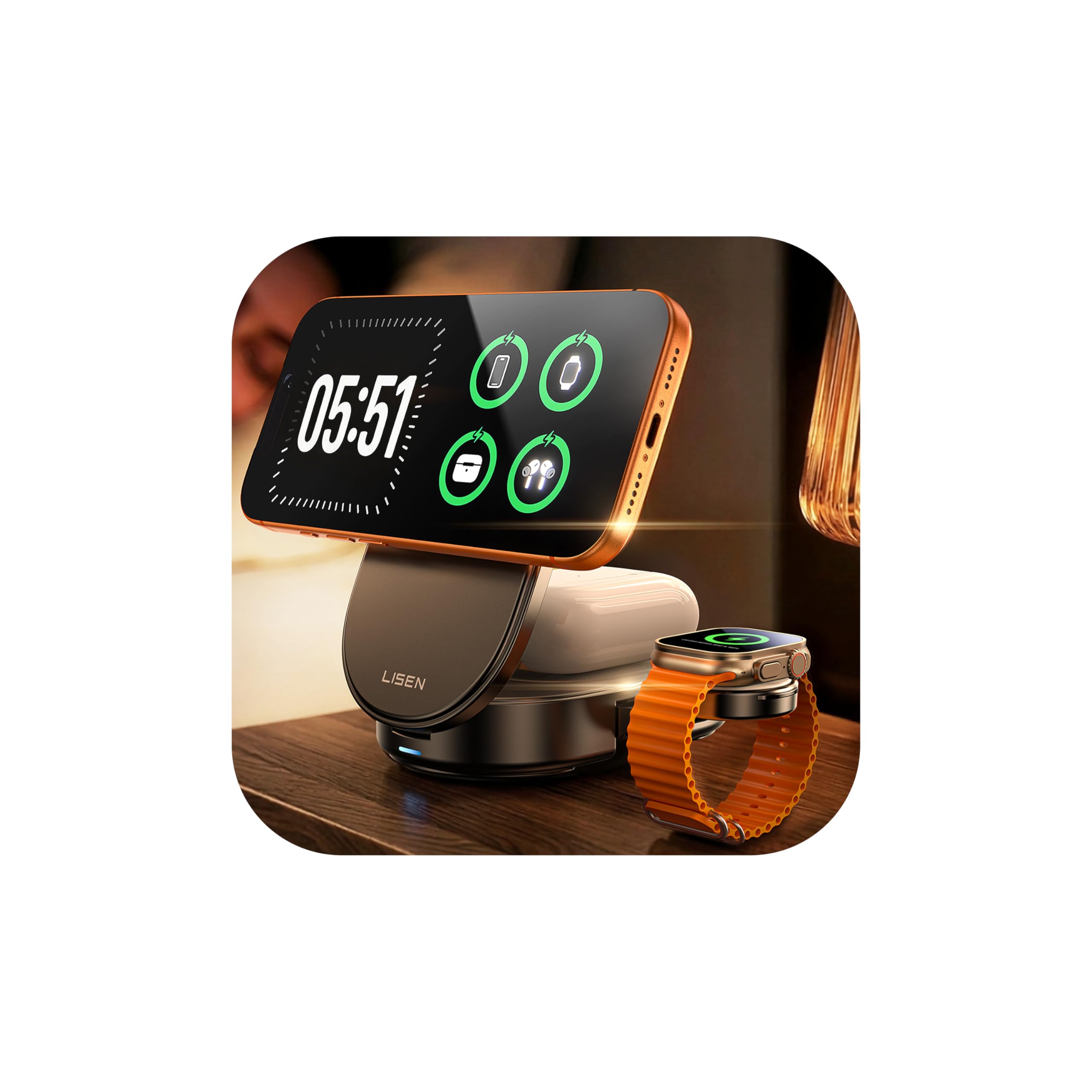
Folds to 3.94 x 2.44 x 1.23 inches and weighs 6.35 oz — the one that disappears into a carry-on.
You can fold this charger flat and slip it into a backpack pocket or handbag, so it travels as easily as a notebook. The design is the argument here: the phone panel opens up to 65° for viewing, the bottom earbud pad rotates 180°, and the whole thing collapses flat. It runs on Qi2.2 magnetic wireless charging at up to 25W, which the makers say fully charges an iPhone 17 Pro Max in about an hour and 45 minutes and reaches 60% in 30 minutes — comfortably above the 15W ceiling of older wireless pads.
Inside, a separated PCBA heat-dissipation plate keeps heat away from the phone during overnight or long desk sessions, and a 1200-gram magnetic hold lines the iPhone up without fiddling. The base is silicone so it does not skate across a nightstand or tray table, and the stand works in portrait or landscape. The kit includes a 45W power adapter and a 3.3ft nylon-braided USB-C to USB-C cable, so there is nothing else to buy.
Buyers praise this charger most for portability, followed closely by Apple compatibility. Charging performance is the mixed part — one very critical report describes overnight sessions where the iPhone stopped charging roughly half the time, leaving the phone dead by morning, while many others report consistent fast top-ups with no overheating. If reliability overnight matters more than travel bulk, a wired station is the safer bet. For suitcase space, this one is hard to argue with.
Suitcase math: it folds smaller than a paperback and stows with its 45W adapter and braided cable, so a hotel desk setup takes seconds to unpack.
Fit note: if the charging plate loses alignment on a soft mattress or off-angle surface, the phone can miss overnight charging — set it flat on a firm table and it is the cleanest option for travelers.
Packed and gone: for an Apple household that wants one foldable station for the hotel room, the office desk, and the bedside table.
Think twice if: you need bulletproof overnight reliability — this is a travel-first pick, not the last word in overnight dependability.
7. MobileVision Bamboo Charging Station Slim Version

Room for a laptop, several tablets, and three phones in a bamboo shape that doubles as furniture.
Where the Homde above multiplies storage compartments, this one takes on the larger hardware: the maker says the station organizes and charges up to one laptop, several tablets, and at least three smartphones. The footprint is 10 x 6.5 x 9 inches, so it earns its counter space by consolidating a genuinely tall pile of devices. The top lid uses integrated magnets to hold closed and stop devices from tipping out, and cutouts through the bamboo let charging cables route cleanly inside.
What buyers keep coming back to is the look: the bamboo frame is described as much prettier than the plastic-and-cable pile it replaces, and the wide base compartment hides a power strip and multi-port adapter inside. That said, it is a shell — charging cables and the power strip are sold separately, and you will want a multi-port brick to slot into the base. A separate six-port unit in the base is the setup most owners describe.
Two honest limits show up repeatedly. The smooth bamboo base can slide unless you add rubber feet, and the top lid’s magnets are described as weak enough that the lid can detach easily — though many owners say it works fine daily when set down gently. The occasional cracked or splintery unit does appear in feedback, but that needs to be weighed against the many owners who describe years of steady use. Customer service has also been responsive when something does arrive damaged — one owner’s cracked unit was replaced with a perfect one and the rating bumped to five stars.
Laptop-and-tablet scale
- Fits one laptop, multiple tablets, and three-plus phones in one bamboo stand
- Magnetic lid protects devices from sliding out
- Hollow base hides a power strip or multi-port adapter
- Warm bamboo finish reads as furniture rather than gadget storage
Watch out for
- Charging cables and power strip are sold separately
- Smooth base can slide on wood or glass without rubber feet
- Magnetic lid can detach easily if snagged
Choose this when: your desk pile includes a laptop or big tablets and you want one bamboo piece to organize them all.
Then add: a multi-port power brick and cables to go inside — the stand alone does not include them.
8. Kioson 12-in-1 200W USB C Power Strip

Four wall outlets and eight USB ports in one flat slab — the desk power upgrade that ends extension-cord hunts.
The count tells the story: 4 AC outlets and 8 USB ports (4 USB-C + 4 USB-A) share 200W, and one USB-C port handles laptops at 65W, reaching roughly 50% in about 30 minutes according to the maker. So it handles the kettle and a projector as comfortably as it does a phone lineup, which makes it the only pick here that doubles as your actual wall outlet. The cord is 5ft of 14AWG pure copper rated to 15A, and the flat 0.7-inch plug slots behind furniture that a chunky brick cannot squeeze past.
You get cooler running and a slimmer body from GaN IV (fourth-generation Gallium Nitride circuitry, the tech behind cooler running and a slimmer body) on the USB side, and the shell is fire-resistant polycarbonate rated to 1382°F — a genuinely reassuring number to see on a device that stays plugged in permanently. Build quality shows in the flat slab design: it measures 5.04 x 3.02 x 1.18 inches, so it takes up about the footprint of a paperback on the desk. Warranty runs three years per the manufacturer.
Sizing up the trade-offs: it is light enough to hide but chunky enough that owners describe it as not ideal for travel — the unit carries a bit of heft. Only one output is laptop-specific, so a second laptop will get whatever the 110V sockets and remaining ports can offer. And the size is the flip side of the power: it replaces a whole multi-plug setup, which is why it works so well on permanent desks and less well in a suitcase.
Ends extension-cord clutter: replacing a wall strip, a laptop brick, and two phone plugs with one 5.04-inch slab is a real space win on a narrow desk.
Before you commit: it is built for a permanent spot, not a carry bag — treat it as furniture you set down once.
Right for the home office: a monitor, a laptop charger, two phones, and AirPods all want a permanent home — this one slab gives every one of them a plug.
Skip if: you carry your charging setup to cafés and hotels every week; the size makes it a stay-at-home unit.
9. Belkin Qi2.2 25W 3-in-1 Wireless Charging Station

A weighted chrome base and a fan that idles unless a device is dropped on — the premium end of the wireless stand.
Your dock stays up to 10°F cooler during high-speed charging thanks to ChillBoost, a built-in cooling system. A quiet smart fan auto-adjusts by temperature and runs only when a device is attached. Paired with 25W Qi2.2 magnetic charging — a newer wireless standard that pushes power well above the 15W ceiling of older pads — the makers state an iPhone can go from 0-50% in 25 minutes and an Apple Watch Series 10 from 0-80% in 45 minutes. AirPods charge up to 5W while your other devices run.
Where the LISEN above wins on travel bulk, the Belkin earns its premium label on stability and finish: a weighted chrome base, soft-touch silicone top, and silicone foot that keeps the dock planted. A 45W power supply and 5ft USB-C to USB-C cable are included, so setup is plug-and-play, and StandBy support lets an iPhone display clock or calendar while it sits on the stand. The weighted chrome base and soft-touch silicone top are what justify the premium price, not the 25W rating.
The feedback confirms this is a demanding crowd that is often happy: quality and charging speed lead the positives, with clean-desk and low-clutter comments common. Two things owners mention honestly: the fan is audible to some and inaudible to others, and the strong magnets can actually make phone removal require a firm pull. The 3-in-1 is Apple-only, so Android owners should skip it — a USB-C station covers more devices for less.
what separates it
- 25W Qi2.2 wireless charging with ChillBoost keeping the dock 10°F cooler
- Weighted chrome base plus silicone top holds the phone without sliding
- 45W PSU and 5ft USB-C cable included — nothing else to buy
- StandBy support for clock and calendar display
Then there is
- Fan hum bothers some users, though a switch can disable it
- Strong magnets make removing the phone take a firm pull
- Apple-only — Samsung and Google owners should look elsewhere
The premium trade: you get a weighted, cooled, Apple-first 3-in-1 that stays put and looks intentional on a nightstand or desk.
Look elsewhere if: Android phones are in the house — the LISEN folds smaller for travel and the MEKIOJEO covers far more devices for the money.
Understanding the Specs
Total wattage (shared power)
Total wattage is the ceiling on every device plugged into the station at once. A 380W block splits that across 12 ports, so a laptop can pull 65W while phones and earbuds take the rest. A lower total means each port gets a thinner slice when the station is busy. When two stations share a port count but not a wattage, the higher-wattage one keeps a laptop fast even with everything else plugged in.
USB-C PD (Power Delivery) vs USB-A
PD is the standard that lets one USB-C port negotiate higher wattages for laptops and tablets. USB-A ports top out much lower, which is fine for phones, earbuds, watches, and accessories. A good station pairs one high-wattage USB-C PD port for your laptop with several mid-wattage ports for everything else — that split is what makes a station useful rather than just a big outlet multiplier.
GaN vs traditional charging
GaN (Gallium Nitride) is a newer chip material that lets chargers run cooler and pack the same power into a smaller body than older silicon. A GaN station in a small aluminum or plastic shell can output serious wattage without needing a brick-sized power supply or a noisy fan. On the Belkin, that same idea arrives as ChillBoost active cooling — a heat solution to keep the wireless pad cool during fast charging.
Magnetic wireless (Qi2 / Qi2.2) vs MagSafe
Qi2 and Qi2.2 are newer wireless charging standards that ramp wireless speed above the older 15W ceiling, and both rely on magnetic alignment to lock the phone in the right spot. MagSafe is Apple’s own version of that magnet system. A wireless stand’s fast charging usually demands a compatible phone, a case under about 5mm, and a newer iOS version — so check compatibility before buying a wireless-only station.
FAQ
Will a magnetic wireless charging station work with my Android phone?
How many devices can I charge at once without slowing everything down?
Is a wireless station slower than plugging in a cable?
Do I need to buy extra cables with a charging station?
Will a charging station get hot when every port is full?
Can I charge a laptop on a charging station?
What is the difference between Qi2 and Qi2.2 wireless charging?
Do bamboo charging organizers include the power strip and cables?
How long will a charging station last?
Will my phone case stop it from charging on a magnetic stand?
Can I use a charging station while traveling?
Final Thoughts: The Verdict
For most people, the attractive charging station winner is the MEKIOJEO 12-Port 380W Charging Station because it powers the widest range of devices — a laptop, two phones, a watch, and earbuds all at once — from an aluminum body that stays cool. It also does it with the highest customer rating of any pick here: the crowd favorite holds 4.6 stars across 800+ owners, which is why it takes the top spot. If you want to travel with one station in a carry-on, grab the LISEN Qi2.2 25W 3-in-1. And for a nightstand that deserves to be seen, the Belkin Qi2.2 25W 3-in-1 is the one to reach for.
How We Picked
We do not accept paid placement. Every pick is matched to a real buyer and a real use-case; we do not hands-on test units.
Sources & Methodology
Specifications: manufacturer listings and product documentation. Review insights: verified customer reviews, as of September 2026. Pricing: not shown on this page (it changes often); check the current price via the retailer link.
As an Amazon Associate, Gadgets Feed earns from qualifying purchases. This does not affect which products we feature.