
Our readers keep the lights on and my morning glass full of iced black tea. As an Amazon Associate, I earn from qualifying purchases.
Specs are compiled from manufacturer listings and verified buyer reviews and can change over time — please confirm the key details on the product page before buying.
You know the feeling — you have your Ryzen CPU picked out, your GPU ready to go, and then you hit the motherboard aisle. Endless model numbers, confusing chipset letters, and every board claiming to be the one for you. What actually makes an ATX AM4 motherboard worth buying right now, in a socket that has been around for years? The answer has almost nothing to do with B550 versus X470 on the box. It depends on the power delivery system that keeps your processor fed under load, the memory speed it actually holds stable, and whether the board has the slot layout and ports you will use every single day. This guide cuts through the noise by comparing the real specs and verified buyer experiences across five very different ATX AM4 boards — from a budget-friendly sleeper to a premium feature-packed performer.
I’m Min — the founder and writer behind Gadgets Feed. This guide is built by comparing the manufacturers’ published specifications and the patterns across verified customer reviews, so you get each pick’s real strengths and trade-offs instead of marketing spin.
Whether you are building fresh or slotting in a last-gen CPU, you need a board that balances power delivery, memory support, and connectivity — which is exactly what this guide to the best atx am4 motherboard will help you find.
Quick Picks
- MSI MAG B550 Tomahawk Gaming Motherboard — Best Overall
- ASUS ROG Strix B550-F Gaming Motherboard — Premium Build
- GIGABYTE B550 AORUS Elite Gaming Motherboard — Cool Runner
- ASRock AMD B550 PG Riptide ATX Motherboard — Budget Champion
- MSI AMD X470 Pro Carbon Gaming ATX Motherboard — Legacy Option
How To Choose The Best ATX AM4 Motherboard
The AM4 socket has been around for a long time, supporting CPUs from the early Ryzen 1000 series all the way up to the 5000 series. While that means you have plenty of options, it also means you need to be careful about what you are actually getting. Here is what matters most.
Power Phase Design and VRM Quality
The voltage regulator module (VRM, the set of components that convert power from your PSU into the precise voltage your CPU needs) is the most important factor for stability and overclocking. A board with a true 12+2 phase design, like the GIGABYTE B550 AORUS Elite, can handle a Ryzen 9 without breaking a sweat, while a weaker design might struggle under sustained load. Check the phase count and whether the VRMs have adequate heatsinks.
Memory Support and Speed
Ryzen processors love fast memory. Look for a board that supports at least DDR4 4400 MHz (overclocked) and has four DIMM slots for future upgrades. The difference between a board that tops out at 3466 MHz and one that goes past 4866 MHz is real — higher memory speed translates to better performance in CPU-bound tasks and games. Also, check what speed the board supports from the start before a BIOS update.
Connectivity and Expansion
Count the rear USB ports, M.2 slots, and SATA ports carefully. If you run multiple NVMe drives, you need at least two M.2 slots. For a modern desk setup, having at least one USB 3.2 Gen 2 Type-C connector on the rear is a practical advantage. The LAN port speed also matters — a 2.5 Gigabit Ethernet port gives you faster file transfers over your home network than a standard Gigabit port.
Quick Comparison
On smaller screens, swipe sideways to see the full table.
| Model | Best For | Power Phase | Max Memory | M.2 Slots | Amazon |
|---|---|---|---|---|---|
| MSI MAG B550 Tomahawk | Overall Balance | 10+2 | 128 GB | 2 | Amazon |
| ASUS ROG Strix B550-F | Build Quality & Audio | 12+2 | 128 GB | 2 | Amazon |
| GIGABYTE B550 AORUS Elite | VRM Thermal Design | 12+2 | 128 GB | 2 | Amazon |
| ASRock AMD B550 PG Riptide | Budget Value | 8 | 128 GB | 2 | Amazon |
| MSI AMD X470 Pro Carbon Gaming | Legacy Compatibility | — | 64 GB | 2 | Amazon |
In‑Depth Reviews
1. MSI MAG B550 Tomahawk Gaming Motherboard

The balanced brawler that handles a Ryzen 7 overclock without breaking a sweat.
Your PC build needs a board that does not cut corners on power delivery just to hit a lower price point. The MSI MAG B550 Tomahawk delivers with a 10+2 phase VRM design (a voltage regulator module with 10 phases for the CPU and 2 for the memory controller) that buyers report handles a Ryzen 7 5800X overclocked to 4.82GHz and RAM overclocked to 3600MHz — all while staying cool enough to push 120+ FPS at ultra settings. The memory support goes all the way up to 128GB at 4866 MHz, versus 64 GB on the X470 Pro Carbon Gaming board, so you can pack in a lot of RAM for content creation or heavy multitasking.
An on-board dual LAN setup gives you both a 2.5 Gigabit port and a separate Gigabit port — handy if you want to keep gaming traffic on one line and file transfers on the other. The Audio Boost feature uses a Realtek ALC1200 codec (the part of the motherboard that turns digital audio into sound signals for your speakers or headphones) for studio-grade sound quality. One reviewer who replaced a failing ASRock X570 Steel Legend said the Tomahawk fixed micro-stutter and severe online lag, making the whole system feel smoother. The catch to keep in mind: the I/O panel only has six USB ports, and a few buyers noted that certain RAM kits, like Corsair Vengeance LPX 32GB, caused instability. Using memory from the board’s qualified vendor list (QVL) is a smart move here.
Reasons to Choose
- Supports up to 128 GB DDR4 at 4866 MHz, more than enough for heavy workloads.
- VRM handled 5800X overclock to 4.82 GHz, per verified buyers.
- Dual LAN with 2.5 Gigabit plus Gigabit ports for flexible networking.
Watch Out For
- Only six rear USB ports, limiting peripheral connections.
- Some RAM kits incompatible; check QVL.
- LED location can be awkward for certain case layouts.
The best-balanced pick: This is the right board if you want strong VRMs, dual LAN, and high memory support without jumping to a boutique-tier price — it is the most versatile ATX AM4 option for a mid-to-high-end Ryzen 5000 build.
One real limitation: If you need more than six rear USB ports or plan to run a less common RAM kit, check the QVL first or consider a board with more rear I/O.
2. ASUS ROG Strix B550-F Gaming Motherboard
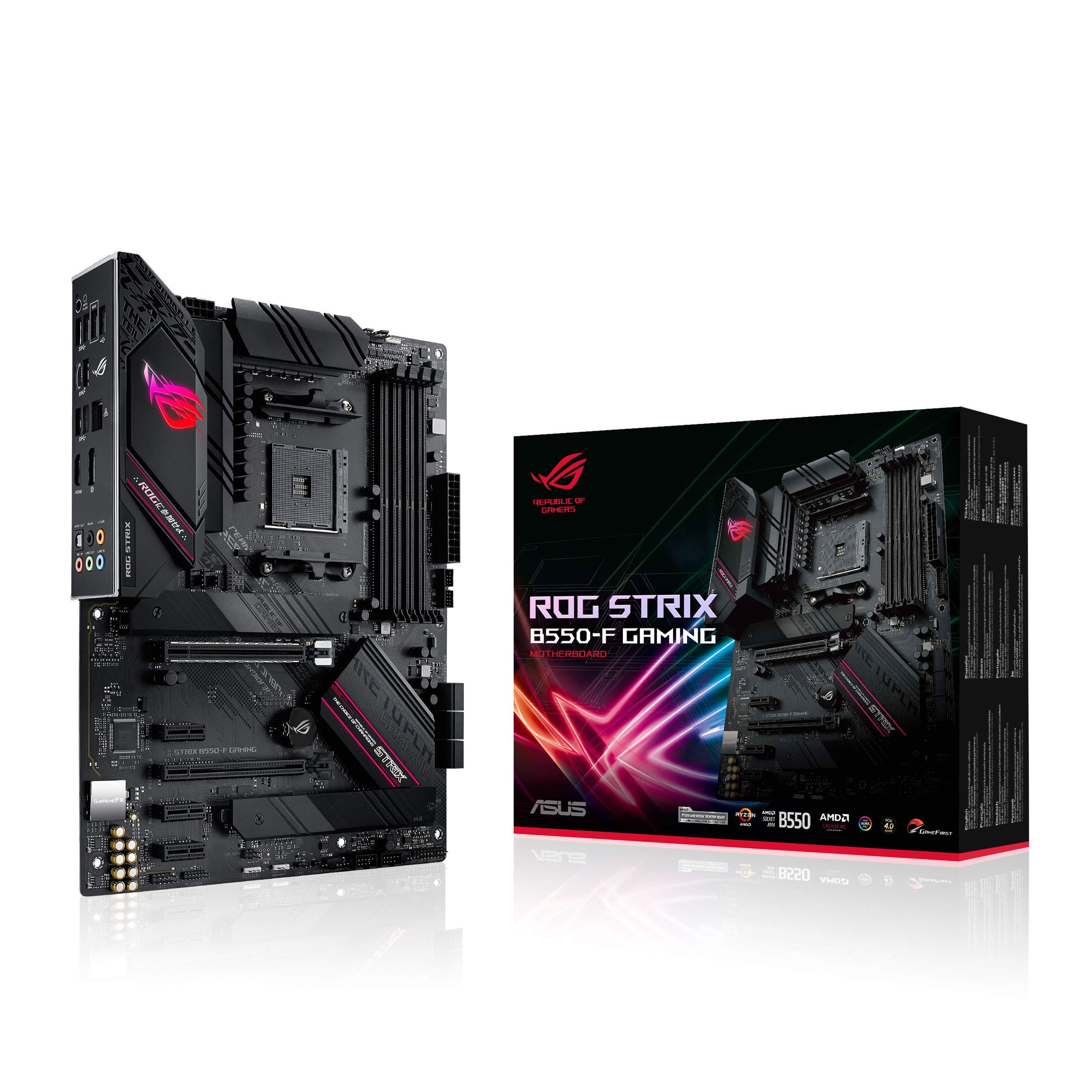
The board you buy when you want better PCB quality and memory support without guessing.
If you have ever been stuck with a motherboard that refused to run more than two sticks of RAM at its rated speed, the ASUS ROG Strix B550-F is designed to solve that exact problem. It uses ASUS OptiMem II (a proprietary memory trace layout that reduces signal interference between the CPU and RAM), which lets you fill all four DIMM slots — one buyer confirmed running 4x8GB of DDR4 3600 C16 in it after their TUF B550M failed beyond two sticks.
The 12+2 power phase design, paired with ProCool connectors (reinforced power connectors that ensure even contact and lower resistance for stable current delivery), means a Ryzen 5000-series CPU gets clean, stable power even under sustained loads. The Intel 2.5 Gigabit LAN port handles lag-free online gaming, and the board includes PCI Express 4.0 support for modern graphics cards and SSDs. One reviewer who replaced a faulty board said the ROG’s PCB quality and audio are superior to cheaper options. A notable catch: the board does not come with built-in Bluetooth or Wi-Fi, which is a surprising omission at this tier. You will need to add a separate Wi-Fi/Bluetooth card if you want wireless connectivity. The board also lacks an integrated I/O shield, so you have to install the separate one during the build.
Standout Features
- Four RAM slots stable at 3600 MHz C16 with 4 sticks.
- 12+2 power phases with ProCool connectors for reliable delivery.
- Light at 900 grams, easier to handle and mount.
Consider Before Buying
- No built-in Bluetooth or Wi-Fi.
- No integrated I/O shield.
- Premium price tier.
Reach for this if: You plan to run four sticks of high-speed DDR4 memory and want a board with a proven 12+2 phase power system and superior PCB quality — all in a relatively light package.
Look elsewhere if: Wireless connectivity from the start is a must, or you prefer a board with an integrated I/O shield.
3. GIGABYTE B550 AORUS Elite Gaming Motherboard

The true 12+2 phase board with enlarged surface heatsinks for serious thermal control.
When your Ryzen CPU pulls hard during a rendering job or a gaming session, the VRMs heat up — and that heat directly affects stability. The GIGABYTE B550 AORUS Elite uses a true 12+2 phase digital VRM (a voltage regulator module where each phase has dedicated control for cleaner power delivery) with 50A DrMOS (a DrMOS is a combined MOSFET and driver chip that handles higher currents more efficiently than separate components), plus enlarged surface heatsinks to keep those temperatures in check. It weighs 1500 Grams versus 900 Grams for the ASUS ROG Strix B550-F, and that extra mass comes from the large thermal solutions that help sustain overclocks. Owners mention that after a BIOS update to version F13, Ethernet disconnects and USB drops that appeared during VR streaming were fixed by setting PCIe to Gen3.
The board supports dual ultra-fast NVMe PCIe 4.0 M.2 slots with thermal guards (small heatsinks that sit on top of the SSD to pull heat away and prevent thermal throttling during long write operations). The AMP-UP audio section uses a Realtek ALC1200 codec paired with WIMA capacitors, which results in cleaner audio output to studio monitors. The rear I/O includes DisplayPort and HDMI outputs, plus a 2.5 Gigabit Ethernet LAN port for fast network file transfers. A buyer running a Ryzen 7 5800X with RTX 3080 and 32GB 3600MHz RAM confirmed the board works well after the BIOS flash. One practical detail: the G-connector simplifies front panel header wiring, and the integrated I/O shield saves you a small installation hassle. However, the board lacks a USB-C header on the front panel connector.
Thermal Edge
- True 12+2 phase digital VRM with 50A DrMOS for clean power.
- Enlarged surface heatsinks for sustained thermal performance under load.
- Dual M.2 slots with thermal guards prevent SSD throttling.
Heads Up
- Heavier at 1500 grams due to thermal solution.
- No front panel USB-C header.
- Some buyers needed a BIOS update (F13) and Gen3 PCIe setting to fix Ethernet/USB drops.
Best suited for: Overclockers and users running a Ryzen 7 or 9 who want sturdy thermal management on the VRMs and SSDs without stepping up to an X570 board.
Trade-off to note: The larger size may require fan removal in some cases, and a BIOS update is recommended to resolve early Ethernet issues.
4. ASRock AMD B550 PG Riptide ATX Motherboard

The affordable AM4 board that still gives you two NVMe slots and extensive USB connectivity.
Building on a budget does not have to mean missing out on modern storage and port options. The ASRock B550 PG Riptide provides 2 NVMe slots (one PCIe Gen4 x4 and one PCIe Gen3 x2 & SATA3) and 8 rear USB ports, with 2 USB 3.2 Gen2 (one Type-A and one Type-C), 4 USB 3.2 Gen1, and 2 USB 2.0 on the rear, plus 4 front USB 2.0 headers. One buyer called it “an amazing am4 mother board for the price, love the fact that it has 2 nvme slots and 9 rear usb ports.” At 1.7 Kilograms, it is heavier than the MSI X470 Pro Carbon Gaming at 0.5 Kilograms, so it feels more substantial during installation. The board’s dimensions are 12.2″L x 8.27″W x 1.97″H, versus 9.6 inches long for the MSI MAG B550 Tomahawk.
The 8-phase Digi Power design with DrMOS delivers stable power to Ryzen 3000, 4000 G-Series, and 5000 Series processors. It supports DDR4 up to 4733+ when overclocked, and the one PCIe 4.0 x16 slot means you can run a modern graphics card at its full bandwidth. There is also a dedicated M.2 Key E slot for a Wi-Fi card, and the board includes antenna holes in the rear I/O shield. A buyer running a 5800X with 2x16GB RAM and an 6900XT reported fast boots and great gaming stability. The catch: some units shipped with a corrupted BIOS from the factory — one reviewer noted the board failing to recognize any CPU, and force-flashing was not possible. Amazon also denied a refund in that case. This is a known issue documented on Reddit, so buying from a retailer with a good return policy is wise.
Why It Stands Out
- Two NVMe slots give you fast storage options at a low price.
- Eight rear USB ports give you plenty of peripheral connectivity.
- Dedicated M.2 slot for Wi-Fi card and included antenna holes.
Potential Risk
- Factory-corrupted BIOS reported on some units.
- No BIOS flashback feature, so a bad BIOS means a repair shop visit.
- Arrived warped in one buyer’s report, though still functional.
Who should buy it: The budget-conscious builder who wants two NVMe slots and plenty of rear USB ports without stepping up to the mid-range tier — just ensure you buy from a seller with a solid return policy.
Who should pass: Anyone unwilling to risk a potential BIOS issue or who needs a guaranteed out-of-box experience without troubleshooting.
5. MSI AMD X470 Pro Carbon Gaming ATX Motherboard

The older chipset board that still overclocks well if you already own a Ryzen 2000 CPU.
If you are holding on to a Ryzen 2600 or 3000-series CPU and want a high-quality board with solid overclocking muscle, the MSI X470 Pro Carbon Gaming is worth a look. It topped out at 64 GB of DDR4 memory versus 128 GB on the MSI MAG B550 Tomahawk and supports speeds up to 3466 MHz, which is lower than modern B550 boards. However, buyers reported overclocking their Ryzen 2600 to 4.2 GHz and taking RAM to 3466CL14 without stability issues. One buyer mentioned it performed better than a Gigabyte X470 Ultra Gaming when running RAM past 2933 MHz. The board weighs just 0.5 Kilograms, compared to 1.7 Kilograms for the ASRock B550 PG Riptide.
The X470 chipset lacks native PCI Express 4.0 support, meaning you will not get the full speed from a modern Gen4 graphics card or SSD. However, it still has 4 x USB3.0 Type-A, 1 x USB3.1 Type-A, 1 x USB3.1 Type-C, and dual M.2 slots for storage expansion. The board includes HDMI and DisplayPort outputs, a single Ethernet LAN port (RJ-45), and a PS/2 port for legacy peripherals. Buyers praise the clean look and easy-to-navigate UEFI, mentioning that the lighting is only controllable via Windows software, but settings persist after reboot. A minor but real catch: the I/O shroud is too tall and may interfere with a rear exhaust fan in cases like the Fractal Define R6 or Jonsbo UMX4. The shroud is removable, but it is an extra step during installation.
Why Consider It
- Light board at 0.5 kg, easy to work with.
- Stable overclocking performance with Ryzen 2000/3000 series.
- Dual M.2 slots and USB 3.1 Type-C on the rear.
Limitations
- No PCIe 4.0 support at all.
- Memory capped at 64 GB and 3466 MHz.
- I/O shroud too tall for some cases.
This fits if: You have a Ryzen 2600 or 3000-series CPU and want a lightweight board with solid overclocking performance at a legacy chipset price — especially if you do not need PCIe 4.0.
Not the right pick for: Anyone building a new system with a Ryzen 5000-series CPU or planning to use a PCIe 4.0 GPU or SSD at full speed; a B550 board will serve you much better.
Understanding the Specs
VRM Phases
Think of a power phase as a single lane on a highway — more lanes mean your CPU can get a smoother, more stable supply of power without traffic jams, especially when you overclock. A 12+2 phase design means 12 phases for the CPU core and 2 for the memory controller, which is ideal for Ryzen 7 and 9 chips. An 8-phase design is fine for Ryzen 5 or a mild overclock on a Ryzen 7.
PCIe Generation
PCI Express is the slot that connects your graphics card and fastest SSDs to the CPU. A board with PCIe 4.0 has double the bandwidth per lane compared to PCIe 3.0 — that means your Gen4 graphics card can transfer data faster and your Gen4 NVMe drive can hit read speeds beyond 5000 MB/s. X470 boards lack PCIe 4.0, a major reason to prefer B550 today.
FAQ
Can I use a Ryzen 5000 CPU on any AM4 motherboard?
What is the real difference between B550 and X470?
How much RAM do I need for gaming on a B550 board?
Will a B550 motherboard fit in my ATX case?
Is the MSI X470 Pro Carbon Gaming still worth buying in 2024?
Why do some motherboards need a BIOS update before they work with Ryzen 5000?
How many M.2 slots do I need for a gaming PC?
What does a USB 3.2 Gen 2 port do that USB 3.0 does not?
Is 2.5 Gigabit Ethernet worth having on a motherboard?
Can I use my old DDR4 RAM on a B550 board?
Final Thoughts: The Verdict
Across the board, the best atx am4 motherboard winner is the MSI MAG B550 Tomahawk because it delivers a strong 10+2 phase VRM, dual LAN, and support for up to 128 GB of fast DDR4 memory at a price that undercuts the premium options while outclassing the budget ones. If you want superior PCB quality and guaranteed four-stick memory stability, grab the ASUS ROG Strix B550-F. And for the budget builder who needs two NVMe slots and a wall of USB ports, the ASRock B550 PG Riptide is the smart play.
How We Picked
We do not accept paid placement, and we did not hands-on test every unit. Instead, we match each pick to a real buyer and use-case by comparing the manufacturers’ published specifications against the patterns in verified customer reviews — so you get each pick’s real strengths and trade-offs instead of marketing copy.
Sources & Methodology
Specifications: manufacturer listings and product documentation. Review insights: verified customer reviews, as of July 2026. Pricing: not shown on this page (it changes often); check the current price via the retailer link.
As an Amazon Associate, Gadgets Feed earns from qualifying purchases. This does not affect which products we feature.
Product prices and availability are accurate as of the date/time indicated and are subject to change. Any price and availability information displayed on Amazon at the time of purchase will apply to the purchase of this product. As an Amazon Associate I earn from qualifying purchases.
CERTAIN CONTENT THAT APPEARS ON THIS SITE COMES FROM AMAZON. THIS CONTENT IS PROVIDED "AS IS" AND IS SUBJECT TO CHANGE OR REMOVAL AT ANY TIME.
Amazon and the Amazon logo are trademarks of Amazon.com, Inc. or its affiliates.