
Our readers keep the lights on and my morning glass full of iced black tea. As an Amazon Associate, I earn from qualifying purchases.
Specs are compiled from manufacturer listings and verified buyer reviews and can change over time — please confirm the key details on the product page before buying.
The AM5 socket is the foundation of any modern AMD build, and the motherboard you choose determines how much performance you can open up from your Ryzen chip. Whether you are chasing high frame rates or building a quiet workstation, the board’s power delivery, storage options, and networking dictate the experience. You want a board that works from the start, handles a demanding CPU without thermal throttling, and offers room to grow.
I’m Min — the founder and writer behind Gadgets Feed. This guide is built by comparing the manufacturers’ published specifications and the patterns across verified customer reviews, so you get each pick’s real strengths and trade-offs instead of marketing spin.
Your next build deserves a stable foundation, and the best atx am5 motherboard balances price, power delivery, and connectivity for years of reliable performance.
Our Picks at a Glance


How To Choose The Best ATX AM5 Motherboard
Picking a motherboard is about matching the board’s capabilities to your CPU and your long-term plans. The chipset is your first filter, followed by the power delivery system and the amount of storage connectivity you need.
Chipset: B650 vs B850 vs X870
The chipset dictates how many high-speed lanes are available. A B650 board covers the essentials for most gamers, while the newer B850 adds more PCIe 5.0 support. The X870 sits at the top for enthusiasts who want maximum bandwidth and USB4 built in. You don’t need the most expensive chipset if your main goal is gaming.
Power Delivery and VRM Quality
The VRM (voltage regulator module) feeds clean power to your CPU. A board with more power phases, like a 16+2+2 design, runs cooler and more stable under heavy loads like video rendering. A solid VRM also gives you headroom for overclocking without worrying about thermal throttling.
Storage and Connectivity Priorities
Count the M.2 slots (the slots for fast NVMe solid-state drives) and the USB ports on the rear. A board with three or four M.2 slots lets you expand storage without using slower drives. Networking matters too: a 2.5GbE LAN port (a wired connection that’s faster than standard gigabit) is now common, and Wi-Fi 7 is the latest wireless standard if you can’t use a cable.
Quick Comparison
| Model | Best For | Chipset | Memory Speed | M.2 Slots | Amazon |
|---|---|---|---|---|---|
| GIGABYTE B650 Eagle AX★ Best Overall | Budget Gaming | AMD B650 | 5200 MHz | 3 | Amazon |
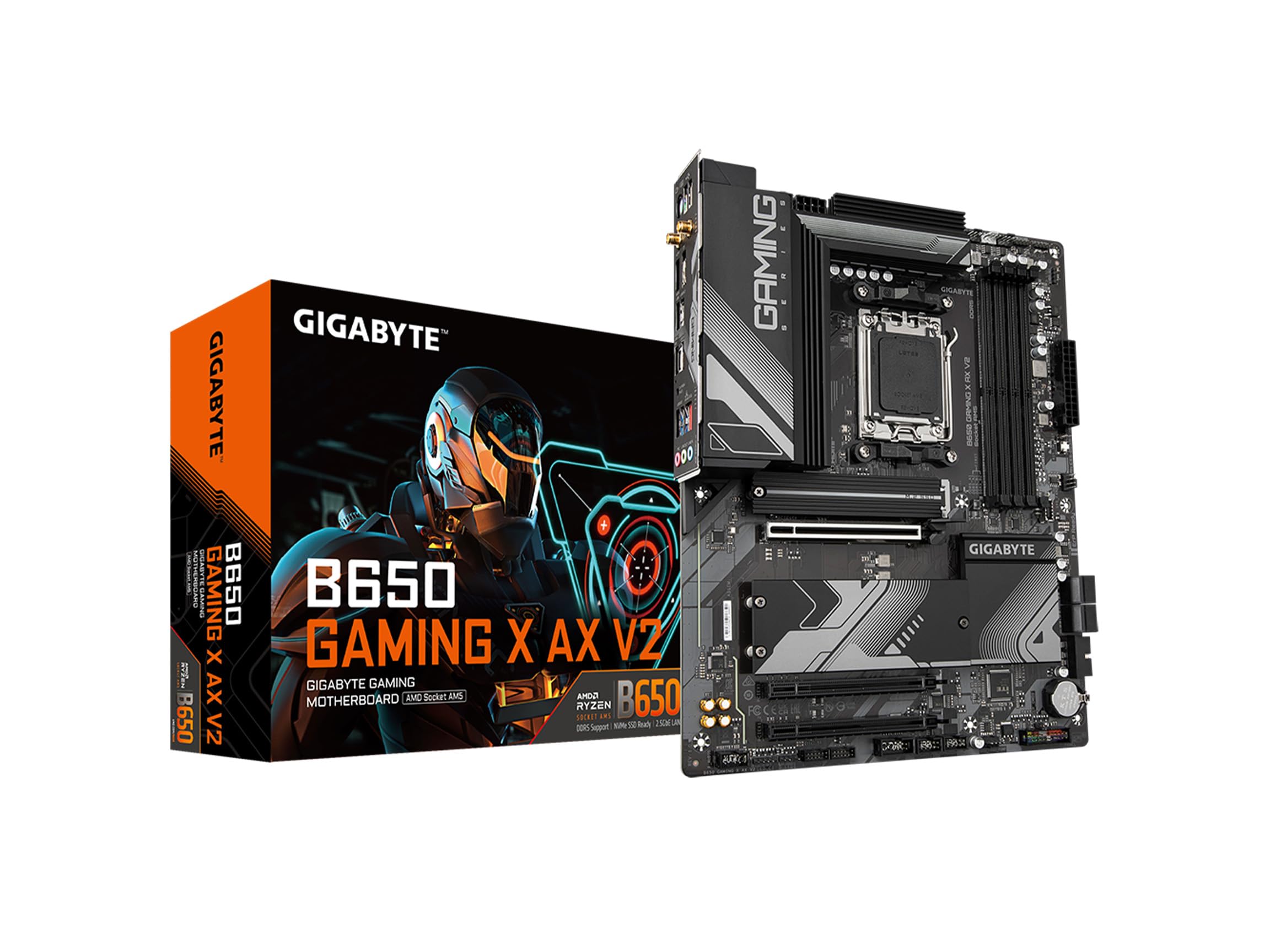
| GIGABYTE B650 Gaming X AX V2Gaming Staple | Value Mid-Range | AMD B650 | 5200 MHz | 3 | Amazon |
| ASRock B650 Steel LegendValue Performer | Aesthetic Builds | AMD B650 | 7200+ MHz | 3 | Amazon |
| ASRock B850 Steel Legend | Latest Gen Value | AMD B850 | 8000+ MHz | 4 | Amazon |
| GIGABYTE X870 AORUS Elite | USB4 Connectivity | AMD X870 | 8200 MHz | 4 | Amazon |
| ASUS TUF Gaming X870-PLUS | Durable Gaming | AMD X870 | 160 MHz | 4 | Amazon |
| MSI MAG X870 Tomahawk | Enthusiast Features | AMD X870 | 7800 MHz | 4 | Amazon |
| MSI MAG B850 Tomahawk MAX | High-Speed Memory | AMD B850 | 8400+ MHz | 4 | Amazon |
| ASUS ROG Strix X870-A | Premium White Builds | AMD X870 | 160 MHz | 4 | Amazon |
In‑Depth Reviews
1. GIGABYTE B650 Eagle AX
Our pick — over 4.5★ from 950+ verified ratings; the strongest balance of quality and price.
The dependable daily driver that just works for most builders.
You get a rock-solid foundation here: a 12+2+2 phase digital VRM (the power delivery system that feeds your processor) keeps things stable even after months of use. The board supports the full Ryzen 9000, 8000, and 7000 series, so it’s ready for whatever AM5 chip you already own or plan to buy later.
The review pages sum it up: pairing it with a Ryzen 7 7800X3D “has worked perfectly.” Buyers report it runs cleanly from the start, with an easy-to-navigate BIOS and fast Wi-Fi. It sits at 5200 MHz for memory clock speed, which is the baseline for DDR5, while the triple M.2 setup (one PCIe 5.0 and two PCIe 4.0) gives you plenty of room for fast storage.
At 1000 g this board is lighter than the GIGABYTE Gaming X AX V2 (1755 g), but it carries the same real-world reliability. The Q-Flash Plus feature is a lifesaver because it lets you update the BIOS with a USB stick even if you have no CPU installed. It’s the kind of safety net that turns a potential disaster into a five-minute fix.
What Owners Love
- Reliable out-of-box performance that lasts months without hiccups.
- Triple M.2 slots for expanding storage later.
- Q-Flash Plus lets you recover a bricked BIOS easily.
Trade-Offs
- Memory speed tops out at 5200 MHz, so no extreme overclocking.
- Port selection is solid but not as extensive as premium boards.
The pick if: You want a no-drama board for a first build or a mid-range gaming rig that just runs.
Look elsewhere if: You plan to push DDR5 far beyond 5200 MHz or need heavy-duty overclocking features.
2. GIGABYTE B650 Gaming X AX V2
A classic gaming board refreshed with faster wired networking.
If you regularly move large files across your home network, this V2 revision adds a 2.5GbE LAN port (a wired network connection roughly two and a half times faster than standard gigabit ports), so transfers finish in a fraction of the time. The direct 8+2+2 phase digital VRM design (a power delivery system that regulates voltage to the CPU) keeps power clean and stable for Ryzen 9000 and 8000 series chips, so you get reliable performance even under load.
The board carries a solid reputation for quality, with owners building their first PCs on it and reporting a “Great product no issues” experience for their gaming setups. It also comes with EZ-Latch, which streamlines installation for M.2 drives and graphics cards with a tool-free release mechanism.
The trade-off is a hiccup in the data: its memory slots are listed at just 2, which is unusual for a full ATX board (the Eagle AX offers 4). This means you are more limited on RAM expansion options. Also, the 5200 MHz memory clock speed is the same baseline as the cheaper Eagle AX, so you are paying a bit more for the networking upgrade rather than memory speed.
The call: Choose this if you prioritize the faster LAN and the refined Gaming X aesthetics, and you are fine with fewer memory slots.
Reach for this if: You need faster wired networking for a home server or large file transfers.
Think twice if: You want maximum RAM capacity or the absolute best memory overclocking headroom.
3. ASRock B650 Steel Legend WiFi 6E
The performance-focused board that feels more premium than its price tag.
For a demanding chip like the Ryzen 7 7800X3D, this board stays cool and stable thanks to a 14+2+1 power phase design using 80A Dr.MOS components (high-current power stages that handle the CPU’s core voltage). It delivers a rock-solid experience in that build, and the memory clock speed is rated up to 7200+ MHz—a noticeable step up from the 5200 MHz on the Eagle AX above, so you can run faster RAM for snappier performance.
BIOS flashback “worked flawlessly,” as owners mention — just rename a file, plug in a USB, and press a button. The four DDR5 DIMM slots give you full memory expansion, and the board’s 4-slot advantage over the GIGABYTE Gaming X AX V2 (which has only 2) is a real win for future upgrades. Multiple M.2 slots come with built-in heat spreaders, which keeps fast NVMe drives cool under sustained loads.
The one recurring gripe is the UEFI GUI (the graphical interface you see when entering the BIOS) — it’s functional but basic, and RGB sync options are limited. That’s a minor cosmetic complaint on a board that performs reliably and offers excellent connectivity for the money.
Why It Wins
- Strong VRM keeps hot CPUs stable.
- 7200+ MHz memory support for faster RAM.
- Full 4-slot DDR5 layout.
The Catch
- BIOS interface feels dated.
- RGB software is basic and sometimes unreliable.
Best for: Builders who want near-flagship power delivery without paying a premium.
skip it if: Fancy RGB lighting control is a necessity for your setup.
4. ASRock B850 Steel Legend WiFi

The next-gen chipset board with Wi-Fi 7 and four M.2 slots.
Stepping up to the B850 chipset gets you modern features: a 14+2+1 power phase design with 80A Dr.MOS, support for DDR5 up to 8000+ MHz with overclocking, and a full four M.2 slots. This board is built for builders who want the latest standards without jumping to the priciest X870 tier.
Performance feedback is genuinely split here. It runs a Ryzen 5 9600X flawlessly, and customers note smooth operation with an R7 9800X3D and RX 9070 XT combo. However, the data explicitly notes it’s “not recommended for high-core/hot CPUs like 9950X/9800X3D due to reported damage risk” — a warning that points to voltage concerns in some owners’ experiences, so it’s a board best matched with mainstream chips rather than the absolute hottest flagships.
The build quality earns consistent praise, and it upgrades the older Steel Legend look with a cleaner design and a fourth M.2 slot. It’s a strong value proposition for a mid-range to upper-mid-range gaming system, offering 2.5G LAN and Wi-Fi 7 (the newest wireless standard) for a future-proof network setup.
Smart choice for: A Ryzen 5 or Ryzen 7 build where you want the latest chipset features and storage flexibility.
Pick this over: A B650 board if you want Wi-Fi 7 and four M.2 slots for similar money.
Be cautious if: You plan to run a 16-core flagship CPU — consider the more sturdy X870 boards instead, which are built to handle that extra heat and power draw.
5. GIGABYTE X870 AORUS Elite WIFI7

The USB4 king for creators who need serious data transfer speeds.
If you’re a content creator who constantly moves large video files to external drives, this X870 board is your balance. Dual USB4 ports deliver 40Gbps transfer speeds, so you can back up a system or shift massive projects in a fraction of the time. The 16+2+2 power design is overbuilt enough to handle an AMD Ryzen 9800X3D while staying cool and stable, so you get consistent performance during long renders.
Owners consistently call this the best value in the X870 lineup, noting the “overbuilt VRMs” and a Wi-Fi 7 connection that hits real-world speeds of 5-6 Gbps. The four M.2 slots (including PCIe 5.0) give you room for a fast boot drive and a big game storage array.
It also ships with a 5-year warranty, which says a lot about the manufacturer’s confidence in the hardware. Assembly is straightforward, and the EZ-Latch system makes installing M.2 drives and GPUs tool-free. The only downside is the box may not be sealed, which is a minor tamper concern but not a functional issue.
The Highlights
- Dual USB4 ports at 40Gbps.
- 5-year warranty for confidence.
- Wi-Fi 7 hits multi-gig speeds.
The Minorities
- Box may arrive unsealed, raising tamper questions.
- Premium price over B650 options.
Reach for this if: You move huge files daily or want the newest USB4 and Wi-Fi 7 standards now.
Consider cheaper if: Your workflow is purely gaming and you rarely use external storage.
6. ASUS TUF Gaming X870-PLUS WiFi

A robustly built board for gamers who value stability and easy setup, with a 16+2+2 power design that keeps a Ryzen 9800X3D cool under load.
ASUS built this one for the long haul, with a 16+2+1 power stage design using 80A SPS components and an 8-layer PCB (the main circuit board with more layers for cleaner power traces). That adds up to stable performance for demanding workloads, and owners confirm a Ryzen 7 9800X3D runs flawlessly alongside a high-end GPU.
The installation experience stands out — this is the smoothest plug-and-play board from an MSI Tomahawk, with a convenient port layout and a GPU release button that makes swapping graphics cards easier. EZ Debug LEDs help you troubleshoot boot issues by lighting up the specific component that’s failing.
The honest trade-off: this board only has two SATA ports (the older connectors for hard drives and SSDs). If you have multiple legacy drives, an optical drive, or a card reader, you’ll be limited. The rear USB is plentiful, but storage purists should check the spec sheet first. Driver installation for Wi-Fi and Bluetooth can also be a manual process on Windows 11, requiring a visit to the ASUS site.
What Shines
- Rock-solid stability under load.
- Easy installation with tool-free M.2 and GPU release.
- Clean, intuitive BIOS with AI overclocking help.
The Limit
- Only 2 SATA ports for legacy storage.
- Wi-Fi and Bluetooth drivers may need manual setup.
Choose this if: You want a durable, stable board for a high-end gaming PC and use modern NVMe drives.
Look elsewhere if: You need to connect several older SATA hard drives.
7. MSI MAG X870 Tomahawk WiFi

The feature-forward board for enthusiasts who want it all.
MSI loaded this X870 with enthusiast-grade features: a 5Gbps LAN port (that’s five times faster than standard gigabit for wired networking), USB4 at 40Gbps, and Audio Boost 5 with an isolated audio processor for cleaner sound. The name Tomahawk carries weight in the PC community, and this board lives up to the reputation.
What wins people over is the performance under load — the review pages consistently describe it as stable and reliable, with a user-friendly BIOS that takes only a minute to configure. The extended PWM heatsink (a heatsink over the power delivery components) keeps high-end processors running at full speed without throttling.
The trade-off is reliability of early firmware versions. Some owners ran into a debug code 08 (which required a beta BIOS), Wi-Fi 7 packet drops, and a slow boot time before an update fixed it. This is a board that may require a bit of firmware patience when it first arrives, especially if you’re on a brand-new platform.
Pro Features
- 5Gbps LAN and USB4 for top-tier connectivity.
- Isolated audio for cleaner sound.
- Tool-less M.2 installation.
Initial Quirks
- Some units need a BIOS update to fix boot times.
- Wi-Fi 7 can drop packets on older drivers.
Best for: Enthusiasts who want the full feature set and are comfortable updating firmware.
Not for: Beginners who want a truly out-of-the-box experience with zero setup friction.
8. MSI MAG B850 Tomahawk MAX WiFi

The memory-obsessed board for pushing DDR5 to its absolute limits.
If you want the fastest possible RAM performance, this is the board. The memory boost rating hits 8400+ MT/s (megatransfers per second, a measure of how fast the RAM can move data), which is the highest ceiling in this lineup. That means an extremely responsive system, especially for games and applications that love fast memory.
It also runs a clean B850 design with a 14 Duet Rail Power System (80A, SPS) VRM, so power delivery is solid for a Ryzen 9800X3D right from the start. Reviewers point out it boots a 9800X3D without needing a BIOS flash, pulls 100-300 FPS at 1440p with DLSS, and handles first-time builders with a “straightforward” installation. The four M.2 slots (including two Gen5 x4 slots at 128Gbps) give you top-tier storage bandwidth.
The performance is there, but the data flags some mixed notes on compatibility, network connectivity, and boot time. One owner had to wait 1-2 minutes to boot with a SATA SSD, and there’s no paper manual in the box — you’ll rely on the online PDF. The green color scheme also divides opinion.
The Strength
- Top-tier 8400+ MT/s memory support.
- Two Gen5 M.2 slots for blazing storage.
- Works with 9800X3D from the start.
The Drawbacks
- Boot time can be slow with older SATA drives.
- No paper manual included.
Pick this if: You’re building a high-refresh-rate gaming rig with fast DDR5 and don’t mind a simple boot wait.
Think twice if: You still rely on SATA SSDs and want instant boot times.
9. ASUS ROG Strix X870-A Gaming WiFi

The premium white centerpiece for a high-end, good-looking build.
This is the board you pick when aesthetics matter as much as performance. The clean white and silver theme is a striking centerpiece for a modern gaming setup, and it’s backed by serious hardware: a 16+2+2 power solution rated for 90A per stage with dual ProCool II power connectors. That’s a lot of clean power for a flagship CPU.
Shoppers say a flawless experience with a Ryzen 9 9800X3D, no BIOS or RAM issues, and stable Wi-Fi 7. The standout features are the Q-Release Slim (a tool-free mechanism for releasing the graphics card) and dual M.2 heatsinks that keep fast drives cool. The BIOS is user-friendly with Dynamic OC Switcher and AEMP, which makes overclocking accessible even for newer builders.
The cost is the main barrier — this sits at the top of the price ladder. But for those who want a reliable, feature-rich board that looks the part, the quality justifies the premium. The rearmost USB selection is generous, and the board stays cool and stable under load.
Why Go Premium
- Clean white aesthetic for themed builds.
- sturdy 16+2+2 power design.
- Tool-free Q-Release Slim for easy GPU swaps.
The Cost
- Premium price for the ROG name and design.
- Some buyers report compatibility snags with certain components.
For those who want: The best-looking high-end board that also delivers top-tier stability and features.
pass on it if: You’re on a budget or don’t care about the white aesthetic — the performance can be matched for less.
Understanding the Specs
VRM Power Phases
The VRM (voltage regulator module) is the system that converts power from your PSU into clean, stable voltage for the CPU. The number of phases (like 12+2+2 or 16+2+2) indicates how many separate power channels exist. More phases generally mean cooler operation and more stable delivery, which is important for high-core CPUs and overclocking.
Memory Clock Speed
The memory clock speed rating (measured in MHz or MT/s) tells you the maximum speed the board can support for DDR5 RAM. A higher rating like 7200 MHz or 8400 MHz means you can install faster RAM kits and enable EXPO profiles for better performance. A 5200 MHz board is the baseline for DDR5 and still works fine with mainstream kits.
FAQ
What is the difference between B650 and X870 chipsets?
Will a B650 board support a Ryzen 9000 series CPU?
How many M.2 slots do I really need?
Is Wi-Fi 7 worth paying extra for?
What does 8400 MT/s mean for DDR5 memory?
Do I need a BIOS update before installing a new CPU?
What is the difference between PCIe 5.0 and 4.0 for M.2 drives?
How important is the VRM phase count for a gaming build?
Can I use an AMD EXPO RAM kit on any of these boards?
What should I check for case compatibility with an ATX board?
Final Thoughts: The Verdict
For most people, the winner is the GIGABYTE B650 Eagle AX because it delivers dependable performance, triple M.2 storage, and an easy recovery path at a price that respects your budget. If you want the latest Wi-Fi 7 and four M.2 slots, grab the ASRock B850 Steel Legend. And for a premium white showpiece with top-tier power delivery, the ASUS ROG Strix X870-A is the one to reach for.
How We Picked
We do not accept paid placement. Every pick is matched to a real buyer and a real use-case; we do not hands-on test units.
Sources & Methodology
Specifications: manufacturer listings and product documentation. Review insights: verified customer reviews, as of August 2026. Pricing: not shown on this page (it changes often); check the current price via the retailer link.
As an Amazon Associate, Gadgets Feed earns from qualifying purchases. This does not affect which products we feature.