
Our readers keep the lights on and my morning glass full of iced black tea. As an Amazon Associate, I earn from qualifying purchases.
Specs are compiled from manufacturer listings and verified buyer reviews and can change over time — please confirm the key details on the product page before buying.
You want a PC case you can actually pick up and carry — not just a box with a strap bolted on for looks. The real question is which handle design survives a full ATX build, and which case still cools a hot GPU while it travels. This guide cuts straight to the two cases that matter: one compact travel favorite and one flexible mid-tower, both with real carrying handles.
I’m Min — the founder and writer behind Gadgets Feed. This guide is built by comparing the manufacturers’ published specifications and the patterns across verified customer reviews, so you get each pick’s real strengths and trade-offs instead of marketing spin.
Here’s the honest read on the atx case with handle worth your desk space, based on real builder feedback and the specs that actually affect your daily carry.
Our Picks at a Glance

How To Choose The Best ATX Case With Handle
Choosing a portable case is about more than just a handle. You need to balance how much hardware you carry with how often you actually move it. The two cases here solve that problem in very different ways.
Check your GPU clearance first
A carrying handle means nothing if your graphics card doesn’t fit. Measure your GPU’s length before you buy, and compare it against the case’s listed clearance. A case with 363mm of room will not accept a card meant for a 415mm slot, so know which one you need.
Decide on a detachable or fixed handle
A detachable handle stays out of your way on a desk, and a fixed handle is always ready to grab. If you move your PC weekly, a detachable one keeps the profile clean when it sits still. If you only carry it for LAN parties, either works.
Think about your power supply size
ATX power supplies are wide, and small cases hide them in tight spots. Some cases let you rotate the PSU or mount it on its side to free up space for cables. Check that your PSU’s length matches the case’s support before you commit.
Weigh the airflow against the size
Shrinking a tower reduces air volume, so fan placement matters more. Look for cases with multiple top and bottom mounts to pull cool air in from below and push hot air out the top. A single included fan may not be enough for a hot CPU and GPU.
Quick Comparison
In‑Depth Reviews
1. JONSBO Z20 Micro-ATX Mini Tower
The compact travel case that swallows a full-size GPU without giving up desk space
This is the case for someone who wants a small footprint but refuses to compromise on internals. It packs a 240mm AIO water cooler, a full ATX semi-modular power supply, and up to a 363mm graphics card into a roughly 20L volume — small enough to sit anywhere on a desk, yet ready for a high-end build. The entire structure uses thick 2mm integrated bent steel panels, so it feels rigid when you lift it by the solid detachable handle.
A build with an RTX 3060, Ryzen 9 5950X, 240mm AIO, and three fans kept the CPU at or below 73°C and the GPU at or below 71°C. They describe the case as well-made with clean coating, cuts, and panels, and praise the removable PCI-E fixing piece that makes fitting a longer GPU much easier. The handle gets consistent credit for being solid, which is exactly what you want when carrying a complete PC.
There are a few assembly quirks to know about. The front I/O cable sits awkwardly, and the manual warns you to plug it in before seating the motherboard. The 90° 24-pin adapter can also be blocked, so plan your cable routing early. Owners note that re-routing after assembly is tough in such a compact space, but the end result is a portable case that is easy to travel with and thermals that hold up.
Case quality is the most-discussed positive, with build quality right behind it. Compact size, fit, and appearance all earn strong praise. If you want a desk-friendly case that travels well and fits flagship-adjacent hardware, this is the one.
Built for the Road
- Genuinely compact at roughly 20L with a solid detachable handle
- 2mm integrated bent steel panels feel rigid and premium
- Supports 240mm AIO and up to 363mm graphics cards
- Ventilated top and bottom with magnetic dust filters
Cable Routing Caveats
- Complex assembly with tight internal space
- Front I/O cable needs to be plugged in before seating the board
- 90° 24-pin adapters can be blocked
- Limited internal drive bays
Reach for this if: you want a portable, well-built case that fits a 240mm AIO and a long GPU without crowding your desk.
Look elsewhere if: you need room for multiple 3.5-inch drives or you prefer a straightforward one-and-done build.
2. Cooler Master QUBE 540 ATX Mid-Tower
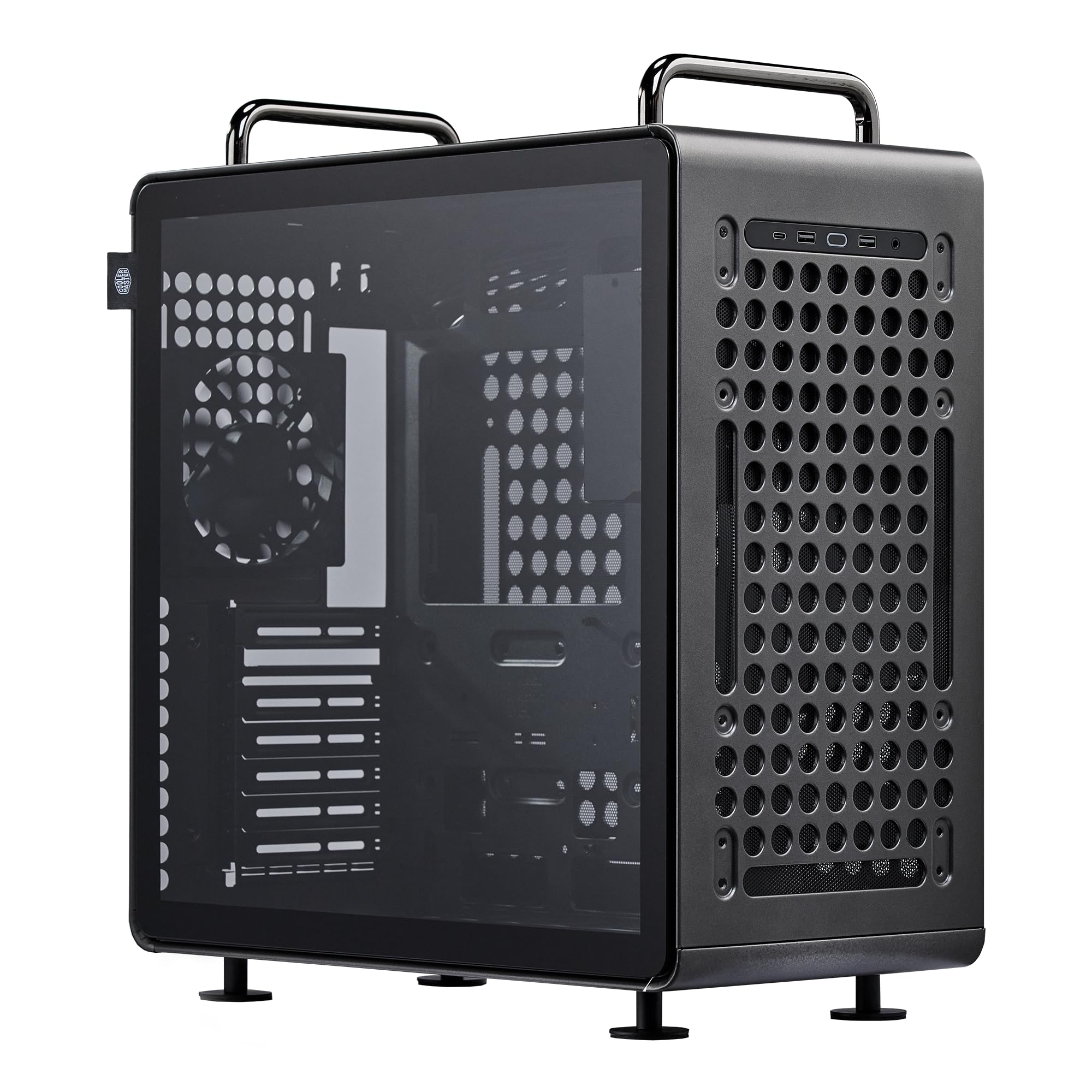
The modular mid-tower that reconfigures around your hardware and your grip
This is the pick for builders who want maximum flexibility and a handle they can reposition. The QUBE 540 works in both horizontal and vertical positions, with a reversible I/O panel and movable handles, so you can set the layout for best airflow or easiest access. It supports ATX, Micro-ATX, Mini-ITX, and large E-ATX motherboards up to 11 inches wide — all within a compact ATX form factor.
The full front mesh panel boost ventilation, backed by a pre-installed SickleFlow 120mm fan. It fits a dual Xeon ATX board with room for full PCI-E cards and multiple drives, and one buyer configured it to look like a Mac Pro.
Here’s the honest catch: this is not a beginner’s case. Owners warn of difficult cable management and little space under a full ATX board. The 360mm radiator fits top-only and can conflict with PSU placement, and some found the mounting hardware lacking for their components. An occasional unit needs a workaround, like a 3D-printed front fan bracket, but the cooling payoff is excellent with bottom intake and top/rear exhaust.
The design is the top praised feature, with compact size a close second. Owners call the build quality industrial, premium, and well-made. If you’re an experienced builder who loves tweaking, this case rewards you with serious flexibility; if you want a drop-in build, expect a project.
Who it suits: experienced builders who want a reconfigurable chassis with true E-ATX support and an adjustable handle.
The trade-off: cable management is tight, and some hardware needs extra brackets or mods to fit perfectly.
Understanding the Specs
GPU Clearance
This is the maximum length of graphics card the case can hold, measured in millimeters. Always measure your GPU and compare it to the case’s clearance before buying — a 363mm case won’t fit a card meant for a 415mm slot. The QUBE 540 offers 415mm, while the JONSBO Z20 offers 363mm.
Handle Design
Handles come in two styles: detachable, which you remove when the case sits on a desk, and movable, which you can reposition along the chassis. A solid, rigid handle is essential for carrying a heavy full ATX build with water cooling. The Z20’s handle is detachable; the QUBE 540’s handles are movable.
FAQ
Will these cases fit a full ATX motherboard?
Can I fit a 240mm AIO cooler in these cases?
How long of a graphics card can I install?
Is the handle strong enough to carry a full build?
Which case is better for a beginner builder?
Can I use a full ATX power supply in these cases?
How does airflow compare between the two cases?
Which case is more compact for travel?
Final Thoughts: The Verdict
Across the board, the atx case with handle winner is the JONSBO Z20 because it pairs a solid detachable handle with true portability for a full-size GPU. If you want maximum flexibility and E-ATX support, grab the Cooler Master QUBE 540. And if you’re an experienced builder who doesn’t mind a project, the QUBE 540’s reconfigurable layout is the one to reach for.
How We Picked
We do not accept paid placement. Every pick is matched to a real buyer and a real use-case; we do not hands-on test units.
Sources & Methodology
Specifications: manufacturer listings and product documentation. Review insights: verified customer reviews, as of August 2026. Pricing: not shown on this page (it changes often); check the current price via the retailer link.
As an Amazon Associate, Gadgets Feed earns from qualifying purchases. This does not affect which products we feature.