
Our readers keep the lights on and my morning glass full of iced black tea. As an Amazon Associate, I earn from qualifying purchases.
Choosing an ATX motherboard means navigating a dense thicket of power phases, socket generations, and chipset tiers. One wrong pick can leave you with a board that can’t feed your CPU under load or lacks the M.2 slots your storage strategy demands. The difference between a smooth build and a frustrating rebuild often comes down to a handful of specs hidden in the product description.
I’m Min — the co-founder and writer behind Gadgets Feed. I’ve spent hundreds of hours analyzing PCB layering, VRM thermal pad ratings, and BIOS compatibility tables across the entire AM4, AM5, and LGA 1700 landscape to separate genuine builds from marketing traps in this category.
Whether you are upgrading a legacy rig or assembling a fresh platform, this guide walks through the specs that actually matter so you can confidently choose the right atx mobo for your next workstation or gaming system.
How To Choose The Best ATX Mobo
The ATX form factor offers the most expansion slots and thermal headroom, but the chipset and socket generation determine what CPUs and RAM you can use. Matching the board to your processor tier is the first filter — AM4 boards max out at DDR4 and PCIe 4.0, while AM5 and LGA 1700 unlock DDR5 and faster storage lanes.
VRM Phase Count and Thermal Pads
A board with a 10+2 power phase design and 5 W/mK thermal pads handles an 8-core Ryzen 7 under all-core loads better than a 6+2 phase board with thin passive heatsinks. The MOSFET thermal pad rating (measured in W/mK) directly affects how long the VRM can sustain boost clocks before throttling. Budget boards often skip choke pads entirely, leading to higher voltage ripple during extended rendering or gaming sessions.
PCIe Lane Distribution and M.2 Slot Config
Not all M.2 slots run at full x4 speed. On B550 and B760 chipsets, the second M.2 slot often drops to PCIe 3.0 x2 or shares bandwidth with a SATA port. Higher-end X870 and B850 boards route two or three Gen5 lanes to dedicated M.2 slots, which matters if you plan to run multiple high-speed NVMe drives. Check the manual to see if installing a drive in the third M.2 slot disables a PCIe x16 slot — this is a common trap on mid-range boards.
Quick Comparison
On smaller screens, swipe sideways to see the full table.
| Model | Category | Best For | Key Spec | Amazon |
|---|---|---|---|---|
| GIGABYTE X870 AORUS Elite WIFI7 | Premium | High-end AM5 builds | 16+2+2 VRM, USB4 | Amazon |
| ASUS ROG Strix X870-A Gaming WiFi | Premium | Enthusiast overclocking | 90A stages, AI OC | Amazon |
| MSI MAG B850 Tomahawk MAX WiFi | Mid-Range | AM5 gaming rigs | WiFi 7, 5G LAN | Amazon |
| MSI B760 Gaming Plus WiFi | Mid-Range | Intel DDR5 builds | DDR5 6800+ OC | Amazon |
| MSI PRO B760-P WiFi DDR4 | Mid-Range | Intel workstation | DDR4, 12+1 duet rail | Amazon |
| MSI MPG B550 Gaming Plus V1 | Mid-Range | AM4 gaming | PCIe 4.0, Mystic Light | Amazon |
| GIGABYTE B650 Eagle AX | Mid-Range | Entry AM5 | 12+2+2 phases | Amazon |
| GIGABYTE B550 Eagle WIFI6 | Budget | Value AM4 | 10+3 phases, WiFi 6 | Amazon |
| ASUS Prime B550-PLUS AC-HES | Budget | Budget AM4 | 8+1 DrMOS, 6 SATA | Amazon |
In‑Depth Reviews
1. GIGABYTE X870 AORUS Elite WIFI7

The X870 AORUS Elite delivers a 16+2+2 phase VRM design that keeps a Ryzen 9 7950X3D ice-cold even during prolonged all-core rendering. The dual USB4 ports provide 40 Gbps throughput for external NVMe enclosures or high-res displays, while the four M.2 slots — one of them PCIe 5.0 — let you build a storage array without lane-sharing compromises. The WiFi 7 module hits real-world speeds of 5-6 Gbps on a compatible router, and the Bluetooth 5.4 connection stays rock-solid with peripherals.
GIGABYTE’s EZ-Latch system simplifies GPU and M.2 installation, and the Q-Flash Plus button lets you update the BIOS without a CPU installed. The VRM thermal guard uses extended heatsinks that cover both the MOSFETs and chokes, preventing hot spots that can cause voltage droop under high-current loads. Users report flawless dual-boot stability across Windows 11 and Linux distributions, with zero BSOD occurrences over seven months of daily use.
The white PCB and subtle RGB accents give the board a clean aesthetic that fits into both minimalist and themed builds. The 5-year warranty adds peace of mind for long-term ownership. For anyone building a premium AM5 rig that needs to handle creative workloads and high-refresh gaming, this board delivers the full feature set without forcing compromises on storage or connectivity.
Why it’s great
- Overbuilt VRM stays cool with Ryzen 9-class CPUs under sustained load
- Four M.2 slots with one Gen5 slot and dual USB4 ports
- EZ-Latch and Q-Flash Plus simplify building and troubleshooting
Good to know
- Board runs warm in cases with poor front-to-rear airflow
- No onboard power or reset buttons for open-bench testing
2. ASUS ROG Strix X870-A Gaming WiFi

The ROG Strix X870-A uses a 16+2+2 power stage design rated at 90A per stage, giving it the headroom to push Ryzen 9000-series processors to their boost limits without voltage sag. ASUS integrates Dynamic OC Switcher and Core Flex algorithms that automatically adjust per-core overclocking based on real-time workload, which means you get higher multi-core performance in rendering tasks without manual tuning. The white PCB and silver heatsinks make it one of the few premium boards that fits an all-white build theme.
Connectivity includes WiFi 7 with a high-gain antenna, four M.2 slots (two routed directly to the CPU for Gen5 speeds), and dual USB4 Type-C ports on the rear I/O. The Q-Release Slim mechanism lets you eject the GPU with a single button press, and the M.2 latches are tool-free. UEFI BIOS supports AEMP for automatic DDR5 memory overclocking, and the AI Overclocking module learns your cooling capacity to find a stable voltage curve within minutes.
Linux users report full out-of-the-box support on Ubuntu 24.04, including WiFi and Bluetooth without driver hunting. The board is heavier than most at over 5.5 pounds due to the reinforced PCIe slots and thick VRM heatsinks, which adds structural rigidity but requires careful handling during installation. For enthusiasts who want maximum CPU performance with minimal tuning effort, this board justifies its investment through automated overclocking intelligence.
Why it’s great
- 90A power stages with Dynamic OC Switcher for automated overclocking
- White PCB with clean aesthetic for themed builds
- Q-Release Slim and tool-free M.2 latches
Good to know
- Filling the third M.2 slot disables the bottom PCIe x16 slot
- Sharp solder points on the bottom edge require careful cable routing
3. MSI MAG B850 Tomahawk MAX WiFi

The MAG B850 Tomahawk MAX packs a 14 Duet Rail power system with 80A Smart Power Stages, providing stable voltage delivery for Ryzen 9 7950X3D and 9800X3D chips without needing a BIOS update out of the box. It supports DDR5 memory up to 8400 MT/s in 1DPC 1R configuration, making it one of the highest-rated memory overclockers in the mid-range AM5 segment. The board includes two M.2 Gen5 x4 slots and one M.2 Gen4 x4 slot, giving you three high-speed NVMe lanes without lane-sharing penalties.
Networking hardware is a standout feature here: a full-speed WiFi 7 module with Bluetooth 5.4 and a 5Gbps LAN port eliminate network bottlenecks for online gaming or large file transfers. The EZ M.2 Shield Frozr II uses a push-pin design that secures the thermal pad directly against the SSD, preventing thermal throttling during sustained writes. Rear I/O includes a USB 20Gbps Type-C port and 7.1 audio with S/PDIF output, covering both modern and legacy audio setups.
The board uses an 8-pin plus 4-pin CPU power connector setup, which means older PSUs without the extra 4-pin EPS header may limit peak current draw. The green circuit board accents clash with most component color schemes, though this is cosmetic. For builders who want AM5 features like PCIe 5.0 and DDR5 overclocking without jumping to an X870E flagship, the Tomahawk MAX delivers a mature feature set at a rational price.
Why it’s great
- 14 duet rail 80A VRM handles 9800X3D without BIOS flash
- DDR5 rated to 8400 MT/s for extreme memory overclocking
- WiFi 7 plus 5Gbps LAN for high-speed networking
Good to know
- Requires both 8-pin and 4-pin CPU power for full current delivery
- Green accents clash with most component color schemes
4. MSI B760 Gaming Plus WiFi

The B760 Gaming Plus brings DDR5 support to Intel’s LGA 1700 platform at a price that undercuts most Z790 boards while retaining core gaming features. It supports dual-channel DDR5 up to 6800 MHz (OC), which gives 12th, 13th, and 14th Gen Core processors the memory bandwidth they need for CPU-intensive titles. The PCIe 4.0 slot runs at full x16 bandwidth, and the Lightning Gen 4 M.2 slot delivers sequential read speeds over 7000 MB/s with compatible NVMe drives.
Cooling hardware includes an extended heatsink over the VRM with 7 W/mK MOSFET thermal pads, plus additional choke thermal pads that reduce voltage ripple under high-current loads. The 2.5Gbps LAN port and WiFi 6E module provide dual-band wireless and wired networking that avoids congestion on crowded home networks. MSI’s Mystic Light software syncs the onboard RGB header with compatible fans and RAM kits, and the BIOS interface is intuitive for both novice and experienced builders.
Owners report six months of stable operation with DDR5 kits, RTX 4070-class GPUs, and capture cards running simultaneously without lane conflicts. The board does not support CPU overclocking (locked to B760 chipset limitations), so enthusiasts aiming for manual multiplier tuning should look at Z790 boards instead. For mainstream gaming and productivity builds that benefit from DDR5 speeds, this board delivers a strong cost-to-performance ratio.
Why it’s great
- DDR5 support with 6800+ MHz overclocking capability
- 7 W/mK VRM thermal pads and extended heatsink
- WiFi 6E and 2.5Gbps LAN for fast connectivity
Good to know
- No CPU overclocking support due to B760 chipset limitations
- Bottom connectors are tight against case cable routing holes
5. MSI PRO B760-P WiFi DDR4

The PRO B760-P DDR4 is built for professionals who need Intel LGA 1700 stability without the premium of DDR5. The 12+1 Duet Rail power system with P-PAK MOSFETs delivers clean voltage to 12th, 13th, and 14th Gen processors, and the 6-layer PCB with 2oz thickened copper reduces electrical impedance for clean signal traces across the board. It supports DDR4 memory up to 5333 MHz (OC), which allows users to reuse existing RAM kits and keep build costs low.
The cooling solution includes an extended VRM heatsink with 7 W/mK thermal pads, choke thermal pads, and an M.2 Shield Frozr that prevents NVMe drives from thermal throttling during long file transfers. Wi-Fi 6E and Bluetooth 5.3 are integrated, removing the need for a separate wireless card. The 2.5Gbps LAN port handles local network backups and streaming without bottlenecking. The board supports Core Boost and Memory Boost features that optimize power delivery for single- and multi-threaded workloads.
Home recording studio builds and office workstations benefit from the rock-solid stability users report across Windows 11 Pro and Linux installations. The board does not support PCIe 5.0 — the top M.2 slot runs at PCIe 4.0 x4 — but for DDR4-based builds using current-gen graphics cards, this limitation rarely affects real-world performance. For budget-conscious upgrades on the Intel platform, this board preserves DDR4 value while providing modern connectivity standards.
Why it’s great
- 12+1 duet rail power system with 2oz copper PCB
- Integrated WiFi 6E and Bluetooth 5.3
- DDR4 support up to 5333 MHz for cost-effective builds
Good to know
- No PCIe 5.0 support on M.2 or GPU slots
- 6-layer PCB is thinner than premium Z790 boards
6. MSI MPG B550 Gaming Plus V1

The MPG B550 Gaming Plus V1 offers a mature AM4 platform for Ryzen 5000-series processors with PCIe 4.0 support on the primary GPU slot and one M.2 slot. The 10+2 phase VRM uses extended heatsinks with a 7 W/mK thermal pad rated for the choke area, maintaining stable power delivery during extended gaming sessions. Dual channel DDR4 memory overclocking up to 4400 MHz is supported across four DIMM slots, and the board includes two M.2 slots with Shield Frozr thermal guards.
Lightning Gen 4 M.2 support delivers sequential read speeds over 5000 MB/s with compatible NVMe drives, while the Mystic Light RGB system provides 16.8 million colors across 29 effects that sync with MSI-compatible fans and RAM. The built-in I/O shield saves installation time, and the board includes a USB 3.2 Gen 2 Type-C port on the rear. Owners report that a BIOS update is required to boot with Ryzen 5600X processors, but the USB Flashback button makes this easy without a CPU installed.
The board does not include integrated WiFi, so you will need an Ethernet cable or a separate wireless adapter. The all-black design with subtle red accents fits into most build themes without clashing. For AM4 builders who want PCIe 4.0 speeds for their GPU and primary NVMe drive on a budget, this board delivers stable performance with minimal BIOS quibbles.
Why it’s great
- PCIe 4.0 on GPU and M.2 for modern storage speeds
- Mystic Light RGB with 29 effects and sync capability
- Pre-installed I/O shield for faster installation
Good to know
- No integrated WiFi or Bluetooth
- BIOS update needed for Ryzen 5600X out of the box
7. GIGABYTE B650 Eagle AX

The B650 Eagle AX serves as the lowest-cost entry point into AMD’s AM5 platform while retaining DDR5 support and PCIe 5.0 on the primary M.2 slot. The 12+2+2 phase digital VRM design provides enough current for Ryzen 7 and Ryzen 9 processors up to the 7950X, with the three M.2 slots (one Gen5, two Gen4) offering flexible storage expansion. DDR5 memory support includes AMD EXPO and Intel XMP profiles, making it easy to run 6000 MT/s kits at rated speeds without manual tuning.
The board includes WiFi 6E and Realtek GbE LAN for networking, and the rear I/O features six USB-A ports, HDMI and DisplayPort outputs for integrated graphics, and a USB 3.2 Gen 2×2 Type-C port. The M.2 Thermal Guard keeps Gen5 drives from thermal throttling during sustained writes, and Q-Flash Plus allows BIOS updates without a CPU installed — a critical feature for early Ryzen 9000 compatibility. Users report stable operation with Ryzen 7500F and 7600 processors out of the box after a quick BIOS flash.
The board runs hotter under sustained load compared to premium X670/E models because the VRM heatsink is smaller and lacks active cooling. Good case airflow with front-to-rear fan orientation keeps VRM temperatures within safe operating ranges. For builders who want the performance benefits of DDR5 and PCIe 5.0 storage without the investment of an X870 board, the B650 Eagle AX offers a balanced entry path into the AM5 ecosystem.
Why it’s great
- 12+2+2 phase VRM supports Ryzen 9 processors on AM5
- One PCIe 5.0 M.2 slot for Gen5 NVMe drives
- Q-Flash Plus and EXPO/XMP memory support
Good to know
- VRM runs hot under sustained all-core loads without good airflow
- Manual could be clearer about BIOS version requirements
8. GIGABYTE B550 Eagle WIFI6
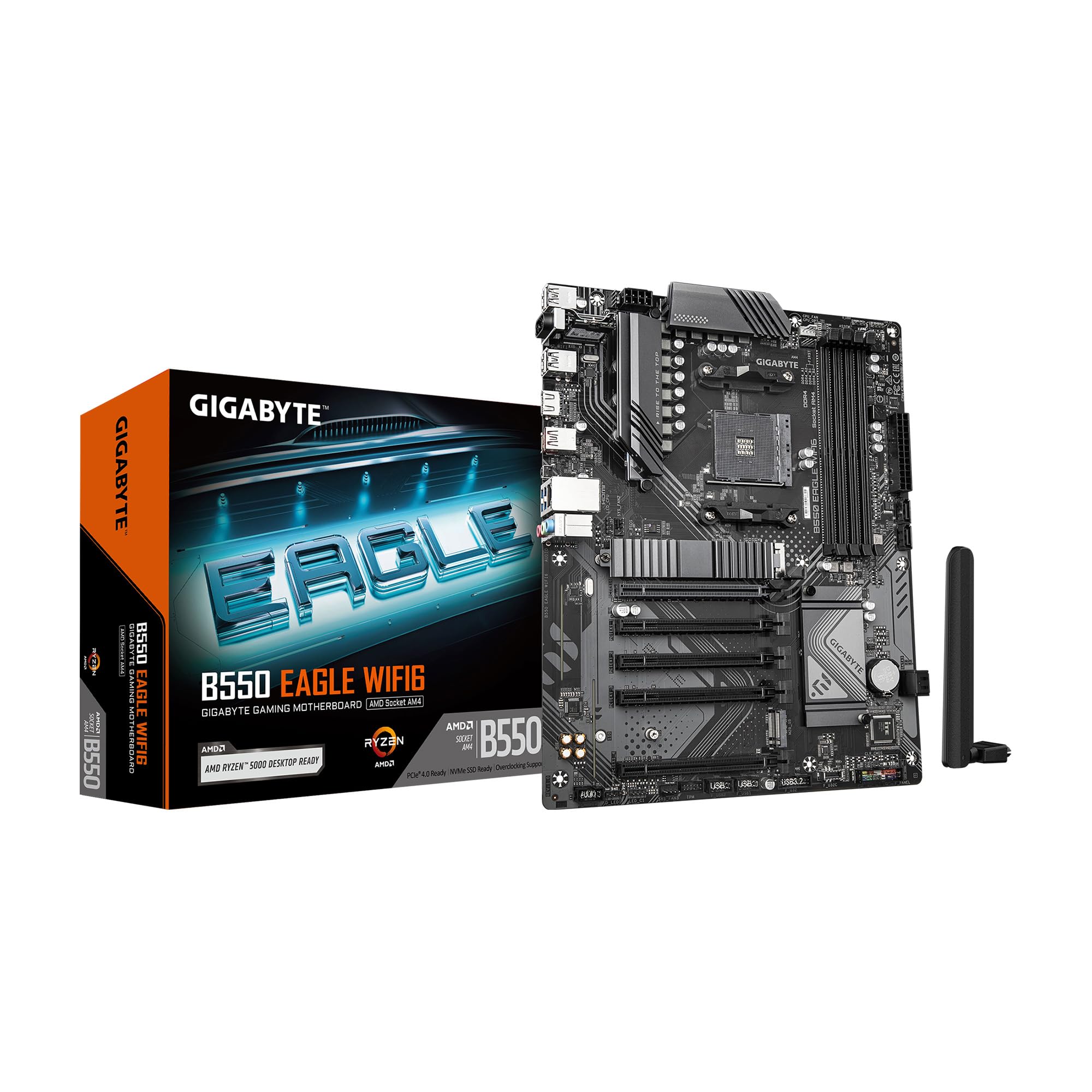
The B550 Eagle WIFI6 brings integrated WiFi 6 and Bluetooth to the AM4 platform at a price point typically reserved for boards without wireless. The 10+3 phase digital VRM with 5 W/mk thermal pads provides stable power delivery for Ryzen 5000-series processors up to the 5700X, and the dual M.2 slots (one PCIe 4.0, one PCIe 3.0) cover primary storage acceleration without sacrificing the second slot. DDR4 memory support with AMD EXPO profiles lets you run 3600-4000 MT/s kits at rated speeds using the four DIMM slots.
The board includes PCIe EZ-Latch for easier GPU removal and a pre-installed I/O armor that simplifies case installation. Realtek GbE LAN serves as the wired networking fallback, and the rear USB 3.2 Gen 2 Type-C port supports fast external storage. Users report clean BIOS navigation, straightforward setup with Ryzen 5600 and 5700X processors, and stable WiFi 6 performance with strong signal retention through walls. The RGB Fusion software allows LED customization across compatible GIGABYTE peripherals.
The board lacks PCIe 4.0 support on the second M.2 slot — it maxes out at PCIe 3.0 x4 — which matters if you plan to run dual Gen4 NVMe drives. The 1 Gbps Ethernet port feels dated compared to boards with 2.5Gbps LAN. For budget-conscious AM4 builders who want integrated WiFi and solid VRM performance for mid-range gaming, this board delivers reliable functionality without unnecessary frills.
Why it’s great
- Built-in WiFi 6 with strong signal stability
- 10+3 phase VRM handles Ryzen 7 processors well
- Pre-installed I/O shield and EZ-Latch for GPU
Good to know
- Second M.2 slot limited to PCIe 3.0 speeds
- GbE LAN instead of 2.5Gbps Ethernet
9. ASUS Prime B550-PLUS AC-HES

The Prime B550-PLUS AC-HES uses an 8+1 DrMOS power stage design with quality alloy chokes and durable capacitors, providing reliable power for 3rd Gen Ryzen CPUs and the Ryzen 5000 series. The board features six SATA 6 Gbps ports — more than most B550 boards — making it ideal for home servers or workstations that need multiple mechanical drives for storage. Dual M.2 slots support PCIe 4.0 on the primary slot, and the secondary slot runs at PCIe 3.0 x4 speeds.
ASUS includes WiFi 5 (802.11ac) and 1 Gb Ethernet, which covers basic wireless needs but lacks the faster WiFi 6 or 6E modules found on newer boards. The 5X Protection III suite adds LANGuard, DRAM overcurrent protection, overvoltage protection, SafeSlot Core for the GPU, and stainless-steel back I/O for corrosion resistance. The Aura Sync RGB header and Addressable Gen 2 RGB header allow LED customization with compatible components.
Users report that the board works well with Ryzen 3 and Ryzen 5 processors in budget gaming and home theater PC builds, though a small percentage received boards that needed replacement for video output issues. The OptiMem memory trace layout supports higher memory frequencies at lower voltages, which helps stability with 3600-4000 MT/s DDR4 kits. For builds that need maximum SATA connectivity on a tight budget, this board offers the highest drive count in its price band.
Why it’s great
- Six SATA 6 Gbps ports for multi-drive storage setups
- 8+1 DrMOS power stages with 5X Protection III
- Aura Sync RGB headers with Addressable Gen 2 support
Good to know
- WiFi 5 only, no WiFi 6 or 6E
- Some units required RMA for video output issues
FAQ
Can I use DDR4 RAM on an AM5 ATX mobo?
What does BIOS Flashback or Q-Flash Plus do on an ATX motherboard?
Why does the second M.2 slot on my B550 run slower than the first?
How many SATA ports does a typical ATX mobo have?
Final Thoughts: The Verdict
For most users, the atx mobo winner is the GIGABYTE X870 AORUS Elite WIFI7 because it combines a 16+2+2 phase VRM with USB4 and four M.2 slots, making it future-ready for multi-year AM5 builds. If you want PCIe 5.0 storage and automated AI overclocking, grab the ASUS ROG Strix X870-A Gaming WiFi. And for a balanced mid-range AM5 option with WiFi 7 and DDR5 overclocking, nothing beats the MSI MAG B850 Tomahawk MAX WiFi.