
Our readers keep the lights on and my morning glass full of iced black tea. As an Amazon Associate, I earn from qualifying purchases.
Specs are compiled from manufacturer listings and verified buyer reviews and can change over time — please confirm the key details on the product page before buying.
A PC that suddenly refuses to boot usually points at one of two things: the power supply or something simple like a loose case wire. Guessing wrong means an afternoon of tearing the build apart for nothing. A dedicated ATX power supply tester ends that cycle by plugging into the 24-pin connector and spitting out a voltage readout in seconds.
I’m Min — the founder and writer behind Gadgets Feed. This guide is built by comparing the manufacturers’ published specifications and the patterns across verified customer reviews, so you get each pick’s real strengths and trade-offs instead of marketing spin.
These small tools confirm your PSU’s health before you blame the motherboard, and the right one reads every rail you rely on. atx power supply tester choices come down to connector coverage, display clarity, and build quality.
Our Picks at a Glance

How To Choose The Best ATX Power Supply Tester
An ATX power supply tester exists to answer one question: is my PSU delivering the voltages my components need? It won’t simulate a heavy gaming load, but for checking idle voltages on a dead or suspicious unit, it’s the fastest tool you can own.
Check connector coverage first
Modern power supplies carry more than the old 20-pin motherboard cable. Look for a tester that accepts a 24-pin ATX plug, plus SATA, Molex (IDE), and a 4-pin CPU connector. If you run a newer GPU, verify whether the tester handles a PCIe 6-pin — and remember that the 8-pin PCIe variant is a separate, less common test.
Decide how you want the results
A digital LCD screen shows each rail’s voltage numerically, like +12V or +5V, which makes spotting an out-of-range reading easy. LED-based testers simply light up to confirm a rail exists, which is fast but less precise. A buzzer alarm that sounds when a voltage drifts out of spec adds a helpful audio cue.
Match the tester to your skill level
Beginners want simple plug-and-play operation with clear markings. Technicians repairing many machines need durable construction, usually an aluminum case, and connectors that tolerate repeated plugging and unplugging. Consider how often you will use it before paying for extra features.
Quick Comparison
| Model | Best For | Display | Connectors | Weight | Amazon |
|---|---|---|---|---|---|
| Kingwin Digital Tester★ Best Overall | First-time builders & quick checks | LCD Screen | 24-pin ATX, ITX, IDE, HDD, SATA, BTX | — | Amazon |
| Fuhengli PC Tester | Techs who need 8 connectors | 1.8” LCD Screen | 24-pin, SATA, IDE, Floppy, PCI-e | 3.1 ounces | Amazon |
| Manhattan Digital Tester | IT pros managing many PCs | LED + Alarm | 20/24-pin ATX, CPU, FDD, Molex, SATA | 4 ounces | Amazon |
In‑Depth Reviews
1. Kingwin Digital Power Supply Tester with LCD Screen
Our pick — over 4.5★ from 600+ verified ratings; the strongest balance of quality and price.
The plug-and-play digital tester that takes the guesswork out of a dead PC build.
The Kingwin is the tester most builders reach for because it covers the bases without demanding any technical knowledge. You plug it in and the LCD screen gives you real-time voltage levels across +12V, +5V, and +3.3V, so you can see at a glance whether your PSU is delivering what your components need.
It handles a wide range of PSU types — ATX, ITX, IDE, HDD, SATA, and BTX — which makes it useful even if you keep old power supplies around. The aluminum body is built for long-term use, and built-in safeguards protect against short circuits and overvoltage. The one thing to know: it lacks the capability to test PCIE 5 cables on newer power supplies, as owners point out.
What wins people over is its functionality — the thing everyone raves about is how quickly it tells you if an old or suspect PSU is worth keeping. It saves you from swapping parts on a hunch. Just keep in mind that some owners find the screen a bit hard to read in certain lighting, and a few note the -5V rail isn’t actually supported despite older descriptions.
Plug-and-play value: For a first tester, this offers the best balance of digital readouts, multi-connector support, and a durable aluminum case.
Worth noting: If you already run a PCIe 5.0 GPU, check your cable compatibility before buying, since this tester doesn’t handle that newer standard.
Reach for this if: you’re a hobbyist builder or repair beginner who wants accurate rail voltages without learning a manual.
Look elsewhere if: you specifically need to validate PCIe 5.0 connections on a brand-new high-end power supply.
2. Fuhengli Computer PC Power Supply Tester

An eight-connector diagnostic tool that pinpoints a dead PSU before you swap anything.
The Fuhengli is the tester for the tinkerer who has seen it all. It supports 20-pin ATX, 24-pin ATX, HDD (IDE), Floppy 4-pin, PCI-e 6-pin, 4-pin, EPS 8-pin, and SATA connectors — though it won’t fit a PCI-e 8-pin. That breadth means you can test nearly every cable coming out of a modern power supply.
The 1.8-inch LCD screen displays +3.3V, +12V1, +5V, -12V, 5VSB, and PG values, and it’s powered directly by the 20-pin or 24-pin connector, so there are no batteries to replace. If a voltage reads beyond normal range, a buzzer alarm goes off — a simple audio cue that’s easy to notice while you’re hunched inside a case. Owners confirm the readings match a multimeter within a tenth of a volt, which is reassuring.
At just 3.1 ounces and a 4.9 x 2.6 x 0.63-inch footprint, it slips into a drawer. There’s a protective film over the screen that can look scratched from the start; peel it off. One quirk to respect: connect only one of SATA, Floppy, or Molex at a time, since the manual doesn’t spell that out.
What wins people over
- Reads within a tenth of a volt of a proper multimeter
- Powered by the ATX connector, so no batteries needed
- Buzzer alarm flags out-of-range voltages instantly
The honest trade-offs
- Doesn’t fit PCI-e 8-pin connectors
- Only one SATA/Floppy/Molex test at a time
- Screen comes with a protective film that looks like scratches
Who it beats: it’s the best pick if you want the widest connector coverage and multimeter-accurate reads in a compact tool.
Who it doesn’t: if you only test one or two cables a year, the extra connectors won’t justify the learning curve.
3. Manhattan Digital Power Supply Tester
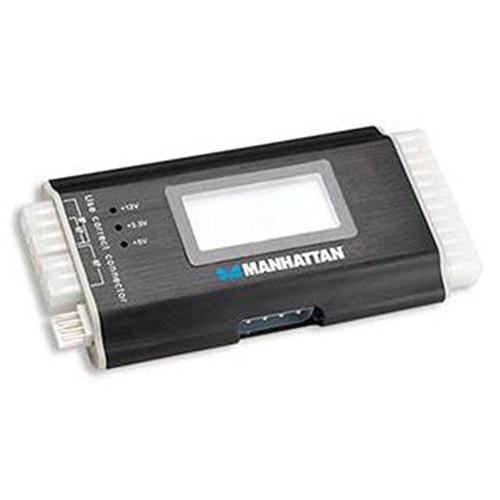
A lab-grade aluminum tester that has spent years diagnosing a 75-PC network.
The Manhattan is the seasoned pro’s choice, verified against a Fluke 27 and a Wavetek 23XT and trusted through four years of heavy use without a recheck. It supports 20-pin or 24-pin ATX, plus CPU, FDD, Molex, and SATA connectors, with LEDs and alarms giving both visual and audible confirmation of each rail.
Its strength is speed during in-case testing. Buyers report it eliminates the need to remove the PSU from the case entirely, which is a huge time-saver when you’re troubleshooting motherboard, RAM, or HDD faults across many machines. The beeps are helpful, and the connectors are snug enough to stay put. The trade-off is that the protruding 4-pin floppy connector bends easily, so it needs a carrying case or end caps when stored.
The instructions are the weak point — several owners find them cryptic, and the display isn’t well documented from the start. But they also note it’s easy to learn through use. The crowd favorite — 4.6 stars across 600+ owners for the Kingwin above, versus this one’s smaller following — tells you the Manhattan is more niche, but for IT pros managing fleets of PCs, it’s described as one of the best tools in the kit.
Built for the bench: Recurring praise centers on reliability, with owners calling it genuinely useful for IT troubleshooting and noting it holds its accuracy after years of use.
A fair caveat: The cryptic documentation and the fragile floppy connector mean this tester rewards someone who learns by doing, not by reading a manual.
Reach for this if: you maintain multiple PCs and want a rugged tester that verifies power output fast without pulling the PSU.
Think twice if: you’re a casual builder who prefers clear instructions and a bigger readout — the LCD models above are friendlier.
Understanding the Specs
Voltage rails and what they mean
Your PSU outputs several fixed voltages: +12V for the CPU and GPU, +5V for drives and USB, and +3.3V for the motherboard logic. A tester reads each rail and shows the number on screen. If a rail reads far outside its label — say +12V showing 11.2V — that’s a sign the PSU is struggling. Most testers check these at idle, not under load, so they catch dead rails and big drift, not every instability.
LCD readouts vs LED indicators
An LCD screen shows the actual voltage number for each rail, which lets you spot small drift before it becomes a problem. LED lights simply confirm a rail exists and is active, which is faster but gives no precision. The Fuhengli and Kingwin here use LCD screens for measured values, while the Manhattan relies on LEDs and alarms for its confirmation-based approach.
FAQ
Will an ATX power supply tester work with my 24-pin motherboard connector?
Can a PSU tester check a PCIe 8-pin GPU cable?
Does a power supply tester put a load on the PSU?
How do I read the +12V, +5V, and +3.3V readouts?
Why does my tester beep when I plug in a connector?
Can I test a PSU without removing it from my PC case?
Is a digital tester better than an LED-only tester?
How long does a power supply tester last?
Final Thoughts: The Verdict
If you want one dependable pick, the atx power supply tester winner is the Kingwin Digital Tester because it pairs a clear LCD readout with broad connector support in a durable aluminum shell. If you want the widest connector coverage and multimeter-accurate readings, grab the Fuhengli PC Tester. And for IT pros managing many machines, the Manhattan Digital Tester is the one to reach for.
How We Picked
We do not accept paid placement. Every pick is matched to a real buyer and a real use-case; we do not hands-on test units.
Sources & Methodology
Specifications: manufacturer listings and product documentation. Review insights: verified customer reviews, as of August 2026. Pricing: not shown on this page (it changes often); check the current price via the retailer link.
As an Amazon Associate, Gadgets Feed earns from qualifying purchases. This does not affect which products we feature.