
A low-noise signal chain is the difference between a recording that cuts through the mix and one that gets lost in the noise floor. Whether you’re tracking vocals, connecting a DI for a bass rig, or live-streaming with a dynamic mic, the preamp quality and converter specs of your interface directly shape the final result.
I’m Min — the co-founder and writer behind Gadgets Feed. This guide is the result of many hours spent dissecting spec sheets, cross-referencing user experiences, and evaluating the feature sets of the top audio interfaces and channel strips on the market so you can invest in the right gear the first time.
After careful analysis of preamp gain, sample rates, and connectivity options, I’ve compiled everything you need to confidently select the best audio equipment for your home studio or streaming setup.
How To Choose The Best Audio Equipment
Selecting the right audio interface or preamp comes down to matching the device’s specs to your recording scenario. The three most impactful factors are preamp gain, connectivity type, and the included software ecosystem. Prioritize clean gain if you use dynamic microphones, and check sample rate support if you aim for high-resolution recording.
Preamp Gain and Phantom Power
For dynamic microphones like the Shure SM7B or SM58, you need at least 60dB of clean gain to avoid a noisy signal. Condenser mics require 48V phantom power, which is standard on most interfaces but worth confirming. A high-gain preamp with low self-noise (under -127dB EIN) gives you flexibility without adding hiss to your vocal takes.
Sample Rate and Bit Depth
Sample rates of 96 kHz or 192 kHz affect the frequency range your interface can capture. While 44.1 kHz is sufficient for most streaming and podcasting, higher sample rates provide headroom for pitch-shifting and heavy processing in music production. Bit depth of 24-bit ensures a dynamic range above 110dB, which preserves quiet details without distortion.
Connectivity and Monitoring
USB-C connections are now standard for low-latency data transfer. Zero-latency direct monitoring is critical for performers who need to hear themselves in real time without digital delay. For live sound or multi-device setups, consider interfaces with MIDI I/O, multiple headphone outputs, or loop-out jacks for adding external processors.
Quick Comparison
On smaller screens, swipe sideways to see the full table.
| Model | Category | Best For | Key Spec | Amazon |
|---|---|---|---|---|
| Focusrite Scarlett 2i2 Studio 4th Gen | Audio Interface Bundle | Songwriter Home Studio | 120dB dynamic range | Amazon |
| dbx DBX286SV | Channel Strip | Vocal Processing/Live | Compressor, De-Esser, Gate | Amazon |
| Universal Audio Volt 1 | USB Interface | Mobile Recording | 24-bit / 192 kHz | Amazon |
| PreSonus AudioBox USB 96 Studio | Interface Bundle | Beginner All-in-One | 96 kHz sample rate | Amazon |
| Radial Pro DI | DI Box | Live Instrument Direct | Custom transformer | Amazon |
| Shure MVX2U | XLR-to-USB Adapter | Ultra-Portable Streaming | 60dB gain, 48V phantom | Amazon |
| Focusrite Vocaster Two | Podcast Interface | Two-Person Podcasts | Auto Gain & Enhance | Amazon |
In‑Depth Reviews
1. Focusrite Scarlett 2i2 Studio 4th Gen USB Audio Interface Bundle
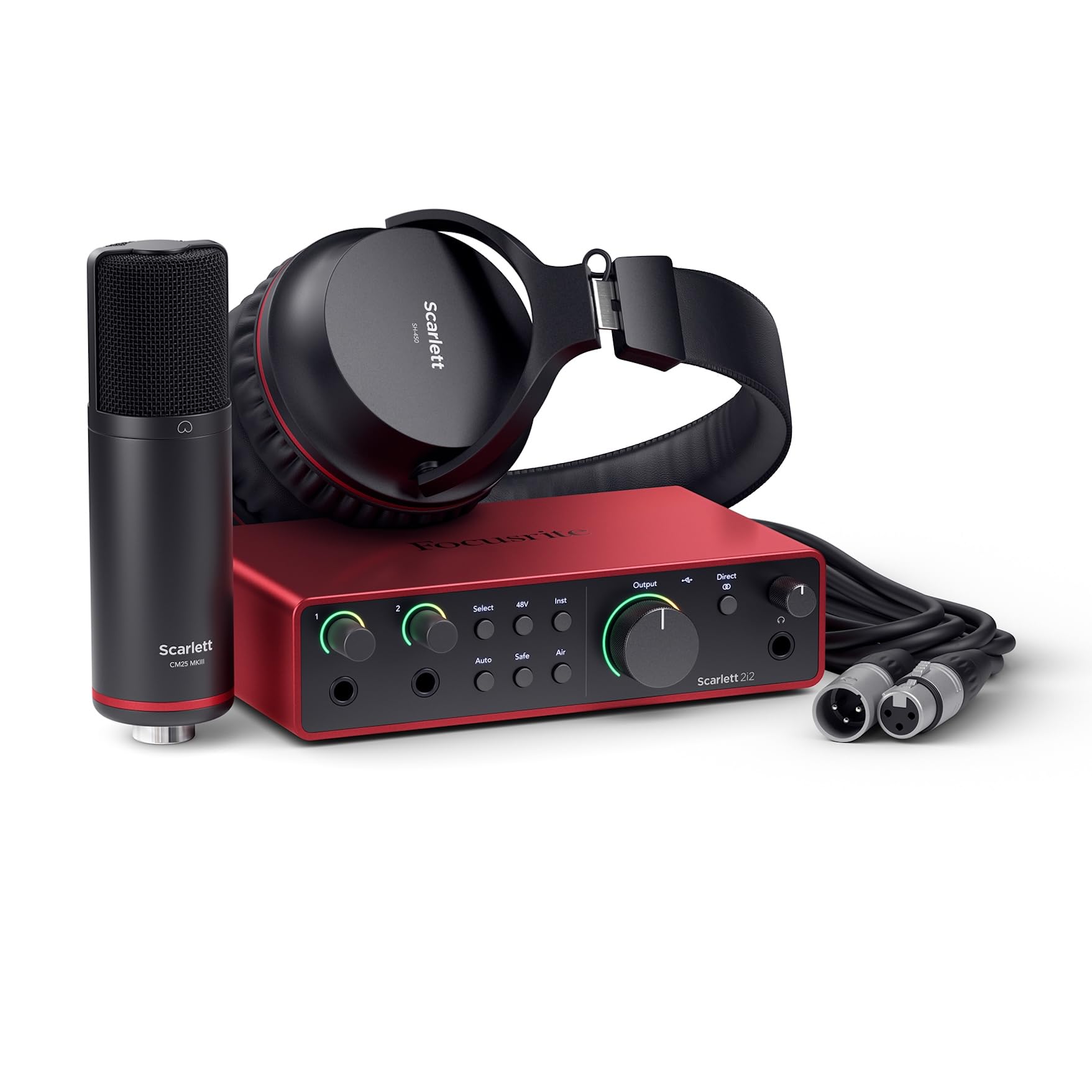
The Scarlett 2i2 Studio 4th Gen is the complete songwriting package, pairing the latest Scarlett interface with the CM25 MkIII condenser mic and SH-450 headphones. The 120dB dynamic range matches Focusrite’s flagship RedNet converters, giving you studio-grade headroom for capturing loud transient peaks without distortion. Auto Gain takes the guesswork out of setting levels, while Clip Safe acts as a safety net during unexpected volume spikes.
Air mode is a key differentiator, applying a high-frequency boost that lifts vocals and acoustic guitars to the front of the mix. The included Hitmaker Expansion pack bundles Pro Tools Intro+, Ableton Live Lite, and Cubase LE, so you have a full production suite out of the box. The dual combo inputs accept mic, line, and instrument signals, and the 7.1 x 4.6-inch footprint stays tidy on a crowded desk.
The only downside is the lack of a dedicated 3.5mm auxiliary input for external audio sources, which streaming gamers might miss. Otherwise, the 4th Gen iteration addresses every pain point of previous generations—lower latency, smarter leveling, and richer preamp character. It’s the gold standard for anyone building a serious home studio on a mid-range budget.
Why it’s great
- 120dB dynamic range for clean, high-headroom recordings
- Auto Gain and Clip Safe prevent ruined takes
- Includes mic, headphones, and full DAW software
Good to know
- No dedicated 3.5mm line input
- Bundle may be overkill if you already own a mic
2. dbx DBX286SV Microphone Preamp & Channel Strip Processor

The dbx 286s is a preamp and channel strip in one rack-mountable unit, offering four independent effects: compression, de-esser, enhancer, and expander/gate. The classic dbx compression circuit reduces dynamic range without audible pumping, making it ideal for smoothing out vocal performances. The enhancer adds punch to low frequencies and shimmer to highs, while the de-esser tames sibilance that can ruin a spoken-word or vocal track.
Loop-out jacks let you insert external processors between the preamp and the effect section, giving modular flexibility. The 1U chassis fits standard rack gear, and the floating balanced XLR input accepts both balanced and unbalanced signals. Users report that pairing the 286s with a dynamic mic like the Shure SM7B delivers clean, broadcast-ready vocals with zero post-processing needed.
One limitation is the lack of a power switch—you’ll need to cut power via a surge protector. The unit also runs on 120VAC, so international users must verify compatibility. Despite those quirks, the 286s offers studio-grade processing that would cost thousands in standalone units. It’s a secret weapon for voiceover artists and podcasters who want polished audio without extra software.
Why it’s great
- Four analog processors in a single rack unit
- Low-noise preamp with phantom power
- Loop-out for external gear integration
Good to know
- No built-in power switch
- 120VAC only; requires step-down for 220V regions
3. Universal Audio Volt 1 USB Audio Interface

The Volt 1 brings Universal Audio’s 610 tube preamp emulation to a compact USB interface, offering Vintage mode that adds musical saturation and harmonic richness to vocals and instruments. With 24-bit / 192 kHz converters, it captures every detail of a performance, and the crystal-clear AD/DA conversion preserves the integrity of the original source. MIDI I/O is included, allowing you to connect controllers without a separate hub.
The rugged metal chassis weighs 544 grams and measures just 5.7 x 5.1 inches, making it easy to slip into a laptop bag. It ships with LUNA DAW, Ableton Live Lite, Melodyne, and Marshall/Ampeg amp simulators—a software bundle valued well above the hardware price. The direct monitoring switch lets you blend the input signal with playback, eliminating latency for tracking.
The Volt 1 lacks software-based control over gain staging, so adjustments must be made via the physical knob. Some users also report needing to max the gain for very quiet dynamic mics. Still, the combination of UA’s analog modeling, high-resolution audio, and a generous software suite makes this the most feature-dense entry-level interface available.
Why it’s great
- Vintage 610 preamp mode for analog warmth
- 24-bit / 192 kHz high-resolution recording
- MIDI I/O and included DAW & plugins
Good to know
- No software-based gain controls
- May need external gain booster for low-output mics
4. PreSonus AudioBox USB 96 25th Anniversary Studio Recording Package

The AudioBox USB 96 Studio is PreSonus’s 25th anniversary bundle, containing an AudioBox USB 96 interface, M7 large-diaphragm condenser microphone, HD7 monitoring headphones, and Studio One Artist DAW. The interface operates at 24-bit / 96 kHz resolution with two combo mic/instrument inputs and MIDI I/O, offering low-latency monitoring via the built-in mixer. The M7 mic delivers a warm, rich tone suited for vocals and acoustic instruments.
The HD7 headphones provide balanced sound reproduction with decent isolation, letting you mix without bleed into the recording mic. Studio One Artist is an intuitive DAW with drag-and-drop workflow and includes Studio Magic plugin suite. Every cable and a desktop mic stand are included, meaning you can unpack and record within minutes.
The sample rate maxes out at 96 kHz—fine for most production but less headroom than 192 kHz interfaces. The included USB cable is best kept as the primary connection, as swapping for a longer cord can cause communication issues. For a beginner building a first studio from scratch, this bundle removes all guesswork and delivers reliable, broadcast-quality results.
Why it’s great
- Complete recording kit with mic, phones, and DAW
- Low-latency hardware monitoring
- Rugged construction with MIDI I/O
Good to know
- Max sample rate is 96 kHz, not 192 kHz
- Replaceable cable may cause connection issues
5. Radial Pro DI Passive Direct Box

The Radial Pro DI is a passive direct box that relies on a custom-wound transformer to convert unbalanced high-impedance instrument signals into balanced low-impedance XLR outputs, eliminating hum and noise over long cable runs. The legendary I-beam construction uses a 14-gauge steel shell and a heavy-duty internal frame, making it virtually indestructible on stage or in the studio. The ground lift switch breaks ground loops instantly, a lifesaver in venues with questionable wiring.
Unlike active DI boxes, the Pro DI requires no phantom power or batteries, saving mixer channels for microphones. It handles high-output signals from guitar and bass amps without distortion, and the -15dB pad engages to prevent input clipping on hot sources. Musicians consistently report a cleaner, more defined tone compared to budget DI units, with improved transient response and low-end clarity.
The primary trade-off is that the passive design offers no signal amplification, so it’s best paired with a preamp that provides sufficient gain. It lacks the multi-channel options of a rack DI system, but for a single mono source—be it keyboard, acoustic-electric, or bass—the Pro DI remains the industry benchmark for reliability and sonic purity.
Why it’s great
- Indestructible I-beam steel chassis
- No external power required
- Ground lift switch eliminates hum
Good to know
- No built-in signal amplification
- Single mono channel only
6. Shure MVX2U XLR-to-USB Digital Audio Interface

The MVX2U transforms any XLR microphone into a USB-C device, coming in at just 100 grams and 3.35 inches long. It delivers 60dB of clean gain with 48V phantom power, suitable for both dynamic mics like the SM7B and sensitive condensers. Zero-latency monitoring through the built-in 3.5mm headphone jack ensures you hear your performance in real time, making it viable for live streaming without delay.
Auto Level Mode sets your input gain automatically, while the ShurePlus desktop app gives you EQ and compression controls. Dual mounting options let you plug the MVX2U directly onto the mic or use it inline with an XLR cable for better cable management. Users report that saving settings is permanent even after power cycling, so you can set it once and treat it as a fixed studio upgrade.
The MVX2U is a single-channel interface, so it won’t accommodate stereo recording or a dual-mic podcast setup. Connectivity is also limited to computers and compatible USB-C devices—smartphone support works but can be inconsistent. For streamers or field recordists who need a high-quality preamp in a thumb-drive form factor, this adapter delivers surprising sonic fidelity.
Why it’s great
- Ultra-compact, 100g design
- 60dB gain with 48V phantom power
- Zero-latency headphone monitoring
Good to know
- Single channel only
- Smartphone compatibility may vary
7. Focusrite Vocaster Two Podcasting Interface

The Vocaster Two is built specifically for two-person podcasts, offering two mic inputs with over 70dB of gain and individual headphone outputs with Show Mix control. Auto Gain sets levels in seconds, and Enhance applies one of four broadcast presets to polish vocal tone. The hardware Mute button lets you cut unwanted noise instantly, a feature that live streamers and meeting participants will appreciate.
Bluetooth connectivity allows phone call integration directly into the recording, and the camera line-out sends audio to a DSLR or webcam via TRS cable. The interface is bus-powered via USB-C, so it works with laptops and iPads without a wall plug. The compact plastic chassis keeps weight at 1.8 pounds while maintaining a footprint of 8.8 x 4.4 inches.
The Vocaster Two’s preamps are clean but the Auto Gain function can be inconsistent on particularly quiet or loud sources—manual gain adjustment is recommended for precise control. The front-mounted jacks for headphones stick out further than ideal for a clean desk. At its price point, however, it’s the only dedicated podcast interface with two independent headphone mixes and built-in Bluetooth, offering unique value for co-hosted shows.
Why it’s great
- Two independent headphone outputs with Show Mix
- Built-in Bluetooth for phone call recording
- Hardware Mute button for instant silence
Good to know
- Auto Gain may require manual tweaking
- Plastic chassis feels less premium
FAQ
Do I need a 192 kHz sample rate for podcasting?
What is 48V phantom power and when should I use it?
Should I get an audio interface or a channel strip processor first?
Final Thoughts: The Verdict
For most users, the best audio equipment winner is the Focusrite Scarlett 2i2 Studio 4th Gen because it combines a 120dB dynamic range with a complete bundle of mic, headphones, and production software. If you want hardware compression without post-processing, grab the dbx DBX286SV. And for ultra-portable streaming, nothing beats the Shure MVX2U.