
Our readers keep the lights on and my morning glass full of iced black tea. As an Amazon Associate, I earn from qualifying purchases.
Specs are compiled from manufacturer listings and verified buyer reviews and can change over time — please confirm the key details on the product page before buying.
Your microphone captures the sound, but the audio interface is the translator that carries your voice and instruments into your computer without adding noise, distortion, or frustrating delay. Choosing the right interface hinges on input count, mic gain needs, and whether you prefer plug-and-play simplicity or mixer-style depth. This guide breaks down a range of options from budget-friendly to premium, so you can match the gear to your actual recording style.
I’m Min — the founder and writer behind Gadgets Feed. This guide is built by comparing the manufacturers’ published specifications and the patterns across verified customer reviews, so you get each pick’s real strengths and trade-offs instead of marketing spin.
Whether you’re tracking your first vocal, podcasting, or wiring up a full drum kit, choosing the right audio interface for home studio is the single most important step to getting professional-sounding recordings without a professional budget.
Our Picks at a Glance

How To Choose The Best Audio Interface For Home Studio
Before you compare specs, think about what you’ll connect. A solo vocalist needs a totally different box than someone recording a drum kit or a full band. The number of inputs is the first filter because it locks in what you can record at once.
How many inputs do you actually need?
If you record one mic or one guitar at a time, a 2-input interface is plenty and keeps things simple. But if you want to mic a drum kit with multiple mics, or record a guitarist and vocalist live together, you’ll need 4 or more inputs from the start. Adding inputs later means replacing the whole unit, so it’s worth thinking ahead about your next project.
Mic preamp gain and phantom power
Every interface has a mic preamp that boosts the tiny signal from your microphone up to a usable level. Gain is measured in dB, and more gain helps quiet dynamic mics without needing an extra booster. Phantom power (+48V) is a separate circuit that powers condenser mics, which need electricity to work. You’ll want both features, but check the gain spec if you plan to use a dynamic mic like the Shure SM7B.
Quick Comparison
| Model | Best For | Max Sample Rate | Inputs | Weight | Amazon |
|---|---|---|---|---|---|
| Focusrite Scarlett 2i2 Studio 4th Gen★ Best Overall | Complete artist’s studio bundle | 192 KHz | 2 | 3.5 lb | Amazon |
| Focusrite Vocaster OnePodcast Pick | Solo podcasters | 48 KHz | 1 | 1.6 lb | Amazon |
| Pyle PMUX6Budget Champion | Budget multi-source recording | 48 KHz | 2 | 16 oz | Amazon |
| MAONO AME2 | Live streaming with sound pads | — | 10 | 0.95 kg | Amazon |
| Behringer U-Phoria UMC204HD | Budget-friendly high-res recording | 192 KHz | 2 | 1.4 lb | Amazon |
| Universal Audio Volt 2 | Vintage-style preamp sound | 192 KHz | 2 | 650 g | Amazon |
| Solid State Logic SSL 2 MKII | Pro-grade clarity and build | 192 KHz | 2 | 2.25 lb | Amazon |
| PreSonus AudioBox 96 Bundle | Complete beginner recording kit | 96 KHz | 2 | 0.27 g | Amazon |
| Motu M4 | Multi-track recording with extras | 192 KHz | 4 | 16 oz | Amazon |
| Focusrite Scarlett 4i4 4th Gen | Expanding synth and guitar rigs | 192 KHz | 4 | 2.2 lb | Amazon |
| Tascam US-16×08 | Full band and drum recording | 96 KHz | 16 | 6.1 lb | Amazon |
In-Depth Reviews
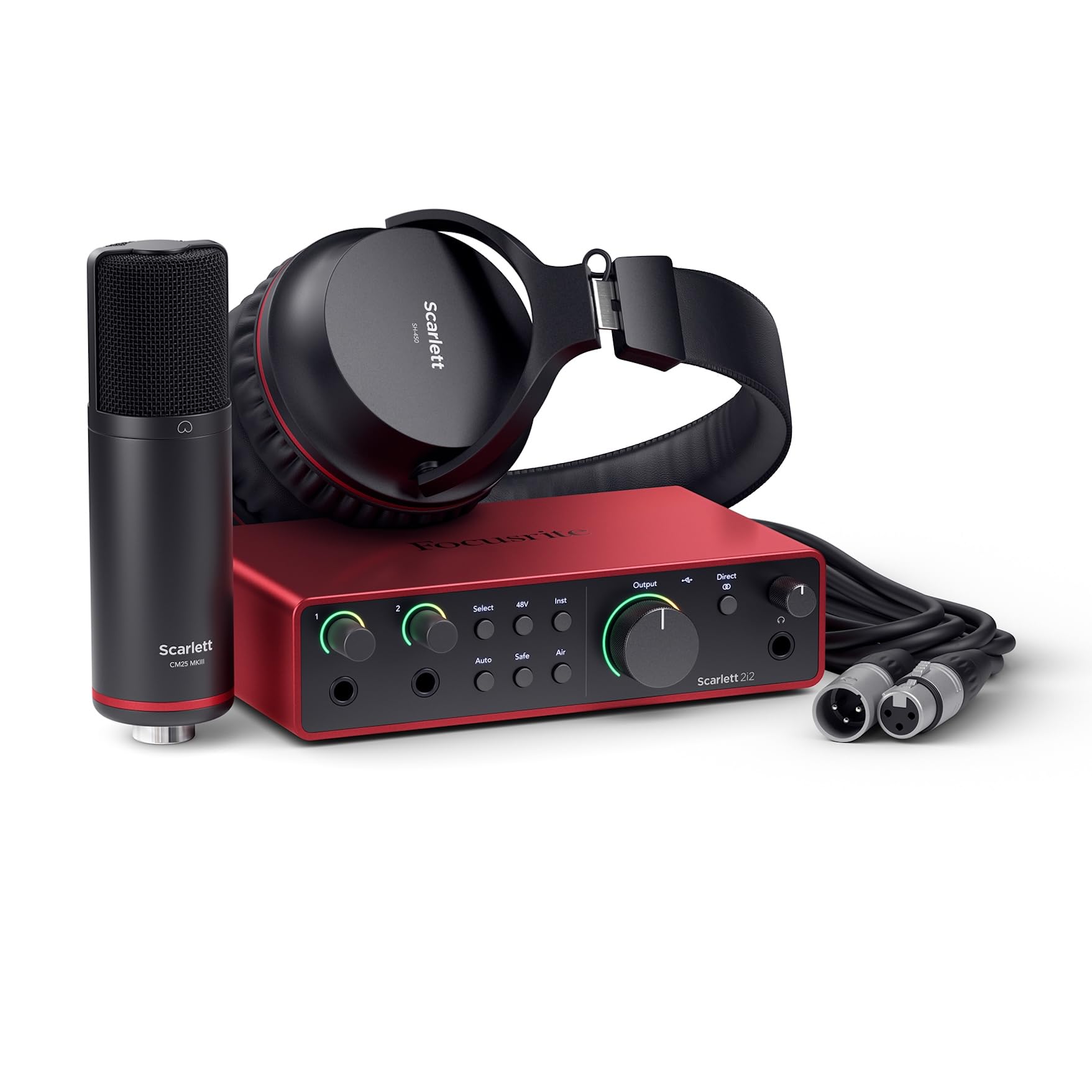
1. Focusrite Scarlett 2i2 Studio 4th Gen USB-C Audio Interface Bundle
Our pick — over 4.5★ from 650+ verified ratings; the strongest balance of quality and price.
The complete artist’s studio that arrives ready to record your first big hit from the start.
With a 120dB dynamic range and a 192 KHz maximum sample rate, this is the same converter technology Focusrite uses in its flagship interfaces found in the world’s biggest studios. That translates to a wide, clean signal path that captures quiet details without the hiss that plagues cheaper gear — so your vocals and acoustic guitar come through with real depth. The bundle includes the CM25 MkIII condenser mic, SH-450 headphones, and a 3m XLR cable, meaning you get everything to start tracking the moment the box opens.
Two smart features handle the technical mistakes that usually send beginners back to YouTube. Auto Gain sets the perfect level for your mic or guitar automatically, and Clip Safe prevents clipping before it ruins a take — so you can focus on the performance instead of the meters. Air mode lifts vocals and guitars to the front of the mix, adding musical presence and rich harmonic drive to your recordings. It’s a 3.5-pound unit with rear ports that give you flexibility for future studio monitors.
The software bundle is the deep end of the pool: Pro Tools Intro+, Ableton Live Lite, Cubase LE, and the Hitmaker Expansion suite of effects, software instruments, and mastering tools. Owners consistently record full albums on this unit, with one calling it the “best purchase ever” for songwriting. The main trade-off is that compatibility gets mixed feedback, with some systems working flawlessly while others report it doesn’t work at all, so check your OS version first if you’re on an older machine.
What wins people over
- The functionality is what owners praise most — recording a whole album straight through without issues is the recurring theme.
- Auto Gain and Clip Safe make it nearly impossible to record a bad take by accident.
- The complete bundle (mic, headphones, cables) removes the guesswork for first-time buyers.
Where it gets tricky
- Compatibility is a mixed bag, so double-check your computer’s operating system before buying.
- It lacks a 3.5mm input, which some owners wish it had for phone or tablet connections.
- The included software gets mixed reviews, so expect a learning curve with the DAWs.
Reach for this if: you’re a songwriter or vocalist who wants one box with everything needed to record, mix, and master a full project.
Look elsewhere if: you run an older operating system and want absolute certainty about driver support before you commit.
2. Focusrite Vocaster One
A dedicated solo-podcasting box that makes your voice sound broadcast-ready in seconds.
Over 70dB of gain means this interface can get the best out of any mic without needing an external booster — a lifesaver if you own a quiet dynamic mic. Auto Gain sets your level in seconds by just pushing a button and talking, which is exactly the workflow a podcaster wants when they sit down to record. The Enhance feature gives you four podcaster-approved presets to reveal the true quality of your voice, and the Mute button cuts out coughs, sneezes, and interruptions instantly.
At just 1.6 pounds, it’s roughly 2.2 times lighter than the Scarlett 2i2 Studio bundle, making it easy to move between a desk and a travel kit. The phone connectivity is a standout for interview shows: connect a phone with a single TRRS cable and capture the whole conversation, or play music and other premium audio straight onto your show. Camera connectivity sends Vocaster’s audio directly to your camera with a single TRS cable, which means no post-sync hassle when you’re recording video. The 48 KHz maximum sample rate is lower than the 192 KHz on the Scarlett 2i2, but for spoken word that difference is imperceptible.
Reviewers praise its ease of use and value, noting excellent compatibility with AT2035 mics and highlighting the Enhance and Mute features. The honest caveat is reliability feedback — a small number of buyers report random static or distortion in the headphones after a couple months of use, requiring a restart.
Best for solo creators: podcasters, voiceover artists, and streamers who want a single-mic interface with automatic leveling and built-in voice enhancement.
The catch: it’s a one-input device, so you can’t record a guest on a second mic without a mixer or a different interface.
3. Pyle Professional USB Audio Interface PMUX6
A straightforward, rugged metal box that outperforms its price without any fiddly setup.
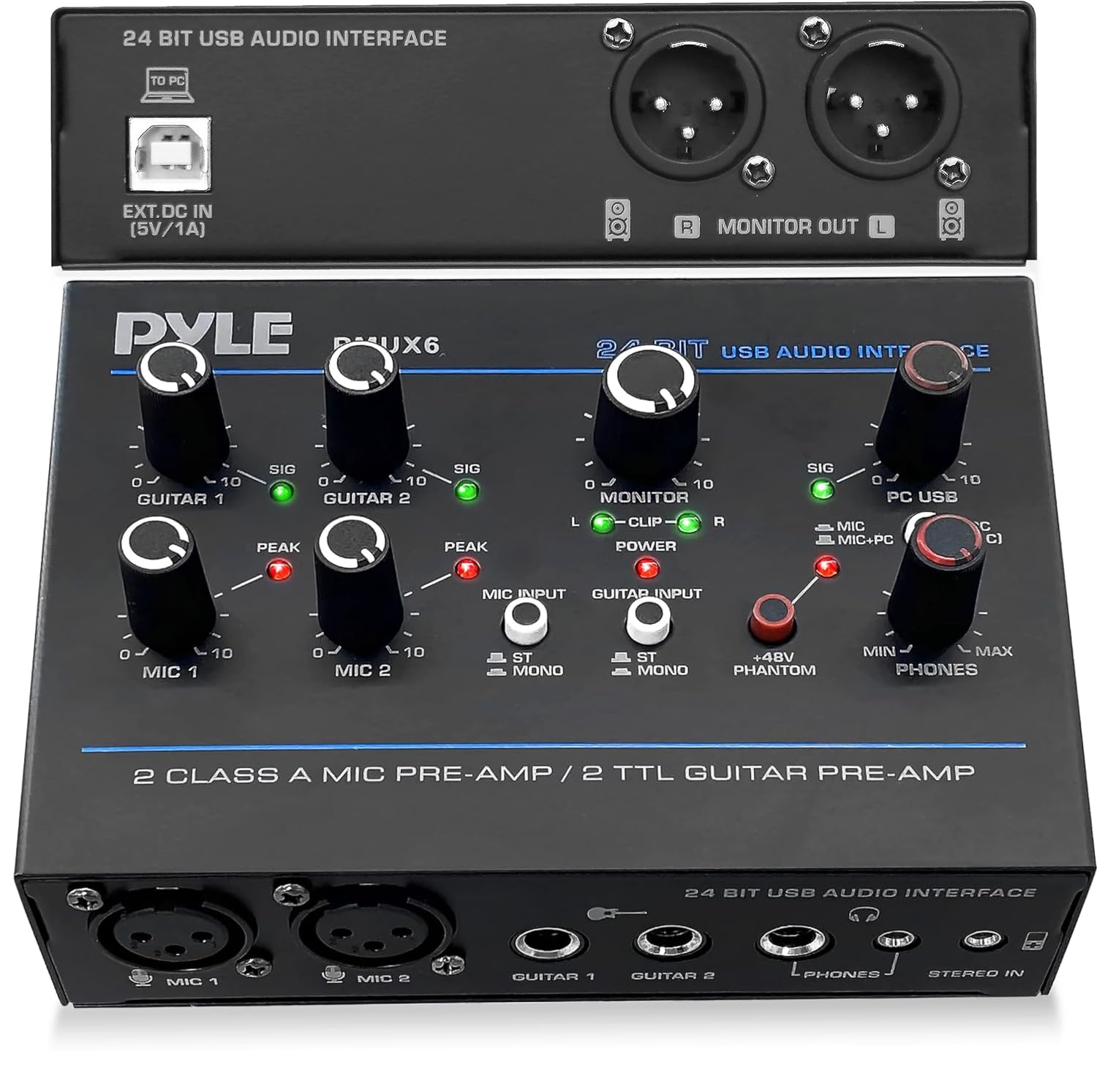
At 1.5″ x 5.6″ x 4.1″, this is about 12% more compact than the Scarlett 2i2 Studio bundle, so it slips easily into a backpack or small desk setup. The multiple connectivity is the real story here: for input, you get 2 XLR jacks, 2 6.35mm jacks, and 1 AUX 3.5mm jack, with a 6.35mm and 3.5mm headphone output plus L/R monitor outputs on the output side. That’s enough flexibility to run two dynamic mics for a podcast or plug in a guitar and a line-level source simultaneously.
The 48V phantom power supply brings condenser mics to life, and the phantom LED tells you clearly when it’s active. Power consumption sits at just 3W with a DC 5V input, so it’s efficient to run from a standard USB port. The 24-bit/48kHz resolution delivers detailed, pristine recording quality that owners describe as more than sufficient for podcasting, with several noting it works perfectly without fiddling to link two dynamic mics to a Windows laptop.
The biggest vote of confidence comes from a surprising source: one owner bought this to replace their Scarlett 4th Generation and found it actually does what they need for a fraction of the cost. That said, bass guitar performance receives mixed feedback — it doesn’t work well with bass guitar in some DAW setups, so keep that in mind if you’re primarily a bass player.
Who it fits: podcasters and home recordists on a tight budget who need multiple input types and phantom power without spending premium money.
Who should skip it: bass guitarists who need reliable low-frequency tracking, since that specific use case gets mixed reviews.
4. MAONO AME2 Audio Interface Mixer

A 10-channel streaming mixer with sound pads, auto-tune, and reverb built right in.
This isn’t just an audio interface — it’s a full podcast studio console. The 10-channel mixer lets you assign 11 customizable sound pads: 3 of them can record up to 60 seconds of audio each with one-key looping, and the other 8 handle up to 20 seconds each. You can upload your favorite audio for podcast recording via smartphone, PC, microphone, or Bluetooth device, which makes it incredibly flexible for live shows and karaoke.
For vocal polish, the six reverb modes and 12-step auto-tune give you studio tricks without needing external plugins, and the 3 modifiable tones (treble, mid-range, bass) plus pitch changer knobs offer hands-on control. The built-in preamps support phantom power for XLR microphones, with 3-level mic gain adjustment offering ultra-low noise gain up to 60dB. The 32-bit high-performance chipset and DENOISE function provide clearer sound even in less-than-ideal rooms.
Connectivity is built for live streaming: USB-C to your computer or tablet, LIVE-OUTPUT1/2 to your smartphone, and MONITOR SPK for studio monitors. It’s compatible with most analog microphones including the Shure SM7B, SM58, Rode Podmic, and Samson Q2U, though USB microphones are not supported. While quality and value are praised, reliability is a concern—some units fail within months, and initial connectivity can be tricky.
What it does best
- The sound pads and effects turn it into an all-in-one streaming console, not just a USB box.
- Bluetooth and multiple output options make it easy to bring in phone callers and music.
- Quality is the top praise — a sturdy build with crisp preamps and phantom power.
What to watch
- Reliability is the recurring concern, with some units failing after a few months.
- Connectivity gets mixed feedback — some owners find it really hard to get working initially.
- It’s a bigger footprint at 9.64″D x 6.18″W x 2.16″H, so it needs dedicated desk space.
Best for: live streamers and content creators who want sound effects, reverb, and auto-tune at their fingertips without software routing.
Think twice if: you need bulletproof reliability for daily paid streams, given the reports of units failing after a few months.
5. Behringer U-Phoria UMC204HD
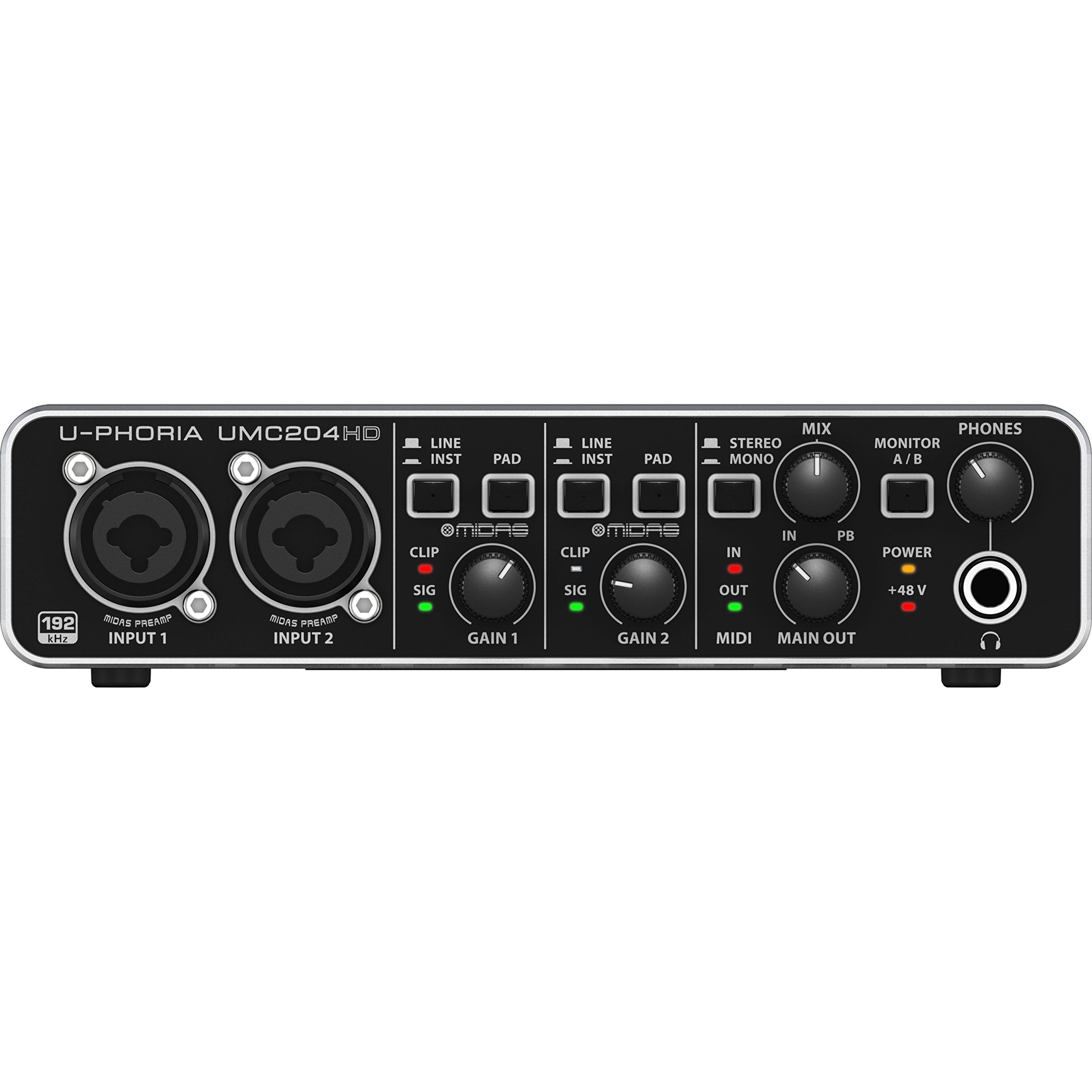
The budget interface that packs MIDAS preamps, high-res audio, and MIDI connectivity into a solid metal box.
The 2 MIDAS preamps are the headline feature here, delivering the kind of clean, musical gain that usually costs significantly more. With 24-bit/192kHz resolution and phantom power, it matches the sample rate of far pricier units while keeping the cost down. It’s a 2-in/4-out design, meaning you get 2 inputs and 4 outputs for flexible monitoring, plus MIDI I/O for connecting keyboards and other MIDI gear.
For Linux users, this is a standout choice — it’s class-compliant and gets recognized instantly on macOS and Ubuntu with flawless plug-and-play. The insert jacks on each channel add another layer of flexibility, letting you patch in external processors like compressors or EQs. At just 1.4 pounds it’s one of the lighter options, and the metal build with quality jacks and knobs feels reassuringly solid.
Owners say it outperforms its price, with one noting it beats the Motu M2 for driving 250ohm headphones and decoding 24/192 FLAC. The value and sound quality get the most praise, but there’s a mix of feedback on noise — some report no issues while others mention inherent noise problems with their units. There’s no power switch, so a boot pop could potentially damage speakers if they’re on when the computer starts.
Who it’s for: musicians on a budget who need clean preamps, high-res audio, and MIDI in one compact box, especially Linux users.
The trade-off: noise performance varies between units, so it’s not the safest bet for ultra-quiet recordings where every hiss matters.
6. Universal Audio Volt 2 USB Audio Interface

The interface that brings the rich, album-ready sound of UA’s classic 610 preamps to your desk.
The Vintage mode is the defining feature here — it gives you the rich, full sound of UA’s classic 610 preamps, a legendary circuit found in countless hit records. With up to 24-bit/192 kHz quality and crisp converters, it captures every detail and nuance of your performance. The dual inputs handle both XLR and 1/4 inch connections, so you can plug in a microphone and a guitar simultaneously without adapters.
It comes bundled with the LUNA Digital Audio Workstation, giving you the sound and workflow of a real analog studio, plus access to the UAD plug-ins and instruments trusted by top industry pros. The setup experience is genuinely plug-and-play for most — one owner had it running in 30 minutes via USB-C with auto driver install, and noted it completely eliminated PC electrical interference. At 650 grams, it’s portable enough to take anywhere.
The sound quality gets strong praise, with owners calling it one of the best options available and highlighting the dual inputs for XLR and 1/4 inch connections. It’s particularly beloved by guitarists — one apartment-dweller uses it as a night-use amp alternative for quiet practice, finding the included plugins and pedals excellent for recording. The catch is that setup gets mixed feedback, with some finding it straightforward while others note it requires proper configuration, and it needs an external power supply when used with iPhone or iPad.
Why it stands out: the Vintage 610 preamp gives you a signature tonal color that no other interface in this price range offers, plus the LUNA DAW is a serious recording environment.
Consider this: if you prefer a flat, neutral preamp sound, the vintage coloration might not be what you’re after — this one colors your tone by design.
7. Solid State Logic SSL 2 MKII

Legendary SSL studio sound in a desktop box, with a build quality that feels built for the road.
The SSL name carries serious weight in professional studios, and the 2 MKII brings that heritage home. With 32-bit/192 kHz AD/DA converters and Legacy 4K analog enhancement, it delivers the warm, detailed preamp sound that SSL is famous for. The 2 XLR mic preamps and 2 1/4″ line/Hi-Z inputs give you plenty of flexibility, and the high-pass filters effectively eliminate low-end rumble that can muddy a vocal take.
At 2.25 pounds with a stainless steel build, it feels heavy and industrial in the best way, with rubber feet that keep it planted on your desk. The zero-latency monitoring means you can hear yourself in real time while recording, and the stereo loopback lets you grab audio from your computer to stream. MIDI I/O on 5-pin DIN jacks adds another layer of connectivity for synth players. The headphone amp is notably powerful and clean, with owners describing it as loud and clear with no noise floor.
The sound quality and build are the standout features — owners describe the mic preamps as warm and detailed with a low noise floor, and the Legacy 4K button adds a musical sheen. One owner specifically sought this out after struggling with rumble issues on another interface, and the high-pass filter eliminated it completely. It’s note this is not 32-bit float — you can still clip if you push levels too hard — but the D/A conversion is 32-bit, which delivers excellent clarity.
What makes it special
- “Legendary SSL sound in my HOME” is the recurring sentiment — the preamp clarity rivals pricier gear.
- The high-pass filter genuinely solves rumble issues that plague other interfaces.
- Rock-solid stainless steel build with smooth, weighted gain knobs.
What you should know
- It’s larger and heavier than the Focusrite 2i2, so it’s less portable.
- It’s not 32-bit float recording, so careful gain staging still matters to avoid clipping.
- The numeric noise gauge is a nice touch but takes a moment to learn.
Best for: serious home hobbyists and semi-pros who want SSL’s legendary tonal character and a build that feels like it will outlast everything else on your desk.
skip it if: you need 32-bit float recording for ultra-safe dynamic range — this one still clips if you push it too hard.
8. PreSonus AudioBox 96 Bundle with LyxPro Mic Kit

A feature-packed recording studio in a box, purpose-built for beginners who want everything included.
This bundle is designed specifically for people just starting out, and it shows in the thoughtful component selection. The AudioBox 96 itself is a 2×2 USB interface with 24-bit/96 kHz conversion, two front-panel XLR/TRS combo inputs with Class-A mic preamps, +48V phantom power, and MIDI I/O in a rugged all-metal chassis. The included LyxPro condenser mic features a cardioid polar pattern for focused vocal capture, and the kit adds a suspension shockmount, XLR cable, and foam windscreen for clean, low-noise recording.
The bundle goes further with over-ear closed-back studio headphones for full-range monitoring, plus a height-adjustable boom microphone stand and clamp-on pop filter to position the mic correctly and tame plosives and breath noise. That’s a complete recording chain right from the start — no scrambling for missing cables or stands. The dedicated Mix control blends direct input with DAW playback, so you can monitor yourself without latency while tracking.
The real gift here is the software: a license for Studio One Artist plus the Studio Magic plug-in suite gives you multitrack recording, editing, mixing tools, virtual instruments, amp sims, effects, and loop content. Owners call it a great value for beginners, with one describing it as a feature-packed studio in a box and buying it twice. The caveats are that software setup can be tricky (YouTube tutorials help), and the box doesn’t come with a software disc — everything must be downloaded.
Who it’s for: absolute beginners who want one purchase that includes everything — interface, mic, headphones, stand, pop filter, and a professional DAW.
The honest note: the bundle includes a lot, but the headphones are where corners get cut, and setup requires some patience with the software download.
9. Motu M4 4×4 USB-C Audio Interface

The 4-in/4-out studio hub that owners call the Focusrite killer for its build and audio quality.
The M4 gives you 4 inputs and 4 outputs in a compact box, with 2 microphone preamps that are celebrated for their transparent, clean sound. At 192 KHz maximum sample rate with low latency monitoring, it handles heavy multi-source live processing without hiccups. The built-in LCD screen displays metering so you can visually confirm your levels, and the hardware monitoring lets you hear yourself directly without any computer delay. It’s USB-C bus powered, so no wall wart needed on your desk.
The loopback feature is a quiet hero for streamers and podcasters — it grabs audio from your computer and routes it back into your stream, perfect for intros, outros, and music. Owners describe the sound as crisp with pretty much no latency, and it’s plug-and-play compatible with Linux, which is rare in this category. At 16 ounces, it’s one of the lighter 4-input options, and the all-metal build feels noticeably more premium than competitors.
Owners praise its functionality and value, often calling it better than the Focusrite 4i4 in ease, sound, and build. The recurring wisdom is that if you need the extra I/O, the M4 is perfect — if you don’t, the M2 offers the same quality with fewer inputs at a better value. The reliability picture is mixed, with a small number of owners reporting it stopped working after about 3.5 years, and there’s a known quirk where occasional pitch-shifted audio on Windows is fixed by disabling fast startup.
Why owners love it
- The transparent sound and rock-solid Windows drivers make it reliable for daily recording.
- LED meters and a physical direct monitoring mix control stand out for musicians.
- Loopback and 4 inputs make it versatile for streaming and multi-mic setups.
The honest trade-offs
- Reliability gets mixed feedback, with some units failing after a few years.
- The headphone amp is weak on USB bus power — you may want an external amp for demanding headphones.
- The rear line inputs can’t handle typical keyboard output without a preamp.
Reach for this if: you’re recording multiple sources like a guitarist, vocalist, and synth player, and you want studio-grade conversion with an LCD display.
Look elsewhere if: you only ever record one mic at a time — the M2 gives you the same quality with fewer inputs for less money.
10. Focusrite Scarlett 4i4 4th Gen USB-C Audio Interface

The music maker’s studio hub for connecting mics, guitars, synths, and drum machines in one go.
The 4i4 is the grown-up version of the 2i2, built for musicians whose gear collection is expanding. It offers 4 line inputs and 4 line outputs alongside 2 mic preamps and 2 Hi-Z instrument inputs, plus MIDI I/O for connecting keyboards and hardware synths. The 120dB dynamic range and 24-bit/192kHz conversion match the 2i2’s studio-quality sound, while the extra inputs mean you can leave a guitar, synth, and vocal mic all plugged in and ready.
The phone app control is a differentiator — you can adjust settings, choose various setups, and manage routing from your phone, which owners find easy to understand and use. The separate monitor and headphone controls are a thoughtful touch for anyone switching between speakers and cans. At 2.2 pounds with a USB-C 5V 3A power supply included, it’s ready for demanding setups that need more than bus power alone.
Owners describe it as the perfect audio companion for content creators, with zero-latency monitoring for multi-person recording and ASIO per-input tracks for live VST routing. One owner upgraded from an old Behringer specifically to record various analog and hybrid synthesizers plus guitar, and reported no issues. The honest fit note is that only 2 of the inputs are XLR — the other 2 are TRS, which work with TS cables but can be noisier — and there’s a slight software learning curve to get the routing dialed in.
Who it’s best for: synth players and multi-instrumentalists who need more inputs and MIDI connectivity without stepping up to a rackmount unit.
Consider this: if your main gear is condenser mics, you’ll only get 2 XLR connections — the other inputs are 1/4″ line level.
11. Tascam US-16×08 Rackmount USB Audio/MIDI Interface

The rackmount workhorse that captures 16 inputs at once for full band and drum recording sessions.
If you’re recording drums or a full band, this is the interface that can handle it. The US-16×08 captures 16 mic and line inputs to your computer with clear sound quality and advanced features to manage big sessions. Eight Ultra-HDDA microphone preamps deliver the cleanest and quietest operation in their class while delivering up to 56dB of gain, and an additional eight line inputs are provided, two of them switchable to instrument level for direct guitar or bass recording.
On the output side, eight balanced line outputs are available, two with a level control on the front panel for monitoring. The built-in DSP Mixer handles low-latency digital mixing, and each channel has four-band EQ and compression for polished-sounding monitor mixes. At 6.1 pounds with dimensions of 11.34″D x 22.09″W x 5.04″H, this is a serious piece of gear designed for a rack or a permanent studio position — not something you’ll toss in a backpack.
Owners are impressed by the value, with one noting it offers 16 tracks at a price that undercuts most competitors. The versatility and many inputs and outputs earn consistent praise, and drummers report tracking 14 mics flawlessly at 96kHz/24-bit. That said, compatibility gets the most mixed feedback of any aspect, and driver quality is the weakest point — several owners mention Windows driver issues that require updates to resolve, and the gain knobs are small and closely spaced, which can be fiddly in a live tracking session.
The big wins
- 16 inputs is enormous for the price — perfect for drum kits and full-band capture.
- The DSP mixer with per-channel EQ and compression gives you monitor mixes without taxing your computer.
- Plug-and-play works with Reaper, and the preamps are quiet with zero-latency monitoring.
Where it stumbles
- Driver quality is the most common complaint — Windows drivers can be finicky and need updates.
- It’s large and heavy at 6.1 pounds, so it’s not designed for portability.
- The small, closely spaced gain knobs are tricky to adjust quickly during a live session.
Reach for this if: you’re tracking drums, full bands, or any session that needs more than 8 simultaneous inputs, and you have rack space.
Look elsewhere if: you’re a solo musician or podcaster — this is dramatically more I/O than you’ll ever use, and the driver quirks aren’t worth it for a single mic.
Understanding the Specs
Sample Rate and Bit Depth
Sample rate (measured in kHz) is how many times per second your audio is captured, and bit depth is the detail level of each sample. A higher rate like 192 KHz captures more high-frequency detail, while 48 KHz is fine for spoken word. For music production, you’ll want at least 24-bit/96kHz to give yourself clean headroom when you process and mix later.
Mic Preamp Gain and Phantom Power
Gain is the boost your interface applies to the mic’s signal, measured in dB. More gain (like 70dB, often called high-gain) helps quiet dynamic mics like the Shure SM7B without a separate booster. Phantom power (+48V) is a separate circuit that provides electricity to condenser mics, which need it to operate. If you own a condenser mic, you need an interface with phantom power.
Latency and Direct Monitoring
Latency is the delay between when you make a sound and when you hear it through your headphones. High latency makes recording feel laggy and unnatural. Direct or zero-latency monitoring routes your input signal straight to your headphones without going through the computer, so you hear yourself instantly. Loopback is a related feature that grabs computer audio and routes it into your stream or recording.
Connectivity and MIDI
USB-C is the modern standard for audio interfaces, offering fast, reliable data transfer. If you have an older computer, check if you need an adapter. MIDI I/O lets you connect keyboards, drum machines, and other MIDI gear to trigger software instruments. Not every interface has MIDI, so it’s a key spec to check if you use hardware synths.
FAQ
What is the difference between an audio interface and a USB microphone?
FAQ
What is the difference between an audio interface and a USB microphone?
A USB microphone has its own built-in analog-to-digital converter and plugs straight into your computer. An audio interface lets you connect professional XLR microphones and instruments, giving you more control over gain, phantom power, and routing. If you plan to grow your setup with multiple mics or instruments, an interface is the more flexible choice.
Do I need phantom power for my microphone?
Only if you use a condenser microphone. Condenser mics need an external electrical charge to work, which is what the +48V phantom power switch provides. Dynamic mics like the Shure SM58 do not need phantom power and will work fine with the switch off. If you ever plug a ribbon mic in, keep phantom power off to avoid damaging it.
Why does the sample rate matter for home recording?
Sample rate controls the frequency detail your recording captures. A higher rate like 192 KHz captures more high-frequency air and sheen, while 48 KHz is fine for podcasts and voiceovers. For music production, 24-bit/96kHz or higher gives you more headroom to process and mix without introducing digital artifacts.
What does gain of 70dB actually mean for my mic?
Gain is how much the interface boosts your mic’s quiet signal up to a usable level. A gain spec of 70dB is considered high-gain territory, meaning you can drive quiet dynamic mics like the Shure SM7B without needing an external booster like a Cloudlifter. Lower-gain interfaces might leave you pushing the knob to max and still getting a thin signal from such mics.
Can I record guitar and vocals at the same time with a 2-input interface?
Yes. A 2-input interface typically has two combo jacks that accept both XLR (for a mic) and 1/4 inch (for a guitar). You plug your mic into one input and your guitar into the other, and your DAW records them as two separate tracks simultaneously. This is the most common home studio setup for singer-songwriters.
What is zero-latency monitoring and why do I need it?
Latency is the delay between when you sing or play and when you hear it in your headphones. Zero-latency monitoring routes your input signal directly to your headphones without sending it through the computer first, so you hear yourself instantly. Without it, a noticeable delay makes recording feel laggy and can throw off your timing.
Is loopback important for podcasting and streaming?
Loopback captures any audio playing on your computer and routes it into your recording or livestream. This is what lets you play background music, intros, or sound effects into a stream alongside your microphone. If you plan to stream or record with music underneath your voice, look for an interface that explicitly lists loopback or stereo loopback.
Why do some interfaces weigh more than others?
Weight usually reflects the build quality and the components inside. A heavier interface often means a thicker metal chassis and more substantial knobs and jacks, which can feel more durable on a desk. A lighter interface is easier to move around or use on the go, but might feel less premium in hand. Consider whether you’ll mostly leave it on a desk or travel with it.
How many inputs do I need for a podcast with two hosts?
You need at least 2 microphone inputs to record two hosts on separate tracks. A 2-input interface with two XLR jacks works, but if you want to add phone callers, background music, or a third guest later, consider a 4-input interface or one with loopback. The Tascam US-16×08 is overkill for a simple two-person podcast but perfect if you plan to expand to a full table of mics.
Can I connect multiple MIDI keyboards to one interface?
Yes, if your interface has MIDI I/O on 5-pin DIN jacks, you can connect one keyboard directly to the MIDI In port. To connect multiple keyboards, you’ll need a separate MIDI interface or a USB hub, since most audio interfaces provide a single set of MIDI in/out ports. The Behringer UMC204HD, Motu M4, and Focusrite Scarlett 4i4 all include MIDI I/O.
What is the difference between an audio interface and a USB microphone?
Do I need phantom power for my microphone?
Why does the sample rate matter for home recording?
What does gain of 70dB actually mean for my mic?
Can I record guitar and vocals at the same time with a 2-input interface?
What is zero-latency monitoring and why do I need it?
Is loopback important for podcasting and streaming?
Why do some interfaces weigh more than others?
How many inputs do I need for a podcast with two hosts?
Can I connect multiple MIDI keyboards to one interface?
Final Thoughts: The Verdict
For most people, the winning audio interface for home studio is the Focusrite Scarlett 2i2 Studio 4th Gen Bundle because it pairs studio-grade sound with a complete set of gear — mic, headphones, cables, and full software — so you can start recording an album the day it arrives. If you want a focused solo-podcasting tool, grab the Focusrite Vocaster One for its one-button Auto Gain and Enhance features. And for serious multi-track recording with room to grow, the Motu M4 is the workhorse that owners swear by for its crisp sound and reliable drivers.
The Scarlett 2i2’s popularity stems from its reliable performance and clean sound, as evidenced by the many owners recording full projects.
How We Picked
We do not accept paid placement. Every pick is matched to a real buyer and a real use-case; we do not hands-on test units.
Sources & Methodology
Specifications: manufacturer listings and product documentation. Review insights: verified customer reviews, as of September 2026. Pricing: not shown on this page (it changes often); check the current price via the retailer link.
As an Amazon Associate, Gadgets Feed earns from qualifying purchases. This does not affect which products we feature.