
Your stream is only as good as your audio, and the weakest link in your signal chain is the interface between your microphone and your computer. A noisy preamp, high latency, or limited connectivity can turn a professional mic setup into a muddy, frustrating mess that pushes viewers away within seconds. Choosing the right unit means locking in clean gain, near-zero round-trip latency, and the specific I/O your streaming workflow demands.
I’m Min — the co-founder and writer behind Gadgets Feed. I’ve logged hundreds of hours comparing preamp noise floors, driver stability across operating systems, and loop-back routing for live mixing to find the interfaces that actually deliver in a live streaming environment.
Whether you host a talk show, game on Twitch, or produce live music, this guide breaks down the specs that matter most for your specific setup so you can confidently pick the best audio interface for live streaming.
How To Choose The Best Audio Interface For Live Streaming
Live streaming places unique demands on an audio interface that studio recording doesn’t. You need reliable real-time monitoring, low-latency loopback for mixing desktop audio with your mic, and preamps clean enough to handle dynamic microphones without external boosters. Here are the three factors that separate a streaming-friendly interface from a purely studio-focused one.
Preamp Gain and Noise Floor
The amount of clean gain your preamps can deliver determines whether a quiet dynamic microphone like the Shure SM7B sounds full or thin and noisy. Look for interfaces offering at least 60 dB of gain with a low Equivalent Input Noise (EIN) rating, ideally below -127 dBV. This combination lets you skip inline boosters like Cloudlifters, keeping your desk clean and your signal path pure.
Loopback and Monitoring Flexibility
Loopback is a non-negotiable feature for streamers who need to route desktop audio — game sounds, music, browser alerts — back into their streaming software alongside their microphone input. Hardware direct monitoring with a mix knob is equally important: it lets you hear your own voice without the delay of software processing, which prevents the disorienting echo that kills live performance flow.
Connectivity and Bus Power
Streaming setups often involve multiple devices: a primary PC, a secondary laptop for chat, a camera, and headphones. Interfaces with USB-C bus power keep your desk cable-free, but higher-channel-count units may require external power for phantom voltage stability. Check that the interface plays well with your operating system — Windows users especially benefit from interfaces with mature, regularly updated drivers.
Quick Comparison
On smaller screens, swipe sideways to see the full table.
| Model | Category | Best For | Key Spec | Amazon |
|---|---|---|---|---|
| RØDE RØDECaster Duo | All-in-One | Streamers who want a full mixer | 76 dB gain, -131.5 dBV EIN | Amazon |
| Universal Audio Apollo Solo HE | Premium | Professional near-zero latency tracking | UAD Solo Core processing | Amazon |
| Solid State Logic SSL 2 MKII | Mid-Range | Warm preamps with built-in HPF | 32-bit / 192 kHz converters | Amazon |
| MOTU M4 | Mid-Range | Clean routing with independent monitoring | 4-in/4-out with LCD metering | Amazon |
| Universal Audio Volt 2 | Mid-Range | Vintage 610 preamp character on a budget | Vintage mode, 24-bit / 192 kHz | Amazon |
| M-AUDIO AIR192x4 VSPro | Bundle | First-time streamers needing everything | 2.59 ms round-trip latency | Amazon |
| Focusrite Scarlett Solo 3rd Gen | Entry | Reliable solo podcasting or music | Air mode, 24-bit / 192 kHz | Amazon |
| Focusrite Vocaster Two | Value | Dual-person interviews and Bluetooth calls | 70 dB gain, Auto Gain | Amazon |
| Shure MVX2U | Compact | Ultra-portable single-mic streaming | 60 dB gain, zero-latency monitoring | Amazon |
In‑Depth Reviews
1. RØDE RØDECaster Duo
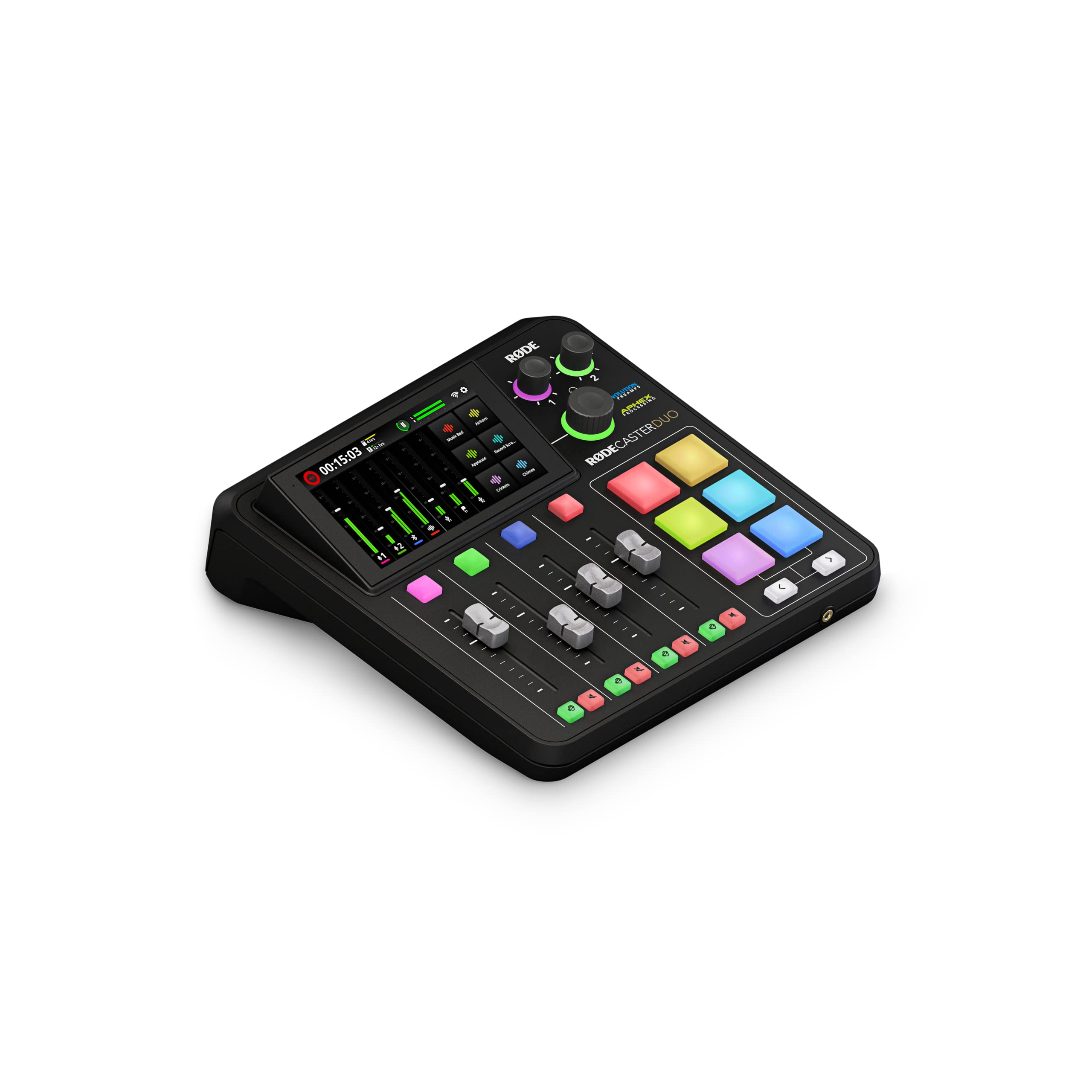
The RØDECaster Duo is the most complete all-in-one production hub for live streaming. Its Revolution Preamps deliver an astonishing 76 dB of gain with an EIN of -131.5 dBV, meaning you can run a ribbon or dynamic microphone without any external booster and hear nothing but silence underneath your voice. The four broadcast-quality faders give you tactile control over multiple audio sources — mic, music, browser alerts, and a second host — without needing to touch a mouse.
The high-resolution touchscreen with haptic feedback lets you route audio, apply APHEX processing (Aural Exciter and Big Bottom), and trigger SMART pads for sound effects or jingles in real time. The 3.5mm TRRS input supports headsets like the NTH-100M for private monitoring, and the dual Neutrik combo jacks accept both XLR and ¼-inch inputs. Bus power is not an option here — it ships with an external power supply to keep phantom voltage stable across all channels during long streaming sessions.
Setup has a learning curve, particularly for iPhone users who need specific RØDE cables and adapters. Once configured, the Duo replaces a separate mixer, interface, headphone amp, and soundboard in a single chassis. If you live-stream regularly and want to eliminate gear clutter, this is the unit that does it all without compromising audio fidelity.
Why it’s great
- Integrated faders, pads, and processing eliminate the need for extra gear
- Revolution Preamps handle any microphone without a booster
- Built-in APHEX effects polish voice in real time
Good to know
- Requires external power; not bus-powered
- Software routing can be confusing for beginners
- iPhone compatibility requires separate RØDE cable
2. Universal Audio Apollo Solo Heritage Edition

The Apollo Solo Heritage Edition brings the same UAD Solo Core processing found in UA’s rackmount units into a compact bus-powered chassis. This means you can track through vintage compressor, EQ, tape machine, and preamp emulations with near-zero latency before the signal even reaches your streaming software. The Unison preamp technology physically reconfigures the input impedance and gain staging to match the hardware being emulated, giving you genuine Neve, API, Avalon, or Manley tones from a single XLR input.
The Heritage bundle includes five premium plug-ins from Teletronix, Pultec, and UA — a value that alone exceeds the interface’s price. The headphone amplifier delivers loud, detailed, low-noise monitoring, and the bus-powered USB-C connection keeps your desk tidy. Compatibility spans Logic Pro, Pro Tools, Cubase, and Ableton Live, plus the LUNA Recording System (Mac only) tightens the integration further.
Windows users have reported USB driver hurdles, and the interface requires a Thunderbolt 4 cable to function properly on many systems — a detail that trips up new buyers. Once stable, the Apollo Solo offers the lowest-latency hardware monitoring in this class, making it the top choice for streamers who sing, play instruments, or want studio-grade processing during live broadcasts.
Why it’s great
- UAD Solo Core enables near-zero-latency vintage effects during streaming
- Unison preamps emulate iconic hardware with authentic impedance matching
- Heritage plug-in bundle adds massive software value
Good to know
- Thunderbolt 4 cable required; USB-C alone may fail
- Windows driver compatibility can be problematic
- Single XLR input limits multi-mic streaming setups
3. Solid State Logic SSL 2 MKII

The SSL 2 MKII inherits the legendary British console sound that defined countless hit records. Its two XLR mic preamps incorporate the Legacy 4K analog enhancement, a single button that adds high-frequency presence and subtle harmonic saturation — exactly the polish that makes voices cut through a busy stream mix without additional EQ. The 32-bit / 192 kHz AD/DA converters deliver class-leading dynamic range and headroom, so even loud peaks from a dynamic vocal performance stay clean.
Streamers benefit from the built-in high-pass filter (HPF) that instantly cuts rumble from desk vibrations or HVAC noise, and the zero-latency monitoring with stereo loopback lets you blend your mic with desktop audio before it hits OBS. The two headphone outputs each have independent volume control, a huge advantage for co-streamers or guests who need separate cue mixes. The metal chassis and smooth, weighted knobs feel like a miniature SSL console on your desk.
The unit includes MIDI I/O on 5-pin DIN jacks, which is rare at this price point, and ships with the SSL Production Pack software bundle. The noise gauge readout on the front panel provides a numerical value that helps you set gain precisely without visual guessing. For the streamer who wants the sonic signature of a professional mixing console without the complexity, the SSL 2 MKII delivers immediately out of the box.
Why it’s great
- Legacy 4K switch adds console-grade presence and saturation
- High-pass filter eliminates rumble without extra processing
- Two independent headphone outputs for co-streamers
Good to know
- Larger and heavier than competing 2-in/2-out interfaces
- Bus-powered, but phantom power may strain some USB ports
- Legacy 4K is subtle — not a dramatic effect
4. MOTU M4

The MOTU M4 is the routing champion for streamers who need more than two inputs. With four analog inputs and four outputs, you can connect a primary microphone, a secondary mic, a stereo music source, and still have a channel left for a backup recorder or camera feed. Each of the two mic preamps delivers ultra-transparent sound with an exceptionally low noise floor, and the LCD level meters on the front panel give you precise visual feedback so you never clip during a live show.
The built-in hardware direct monitoring features a dedicated mix control that operates independently of your computer, which means zero-latency cue mixes even when your DAW or streaming software stutters. The loopback function lets you route any combination of inputs and outputs back into your streaming software, making it easy to blend game audio, voice, and music with full control. The USB-C bus power keeps the footprint small, and MOTU’s ASIO drivers on Windows are widely regarded as among the most stable in the industry.
One quirk: the volume knobs have a dead zone in the first 25% of rotation, which requires you to adjust past the silent range before level changes begin. The headphone amp is slightly underpowered when bus-powered, so if you use high-impedance headphones, an external headphone amplifier may be necessary. For the streamer who values flexible routing and rock-solid driver performance above all else, the M4 is hard to beat.
Why it’s great
- Four inputs/excellent routing for complex streaming setups
- LCD meters provide instant gain confirmation
- Rock-solid ASIO drivers for Windows users
Good to know
- Volume knobs have a dead zone at the start of rotation
- Headphone amp is weak on bus power for high-impedance cans
- Occasional pitch-shift bug requires disabling Windows fast startup
5. Universal Audio Volt 2

The Volt 2 brings UA’s legendary 610 vacuum tube preamp character to a compact, affordable USB-C interface. The Vintage mode button engages analog circuitry that adds the warm saturation and harmonic richness of the classic 610 preamp, giving voices a full-bodied, broadcast-ready quality without any plugin processing. The crystal-clear 24-bit / 192 kHz converters capture every detail behind that vintage tone, making it an excellent choice for streamers who want immediate vocal polish.
The Volt 2 includes the LUNA Recording System and a curated bundle of UAD plugins, though the real-time DSP processing that makes the Apollo series special is not present here — the Vintage mode is purely analog. The bus-powered USB-C connection works with Mac, Windows, iPad, and iPhone (iOS 14+ with a Lightning to USB Camera Adapter for non-USB-C iPads). The solid metal chassis and weighted knobs feel premium on any desk.
The two inputs give you one XLR combo jack and one high-impedance instrument input, so you can run a mic and a guitar simultaneously. The Volt 2 is not designed for multi-person podcasting, but for the solo streamer who wants to dial in a professional vocal signature from the moment the microphone hits the preamp, it delivers exceptional value. The absence of loopback routing means you’ll need to handle desktop audio mixing within your streaming software.
Why it’s great
- Vintage mode adds analog warmth and saturation to vocals
- Premium build quality with a smooth, heavy feel
- Compatible with iOS devices for mobile streaming
Good to know
- No hardware loopback for desktop audio routing
- Single microphone input limits co-hosting
- Vintage mode is always analog; no real-time UAD DSP
6. M-AUDIO AIR192x4 VSPro

The AIR192x4 VSPro is the only package in this guide that includes everything a first-time streamer needs to go live immediately: the AIR 192|4 interface, a Nova black condenser microphone, a shock mount, an XLR cable, and HDH40 studio headphones. The interface itself is no slouch — its Hi-Speed USB-C circuitry delivers a class-leading round-trip latency of just 2.59 milliseconds, meaning you can monitor your voice in real time without any distracting delay.
The crystal preamps and ultra-pristine AD/converters capture clean, detailed audio at up to 24-bit / 192 kHz resolution. Connectivity includes one XLR+¼-inch TRS combo input, one ¼-inch instrument input, stereo ¼-inch outputs, and a ¼-inch headphone output with independent level control. The included software bundle — MPC Beats, Ableton Live Lite, Touch Loops, Creative FX Collection, Xpand!2, Mini Grand, and Revalver — gives you a full production suite out of the box.
Build quality is decent for the price point, though the Nova microphone included in the bundle is not a high-end condenser — it works well for spoken word and vocals but lacks the detail of dedicated broadcast mics. Some users have reported USB connection failures after extended use, though M-Audio support has been responsive in replacing defective units. For a streamer on a tight budget who needs a complete, low-latency setup in one box, the VSPro bundle is the most practical starting point.
Why it’s great
- Complete package with microphone, headphones, and cables
- Industry-leading 2.59 ms round-trip latency
- Generous software bundle for production and effects
Good to know
- Included condenser mic is adequate but not professional-grade
- Some units have experienced USB failure over time
- Single XLR input limits two-microphone streaming
7. Focusrite Scarlett Solo 3rd Gen

The Scarlett Solo 3rd Gen is the benchmark that other entry-level interfaces are measured against. Its mic preamp with switchable Air mode adds a high-frequency presence boost inspired by Focusrite’s original ISA transformer-based preamps, bringing clarity to vocals and acoustic instruments without needing external EQ. The Gain Halo indicators — green for good level, red for clipping — make it nearly impossible to ruin a take by overloading the input, a critical safety net for live streaming where you can’t afford to check levels constantly.
The 24-bit / 192 kHz converters capture full-frequency detail, and the two low-noise balanced outputs deliver clean playback through studio monitors. The included software bundle — Pro Tools Intro+, Ableton Live Lite, Cubase LE, and the Hitmaker Expansion — provides everything from recording to mastering. The metal chassis has survived years of abuse in user reports, and Focusrite offers a three-year global warranty.
The Scarlett Solo is strictly a 1-in/2-out interface — one XLR combo input and one instrument input — which limits it to solo streamers or single-mic podcasters. It lacks loopback routing, so desktop audio mixing must happen in software. For a streamer who wants a durable, proven, and sonically clean interface for a single microphone, the Scarlett Solo remains the safest bet in its class.
Why it’s great
- Air mode adds clarity without external processing
- Gain Halo indicators prevent clipping in real time
- Durable metal build with a three-year warranty
Good to know
- Single XLR input — not suitable for two-mic streaming
- No hardware loopback for mixing desktop audio
- AFX2DAW plugin support costs extra on Windows
8. Focusrite Vocaster Two

The Vocaster Two is purpose-built for the live interview and co-hosting scenario that defines so many streaming shows. Two XLR inputs with over 70 dB of gain each mean you can run two dynamic microphones — like a pair of SM58s — without any inline booster, and the Auto Gain feature sets your levels in one button press. The Enhance button offers four podcaster-approved presets that EQ and compress your voice in real time, giving a polished broadcast sound without manual tweaking.
Bluetooth phone connectivity lets you bring in callers wirelessly, or you can use the TRRS cable for a wired connection — the interface auto-routes the remote audio into your mix. Each presenter gets their own headphone output with independent Show Mix control, so the host hears one blend and the guest hears another. The mute button on the front panel cuts coughs, sneezes, and off-mic conversation instantly, and the camera line-out sends premium audio directly to your DSLR or mirrorless camera for video sync.
The plastic chassis feels lighter and less premium than the all-metal Scarlett series, and the front-panel headphone jacks protrude in a way that can snag cables. Auto Gain is a convenience feature, not a replacement for manual level adjustment in a critical broadcast. For streamers who host regular interviews, bring in phone guests, or co-stream with a partner, the Vocaster Two’s feature set is uniquely tailored to those workflows.
Why it’s great
- Two high-gain mic inputs with Auto Gain simplify setup
- Bluetooth phone connectivity for remote interviews
- Independent headphone mixes for host and guest
Good to know
- Plastic build attracts fingerprints and feels less durable
- Front headphone jacks protrude and may snag cables
- Auto Gain is a guide, not a set-and-forget solution
9. Shure MVX2U

The MVX2U proves that a pro-level streaming interface can fit in the palm of your hand. This XLR-to-USB adapter packs 60 dB of clean gain and 48V phantom power, enough to drive a Shure SM7B to full output without a Cloudlifter — a feat that interfaces three times its size often struggle with. The built-in 3.5mm headphone jack delivers zero-latency monitoring, so you hear your processed voice exactly as your audience does, with no delay.
The Auto Level Mode sets your input gain automatically for distortion-free streaming right out of the box, and the MOTIV desktop app gives you access to advanced DSP: EQ, compression, limiter, and high-pass filter. You can mount it directly onto your XLR microphone for an ultra-clean, cable-minimal setup, or use it inline with a standard XLR cable. The USB-C connection makes it compatible with Mac, Windows, and even iPhone and iPad with the appropriate camera adapter.
This is a single-channel device — it handles one microphone and one headphone feed only. The compact form factor means it’s easy to misplace on a cluttered desk, and the thin USB-C cable supplied in the box has been reported as a failure point by some users. For the mobile streamer, solo podcaster, or musician who needs a portable, high-gain interface that disappears into the setup, the MVX2U is an ingenious solution.
Why it’s great
- 60 dB gain drives an SM7B without an external booster
- Ultra-compact design mounts directly onto a microphone
- Zero-latency monitoring with MOTIV app DSP
Good to know
- Single-channel — no support for a second microphone
- Thin USB-C cable is a potential failure point
- Not recommended for smartphone use without specific adapters
FAQ
Do I need phantom power for a dynamic microphone?
What is the minimum round-trip latency I should accept for live streaming?
Can I use a 2-input interface for a two-person podcast stream?
Final Thoughts: The Verdict
For most streamers, the best audio interface for live streaming winner is the RØDE RØDECaster Duo because it replaces an entire rack of gear with integrated faders, pads, and studio-grade effects, all optimized for live production. If you want vintage analog character that polishes your voice instantly, grab the Universal Audio Volt 2. And for a portable, high-gain solution that drives any dynamic microphone without extra boxes, nothing beats the Shure MVX2U.