
Our readers keep the lights on and my morning glass full of iced black tea. As an Amazon Associate, I earn from qualifying purchases.
Specs are compiled from manufacturer listings and verified buyer reviews and can change over time — please confirm the key details on the product page before buying.
Plug a mic or guitar into your PC and the sound comes out thin, noisy, or just wrong. An audio interface — the box that converts analog sound into digital data your computer understands — fixes that. The trick is picking one that matches your gear and workflow so you get clean recordings without hassle.
I’m Min — the founder and writer behind Gadgets Feed. This guide is built by comparing the manufacturers’ published specifications and the patterns across verified customer reviews, so you get each pick’s real strengths and trade-offs instead of marketing spin.
Finding the right tool means weighing preamp quality, input count, and software value. This guide to the audio interface for pc usb lays out seven options so you can match one to your setup on the first try.
Quick Picks
- MOTU M4 4×4 USB-C Audio Interface — Best Overall
- Focusrite Scarlett 2i2 Studio 4th Gen USB Audio — Complete Bundle
- Universal Audio Volt 2 USB Audio Interface — Vintage Character
- Solid State Logic SSL 2 MKII — Studio‑Grade Preamps
- PreSonus AudioBox USB 96 25th Anniversary — All‑In‑One Starter
- Focusrite Scarlett Solo 3rd Gen USB Audio — Compact Performer
- Shure MVX2U Gen 2 XLR-to-USB-C Digital Audio — Mobile Powerhouse
How To Choose The Best Audio Interface For PC USB
Start with what you want to record — a single podcast mic, a vocalist with a guitar, or multiple instruments at once. That choice decides how many inputs you need and if you want extras like onboard DSP (a built-in processor for effects) or loopback (routing computer audio back to your DAW) for streaming.
Inputs, outputs, and your actual gear
A solo vocalist or podcaster can get by with one XLR (a 3-pin connector for professional mics) input and one instrument input. A songwriter recording guitar and voice together needs two mic preamps. If you plan to send separate headphone mixes during a session, you need at least two headphone outputs. Count your current mic and instrument cables before you buy.
Sample rate and preamp quality
Most modern interfaces record at up to 192 KHz — that is 192,000 snapshots of your sound per second, so you capture more detail during mixing. A measurable gap: the Universal Audio Volt 2 reaches 192 KHz, while the PreSonus AudioBox USB 96 tops out at 96 KHz — a real difference if you plan to pitch-shift or time-stretch later. Preamp noise matters too: a clean preamp with enough gain (around +60 dB — the boost level for quiet mics) means you do not need an extra booster for quieter mics.
Software bundle value
The interface is half the package — the included DAW (digital audio workstation, the software you record and edit in) and plugins often save you hundreds of dollars. Some come with Ableton Live Lite, Pro Tools Intro, or Studio One Artist, plus a library of effects. If you are starting from scratch, a generous bundle gets you recording on day one without extra shopping.
Quick Comparison
| Model | Best For | Max Sample Rate | Input Channels | Weight | Amazon |
|---|---|---|---|---|---|
| MOTU M4 | Home studio with multiple inputs | 192 KHz | 4-in/4-out | 16 oz | $279.95Amazon |
| Focusrite Scarlett 2i2 Studio 4th Gen | Complete all-in-one recording bundle | 192 KHz | 2 inputs | 3.5 lbs | $279.99$329.99Amazon |
| Universal Audio Volt 2 | Warm, vintage-style recordings | 192 KHz | 2 inputs | 650 g | $179.00Amazon |
| Solid State Logic SSL 2 MKII | Voice artists needing low noise and HPF | 192 KHz | 2 inputs | 2.57 lbs | $229.99Amazon |
| PreSonus AudioBox USB 96 25th Anniv. | Beginner all-in-one studio kit | 96 KHz | 2 inputs | 5 lbs | $169.99$220.99Limited time dealAmazon |
| Focusrite Scarlett Solo 3rd Gen | Single vocalist or podcaster | 192 KHz | 1 input | 12.32 oz | $99.99$119.99Amazon |
| Shure MVX2U Gen 2 | On-the-go XLR to USB-C mobile setup | 192 KHz | 1 channel | 100 g | $139.00Amazon |
In‑Depth Reviews
1. MOTU M4 4×4 USB-C Audio Interface

Four inputs let you record two mics and two instruments at once — and the LCD screen takes the guesswork out of setting levels.
You get four analog inputs and four outputs over a single USB-C cable, so you can record two microphones and two line-level sources simultaneously without an extra adapter. The preamps are clean and quiet — buyers report the noise floor (the background hiss level) and distortion are extremely low, with jitter (tiny timing errors) that is non-existent. That keeps your layered tracks hiss-free.
Unlike the Focusrite Scarlett Solo 3rd Gen with its single input, the M4 gives you two mic preamps plus two line inputs. A home studio with a vocalist and an acoustic guitarist can both plug in at once. The LCD screen shows levels for each input in real time — one reviewer called it extremely helpful when dialing in gain. Loopback is built in, so you can route computer audio back into your DAW for streaming or podcasting without extra cables.
What makes it versatile
- Four analog inputs cover mic, guitar, and line sources together
- Built-in loopback for streamers who need to capture desktop audio
- LCD meters give you visual gain-staging without squinting at a software meter
The small catch
- Volume knobs feel like they only start responding after the first quarter turn, according to some users
- No included microphone or headphones — interface only
Best for the multi-source studio: If you record two mics, a guitar DI, and a synth all at once, the M4’s four inputs and clean preamps make it your central hub.
Not for the bare-bones beginner: You will need to buy your own microphone and headphones separately, so factor that into the total spend.
2. Focusrite Scarlett 2i2 Studio 4th Gen USB Audio Interface Bundle
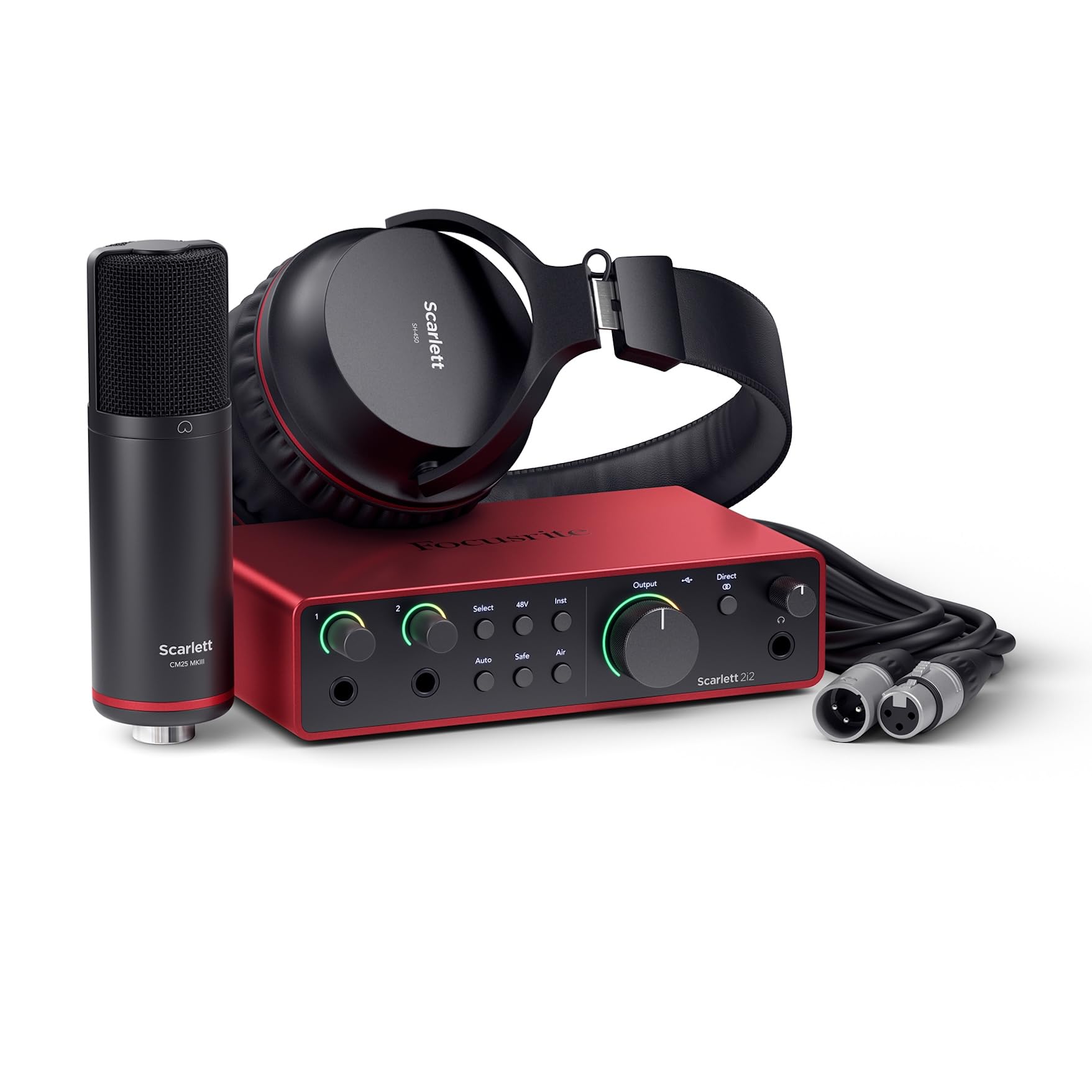
Open the box and you have a microphone, headphones, cables, and interface — everything to start recording the same day.
This bundle includes the Scarlett 2i2 4th Gen interface, a CM25 MkIII condenser microphone, SH-450 headphones, a 3m XLR cable, and a USB A-C cable, so you truly have nothing else to buy. The interface uses the same converters as Focusrite’s flagship models, delivering a 120dB dynamic range — that is the quiet-to-loud span the interface captures without noise. Your quiet vocal phrases stay clean and your loud strums do not distort.
Auto Gain sets the perfect level for your mic or guitar automatically, and Clip Safe prevents clipping if you suddenly get louder. Those two features matter when you are focused on performing, not staring at level meters. Owners mention it works well with electric guitar and bass using BIAS FX 2, though it lacks an extra 3.5mm input for external audio. The Air mode lifts vocals and guitars forward in the mix, adding presence without extra EQ work.
What you get in the box
- CM25 MkIII condenser mic and SH-450 headphones included
- Auto Gain and Clip Safe protect against bad takes
- Pro Tools Intro+, Ableton Live Lite, Cubase LE, and Hitmaker Expansion bundled
What is missing
- No extra 3.5mm input for external audio sources
- Bundle is heavier (3.5 lbs) than a solo interface for travel
Reach for this if you want everything in one shipment: A songwriter or podcaster who needs a mic, headphones, and a modern interface with smart gain features will have zero setup delays.
Look elsewhere if you already own a mic and headphones: The bundled gear is good, but you would be paying for items you may not need.
3. Universal Audio Volt 2 USB Audio Interface

A single button gives your recordings the warmth of a classic tube preamp — no extra hardware needed.
The headlining feature here is Vintage mode, which emulates UA’s classic 610 preamps — the same circuits used on countless hit records. Engaging it adds a bit of warmth and harmonic richness to vocals and DI (direct injection, guitar plugged straight in) guitar. Your raw recordings have a polished character before you even open a plugin. Sound quality is excellent for direct-in guitar, customers note, though some find the preamp a little soft for certain mics.
At 192 KHz / 24-bit, it captures as much detail as the MOTU M4 and the Focusrite Scarlett Solo 3rd Gen. The Volt 2 includes the award-winning LUNA Digital Audio Workstation, giving you an analog-style recording workflow for free. Reviewers point out it feels super solid, with low latency (the delay between playing and hearing) and a vintage tone button that makes a noticeable difference. It works with MacOS, Windows, iPad, and iPhone (iOS 14+), though iOS requires an external power supply and camera adapter.
Why the Volt stands out
- Vintage mode adds analog warmth without external gear
- Bundled with LUNA DAW and UAD plugins
- USB-powered, compact design
A real trade-off
- iOS use requires external power supply and a camera adapter
- Preamp gain may feel insufficient for very quiet dynamic mics
Best for the producer who wants character: If you record guitar and vocals and want instant “record-ready” tone without plugin tweaking, the Volt 2 delivers.
Less ideal for the pure neutrality seeker: If you prefer a completely transparent signal chain for post-processing, the vintage coloration may not suit your workflow.
4. Solid State Logic SSL 2 MKII – 2×2 USB Audio Interface

Take the sound of a legendary mixing console and put it on your desk — bus-powered and backpack-ready.
SSL is famous for the mixing consoles that shaped countless albums, and the SSL 2 MKII brings a piece of that sound home. The Legacy 4K analog enhancement button adds high-frequency sheen and harmonic presence — a subtle lift that makes vocals and acoustic instruments feel more polished. The mic preamps have a low noise floor (low background hiss), and the headphone amp is powerful enough for high-impedance monitoring (headphones that need more power, like studio-grade models).
Voice artists will appreciate the built-in high-pass filters (HPF) that cut low-end rumble from air conditioners or traffic — one reviewer who does voice work said the HPF eliminated booth rumble and helped their voice sound crisper. The unit runs on 32-bit / 192 KHz AD/DA converters (the chips that convert analog to digital and back), which is a step above the 24-bit interfaces for headroom. It also includes MIDI I/O on 5-pin DIN jacks, so you can connect a keyboard controller without a separate MIDI interface. Shoppers say zero driver issues on Windows 11.
SSL pedigree in practice
- Legacy 4K button adds professional polish to recordings
- High-pass filters clean up low-end noise on mic inputs
- MIDI I/O for connecting controllers without extra hardware
The honest trade
- Heavier and larger than entry-level interfaces (2.57 lbs, 10.63 x 7.87 x 4.33 inches)
- No included microphone or headphones
Ideal for voice artists and home studio owners who want console-grade preamps: The HPF and 4K enhancement make your voice cuts sound broadcast-ready almost instantly.
Not the pick if portability is your first concern: The metal chassis is built to last but it is bulkier than the Shure MVX2U for mobile recording.
5. PreSonus AudioBox USB 96 25th Anniversary Studio Recording Package
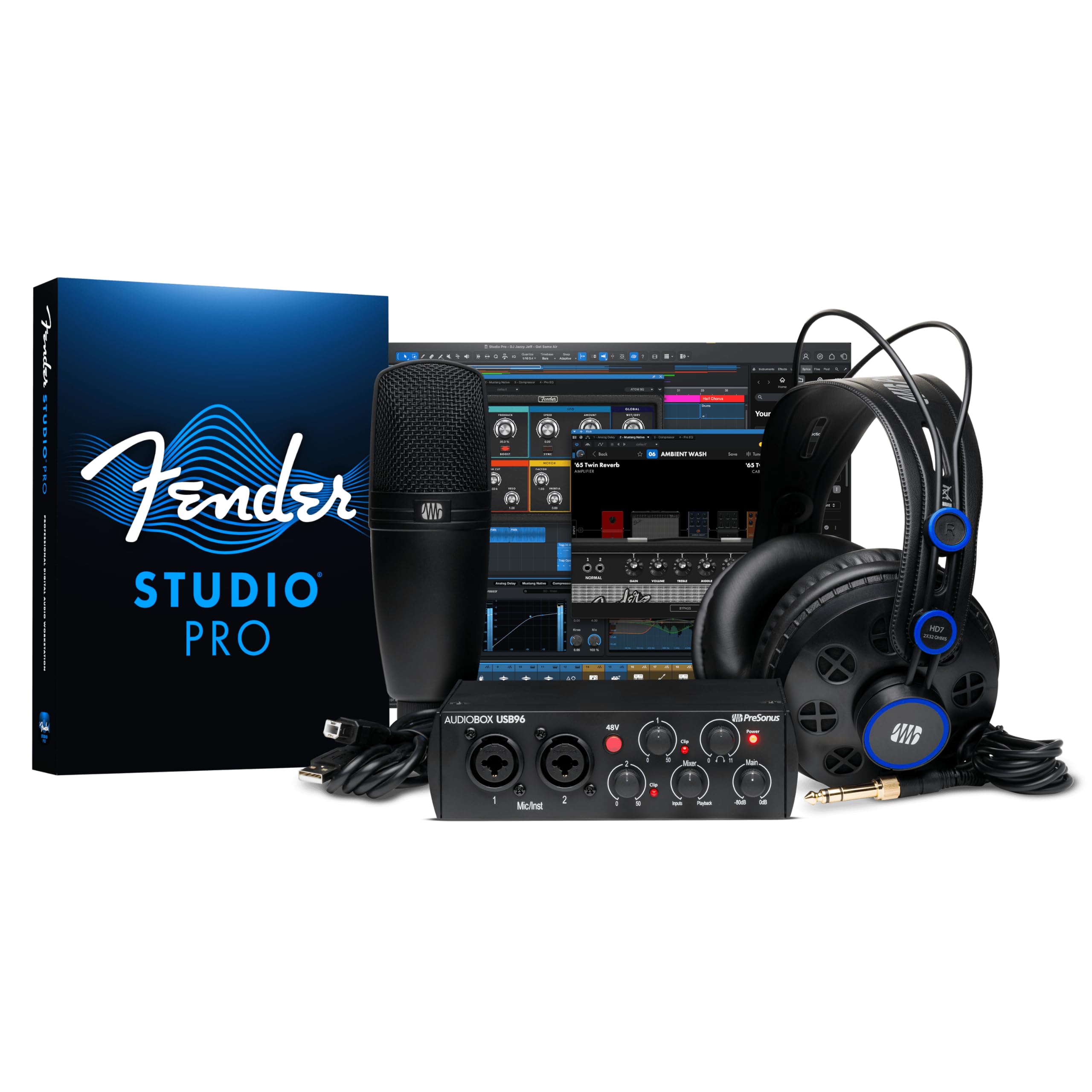
A home studio in a single box that a beginner can open, plug in, and start recording the same day.
The AudioBox USB 96 interface runs at 96 KHz and 24-bit, enough for clear demo-level recordings and podcasting, and it includes two combo inputs for mic or instrument. The package adds an M7 large-diaphragm condenser microphone, HD7 headphones, and a desktop mic stand, plus Studio One Artist and Studio Magic software — a bundle the maker claims is worth over 1000 USD if bought separately. For a beginner who owns nothing, this is a complete turnkey kit.
A useful real-world detail from a buyer: they tried to use a longer USB cable than the one provided and spent four hours trying to figure out why the interface would not talk to their PC — once they switched back to the original cable, it worked perfectly. That tells you to use the included cable or one with the same rating. While the 96 KHz max sample rate is lower than the 192 KHz of the MOTU M4 and the Universal Audio Volt 2, it still captures clean audio for vocals and acoustic instruments at a confidence-building price.
What makes it beginner-proof
- Everything included: interface, condenser mic, headphones, mic stand, cables, DAW
- Two combo inputs for mic or instrument, plus MIDI I/O
- Studio One Artist is intuitive with drag-and-drop that reviewers call easy to learn
The meaningful limitation
- 96 KHz max sample rate (versus 192 KHz on premium interfaces)
- The cable included with the interface is critical — longer cables can cause connection issues
Best for the first-time home recordist: If you own no mic, no headphones, and no recording software, this bundle gets you up and running with every physical piece you need.
skip it if you already have a decent mic and headphones: You would be paying for gear you do not need, and you could get a higher sample rate interface for a similar spend.
6. Focusrite Scarlett Solo 3rd Gen USB Audio Interface

A solo artist’s essential — one XLR for your mic, one instrument input, and it has been durable enough to survive a winter in storage.
This 3rd Gen Scarlett Solo records at up to 192 KHz and has one XLR mic input and one instrument input, so it is built for a single vocalist or guitarist who does not need multiple mics running at once. The mic preamps deliver a brighter recording with switchable Air mode that adds clarity to acoustic instruments. It records and plays back at 24-bit / 192kHz, so your recordings keep their sonic detail.
A real-world durability note from a buyer: “I bought this almost three years ago” — it survived multiple moves and a winter in a non-climate-controlled storage unit, then worked fine when plugged back in. That tells you the all-metal build is tough. The stereo loopback works for single-mic podcasters, and the bundled software includes Pro Tools Intro+, Ableton Live Lite, Cubase LE, and Hitmaker Expansion. It is the lightest full interface here at 12.32 ounces.
Why it remains a classic
- 192 KHz / 24‑bit recording in a very portable form
- Metal body that has proven durable over years of moving and storage
- Air mode adds brightness to vocal and acoustic takes
The limit you will hit
- Single mic input means no simultaneous two-mic recording
- Some users find the pop-up welcome folder on connection a minor annoyance
Perfect for the solo podcaster or singer-songwriter who values portability: At 12.32 oz with 192 KHz quality, it slips into a laptop bag and records clean takes anywhere.
Not the choice for duo recordings or dual‑mic interviews: You need the Focusrite Scarlett 2i2 or MOTU M4 for two XLR mics simultaneously.
7. Shure MVX2U Gen 2 XLR-to-USB-C Digital Audio Interface

A pocket-sized adapter that turns any XLR microphone into a plug-and-play USB-C tool with built-in noise reduction.
Unlike all the other interfaces here that have knobs, gain dials, and multiple I/O ports, the MVX2U Gen 2 is a single-channel adapter that goes between your XLR microphone and a USB-C device. It provides up to +60 dB of clean gain and 48V phantom power, so even a Shure SM7B — a notoriously gain-hungry mic — works without an external booster. Onboard Shure Digital Audio Processing (DSP, a built-in processor) includes Auto Level Mode, Real-Time Denoiser, and a Digital Popper Stopper, all running with zero latency (no delay from processing).
Shure’s MOTIV app (for desktop, smartphone, or tablet) lets you adjust tone, EQ, compression, and limiter. One reviewer noted the unit is easier to dial in than box interfaces because there are no knobs to bump during a session. The interface weighs just 100 grams and is bus-powered (powered by the device you plug into), meaning you can plug a dynamic mic straight into an iPhone (via USB-C) and record studio-quality audio on a park bench. However, a reviewer noted that of 3 units bought, 2 worked and 1 was defective — so quality control may vary.
Why it is unique
- Onboard DSP (Auto Level, Denoiser, Popper Stopper) works without any computer
- +60 dB gain with 48V phantom power powers demanding mics like SM7B
- Ultra-portable at 100 g, fits in a coat pocket
The honest risk
- Single channel only — no simultaneous second mic or instrument input
- Buyers report quality control issues: one reviewer had 1 defective unit out of 3 purchased
The mobile creator’s secret weapon: If you film video content in the field or want to record clean voiceovers on your phone with a real XLR mic, this is the only interface that fits your pocket.
Not for the multitrack studio: With a single channel, you cannot record a two-mic podcast or a vocal-plus-guitar session at the same time.
Understanding the Specs
Sample Rate and Bit Depth
The sample rate (measured in KHz) tells you how many times per second the interface captures a snapshot of your sound. A higher rate like 192 KHz captures more high-frequency detail than 96 KHz, so your recordings have more headroom when you pitch-shift or stretch them during mixing. Bit depth works alongside it — 24-bit gives you a very wide dynamic range (the quiet-to-loud span), so your quiet vocals do not get buried in noise. For podcasting and most vocal recording, 48 KHz / 24-bit is plenty, but 192 KHz is better for instrumental work where you may manipulate the audio heavily.
Preamps and Phantom Power
The preamp is the circuit that boosts your microphone’s weak signal up to line level. A clean preamp with low noise means your raw recordings need less cleanup. Look for at least +60 dB of gain if you use dynamic microphones (like Shure SM7B or SM58), which have a naturally lower output. Phantom power (+48V) is what condenser microphones need to work — every interface on this list has it, but if you buy a mic without checking phantom power compatibility, you may get silence. The Shure MVX2U Gen 2 includes onboard DSP for automatic gain-leveling and noise reduction, which is a feature most box interfaces do not have.
FAQ
Do I need an audio interface if my PC already has a microphone jack?
Will a USB audio interface work on Windows 11?
How many inputs do I need for podcasting with two hosts?
Can I connect a USB microphone to an audio interface?
What does phantom power (+48V) do, and when should I use it?
Is 96 KHz sample rate good enough for home recording?
Does an audio interface reduce latency?
Can I use an audio interface with my iPad or iPhone?
What is the difference between a 2-in/2-out and a 4-in/4-out interface?
Do I need to install drivers for a USB audio interface on Windows?
Final Thoughts: The Verdict
For most buyers, the audio interface for pc usb winner is the MOTU M4 because its four inputs, LCD screen, and rock-solid Windows drivers make it the most versatile for growing home studios. If you want a complete studio in one box with a mic and headphones, grab the Focusrite Scarlett 2i2 Studio 4th Gen. And for on-the-go mobile recording with an iPhone or iPad, the standout is the pocket-sized Shure MVX2U Gen 2.
How We Picked
We do not accept paid placement. Every pick is matched to a real buyer and a real use-case; we do not hands-on test units.
Sources & Methodology
Specifications: manufacturer listings and product documentation. Review insights: verified customer reviews, as of July 2026. Pricing: not shown on this page (it changes often); check the current price via the retailer link.
As an Amazon Associate, Gadgets Feed earns from qualifying purchases. This does not affect which products we feature.
Related Guides
Product prices and availability are accurate as of the date/time indicated and are subject to change. Any price and availability information displayed on Amazon at the time of purchase will apply to the purchase of this product. As an Amazon Associate I earn from qualifying purchases.
CERTAIN CONTENT THAT APPEARS ON THIS SITE COMES FROM AMAZON. THIS CONTENT IS PROVIDED "AS IS" AND IS SUBJECT TO CHANGE OR REMOVAL AT ANY TIME.
Amazon and the Amazon logo are trademarks of Amazon.com, Inc. or its affiliates.